All Emperor2011's Software in one thread !! (updated daily)

869ac5ec97dfb34aad9a735d69461681.png


Ultimate Settings Panel 8.0.4 | Size: 6.49 MB
Language: English
Ultimate Settings Panel Pro is an all in one settings solution for a multitude of configuration options in Windows 7, 8.1 and 10, Microsoft Office, Windows Server and System Center Configuration Manager. The latest release now has 13 different configuration tabs including Windows 8.1 and a total of 238 configuration items spanning across all versions of Windows, Powershell, Outlook, Server Administration and Configuration Manager.

The latest release is now also compatible with Windows 10 operating systems.

Ultimate Settings Panel is a tab based utility giving you the option of selecting from a wide range of different configuration options. So all you have to do is select a tab and click the button for the configuration item that you wish to use. This program also includes Windows God Mode built into it for extra configuration items.

OS : Windows XP/Vista/7/8/10
Language : English

HOMEPAGE:
Код:
http://www.ultimatesettingspanel.co.uk/

FREE DOWNLOAD LINKS:

Код:
https://rapidgator.net/file/c2ae2d1465c04b8f470b5882509e4ae7/Ultimate_Settings_Panel_8.0.4.rar


Код:
https://nitroflare.com/view/F152074F51FE923/Ultimate_Settings_Panel_8.0.4.rar
 

c301c0909b71bb4fd4ebe0287e5e7c93.jpg


Universal Tool Updater 2.6.0 | Size: 13.2 MB
Language: English

Universal Tool Updater is a lightweight console utility that enables you to check for and update most of the tools you're using in one go. It goes without saying that the app is not designed to handle Windows updates.

Before you can use the application, first you need to open the tools.ini file and add the programs to be monitored and updated. Take note that the configuration file is kind of empty, as the developer only included a few examples, so you get an idea about how to add your programs.
Adding new utilities is not overly complicated as you only need to specify a few things, starting with the name of the app. You need to list the local folder where the app is installed as well as the URL where the app should monitor for updates.

The program supports regular expressions, but they are not mandatory. To make sure things work smooth, you can include two regexes to help the updater extract the version number and the download link from the web page. There are a few more values that can be added and you can check them out on the app's home page.
Depending on how many apps you update on a regular basis, you can consider running Universal Tool Updater as a scheduled task. The program doesn't include this function, but you can easily add it to the Task Manager in Windows.

System Requirements: Windows 11, Windows 10

FREE DOWNLOAD LINKS:

Код:
https://rapidgator.net/file/db6d7503f57a7b8bb14a12a0183e26fa/Universal_Tool_Updater_2.6.0.zip


Код:
https://nitroflare.com/view/9D958C21BBCFBD8/Universal_Tool_Updater_2.6.0.zip
 
36d4840ef85067b8eb166c83d1f88a2b.jpg


Visual Subst 6.1 Multilingual | Size: 5.57 MB
Language: English
Visual Subst is a handy utility which allows you to associate the most accessed directories with virtual drives. It solves 3 main issues with the built-in 'subst' command: it seamlessly creates drives for elevated applications, adds editable drive labels and restores virtual drives after reboots. Also, Visual Subst makes it easier to create, edit and remove virtual drives in a GUI way.

You can use virtual drives everywhere - it's so much easier to access files in a project directory you are currently working on using just a single drive letter. Visual Subst provides you with a clean, simple and distraction-free user interface where you can manage all your virtual drives at any time.

Operating System: Windows Vista, 7, 8/8.1, 10

HOMEPAGE:
Код:
https://www.ntwind.com/

FREE DOWNLOAD LINKS:

Код:
https://rapidgator.net/file/dc1ffd2394c6597da81e26407fd5c3e5/Visual_Subst_6.1_Multilingual.rar


Код:
https://nitroflare.com/view/AB970B7DD5D4DFA/Visual_Subst_6.1_Multilingual.rar
 
01c90d7af7772b26a1634742a7af45a8.jpg


W10Privacy 6.3.0.1 Multilingual | Size: 2.19 MB
Language: English

W10Privacy can display common Windows 10 security settings that can be activated as well as deactivated within the program. It also allows importing and exporting of your changes. While there are a lot of Windows 10 privacy tools out there, many of them lack the detail this program has. Of course, this means that it might take you a bit longer to go through your choices.

For those who don't want to go into detail you can choose from 3 predefined settings. While the design is very simple, there are also 3 colors so that you can easily spot the these 3 settings
Green - Recommended - this is a conservative mode. Yellow - Conditionally recommended - probably the best bet but look over the choices. Red - Restricted - think of this as geek mode. Better know what you're doing. Must run as administrator.
Also, other similar apps don't always have a back or set a restore point making them a bit scary. This program however does offer a save, save as and load options so you can backup and import or export your settings anytime.
W10Privacy has a built in update checker and a handful of user settings as well.

System Requirements: Windows 11, Windows 10, 8 , 7

FREE DOWNLOAD LINKS:

Код:
https://rapidgator.net/file/b7feb9f707f52f4b53a4ae72a7c3565d/W10Privacy_6.3.0.1_Multilingual.zip


Код:
https://nitroflare.com/view/8C7B25CF33A79B5/W10Privacy_6.3.0.1_Multilingual.zip
 
_cf8f2f3fe1327ab7ff9573e927d72ba3.jpeg


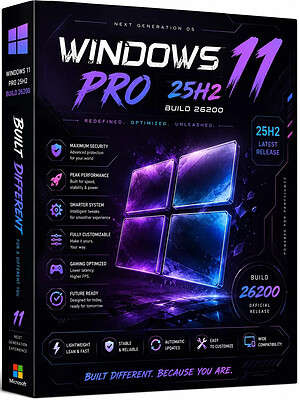
Windows 11 Pro 25H2 Build 26200.9278 (No TPM Required) Preactivated Multilingual | Size: 6.83 GB
Languages: Arabic,English,German,Greek,French,Spanish,Italian,Portuguese-Portuguese,Portuguese-Brazil,Turkish,Dutch,Czech,Norwegian
Windows 11, version 25H2 is an enablement update that builds on the features of 24H2 by enabling new, "continuous innovation" features, rather than introducing entirely new features itself. Key updates include a Braille Viewer for the Narrator, improvements to Click-to-Do (including a new "Convert to Table" feature), support for plug-in credential managers for passkeys, and enhancements to the mobile device companion experience. Microsoft is also implementing IT admin-focused features like the ability to remove pre-installed Store apps and a new Quick Machine Recovery system to reduce downtime.

For Users

Accessibility
The Narrator now includes a Braille Viewer, allowing users to see the braille equivalent of on-screen text on a refreshable braille display.

Passkeys
Users can now utilize plug-in credential managers for setting up and using passkeys, offering improved security and management.

Time & Language
Ported settings from the Control Panel to the Settings app, including configuring additional clocks and changing the NTP time server.

Mobile Experience
The mobile device companion has a new, more accessible layout to view calls, messages, photos, and more from your phone.

Click-to-Do
New AI features for Click-to-Do are included, such as a new "Convert to Table" capability for converting text to an Excel table and more flexible selection methods.

For IT Administrators
Quick Machine Recovery
This new feature in the recovery system aims to reduce downtime and simplifies the process for recovering a system, according to PCMag.

Removable Apps
IT admins can now remove certain pre-installed Microsoft Store apps via Group Policy or MDM CSP on Enterprise/EDU devices.

Feature Removals
25H2 removes older components like PowerShell 2.0 and WMIC for greater security and efficiency.

System Requirements
Processor: 2 gigahertz (GHz) or faster.
RAM: 2 gigabyte (GB).
Free space on hard disk: 40 gigabytes (GB).
Graphics card: DirectX 9 graphics device or a newer version.
Additional requirements to use certain features.
To use touch you need a tablet or monitor that supports multitouch.
To access the Windows store to download and run apps, you need an active Internet connection and a screen resolution of at least 1024 x 768 pixels

HOMEPAGE:
Код:
https://microsoft.com

FREE DOWNLOAD LINKS:

Код:
https://rapidgator.net/file/3aac43c59a43ecb0e15b26d0dbcffbbc/Win.11.Pro.26200.9278..part1.rar
https://rapidgator.net/file/8a03fdbc0b6e4a823847a7d69701ba20/Win.11.Pro.26200.9278..part2.rar
https://rapidgator.net/file/fddc523966e9b2d2a2c0f9a7f1ccd521/Win.11.Pro.26200.9278..part3.rar
https://rapidgator.net/file/149827d7c5a69ad6ef227adb74fc7f41/Win.11.Pro.26200.9278..part4.rar
https://rapidgator.net/file/a75d51eddc84ec5de6f82b7a0f487ca6/Win.11.Pro.26200.9278..part5.rar
https://rapidgator.net/file/b2fadd273041654a01e06ab91dae7bf2/Win.11.Pro.26200.9278..part6.rar
https://rapidgator.net/file/613545e6a4f89e857c0a2dee077c7df9/Win.11.Pro.26200.9278..part7.rar


Код:
https://nitroflare.com/view/A9680FBC7B8DF22/Win.11.Pro.26200.9278..part1.rar
https://nitroflare.com/view/0C5DF31A1755B5A/Win.11.Pro.26200.9278..part2.rar
https://nitroflare.com/view/4332D684724F882/Win.11.Pro.26200.9278..part3.rar
https://nitroflare.com/view/F41E0D41A8B80CB/Win.11.Pro.26200.9278..part4.rar
https://nitroflare.com/view/E6FC2907E81769A/Win.11.Pro.26200.9278..part5.rar
https://nitroflare.com/view/1D6BCF439EBE222/Win.11.Pro.26200.9278..part6.rar
https://nitroflare.com/view/231058EA07BDD4B/Win.11.Pro.26200.9278..part7.rar
 
cae2e4e1516b8c88680638e9c408d478.jpg


Advanced Renamer 4.25 (x64) Commercial Multilingual | Size: 12.71 MB
Language: English
Advanced Renamer is a program for renaming multiple files and folders at once. By configuring renaming methods the names can be manipulated in various ways. It is easy to set up a batch job using multiple methods on a large amount of files. The 14 different methods enables you to change the names, attributes, and timestamps of files in one go. The files can also be copied or moved to new locations based on information in the files.

With Advanced Renamer you can construct new file names by adding, removing, replacing, changing case, or giving the file a brand new name based on known information about the file.

Before performing the operations on the files you can verify that the output will be correct and if you perform the rename and regret it, you can undo the complete batch.

System requirements:
Windows 10 or later, 64-bit only.
macOS 11 or later

HOMEPAGE:
Код:
https://www.advancedrenamer.com

FREE DOWNLOAD LINKS:

Код:
https://rapidgator.net/file/5b53528300676a51cce00c007f6eaf31/Advanced_Renamer_4.25_x64_Commercial_Multilingual.rar


Код:
https://nitroflare.com/view/9C7B0038EC91B71/Advanced_Renamer_4.25_x64_Commercial_Multilingual.rar
 
ccc8d88bfbe5ab0e103634026e4fa3a7.jpg


Ashampoo Snap Pro 26.0.6 (x64) Multilingual | Size: 257.39 MB
Language: English
With Ashampoo Snap Pro 26, creating screenshots and videos is easier than ever! Everything that appears on your screen can be captured in seconds. In the image editor, you can edit, annotate, save, and share your captures instantly. New: With Live Edit, you can even mark content directly on your Desktop before the screenshot is taken. Snap Pro 26 also enhances your screenshots with graphical elements such as automatic numbering, comments, stickers, and more. Whether you're working from home, explaining something quickly, or creating detailed tutorials, Snap Pro 26 lets you get the job done faster.

Screenshots and video recordings with scrolling function, sound option and quick access via hotkeys
Direct editing with text, highlighting, numbering, blur tools and a handy screenshot library
Ideal for instructions, tutorials and documentation with flexible export as PNG, JPG, PDF and cloud upload

Live Edit-Mark directly on your desktop
Live Edit places a transparent layer like a sheet of glass over your screen. On this layer, you can draw arrows, add text, or highlight areas directly on top of the content you want to explain. Unlike traditional screenshot tools, your screen does not freeze during this process. You can switch back to your Desktop at any time to move windows, adjust content, or let a video continue playing, and then continue working on your annotations. This way, the final screenshot evolves step by step without having to restart the process.

Prepare and create screenshots faster
With Live Edit, multiple screenshots can be prepared and created within a single workflow. Annotations remain visible while you continue working on your Desktop and can be adjusted at any time. Especially with large workspaces or multi-monitor setups, Live Edit provides plenty of screen estate to organize content clearly. The final screenshot is then created directly from the Live Edit view-What you see is always what you get!

Better performance, stability and resource efficiency
The new Ashampoo Snap is built on a fully modernized technical foundation: The program starts faster, responds more quickly, and operates more smoothly overall. At the same time, memory usage and background process activity has been significantly reduced so Snap remains responsive and stable even during longer sessions. This new foundation improves everyday performance while also preparing Snap for future enhancements and new features.

Enhanced workflow and modernized interface
We have also improved many details for everyday work with Snap. The image editor's toolbar is smarter and supports your workflow even better. The properties bar has been restructured to provide a clearer and more consistent user experience. The updated color scheme improves readability and makes longer working sessions less strainful. With Quick Scroll, you also get a smart thumbnail preview that automatically appears when needed and helps you navigate large captures more easily.

More practical improvements
Many already useful features have been further refined: Cliparts now support drag & drop and image imports are more convenient, tools like the arrow tool offer better precision, and additional output formats are available for emailing images. The print dialog has also been updated and now supports margin settings in centimeters. In addition, video exports now support a quality settings to save storage space or speed up exports.

Smart desktop capturing and sharing
Once active, Snap's magic eye auto-detects elements below your mouse pointer (browser windows, program menus, images, etc.) and offers instant 1-click capturing with pixel precision. But it doesn't stop there: Snap can also capture custom rectangular or freehand regions and even supports scrolling content! Naturally, the program supports all possible kinds of sharing options, including email and Ashampoo Web!

Optical character recognition (OCR) for your screenshots
As of now, Snap no longer recognizes just 7 but over 180 languages! Our new text recognition utilizes Windows' own language packs and produces better results faster. Chances are you won't be needing over 180 languages straight away so, in the interest of simplicity, we've limited the number of initially available languages to the system languages currently installed on your machine. You can easily add additional languages via the "Add language" menu item.

Fast and easy video cutting
Not every video recording is an instant success. Ads, extra steps or pauses are a frequent bother. The same applies to screen captures. Keep the important bits and get rid of the rest with Ashampoo Snap! Remove ads, glitches or superfluous scenes or split your video into individual episodes. It doesn't matter whether you're casually pointing and capturing, creating an extensive webinar or producing a high-quality presentation: With Ashampoo Snap, every video capture comes out a success!

Create videos for any purpose
Creating instructional videos or documentaries is a breeze with Ashampoo Snap. Recordings are live-annotable with texts, drawings and voice narration. Clear things up with visualized mouse clicks and key strokes and add watermarks to protect your intellectual property. Take it to the next level and add live feeds from your webcam in a single click. Here's your ticket to create engaging tutorials, prepare instructive webinars and to point the way to the things that matter most to you-literally!

Perfect for different screen resolutions and multi-display environments
Ashampoo Snap fully supports multi-display setups, even with different resolution and DPI combinations, e.g. mixed Full HD and 4K environments. Each display is captured at its individual resolution for maximum crispness and results are instantly editable. And once you're in the editor, it's smooth sailing for beginners and professionals alike!

Create GIFs from any video
What would the internet be without those charming GIF animations? But GIFs can also be used in tutorials or demonstrations to great effect. Ashampoo Snap can turn any video segment into GIFs. Just set the start and end positions, fire up the built-in converter and you're done!

More than a snipping tool: extensive comfort features
Ashampoo Snap does most of the heavy lifting for you. Automatic numbering or time-delayed captures will help you make the most of your shots. Freely annotate your captures with texts and drawings or use flood fills. Put the spotlight on individual portions, blur sensitive data and use the highlighter to direct attention in style!

Capture desktop contents and save videos or images from the internet
The internet is brimming with fascinating images, texts and videos. Ashampoo Snap makes it easy to capture what you like! Save image and videos and edit them on the fly and to your liking! Anything you see on your screen, or hear through your sound card, Snap can capture!

Operating System: Windows 11, Windows 10 (64-bit only)

HOMEPAGE:
Код:
https://www.ashampoo.com/

FREE DOWNLOAD LINKS:

Код:
https://rapidgator.net/file/6d2746cb65341079d0c860bee69f9d35/Ashampoo_Snap_Pro_26.0.6_x64_Multilingual.rar


Код:
https://nitroflare.com/view/D1007A7F9B255F3/Ashampoo_Snap_Pro_26.0.6_x64_Multilingual.rar
 
586ee51b9c80399811390abad02ef415.jpg


Audacity 4.0.0 Multilingual | Size: 47.24 MB
Language: English
Audacity is an open source, cross-platform audio editor and recorder that aims to process the most popular audio formats, podcasts included. Audacity will not disappoint if you need a piece of software that can record live, convert tapes or cut and mix sounds.

Seamless setup and clean GUI
The installation process runs quite fast and does not pose any kind of problems, while the interface is pleasant and clean. It encompasses a menu bar, several buttons and a pane in which to view the waveform of any uploaded item.
It might take a while to get used to it, especially if you have never worked with a similar kind of product before. Nevertheless, some comprehensive Help contents are provided, which will aid you in getting around Audacity.
Extensions you can use and simple editing options
This utility features support for importing, processing and exporting WAV, FLAC, AIFF, AU and OGG Vorbis files. Bundled with an array of plugins and effects, this software can help you in regards to audio recording/playback, track mixing and spectrum analysis.
Audacity can record multiple channels simultaneously at high sample rates from microphones, USB or Firewire devices. Simple sound editing operations can be performed via cut, copy, paste and delete features, while mixing can be achieved from multiple clips, while the "Draw" function allows altering individual sample points.

Effects to tweak and use, and perform audio analysis
The rich list of effects includes noise processing, equalization, bass, high and low pass filters, as well as amplify, fade in and out, normalize, reverse, echo and phaser filters. Additional effects can be added to the program, as it supports plugins.
Last but not least, it can perform flawless audio analysis through an algorithm based on the Fourier transformation. Frequencies can be visualized through spectrogram views, while the Plot Spectrum allows users to analyze frequencies.
Bottom line
All in all, Audacity impresses through its plethora of features combined with ease of use and accessibility. The processing speed is decent, to say the least and the results are of superior audio quality.
The system performance is not affected at all and we did not come across any freezes or bugs in our tests.If you are interested in bypassing the installation process, you should know that a portable counterpart is available for download, called Portable Audacity.

You can use Audacity to
• Record live audio.
• Convert tapes and records into digital recordings or CDs.
• Edit Ogg Vorbis, MP3, WAV or AIFF sound files.
• Cut, copy, splice or mix sounds together.
• Change the speed or pitch of a recording.
• And more! See the complete list of features.

System Requirements: Windows 11, Windows 10, 8 , 7

HOMEPAGE:
Код:
https://www.audacityteam.org/

FREE DOWNLOAD LINKS:

Код:
https://rapidgator.net/file/43aba88a4276ef81ca5b361e962fe9e3/Audacity_4.0.0_Multilingual.rar


Код:
https://nitroflare.com/view/3F8BBD719236B0A/Audacity_4.0.0_Multilingual.rar
 
_172d5e387fa3674ca4fd1ac7a547291f.jpeg


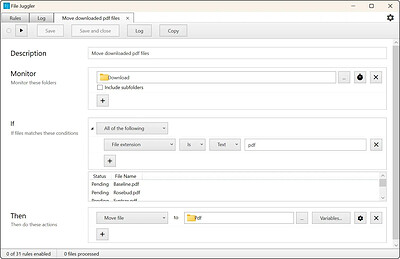
Bitvaerk File Juggler 3.1.7 | Size: 11.33 MB
Language: English
File Juggler makes it easy to create automatic workflows with files.

Watch your files fly magically in place
Create powerful file automation rules, and sit back and watch as your files are renamed, moved, deleted as you want. Instantly and automatically.

Automatic document organizing
Save hours of boring manual document organization. File Juggler reads the contents of your files and puts them in the right spot while you do your real job.

HOMEPAGE:
Код:
https://www.filejuggler.com/

FREE DOWNLOAD LINKS:

Код:
https://rapidgator.net/file/9c145bc6ffce93d0604742ab39987206/Bitvaerk_File_Juggler_3.1.7.rar


Код:
https://nitroflare.com/view/2B2B60518AB899C/Bitvaerk_File_Juggler_3.1.7.rar
 
0b93356354a08f6799870ae0cb2f910e.jpg


Broadgun pdfMachine 20.62 | Size: 22.14 MB
Language: English
PDF enabled software is a vital component for every desktop. PDF or Portable Document Format is a widely used file format originally developed by Adobe. This format is rapidly becoming the defacto standard for publishing on the web.

PDF documents generated by pdfMachine, when printed or viewed, maintain the integrity of all formatting in the original document. PDF files preserve documents formats independent of software, hardware, or operating system used to generate the original file. They can be opened, read and printed by many free PDF readers available on the web, and viewed on operating systems such as Windows, MacOS, and Unix variants.

PDF format is the best document format for long-term digital archival. Often software becomes obsolete, rendering some documents unreadable by current technology. Widely published formats, such as PDF, are more future proof that proprietary formats such as MS Word. In 50 years time, even if PDF's are not used anymore, all you need is the PDF specification and you can have a viewer developed to read your documents.

PDF has the ability to store text in a searchable form.

PDF files can be viewed within Netscape and Internet Explorer. These files can then be saved for off-line use or printed. This makes for easy use within an intranet or website.

PDF files enable sharp, colour-precise printing on most printers with precise onscreen colour match regardless of monitor brand. Users can magnify documents up to 800% without the loss of clarity in text or graphics. PDF files can be optimized and are often smaller than conventional document formats.

Features:
- Print to create PDF
- PDF Editing and mark-up
- Scanning Support
- Use OCR to convert scanned PDFs into searchable text
- Open any PDF
- Comment PDF
- Multilingual font support
- Mail Integration
- Small File Sizes
- Voice annotations
- Text annotations
- PDF Stationery
- Text and image watermarks
- Security Encryption
- Active URLs
- Hyperlinks
- N-Up Printing
- MS Office Integration
- MS IE Integration
- Network Installations
- Bookmark Editing
- pdfMachine merge
- Word Mail Merge
- Digital Signatures
- Parameter parsing
- Custom toolbar
- Terminal Server
- Set Next Action
- Set Document properties
- Multiple Print Profiles / Multiple Printers
- Windows XP/Vista x64 drivers
- File embedding/attaching
- PDF/A

Operating System: Windows 2008 / 2012 / 2016 / 2019 / 7 SP1/ 8 / 10 / 11

HOMEPAGE:
Код:
https://www.pdfmachine.com/

FREE DOWNLOAD LINKS:

Код:
https://rapidgator.net/file/04f0525b4802802e83e1ba2f24eb2e16/Broadgun_pdfMachine_20.62.rar


Код:
https://nitroflare.com/view/3C11BC0299F1D93/Broadgun_pdfMachine_20.62.rar
 
7b3db87c875a1c2a2c302998381447ff.jpg


EasyCut Pro 5.124 Multilingual | Size: 14.88 MB
Language: English
The complete solution for designing, printing, cutting and print+cut. It gives you the ability to cut any TrueType font, OpenType font, graphics, SVG, PDF, as well as your own original designs with your cutting plotter. This awesome vinyl cutting software even supports vectorize your images and built-in shape library includes hundreds of vectorial designs ready for cutting. With the intuitive user interface, Now anyone can cut designs like a pro! Professional sign cutting software for your vinyl cutter.

Image Tracing & Vectorizing
Unmatched image vectorization, Simply use the powerful tracing tool to create cuttable outlines from any imported raster graphics (including PNG, JPG, GIF, PSD, PDF, BMP, TGA, TIFF, etc.) or scanned images. Easily create accurate vector paths ready for cutting or make further editing.

Draw your own designs
Drawing and Designing couldn't get any easier! This powerful vinyl cutting software comes with a suite of various shape drawing and editing tools to draw and edit any shape directly on the mat. Easily draw unique shapes, modify signs, create logos, edit images, customize text with fonts on your computer plus special effects. Easy Cut Studio will make your design and cut your shapes easier than with any other sign-making software in the market today. It is a little design powerhouse for vinyl cutting.

Import/Export most file formats
Import various file formats, including PNG, SVG, EPS, PDF, AI, GSD, SCUT, WPC and other popular vector formats as editable objects. giving you the power to cut any shape and custom artworks. You can also export your design to SVG, PDF, PNG, FCM, TIFF, JPG, and BMP format.

Print and Cut (Contour Cut)
Print to Cut made easy, fast and accurate. Automatic creation of registration marks for print and cut applications. Easily print your artwork and then cut out around the printed image using your cutting plotter, which is perfect to create decals and stickers. User control over registration size, thickness and offset will help the cutter find the contour cut marks easily.

Working With Layers
Easily create complex designs using multiple layers, grouping to organize the display order of objects. Using Layers can help you more control over how you organize, edit and cut objects with Easy Cut Studio. The Shadow Layer option will create cuttable shadows from any shape.

Weld Text and Shapes Together
Welding is an advanced option allows you to make overlapping text and shapes to become a single shape, by joining shapes together wherever an overlap occurs. There are two ways to combine shapes/letters together: welding and joining.

Design and Cut Rhinestone Templates
Easily convert designs into rhinestone templates and make your own custom rhinestone designs with typeable rhinestone ready fonts. Specify stone size and spacing to make a rhinestone template and lattice shapes. Just select an object on the screen mat, and then choose "Rhinestones" from under the "Effects" menu to bring up the Rhinestone window shown below.

Features
- Works with your installed TrueType and OpenType fonts on your computer
- Works with Black Cat Cougar/Lynx™ , Bosskut Gazelle™, Craftwell eCraft™, CraftROBO/Graphtec™,
- GCC™, Foison™, Liyu™, Pazzles Inspiration/Pro™, Ramtin™, Roland™, Seki™, Silhouette
- SD/CAMEO/Portrait™, Silver Bullet™, USCutter™, Vinyl Express™, Wishblade™, & more
- Works with thousands of free TrueType, OpenType and Dingbat/Wingding fonts
- Import various file formats, including SVG, PDF, EPS, WPC
- Drawing tools to draw and edit shapes
- Auto tracing feature to automatically convert images (including jpg, bmp, gif, png) for cutting
- Create rhinestone templates and lattice shapes
- Weld overlapping letters and shapes together
- Select styles, including Shadow and Blackout, to change the look of your letters and shapes
- WYSIWYG Interface - What you see is what you cut
- Text on arch tool and text on path tool.
- Place text or objects on bezier paths.
- Convert text to outlines/paths.
- Creating multiple copies of the same object.
- Node editing tool.
- Creating the registration marks.
- Layout and special effects for your text and shapes.
- Cut font files already installed on your Mac or Windows.
- Create shadowed mat effects.
- Stencil function for bridging interior shapes.
- Unlimited undo/redo

Operating System: Windows XP, 7, 8, 10 & 11

HOMEPAGE:
Код:
https://www.easycutpro.com/

FREE DOWNLOAD LINKS:

Код:
https://rapidgator.net/file/be697e7295b3f7abaa3e6e9aa8f809cf/EasyCut_Pro_5.124_Multilingual.rar


Код:
https://nitroflare.com/view/8DC7504D071FE4A/EasyCut_Pro_5.124_Multilingual.rar

 
18d9a114d6735fea9fb990e49500977b.jpg


Fast Video Cutter Joiner 7.2.1 Multilingual | Size: 22.96 MB
Language: English
Easy and professional Video Cutter and Video Joiner Software. Why choose Fast Video Cutter Joiner? This is a fast video-cutting and joining software with an easy-to use interface. It allows users to trim parts of a video quickly while maintaining the quality of the original video. User can also join multiple video files.

Cut clips
If you want to cut and save specific parts of a video.

Join multiple videos
If you want to join multiple videos or merge more than two video files.

Features:
You can cut multiple video clips at once.
Video cutting speed is fast, taking only a few seconds.
Lossless cutting, with the same quality as the original video.
Clipped clips can be converted to other video formats.
Supports all video formats, such as mp4, avi, mpeg, rmvb and more.
Free to set the start and end points of video clips, very simple.
Play video from anywhere.
Any number of videos can be merged.
The merged video can be in any video format.
Supports all video formats, such as mp4, avi, mpeg, rmvb and more.
Can play any video clip.

HOMEPAGE:
Код:
https://www.videocutterjoiner.com/

FREE DOWNLOAD LINKS:

Код:
https://rapidgator.net/file/72d0c4c74deabc7e3c59534b095a29df/Fast_Video_Cutter_Joiner_7.2.1_Multilingual.zip


Код:
https://nitroflare.com/view/A606AB935686F17/Fast_Video_Cutter_Joiner_7.2.1_Multilingual.zip
 
eaf993bb51ebe43773f606c98344587c.jpg


GiliSoft USB Lock 12.0 Multilingual | Size: 10.85 MB
Language: English
GiliSoft USB Lock is a data leak prevention tool that prevents leakage and copy of your data to USB Drives, External Drives, CDs/DVDs or other such portable devices. Once installed, USB Lock lets you block all such drives and devices that do not belong to you. With USB Lock, you can share your PC with anyone without fear of data theft.This is an easy USB Secure Software and powerful Endpoint DLP Suite that helps you to lock usb port,make dvd/cd burner read-only,block some websites,forbid some programs and disable more devices.

Block USB Drives:
Disable reading from USB disks or disable writing to USB disks.USB Lock doesn't allow any type of USB drive to access your computer unless you authorize it. By default, all types of USB drives are blocked including external drives, FireWire, Enhanced mini-USB, Host Controller Interface (HCI), HP-IL, Com, LPT, IrDA, USB on-the-go, U3, EHCI, RAID Controller, Host adapter, Serial Cable (use with data transfer), Serial ATA, ACCESS.bus and any storage device that is attached to USB port showing a drive in the system.

CD Lock,Block Media & Blu-ray Discs:
Disable reading from DVD/CD discs or making DVD/CD burner read-only.The application also blocks any disc that uses the disk hub, bay, combo or CD/DVD drive and allots a drive letter, for example; CD-R, CD-RW, CD-RAM, DVD-R, DVD-RW, DVD-RAM, HD-R, HD-RW, HD-RAM, Blu Ray-R, Blu Ray-RW, Blu Ray-RAM, Floppy Disk A, Floppy Disk B and Zip Drives.

Website Lock
Block accessing some websites. This utility allows you to block unwanted websites from display in Internet Explorer. If a website is blocked the user is forwarded to a blank page or to a "blocked page" and the contents of the original page are not loaded on your PC. Stop loading banners and ads, stop your kids from spending hours in chat rooms or remove undesired websites from their view. Prevent your children from having access to certain websites content such as adult sites and gambling.

Programs Lock
Block running any programs, including IE, Outlook, AOL, AIM, and more. You can even lock your control panel with one button click. Other features include the ability to choose your own message to display if anyone attempts to run one of your locked programs, and also includes password protection so only you can unlock the program when you are ready to use it. Allows the entire computer to remain active and running, and it only locks and prevents access to the programs that you specify. Easy to use interface shows you current status of all locked programs, and allows you to easily click and unlock as you wish

Devices Lock:
The program can be used to restrict read or write access to removable media devices such as CD, DVD, floppy, flash and USB drives.It also can be used to disable printer,moderm,com lpt ports,infrared,bluetooth,1394 ports.

Alarm Notification :
If user enters wrong password more than 5 times,it will send alarm notifications to your e-mail .

Copy Protection:
The program uses an advanced level of data leak prevention technology that does not permit duplication of your important files and copyright material to any USB drive or other such storage devices without your permission. The program works by blocking all types of unauthorized storage devices like USB drives, external drives, CDs, DVDs, etc., in this way it prevents plagiarism, piracy, illegal distribution and copying of your data

Data Leak Prevention:
USB Lock is a data leak prevention software. It prevents your data from getting leaked out to USB drives and other such storage devices by letting you control which device can access your computer while blocking all other unauthorized devices that do not belong to you. With USB Lock installed on your computer, you can feel safe that your data will remain on your PC safe and secure.

Operating System: Windows 2000/2003/XP/7/8/10/11

HOMEPAGE:
Код:
http://www.gilisoft.com/

FREE DOWNLOAD LINKS:

Код:
https://rapidgator.net/file/5b9e94fb18408dc18c8da8db720fa7fc/GiliSoft_USB_Lock_12.0_Multilingual.rar


Код:
https://nitroflare.com/view/90D214C677BD088/GiliSoft_USB_Lock_12.0_Multilingual.rar
 
ff792e4bb55eb17da12343f0fd2af5fe.jpg


Gillmeister Automatic PDF Processor 2.9 | Size: 228.43 MB
Language: English
With Automatic PDF Processor, PDF files can be processed automatically. Any number of folders can be monitored in order to automatically print, rename or move incoming PDF files to dynamically named folders. Numerous metadata of the PDF document can be used in addition to the content, for example to include invoice information in the file path. The PDF files to be processed can be narrowed down with various profile-specific filters - the document text, PDF metadata and general file information are available as filters.

Extraction of data from the text of PDF files is optional. An unlimited number of extraction rules can be created within a profile. The extracted data can be used (after optional validation and formatting) for naming folders or the file name, and can be saved as an extract in a CSV file. Another task that can be automated with the Automatic PDF Processor is the extraction of attachments from PDF files, for example to save ZUGFeRD XML files, XRechnung attachments or similar as part of a PDF invoice in the same folder.

Features:
Print, rename, move, or copy PDF files automatically
Store embedded PDF attachments in any folder for archiving
Extract textual data from PDF documents automatically and save them as CSV file
Monitor any number of folders (hot folder monitoring)
Create individual rules for different tasks
Filter by document text, file date, attachment name or count, title .
Create the storage location (storage folder) dynamically from PDF document properties or based on content
Get informed about different processing statuses by email
Limit the automatic processing of PDF files to certain days and times, for example to print only during office hours
Combine a scan and OCR process with subsequent automatic naming by the Automatic Email Processor in order to be able to file older PDF documents in a structured way as well
Perform subsequent actions e.g., start a program with the path of the saved PDF file or PDF attachment as parameter
Process all already existing PDF files of a folder (with user-defined criteria)
Sort PDF - files automatically or have them moved to another folder and subfolder created dynamically from file properties
Send an Excel report with overview and detailed information on a regular basis

System requirements:
Microsoft Windows 11, 10, 8, 7 or Server (32-bit or 64-bit version)

HOMEPAGE:
Код:
https://www.gillmeister-software.com/

FREE DOWNLOAD LINKS:

Код:
https://rapidgator.net/file/e696bfca941a2b14083cf5543a28bedf/Gillmeister_Automatic_PDF_Processor_2.9.rar


Код:
https://nitroflare.com/view/11B82C21DF90A94/Gillmeister_Automatic_PDF_Processor_2.9.rar
 
b359d0f196f4a52c8eb1ac540f734142.jpg


IDimager Photo Supreme 2026.3.2.9577 Multilingual | Size: 183.71 MB
Language: English
Photo Supreme v2026 is a thoughtful and forward-looking release. This update has focused on smarter discovery, faster performance, and modern workflow expectations, especially around large catalogs, mobile integration, searches, and team environments.

Import and Select
One of the standout additions in Photo Supreme v2026 is the new multi-pass Import and Select workflow. This allows users to review and refine image selections in multiple stages instead of making all decisions in one pass. It's especially useful for large shoots, letting photographers cull images more deliberately and with less pressure. In addition, the Import and Select feature now loads images faster than ever. Mac users will also appreciate direct iOS device importing, which makes it possible to bring photos straight from an iPhone or iPad into the catalog without relying on intermediary software. This significantly streamlines mobile-first workflows.

Powerful Searches
Photo Supreme now supports natural language searching, allowing users to find images using plain, conversational phrases rather than rigid metadata queries. This feature is powered by AI services such as OpenAI, Google Gemini, or local models with Ollama. This gives users flexibility in how advanced features are enabled. In addition, a new classification system enhances search accuracy by grouping images into meaningful categories upon import, making it easier to surface relevant results in large or complex catalogs.

Video & Media Handling
For users working with video, Photo Supreme v2026 introduces hover-based video previews. Simply hovering over a video thumbnail now reveals a short animated preview, making it much faster to identify clips without opening them individually. Support for modern formats has also been expanded, ensuring the software keeps pace with current media standards.

Sharing with ZIP
Exporting images is more flexible in v2026 thanks to ZIP output support in transfer profiles. This makes it easy to bundle images into a single archive for delivery, backup, or client sharing, all directly from within Photo Supreme. These enhancements simplify distribution workflows and reduce the need for external tools.

GEO Maps
GEOgraphic-Mapping features can now generate maps using not only Google Maps, but also OpenFreeMap with OpenStreetMaps. This removes the need for API keys while still delivering rich, interactive map displays. This update makes location-based browsing easier to configure and more accessible for all users.

Performance and Refinements
Photo Supreme v2026 delivers notable performance enhancements, resulting in faster browsing and a more responsive overall experience. Response times are improved by up to 10%, with especially noticeable gains for large libraries containing many catalog labels.
Catalogs with numerous stacks also see significant performance improvements, particularly when displayed in stacked views.
v2026 includes a wide range of refinements, such as: "Visually similar" stack detection, numerous stability fixes and workflow enhancements, polished UI behavior in collections, searches, and metadata handling

Wait, there's more, a lot more.
New "RAW Files" and "Video Files" catalog states
Added support for Google Gemini as an AI service
Added support for OpenAI GPT-5.2 as an AI Service
Added support for Ministral3 model with Ollama
Added file management support for ACR sidecar files
Update HTTP Server with Photo Supreme Online (Server Edition)
Faster face recognition
Added "AI-Estimated GEO Location" to the AI Panel
Faster result display in the Collection Viewer
"Cascade Metadata" from image to Stack or Version Set is now a background process
A highlighted stroke has been added to the active tabs, improving navigation
Now you can display metadata charts and graphs across multiple tabs
Added support for Ctrl/Cmd+Z functionality in text and memo fields
Defined the new Affinity v3 .AF and .AVIF file format as a supported "other file format"
Switching the collection viewer's view style is faster (eg from Basic to Grid to Clean to Custom Thumb Info)
Advanced Search now has an option to search by "File Size" and "File Size MB"
Finetuned the check for "need to compact" on PostgreSQL (Server Edition)
Bookmark keyboard shortcuts are now a "toggle", similar to ratings and color labels
Expanding nodes in the Catalog Tree is ~25% faster
When using the "Dump Full to Catalog File" feature, there's now the option to create either a "catalog dump" file, or a "catalog with thumbs" dump files
Added a XMP Storage Location for "original file AND non-standard sidecar file"
In "Stacked View", you can now select a specific item from the stack to show
Support for PostgreSQL 18.
And more.

Highlights for v2026
Multi-Pass "Import and Select": Seamlessly transition through passes with a fast-culling system that optimizes your workflow.
Direct iOS Image Import on macOS: Import images directly from your iOS devices with ease.
Video Thumbnail Preview: Hover over a video thumbnail or open the Quick View to view a live video preview.
Natural Language Search Powered by AI: Search your content using plain language, with smart integration through OpenAI, Google Gemini, or Ollama models.
Transfer Profiles can now create ZIP output files: Copy or send sets of images as a single ZIP file for easier sharing.
Maps with OpenFreeMap: Display images on interactive maps using OpenFreeMap/OpenStreetMaps with no API key needed.
Server Edition Thumbnail Caching: Enjoy faster performance with local thumbnail caching, automatic cleanup, and customizable settings for retention and cache size.
Classifications: Enhance search accuracy with an automatic image classification mechanism on import.

Operating System: Windows 10 or higher

HOMEPAGE:
Код:
https://www.idimager.com/

FREE DOWNLOAD LINKS:

Код:
https://rapidgator.net/file/319fca0d8040d4b1558b3dfd6e5c6ead/IDimager_Photo_Supreme_2026.3.2.9577_Multilingual.rar


Код:
https://nitroflare.com/view/A4EE2D707DBAC83/IDimager_Photo_Supreme_2026.3.2.9577_Multilingual.rar
 
f77ffdc91e4e7a14d43d62e7bb1dfa98.jpg


Macro Expert Enterprise 4.9.9.1 | Size: 18.84 MB
Language: English
Effortlessly Breeze Through Your Daily Tasks. Macro Expert is a Robotic Process Automation software that can perform repetitive tasks for you, drastically increasing your work efficiency and quality, and achieving results faster, freeing you to focus on more important matters.

How it Works
Macro Expert acts like a digital assistant for you. You can use the process recorder or editor to create a script for your daily tasks, and then execute it. This will complete the work as if you were doing it yourself on the computer, even if you are not around the computer.

Effortless and Seamless Use
No coding skills are required to use Macro Editor-just drag and drop the required steps to complete the script creation. A process recorder is also provided to make it even easier to get started building a script. This makes it possible for anyone to start using it swiftly and effortlessly.

For a complex task, Macro Expert provides 300+ actions and built-in functions, allowing users to quickly and efficiently create the scripts to complete tasks, such as data migration and import, text extraction, financial and accounting processes, and web browser automation.

Attended and Unattended Automation
Macro Expert offers both attended and unattended automation modes. In attended mode, a human is involved to complete the task and can intervene as needed, while in unattended mode, automation is applied without any human intervention.

Your Exclusive Digital Workforce
Macro Expert can do almost everything you can

Finance and Accounting
Automate processes such as data entry and reconciliation, invoice processing, customer onboarding, accounts payable and receivable, budgeting, forecasting, and more with RPA software. It can help streamline operations, reduce human errors, and save time and money.

Data Migrating
Automate the process of entering data into systems or migrating data between systems, reducing the risk of errors and increasing efficiency.

Text Extracting
Extract information from unstructured documents such as invoices, receipts, and contracts. Text extraction is particularly useful in industries such as finance, insurance, and healthcare where there is a high volume of paperwork that needs to be processed.

Sales & Marketing
Sales and Marketing can use RPA to automate manual tasks such as lead filtering, updating CRM, researching prospects and creating quotes, to reach more customers, build client relationships, and unify processes across geographies.

Operating System: Windows XP or later

HOMEPAGE:
Код:
https://www.macro-expert.com/

FREE DOWNLOAD LINKS:

Код:
https://rapidgator.net/file/f58d14614ba9c9b9e6324b418d95ae52/Macro_Expert_Enterprise_4.9.9.1.rar


Код:
https://nitroflare.com/view/1F70F70FF214890/Macro_Expert_Enterprise_4.9.9.1.rar
 

b862b61d1b073d2e9a1798e5286ed600.png


Microsoft Edge 152.0.4191.62 Stable Multilingual | Size: 428.21 MB
Language: English

Introducing the new Microsoft Edge: Rebuilt from the ground up to bring you world-class compatibility and performance, the security and privacy you deserve, and new features designed to bring you the best of the web. The new Microsoft Edge is a modern web browser - designed for faster, safer browsing. Get more done on the web with built-in tools for notetaking, reading and more.

The new Microsoft Edge is based on the Chromium project, so you can use the extensions/add-ons from Google Chrome extensions web store and from Microsoft Edge extensions web store for free. Choose your style
News, images, search-choose what you want to see when you open a new tab. Select a layout best for you: Focused, Inspirational, or Informational.
Take control of your data
Microsoft Edge and Bing give you more control over your data, and more transparency into what information is being collected, while you browse with new features like Tracking Prevention and InPrivate mode.
Browse with peace of mind
Microsoft Defender SmartScreen automatically protects you online from security issues, phishing schemes, and malicious software.
Browse anywhere
The new Microsoft Edge is now available on all supported versions of Windows, macOS, iOS, and Android.
Experience 4K streaming
Get the best browser for high definition media on Windows 10 with unique support for streaming in 4K Ultra HD.
Customize with extensions
The new Microsoft Edge is now compatible with your favorite extensions, so it's easy to personalize your browsing experience.

System Requirements: Windows 11, Windows 10

FREE DOWNLOAD LINKS:

Код:
https://rapidgator.net/file/1e6dbb7c26aabe37b4b579dca1066eab/Microsoft_Edge_152.0.4191.62_Stable_Multilingual.rar


Код:
https://nitroflare.com/view/34C90D5FC4CBD5F/Microsoft_Edge_152.0.4191.62_Stable_Multilingual.rar
 
efed7bd9169098f5fc3d9afacd3d0c1a.jpg


OcenAudio 3.21.0 (x64) Multilingual | Size: 57.99 MB
Language: English

OcenAudio is a cross-platform, easy to use, fast and functional audio editor. It is the ideal software for people who need to edit and analyze audio files without complications. OcenAudio also has powerful features that will please more advanced users. This software is based on Ocen Framework, a powerful library developed to simplify and standardize the development of audio manipulation and analysis applications across multiple platforms.

Why OcenAudio?
It works on your computer!
OcenAudio is available for all major operating systems: Microsoft Windows, Mac OS X and Linux. This means you can always rely on OcenAudio on any computer.
It stays out of your way
No matter how many files are open, OcenAudio always remains responsive. Time-consuming tasks (such as opening and saving audio files, or applying effects) run in background, allowing you to work on other files.
The user comes first
The development of OcenAudio began when a brazilian research group at the Federal University of Santa Catarina (LINSE) needed an easy-to-use audio editor loaded with features such as multiple file formats support, spectral analysis and audio signal generation. OcenAudio development focuses primarily on usability, providing the user with a cohesive and intuitive audio editing and analysis tool.
Features
VST plugins support
• OcenAudio supports VST (Virtual Studio Technology) plugins, giving its users access to numerous effects. Like the native effects, VST effects can use real-time preview to aide configuration.
Real-time preview of effects
• Applying effects such as EQ, gain and filtering is an important part of audio editing. However, it is very tricky to get the desired result by adjusting the controls configuration alone: you must listen the processed audio. To ease the configuration of audio effects, OcenAudio has a real time preview feature: you hear the processed signal while adjusting the controls.
• The effect configuration window also includes a miniature view of the selected audio signal. You can navigate on this miniature view in the same way as you do on the main interface, selecting parts that interest you and listening to the effect result in real time.
Cross-platform support
• OcenAudio is available for all major operating systems: Microsoft Windows, Mac OS X and Linux. Native applications are generated for each platform from a common source, in order to achieve excelent performance and seamless integration with the operating system. All versions of OcenAudio have a uniform set of features and the same graphical interface, so the skills you learn in one platform can be used in the others.
Multi-selection for delicate editions
• To speed up complex audio files editing, OcenAudio includes multi-selection. With this amazing tool, you can simultaneously select different portions of an audio file and listen, edit or even apply an effect to them.
• For example, if you want to normalize only the excerpts of an interview where the interviewee is talking, just select them and apply the effect.
Efficient editing of large files
• With OcenAudio, there is no limit to the length or the quantity of the audio files you can edit. Using an advanced memory management system, the application keeps your files open without wasting any of your computer's memory. Even in files several hours long, common editing operations such as copy, cut or paste happen almost instantly.
Fully featured spectrogram
• Besides offering an incredible waveform view of your audio files, OcenAudio has a powerful and complete spectrogram view. In this view, you can analyze the spectral content of your audio signal with maximum clarity.
• Advanced users will be surprised to find that the spectrogram settings are applied in real time. The display is updated immediately when altering features such as the number of frequency bands, window type and size and dynamic range of the display.

System Requirements: Windows 11, Windows 10, 8 , 7

FREE DOWNLOAD LINKS:

Код:
https://rapidgator.net/file/edb11e3e81274c40e1dae97bee1e1204/OcenAudio_3.21.0_x64_Multilingual.rar


Код:
https://nitroflare.com/view/A40ABB21BF4F0CD/OcenAudio_3.21.0_x64_Multilingual.rar
 
279edd7c6216d758c3db437ea4004af2.png


OkMap Desktop 19.8.3 Multilingual | Size: 206.48 MB
Language: English
OkMap is an interactive software which allows you to work on your computer screen with web maps or digital maps that you have either bought or scanned. OkMap can also import vectorial data from the most common formats and DEM data relevant to height information. Through these maps, you can organize your paths by creating waypoints, routes and tracks on your computer monitor, and upload this data to your GPS. OkMap sets automatically altitude data and estimates travel times.

Features:
Calibration / display raster maps (over 30 image formats)
Display vectorial maps
Display hybrid maps (raster + vectorial data)
Ability to open multiple maps simultaneously
9 cartographic projections of the most used
Database with over 500 predefined projections by geographic area
Database with over 300 datum
Viewing 3D raster maps on Google Earth (for supported image formats)
Map add-ons management (icons, comments)
Vectorial data management (point, multipoint, line, polygon)
GPX data management (waypoints, tracks, routes)
Selecting multiple objects with the mouse
Context menu (right mouse)
Auto-info function
Zoom, autofit functions
Moving map function in 3 modes
Customizing toolbar
Showing yes / no toolbar
Showing yes / no statusbar
Check new releases at startup

Operating System: Windows 7, 8/8.1, 10, 11

HOMEPAGE:
Код:
https://www.okmap.org/

FREE DOWNLOAD LINKS:

Код:
https://rapidgator.net/file/81dcaf7625c8084e0507c8cd8638b484/OkMap_Desktop_19.8.3_Multilingual.rar


Код:
https://nitroflare.com/view/98E3678D71189DB/OkMap_Desktop_19.8.3_Multilingual.rar
 
2a72b86ef9a9b1d9767923d60a2b9c67.png


OpenVPN 2.7.7-I001 | Size: 10.51 MB
Language: English

The OpenVPN application was designed to be a full-featured SSL VPN solution which can accomodate a wide range of configurations, including remote access, site-to-site VPNs, WiFi security, and enterprise-scale remote access solutions with load balancing. OpenVPN implements OSI layer 2 or 3 secure network extension using the industry standard SSL/TLS protocol, supports flexible client authentication methods based on certificates, smart cards, and/or 2-factor authentication, and allows user or group-specific access control policies using firewall rules applied to the VPN virtual interface. OpenVPN is not a web application proxy and does not operate through a web browser.

Features
Tunnel any IP subnetwork or virtual ethernet adapter over a single UDP or TCP port,
Configure a scalable, load-balanced VPN server farm using one or more machines which can handle thousands of dynamic connections from incoming VPN clients,
Use all of the encryption, authentication, and certification features of the OpenSSL library to protect your private network traffic as it transits the internet,
Use any cipher, key size, or HMAC digest (for datagram integrity checking) supported by the OpenSSL library,
Choose between static-key based conventional encryption or certificate-based public key encryption,
Use static, pre-shared keys or TLS-based dynamic key exchange,
Use real-time adaptive link compression and traffic-shaping to manage link bandwidth utilization,
Tunnel networks whose public endpoints are dynamic such as DHCP or dial-in clients,
Tunnel networks through connection-oriented stateful firewalls without having to use explicit firewall rules,
Tunnel networks over NAT,
Create secure ethernet bridges using virtual tap devices, and
control OpenVPN using a GUI on Windows or Mac OS X

System Requirements: Windows 11, Windows 10, 8 , 7

FREE DOWNLOAD LINKS:

Код:
https://rapidgator.net/file/83b34c241d9fd1ae2e8b0e1ce9e3c6db/OpenVPN_2.7.7-I001.rar


Код:
https://nitroflare.com/view/8058098D65F2684/OpenVPN_2.7.7-I001.rar
 
Назад
Сверху Снизу