







All mitsumi'1s Applications !! (updated daily)

70d0394f3a0996b811eaa5b87ea6388e.jpg


TeamViewer Free 15.83.3 Multilingual | Size: 160.45 MB
Language: English


TeamViewer is a simple and fast solution for remote control, desktop sharing and file transfer that works behind any firewall and NAT proxy. To connect to another computer just run TeamViewer on both machines without the need of an installation procedure. With the first start automatic partner IDs are generated on both computers. Enter your partner's ID into TeamViewer and the connection is established immediately. With many thousand users worldwide TeamViewer is a standard tool to give support and assistance to people in remote locations. The software can also be used for presentations, where you can show your own desktop to a partner. This application also is VNC compatible and offers secure, encrypted data transfer with maximum security.

TeamViewer establishes connections to any PC all around the world within just a few seconds. You can remote control your partner's PC as if you were sitting in right front of it. TeamViewer is completely free for private use.

Features
- One solution for everything. While most competitors offer different packages for remote support, remote administration, training and sales (and also charge for them...) The application is the one-stop solution for everything you need: includes all modules in one simple and very affordable package.
- Remote administration of unattended servers. TeamViewer can also be used to control unattended computers and servers. Installation as a system service even allows remote reboot and reconnect.
- File transfer. TeamViewer comes with integrated file transfer that allows you to copy files and folders from and to a remote partner - which also works behind firewalls
- Highest security standard. TeamViewer is a very secure solution. All versions feature completely secure data channels with key exchange and RC4 session encoding, the same security standard used byhttps/SSL.
- No installation required. To install TeamViewer no admin rights are required. Just run the software and off you go...
- High performance with international router network. Optimized for connections over LANs AND the Internet, TeamViewer features automatic bandwidth-based quality selection for optimized use on any connection.
TeamViewer uses an extended international server network with server locations in many countries all over the world, so no matter where you are located we will make sure that a high-security, high-performance router near your home destination will ensure great performance.
- Remote support without installation. With TeamViewer you can remotely control any PC anywhere on the Internet. No installation is required, just run the application on both sides and connect - even through tight firewalls.
- Remote presentation of products, solutions and services. The second TeamViewer mode allows you to present your desktop to a partner. Show your demos, products and presentations over the Internet within seconds - live from your screen.
- Works behind firewalls. The major difficulties in using remote control software are firewalls and blocked ports, as well as NAT routing for local IP addresses. If you use TeamViewer you don't have to worry about firewalls: TeamViewer will find a route to your partner.
- Flexible use for a variety of applications. TeamViewer lets you connect to your partners in many different ways: You can either view or control your partner's desktop in order to do online-support; You can transmit your screen to your partners for presentation purposes - You may even change directions during a session for high fidelity teamwork!

System Requirements: Windows 10, 11


DOWNLOAD LINKS:


Код:
https://rapidgator.net/file/d5e6b1e930ec936c533a077896938ea1/TeamViewer_Free_15.83.3_Multilingual.rar.html

Код:
https://clicknupload.click/gpfc4vpqtnc2/TeamViewer_Free_15.83.3_Multilingual.rar
 
70d0394f3a0996b811eaa5b87ea6388e.jpg


TeamViewer Free 15.83.3 Multilingual | Size: 160.45 MB
Language: English


TeamViewer is a simple and fast solution for remote control, desktop sharing and file transfer that works behind any firewall and NAT proxy. To connect to another computer just run TeamViewer on both machines without the need of an installation procedure. With the first start automatic partner IDs are generated on both computers. Enter your partner's ID into TeamViewer and the connection is established immediately. With many thousand users worldwide TeamViewer is a standard tool to give support and assistance to people in remote locations. The software can also be used for presentations, where you can show your own desktop to a partner. This application also is VNC compatible and offers secure, encrypted data transfer with maximum security.

TeamViewer establishes connections to any PC all around the world within just a few seconds. You can remote control your partner's PC as if you were sitting in right front of it. TeamViewer is completely free for private use.

Features
- One solution for everything. While most competitors offer different packages for remote support, remote administration, training and sales (and also charge for them...) The application is the one-stop solution for everything you need: includes all modules in one simple and very affordable package.
- Remote administration of unattended servers. TeamViewer can also be used to control unattended computers and servers. Installation as a system service even allows remote reboot and reconnect.
- File transfer. TeamViewer comes with integrated file transfer that allows you to copy files and folders from and to a remote partner - which also works behind firewalls
- Highest security standard. TeamViewer is a very secure solution. All versions feature completely secure data channels with key exchange and RC4 session encoding, the same security standard used byhttps/SSL.
- No installation required. To install TeamViewer no admin rights are required. Just run the software and off you go...
- High performance with international router network. Optimized for connections over LANs AND the Internet, TeamViewer features automatic bandwidth-based quality selection for optimized use on any connection.
TeamViewer uses an extended international server network with server locations in many countries all over the world, so no matter where you are located we will make sure that a high-security, high-performance router near your home destination will ensure great performance.
- Remote support without installation. With TeamViewer you can remotely control any PC anywhere on the Internet. No installation is required, just run the application on both sides and connect - even through tight firewalls.
- Remote presentation of products, solutions and services. The second TeamViewer mode allows you to present your desktop to a partner. Show your demos, products and presentations over the Internet within seconds - live from your screen.
- Works behind firewalls. The major difficulties in using remote control software are firewalls and blocked ports, as well as NAT routing for local IP addresses. If you use TeamViewer you don't have to worry about firewalls: TeamViewer will find a route to your partner.
- Flexible use for a variety of applications. TeamViewer lets you connect to your partners in many different ways: You can either view or control your partner's desktop in order to do online-support; You can transmit your screen to your partners for presentation purposes - You may even change directions during a session for high fidelity teamwork!

System Requirements: Windows 10, 11


DOWNLOAD LINKS:


Код:
https://rapidgator.net/file/d5e6b1e930ec936c533a077896938ea1/TeamViewer_Free_15.83.3_Multilingual.rar.html

Код:
https://clicknupload.click/gpfc4vpqtnc2/TeamViewer_Free_15.83.3_Multilingual.rar
 
763088cbc1e43d3a01b8b34b17b7e427.jpg


The Graphics Creator 8 v1.4.21 | Size: 933.63 MB
Language: English


The Graphics Creator 8 - Create your own graphics in minutes without ANY design skills or a big budget! Grab attention with stunning graphics. fast! Search from hundreds of thousands of high-quality stock photos and videos. And much more!

PROFESSIONAL DESIGN FEATURES
• Search from hundreds of thousands of high-quality stock photos and videos
• Select from over 1000 stunning fonts from Google
• Remove an image's background to make it transparent
• Increase the Graphic Creator's Canvas to 10,000 x 10,000 pixels (great for creating your own t-shirt designs or desktop wallpapers)
• Captivating, ready-made design templates

IN 10 MINUTES OR LESS YOU CAN:
Make a graphic, download it in multiple formats, and post it to get more traffic, clicks, and sales. And you can create graphics for your social media posts, blog, website, marketing materials, emails, YouTube videos. and more!

Here's What You Get with The Graphics Creator:
- Easy Drag and Drop Design
- Unlimited Saves
- Unlimited Downloads
- Unlimited Revisions
- 1000+ Google Fonts
- Over 1 Million Royalty-Free Stock Images
- 10,000 X 10,000 Canvas Size
- Save as JPG, PNG, Transparent PNG
- Save and Record Video
- Save Your Designs
- Color-Picker Tool
- Background Removal Tool
- Add Shapes feature
- Duplication of Objects and Text
- Easy Layering of Objects and Text
- Complete Control of Every Element

Included Add-ons:
- Facebook Graphics Pak
- Mascots2Go Mega Colllection
- Social Media Pak
- The Alphabet Logo Pak
- The Business Card Creator
- The Character Creator
- The Design Set
- The eCover Creator
- The Graphics Creator 8 - Extra Templates
- The Mockup set - The Mockup Creator
- The Promobot 365
- The YouTube Graphics Creator
- Video Backgrounds

Requirements: Windows® 10, Windows® 8/8.1, and Windows® 7

HOMEPAGE: Code:
Код:
https://www.laughingbirdsoftware.com/the-graphics-creator-8/


DOWNLOAD LINKS:


Код:
https://rapidgator.net/file/6ca24f4c119ab21be17634f7a135ebd3/The_Graphics_Creator_8_v1.4.21.rar.html

Код:
https://clicknupload.click/okh0pi3krx4e/The_Graphics_Creator_8_v1.4.21.rar
 
763088cbc1e43d3a01b8b34b17b7e427.jpg


The Graphics Creator 8 v1.4.21 | Size: 933.63 MB
Language: English


The Graphics Creator 8 - Create your own graphics in minutes without ANY design skills or a big budget! Grab attention with stunning graphics. fast! Search from hundreds of thousands of high-quality stock photos and videos. And much more!

PROFESSIONAL DESIGN FEATURES
• Search from hundreds of thousands of high-quality stock photos and videos
• Select from over 1000 stunning fonts from Google
• Remove an image's background to make it transparent
• Increase the Graphic Creator's Canvas to 10,000 x 10,000 pixels (great for creating your own t-shirt designs or desktop wallpapers)
• Captivating, ready-made design templates

IN 10 MINUTES OR LESS YOU CAN:
Make a graphic, download it in multiple formats, and post it to get more traffic, clicks, and sales. And you can create graphics for your social media posts, blog, website, marketing materials, emails, YouTube videos. and more!

Here's What You Get with The Graphics Creator:
- Easy Drag and Drop Design
- Unlimited Saves
- Unlimited Downloads
- Unlimited Revisions
- 1000+ Google Fonts
- Over 1 Million Royalty-Free Stock Images
- 10,000 X 10,000 Canvas Size
- Save as JPG, PNG, Transparent PNG
- Save and Record Video
- Save Your Designs
- Color-Picker Tool
- Background Removal Tool
- Add Shapes feature
- Duplication of Objects and Text
- Easy Layering of Objects and Text
- Complete Control of Every Element

Included Add-ons:
- Facebook Graphics Pak
- Mascots2Go Mega Colllection
- Social Media Pak
- The Alphabet Logo Pak
- The Business Card Creator
- The Character Creator
- The Design Set
- The eCover Creator
- The Graphics Creator 8 - Extra Templates
- The Mockup set - The Mockup Creator
- The Promobot 365
- The YouTube Graphics Creator
- Video Backgrounds

Requirements: Windows® 10, Windows® 8/8.1, and Windows® 7

HOMEPAGE: Code:
Код:
https://www.laughingbirdsoftware.com/the-graphics-creator-8/


DOWNLOAD LINKS:


Код:
https://rapidgator.net/file/6ca24f4c119ab21be17634f7a135ebd3/The_Graphics_Creator_8_v1.4.21.rar.html

Код:
https://clicknupload.click/okh0pi3krx4e/The_Graphics_Creator_8_v1.4.21.rar
 
ec0cb670451653dd5799e4ad657015ae.jpg


The KMPlayer 2026.10.27.9 (x64) Multilingual | Size: 56.91 MB
Language: English


KMPLAYER is a korean movie and audio player that supports a wide range of codecs and file formats. It has full VCD/DVD playback functionality.

Supported Files or Devices:

- HTTP Streaming(AVI etc including none-streaming media)
- Directshow playback (avi, mkv etc)
- Real Engine + Directshow (needs Real Player or Alternative)
- QuickTime Engine + Directshow (needs QuickTime player or Alternative)
- Mplayer Engine Support
- Winamp Input Plugin(decoder) Support
- Compressed Audio Album Support(zip, rar)
- Audio CD(2000, XP only / Win9x-Support by winamp plugin)
- Video CD/SVCD/XCD : CDXA Format (2000, XP only)
- DVD playback
- DTS Wave and AC3 files
- WDM device support like TV or Camera
- CD Image File (BIN/ISO/IMG/NRG) ; NRG needs mplayer.dll
- Shoutcast (Including NSV)

- AAC, OGG parser/decoder
- Shockwave Flash/FLC/FLI
- Ape/MPC/Flac/Module etc
- Various Image files like png, gif etc
- Incomplete/Damaged AVI file (Skip Damaged Frames)
- Locked Media Files while downloading or sharing

Built-in Codec/Filters:

Video Codec:


- MPEG4 (Divx/Xvid : ffmpeg/xvid)
- MPEG1/2 (ffmpeg/libmpeg)
- etc (ffmpeg)
- AC3/DTS/LPCM/MPG/MP3/OGG/AAC/WMA
- 2Ch to Multi Channel expansion

External Codec:

- Media Priority to Connect among Directshow, Real, QT, Winamp and Mplayer

- Custom Filter Manager
- System Filter Manger

Plugins:

- Winamp Input Plugins
- Winamp DSP Plugins (Can Stack)
- Winamp Visual Plugins (Can Stack)
- Winamp General Plugins (Media Library etc Support)
- KMP Video Plugins by SDK (Can Stack)
- DScaler Filter Support (Can Stack)

HOMEPAGE: Code:
Код:
http://www.kmplayer.com/


DOWNLOAD LINKS:


Код:
https://rapidgator.net/file/cd1f320cdc6c867fbd9a32f40f7dd7ba/9_x64_Multilingual_26.10.27.rar.html

Код:
https://clicknupload.click/ptzrhtiacb6g/9_x64_Multilingual_26.10.27.rar
 
8848976ed4259d0084bc6e9efb829920.jpg


Abelssoft YouTube Song Downloader 2026 v26.19 Multilingual | Size: 220.37 MB
Language: English


Simply enter the artist or song title in the search box and you'll get great results from the YouTube portal. Afterwards, you can download the video or audio file. The albums search helps you to find a complete album for free on YouTube. The YouTube Song Downloader loads automatically the version with the best quality of each download and adjust the volume over all songs.

Download music and videos
Simply enter the artist or song title in the search box and you'll get great results from the YouTube portal. Afterwards, you can download the video or audio file.

Album search
The albums search helps you to find a complete album for free on YouTube.

YouTube Converter with Top quality
The YouTube Song Downloader loads automatically the version with the best quality of each download and adjust the volume over all songs.

Find music
Simply enter a song title, YouTube link or artist in the search box and you'll get great results from the YouTube portal. Afterwards, you can download the video or audio file.

Album search
The Album search helps you to find each song of an album on YouTube. For that, you simply need to enter the artist name and select an album.

Formats
You can download music files in MP3 or OGG and videos is FLV, AVI or MP4.

Make your choice
The YouTube Song Downloader allows you to preview files immediately. Simply select an entry and click the play button to get things going.

Operating System: Windows 11, Windows 10, Windows 8.1, Windows 8, Windows 7

HOMEPAGE: Code:
Код:
https://www.abelssoft.de/


DOWNLOAD LINKS:

Код:
https://rapidgator.net/file/bd7bb77192a90aa8ed8b61237984569b/Abelssoft_YouTube_Song_Downloader_2026_v26.19_Multilingual.rar.html

Код:
https://clicknupload.click/i3bq8mqzrain/Abelssoft_YouTube_Song_Downloader_2026_v26.19_Multilingual.rar
 
8848976ed4259d0084bc6e9efb829920.jpg


Abelssoft YouTube Song Downloader 2026 v26.19 Multilingual | Size: 220.37 MB
Language: English


Simply enter the artist or song title in the search box and you'll get great results from the YouTube portal. Afterwards, you can download the video or audio file. The albums search helps you to find a complete album for free on YouTube. The YouTube Song Downloader loads automatically the version with the best quality of each download and adjust the volume over all songs.

Download music and videos
Simply enter the artist or song title in the search box and you'll get great results from the YouTube portal. Afterwards, you can download the video or audio file.

Album search
The albums search helps you to find a complete album for free on YouTube.

YouTube Converter with Top quality
The YouTube Song Downloader loads automatically the version with the best quality of each download and adjust the volume over all songs.

Find music
Simply enter a song title, YouTube link or artist in the search box and you'll get great results from the YouTube portal. Afterwards, you can download the video or audio file.

Album search
The Album search helps you to find each song of an album on YouTube. For that, you simply need to enter the artist name and select an album.

Formats
You can download music files in MP3 or OGG and videos is FLV, AVI or MP4.

Make your choice
The YouTube Song Downloader allows you to preview files immediately. Simply select an entry and click the play button to get things going.

Operating System: Windows 11, Windows 10, Windows 8.1, Windows 8, Windows 7

HOMEPAGE: Code:
Код:
https://www.abelssoft.de/


DOWNLOAD LINKS:

Код:
https://rapidgator.net/file/bd7bb77192a90aa8ed8b61237984569b/Abelssoft_YouTube_Song_Downloader_2026_v26.19_Multilingual.rar.html

Код:
https://clicknupload.click/i3bq8mqzrain/Abelssoft_YouTube_Song_Downloader_2026_v26.19_Multilingual.rar
 
8848976ed4259d0084bc6e9efb829920.jpg


Abelssoft YouTube Song Downloader 2026 v26.19 Multilingual | Size: 220.37 MB
Language: English


Simply enter the artist or song title in the search box and you'll get great results from the YouTube portal. Afterwards, you can download the video or audio file. The albums search helps you to find a complete album for free on YouTube. The YouTube Song Downloader loads automatically the version with the best quality of each download and adjust the volume over all songs.

Download music and videos
Simply enter the artist or song title in the search box and you'll get great results from the YouTube portal. Afterwards, you can download the video or audio file.

Album search
The albums search helps you to find a complete album for free on YouTube.

YouTube Converter with Top quality
The YouTube Song Downloader loads automatically the version with the best quality of each download and adjust the volume over all songs.

Find music
Simply enter a song title, YouTube link or artist in the search box and you'll get great results from the YouTube portal. Afterwards, you can download the video or audio file.

Album search
The Album search helps you to find each song of an album on YouTube. For that, you simply need to enter the artist name and select an album.

Formats
You can download music files in MP3 or OGG and videos is FLV, AVI or MP4.

Make your choice
The YouTube Song Downloader allows you to preview files immediately. Simply select an entry and click the play button to get things going.

Operating System: Windows 11, Windows 10, Windows 8.1, Windows 8, Windows 7

HOMEPAGE: Code:
Код:
https://www.abelssoft.de/


DOWNLOAD LINKS:

Код:
https://rapidgator.net/file/bd7bb77192a90aa8ed8b61237984569b/Abelssoft_YouTube_Song_Downloader_2026_v26.19_Multilingual.rar.html

Код:
https://clicknupload.click/i3bq8mqzrain/Abelssoft_YouTube_Song_Downloader_2026_v26.19_Multilingual.rar
 
9cce5028381674b6cd1384fea03fab20.webp

Free Download Affinity by Canva 3.3.3.5004 (x64) Multilingual | 980 Mb
Affinity by Canva is a creative design solution that brings together tools for producing, editing, and preparing visual content for different purposes. It is designed to support a wide range of creative projects, from personal designs and digital content to professional marketing materials and branded business assets.
The Canva ecosystem provides access to design resources, templates, photos, graphics, videos, audio, fonts, and charts. It also offers learning materials, collaboration features, AI-powered creative tools, and options for preparing designs for professional printing.


Software Overview

Affinity by Canva is aimed at individuals, creative professionals, teams, and businesses looking for a flexible design environment. Its associated creative resources help users develop visual projects through templates, guided lessons, and real-world examples. Content libraries provide additional assets for creating designs with different styles and requirements.
Collaboration is another important part of the Canva environment. Users can tag teammates in comments, assign tasks, and coordinate work across documents, presentations, whiteboards, and other shared projects. Businesses can also establish brand kits, prepare reusable templates, and manage permissions to maintain consistency across team designs.
The platform also connects digital design with physical production. Users can turn creative projects into printed products such as photo albums, T-shirts, business cards, flyers, and invitations. AI-powered tools provide additional assistance with branded copy, template creation, and video editing.

Key Features

  • Creative tools for designing, generating, editing, and preparing visual content.
  • Step-by-step lessons, templates, and practical examples for learning design workflows.
  • Access to photos, graphics, videos, audio, fonts, charts, and other creative resources.
  • Content libraries featuring materials from brands such as Disney, Artlist, and pocstock.
  • Collaboration features for sharing projects and coordinating team activities.
  • Comment tagging and task assignment across Docs, Presentations, and Whiteboards.
  • Support for creating photo albums, T-shirts, business cards, flyers, and invitations.
  • Integrated design and printing workflows with delivery options.
  • Workplace plans for teams and businesses.
  • AI-powered tools for generating branded copy, templates, and video-editing content.
  • Brand Kits for maintaining consistent visual identity across projects.
  • Reusable templates that help teams create consistent branded materials.
  • Permission management, task assignment, and structured design approval workflows.

Why Choose Affinity by Canva

Affinity by Canva brings creative resources, design workflows, collaboration tools, and AI-assisted capabilities into the broader Canva ecosystem. Its combination of templates, learning materials, and content libraries helps users develop projects without having to source every creative asset independently.
For businesses and collaborative teams, features such as Brand Kits, shared templates, task assignments, and approval workflows provide ways to organize design production. The connection between digital projects and printing services also makes it possible to prepare creative work for physical products.

System Requirements

- Architecture: x64.
- No specific operating system, processor, memory, or graphics requirements are listed in the supplied release information.

Frequently Asked Questions

What is Affinity by Canva used for?

Affinity by Canva is a creative design solution for producing visual content, preparing branded materials, and working on different types of design projects.

Does Affinity by Canva support team collaboration?

Yes. Canva's collaboration environment supports comments, teammate tagging, task assignments, and shared work across Docs, Presentations, and Whiteboards.

Does the Canva ecosystem include AI-powered tools?

Yes. The supplied product information highlights AI-assisted creation of branded copy and templates, along with video-editing capabilities.

Can designs be prepared for printing?

Yes. The described printing services support products such as photo albums, T-shirts, business cards, flyers, and invitations.

Home Page

Код:
https://www.canva.com/

Product Information
  • Software Name: Affinity by Canva
  • Version: 3.3.3.5004
  • Architecture: x64
  • Languages: Multilingual
  • License type: Full Version
  • File Size: 980 Mb
Rapidgator
Код:
https://rapidgator.net/file/e612ecaa0a9b121ce472faa1b6861668/r6w4m.Affinity_by_Canva_3_3_3_5004_x64_Multilingual.rar.html

Код:
https://clicknupload.click/zrsy8skfs06r/r6w4m.Affinity_by_Canva_3_3_3_5004_x64_Multilingual.rar
 
9cce5028381674b6cd1384fea03fab20.webp

Free Download Affinity by Canva 3.3.3.5004 (x64) Multilingual | 980 Mb
Affinity by Canva is a creative design solution that brings together tools for producing, editing, and preparing visual content for different purposes. It is designed to support a wide range of creative projects, from personal designs and digital content to professional marketing materials and branded business assets.
The Canva ecosystem provides access to design resources, templates, photos, graphics, videos, audio, fonts, and charts. It also offers learning materials, collaboration features, AI-powered creative tools, and options for preparing designs for professional printing.


Software Overview

Affinity by Canva is aimed at individuals, creative professionals, teams, and businesses looking for a flexible design environment. Its associated creative resources help users develop visual projects through templates, guided lessons, and real-world examples. Content libraries provide additional assets for creating designs with different styles and requirements.
Collaboration is another important part of the Canva environment. Users can tag teammates in comments, assign tasks, and coordinate work across documents, presentations, whiteboards, and other shared projects. Businesses can also establish brand kits, prepare reusable templates, and manage permissions to maintain consistency across team designs.
The platform also connects digital design with physical production. Users can turn creative projects into printed products such as photo albums, T-shirts, business cards, flyers, and invitations. AI-powered tools provide additional assistance with branded copy, template creation, and video editing.

Key Features

  • Creative tools for designing, generating, editing, and preparing visual content.
  • Step-by-step lessons, templates, and practical examples for learning design workflows.
  • Access to photos, graphics, videos, audio, fonts, charts, and other creative resources.
  • Content libraries featuring materials from brands such as Disney, Artlist, and pocstock.
  • Collaboration features for sharing projects and coordinating team activities.
  • Comment tagging and task assignment across Docs, Presentations, and Whiteboards.
  • Support for creating photo albums, T-shirts, business cards, flyers, and invitations.
  • Integrated design and printing workflows with delivery options.
  • Workplace plans for teams and businesses.
  • AI-powered tools for generating branded copy, templates, and video-editing content.
  • Brand Kits for maintaining consistent visual identity across projects.
  • Reusable templates that help teams create consistent branded materials.
  • Permission management, task assignment, and structured design approval workflows.

Why Choose Affinity by Canva

Affinity by Canva brings creative resources, design workflows, collaboration tools, and AI-assisted capabilities into the broader Canva ecosystem. Its combination of templates, learning materials, and content libraries helps users develop projects without having to source every creative asset independently.
For businesses and collaborative teams, features such as Brand Kits, shared templates, task assignments, and approval workflows provide ways to organize design production. The connection between digital projects and printing services also makes it possible to prepare creative work for physical products.

System Requirements

- Architecture: x64.
- No specific operating system, processor, memory, or graphics requirements are listed in the supplied release information.

Frequently Asked Questions

What is Affinity by Canva used for?

Affinity by Canva is a creative design solution for producing visual content, preparing branded materials, and working on different types of design projects.

Does Affinity by Canva support team collaboration?

Yes. Canva's collaboration environment supports comments, teammate tagging, task assignments, and shared work across Docs, Presentations, and Whiteboards.

Does the Canva ecosystem include AI-powered tools?

Yes. The supplied product information highlights AI-assisted creation of branded copy and templates, along with video-editing capabilities.

Can designs be prepared for printing?

Yes. The described printing services support products such as photo albums, T-shirts, business cards, flyers, and invitations.

Home Page

Код:
https://www.canva.com/

Product Information
  • Software Name: Affinity by Canva
  • Version: 3.3.3.5004
  • Architecture: x64
  • Languages: Multilingual
  • License type: Full Version
  • File Size: 980 Mb
Rapidgator
Код:
https://rapidgator.net/file/e612ecaa0a9b121ce472faa1b6861668/r6w4m.Affinity_by_Canva_3_3_3_5004_x64_Multilingual.rar.html

Код:
https://clicknupload.click/zrsy8skfs06r/r6w4m.Affinity_by_Canva_3_3_3_5004_x64_Multilingual.rar
 
_7781803b4ab8f0306cdd6d253b664a43.jpeg


AI ImageStudio 1.3.4 | Size: 266.47 MB
Language: English


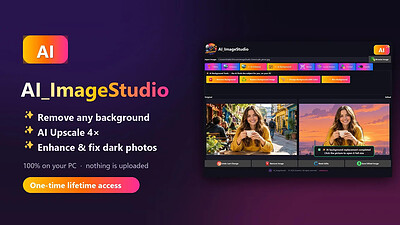
AI ImageStudio all‑in‑one desktop tool is a powerful desktop tool designed to enhance, edit, and transform images with speed and precision. It gives you complete control over your visuals with clean background editing, intelligent enhancement filters, custom resizing, and seamless format conversion - all in one unified workspace. You can create crisp icons, prepare social‑media‑ready graphics, and fine‑tune every detail without relying on online services or cloud processing. With instant previews, drag‑and‑drop simplicity, and full offline functionality, Advanced Image Studio delivers a fast, secure, and professional editing experience. Everything runs locally on your device for maximum performance, privacy, and reliability.

Background Editing Suite
Remove backgrounds instantly, replace them with any image, apply solid color fills, or add soft‑to‑strong blur for a professional look.

Image Enhancement Tools
Improve photos instantly with Auto Enhance, Noise Reduction, Auto White Balance, and Smart Sharpen

Image Filters
Adjust brightness, contrast, vibrance, sharpness, and warm/cool tones with easy sliders.

Manual Resize
Resize images to any custom width and height.

Social Media Presets
Instantly resize images for Instagram, Facebook, YouTube, and LinkedIn.

Image Format Cinversion
Convert images in PNG, JPEG, or BMP formats.

Icon Generator
Create Windows .ICO files in multiple standard sizes.

Drag & Drop Support
Quickly load images by dragging them into the app

Side‑by‑Side Preview
Compare original and edited images at the same time.

System Requirements
Windows 10 version 17763.0 or higher (64-bit)

HOMEPAGE: Code:
Код:
https://smartus.co/image-studio


DOWNLOAD LINKS:


Код:
https://rapidgator.net/file/ab6ac4295ad33693529d0b4107123f3c/AI_ImageStudio_1.3.4.rar.html

Код:
https://clicknupload.click/ub28t8hvlijb/AI_ImageStudio_1.3.4.rar
 
_7781803b4ab8f0306cdd6d253b664a43.jpeg


AI ImageStudio 1.3.4 | Size: 266.47 MB
Language: English


AI ImageStudio all‑in‑one desktop tool is a powerful desktop tool designed to enhance, edit, and transform images with speed and precision. It gives you complete control over your visuals with clean background editing, intelligent enhancement filters, custom resizing, and seamless format conversion - all in one unified workspace. You can create crisp icons, prepare social‑media‑ready graphics, and fine‑tune every detail without relying on online services or cloud processing. With instant previews, drag‑and‑drop simplicity, and full offline functionality, Advanced Image Studio delivers a fast, secure, and professional editing experience. Everything runs locally on your device for maximum performance, privacy, and reliability.

Background Editing Suite
Remove backgrounds instantly, replace them with any image, apply solid color fills, or add soft‑to‑strong blur for a professional look.

Image Enhancement Tools
Improve photos instantly with Auto Enhance, Noise Reduction, Auto White Balance, and Smart Sharpen

Image Filters
Adjust brightness, contrast, vibrance, sharpness, and warm/cool tones with easy sliders.

Manual Resize
Resize images to any custom width and height.

Social Media Presets
Instantly resize images for Instagram, Facebook, YouTube, and LinkedIn.

Image Format Cinversion
Convert images in PNG, JPEG, or BMP formats.

Icon Generator
Create Windows .ICO files in multiple standard sizes.

Drag & Drop Support
Quickly load images by dragging them into the app

Side‑by‑Side Preview
Compare original and edited images at the same time.

System Requirements
Windows 10 version 17763.0 or higher (64-bit)

HOMEPAGE: Code:
Код:
https://smartus.co/image-studio


DOWNLOAD LINKS:


Код:
https://rapidgator.net/file/ab6ac4295ad33693529d0b4107123f3c/AI_ImageStudio_1.3.4.rar.html

Код:
https://clicknupload.click/ub28t8hvlijb/AI_ImageStudio_1.3.4.rar
 
2d9a61b7b39a9b95c3657b88201b2e49.jpg


AI Old Photo Restorer 1.0.4 | Size: 430.65 MB
Language: English


Bring your old photos back to life with AI - right on your own PC. AI Old Photo Restorer repairs, enhances and sharpens old, faded, scratched and blurry pictures in seconds, and restores the faces of the people you love - without ever uploading your memories. Everything runs 100% offline. Your precious family photos never leave your computer. No internet, no subscription, no monthly fees.

WHAT IT DOES
- Restore faces faithfully - sharpen the people in your photo without changing who they are
- De-blur & un-blur - turn soft, out-of-focus pictures crisp and clear
- Remove noise & grain from old scans and phone photos
- Upscale & enhance - recover detail and boost quality
- Fix old, faded, low-resolution and damaged photos
- Restore several faces at once - perfect for family & group photos

TWO ONE-CLICK MODES
- Full Restore - restore the whole photo + fix every face (recommended)
- Faces Only - sharpen faces, keep the original size

BEAUTIFUL & EASY
- Drag the before/after slider to see every detail come back
- Save a restored copy right next to your original - one click
- Just open a photo and press Restore. That's it.

PRIVATE & 100% OFFLINE
Your photos are processed entirely on your PC and are never uploaded to any server - ideal for personal, family and sensitive photos.

PERFECT FOR
Old family photos • Grandparents' pictures • Childhood photos • Faded & scratched prints • Blurry phone shots • Scanned albums • Restoring & preserving memories

System Requirements
Windows 10 version 17763.0 or higher

HOMEPAGE: Code:
Код:
https://smartus.co


DOWNLOAD LINKS:


Код:
https://rapidgator.net/file/39b6301771595b776669fceaad943460/AI_Old_Photo_Restorer_1.0.4.rar.html

Код:
https://clicknupload.click/dbaehj0ydomv/AI_Old_Photo_Restorer_1.0.4.rar
 
2d9a61b7b39a9b95c3657b88201b2e49.jpg


AI Old Photo Restorer 1.0.4 | Size: 430.65 MB
Language: English


Bring your old photos back to life with AI - right on your own PC. AI Old Photo Restorer repairs, enhances and sharpens old, faded, scratched and blurry pictures in seconds, and restores the faces of the people you love - without ever uploading your memories. Everything runs 100% offline. Your precious family photos never leave your computer. No internet, no subscription, no monthly fees.

WHAT IT DOES
- Restore faces faithfully - sharpen the people in your photo without changing who they are
- De-blur & un-blur - turn soft, out-of-focus pictures crisp and clear
- Remove noise & grain from old scans and phone photos
- Upscale & enhance - recover detail and boost quality
- Fix old, faded, low-resolution and damaged photos
- Restore several faces at once - perfect for family & group photos

TWO ONE-CLICK MODES
- Full Restore - restore the whole photo + fix every face (recommended)
- Faces Only - sharpen faces, keep the original size

BEAUTIFUL & EASY
- Drag the before/after slider to see every detail come back
- Save a restored copy right next to your original - one click
- Just open a photo and press Restore. That's it.

PRIVATE & 100% OFFLINE
Your photos are processed entirely on your PC and are never uploaded to any server - ideal for personal, family and sensitive photos.

PERFECT FOR
Old family photos • Grandparents' pictures • Childhood photos • Faded & scratched prints • Blurry phone shots • Scanned albums • Restoring & preserving memories

System Requirements
Windows 10 version 17763.0 or higher

HOMEPAGE: Code:
Код:
https://smartus.co


DOWNLOAD LINKS:


Код:
https://rapidgator.net/file/39b6301771595b776669fceaad943460/AI_Old_Photo_Restorer_1.0.4.rar.html

Код:
https://clicknupload.click/dbaehj0ydomv/AI_Old_Photo_Restorer_1.0.4.rar
 
5d265e8cb78d611264b162be6f29e2ea.jpg


AI Text To Image Generator Pro 1.2.15 | Size: 1.93 GB
Language: English


Unleash your creativity with AI Text to Image Generator, the ultimate desktop app for turning your words into stunning, high-quality art. Whether you're a digital artist, designer, or hobbyist, our powerful AI image generator gives you direct access to state-of-the-art models like Flux, Stable Diffusion, Juggernaut XL, and more-right on your PC.

Create photorealistic portraits, anime characters, breathtaking landscapes, and abstract art with a simple text prompt. Our application is a complete AI art studio, designed for both beginners and experts. It operates locally on your computer, ensuring your creations and prompts remain private.

State-of-the-Art AI Models
Generate incredible images with built-in models like Flux, Stable Diffusion, Juggernaut XL for photorealism, and Animagine XL for anime styles.

Total Creative Control
Fine-tune your creations with advanced settings for Image Size, Guidance Scale (CFG), Inference Steps, and Seed for reproducible results.

Add Your Own Models - PRO
Import any Diffusers-compatible model from the Hugging Face Hub to expand your creative toolkit with endless variety.

100% Private & Offline
After the initial model download, everything works completely offline. Your prompts and images never leave your computer.

No Subscriptions, No Limits - PRO
A one-time purchase gives you unlimited image generations forever. Generate as many images as you want!

One-Click Recommended Settings
Instantly apply the optimal settings for any selected model to get the best quality results with a single click.

Generate Any Style
- Photorealistic Portraits: Create stunning, lifelike human portraits and faces.
- Anime & Manga Art: Generate vibrant anime characters with specialized models like Animagine XL.
- Landscapes & Scenery: Design breathtaking natural and fantasy landscapes.
- Abstract & Conceptual: Explore abstract art and unique visual concepts.
- Product Visualization: Create product mockups and design concepts.

System Requirements
Requires Windows 10 version 17763.0 or higher. Minimum 8GB RAM (16GB recommended). A GPU with 4GB VRAM minimum (6GB recommended) is required for optimal performance.

HOMEPAGE: Code:
Код:
https://bytesweavers.tech


DOWNLOAD LINKS:


Код:
https://rapidgator.net/file/a20901d4d26e14a2db829f066a330146/AI_Text_To_Image_Generator_Pro_1.2.15.rar.html

Код:
https://clicknupload.click/sii68j8sdwoj/AI_Text_To_Image_Generator_Pro_1.2.15.rar
 
5d265e8cb78d611264b162be6f29e2ea.jpg


AI Text To Image Generator Pro 1.2.15 | Size: 1.93 GB
Language: English


Unleash your creativity with AI Text to Image Generator, the ultimate desktop app for turning your words into stunning, high-quality art. Whether you're a digital artist, designer, or hobbyist, our powerful AI image generator gives you direct access to state-of-the-art models like Flux, Stable Diffusion, Juggernaut XL, and more-right on your PC.

Create photorealistic portraits, anime characters, breathtaking landscapes, and abstract art with a simple text prompt. Our application is a complete AI art studio, designed for both beginners and experts. It operates locally on your computer, ensuring your creations and prompts remain private.

State-of-the-Art AI Models
Generate incredible images with built-in models like Flux, Stable Diffusion, Juggernaut XL for photorealism, and Animagine XL for anime styles.

Total Creative Control
Fine-tune your creations with advanced settings for Image Size, Guidance Scale (CFG), Inference Steps, and Seed for reproducible results.

Add Your Own Models - PRO
Import any Diffusers-compatible model from the Hugging Face Hub to expand your creative toolkit with endless variety.

100% Private & Offline
After the initial model download, everything works completely offline. Your prompts and images never leave your computer.

No Subscriptions, No Limits - PRO
A one-time purchase gives you unlimited image generations forever. Generate as many images as you want!

One-Click Recommended Settings
Instantly apply the optimal settings for any selected model to get the best quality results with a single click.

Generate Any Style
- Photorealistic Portraits: Create stunning, lifelike human portraits and faces.
- Anime & Manga Art: Generate vibrant anime characters with specialized models like Animagine XL.
- Landscapes & Scenery: Design breathtaking natural and fantasy landscapes.
- Abstract & Conceptual: Explore abstract art and unique visual concepts.
- Product Visualization: Create product mockups and design concepts.

System Requirements
Requires Windows 10 version 17763.0 or higher. Minimum 8GB RAM (16GB recommended). A GPU with 4GB VRAM minimum (6GB recommended) is required for optimal performance.

HOMEPAGE: Code:
Код:
https://bytesweavers.tech


DOWNLOAD LINKS:


Код:
https://rapidgator.net/file/a20901d4d26e14a2db829f066a330146/AI_Text_To_Image_Generator_Pro_1.2.15.rar.html

Код:
https://clicknupload.click/sii68j8sdwoj/AI_Text_To_Image_Generator_Pro_1.2.15.rar
 
b54528816eae606bbee4fa63ea1b9453.jpg


Anthemion Jutoh 3.33.6 (x64) Multilingual | Size: 70.83 MB
Language: English


Jutoh makes it easy to create ebooks in popular formats that you can sell on many ebook sites. Create your project in seconds from existing files using the New Project Wizard; or create your book from scratch using the built-in styled text editor. Select a book cover design from Jutoh's template, or create your own cover design with the built-in cover editor.

Jutoh Benefits:

Speed
Fast to import your existing content, whether in text, HTML, or OpenDocument.
Fast to create your Epub, Mobipocket or other format.
Fast to edit content and switch between variations of your ebooks.
Jutoh is written in C++ so runs at top speed - no frustrating delays.

Multi-platform design
Jutoh runs on Windows, Mac, Linux and various other Unix-based systems, and you can easily copy your files between machines of different kinds. One licence can be used on multiple operating systems simultaneously; and rest assured that if you buy a different kind of desktop or laptop, you don't have to leave your way of working behind and buy new software.

Create ebook variations rapidly
Thanks to Jutoh's configurations, you can describe differences between versions of your book - a different cover, a different title page, different formatting - all without needing separate projects. Just select a different configuration and click Compile. This is invaluable when you are distributing ebooks using different sites with slightly different requirements.

Ebook checking gives you confidence
Jutoh installs Adobe's EpubCheck and EpubPreflight checker programs, so you can easily check your Epub book for internal errors or problems that might arise with specific readers. The checkers are run within Jutoh, so you don't have to mess about with invoking the applications yourself.

Store related material
Jutoh lets you store text, picture, and web notes together with the book content. So if you're writing or editing your ebook within Jutoh, you can easily refer to your notes or store text that doesn't yet have a place.

Operating System: Windows XP/Vista/7/8/10/11

HOMEPAGE: Code:
Код:
http://www.jutoh.com/


DOWNLOAD LINKS:


Код:
https://rapidgator.net/file/e47f6158af5e94012ded16866853a859/Anthemion_Jutoh_3.33.6_x64_Multilingual.rar.html

Код:
https://clicknupload.click/twxqrdr6oxyz/Anthemion_Jutoh_3.33.6_x64_Multilingual.rar
 
b54528816eae606bbee4fa63ea1b9453.jpg


Anthemion Jutoh 3.33.6 (x64) Multilingual | Size: 70.83 MB
Language: English


Jutoh makes it easy to create ebooks in popular formats that you can sell on many ebook sites. Create your project in seconds from existing files using the New Project Wizard; or create your book from scratch using the built-in styled text editor. Select a book cover design from Jutoh's template, or create your own cover design with the built-in cover editor.

Jutoh Benefits:

Speed
Fast to import your existing content, whether in text, HTML, or OpenDocument.
Fast to create your Epub, Mobipocket or other format.
Fast to edit content and switch between variations of your ebooks.
Jutoh is written in C++ so runs at top speed - no frustrating delays.

Multi-platform design
Jutoh runs on Windows, Mac, Linux and various other Unix-based systems, and you can easily copy your files between machines of different kinds. One licence can be used on multiple operating systems simultaneously; and rest assured that if you buy a different kind of desktop or laptop, you don't have to leave your way of working behind and buy new software.

Create ebook variations rapidly
Thanks to Jutoh's configurations, you can describe differences between versions of your book - a different cover, a different title page, different formatting - all without needing separate projects. Just select a different configuration and click Compile. This is invaluable when you are distributing ebooks using different sites with slightly different requirements.

Ebook checking gives you confidence
Jutoh installs Adobe's EpubCheck and EpubPreflight checker programs, so you can easily check your Epub book for internal errors or problems that might arise with specific readers. The checkers are run within Jutoh, so you don't have to mess about with invoking the applications yourself.

Store related material
Jutoh lets you store text, picture, and web notes together with the book content. So if you're writing or editing your ebook within Jutoh, you can easily refer to your notes or store text that doesn't yet have a place.

Operating System: Windows XP/Vista/7/8/10/11

HOMEPAGE: Code:
Код:
http://www.jutoh.com/


DOWNLOAD LINKS:


Код:
https://rapidgator.net/file/e47f6158af5e94012ded16866853a859/Anthemion_Jutoh_3.33.6_x64_Multilingual.rar.html

Код:
https://clicknupload.click/twxqrdr6oxyz/Anthemion_Jutoh_3.33.6_x64_Multilingual.rar
 
be193a0a02bfcd2f7453c98385a6ce3d.webp

Free Download Aquaveo Groundwater Modeling System (GMS) 10.9.7 | 1.9 Gb
Groundwater Modeling System (GMS) is a comprehensive groundwater modeling application developed by Aquaveo for performing three-dimensional groundwater simulations. It combines a graphical user interface with numerical analysis tools, providing an integrated environment for developing, managing, and analyzing groundwater models.
The software supports several modeling approaches and integrates with established analysis codes such as MODFLOW and MT3DMS. Its toolset covers site characterization, conceptual model development, mesh and grid generation, geostatistical analysis, and post-processing, making it suitable for groundwater engineering and environmental modeling workflows.


Software Overview

Groundwater Modeling System provides a graphical environment for building and analyzing groundwater simulations. Rather than relying on a single modeling method, GMS supports multiple model types and provides facilities for sharing information between different models and data formats.
Its modeling workflow includes tools for preparing site information, developing conceptual representations, generating computational meshes and grids, and processing simulation results. Integration with numerical modeling codes such as MODFLOW and MT3DMS extends its capabilities for groundwater analysis.
In GMS 10.9, the Map from Coverage command was moved directly into the package dialog for MODFLOW 6 modeling. This allows users to map data within the active workflow without repeatedly switching between separate windows.

Key Features

  • Three-dimensional groundwater simulation environment.
  • Graphical user interface combined with numerical analysis codes.
  • Support for multiple groundwater modeling approaches.
  • Integration with MODFLOW, MT3DMS, and other analysis codes.
  • Tools for site characterization and groundwater model preparation.
  • Conceptual model development and management.
  • Mesh and grid generation capabilities.
  • Geostatistical tools for groundwater modeling workflows.
  • Post-processing tools for analyzing simulation results.
  • Facilities for sharing information between different models and data types.
  • Improved MODFLOW 6 workflow with the Map from Coverage command integrated into the package dialog.

Why Choose Groundwater Modeling System

GMS brings several stages of groundwater modeling into one graphical environment, helping users manage site data, develop conceptual models, prepare computational grids, and process simulation results. Its support for established numerical modeling codes also provides flexibility when working with different groundwater analysis requirements.
The integration of modeling tools and data-sharing facilities makes GMS useful for groundwater engineers, environmental consultants, researchers, and professionals involved in water resource assessment and simulation.

What's New

GMS 10.9.7, released on October 13, 2026, includes:
  • Various minor improvements.

System Requirements

- Operating System: Windows. The source does not specify a particular Windows version.
- Architecture: x64.

Frequently Asked Questions

What is Groundwater Modeling System used for?

GMS is used to develop, manage, and perform groundwater simulations in a three-dimensional modeling environment.

Which numerical modeling codes does GMS support?

The supplied information identifies MODFLOW and MT3DMS among the numerical analysis codes supported by the software.

What tools are available in GMS?

The application provides tools for site characterization, conceptual modeling, mesh and grid generation, geostatistics, and post-processing.

What changed in GMS 10.9?

The Map from Coverage command was moved directly into the MODFLOW 6 package dialog, allowing users to map data within the same working interface.

Home Page

Код:
https://www.aquaveo.com

Product Information
  • Software Name: Groundwater Modeling System (GMS)
  • Year of release: 2026
  • Version: 10.9.7
  • Architecture: x64
  • Languages: English
  • License type: Full Version
  • File Size: 1.9 GB

dbd4526c8124feeafc43768c705a7e4a.webp

fcfb78c9e53394ba3898c3836ea526bd.webp


Rapidgator
Код:
https://rapidgator.net/file/45b4e49e317914749f9b0c65f10a8684/4ydku.Aquaveo_Groundwater_Modeling_System_GMS_10_9_7.rar.html

Код:
https://clicknupload.click/aacvmzssc641/4ydku.Aquaveo_Groundwater_Modeling_System_GMS_10_9_7.rar
 
be193a0a02bfcd2f7453c98385a6ce3d.webp

Free Download Aquaveo Groundwater Modeling System (GMS) 10.9.7 | 1.9 Gb
Groundwater Modeling System (GMS) is a comprehensive groundwater modeling application developed by Aquaveo for performing three-dimensional groundwater simulations. It combines a graphical user interface with numerical analysis tools, providing an integrated environment for developing, managing, and analyzing groundwater models.
The software supports several modeling approaches and integrates with established analysis codes such as MODFLOW and MT3DMS. Its toolset covers site characterization, conceptual model development, mesh and grid generation, geostatistical analysis, and post-processing, making it suitable for groundwater engineering and environmental modeling workflows.


Software Overview

Groundwater Modeling System provides a graphical environment for building and analyzing groundwater simulations. Rather than relying on a single modeling method, GMS supports multiple model types and provides facilities for sharing information between different models and data formats.
Its modeling workflow includes tools for preparing site information, developing conceptual representations, generating computational meshes and grids, and processing simulation results. Integration with numerical modeling codes such as MODFLOW and MT3DMS extends its capabilities for groundwater analysis.
In GMS 10.9, the Map from Coverage command was moved directly into the package dialog for MODFLOW 6 modeling. This allows users to map data within the active workflow without repeatedly switching between separate windows.

Key Features

  • Three-dimensional groundwater simulation environment.
  • Graphical user interface combined with numerical analysis codes.
  • Support for multiple groundwater modeling approaches.
  • Integration with MODFLOW, MT3DMS, and other analysis codes.
  • Tools for site characterization and groundwater model preparation.
  • Conceptual model development and management.
  • Mesh and grid generation capabilities.
  • Geostatistical tools for groundwater modeling workflows.
  • Post-processing tools for analyzing simulation results.
  • Facilities for sharing information between different models and data types.
  • Improved MODFLOW 6 workflow with the Map from Coverage command integrated into the package dialog.

Why Choose Groundwater Modeling System

GMS brings several stages of groundwater modeling into one graphical environment, helping users manage site data, develop conceptual models, prepare computational grids, and process simulation results. Its support for established numerical modeling codes also provides flexibility when working with different groundwater analysis requirements.
The integration of modeling tools and data-sharing facilities makes GMS useful for groundwater engineers, environmental consultants, researchers, and professionals involved in water resource assessment and simulation.

What's New

GMS 10.9.7, released on October 13, 2026, includes:
  • Various minor improvements.

System Requirements

- Operating System: Windows. The source does not specify a particular Windows version.
- Architecture: x64.

Frequently Asked Questions

What is Groundwater Modeling System used for?

GMS is used to develop, manage, and perform groundwater simulations in a three-dimensional modeling environment.

Which numerical modeling codes does GMS support?

The supplied information identifies MODFLOW and MT3DMS among the numerical analysis codes supported by the software.

What tools are available in GMS?

The application provides tools for site characterization, conceptual modeling, mesh and grid generation, geostatistics, and post-processing.

What changed in GMS 10.9?

The Map from Coverage command was moved directly into the MODFLOW 6 package dialog, allowing users to map data within the same working interface.

Home Page

Код:
https://www.aquaveo.com

Product Information
  • Software Name: Groundwater Modeling System (GMS)
  • Year of release: 2026
  • Version: 10.9.7
  • Architecture: x64
  • Languages: English
  • License type: Full Version
  • File Size: 1.9 GB

dbd4526c8124feeafc43768c705a7e4a.webp

fcfb78c9e53394ba3898c3836ea526bd.webp


Rapidgator
Код:
https://rapidgator.net/file/45b4e49e317914749f9b0c65f10a8684/4ydku.Aquaveo_Groundwater_Modeling_System_GMS_10_9_7.rar.html

Код:
https://clicknupload.click/aacvmzssc641/4ydku.Aquaveo_Groundwater_Modeling_System_GMS_10_9_7.rar
 
Назад
Сверху Снизу