All mitsumi'1s Applications !! (updated daily)

4f2920d316e3b79cf02a85926ee6ac81.jpg


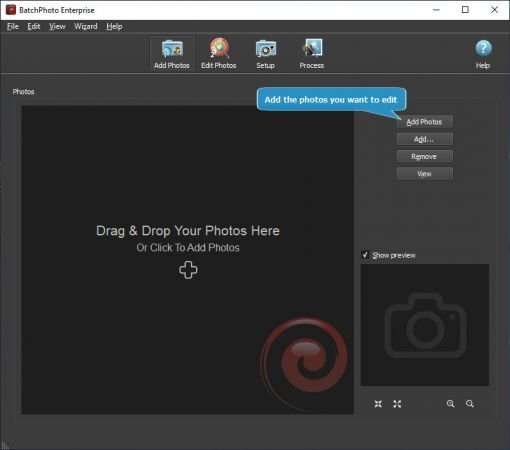
BatchPhoto 5.1 Multilingual

File size: 29.1 MB


Do you have repeatable and predictable actions to apply to your massive photo collection? Actions like: resizing, converting, date/time stamping, cropping, watermarking, renaming, and so on? Since 2005 we've been working hard to make BatchPhoto the best tool for automating those repeatable actions!

Functionality
- Edit and convert hundreds of digital photos in one session with support for multi-core CPUs.
- Convert to and from 170+ image formats, including: JPEG, TIFF, PNG, GIF, BMP, and more.
- Change the cryptic names generated by digital cameras to meaningful names.
- Edit your photos and upload them to Facebook or Flickr in the same session.
- Edit images, optimize for web use, then upload to FTP.
- Monitor folders for newly added images and automatically apply custom defined edits.
- Support for RAW image formats (digital negatives) from DSLR digital cameras.
- Create PDF albums from multiple photos for easy sharing.
- Edit photos with custom profiles, directly from Windows® Explorer's right-click menu.
- Use predefined profiles and scripts with common edits to improve your productivity.

Annotate & Decorate
- Automatically imprint the original date and time on dozens of digital photos.
- Add single or multi-line text comments to pictures.
- Decorate your photos with classic picture frames.
- Protect photos with watermarks as either text or logos.
- Add grunge, vintage, and shape borders to pictures in batch mode.
- Add vintage picture frames to batches of photos.

Transform
- Resize hundreds of photos in one step for easy sharing or to save space.
- Automatically crop images to a predefined aspect ratio or custom rectangle.
- Replace any color in the image, with another color or with the alpha channel.
- Automatically rotate dozens of digital photos to portrait or landscape.
- Easily adjust the DPI and the document size in inches.
- Rotate photos by a specified number of degrees.

Touch-Up
- Automatically adjust the contrast of dozens of photos in one session.
- Sharpen pictures by enhancing edge contrast.
- Accurately adjust contrast levels.
- Automatically adjust gamma levels.
- Adjust the light intensity of multiple photos at once.
- Adjust the Red, Green and Blue color channels.

Effects
- Make dozens of pictures look older, in warmer colors, with the sepia special effect.
- Transform dozens of pictures to a charcoal sketch.
- Highlights edges in picture with a 3D effect.
- Transform multiple pictures from true colors to gray scale colors.
- Make lots of pictures look like oil paintings in batch mode.
- Make picture look like the photographic film was exposed to light.


HOMEPAGE


Код:
https://www.batchphoto.com/


DOWNLOAD

Код:
https://rapidgator.net/file/f30d9187ff1c87874eb3122d7c02518d/BatchPhoto_5.1.rar.html

Код:
https://nitroflare.com/view/FAA8EABA04943CC/BatchPhoto_5.1.rar
 
b5e53f2e21bf68cf669b0d2826a7600e.avif


Bitwig Studio 6.0 Beta 10

File size: 363.8 MB


Bitwig Studio 6 takes a big step up, improving and expanding on the core DAW functions that you use every day. This major update brings you fresh and faster ways to work that will feel familiar. You'll notice the difference right away: Bitwig Studio's looks have been improved, and the visual interface is now easier to adjust to your needs. There are also countless changes under the hood, large and small.

It starts with an extensive upgrade to automation editing, which touches everything from smoother editing gestures to new behaviors such as spread and hold. You can also now work with automation in clips, opening up new possibilities that make intuitive sense.

Clip aliases offer a new way to handle repetition and structure in your music, while project-wide key signature helps guide your work with notes. New and improved tools, such as the Spray Can and Audition tool, join enhanced expression editing - for the fine details - and layered editing, for big picture work. All of these changes add up to a big improvement in the way you use Bitwig Studio 6 for fundamental music-making tasks.


HOMEPAGE


Код:
https://www.bitwig.com/


DOWNLOAD

Код:
https://rapidgator.net/file/c0dc4af232231c5b591fc8a319ec2df5/B6b10-Windows.rar.html

Код:
https://nitroflare.com/view/4864747E4B87F3F/B6b10-Windows.rar
 
ed9ddb4374a4b1301e3823591d5e7966.avif


Blackmagic Design Fusion Studio 20.3.1 (x64) Multilingual
File Size: 5.5 GB


The world's most advanced visual effects, 3D, VR and motion graphics solution! Fusion is the world's most advanced compositing software for visual effects artists, broadcast and motion graphic designers, and 3D animators. Over the last 30 years, Fusion has been used on thousands of Hollywood blockbuster movies and television shows. Fusion features a powerful node based interface that lets you quickly and easily create sophisticated effects by connecting different types of image processing tools together! You get a massive range of tools, incredible VR and 3D support, GPU accelerated performance, unlimited network rendering and more! Fusion gives you everything you need to create exciting broadcast graphics, dramatic titles, and even major feature film visual effects!

What's New in Fusion 20
Compositions you create on the Fusion page can now be saved as a template and used on the edit or cut page! New animation curve modifiers can be used to automatically retime animations when you change their duration in an edit. Audio playback with waveform display makes it easier to create precisely timed animations, there are shared markers with the edit page and more. In addition, 27 GPU accelerated Resolve FX have been added to the Fusion page, including the noise reduction and sharpening tools from the color page! New node view bookmarks make it easy to navigate large comps, the toolbar can be customized with your favorite tools, and vertical layouts are supported in the node editor.
Build Your Own Effects with Customizable Templates
Fusion effect templates let you create any effect imaginable and apply them to clips on the edit and cut pages! Simply build a composition, save it as a macro, define the parameters you want to make visible, and save it in the correct location. Just drag Fusion effect from the library onto any clip!
Automatically Retime Animations
Retime Animations
Animation curve modifiers let you easily stretch or squish keyframes and add bounce, mirror or loop animations that automatically change when the duration of the composition changes. When you drop Fusion titles or effects onto the timeline and change its duration, the animation adjusts accordingly!
Video Step
Animations
The Fusion page can now playback audio from the edit or cut page timeline. You can choose a mix down from the timeline, or you can listen to the source clip's audio. Waveforms are displayed in the keyframe editor, allowing you to create precisely timed animations that are in sync with the audio!
Custom Vector Shapes
Vector shape tools make it easier to create motion graphics! You get ellipsis, rectangles, polygons and stars, along with boolean operators for combining shapes to create intricate designs. Grid, jitter, offset and transform, let you customize animations. Shapes can also be used as particle sources!
GPU Accelerated Resolve FX
The Fusion page has 27 new GPU accelerated Resolve FX. This includes the color page's noise reduction and sharpening tools, along with lens blur, light effects, color effects, revival image restoration tools and more. You also get texture and stylize, temporal effects, warping and beauty tools.
Personalize Your Workflow
Node tree bookmarks let you quickly navigate to any part of the node tree in a large composition. Customizable toolbars let you quickly switch toolbars based on the current task. Vertical node tree layouts give you more room to view the spline and keyframe editors when creating animations, and more.

HOMEPAGE
Код:
https://www.blackmagicdesign.com/
DOWNLOAD
Код:
https://rapidgator.net/file/9449dcde9afb5e9a0bde36cbf2556588/Blackmagic_Design_Fusion_Studio_20.3..part1.rar.html
https://rapidgator.net/file/9a02876b0d3e6dc94c5a3c1ab963abd0/Blackmagic_Design_Fusion_Studio_20.3..part2.rar.html
https://rapidgator.net/file/68b7c9d1b44188eb61aaf1fd7b58a5b0/Blackmagic_Design_Fusion_Studio_20.3..part3.rar.html
https://rapidgator.net/file/55f4cae8c64b1a5b92413086f2cadf10/Blackmagic_Design_Fusion_Studio_20.3..part4.rar.html
https://rapidgator.net/file/0592e4cf6adeb3c3c5c87d144f3ca6d3/Blackmagic_Design_Fusion_Studio_20.3..part5.rar.html
https://rapidgator.net/file/0307ee82e62790bbd9d7da7da309c75b/Blackmagic_Design_Fusion_Studio_20.3..part6.rar.html

Код:
https://nitroflare.com/view/2EFCCA0C0C91B5B/Blackmagic_Design_Fusion_Studio_20.3..part1.rar
https://nitroflare.com/view/D2FB2C0B56C80A1/Blackmagic_Design_Fusion_Studio_20.3..part2.rar
https://nitroflare.com/view/90E81AC73BF6EC2/Blackmagic_Design_Fusion_Studio_20.3..part3.rar
https://nitroflare.com/view/619E5B9F626173F/Blackmagic_Design_Fusion_Studio_20.3..part4.rar
https://nitroflare.com/view/2944A715F7F3739/Blackmagic_Design_Fusion_Studio_20.3..part5.rar
https://nitroflare.com/view/DB68DA464E9E1B8/Blackmagic_Design_Fusion_Studio_20.3..part6.rar
 
557ec535aa76d7ddba75f8eaef1d9d9a.avif

Boris Fx Music Studio 2025.0.3.25267 (x64) Multilingual
File Size: 385.1 MB


Ready, Set, Record. Get Started in Music Production. Music Studio is beginner-friendly music software with creative tools for easily composing, recording, mixing, and mastering your songs. You get a variety of sample loops and virtual instruments to help you hit the right notes.
Object-Based Editing
Edit even the smallest sections of large projects efficiently and precisely. Control plugins, sends, and automation directly in the Object Editor for each individual clip.
Flexible Recording
Create the highest quality recordings on up to 128 tracks with maximum stability. Combine your best takes, clearly and effortlessly, into the perfect version.
MIDI and Plugin Support
Seamlessly integrate a huge selection of plugins into your production process. Comprehensive MIDI functionality also offers total control, precision, and flexibility when composing.
Customizable Workspaces
Customize your workspace to your exact needs. Move, dock, and save windows to fit your workflow.
Virtual Instruments and Loops
Compose your own melodies with versatile virtual instruments. Complement your productions with high-quality loops from a wide variety of genres.
Mixing and Mastering Tools
Equalizers, compressors, limiters, and more. Optimize your mix with precise tools and bring your productions to a professional sound level.

Код:
https://rapidgator.net/file/32be64e32dac3df6b9f93fad922341be/Boris_FX_Music_Studio_v2025.0.3.25267.rar.html

Код:
https://nitroflare.com/view/8C13C4FB6AEC1D1/Boris_FX_Music_Studio_v2025.0.3.25267.rar
 
c7e2fbdf20c4e1f9c6f238c612ad4160.avif

Boris Fx Samplitude Suite 2025.0.3.25267 (x64) Multilingual
File Size: 541.2 MB


Shape your sound precisely and without compromise. Samplitude is the DAW for audio professionals with the highest quality standards from recording to mastering. It combines the Hybrid Audio Engine for absolute sound neutrality with an object-based workflow and innovative editing features for recording , mixing, and mastering engineers. Exclusive to Samplitude Suite: Dolby Atmos, ADM integration, and premium plugins from CrumplePop, 3D Reverb, Acon Digital Acoustica 7, and SOUND FORGE Pro 17.
Object-Based Editing
Edit even the smallest sections of large projects efficiently and precisely. Control plugins, sends, and automation directly in the Object Editor for each individual clip.
Flexible Recording
Create the highest quality recordings on up to 999 tracks with maximum stability. Combine your best takes clearly and effortlessly into the perfect version.
MIDI and Plugin Support
Seamlessly integrate a huge selection of plugins into your production process. Comprehensive MIDI functionality also offers full control, precision, and flexibility when composing.
Customizable Workspaces
Customize your workspace to your exact needs. Move, dock, and save windows to fit your workflow.
Virtual Instruments
Compose your own melodies with versatile virtual instruments. Import your own VSTI plugins to take advantage of the full range of the plugin market.
Mixing and Mastering Tools
Mixing and mastering tools Equalizers, compressors, limiters and more - optimize your mix with precise tools and bring your productions to a professional sound level.
Unparalleled sound, absolute audio neutrality
The Hybrid Audio Engine delivers uncompromising audio quality thanks to its unique latency management. Short response times when calculating track effects enable live monitoring with minimal latency. The integrated High Latency Engine ensures more effective system utilization and enables the integration of computationally intensive object, AUX, and surround functions.
Exclusively in Samplitude Suite
You're perfectly equipped for next-gen audio with this comprehensive bundle thanks to native Dolby Atmos and ADM integration. Discover premium plugins like CrumplePop, Celemony Melodyne, Acon Digital Acoustica 7, and SOUND FORGE Pro 17, as well as other exclusive features.
Dolby Atmos
Experience a new dimension in audio production with native Dolby Atmos support. Create immersive soundscapes that go beyond traditional surround sound for an even more engaging listening experience.
ADM Editor
The ADM Editor enables structured management and clear presentation of ADM (Audio Definition Model) metadata for immersive audio formats such as Dolby Atmos. This allows you to organize your ADM metadata and keep track of it throughout the entire production process, from creation to final ADM export.
SOUND FORGE Pro 17
This powerful audio editor offers extensive editing and mastering features. It works with sample accuracy and allows precise editing and finalization of audio material in stereo and surround.
CrumplePop
Make your audio sound great! Add CrumplePop onto your track, adjust a knob or two, and transform your audio. There's no need to study waveforms and manually keyframe your track (unless you want to). CrumplePop tools are easy enough for any video or podcast creator to use, but powerful enough to satisfy the most demanding audio engineer. That's why CrumplePop is a go-to for one-person podcasts, broadcast TV, and everything in between.

Код:
https://rapidgator.net/file/0ccec87ba6a484b43f40d91ded87cc01/Boris_FX_Samplitude_Suite_v2025.0.3.25267.rar.html

Код:
https://nitroflare.com/view/34B34951BD26B45/Boris_FX_Samplitude_Suite_v2025.0.3.25267.rar
 
5d19d27c443cb020dc86cd64a72b9a4b.avif

Boris Fx Sequoia 2025.0.3 V17.4.3.25267 (x64) Multilingual
File Size: 631.5 MB


Post-Production, Mastering, and Broadcast
Sequoia is a high-end DAW for recording and mixing, professional mastering, immersive audio, and real-time broadcast CMS workflows. It's trusted by Europe's top broadcasters, Grammy Award-winning mastering engineers, and live sound engineers.
The world's most renowned studios rely on Sequoia - now with a new ADM editor and Dolby Atmos rendering for immersive 3D audio productions. Broadcasters and top sound engineers trust its reliability, intuitive workflow, and flexible integration in the studio and live environment.
Hybrid Audio Engine
With its intelligent latency management, the Hybrid Audio Engine delivers uncompromising audio quality. Reduced response time when calculating track effects allows for live monitoring at lower latencies. In addition, the integrated High Latency Engine ensures more effective system utilization and the integration of sophisticated object, AUX & Surround functions. Create flawless 32-bit float recordings and achieve maximum precision at up to 384 kHz. Take advantage of unsurpassed clarity and detail on your most demanding projects.
Object-Based Editing
Every aspect of your audio project is in your hands with Sequoia's object-based editing. Break your tracks into as many objects as you need and position them anywhere on the timeline. Every object has custom fades, effects, automations, and even routing. Object-based editing gives you real-time control over every parameter so that you can tweak, refine, and perfect your sound at the most granular level.
What you get
First-class audio processing, stability, and performance
Object based editing - edit even the smallest sections efficiently and precisely
Hybrid Audio Engine - uncompromising audio quality with unique latency management
Support for 32-bit recording devices and true 32-bit float recording
High level mastering tools and DSP
Highest quality in recording, restoration, mixing,mastering, and broadcast production
Edit multiple projects within the same session and while recording
Third-party tools: CrumplePop Creator VST3 Suite, Acon Digital Acoustica 7 Premium Edition, Celemony Melodyne 5 Essential, and more
What's New
official site does not provide any info about changes in this version.

Код:
https://rapidgator.net/file/5ff341f7b99bb9ce6bbca8884ad26554/Sequoia.2025.0.3.25267.rar.html

Код:
https://nitroflare.com/view/FBAF0624ECFF50C/Sequoia.2025.0.3.25267.rar
 
760b81f50958282325000b5740303c98.jpeg


Broadgun pdfMachine 20.53

All Editions | File size: 18.3 MB


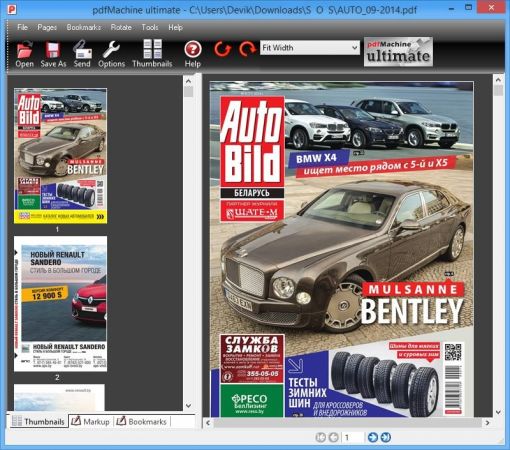
pdfMachine converts a print stream from an application directly into a PDF. Once you have installed the pdf writer, open your document that you want to convert, then click "print", select the "Broadgun pdfMachine printer" and that's it - you have a PDF!

Integrity
PDF documents generated by pdfMachine, when printed or viewed, maintain the integrity of all formatting in the original document. PDF files preserve documents formats independent of software, hardware, or operating system used to generate the original file. They can be opened, read and printed by many free PDF readers available on the web, and viewed on operating systems such as Windows, MacOS, and Unix variants.

Technology
PDF format is the best document format for long-term digital archival. Often software becomes obsolete, rendering some documents unreadable by current technology. Widely published formats, such as PDF, are more future proof that proprietary formats such as MS Word. In 50 years time, even if PDF's are not used anymore, all you need is the PDF specification and you can have a viewer developed to read your documents.

Searchable
PDF has the ability to store text in a searchable form.

Browsers
PDF files can be viewed within Netscape and Internet Explorer. These files can then be saved for off-line use or printed. This makes for easy use within an intranet or website.

Colour and Size
PDF files enable sharp, colour-precise printing on most printers with precise onscreen colour match regardless of monitor brand. Users can magnify documents up to 800% without the loss of clarity in text or graphics. PDF files can be optimized and are often smaller than conventional document formats.


HOMEPAGE


Код:
https://broadgun.com/


DOWNLOAD

Код:
https://rapidgator.net/file/3e77ccfa62ffcee127e145f763d100d6/Broadgun_pdfMachine_20.53.rar.html

Код:
https://nitroflare.com/view/3F4A6A8FA9C3188/Broadgun_pdfMachine_20.53.rar
 
d0b6d87faaca65a2f6420635c1fcc3b5.jpg

Cableguys Shaperbox V3.6.2
File Size: 12 MB


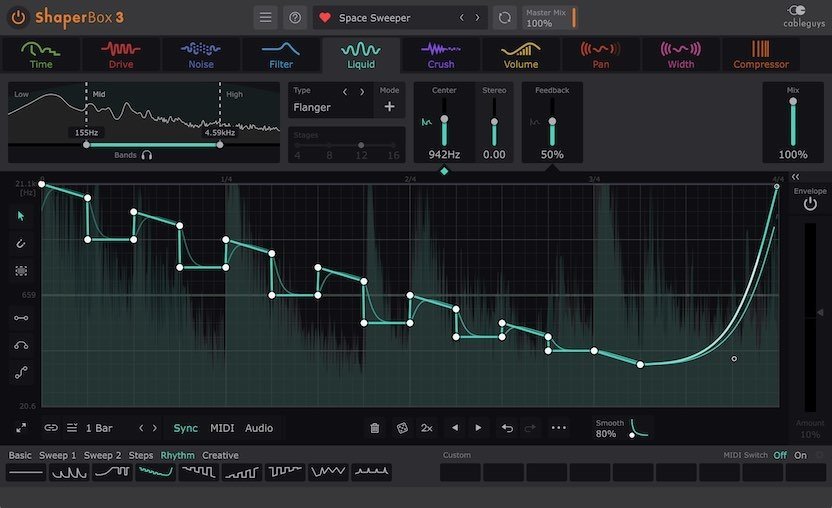
ShaperBox is your go-to tool for rhythmic inspiration, musical motion, and mixing magic. Nine powerful Cableguys Shaper effects come together in one easy, modern interface.
Make your music move
Bring out the emotion in your songs with easy drawable LFO waveforms, reactive envelope followers and new audio triggering. Create rhythmic effects that react to your music - or stamp a whole new groove on it.
Solve complex mix problems
Sculpt your sound in incredible detail with 3-band multiband for every effect. Apply focused enhancement - or erase problem elements of your mix. It's complex mixing made easy.
What's New
official site does not provide any info about changes in this version.

Код:
https://rapidgator.net/file/8932b025ab765ae715f6d017ad9e6ca6/Cableguys.Shaperbox.v3.6.2.rar.html

Код:
https://nitroflare.com/view/857246E1B6DBF44/Cableguys.Shaperbox.v3.6.2.rar
 
9b1d8defcbd10327143470e922382302.avif


Chaos Envision 1.4.1.603083

File size: 1.46 GB


Immersive architectural experiences. Real-time 3D assembly, photorealism, and animations.

Let your design speak for itself with Chaos Envision.
For architects and archviz specialists who want to elevate their design effortlessly.

Scene scaling
As a standalone tool, Envision goes beyond the common CAD limitations and makes it possible to create detail-heavy scenes without compromising on performance or quality.

Robust assembly
Combine scene elements from various 3D creation tools with no data prep or loss.

Real-time realism
Dive into intricate, high-complexity designs with fast performance and visual fidelity.

Creative flexibility
Adjust any aspect of your project without needing to pre-separate objects - data is imported at the object level of granularity.

Cinematic storytelling
Communicate architectural intent and captivate stakeholders with interactive, cinematic, and emotionally compelling visual stories that are intuitive, easy and fast to create.

Advanced animations
From moving objects on paths to showing construction phasing, design variations and cinematic flyovers.

Immersive environments
Adjusting time of day, cloud appearance and haze sets the mood, while animated vegetation and wind effects create a lively feel of the environment.

4D humans and crowds
Bring designs to life with crowds of animated humans - thanks to the direct integration of the Anima engine.

High-end visual realism
Powered by a high-fidelity ray tracing engine, Envision supports trillions of polygons in real-time, allowing users to populate their scenes with high-quality assets.

100% ray-tracing
High-end visual fidelity in both real-time and offline output.

Cosmos library
Render-ready assets, recognized for their rich geometry, advanced materials, dynamic lighting, and lifelike entourage.

AI enhancements
Enhance vegetation and human figures with AI-driven textures, lighting, and clarity.

Design exploration
Research lighting scenarios, materials, and entourage options and see them demonstrated through animated transitions between design variations.

Unlimited variations
Create variations of any adjustable object, material, light, or asset of your scene and explore design options.

Interactive walkthroughs
Seamlessly animate between variations to create immersive walkthroughs and over-the-shoulder presentations.

Intuitive visual presets
One-click effects like rounded corners, translucency, strands, and displacement elevate realism and enhance the natural look of your scenes.

Ecosystem
Seamlessly integrated with the Chaos ecosystem, Envision works with Enscape and V-Ray, offering a natural continuation to their workflows for fluid data exchange and streamlined collaboration.

Easy coordination (.vrscene)
Leveraging the .vrscene format, Envision loads scene data instantly and supports all assets and materials coming from the creation tools.

Non-destructive workflow
Design iterations do not restart the visualization process and minimize repetitive artist work.

Continuous design
Visualization stays up to date even as design evolves thanks to advanced file linking.


HOMEPAGE


Код:
https://www.chaos.com/envision


DOWNLOAD

Код:
https://rapidgator.net/file/a69c5108ee1af35403cd442cb7a26807/Envision-1.4.1-603083..rar.html

Код:
https://nitroflare.com/view/93631CA8234D305/Envision-1.4.1-603083..rar
 
0a2c691d3637a429669c442e38b225f9.jpg


Cisdem Video Converter 4.3.0 Multilingual

Windows x64 | File size: 92.29 MB


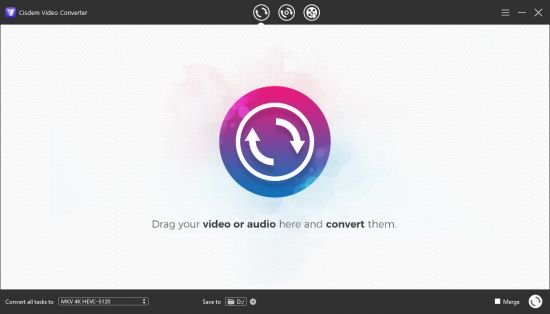
Cisdem Video Converter is the All in one solution for converting video & audio files in any format, ripping DVD movies, and converting online videos. Conversion tool that provides support for more than 150 audio and video file formats and also helps you download or share content with others. Cisdem Video Converter offers you the possibility to make audio or video content compatible with virtually any device.

Features
- Convert almost all video and audio files in different encoding.
- Rip DVD to transfer or backup movies and music with high quality.
- Advanced editing features to ensure an ideal output video.
- Download videos and music from 1000+ sites safely to play offline.

Convert any videos and audios with full quality, high speed
Cisdem Video Converter prepares your video and audio files in any format for instant playback on a range of devices, it supports all encoding formats, including H.265/HEVC, H.264, Xvid, VP8, VP9, etc., also exports videos in latest 4K UHD. It delivers reliable and satisfactory conversion result without sacrificing the quality. If you have tons of videos to convert, you can add and convert multiple files at once, this app will technically accelerate the conversions and bring your fast outputs.

Excellent format support
Convert various videos and audios to 600+ popular and obscure formats, including MP4, AVI, MKV, MOV, WMV, MP3, M4A, FLAC, AAC, WAV, etc. It also inputs and outputs files in HD MP4, HD AVI, HD MKV, 4K MP4, 4K MKV, etc.

Quick device presets
Select from an impressive list of 300+ ready presets for Apple/Microsoft devices, Android devices, game consoles, etc. It will pick the appropriate format for you to play files on specific device.

Full quality
Convert without quality loss. The built-in video enhancer keeps the original quality to the maximum or even better. Also, there are quality configuration options.

30X faster speed
With the latest converting and enhancing engine, the video converting speed has been improved 30X faster than before, especially in 4K/HD converting.

Rip DVD to video and audio with 100% original quality preserved
Rip and convert DVD to standard, HD even 4K videos in the format of MP4, MKV, MOV, H.265 MP4, H.264 MKV, etc. Extract audio from source DVD and save in various audio formats like MP3, M4A, FLAC, AAC, WAV, etc. It allows directly setting device model as output profile, which makes it simple to transfer and watch DVD contents on Apple devices, Android devices, TVs, etc.

Support all kinds of DVD discs
Support DVD discs protected by CSS encryption, multi-angle DVD discs, DVD discs from any region, and DVD discs from any movie studio. Besides DVD discs, it also accepts DVD folders.

Flawless 1:1 quality
With adjustable parameters, original quality of source DVD content can be 100% retained by setting the same Resolution, Frame Rate or Aspect Ratio as that of original.

Blazing fast ripping speed
Boosted by advanced accelerating technology and world-leading disc decryption technique, Cisdem Video Converter handles DVD ripping and converting much faster than its competitors.

Quickly edit videos and make them unique
Touch up your videos with an array of basic editing features and have a precise control of your video conversion.

Download video and music from 1000+ sites safely and successfully
Save video and music from 1000+ hosting sites for offline watching, including YouTube, Facebook, Twitter, Vimeo, Dailymotion, etc. It is safe to use and won't leak your information. Powered by a sharp video analyzer, it can download videos without failure or quality degradation. The batch downloading mode optimizes your efficiency by processing multiple downloads at one time.

What's new

System Requirements Windows7, Windows8, Windows10, Windows11 64 bit OS required


HOMEPAGE


Код:
https://www.cisdem.com/


DOWNLOAD

Код:
https://rapidgator.net/file/32aa4ccae740185817f5b6f32d820b35/Cisdem.Video.Converter.4.3.0_x64.rar.html

Код:
https://nitroflare.com/view/8A6809E5FBA7160/Cisdem.Video.Converter.4.3.0_x64.rar
 
c47f5b873ebc0192b166623c5578fa1a.jpg


CoolUtils Total Image Converter 8.2.0.288 Multilingual

File size: 73.17 MB


Total Image Converter converts images to other formats, crops, resizes and rotates them. Convert large TIFFs into small JPEGs, make photos suitable for the web or recover old photos in unsupported formats - Total Image Converter will do everything you need.

- Supports TIFF, JPEG, RAW, PNG, BMP, PSD, TGA, and many other image formats;
- Works incredibly fast with new multi-threading feature;
- Converts CMYK to RGB;
- Handy resize and crop options to make your photos smaller;
- Watermarking: add your comment, logo or date.

Features
- Total Image Converter supports TIFF, JPEG, JPEG2000, RAW, PNG, BMP, ICO, PSD, TGA, PCX, PCD and many other rare image file types files complete list).
- Along with conversions you can rotate your images! All is done in batch so you save a lot of your valuable time.
- With Total Image Converter it's very easy to resize your photos or images.
- With Total Image Converter you can specify the color space for your output images.
- What to combine images within folders? No problem! Our powerful batch image converter can do that too.
- Total Image Converter will also add a frame to your images in batch.
- Convert TIFF, JPEG, PSD and many other files in seconds via our clear wizard-mode interface (thumbnails or file lists with details).
- The widest list of output file types: PDF, TIFF, BMP, PNG, JPEG, JPEG2000, ICO, GIF, PCX, TGA, PXM, PS, PCL! Besides, it supports many rare formats like PALM, PICT, XPM, FIX, etc.
- Total Image Converter supports almost all RAW camera photos (CRW, CR2, NEF, PEF, RAF, X3F, RAW, BAY, ORF, NRW, SRF, MRW).
- The built-in Preview panel helps you to view each file full-sized and learn the indo about it.
- Add text watermarks to the header or the footer of the output file to prevent unauthorized use.
- When you convert images to PDF you can set user permissions, password-protect your files or sign them with your digital signature.
- Try the Total Image ConverterX SDK to use it on your server (no GUI).
- Total Image Converter can be run via command line (get the ready-to-use command line from GUI settings).


HOMEPAGE


Код:
https://www.coolutils.com/TotalImageConverter


DOWNLOAD

Код:
https://rapidgator.net/file/26b2005908c1578d27700d547987100d/Total.Image.Converter.8.2.0.288.rar.html

Код:
https://nitroflare.com/view/9485E97A8C06EE5/Total.Image.Converter.8.2.0.288.rar
 
4328c76497030f06d73c6902980b1153.png


CoolUtils Total Movie Converter 4.1.0.76 Multilingual

File size: 116.8 MB


Total Movie Converter is a multifunctional tool to convert video files in any popular formats such as: AVI, MPG, WMV, MPEG, FLV. To the same, the program is able to prepare video for a variety of devices - iPod, iPhone, Zune, Apple TV, Archos, Creative Zen Vision, XBox and many others. Provides the ability to batch convert a group of files.

Total Movie Converter supports 3GP format. This will allow you to create a video for any mobile phone. If you have a smartphone of Nokia or Blackberry video Converter provides you the suitable video format just by pressing one button.
If you take a home video with HD cameras, Total Movie Converter to make the case that this video will be possible to lay out in the network by double clicking the button. Total Movie Converter is easy and convenient to use. It does not require any special knowledge to convert video files. Built-in assistant automatically mark all the necessary settings. You can also use the convert a group of files to save your time and effort.
Total Movie Converter can convert videos from YouTube, Vimeo and Sevenload. All you need to insert a link to the video. Video Converter can also change the кодаки or system type between all popular video formats. In addition, you can configure / video bit rate, frame rate, and even cut your video file. Also you can increase the volume of your video. The conversion process is very quick. Total Movie Converter can be run from the command line. In addition, you can integrate Total Movie Converter in the pop-up menu of Windows. This means that you can right-click on the video file that is located on the desktop, and choose the option «Convert» in the menu. Just think, you don't even need to run the program for conversion of the file!!! Built-in video player helps you preview the video before and after the conversion process. It's really very convenient!

Supported formats
- Audio Video Interleaved (.AVI)
- Windows Media Wideo (.WMV)
- DivX Video (.DIVX)
- XviD Video (.XVID)
- DVD (.VOB)
- Digital Video (.DV, .DIF)
- Apple QuickTime Video (.MOV)
- MPEG Video (.MPG, .MPEG, .MPE, .M1V, M2V, .MPV)
- MPEG4 Video (.MPEG4, .M4V, .MP4)
- Advanced Streaming Format (.ASF)
- AVS Video (.AVS)
- Intel Indeo Video (.IVF)
- Matroska Video Stream (.MKV)
- Mobile Phone Video (.3GP, .3G2)
- HD Video (.H261, named .h264)
- JVC Digital Video (.mod files)
- WinAmp3 Video (.NSV)
- MythTV Video (.NUV, .NUT)
- Flash video (.FLI, .FLC, .FLX, .FLV, .FFM, .SWF)
- Sony high definition video (.MTS and .M2TS)
- RealMedia Variable Bitrate (RMVB)
- Telesync (TS)

What's new
• official site does not provide any info about changes in this version


HOMEPAGE


Код:
https://www.coolutils.com/


DOWNLOAD

Код:
https://rapidgator.net/file/8955c25f1befc2626b028622010013b8/Total.Movie.Converter.4.1.0.76.rar.html

Код:
https://nitroflare.com/view/A519169C78F4E05/Total.Movie.Converter.4.1.0.76.rar
 
f848693285df2e9847123c6a1116698d.webp

Free Download Cutting Optimization Pro 5.18.17.1 Multilingual Fast Links | 1.9 Mb
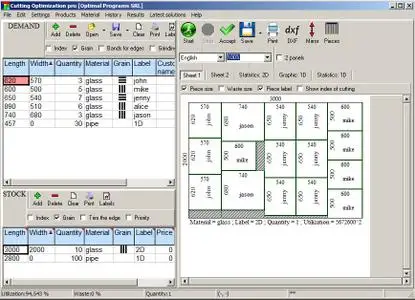
Cutting Optimization Pro is a cutting software used for obtaining optimal cutting layouts for one (1D) and two (2D) dimensional pieces. The software also lets you to define and handle complex products, such as table, desk, cupboard, locker, book shelf.


Cutting Optimization Pro can be used for cutting rectangular sheets made of glass, wood, metal, plastic, or any other material used by industrial applications.
Cutting Optimization Pro can also be used as cutting software for linear pieces such as bars, pipes, tubes, steel bars, metal profiles, extrusions, tubes, lineal wood boards, etc and other materials.
Features:
1D and 2D optimization in the same cutting program - you may use the program for both 2D and 1D optimization.
Guillotine optimization - The cuts are performed from one side to the other of the material. This feature is very useful for glass, wood, thermoglass.
Non-guillotine (nested) optimization - The cutting machine can follow the shape of the material. In this case you need to have a complex machine based on laser or flame blade.
Multi-stage guillotine - all cuts in a stage are perpendicular to the cuts on the previous stage. The user may specify the number of stages and the direction of cuts for the first stage.
Any number of pieces in the INVENTORY and DEMAND - virtually no limit for the number of pieces that you want to optimize.
Any measurement metric- The way in which you introduce the data is a general one. You don't have to specify a metric. Just choose a metric in your mind and enter all data using that metric only.
Fractional input. Pieces can be introduced either as 100.5 or 100 1/2. More info about fractional input can be read here.
Adjustable cutting blade thickness- For glass cutting with diamond the cutting blade thickness is 0, but for wood, metal handling you need a saw with a greater thickness.
Adjustable optimization level- One may specify how many layouts to be generated before the solution is outputted. If you don't have too much time and you don't have a good computer you may set the Optimization Level to a low level. This feature helps you to run your program on any kind of computer (from 486 to the best processors available today).
Maximal cut length limit - You may specify how long a cut can be. This is useful when you perform the cuttings manually.
Adjustable useful waste - all wastes smaller than this size are garbage (will not be added to repository).
It is used in order to avoid the breaking of too small material. Useful in glass industry.
Reduces panel waste and costs - using the latest achievements in the field of Artificial Intelligence to reduce the waste.
Grain direction control - useful for wood cutting optimisation. A parameter let the user to specify if the piece can be rotated or it should be kept fixed.
Automatic offcuts handling - the useful waste is automatically added to the Inventory of materials.
Vertical printing of the labels and edge bands - this will optimise and simplify your layout.
Graphical display black-white or colourful images and text mode of the obtained results - the results are displayed as images (black and white or colourful) or as text-tables.
Save images automatically - all the obtained 2D sheets can be saved as jpeg images with 1 click. The programs automatically appends a number to an image.
Copy-paste from Excel. Just select some columns from Excel and paste them in Demand or Inventory grids.
Grouping similar layouts - this will reduce the number of printed sheets of paper. The number of repetitions for each sheet will be displayed.
Sketchup exporter - We offer a free plugin for Sketchup which helps exporting the size of components from a Sketchup model to a file loaded by Cutting Optimization pro. Read more: here.
Magnifying a sheet. This is useful if you have a long roll which you can visualize it by magnifying it.
Printing the obtained layouts - on any printer.
Printing multiple layouts on the same page - You may print 1, 2, 4 or 6 layouts on the same sheet of paper.
Printing the REPOSITORY and the DEMAND of the customer - you may print the pieces that you want to optimize.
The cuts are shown in text format in order to use them with a CNC machine.
Edge banding handling - the quantity and the type of material attached to the edges of the wood sheets is manipulated by the program.
Computes / Prints the total cutting length.
Displays diagrams - a table which contain the pieces cut for each sheet.
Possibility to define complex products such as table, desk, cupboard, locker, book shelf ...
Possibility to define types of materials (glass, wood, band) - for each material the user has a special table where it can introduce more information about the material.
Automatic tool for computing the size of the pieces based on the external sizes of the product.
Statistics related to the current cut / layout- At the end of the optimisation process you will have access to the: number of cuts, cuts definition (starting and ending point), number of waste rectangles, the waste rectangles (the coordinates of the top-left and bottom-right corners), number of utilized pieces, the placement of the utilized pieces, used surface, ...
Saves/loads results - All results can saved in txt files and loaded later.
Generates and prints adhesive labels -
Load data from .xml, .dbt (specific files to version 4), .xls (Excel files) and .csv (comma separated) files).
Automatically computing of the order price -
Maximises productivity, saves time and money ....
Data can be exported into very popular formats: Word, Excel, HTML, CSV (comma separated) and XML files.
All panels and table's columns are resizable - You may customize the workspace. The new positions are automatically stored.
Very fast running time - Solutions are obtained within seconds.
Win32 native application. No dependencies required.
Single file application. You can move a single file to a new computer and it will run without installation.
Very efficient written. .exe has about 6 MB and the installation kit just over 1MB.
Desktop application. You are in control of your data. You do not risk loosing data if some distant server fails. You can run the application without problems even if the internet is not working.
Interface in multiple languages.
Operating System:Windows 7, 8/8.1, 10
Home Page-
Код:
https://www.optimalprograms.com/cutting-optimization/

Rapidgator
Код:
https://rapidgator.net/file/237d130d6c8a44e57c5e18d757345dc1/d6pfu.Cutting.Optimization.Pro.5.18.17.1.Multilingual.rar.html

Код:
https://nitroflare.com/view/460C0645ACB3957/d6pfu.Cutting.Optimization.Pro.5.18.17.1.Multilingual.rar

 
45e7a2925208dc03ca412563de89f961.avif

Cyberlink Powerdirector Ultimate 2026 V24.0.1216.0
Languages: Multilingual
File Size: 686.63 MB


Award-winning video editing software for professional creators. Create. Edit. Share. Video editing, made for everyone. No experience necessary. Do more, faster with customizable templates. Discover and create attention-grabbing video intros alongside our community of creatives.
Kickstart Your Projects
- No experience necessary.
- Do more, faster with customizable templates.
Save Time With Thousands of Shareable Video Intros
Discover and create attention-grabbing video intros alongside our community of creatives.
Mask Designer
Remove unwanted objects, or composite clips together.
- Custom Masks
- Image Masks
- Text Masks
Title Designer
Choose from drag-and-drop presets or get creative with an array of gradient, border, and shadow tools.
- Motion Graphics
- Sound Effects
- Blending Modes
- Special Effects
PiP Designer
Use animated stickers, shapes, and callouts to grab your viewers' attention.
- In/Out Animations
- Animated Stickers and Graphics
- Custom Shapes and Callouts
AI Motion Tracking
Add text or graphics that automatically follow the motion of any object.
AI Sky Replacement
From blissful blue skies to dramatic sunsets, don't let bad weather ruin your perfect shot.
AI Object Detection
Instantaneously create masks with automatic object selection for cars, people, pets, and more.
Release Notes
CyberLink PowerDirector - What's New[/code]
Minimum System Requirements
Operating System
Microsoft Windows 11, 10 (64 bit OS only, Windows 11 Arm64 is supported)
Processor (CPU)
- Intel® Core™ i-series (6th generation) and above.
- Intel Haswell (4th generation) processor: Core i7-4770 (only Core and Xeon branded), and above required for AI features.
- AMD Ryzen-series and above
- AMD Phenom® II and above
- AMD A8-7670K and above, AMD Ryzen™ 3 1200 and above required for AI features.
- Qualcomm Snapdragon® 8cx Gen 3
- Qualcomm Snapdragon® X Elite
Graphics Processor (GPU)
- Standard Video: 128 MB VGA VRAM or higher.
- 360-video: DirectX 11 compatible.
- AI Plugin: 2 GB VGA VRAM or higher.
- NVIDIA Audio/Video Denoise and Room Echo Removal: NVIDIA GeForce RTX 2060, NVIDIA Quadro RTX 3000, NVIDIA TITAN RTX, or higher.
Other Requirements
- Memory: 8GB required (16GB or above recommended).
- Hard Disk Space: 7GB
- Burning Device: Burning drive is required for disc burning purpose.
- Sound Card: Windows compatible sound card is required.
- Screen Resolution: 1024 x 768, 16-bit color or above.
Language Support
- English
- French
- German
- Italian
- Spanish (European)
- Chinese Simplified
- Chinese Traditional
- Japanese
- Korean
- Dutch
- Portuguese (Brazilian)

Код:
https://rapidgator.net/file/e0e520dcc1df08cdbe4209b0b4ac4828/PowerDirector_24.0.1216.0.rar.html

Код:
https://nitroflare.com/view/A02C9C6B5396752/PowerDirector_24.0.1216.0.rar
 
dfa63137a5befbd7b19a70714fcaf1ab.jpg

Database Tour Pro 11.5.12.713 Multilingual
Windows x64 | File size: 12.05 MB


Database Tour Pro is a comprehensive software application that enables you to organize all your connected databases. It offers support for Borland Database Engine (BDE) and Microsoft ActiveX Data Objects (ADO), SQL scripts, reports, along with data conversion and exporting, among others.
Outdated, yet clear-cut interface
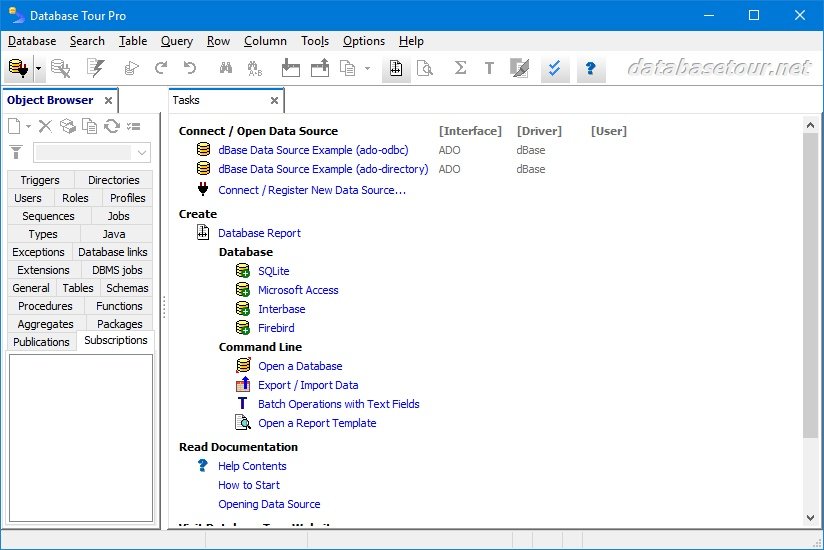
Wrapped up in a large window with a well-structured layout, the interface seems outdated. It contains an object browser for functions, packages, triggers, directories, users, roles, profiles, sequences, jobs, types, Java, exceptions, database links, general properties, tables, schemas, and procedures.
Manage tables and queries
Tables can be created, deleted, emptied, duplicated, renamed or packed. You can allow table editing, view deleted records, set a table password, change the language driver, add, remove, rename and resize fields, add, delete or regenerate indexes, check out the table family, as well as verify referential integrity.
When it comes to queries, Database Tour Pro lets you save, load and print SQL scripts or history, and explore a wide range of predefined query templates which can be seamlessly inserted into the project, like select, update, insert and delete, add or drop field, and create view or create table.
Encrypt databases and build reports
It's possible to isolate, start, commit and roll back transactions, review the database history, clear the password list, resort to a search-and-replace function, as well as locate objects and fields.
The software utility puts a bunch of useful tools at your disposal, including arithmetic functions, batch operations with text fields, a report builder and previewer, printer for table data, data importer and exporter, file encryption and decryption, in addition to a command-line generator.
Features
- Accessing different types of databases.
- Creating tables.
- Viewing data.
- Editing data.
- Several ways to print data.
- Built-in report engine, which allows to produce the reports automatically or by using a visual report designer with templates, expressions, preview etc.
- Expression builder for report expressions.
- Building and executing SQL queries.
- Support for execution of multi statement SQL scripts.
- Syntax highlighting in SQL editor.
- Support for parameterized SQL queries.
- Enhanced database grids, which allow to view and manipulate the data in the most convenient way, including sorting by clicking column header, changing row heights, resizing columns etc.
- Creating, deleting, modifying BDE aliases.
- Command line support for executing queries, opening tables, export-import operations, loading reports etc. with logging the performed operations.
- Searching and replacing text in database with ability to choose fields, record range etc.
- Importing data to table from another table or a query.
- Exporting data from open table or query to large number of file formats like text, CSV, HTML, XLS, XML, RTF, DBF or to any of supported database formats.
- Copying data to clipboard.
- Calculating numeric fields (sum, avg, min, max, count).
- Viewing and editing Blob data, such as MEMO, graphic, RTF.
- Tools for editing text fields (trimming, changing case of symbols, replacing text).
- Sorting (logical and physical) data.
- Filtering data according to user's criteria.
- Viewing table and database structure with ability to print, copy, sort it.
- Reindexing tables.
- Customized data view (font, background).
- Conditional formatting data in database grids and reports.
- Ability to control transactions manually.
- Storing database and SQL history.

Код:
https://rapidgator.net/file/989ed2f8e9edf2ca48da22616d22fc24/Database.Tour.Pro.11.5.12.713_x64.rar.html

Код:
https://nitroflare.com/view/164ADE0F81484EA/Database.Tour.Pro.11.5.12.713_x64.rar
 
2512171947340115.jpg


DBF Converter 7.70

File size: 3.7 MB


DBF Converter is a universal solution to all your DBF format conversion needs. Whenever you need to extract data from a DBF file to CSV, XLS, XLSX, SQL or plain text, the software delivers a straightforward way to do this with minimum efforts.

3-Steps conversion
Working with DBF Converter is easy. You specify a DBF file or a folder with DBF files you want to convert, select fields and filter out records you need. Then it's just a matter of one click for DBF Converter to turn source files into the format of your choice.

Powerful data filtering
Data filtering in DBF Converter is visual. This means the program takes a sample of records in the DBF file and allows you to apply custom filter rules and masks and instantly see the sample changes according to your choice.

Batch conversion for multiple DBF files
When you have dozens of those DBFs, converting them could be tricky. But thanks to DBF Converter there's no difference whether you need to process one file or a hundred. The program accepts a folder containing your source DBF files and converts them all one by one. And thanks to the low-level access to data the conversion remains fast and accurate


HOMEPAGE


Код:
https://www.dbf2002.com/


DOWNLOAD

Код:
https://rapidgator.net/file/2549d793b40af49b8aa334aeea149ff4/DBFConverter7.rar.html

Код:
https://nitroflare.com/view/305C1D462DE3B83/DBFConverter7.rar
 
3c895f67987de02f4b88ebb68eba8348.jpg


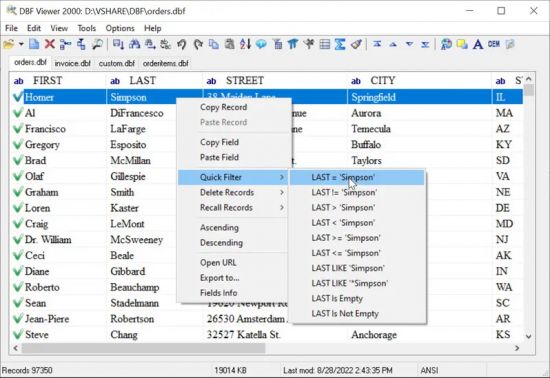
DBF Viewer 2000 v8.94 Multilingual

File size: 4.8 MB


If you're seeking a fast, effective solution for viewing and editing all sorts of DBF files, DBF Viewer 2000® is the answer. This feature-rich program can handle files from dBase, Visual dBase, Foxpro, Visual FoxPro and Clipper, to name just a few, with a performance that easily rivals costly professional database utilities.

Its optimised proprietary engine means that no matter what your file size, DBF Viewer 2000 is incredibly fast, performing any task you set it - from a simple query and duplicate clean-up to data export - at lightning speed.

With DBF Editor's simple, dynamically generated visual dialogues, you can easily see the structure of your DBF files and edit them exactly as you would with native database management tools. In addition to being able to view the contents and structure of DBF files, you can also view and edit dBase III, dBase IV, dBase Level 7, FoxPro and Visual FoxPro format memo fields.

Command line automation is fully supported, making it simple to repeat activities including data import, replacement and export and clean-up of duplicate records. Because DBF Viewer 2000 is completely independent of database engines, drivers and database management systems, you can simply install the program and start viewing and editing DBF files immediately.


HOMEPAGE


Код:
https://www.dbf2002.com/


DOWNLOAD

Код:
https://rapidgator.net/file/23f4dfbcc8964b5e5af3926efd3876df/DBFViewer2000..rar.html

Код:
https://nitroflare.com/view/E142467BB7BBA95/DBFViewer2000..rar
 
b6f26cc7bc3c7eeb5722fa5fe2242aab.png

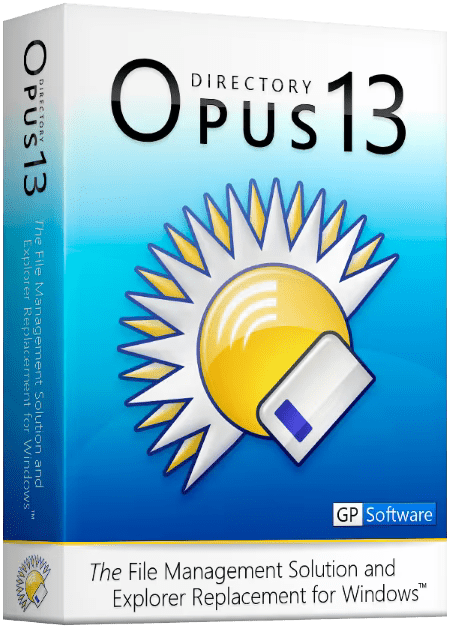
Directory Opus 13.20.2 Beta (x64) Multilingual
File size: 24.3 MB


Are you frustrated by the limitations of Windows Explorer? Directory Opus provides a complete Explorer Replacement with far more power and functionality than any other file manager available today.
Just some of the features include
- Single or dual pane file display and folder trees
- Tabbed interface let you keep multiple folders open and switch quickly between them
- Unique Explorer Replacement mode provides a full replacement for Windows Explorer
- Quickly filter, sort, group and search your folders
- Color-code your files, assign status icons, star ratings, tags and descriptions
- View images, documents and more. Image marking lets you sort your photos quickly and easily
- Batch renaming including easy-to-use keyboard macros
- View and edit file metadata
- Support for FTP and archive formats like Zip, 7Zip and RAR
- Built-in tools including synchronize and duplicate file finder
- Calculate folder sizes and print or export folder listings
- Queue multiple file copies for improved performance
- Fully configurable user interface - colors, fonts, toolbars, keyboard hotkeys, and a full scripting interface let you tailor Opus exactly to suit your needs
- Efficient, multi-threaded, modern design. Supports the latest 4K monitors. Available in both 32 and 64 bit versions.
What makes Opus unique?
Built for speed
Opus is written in native C++ multi-threaded code; compiled for the latest 64 bit CPUs, with high performance our number one design principle.
Fully configurable
Change the colors. Change the fonts. Change the toolbars and menus. Set up hotkeys. Opus adapts to how you want to use it.
Makes file management a breeze
Powerful searching, sorting, grouping, labelling and tagging features let you take control of your files like never before.
Endlessly extensible
Work with third-party tools as easily as with the built-in features. A full scripting interface, including scriptable dialogs, means your imagination is really the only limit.
Replace Windows Explorer and don't look back
Our unique Explorer Replacement mode provides a full replacement for Windows Explorer.
Single or dual pane file display and folder trees
Tabbed interface let you keep multiple folders open and switch quickly between them
Integrated viewer, metadata editor and utility panel
Built-in tools including synchronize and duplicate file finder
Leverage indexed search engines like Windows Search and Everything

Код:
https://rapidgator.net/file/cf7ebfe62995fb934bcbc1e41757f897/DirectoryOpusPro13.rar.html

Код:
https://nitroflare.com/view/B8E79F67B502CA0/DirectoryOpusPro13.rar
 
_2a79ea8455fa1387e0a93543282a78b0.gif.html


DisplayFusion Pro 12.0 Multilingual

File Size: 132 MB


DisplayFusion will make your dual monitor (or triple monitor or more) experience smooth and painless. With DisplayFusion you can add a taskbar to every monitor that works and looks just like the Windows Taskbar. Or take advantage of advanced multi-monitor wallpaper support, Flickr Integration for image searching and fully customizable window management hotkeys. These are just a few of the many things that DisplayFusion can do.

Features
DisplayFusion will make your multi-monitor life much easier. With powerful features like Multi-Monitor Taskbars, TitleBar Buttons and fully customizable Functions, DisplayFusion will make managing your multiple monitors easy. Take a look at some of the features below to learn how DisplayFusion can help you!

Multi-Monitor Taskbars
Keep your windows easily organized by adding a taskbar to each of your monitors. The taskbar on each monitor can be configured to show all windows, or only the windows that are located on that monitor. Use button grouping, auto-hide, window previews, shortcuts, a Start Button and much more to help you work more easily with your application windows.

Advanced Wallpaper Management
DisplayFusion has powerful Wallpaper features that let you use images from your own computer, or load images from online sources. Tile, stretch, scale, crop, position and tint your images exactly how you want.

Customizable Functions
DisplayFusion comes bundled with over 30 pre-configured Functions, or you can create your own powerful custom Functions. Create Functions to load Wallpaper or Monitor Profiles, move windows around, change window opacity, toggle DisplayFusion features and much more. Any Function, including custom Functions that you've created, can be assigned to a TitleBar Button for easier access with the mouse, or to a keyboard shortcut for keyboard power users. Functions can also be assigned to the Jump List menus on the DisplayFusion Multi-Monitor Taskbars, allowing them to be run even on applications that are minimized.

Monitor Configuration
Use DisplayFusion to set your Monitor Configuration. Configure the resolution, colour depth, refresh rate and orientation. You can even save your configurations as Monitor Profiles that you can load later using a key combination or TitleBar Button. Link a Wallpaper Profile with your Monitor Profile to load your desktop wallpaper automatically based on the monitors you have connected.

Window Snapping
DisplayFusion's Window Snapping feature makes it easy to line-up your windows with each other, or line-up your windows along a monitor edge. Just drag a window near a monitor edge or another window and release the mouse button to let DisplayFusion snap the window into place. Fully configurable, with the ability to ignore specific applications if needed.

Window Management
Use DisplayFusion's Window Management feature to easily move windows between your monitors. Whether you use the simple Middle-Click Move, or the more advanced Maximized Window Dragging, managing your desktop windows has never been so easy. You can even show tooltips when moving or resizing windows to help you position them precisely.

Window Location
The Window Location feature allows you to specify which monitor you would like selected applications to open on. You can customize this by specifying actions like maximize, centre, span or 'Run Function'. You can have all windows from the selected application open on the specified monitor, or only the first window.

Windows Logon Background
Use DisplayFusion's powerful Windows Logon background image changer to customize your logon screen. Load images from your computer, or from any of the online providers that DisplayFusion supports. Customize the image positioning and colours (greyscale, sepia... etc) to suit your taste.

Multi-Monitor Screen Savers
Why settle for one screen saver on your main monitor? With DisplayFusion you can span your screen saver across all monitors, or even display a different screen saver on each monitor. Use the default Windows screen savers, or load your own custom screen savers to fully customize your desktop.

Desktop Icon Profiles
sEasily save and load your desktop icon layouts using DisplayFusion's Desktop Icon Profile feature. Loading a previously saved Desktop Icon Profile is an easy way to restore your familiar desktop icon layout when the icons get jumbled after adding or removing a monitor.

Easy Administration
Deploy and manage DisplayFusion in your corporate environment with ease by using DisplayFusion's silent installer options, and custom ADMX templates for Active Directory Group Policy environments. The custom ADMX templates will allow you to make sure your DisplayFusion settings are consistent across all workstations, making management and troubleshooting much easier.

Available in dozens of Languages
DisplayFusion comes bundled with dozens of languages, and more are added all the time. Using DisplayFusion in your native language makes it easier to fully understand and use each feature


HOMEPAGE


Код:
https://www.displayfusion.com/


DOWNLOAD

Код:
https://rapidgator.net/file/4b07f14332ed1cb4e229ea0f47804139/DisplayFusion.Pro.12..rar.html

Код:
https://nitroflare.com/view/103A2D9D711B529/DisplayFusion.Pro.12..rar
 
fd06541f9156431979f915c788f4bc7b.jpg

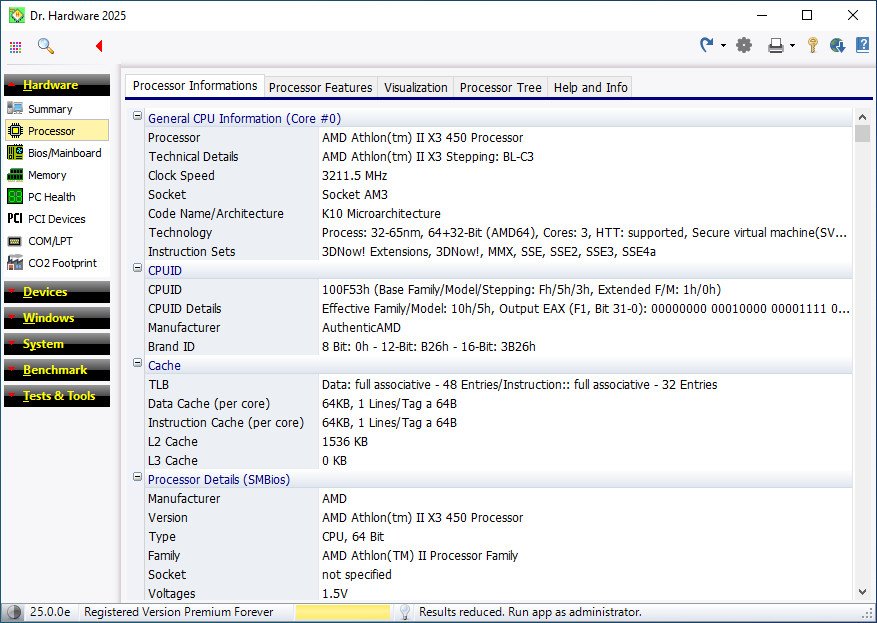
Dr.Hardware 2026 V26.0.0
File size: 4.8 MB


Dr. Hardware has been the tried-and-tested, award-winning PC analysis program for 30 years, impressing users with its wealth of detail, up-to-dateness and innovative features.
Features
- System requirements: from Windows XP. Optimized for Windows 7, 8, 10 and 11.
- detailed analysis of processor, BIOS, bus, memory, chipset, PCI devices
- Temperature monitoring including acoustic warning option
- Analysis of hard drives, optical drives, USB devices, scanners, printers
- Benchmarks (CPU, graphics, hard drives, DVD, network, internet connection)
- detailed information on Windows and security aspects, Win 11 compatibility check
- Rating test, keyboard test, monitor test image, green test (electrical smog, pollutants)
- High DPI support, help and report function (including autoreport, printer/file output)
Whats New
- Support for AMD Ryzen 200, 9900, AI 300, and AI 300 Max mobile processors
(Hawk Point, Strix Halo, Fire Range, Krackan Point)
- Support for AMD Epyc Turin Dense processors
- Support for additional AMD Ryzen chipsets
- Support for Performance/Efficiency Cores on AMD processors
- Support for additional Intel Arrow Lake Core Ultra mobile and desktop processors
- Support for processor temperature on newer AMD processors
- Full support for IT8688E and IT8689E sensors (PC Health)
- More information about DDR5 memory modules
- Updated information on Windows updates
- Various updates

Код:
https://rapidgator.net/file/e7728171026a11fe988b48ff359c7407/Dr.Hardware.2026.v26.0.0.Bilanguage-LAXiTY.rar.html

Код:
https://nitroflare.com/view/8F251FD180268F1/Dr.Hardware.2026.v26.0.0.Bilanguage-LAXiTY.rar
 
Назад
Сверху Снизу