All mitsumi'1s Applications !! (updated daily)

93e0081d995462f1b0b06a8d646a1cba.webp

Free Download Accentize DxSplit v1.0.0 | 14.34 MB
Separate Voice, Reverb and Noise with dxSplit


Repair Every Dialogue Recording
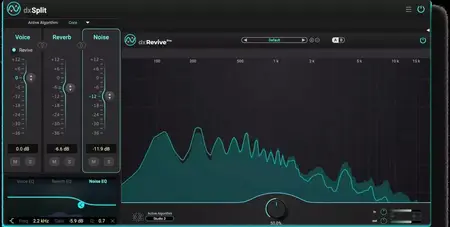
dxSplit is an intelligent audio plugin for dialogue recordings, built for post-production workflows. It automatically splits dialogue into three components, allowing you to perfectly balance voice, reverb, and noise.
High-quality noise and reverb reduction
Real-time capable algorithm
Individual parametric EQs for every channel
Direct dxRevive integration
Home Page-
Код:
https://www.accentize.com/product/dxsplit/

Rapidgator
Код:
https://rapidgator.net/file/4cf65f60c334e0ece3b197c358e2fc98/md5uc.Accentize.DxSplit.v1.0.0.rar.html

Код:
https://nitroflare.com/view/ADDE62A6C24779F/md5uc.Accentize.DxSplit.v1.0.0.rar
 
cbfa6e1ebaf2f975409b6a6b46cbe147.avif


ACDSee Luxea Pro Video Editor 8.5.0.3604 (x64) Multilingual

File Size: 488.9 MB


LUXEA Pro Video Editor 8 equips you for every stage of the creative journey-whether you're crafting cinematic travel vlogs, building engaging tutorials, capturing gameplay victories, or producing polished promo videos. With seamless screen and webcam recording, drag-and-drop editing, dynamic effects, and multi-track precision, you have everything you need to bring bold ideas to the screen. From the first spark of an idea to the final cut, LUXEA Pro Video Editor 8 helps you navigate the wilds of video production and come back with something worth sharing.

What's New in LUXEA Pro Video Editor 8?
Exciting new features and significant improvements in LUXEA Pro Video Editor 8 will have a massive impact on your video editing & production workflow.
Experience a smoother editing workflow with significantly improved performance.
Upscale videos to 4K using AI Super-Resolution.
Keep the focus where it matters with AI-powered Motion Tracking.
Add annotations to your video while recording with pen and brush tools.
Save multiple video clips or edits into one Nest Sequence, which can then be saved as a Nest Preset for any project, not just the one they were created in.
Easily keep markers organized in the new Marker Panel.
Effortlessly separate clips on the timeline using Quick Split Mode.

Enhanced Performance
Experience a smoother editing workflow with significantly improved performance. Enjoy enhanced playback, substantially faster exports, and the benefits of hardware acceleration that takes full advantage of your system's power. Plus, with new support for HDR to SDR conversion, your content is ready for any screen.

Clean, Crisp, AI-Enhanced Quality
Upscale videos to 4K using AI Super-Resolution. Whether you're restoring old footage, working with mixed-quality sources, or zooming in for that perfect shot, this intelligent upscaling technology enhances clarity without sacrificing quality. By analyzing your video and intelligently filling in details, the AI can give you sharper, cleaner, and more consistent footage. Effortlessly push the boundaries of your video and keep your story looking its best, no matter where it began.

Automatically Stay in Sync
Keep the focus where it matters with AI-powered Motion Tracking. Lock text, effects, and graphics onto moving subjects with precision, ensuring they stay in perfect sync with the action. No need to manually set keyframes, the AI does all the tracking for you. Whether you're highlighting a key moment, adding dynamic callouts, or unleashing stellar effects, Motion Tracking makes it effortless.

NEST SEQUENCES
Save multiple video clips or edits into one Nest Sequence, allowing you to re-use the entire sequence elsewhere in your project without manually editing each clip again. It's like a mini-timeline inside your main timeline!

NEST PRESETS
Nest Sequences can be saved into Nest Presets, which are saved to a local directory allowing them to be used on any project, not just the one they were created in. Perfect for maintaining a consistent style or brand across video content.

Improved Timeline
Take full control of your timeline with an exciting suite of new tools! Enable/disable clips directly on the timeline, swap out existing clips in a flash, dive into Quick Split mode for seamless editing, and experience a host of other game-changing quality-of-life improvements for super smooth editing.

ANIMATION OPTIONS
Efficiently add movement to your text using animations found under the Animation Tab of the Text Properties.

TEXT TEMPLATES
Enhanced font support and eye-catching gradient colors give you incredible Text Template options for adding fun callouts, polished titles, or creative flair to your videos faster.

BATCH EDIT TEXT PROPERTIES
Select multiple text assets on your Timeline and modify their properties in a single edit.

COLOR GRADIENT OPTIONS
Set text gradient colors using RGB, HEX, and transparency options.


HOMEPAGE


Код:
https://www.acdsee.com/en/index/


DOWNLOAD

Код:
https://rapidgator.net/file/9767d42f29192e7197731d12627a722a/Luxea.Pro.VideoEditor.8..rar.html

Код:
https://nitroflare.com/view/C495A80DBE6E43A/Luxea.Pro.VideoEditor.8..rar
 
d507b7132c7304ed9f1ccf9f956fcbf4.webp

Free Download Adobe Substance 3D Painter 12.0.1 (x64) Multilingual Fast Links | 2.5 GB
Substance Painter is a brand new 3D Painting app with never before seen features and workflow improvements to make the creation of textures for 3D assets easier than ever. It is acknowledged as the most innovative and user-friendly 3D Painter out there.


Power to the artists
- Substance Painter gives you all the tools you need to texture your 3D assets.
What You See Is What You Get
- The PBR real-time viewport lets you work on asset look development.
- Create in Substance Painter and get real-time feedback in UE4 and Unity thanks to the live link.
Augmented Artistry
- Unleash your creativity with powerful tools and a non-destructive workflow.
Smart Materials
- Tear and wear, scratches and dust instantly appear where they're supposed to.
Smart Masks
- Apply the same mask preset on any type of object and have it adapt automatically.
Integrated 8K Bakers
- Baking is where it all starts. Bake high quality maps in an instant directly within Substance Painter.
Bring VFX to the Top
- Support for Linux, 8K export, color management, UDIM management and Scripting API make integrating Substance Painter into VFX workflows easier than ever.
Open to the world
- Get 1:1 engine exports and share directly to portfolio sites with dedicated formats.
Home Page -
Код:
https://www.substance3d.com/

Rapidgator
Код:
https://rapidgator.net/file/621b34606d2d0834256203ddeae4e5c7/jx7to.Adobe.Substance.3D.Painter.12.0.1.x64.Multilingual.part1.rar.html
https://rapidgator.net/file/43212291a9168dcb2ada461f042ae297/jx7to.Adobe.Substance.3D.Painter.12.0.1.x64.Multilingual.part2.rar.html

Код:
https://nitroflare.com/view/4AA4A05F798D282/jx7to.Adobe.Substance.3D.Painter.12.0.1.x64.Multilingual.part1.rar
https://nitroflare.com/view/69989BC5672E9E5/jx7to.Adobe.Substance.3D.Painter.12.0.1.x64.Multilingual.part2.rar
 
eea845b33024d377dd640a380d860631.webp

Free Download Altium Designer 26.4.1 Build 12 (x64) | 3.2 GB
Altium Designer is a comprehensive system for the automated design of electronic modules based on printed circuit boards, which allows you to perform a full range of design tasks: from creating a functioning concept to releasing a complete set of design and production data.


Altium Designer is the most common PCB design system among electronics engineers and designers. Altium Designer is an affordable, efficient and modern software with a single user interface, with the management of a simple and clear licensing system. A single Altium Designer data model allows you to quickly and efficiently design new electronic products. The optimized unified user interface of all editors (UGO, footprint, circuit, board, design documentation, etc.) increases the productivity of the design process and eliminates the typical difficulties and errors caused by manual data transfer between editors.
Key features of Altium Designer:
-A unified platform where all stages of the design of an electronic device are carried out.
-Creating electrical circuits. Altium Designer supports bidirectional communication between the circuit and the board, which ensures the unity of the user interface and data model for the entire design process and increases its efficiency.
-Component management. A single model of each component, in which there are all the necessary components: UGO, seats, 3D-model and behavioral models for the analysis of functioning.
-Verification of the project. The built-in XSPICE mixed analog and digital analysis editor and signal editor allow for AC analysis, transient analysis, calculation of the operating point, sensitivity analysis to parameter changes, Monte Carlo analysis and other types of analysis.
-Designing a topology where tools have a logical structure and allow you to place and move objects in various modes.
-Supports flex-rigid boards. Altium Designer simplifies the definition and editing of areas with a flexible-rigid stack of layers consisting of different materials and having different thicknesses, which allows you to create flexible-rigid structures on one board.
-Designing devices from several electronic modules. Altium Designer allows you to design an assembly consisting of many connected boards, supports device designs from several electronic modules.
-Interactive tracing. The modern capabilities of the board editor allow tracing of single conductors and differential pairs in various placement modes and adjust the length of the conductors.
-Interaction with mechanical CAD systems. The NATIVE 3D ™ graphics engine allows seamless interaction between the design of the electronic and mechanical parts of the product.
-Data management includes the functions of blocking, visual comparison of document changes and revisions.
-Formation of design and production documentation for ESKD. Data for production and assembly are generated in batches using Output Job files. Draftsman tools allow you to quickly get a set of documentation for production and assembly.
Overview of Altium Designer Features
Change thermal connection styles for pads and vias on the fly.
Discover to how easily route both rigid and flex designs by following the countors of your board.
Improved features in Draftsman make it even easier to create your PCB fabrication and assembly drawings.
Move components on your board without having to reroute them.
Organize your design exactly as you want with no layer restrictions.
Explore how Altium Designer makes it easy to define the materials in your layer stack.
Manage multiple impedance profiles for stripline, microstrip, single or differential pairs.
System Requirements:
Minimum System Requirements
Windows 10 (64-bit only), or Windows 8.1 (64-bit only)
Windows 7 SP1 (64-bit only) is still supported, although not recommended.
Intel® Core™ i5 processor or equivalent
4GB RAM
10GB hard disk space (Install + User Files)
Graphics card (supporting DirectX 10 or better), such as GeForce 200 series/Radeon HD 5000 series/Intel HD 4600
Monitor with at least 1680x1050 (widescreen) or 1600x1200 (4:3) screen resolution
Adobe® Reader® (version XI or later for 3D PDF viewing)
Up to date Web browser
Microsoft Office 32-bit or 64-bit
Home Page -
Код:
https://www.altium.com/

Rapidgator
Код:
https://rapidgator.net/file/9a73c7e3c4f18ce3e710d24f4d95962d/gw4ax.Altium.Designer.26.4.1.Build.12.x64.rar.html

Код:
https://nitroflare.com/view/B67798A06A31364/gw4ax.Altium.Designer.26.4.1.Build.12.x64.rar
 
68014c16866df143ae36507762e23fa3.webp

Free Download ASDIP Wood 4.0.0.4 | 10.3 Mb
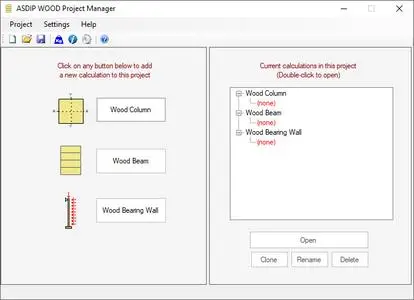
ASDIP Wood is a structural engineering software utilized by engineers for the design of wood members, such as biaxial columns, continuous beams, and out-of-plane bearing walls.


This structural design software is based on the latest NDS provisions. Load combinations as per ASCE 7 and CSA A23.3. ASDIP WOOD substantially simplifies time-consuming calculations for structural engineering design.
Key Benefits of ASDIP WOOD
Quickly model your concrete members with the simple and efficient graphical user interface.
Confidently optimize your design and comply with design code provisions.
Impress clients and plan-checkers with professional condensed or detailed reports.
Extensive documentation, solved examples, and blog posts to guide you throughout the software.
Create, organize, manage, and store your electronic calculations safely.
Key Design Features:
Wood Columns - rectangular or round column cross sections
Wood Beams - rectangular, T-beam, spandrel, inverted-T, or L-beam cross sections.
Wood Bearing Walls - Equally spaced studs with vertical loads and out-of-plane wind.
Dead, Live, Roof live, Snow, Wind and Seismic Loads
Graphic display of 2D and 3D interaction diagrams in columns and walls.
Built-in databases for section and material properties from NDS code.
Easily select either Sawn lumber, Glued Laminated, or Composite Lumber sections.
Home Page-
Код:
https://www.asdipsoft.com/asdip-wood

Rapidgator
Код:
https://rapidgator.net/file/022583b185971a2ca6fbdb0117c8d25c/fn39r.ASDIP.Wood.4.0.0.4.rar.html

Код:
https://nitroflare.com/view/41028434339AF0D/fn39r.ASDIP.Wood.4.0.0.4.rar
 
651cca047b8f46d3fd4cba76ec199486.avif


Ashampoo Photo Optimizer 26.0.1 (x64) Multilingual

File Size: 265.7 MB


Photos constitute irreplaceable memories and capture special moments in our lives. But they do not always come out as expected, or leave room for improvement. Ashampoo Photo Optimizer Pro 26 helps you to make the most of your photos in a single click and achieve stunning results almost instantly and automatically-even with handy batch processing!

Efficient image compression with full control
With the new image compression feature, you can perfectly balance quality and file size. JPG, WebP, and PNG files can now be reduced quickly and precisely-including an interactive live before/after preview. As you adjust the settings, you'll see the expected file size in real time and maintain full control over the final result. Save valuable storage space without visible quality loss-ideal for online use, archiving, or sharing Your images quickly.

Perfect image quality at optimal file size
New image compression with live preview and file size control
27 new LUTs for fresh one-click looks
New photo frames for additional image moods
Modernized user interface
Enhanced RAW support and optimized metadata handling
27 Brand-New LUTs Included!
LUTs (Look-Up Tables) adjust multiple image parameters such as hue, saturation, brightness, and contrast at once, giving photos a completely new look and atmosphere. In this new version, the LUT collection has been significantly expanded: Three new LUTs have been added to each of nine categories-Halloween, Christmas, Autumn, Summer, Vintage, Contrast, HighKey, LowKey, and FX. This means 27 new looks are now available for seasonal images, creative effects, or striking contrast styles.

New frames, new formats, new look
With targeted enhancements, Photo Optimizer has been further refined both visually and technically. New frames expand the existing design library and offer additional options for different image moods. At the same time, the redesigned interface provides a more modern, streamlined appearance without changing the familiar, easy-to-use workflow. In addition, RAW format support has been significantly enhanced and metadata handling optimized for clean and reliable processing.

Perfect results almost instantly
You can spend hours meticulously optimizing every aspect of your photos in search of the perfect look-or you can achieve the same in seconds using our lookup tables crafted by image editing experts. Dissatisfied with the lighting of a whole series of shots? Looking for that uniform exposure across your photo collection? LUTs will fix these issues and add the visual harmony and polish your shots deserve! From now on, visual excellence may always be just one click away!

Level up your vacation, wedding, and party shots!
Straighten misaligned shots, fix perspective errors, or apply a whole range of beautiful effects. Minor issues like red eyes, skin imperfections or stains are now easily fixable. Save time and nerves and achieve stunning results almost instantly with Photo Optimizer!

Important basics and creative freedom
Naturally, Ashampoo Photo Optimizer includes all the usual suspects like image cropping, rotating, watermarking, and softening. But it doesn't stop there. Feel free to get creative with artistic effects and elegant frame designs. Whether you're recovering failed shots, cranking up the image quality by another 5% or just having fun, this is the program for you!

The lifesaver for your vacation shots
Visual blemishes are detected and fixed through careful image analysis. Our carefully crafted algorithm fully automatically optimizes colors, contrasts, and exposure times for single shots or entire collections, turning underwhelming shots into brilliant photos!

A matter of perspective!
Taking shots of buildings often leads to unpleasant, and easily noticeable, perspective distortions, due to the position of the photographer. Buildings and other tall objects almost seem to fall over, putting an unintended comical spin on your photos. Other times, you forgot to bring your tripod and failed to keep your camera completely straight. Enter Photo Optimizer's new perspective correction! Fix horizontal or vertical distortions in just a few clicks and save shots that would have otherwise gone straight to the bin. Give your photos a second chance and get the right perspective, always!

More ease-of-use through favorites
We all have our favorite functions that we most frequently rely on. Now, you no longer have to navigate through various menus and categories to reach them. Ashampoo Photo Optimizer features a customizable "Favorites" menu so you can bundle all your favorite functions in a single instantly accessible location. Need to quickly straighten the horizon after auto-optimization, fix the perspective or do some cropping? Now you can. Genius, right?

Enhance white balance and intensify contrast spreads
White balance is pivotal to the color temperature of your images. Digital cameras are particularly prone to the dreaded bluish cast and dull colors. This leads to photos that seem lifeless and completely devoid of the magic of the moment. Low-contrast images, often due to poor lighting, are another common issue. With the help of custom white balance and contrast spread settings, Photo Optimizer can breathe new life into these otherwise ruined shots! Both features are part of auto-optimization and will auto-enable whenever appropriate!

Photo editing in just a few clicks
The user interface in Photo Optimizer is truly self-explanatory. Functions are arranged into intuitively named categories and never more than two clicks away. Where other photo editors have you wade through manuals, Photo Optimizer gives you results instantly! Everything is simple and logical, there's practically no learning curve. Whether you're a beginner or an advanced user, or maybe you just don't want to spend hours with image tweaking, Ashampoo Photo Optimizer is the program for you.

Versatile export features
Good photos deserve to be seen. That's why we're offering various ways in Photo Optimizer to share your photos with others. This includes email, the free Ashampoo Web and even just setting photos as your desktop background image. If you'd rather go the traditional route and print your photos, you'll love the feature-rich print dialog that not only creates high-quality but also space-efficient print outs, if needed.

Features for perfectionists and creatives
Many sophisticated features are available to those seeking to go beyond auto-optimization. Whether you need to sharpen or soften individual portions, Photo Optimizer offers well-designed tools for every use case. Reduce irritating image noise, adjust color temperatures or crop your images. And for the artist in you, we've also included multiple effects like waves, swirls, even implosion and explosion. There's ample room to experiment.

Naturally-looking portrait enhancements
Faces are the focus of many photos, yet they seldom come out perfect! Enhance your portraits automatically or manually with Photo Optimizer. Fix red eyes and whiten teeth for that dazzling smile. Fix minor glitches with the clone tool and remove stains and other impurities like a pro. Create perfect yet naturally looking portraits in just a few clicks!

Comfortable batch processing
Since Ashampoo Photo Optimizer does so much fully automatically, we've included batch processing to save you time and nerves while the program processes your entire photo library in one go. Select individual images from various sources or entire folders and have Photo Optimizer work its magic. Every image is meticulously analyzed and its quality optimized according to its specific characteristics. Batch-process an entire vacation in one go, polish your wedding or birthday shots and put the fun back into photography


HOMEPAGE


Код:
https://www.ashampoo.com/en-gb


DOWNLOAD

Код:
https://rapidgator.net/file/863ca8a49743678f2d6fa04298e717fe/Photo.Optimizer.26..rar.html

Код:
https://nitroflare.com/view/30444334118C203/Photo.Optimizer.26..rar
 
e1b8410de08fc397d5db59735560e338.webp

Free Download Astral Crow Games AniVoxel 1.11.0 (Win/Linux) | 21.3/26.7 Mb
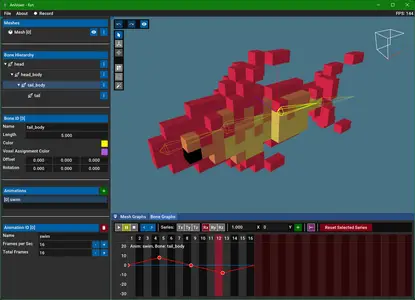
AniVoxel is an editor for grid constrained skeletal voxel animations, helping you bring your voxel models to life faster. Previously, animation of voxel models was available in two ways: Frame by frame modeling/modification in editors such as MagicaVoxel and non-grid constrained animations in editors such as Blender, Maya, or others. With AniVoxel it is now possible to animate voxel models using bones while keeping the unique grid-constrained animation style.


Import models from MagicaVoxel or Qubicle, setup a bone rig, and start moving those voxels with many export options (vox, ply, obj, fbx, glTF, abc) available! Make use of advanced features such as smear frames, per-frame visibility, gif recording, animation tileset generation, bone mirroring, bone and animation glTF import and more.
Home Page-
Код:
https://astralcrowgames.itch.io/anivoxel

Rapidgator
Код:
https://rapidgator.net/file/3e355eeec6a6194189a93bc3b181dbcc/z838x.Astral.Crow.Games.AniVoxel.v1.11.0.Linux.x64BTCR.zip.html
https://rapidgator.net/file/8421b4a19f6584f1aefe3a874d198beb/z838x.Astral.Crow.Games.AniVoxel.v1.11.0.rar.html

Код:
https://nitroflare.com/view/E93ADBAADF2FE31/z838x.Astral.Crow.Games.AniVoxel.v1.11.0.Linux.x64BTCR.zip
https://nitroflare.com/view/046237AC2F667C7/z838x.Astral.Crow.Games.AniVoxel.v1.11.0.rar
 
dba86e0b746fee0bddb9669184760129.avif


Autodesk AutoCAD Architecture 2027 (x64)

x64 | Language:English | File Size: 4.60 GB


Description
AutoCAD Architecture software is AutoCAD software for architects. Architectural drafting and documentation is more efficient with the software's intuitive environment and specialized building design tools built specifically for architects.

Facilities and software features Autodesk AutoCAD Architecture
-the familiar AutoCAD environment, thus enabling a fast learning
-drawing two-dimensional design and drawing three-dimensional architectural work at the same time
-has an extensive library of building components such as walls, doors, windows and ...
-The ability to remove or add a new component designs Bhrvzshdn Overview
-precision in the design and planning
-Speed up design allows quick restoration plan
-Design of ceilings new standards
-creation of full color as close to the real view
-Mapping the floor using different materials
-Ability to Khrvjygrftn for common software design

System requirements
OS:Microsoft Windows 10 (64-bit only) (version 1803 or higher)
CPU:Basic:2.5-2.9 GHz processor / Recommended:3+ GHz processor
Multiple processors:Supported by the application
RAM:Basic: 8 GB / Recommended: 16 GB
Display Resolution
Conventional Displays:1920 x 1080 with True Color
High Resolution & 4K Displays:Resolutions up to 3840 x 2160 supported on Windows 10, 64-bit systems (with capable display card)
Disk space:10.0 GB


HOMEPAGE


Код:
https://www.autodesk.com/


DOWNLOAD

Код:
https://rapidgator.net/file/a0ca067b8bad82cb6da75688385c21ed/ARCHDESK_2027.part1.rar.html
https://rapidgator.net/file/6172db39acf99384be41c8471451bd6f/ARCHDESK_2027.part2.rar.html
https://rapidgator.net/file/ed36e3df98d6c161945b621d65f4a53a/ARCHDESK_2027.part3.rar.html
https://rapidgator.net/file/b816a0a323501a90d7606f63649c8020/ARCHDESK_2027.part4.rar.html
https://rapidgator.net/file/4b79d5d58d834e0b925942c6fb334271/ARCHDESK_2027.part5.rar.html

Код:
https://nitroflare.com/view/1BAD94F9FBFDCA5/ARCHDESK_2027.part1.rar
https://nitroflare.com/view/91458C001199467/ARCHDESK_2027.part2.rar
https://nitroflare.com/view/BF883E448E851E7/ARCHDESK_2027.part3.rar
https://nitroflare.com/view/6369D7137DA98C5/ARCHDESK_2027.part4.rar
https://nitroflare.com/view/F564DEF7F6F8135/ARCHDESK_2027.part5.rar
 
abc59d7bcc72506e889a05d1eefdf527.avif


Autodesk AutoCAD LT 2027 (x64)

x64 | Language:English | File Size: 2.78 GB


Description
AutoCAD LT 2024 is designed to develop and detail 2D drawings. The program automates most of the stages of the project. A full set of 2D commands allows you to create drawings, modify them and release working documentation for projects.The program provides built-in support for DWG format and reliability of work, and also contains powerful tools to improve drawing performance.Thanks to this project files can be easily transferred to other specialists. In addition, you can customize the user interface of the program to fit your needs.

System Requirements
OS:Microsoft Windows 10 (64-bit only) (version 1803 or higher)
CPU:Basic:2.5-2.9 GHz processor / Recommended:3+ GHz processor
Multiple processors:Supported by the application
RAM:8 GB / Recommended: 16 GB
Display Resolution
Conventional Displays:1920 x 1080 with True Color
High Resolution & 4K Displays:Resolutions up to 3840 x 2160 supported on Windows 10, 64-bit systems (with capable display card)
Disk space:6.0 GB


HOMEPAGE


Код:
https://www.autodesk.com/


DOWNLOAD

Код:
https://rapidgator.net/file/a73871e6e7891c2b32de09201233e5a7/ACDLT_2027.part1.rar.html
https://rapidgator.net/file/8ecf53e1ccd630c7f38c51395b178ffc/ACDLT_2027.part2.rar.html
https://rapidgator.net/file/7e24484d6933a2add0c76740c7f7c729/ACDLT_2027.part3.rar.html

Код:
https://nitroflare.com/view/989CCCBE32279E7/ACDLT_2027.part1.rar
https://nitroflare.com/view/CD3E446E4A906B0/ACDLT_2027.part2.rar
https://nitroflare.com/view/AB81EC563A023D8/ACDLT_2027.part3.rar
 
452fe6cfae64f668ab909948c6cdbe65.avif


Autodesk AutoCAD Map 3D 2027 (x64)

x64 | Language:English | File Size: 4.04 GB


Description
Data combining GIS (Geographic Information System and means stands for Geographic Information System) data with CAD tools and infrastructure management and infrastructure planning will make the software Autodesk AutoCAD Map 3D does Hmankary this. This program helps engineers and managers with regional and other specific standards, providing intelligent models to plan and manage their infrastructure.

Facilities and software features Autodesk AutoCAD Map 3D
-mapping and modeling tools to create designs using GIS data
-drawing, enter and edit information through sources such as LIDAR LIDAR sensor data and three-dimensional laser scanning data
-Convert GIS and CAD data can be used to model common in the industry
-with comprehensive tools for planning and analysis of information.
-Organize a variety of resources and assets in the map, such as water, sewer, gas, electricity and ...
-Ability to enter information and coordinate weather maps
-Ability to create and edit a variety of signals and embed dynamic markings in the map, such as arrows, rods and bars graphing and ...
-Access to GIS data through various sources of international mapping
-Coordination with popular GIS software such as ArcGIS

System Requirements
OS:Microsoft Windows 10 (64-bit only) (version 1803 or higher)
CPU:Basic:2.5-2.9 GHz processor / Recommended:3+ GHz processor
Multiple processors:Supported by the application
RAM:Basic:8 GB / Recommended:16 GB
Display Resolution:Conventional Displays:1920 x 1080 with True Color / High Resolution & 4K Displays:Resolutions up to 3840 x 2160 supported on Windows 10, 64-bit systems (with capable display card)
Additional Requirements
Disk Space: 16GB
Memory: 16GB


HOMEPAGE


Код:
https://www.autodesk.com/


DOWNLOAD

Код:
https://rapidgator.net/file/4eeefa09eb4d57c6d6149bebfbbde5ba/Map_3D_2027.part1.rar.html
https://rapidgator.net/file/fd41a885808ab87e92af0f38d3e4e24f/Map_3D_2027.part2.rar.html
https://rapidgator.net/file/e8a9aa04810ee56c82aa7c3bf1185807/Map_3D_2027.part3.rar.html
https://rapidgator.net/file/63d7b953e7300a05ba6959b4b04b2e55/Map_3D_2027.part4.rar.html

Код:
https://nitroflare.com/view/6EBA10B93BF1E26/Map_3D_2027.part1.rar
https://nitroflare.com/view/90AE152BF7D174F/Map_3D_2027.part2.rar
https://nitroflare.com/view/CC54EB7CED6144E/Map_3D_2027.part3.rar
https://nitroflare.com/view/BA37BA699DFA987/Map_3D_2027.part4.rar
 
d98330e8ace4ea3878b2d726c4188417.avif


Autodesk AutoCAD Raster Design 2027 (x64)

x64 | File Size: 1.34 GB


Description
Autodesk Inc is pleased to announce the availability of AutoCAD Raster Design 2023, the vector conversion software with powerful raster editing and raster-to-vector conversion tools.

About Autodesk AutoCAD Raster Design. Autodesk AutoCAD Raster Design software delivers the power of raster image manipulation inside of selected AutoCAD software for customers that need to work with legacy scanned paper drawings, maps or other digital imagery inside a CAD environment.

Many engineering, manufacturing and construction companies still have a substantial legacy of paper or scanned documentation for existing products, machinery and layout drawings that are still "live". But as and when "as built" design changes are required or building layouts change quite often the cost overhead of re-drawing is high and unnecessary.

Equally GIS and infrastructure professionals often need to simply edit existing map data, building elevations or existing geospatial and digital satellite imagery to maintain and update existing records with new developments or proposed plans.

About Autodesk. Autodesk helps people imagine, design and create a better world. Everyone-from design professionals, engineers and architects to digital artists, students and hobbyists-uses Autodesk software to unlock their creativity and solve important challenges.

System Requirements
OS:Microsoft Windows 10 (64-bit only) (version 1803 or higher)
CPU:Basic:2.5-2.9 GHz processor / Recommended:3+ GHz processor
Multiple processors:Supported by the application
RAM:Basic: 8 GB / Recommended: 16 GB
Display Resolution
Conventional Displays:1920 x 1080 with True Color
High Resolution & 4K Displays:Resolutions up to 3840 x 2160 supported on Windows 10, 64-bit systems (with capable display card)
Disk space:6.0 GB
AutoCAD Raster Design:Disk Space: 1GB


HOMEPAGE


Код:
https://www.autodesk.com/


DOWNLOAD

Код:
https://rapidgator.net/file/bd6351b6bdfaf016f8984d4eba139b74/ARDES_2027.part1.rar.html
https://rapidgator.net/file/e56e71e1b70eb5408caaa51505db9d18/ARDES_2027.part2.rar.html

Код:
https://nitroflare.com/view/5F6AAC1555CA253/ARDES_2027.part1.rar
https://nitroflare.com/view/9F84351A6E16AC2/ARDES_2027.part2.rar
 
f3bf597696a6c7fd609c73c542570866.avif


Autodesk Inventor Nastran 2027 R0 (x64)

x64 | File Size: 1.57 GB


Description
Inventor Nastran software offers a wide-range of simulation spanning across multiple analysis types. It is a part of the Product Design and Manufacturing Collection - delivering high-end simulation in a CAD-embedded workflow so engineers and analysts can make informed design decisions.

Features
Autodesk Nastran solver
Use robust and accurate CAD embedded analysis capabilities.
Inventor integration
Go beyond the linear static studies in Inventor with embedded FEA technology.
Automated drop test
Automate projectile impact and virtual drop tests for phones, laptops, and many other products.
Advanced material models
Model metals, rubber, and soft tissue in a single virtual test.
Linear statics
Determine stress, strain, and deformation.
Normal modes
Resolve problems with noise and vibrations.
Autodesk CFD interoperability
Import data from Autodesk CFD, and apply thermal and fluid pressure results.
Response spectrum analysis
Analyze earthquake and wind loading.

Note
This product was formerly known as Nastran In-CAD. To access the 2018, 2019 versions you can download Nastran In-CAD

System Requirements
OS:Windows 10 64-bit(Home,Pro,Enterprise,orEducation editions)
Desktop Workstation Specifications
CPU:Intel Core i5/i7 - Dual or Quad Core at high clock speed
Memory:8 GB
GPU:1GB dedicated video card
Hard Disk:1 TB SATA 7200RPM and 256GB SSD for temp files
Laptop Specifications
CPU:Intel Core i5 - Dual or Quad Core at high clock speed
RAM:4 GB
GPU:1 GB dedicated video card
Hard Disk:1 TB SATA 7200RPM


HOMEPAGE


Код:
https://www.autodesk.com/


DOWNLOAD

Код:
https://rapidgator.net/file/7c2923600781f230d4f3603447b6c49e/Inventor_Nastran_2027.part1.rar.html
https://rapidgator.net/file/d24a18378ac7ffc3970fdd12f3525819/Inventor_Nastran_2027.part2.rar.html

Код:
https://nitroflare.com/view/F16196D36D8EAC7/Inventor_Nastran_2027.part1.rar
https://nitroflare.com/view/E10E10B3D185021/Inventor_Nastran_2027.part2.rar
 
d6779eca584d03fd532836e2ba64b039.avif


Autodesk Inventor Professional 2027 (x64)

x64 | Language:English | File Size: 6.50 GB


Description
Autodesk Inventor software provides professional-grade engineering solutions for 3D
mechanical design, simulation, tool creation, and design communication that help you to make great products, cost-effectively, in less time. Inventor is the foundation of the Autodesk solution for product development. The Inventor model is an accurate 3D digital model that enables you to validate the form, fit, and function of a design as you work, minimizing the need to test the design with physical prototypes.

Features and software features Inventor Professional Autodesk
-User interface is suitable for quick learning
-has a geometric modeling kernel using Autodesk ShapeManager
-Coordination with various CAD software
-includes the following major sections
-Part Modeling:the first part of the work of the most complete mechanical design and modeling environment
-Assembly:assembly designed with specific instructions with access to standard software library includes hundreds of thousands of pieces
-Drawing:the facade of components designed for applications such as AutoCAD and allows output
-Sheet Metal:Vrqkary design and take the form of spreadsheets Khrvjygrftn
-Weldment:welding standards as well as possible gaps between the two pieces of welding
-Presentation:Animation parts and burst modes
-Piping:piping advanced and easy design path with the latest standards Piping Pipes
-Frame Generation:professional design of structures and frames with complete tools ready
-Inventor Studio:construction project designed videos from all views
-Dynamic Simulation:Analysis of Energy and behavior in non-fixed parts

System Requirements
OS:Microsoft® Windows® 10
CPU: Recommended:3.0 GHz or greater, 4 or more cores / Minimum:2.5 GHz or greater
Memory: Recommended:20 GB RAM or more / Minimum:8 GB RAM for less than 500-part assemblies
Graphics: Recommended:4 GB GPU with 106 GB/S Bandwidth and DirectX 11 compliant / Minimum:1 GB GPU with 29 GB/S Bandwidth and DirectX 11 compliant
Display:Recommended:3840 x 2160 (4K); Preferred scaling: 100%, 125%, 150% or 200% / Minimum:1280 x 1024
NET:.NET Framework Version 4.7 or later. Windows Updates enabled for installation.
Spreadsheet
-Full local install of Microsoft® Excel 2010, 2013 or 2016 for iFeatures, iParts, iAssemblies, Global BOM, Parts Lists, Revision Tables, spreadsheet-driven designs and Studio animation of Positional Representations.
-64-bit Microsoft Office is required to export Access 2007, dBase IV, Text and CSV formats.
-Office 365 subscribers must ensure they have a local installation of Microsoft Excel 2016.
-Windows Excel Starter®, OpenOffice®, and browser-based Office 365 applications are not supported.


HOMEPAGE


Код:
https://www.autodesk.com/


DOWNLOAD

Код:
https://rapidgator.net/file/9e8d7f0884ecc64cead7be4b08f08d5c/Inventor_Professional_2027.part1.rar.html
https://rapidgator.net/file/b10afa07ce0d97a2a943f007ac218c06/Inventor_Professional_2027.part2.rar.html
https://rapidgator.net/file/04646de34d9896efa3e4d39046866cae/Inventor_Professional_2027.part3.rar.html
https://rapidgator.net/file/d889705d51ad466d7892079b8ca64f06/Inventor_Professional_2027.part4.rar.html
https://rapidgator.net/file/0d0e2cddd977952ca742869b799418ca/Inventor_Professional_2027.part5.rar.html
https://rapidgator.net/file/409c9c87dd40fbd2c407fe453255ced2/Inventor_Professional_2027.part6.rar.html

Код:
https://nitroflare.com/view/963FE706266B243/Inventor_Professional_2027.part1.rar
https://nitroflare.com/view/2F397708549BBE1/Inventor_Professional_2027.part2.rar
https://nitroflare.com/view/5555E9707C7300A/Inventor_Professional_2027.part3.rar
https://nitroflare.com/view/D61379976A291DC/Inventor_Professional_2027.part4.rar
https://nitroflare.com/view/5F56098AD677E93/Inventor_Professional_2027.part5.rar
https://nitroflare.com/view/035869DD3A7003B/Inventor_Professional_2027.part6.rar
 
0039ddfaa9a4a8f58d9fc406b7415ea7.avif


Autodesk Maya 2027 (x64) Multilanguage

x64 | Languages:Multilanguage | File Size: 7.05 GB


Description
Maya 3D animation software offers a comprehensive creative feature set for 3D computer animation, modeling, simulation, rendering, and compositing on a highly extensible production platform. Maya has next-generation display technology, accelerated modeling workflows, and tools for handling complex data.

Facilities and software features of Autodesk Maya
-Advanced design three-dimensional models
-simulate a variety of natural and environmental elements such as climate change, water and liquids, fire, plants and ...
-having a variety of tools for modeling and data management
-the possibility of transferring the properties of one object to another object
-Design Clothes, hair and sex and different scenarios
-Coordination with other software modeling and animating
-Supports mathematical model NURBS (short for Non-uniform rational B-spline)
-ability to combine elements of two-dimensional and three-dimensional models
-Ability to use scripting programming language and MEL (stands for Maya embedded language) and ++ C and Python in the development of software

System Requirements
OS:Microsoft Windows 10 Anniversary Update (64-bit only) (version 1607 or higher) operating system
CPU:64-bit Intel® or AMD® multi-core processor with SSE4.2 instruction set
RAM:8 GB of RAM (16 GB or more recommended)


HOMEPAGE


Код:
https://www.autodesk.com/


DOWNLOAD

Код:
https://rapidgator.net/file/4babda0ed7127af3bd896ba11ad9517b/Maya_2027.part1.rar.html
https://rapidgator.net/file/c14851391b07f8b72b2fd786f7795d8f/Maya_2027.part2.rar.html
https://rapidgator.net/file/80edc5d9b6de47df85f7854958cdb81a/Maya_2027.part3.rar.html
https://rapidgator.net/file/53e34878a5e5461243621416a5b2f694/Maya_2027.part4.rar.html
https://rapidgator.net/file/1e609ecd1728a729d6554e26fda4c05f/Maya_2027.part5.rar.html

Код:
https://nitroflare.com/view/6B4FA6CEBF908CA/Maya_2027.part1.rar
https://nitroflare.com/view/E1F48AB71CFF4C8/Maya_2027.part2.rar
https://nitroflare.com/view/14CE4913B979EBE/Maya_2027.part3.rar
https://nitroflare.com/view/3056F59EFE855DB/Maya_2027.part4.rar
https://nitroflare.com/view/E671DA104B21D41/Maya_2027.part5.rar
 
db7d0c92f531f957299228f45db4c1ca.avif


Autodesk MotionBuilder 2027 (x64)

x64 | Languages:English | File Size: 3.18 GB


Description
Autodesk MotionBuilder software company to build three-dimensional animated characters. With this program you can easily skeleton, body, face and mimic the physical behavior modeling to the character. MotionBuilder software perfectly coordinated motion capture and final output in other animation giants such as D-Max, Maya and more usable. Of course, keep in mind that none of animation software alone is versatile and do not have to learn an application to become a professional animator.

The following are improvements and fixes to the Camera Switcher
-Improved look and feel: The list of cameras in now displayed in a separate left pane, making it quicker and easier to select cameras.
-Lock switches: Ctrl-select multiple camera switches, right-click the Switcher timeline, and then select Link Selected Clips to lock the selection together, making it easier to move and edit multiple switches at once.
-Move camera switches: Drag the selected camera switch(es) to reposition them on the Switcher timeline.

New embedded media settings
New embedded media settings in the Saving preferences let you select a specific location for your media files locally and preserve their original file paths. You can also enable a warning that appears before saving a scene with embedded files.

Reduce file size with Clean Up Scene
A new tool, Clean Up Scene, has been added in the File menu to let you remove empty or unused assets from your scene. This helps you organize your scene and reduce file size. See Reduce file size with Clean Up Scene.

Translation tool updates

The following improvements have been made to the translation tool
-Translate objects in local relative space: You can now move multiple objects in their own respective local space using the translation tool. Instead of applying to all of the selected objects like a global translation, the local translation only applies to the object with the translation handle. See Viewer window Manipulation and Transformation mode tools.
-Parent Reference Mode: Lets you translate an object along the axes of the object's parent. See Viewer window Reference mode tools

The following updates and fixes improve the overall performance of the Story window
-Ripple Manipulator: The new ripple manipulator lets you scale a clip and move the position of all subsequent clips at the same time. The change in one clip's duration moves all subsequent clips later on the timeline. To see the manipulator, extend the clip length and track height. See Scaling Clips.
-Sync Shot and Shot Clip Lengths: You can now sync the lengths of a shot and its associated shot clip when stretching one or the other, instead of creating loops. To enable this new mode, click in the Story window controls or turn on Maintain Shot and Shot Clip Lengths Synced from the Story context menu. This mode only affects shots and shots clips and does not affect other types of clips (animation, audio, video). Before using this mode, Time Discontinuity and Loop mode must be turned on.
-Show or hide a clip's text: The following new options can be used to hide a story clip's text during playback and manipulation, improving performance in scenes that have many clips
-Disable in the Story window controls to hide text.
-Turn on Settings > Preferences > Story > Remove Clips' Texts During Playback & Manipulation to hide text.
-Shot display: Shots are now displayed on multiple tracks, making it easier to manipulate them.
-Matching shot and shot clip colors: In previous versions, shots were always red, now a shot is the same color as its corresponding shot clip.
-Show or hide shots: By default, a shot is hidden if its associated shot track is minimized or collapsed. Turn on the new preference Settings > Preferences > Story > Display Minimized Action Shot Clips to display shots belonging to shot tracks that are minimized or collapsed. See Story preferences.

Play all takes consecutively
-A new option in the Transport Controls lets you playback all takes consecutively. To enable this option, click the button until appears. When this option is active and the time cursor reaches the end of the first take, the next take plays automatically. Playback stops once the end of the last take is reached.
Note: If reverse playback is enabled, playback stops once the beginning of the first take is reached.
-FCurves Preferences

The following options are now available in the FCurves preferences
-Detect Invalid Keys: An invalid FCurve key can be inserted in a curve following a computation error. When enabled, this new preference detects when an invalid key is inserted, and displays an error message if needed. The problematic key value is automatically reset to 0 and can be fixed manually.
-Force New Keys on Ordinal Property to Step: When enabled (default), keying an ordinal property generates a Step key.

Character Controls: Pinning Presets
-A new Pinning Presets icon in the Controls tab of the Character Controls window lets animators save frequently used pinning setups. It is now possible to save Translation and Rotation pinning values into a unique preset file, and multiple preset files can be saved with different pinning values. Presets can be loaded at any time, eliminating the need to pin and unpin the same effectors repeatedly. See Pinning a Control rig effector and Control tab toolbar.
Baking Improvements
The following new options are now available in the Plot All Properties window

Plot Aux Effectors: When turned off, this option prevents auxiliary effectors from snapping their position onto their related effectors when plotting to the Control Rig.
Evaluate Deformation: When turned on, allows deformation during the baking process.

Control automatic popup of Character Controls
-A new option in the Application.txt config file lets you control when the Character Controls opens. By default, the Character Contols opens automatically when a new character or actor is loaded. Set the new PopUpCharachterControlonce option to No to disable this behavior.
Control Human Finger Limits default value

-A new Human Finger Limits preference (Settings > Preferences > Character) has been added to control the default value of the Character's HumanFingerLimits property value when creating a new character. The preference is turned off by default See Character preferences.

Run MotionBuilder in batch mode
-MotionBuilder can now be run in batch mode, letting you execute commands without the interface. To do so, the -batch flag must be used when starting MotionBuilder. -The batch flag is usually used for executing a Python script, which can be set with the -F flag. See Start MotionBuilder from the command line.
Note: The -batch command is not used for batch rendering.

Time precision improvements
-MotionBuilder 2023 introduces a more accurate tick rate, and the precision of the working rate has been adjusted to match Maya. While working the new rate is used, but while saving the legacy rate is used. This results in greater precision while working, but the same precision as the past while saving.

Set variables in Python console during start up
-The Python Editor now reads the content of the C:\Users[username]\Documents\MB[version]-x64\config\Python\pythonidelib_init.py file, allowing users to execute specific code on startup, like shortcut variables. If the file doesn't exist, MotionBuilder creates it. For example, after scn = FBSystem().Scene is added to pythonidelib_init.py, the shortcut variable scn can be used in the Python Editor each time the editor is launched.
SDK Help improvements
-You can access SDK Help topics directly from the MotionBuilder Help table of contents as well as use the help system's improved search feature.

System Requirements
OS:Windows 10 Professional operating system
RAM:8 GB of RAM (16 GB or more recommended)
GPU:64-bit Intel® or AMD® multi-core processor
Disk Space:4 GB of free disk space for install


HOMEPAGE


Код:
https://www.autodesk.com/


DOWNLOAD

Код:
https://rapidgator.net/file/9a0c3f9604aeff88ff34b46fdbf30a53/MotionBuilder_2027.part1.rar.html
https://rapidgator.net/file/a3d0582ecab3ec0ee56e9c7858650916/MotionBuilder_2027.part2.rar.html

Код:
https://nitroflare.com/view/09481A07B5F4DED/MotionBuilder_2027.part1.rar
https://nitroflare.com/view/5E1A2108BEDD41A/MotionBuilder_2027.part2.rar

 
abdc52997ea78d3fd8e4dc5cbe60ca27.webp

Free Download AYAIC M3 Mixer v2.0.0 | 16.12 MB
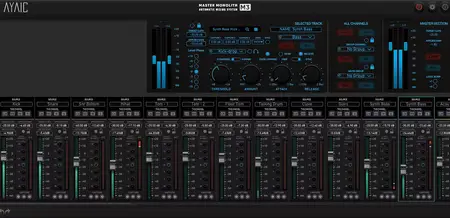
M3 is an advanced version of Mix Monolith that allows you to mix with a more traditional feel. It not only gives you all of the great Monolith features you're used to but adds many more powerful features you're sure to love. M3 can also expand to fit any workspace.


WHAT'S NEW IN v2.0:
* Numbered modules
* Stable module positioning
* Group tabs to hide/unhide groups of modules
* Infinite color palette w/original sub-palette
* Designated "Amount" fader with pre-fader select
* Order modules by DAW
* Level-plane button selection
* Satellites have Target LUFS/Learn/Mix controls
* Free-scale sizing
Home Page-
Код:
https://www.ayaicinc.com/m3-monolith-mixer

b]Rapidgator[/b]
Код:
https://rapidgator.net/file/531dc7a57ead52993d67bfed4efe9451/q2n72.AYAIC.M3.Mixer.v2.0.0.rar.html

Код:
https://nitroflare.com/view/B3346982CB69594/q2n72.AYAIC.M3.Mixer.v2.0.0.rar
 
32d43a4c89bebc73c0ca10c9732c973f.webp

Free Download AyLight Picell Pixel Art Editor 2.0.1 (Win/macOS) | 18.3/61 Mb
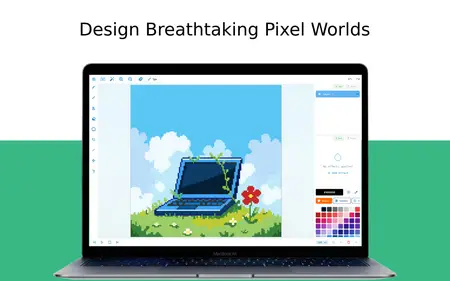
Create pixel art, animations, and game-ready sprites - all in one place. Picell is a full-featured pixel art studio built for artists of every skill level. Designed for sprites, icons, tilesets, UI elements, and animations - all in one clean workspace.Design icons, characters, tilesets, UI elements, and complete pixel worlds directly on your device - then bring them to life with powerful animation tools.


What you can do:
Draw & Paint - Intuitive brush and painting tools tailored for pixel-perfect precision
Layers & Editing - Organize your work with a flexible layer system and advanced editing controls
Animate & Export - Build frame-by-frame animations and export game-ready sprite sheets
Effects & Polish - Add layer effects to give your art depth and visual flair
Whether you're crafting retro game assets, designing app icons, or just exploring pixel art for fun, Picell gives you everything you need in a clean, focused workspace.
Home Page-
Код:
https://aylight.itch.io/picell

Rapidgator
Код:
https://rapidgator.net/file/1c1e4b3cd76a7fce21953c08131150e8/vbbw9.AyLight.Picell.Pixel.Art.Editor.2.0.1.rar.html
https://rapidgator.net/file/b97921f5ac7370c5c22fcdc281b053ef/vbbw9.AyLight.Picell.Pixel.Art.Editor.v2.0.1.MacOS.UBBTCR.zip.html

Код:
https://nitroflare.com/view/929FCB424D5F826/vbbw9.AyLight.Picell.Pixel.Art.Editor.2.0.1.rar
https://nitroflare.com/view/0677B07E800C186/vbbw9.AyLight.Picell.Pixel.Art.Editor.v2.0.1.MacOS.UBBTCR.zip
 
1510b6943413bcb5e438febe38c74ec6.jpg


Classroom Spy Pro 5.6.3

Windows x86/x64 | File size: 102.76 MB


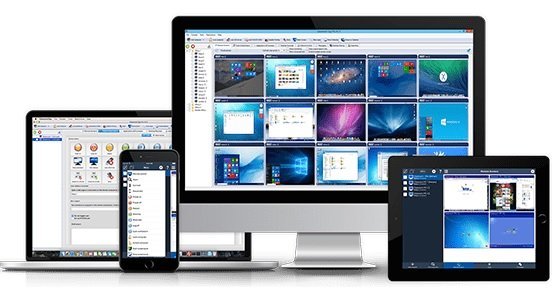
Simple and effective classroom management software. Put classroom management to a higher level. This software lets you see what everyone's doing - without leaving your desk. You can monitor the activity of all student computers in your classroom remotely. Plus, you can share your screen with your students' record activity, control computers, make demos, limit the internet usage, block applications and much more.

Take Control Now
It is hard to teach a group of people how to use a computer. Discipline in classroom can be an issue. We can truly help you with this. Yes, such training isn't easy. For someone who's doing something right, there are probably two others doing it wrong, playing games, checking email, shopping...

Main Features
Displaying a live picture of a remote computer.
You can take control of a remote computer by controlling its mouse and keyboard.
More remote screens can be displayed in a table.
Computers can be organized in computer groups (e.g. classrooms)
A remote screen can be zoomed to an actual size.
The name of the connected user is displayed.
Record remote computers screens to MPG4 files.
Show your desktop to students or show student desktop to students
Power on/off, restart, hibernate, suspend remote computers
Log off desktop users
Lock workstation
Clear desktop
Control screen-saver
Block Internet
Block applications
Mute remote computers
Limit remote computers audio volume level
Disable printing
Disable Ctr+Alt+Del
Blank screen
Start program on remote computers and see the output
Open web page on remote computers
Multi-monitor support
Control over running processes and applications
You can lock selected remote computers
You can display a message on selected remote computers.
When lower bandwidth is required, the refresh interval can be enlarged.
Automatic connection to a remote computer is optional.
Settings for the agent are encrypted and password protected.
Connection to a remote computer is password protected.
Access to monitoring the console is password protected. If more users use the same computer, different profiles and access passwords can be set.
More monitoring consoles can be connected to the same remote computer - you can monitor your students from different locations.
Agent can be remotely installed.
Fast users switching is supported.
Multi-session support for Remote Desktop, Terminal Services, Citrix,...
Console can be used on smart phone or tablet

What are the major benefits of using Classroom Spy Pro?
Installation and use of the application is very easy since all of the functions can be accessed with a few mouse clicks.
You have complete control over what remote users are doing.
This application provides you with a live picture of the remote computer screens.
You can make the presentation by showing your live screen to students or presenting student screen to others.
Application allows you to take over the remote computer by controlling its mouse and keyboard.
The remote computers´ screens are represented in the table with a customizable number of rows as thumbnails.
Schedule remote computers desktop recording to MPEG4 files
Execute several actions on all remote computers with on click
Block applications and Internet access
Log visited web pages
Log used applications
Log keystrokes - keylogger
...and much more - see feature list and screen-shots


HOMEPAGE


Код:
https://classroomspy.com/


DOWNLOAD

Код:
https://rapidgator.net/file/9327939234c1264c3777b70f1e5c1426/Classroom.Spy.Pro.5.6.3.rar.html

Код:
https://nitroflare.com/view/95617E0C79791A8/Classroom.Spy.Pro.5.6.3.rar
 
bd5517c71ba78276d92f5a37c45f4371.webp

Free Download Cockos REAPER 7.66 (x86/x64) | 33.9 Mb
REAPER is a powerful but sensible Windows application that lets you record, arrange, edit, and render multi-track waveform audio. It provides an extensive set of features, but is a very small and lightweight application (the installer is less than 1 megabyte, and includes many effects and a sample project). REAPER supports ASIO, Kernel Streaming, WaveOut, and DirectSound for playback and recording. It reads WAV, OGG, and MP3 files, and records WAV files.


You can arrange any number of items in any number of tracks and use audio processing plug-ins (DirectX and Jesusonic). REAPER also supports volume, pan controls and envelopes per track, multi-layer undo/redo, and user creatable color themes.
Basic features:
- Portable - supports running from USB keys or other removable media
- 64 bit audio engine
- Excellent low-latency performance
- Multiprocessor capable
- Direct multi-track recording to many formats including WAV/BWF/W64, AIFF, WavPack, FLAC, OGG, and MIDI.
- Extremely flexible routing
- Fast, tool-less editing
- Supports a wide range of hardware (nearly any audio interface, outboard hardware, many control surfaces)
- Support for VST, VSTi, DX, DXi effects
- ReaPlugs: high quality 64 bit effect suite
- Tightly coded - installer is just over 2MB
Editing features:
- Tool-less mouse interface - spend less time clicking
- Drag and drop files to instantly import them into a project
- Support for mixing any combination of file type/samplerate/bit depth on each track
- Easily split, move, and resize items
- Each item has easily manipulated fades and volume
- Tab to transient support
- Configurable and editable automatic crossfading of overlapping items
- Per-item pitch shift and time stretch
- Arbitrary item grouping
- Markers and envelopes can be moved in logical sync with editing operations
- Ripple editing - moving/deletion of items can optionally affect later items
- Multiple tempos and time signatures per project
- Ability to define and edit project via regions
- Automation envelopes
Operating System:Windows XP/Vista/7/8/10/11
Home Page-

Rapidgator
Код:
https://rapidgator.net/file/37ab1579037b2bbb61a8eefe3250da28/v01bj.Cockos.REAPER.7.66.rar.html

Код:
https://nitroflare.com/view/F8E5B04CC35C20B/v01bj.Cockos.REAPER.7.66.rar
 
dfb05dd3ee78a85f7b9a25df539ecd34.webp

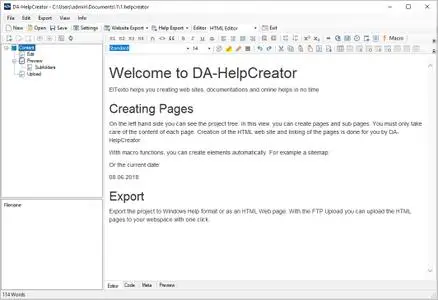
Free Download DA-HelpCreator 2.8.4 | 26.8 Mb
DA-HelpCreator is a help authoring software, which helps you to create online help and documentation. It doesn't matter if you as a software author want to create an online help in Windows CHM-Format or a FAQ page for the internet. DA-HelpCreator allows you to get started quickly and concentrate on the essentials: the content.


The input is done in the simple markdown syntax. Layout and content are separated. You can choose from customizable templates for Export to HTML or the Compiled Help Format (CHM) from Microsoft. You want to offer the content online as a website or help file? No problem, with the FTP upload you can upload the project as a website to your webspace. Another click and you will have the same content as searchable help file on your computer.
Documentation in HTML, CHM format
Export to different formats Create documentation and online help in one time. Export the project as HTML web pages, Windows Help (CHM) file or as a web page with. exe runtime.
Fast content creation thanks to markdown
Create content with MarkdownUse the simple markdown syntax to create the content. Concentrate on the contents.
Macro functions
Macro functions Macro functions automatically create tables of contents and navigation elements, which automatically take care of linking and updating.
Customizable templates
Customizable responsive templates Select the design of the project from several responsive HTML templates. All templates can be customized.
FTP upload for the website export
FTP upload with syncronization Load the export as a website with one click on your webspace, with the integrated FTP upload and synchronization function. Only modified files can be transferred on request.
Security with static content
Security with static content Exporting as a website generates static web pages. This means no security gaps in your project.
Open file format
Open file format Each project is located in an open data structure on the hard disk. The contents are managed in text files. This allows easy management with external programs such as a text editor, Subversion or GIT.
Operating System:Windows 7, 8/8.1, 10
Home Page-
Код:
https://da-software.de/en/software/da-helpcreator/

Rapidgator
Код:
https://rapidgator.net/file/327d955ad20f63a07a3232f91688a0ed/65qw2.DAHelpCreator.2.8.4.rar.html

Код:
https://nitroflare.com/view/BE344F38054CC11/65qw2.DAHelpCreator.2.8.4.rar
 
Назад
Сверху Снизу