All mitsumi'1s Applications !! (updated daily)

1caf0952cb714f09e3ba5c7f75f15b03.jpg


East Imperial Magic Photo Recovery 7.1 Multilingual

Windows x86/x64 | File size: 68.67 MB


Recover digital images and camera RAW files from all types of media. Formatted a memory card or lost a bunch of digital pictures from the hard drive? Magic Photo Recovery will recover all photos in few counted steps. Dozens of image formats are supported with full previews, as well as RAW files produced by all major camera makes.

Digital Photo Recovery by Magic
The new digital photo recovery software allows you to recover digital pictures deleted from your computer, memory card, or the internal memory of your digital camera. Magic Photo Recovery can handle images removed from the Recycle Bin, recover pictures from damaged, formatted and repartitioned hard drives, and extract pictures from corrupted memory cards and digital camera memory.

Photo Recovery Made Easy
Using digital photo recovery software could not be made easier. A fully-guided photo recovery wizard guides you through the entire process of image recovery in a quick, safe and efficient manner. A few simple questions and a couple of mouse clicks, and deleted photos appear right before your eyes with thumbnails and instant full-screen previews. Sounds easy? Magic Photo Recovery is a pleasure to use and a snap to learn, but under the hood it's powered by the most sophisticated photo recovery algorithms invented so far.

Recovery: Under the Hood
Magic Photo Recovery is powered by a sophisticated picture recovery algorithm that allows photo recovery software to successfully locate and recover images from badly damaged, repartitioned and formatted disks and memory cards. Digital photo recovery software can recover pictures even if the disk has been repartitioned and reformatted several times in a raw. The innovative digital picture recovery algorithm used in Magic Photo Recovery enables photo recovery software to recover pictures that no other program can even see.

Preview Deleted Pictures
Magic Photo Recovery can be used as a picture viewer - only it views digital pictures that no longer show up on your disk. The built-in image browser displays thumbnail and instant full-screen previews of deleted photos. Just launch the photo recovery wizard, and you'll be able to browse, preview and recover your lost pictures in just minutes!
The available pre-recovery preview ensures that only valid, uncorrupted pictures are recovered. The plain, straightforward user interface can be used efficiently by computer amateurs and data recovery professionals altogether.

Photo Recovery Software
The digital photo recovery algorithm used in Magic Photo Recovery has been recently improved to allow determining the original names and locations of pictures being recovered - even if there's no file system left on the disk!

Photo Recovery from Disks and Memory Cards
Magic Photo Recovery can successfully recover digital pictures from all types of memory cards, including Compact Flash, Micro Drive, Memory Stick, MultiMedia Card (MMC), PC Card, Secure Digital, SmartMedia, xD Picture Card, and many others.

Recovers Finished Photos and RAW Images
Magic Photo Recovery can successfully recover finished photos in a variety of formats as well as RAW images produced by most SLR and advanced compact cameras. With built-in support of RAW images, Magic Photo Recovery recovers RAW digital photos in formats introduced by Nikon, Canon, Olympus, Casio, Kodak, Sony, Pentax, Panasonic, Ufo and many others.

What's new
• official site does not provide any info about changes in this version

Editions: Unlimited / Commercial / Office / Home

System Requirements: Windows 7/8/10/11


HOMEPAGE


Код:
https://www.magicuneraser.com/


DOWNLOAD

Код:
https://rapidgator.net/file/b32851ac5b4574316b23f903eaa64ed7/Magic.Photo.Recovery.7.1.rar.html

Код:
https://nitroflare.com/view/F0D0257388A7A22/Magic.Photo.Recovery.7.1.rar
 
3d25c45cde0bed6a9ad5e6e8d6aa30d2.webp

Free Download East Imperial Magic RAID Recovery 3.0 Multilingual Fast Links | 75 Mb
Repair corrupted RAID 0, RAID 1, RAID 4, RAID 5, RAID 6 and many other types of arrays by connecting the disks to your computer. Recover data from single-disk and multi-disk attached storage devices and NAS servers. Extract data from hard drives used in Synology, QNAP, ASUSTOR, Western Digital, Thecus, TerraMaster and Buffalo NAS systems.


Features and Benefits
Magic RAID Recovery by East Imperial Soft is designed to help users repair many types of corrupted RAID arrays and recover information from single-disk and multiple-disk volumes created in popular DAS and NAS devices as well as a wide range of RAID controllers manufactured by HP, Dell, Adaptec, IBM, Intel, Fujitsu, Silicon Image, LSI, ASMedia, Broadcom, and many others.
Rebuild Corrupted RAID Arrays
Rebuild and repair corrupted RAID arrays created in Windows, Linux, macOS and NAS devices;
Mount multiple-disk volumes if the original storage device or RAID controller is broken or unavailable;
Supports RAID 0, RAID 1, RAID 4, RAID 5, and RAID 6;
Supports RAID 1E, RAID 5E, RAID 5EE and many types of composite arrays including RAID 01, RAID 10, RAID 50, and RAID 60.
Recovering Data from NAS and DAS Devices
Mount multi-disk volumes and RAID arrays regardless of the type of RAID controller;
Automatic detection of disk order and array configuration parameters;
Recover data from logical volumes spanned across multiple disks;
Recover data from corrupted single-disk volumes and JBOD arrays;
Extract files and folders from degraded and corrupted arrays without a lengthy rebuild/resilvering (for mirrored or checksum-based arrays).
Operating System:Windows XP, Vista, 7, 8/8.1, 10
Home Page -
Код:
https://www.magicuneraser.com/

Rapidgator
Код:
https://rapidgator.net/file/0eb34de5459dc7211efe88d454faca7c/nh7x8.East.Imperial.Magic.RAID.Recovery.3.0.Multilingual.rar.html

Код:
https://nitroflare.com/view/27A36298F372D36/nh7x8.East.Imperial.Magic.RAID.Recovery.3.0.Multilingual.rar
 
24257ad13fa3b3806b87e26b65e9f065.webp

Free Download East Imperial Magic Uneraser 7.3 Multilingual Fast Links | 77 Mb
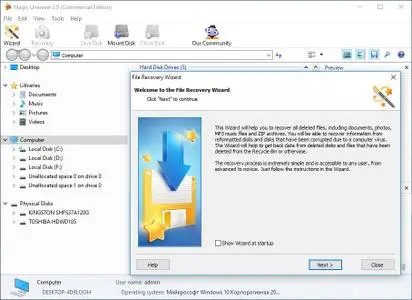
Undelete files in few easy steps! Magic Uneraser is the simplest and easiest to use data recovery tool among the bunch of tools offered on this site. Recover files of any type from FAT and NTFS partitions! Magic Uneraser supports all types of storage media including hard disks, flash drives, digital cameras and memory cards.


File Recovery Software: the Easy Way
Using the new file recovery software is easy. Just run the recovery wizard, and recovery software will scan your disk looking for lost and deleted files. After the scan is complete, you can browse the disk with a convenient Explorer-like tool. The built-in file browser looks exactly like Windows Explorer - no need to learn new tricks to browse and recover deleted files!
Deleted File Preview
Magic Uneraser comes with fully featured pre-recovery preview available in its free evaluation and full versions. The preview will allow you to open and view deleted files, documents, pictures, music, archived and movies just like they were regular files sitting on your disk. Pre-recovery preview saves time and effort allowing you to undelete only those files that can be recovered.
Advanced File Recovery Algorithms
The file recovery software incorporates a variety of advanced algorithms allowing Magic Uneraser to recover deleted files and folders that other file recovery products can't even see. The tool carefully scans the entire hard disk or reads the whole memory card block after block. Comparing information it reads from the disk with a database of recognized file formats, the file recovery algorithm is able to locate deleted files such as documents, pictures, archives, movies and music even if no record of them is left in the file system.
By using advanced file recovery algorithms, Magic Uneraser can successfully recover files and folders from deleted partitions, repartitioned and formatted disks. Even if the disk is completely inaccessible and suffered a crash, file recovery software can still access the disk, locate and recover files from its surface.
Recovers Files from Any Media
The recovery software can undelete files from all types of desktop and laptop hard drives, internal and external storage devices, memory cards, USB sticks, as well as MP3 players and digital cameras connected to a PC via a USB cord.
Program Features
- Supports all revisions of FAT, NTFS, and NTFS5 file systems
- Recovers deleted files from healthy and damaged disks, deleted and formatted partitions
- Supports all versions of Windows including Vista and Windows 7
- Restores from any data carriers (hard disks, digital cameras, USB-disks, flash-cards, memory cards, etc.)
- Features fully guided, step-by-step file recovery wizard
- Restores data lost after a virus attack or because of program errors
- Recovers compressed files on NTFS drives
- Recovers files from physical disks or virtual disk images for greater safety
- Offers easy access to advanced features with Windows Explorer-like user interface
- Saves recovered files onto hard disks or external drives, burns to CD/DVD media, uploads over FTP, or packs into an ISO image
System requirements:
Magic Uneraser supports all versions of Windows including Windows Vista, Windows 10, and Windows 2008 Server as well as all older versions of Windows. File recovery software recognizes all versions and revisions of FAT and NTFS file systems, including the recovery of deleted NTFS-compressed files.
Home Page -
Код:
https://www.magicuneraser.com/

Rapidgator
Код:
https://rapidgator.net/file/1af3203596a9bfae431411def1a6d653/e0h7f.East.Imperial.Magic.Uneraser.7.3.Multilingual.rar.html

Код:
https://nitroflare.com/view/20DF63CE164B393/e0h7f.East.Imperial.Magic.Uneraser.7.3.Multilingual.rar
 
8a2eca37411d9bb9783a4e79940bb8a3.webp

Free Download East Imperial Soft Magic Data Recovery Pack 5.1 Multilingual Fast Links | 141 Mb
Magic Data Recovery Pack offers quick, easy and powerful data recovery capabilities in a convenient package. Offering the ability to recover data from healthy, damaged, corrupted and repartitioned disks, deleted and formatted partitions, crashed and inaccessible hard drives, Magic Data Recovery Pack helps recovering documents, compressed archives, and many other types of data in just a few clicks. The included photo recovery tool allows recovering digital pictures directly from the memory of most digital cameras.


Data Recovery Made Easy
Magic Data Recovery Pack offers quick and easy data recovery by offering an Explorer-like file browser and convenient step-by-step operation. The data recovery suite will guide you through the recovery of lost and deleted files from healthy, damaged, formatted or inaccessible disks and memory cards. No data recovery task is too simple or too complex for Magic Data Recovery Pack. The data recovery software can undelete files removed from the Recycle Bin or deleted bypassing the Recycle Bin, recover data from damaged disks, or extract pictures from any type of storage media including the memory of most digital cameras.
Picture Recovery Software
Magic Data Recovery Pack includes a Magic Photo Recovery, a special tool designed to recover digital pictures. The photo recovery tool undeletes digital pictures and RAW files from all types of media and directly from digital cameras. Supporting all popular image formats and most popular brands, Magic Photo Recovery recovers photos from cameras manufactured by Nikon, Canon, Olympus, Casio, Kodak, Sony, Pentax, Panasonic, and many others.
Universal Data Recovery Software
Combining two useful data recovery tools in one convenient package, Magic Data Recovery Pack offers Magic Uneraser and Magic Photo Recovery for a single attractive price. Magic Data Recovery Pack is one of the most effective and cost-efficient data recovery solutions on the market.
The software recovers data from all types of storage media, including hard disks, USB and flash drives, flash memory drives, as well as MP3 players and digital cameras connected directly to the computer.
System Requirements:
Supporting all 32-bit and 64-bit versions of Windows and all versions and revisions of FAT and NTFS file systems, Magic Data Recovery Pack can recover data from disks, partitions and memory cards formatted with FAT12/16/32, NTFS (NT4) and NTFS5 (2000, XP, Vista, and Windows 7, 8, 10).
Home Page -
Код:
https://www.magicuneraser.com/

Rapidgator
Код:
https://rapidgator.net/file/eb8cb479d6bf078ae34a535678028228/j9yh7.East.Imperial.Soft.Magic.Data.Recovery.Pack.5.1.Multilingual.rar.html

Код:
https://nitroflare.com/view/A565BC72A48C213/j9yh7.East.Imperial.Soft.Magic.Data.Recovery.Pack.5.1.Multilingual.rar
 
b9b3c831ae9013a7f844355076caaf8d.jpg

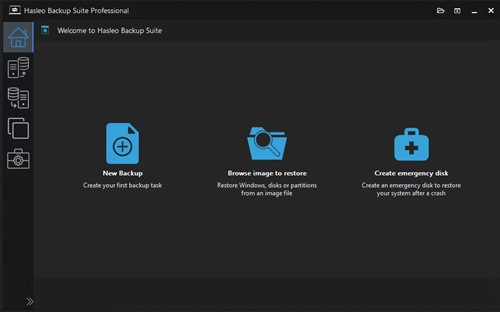
Hasleo Backup Suite 5.8.2.1 Multilingual
All Editions | File size: 40.2 MB


Hasleo Backup Suite is a Windows backup and restore software, which embeds backup, restore and cloning features, it is designed for Windows operating system users and can be used on both Windows PCs and Servers.
The backup and restore feature of Hasleo Backup Suite can help you back up and restore the Windows operating systems, disks and partitions to protect the security of your Windows operating system and personal data. The cloning feature of Hasleo Backup Suite can help you migrate Windows to another disk, or easily upgrade a disk to SSD or a larger capacity disk.
As a professional backup and restore software, the bootable Windows PE emergency disk can help you quickly and effectively restore the Windows operating system to a healthy state after a disaster strikes, such as system crash or disk corruption.
Highly intuitive looks
This application comes with a straightforward appearance that makes it easy even for those with little PC skills to choose the operation they want to initiate. You can either backup the currently running Windows to an image file or an entire disk or partition.
Regardless of the one you need, you can specify customize a flurry of details related to it, such as compression level, protect it with a password, define the notification SMTP server and target email addresses. You can even choose pre- and post-commands.
Restoring a previously created task can be managed just as easily, even if you are not a tech-savvy user.
Supports cloning operations
Hasleo Backup Suite can also be used to clone the currently running OS to another disk, to clone one disk to another one, as well as clone a partition to a different location.
You need to select the source and the target locations, then you can define the new partition size, specify its alignment (1M, Cylinder, 4K or none) and activate sector by sector clone.
Packs additional tools
When using Hasleo Backup Suite, you get the possibility to rebuild the MB =R, wipe a drive or add a boot menu. If you are interested in creating an emergency disk, you can save it to your connected USB device or export it as an ISO file and burn it on a disc later on.
System Requirements: Windows Vista/Server 2008 or later (32/64-bit)

Код:
https://rapidgator.net/file/076185a21a2c014dc86ba23e266c232e/Hasleo_Backup_Suite_5.8.2.1.rar.html

Код:
https://nitroflare.com/view/51FAD4B004A96C1/Hasleo_Backup_Suite_5.8.2.1.rar
 
caf709ccf054f00ac7b743484d07f2cd.webp

Free Download Hetman Office Recovery 5.1 Multilingual Fast Links | 29 Mb
Hetman Office Recovery is designed to help when your office documents go missing. Implementing a range of highly sophisticated low-level disk analysis algorithms, Hetman Office Recovery can retrieve the missing documents even if the disk is corrupted, inaccessible, or does not appear as a drive letter. A special extra-safe recovery more is available for heavily worn and physically unstable devices.


Using Hetman Office Recovery is just as easy as installing it. A step by step wizard guides you through the entire recovery process, helping you choose the right options to achieve maximum recovery rates. From simple undelete to heavy duty recovery, Hetman Office Recovery solves all your data recovery needs when it comes to office documents.
Heavy Duty Recovery Engine
Hetman Office Recovery features a true heavy-duty data recovery engine. The very same engine is used in Hetman's top of the line partition recovery tool used by system administrators, service centers and data recovery specialists. Thanks to this powerful engine, Hetman Office Recovery can easily recover documents other tools won't.
Recovers Documents and Spreadsheets
Hetman Office Recovery is designed to recover documents saved by Microsoft Office 97, 2000, XP, 2003, 2007, 2010, and 2013, as well as OpenOffice. The following types of files are supported:
DOC - Microsoft Word 97-2003 Document (*.doc);
DOCX - Microsoft Word Document (*.docx);
DOT - Document Template (*.dot);
XLS - Microsoft Excel 97-2003 Spreadsheet (*.xls);
XLSX - Microsoft Excel Spreadsheet (*.xlsx);
In addition to Microsoft Word and Excel documents, Hetman Office Recovery natively supports the OpenDocumet Format. This document format is employed by Open Office, Libre and Star Office applications. The following file types are supported:
ODT - OpenDocument Text Document (*.odt);
ODS - OpenDocument Spreadsheet (*.ods);
Finally, Hetman Office Recovery supports the following file formats:
PDF - Adobe Portable Document Format (*.pdf);
PDB - Document File (*.pdb);
RTF - Rich Text Format File (*.rtf);
WPD - WordPerfect Document (*.wpd);
WRI - Windows Write Document (*.wri);
System requirements:
Hetman Office Recovery does not impose any special system requirements. In fact, we tried to make it compatible with all current and legacy systems. Hetman Office Recovery was tested in all 32-bit and 64-bit versions of Windows starting with Windows XP and up to the latest Windows 10.
Home Page -
Код:
https://hetmanrecovery.com/

Rapidgator
Код:
https://rapidgator.net/file/f4e9e01042d241dc3b5987972c90d2d7/eo7ec.Hetman.Office.Recovery.5.1.Multilingual.rar.html

Код:
https://nitroflare.com/view/0CF9A70B1DF3095/eo7ec.Hetman.Office.Recovery.5.1.Multilingual.rar
 
c0694a9836222c23a5adda8be0dffb58.webp

Free Download Hetman Partition Recovery 5.3 Multilingual Fast Links | 76 Mb
Hetman Partition Recovery is designed to reliably recover information and fix all types of issues with healthy, damaged, corrupted, formatted and inaccessible hard drives. This hard drive data recovery software offers a complete, all-in-one solution to take care of typical problems you're your computer's storage. The This hard drive data recovery software will help you recover lost and deleted files, recover missing documents, photos, audio and video files.


In addition, Hetman Partition Recovery comes with a comprehensive set of tools to fix corrupted volumes, recover deleted partitions, unformat formatted disks, and repair all types of damage to your disk system structures.
Hetman Partition Recovery can recover partition tables and MBR records, FAT and NTFS file systems complete with alternative data streams, recovering the entire hard drive complete with all volumes, files and original folder structure. All 32-bit and 64-bit versions of Windows are supported including the latest Windows 7.
Key features
- Recover all types of deleted files including documents, compressed archives, photos, music and videos;
- Recover files and folders from formatted, repartitioned, corrupted and inaccessible disks;
- Unformat formatted partitions and restore original volumes from repartitioned hard drives;
- Fix corrupted file systems, partition tables, master boot records (MBR) and other system information;
- Recover files and folders from built-in and external hard disks, USB flash drives, and all types of memory cards.
Supported File Systems and System Requirements
Hetman Partition Recovery supports all versions of FAT and NTFS file systems. This includes the original FAT, FAT12, FAT 16, VFAT and FAT32, NTFS 3, 4 and NTFS 5. For NTFS disks, the tool supports alternative data streams (ADS), and can recover compressed and encrypted files and folders. Windows XP / 2003 and 2008 Server / Vista / Windows 7 / Windows 8 and Windows 10 are supported. Hetman Partition Recovery runs in both 32-bit and 64-bit editions of Windows. Please note that you must have Administrator's privileges on your computer in order to install and use Hetman Partition Recovery.
Home Page -
Код:
https://hetmanrecovery.com/

Rapidgator
Код:
https://rapidgator.net/file/1bd1de26918d67f9f751cfcebadcc1cd/ntwo2.Hetman.Partition.Recovery.5.3.Multilingual.rar.html

Код:
https://nitroflare.com/view/85B193294FD494D/ntwo2.Hetman.Partition.Recovery.5.3.Multilingual.rar
 
b6032f25e800ca1f197ab2d56a5b0295.webp

Free Download Hetman Photo Recovery 7.1 Multilingual Fast Links | 66 Mb
With Hetman Photo Recovery, the process of recovering digital photos becomes simple and can be performed by anyone. The software recovers lost photos from camera memory cards (Compact Flash, xD, Memory Stick), various HDD and USB drives, mobile phone cards and other sources.


You lost files will be recovered even if the camera memory card or a logical drive has been formatted or there has been a hardware crash that resulted in a loss of files. Thanks to a new algorithm of advanced disk analysis, the software recovers images that other tools don't even detect! The trial version allows you to preview deleted images. The photos that you can preview will be 100% recoverable after you register the program!
Every owner of a digital camera, regardless of his or her skills and experience, may face the problem of digital photo recovery. Hetman Photo Recovery is the simplest and most efficient solution of this problem. This software will be equally appreciated by both novices and professional photographers, photo artists and designers. This software combines the ability to perform deep scanning of logical drives, preview and recover photos in the RAW format with a clear and intuitive recovery wizard, which will help even novices recover digital images in no time.
A great number of digital cameras store images in the RAW format to preserve the original picture quality. Our program can preview and recover RAW formats of all popular cameras. This feature will be especially appreciated by professional photo artists. Hetman Photo Recovery was developed as an "image recovery wizard". All you have to do is to select the necessary disk and the program will scan it and show the thumbnails of recoverable images. You can use zooming to preview these images prior to recovering them.
MAIN FEATURES:
Support of the most popular media cards, various USB and HDD devices, photo cameras and etc
Support of major file systems: VFAT, FAT12/16/32, NTFS/NTFS4/NTFS5
You can preview and select images to be recovered
Support of major types of digital images: *.bmp, *.cel, *.ico, *.jpe, *.jpeg, *.jpg, *.png, *.psd, *.tga, *.tif, *.tiff, *.wmf and etc
Support of the RAW format: *.032, *.3fr, *.bmq, *.cr2, *.crw, *.cs1, *.dc2, *.dcr, *.raw, *.rdc, *.sr2, *.srf, *.x3f and etc
The recovery process is fast and simple
Supported File Systems and System Requirements
Hetman Photo Recovery supports all versions of FAT and NTFS file systems used in all versions of Windows since Windows 95. The tool supports Windows XP / 2003 and 2008 Server / Vista / Windows 7 / Windows 8 and Windows 10. Hetman Photo Recovery runs in both 32-bit and 64-bit editions of Windows.
Home Page -
Код:
https://hetmanrecovery.com/

Rapidgator
Код:
https://rapidgator.net/file/546b2a1251c79bd000ae97c9929ab957/ai89f.Hetman.Photo.Recovery.7.1.Multilingual.rar.html

Код:
https://nitroflare.com/view/40D13AC154F1D12/ai89f.Hetman.Photo.Recovery.7.1.Multilingual.rar
 
30950d66c8d106142e4922122f816065.webp

Free Download Hetman RAID Recovery 3.0 Multilingual Fast Links | 75 Mb
This program recovers data from non-operational RAID systems or from disks within such systems. It reads all the information about the controller, the motherboard or the software used to create a disk array. Our product can rebuild the crashed RAID and it lets you copy all critical information from there.


The integrated constructor wizard helps you recover a failing RAID in a step-by-step mode. You can use one of the presets or chose the required data in the damaged array, and RAID Recovery™ will collect the disks together to provide you with access to the data.
Why RAID gets damaged
Recover software or hardware RAID of any type: JBOD, RAID 0, RAID 1, RAID 10, RAID 5, RAID 50, RAID 6, RAID 60, etc.
Hard disk failure
Both hard disk types, HDD and SSD, have a limited operational life. Certainly, server-type NAS or SCSI disks can last longer than their SATA counterparts intended for home use only, but there is no such thing as a hard disk that works endlessly. For most RAID arrays, the day when one or two disks fail means loss of all information, from all disks within this array. Reliability of the entire array decreases with every disk which is added to it.
Accidental array rebuilding
Mistakes when replacing one of the disks within the storage system, accidental "rebuilding" of the array instead of "restoring" it, disconnecting and reconnecting the disks in a wrong order, incorrect RAID initialization or rebuild - any of these things will certainly result in the loss of information. After such errors, RAID can't restore itself automatically.
A controller bug or failure
A controller is the element containing information of critical importance which is vital for building a disk array and gaining access to all of the files stored on the disks. A controller failure may both result in losing service data and cause several disks to fail. The most expensive controllers use an additional battery and non-volatile memory. Such elements improve the whole system's reliability and are supposed to help save data even if a power interruption occurs.
A motherboard failure
Creating a RAID based on specific motherboard features is a cheaper (though less reliable) solution in comparison with buying an expensive controller. Motherboard failures, botched BIOS updates, low CMOS battery, power surges, disconnecting or reconnecting disks - all these things may cause your RAID to crash. As the entire system is very sensitive to all kinds of power issues, problems with your power supply unit may cause crashes as well.
A system crash
Software RAID systems based on the functionality offered by an operating system - Windows, macOS, Linux, FreeBSD, Ubuntu - depend largely on the health of that operating system. Upgrading your hardware, or updating other software may cause errors that prevent the computer from booting and make the data inside such array inaccessible.
Unlike hardware RAID systems, the software-based arrays are made of logical partitions rather than physical disks. Operations that involve formatting or removing partitions can easily destroy such array.
A virus attack
Both software and hardware solutions store information about the RAID structure on every disk within the array. A virus attack may not only damage system files and prevent the operating system from booting, but also modify the disk partition table or overwrite the disk area which stores data vitally important for the RAID to work properly. Any of these nasty things will make the array inoperable.
Bad sectors
Usually, when there is an attempt to write information to a faulty sector, RAID will enter the data on such sector into a special table so that it doesn't get used any longer, and will use a free sector for writing. However, everything changes when one of the disks within the array breaks down. To continue work, you need to replace the disk and rebuild the array. The process of automatic recovery reads all the data from the remaining disks to recreate the data from the missing disk. Such recovery can't be accomplished when there is at least one bad sector.
Upgrading the storage system or other equipment
Unfortunately, not all manufacturers give you the opportunity to move to new hardware without having to rebuild your RAID. To prevent loss of data, you have to copy all of that from the old array, then create an array with the new hardware, and finally transfer the data to this new RAID. This procedure applies to situations when you are upgrading controllers, motherboards, hard disks - and even operating systems, if you prefer using a software-based RAID.
Initializing RAID without disks, and connecting a disk to another system
When one of the disks within the array is connected to another piece of equipment or computer, it may cause its service information to be overwritten. When such disk is reconnected to your RAID again, the system doesn't start and it just fails.
Disks should be connected and disconnected only with the storage system powered off. If you attempt to start a computer with some of its disks missing, RAID will switch into an emergency mode, and reconnecting the disks to the array will not help to restore the situation back to normal.
Operating System:Windows XP, Vista, 7, 8/8.1, 10
Home Page -
Код:
https://hetmanrecovery.com/

Rapidgator
Код:
https://rapidgator.net/file/7f0665c6b0cf73ab613d3554bd262db1/hrq5y.Hetman.RAID.Recovery.3.0.Multilingual.rar.html

Код:
https://nitroflare.com/view/345CCFFE8827F0F/hrq5y.Hetman.RAID.Recovery.3.0.Multilingual.rar
 
544908df2a46b193fd6a7800d20de57a.webp

Free Download Hetman Uneraser 7.3 Multilingual Fast Links | 76 Mb
Hetman Uneraser recovers deleted files from IDE / ATA / SATA / SCSI hard and external drives,USB and FireWire storage devices, ZIPs and 3.5" disks. The File Recovery Software can unerase deleted files from any cell phones and photo camera memory cards. No matter which file system you use - FAT16, FAT32 or NTFS - Hetman Uneraser will be equally efficient data recovery program. Hetman File Recovery Software will easily recover deleted office documents produced by Microsoft Office or Open Office.


Here are some key features of "Hetman Uneraser":
· VFAT, FAT12/16/32 - the software scans and analyses disk data sector by sector. Hetman Unersser identifies image data and shows the image preview to the user. Full disk scanning is performed to find and restore images that have been removed from FAT tables.
· NTFS/NTFS4/NTFS5 - the software analyses the disk and uses native Windows features for reading encrypted or compressed sectors. You will be able to recover even those files that were stored on encrypted or compressed NTFS volumes.
· The tool allows you to preview deleted files prior to recovering them - Now you can select the files to be recovered. The software finds and displays the deleted files. You can enlarge them for preview purposes or use a filter to reduce the number of images to be displayed. The files that you can see in the preview area will be 100% recoverable after you register the program!
· Recovers files from deleted volumes - Data are often lost after power failures, hardware crashes and virus attacks. Hetman Uneraser will recover files from deleted, formatted and damaged volumes on HDD/USB drives and flash cards.
· Deep disk scanning - The use of cutting-edge scanning and data analysis algorithms allows you to find and recover twice as many files than you normally would with our competitors' products.
· Recovers files that were removed from the Recycle Bin - Recovers files that were deleted without being placed to the Recycle Bin or lost after the Recycle Bin was purged.
· The recovery process is fast and simple - Affordable, simple and always efficient, it will help you recover lost data in situations when time is critical and there is no help around.
· Safety - The software makes absolutely no changes to your drives while scanning and recovering data. Hetman Uneraser performs disk scanning on a low level and restores the selected images to a location of your choice.
Operating System:Windows 7, 8/8.1, 10
Home Page -
Rapidgator
Код:
https://rapidgator.net/file/3f5824d1cfbbd739438a631f8796458b/j0jtq.Hetman.Uneraser.7.3.Multilingual.rar.html

Код:
https://nitroflare.com/view/2131F79B8F70A4D/j0jtq.Hetman.Uneraser.7.3.Multilingual.rar
 
54ee44ac5ebea5f918e7b8fc30d87252.jpg

Hofa Colour Delay 1.0.5
File size: 45.6 MB


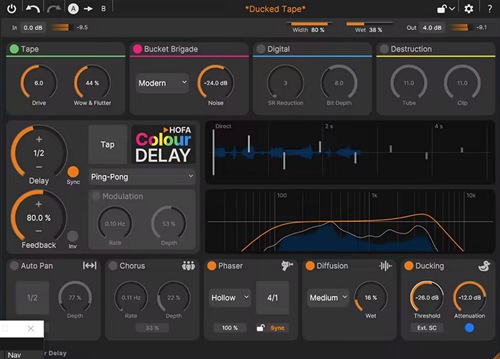
The HOFA Colour Delay provides you with all the iconic delay sounds for your productions. With four unique delay styles that can be freely combined, there are no limits to the retro feeling and your creative freedom.
Easy handling with the interactive display
4 combinable styles: Tape | Bucket Brigade | Digital | Destruction
Standard delays, exciting echoes & sophisticated soundscapes
Post-delay effects: diffusion | phaser | chorus | auto pan | ducker
Whats New
Updates: official site does not provide any info about changes in this version
System Requirements
Formats: VST3, AU, AAX
Windows 10 or later
HOFA plugins are continuously tested on the following DAWs
Ableton Live, Apple Logic, Avid Pro Tools, Bitwig, Cockos Reaper, Image Line FL Studio, Magix Samplitude/Sequoia, Presonus Studio One, Steinberg Cubase/Nuendo/Wavelab

Код:
https://rapidgator.net/file/826b4757c98bec6a2cfa4001b8fd4d94/unfnk3m-hof-cold.rar.html

Код:
https://nitroflare.com/view/39EEEB34FC46A2A/unfnk3m-hof-cold.rar
 
50461872852a5b3c047f63e9062d3cb5.jpg

Hofa Colour Saturator 1.1.2
File size: 49.7 MB


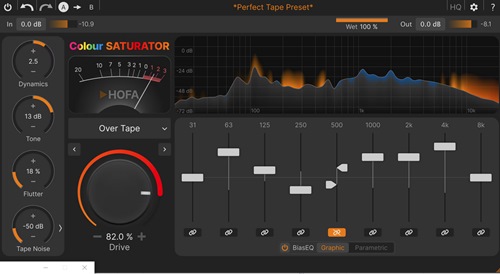
Smooth harmonics, powerful punch, analog warmth and even brutal destruction - saturation and distortion are essential in professional music production. Designed for this very purpose, the HOFA Colour Saturator has become a real game changer.
Modern neural modeling algorithms enable absolutely authentic saturation like you've never heard before. And with the specially developed BiasEQ©, you have completely new creative possibilities.
Subtle harmonics, solid distortion, and extreme fuzz sounds
Tape | tube | desk | solid state | hybrid ...
Neural modeling algorithms for all kinds of tonal variation
BiasEQ© for creative sound shaping
Noise, crackle, and hum for authentic retro feel
Whats New
Updates: official site does not provide any info about changes in this version
System Requirements
Windows 10 or later
Formats: VST3, AU, AAX
HOFA plugins are continuously tested on the following DAWs
Ableton Live, Apple Logic, Avid Pro Tools, Bitwig, Cockos Reaper, Image Line FL Studio, Magix Samplitude/Sequoia, Presonus Studio One, Steinberg Cubase/Nuendo/Wavelab

Код:
https://rapidgator.net/file/936001f9dbbf3a8344f46a1f8bd79dd4/unfnk3m-hof-cols.rar.html

Код:
https://nitroflare.com/view/EA15432946BFEF3/unfnk3m-hof-cols.rar
 
7c19e88addbd7b38f2a22afaf30f5926.jpg


HTML2PDF Pilot 2.33.2

File size: 12.6 MB


The PDF file format has become a standard for storing and sharing information, as it offers many advantages over other document formats. However, converting all your existing files to PDF can be a challenging task.

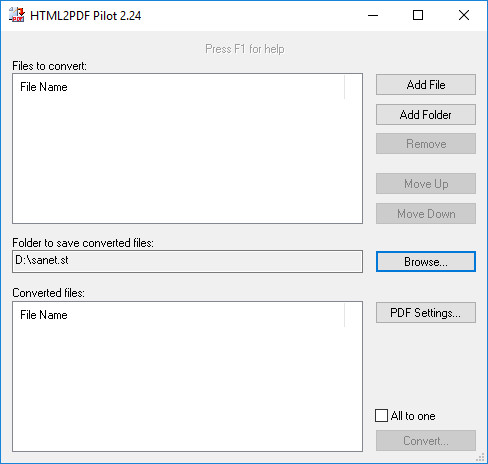
HTML2PDF Pilot is a simple program that can help you batch convert HTML and TXT files to PDF. It features a minimalistic interface that should pose no problems even to inexperienced users, but lacks advanced PDF customization features.

Supports batch processing and command-line activation
The application allows you to load any number of HTML or TXT files in its processing queue and can convert them all in one operation. Files can be added individually, but it is also possible to select entire folders and have the program load all the supported files within them.

After adding a list of documents, you have the option of converting them to separate PDF files, but you can also merge all of them into a single document.

The program can also be run directly from the command-line, enabling you to process all the files in a folder without launching the graphical user interface.

Customize output PDF layout
HTML2PDF Pilot enables you to modify various page settings in the created documents. For example, you can choose page size and orientation, depending on the output file's intended purpose.

Additionally, it is possible to specify the size of page margins and have the application automatically insert page numbers.

Easy-to-use, but only offers basic functions
HTML2PDF Pilot is a very user-friendly application, as its functions are straightforward and simple to understand. However, it lacks certain advanced functions, such as the ability to add items using drag and drop actions, encrypt PDF files and embed metadata.

Overall, this is a handy program, designed to offer a simple way of converting HTML and TXT files to PDF. It requires no advanced computer operating knowledge to be used effectively, but offers limited functionality.

Whats New

System Requirements
Windows XP
Windows Vista
Windows 7
Windows 8
Windows 10
Windows 11


HOMEPAGE


Код:
https://www.colorpilot.com/


DOWNLOAD

Код:
https://rapidgator.net/file/d85ff98cfd9d77d9eeec161ea5f8645e/HTML2PDFPilot2..rar.html

Код:
https://nitroflare.com/view/E592BCEC3ED8B31/HTML2PDFPilot2..rar
 
834146ee55db6bf51c167eeb41222ecf.jpg


IDimager Photo Supreme 2026.3.0.9113 (x64) Multilingual | Size: 162.01 MB
Language: English


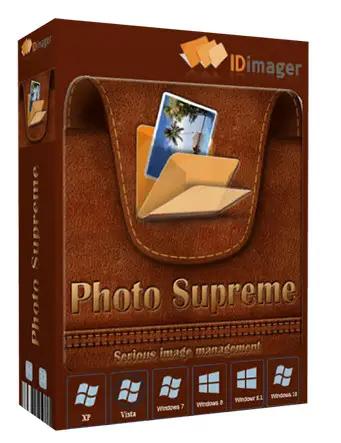
Photo Supreme v2026 is a thoughtful and forward-looking release. This update has focused on smarter discovery, faster performance, and modern workflow expectations, especially around large catalogs, mobile integration, searches, and team environments.

Import and Select
One of the standout additions in Photo Supreme v2026 is the new multi-pass Import and Select workflow. This allows users to review and refine image selections in multiple stages instead of making all decisions in one pass. It's especially useful for large shoots, letting photographers cull images more deliberately and with less pressure. In addition, the Import and Select feature now loads images faster than ever. Mac users will also appreciate direct iOS device importing, which makes it possible to bring photos straight from an iPhone or iPad into the catalog without relying on intermediary software. This significantly streamlines mobile-first workflows.

Powerful Searches
Photo Supreme now supports natural language searching, allowing users to find images using plain, conversational phrases rather than rigid metadata queries. This feature is powered by AI services such as OpenAI, Google Gemini, or local models with Ollama. This gives users flexibility in how advanced features are enabled. In addition, a new classification system enhances search accuracy by grouping images into meaningful categories upon import, making it easier to surface relevant results in large or complex catalogs.

Video & Media Handling
For users working with video, Photo Supreme v2026 introduces hover-based video previews. Simply hovering over a video thumbnail now reveals a short animated preview, making it much faster to identify clips without opening them individually. Support for modern formats has also been expanded, ensuring the software keeps pace with current media standards.

Sharing with ZIP
Exporting images is more flexible in v2026 thanks to ZIP output support in transfer profiles. This makes it easy to bundle images into a single archive for delivery, backup, or client sharing, all directly from within Photo Supreme. These enhancements simplify distribution workflows and reduce the need for external tools.

GEO Maps
GEOgraphic-Mapping features can now generate maps using not only Google Maps, but also OpenFreeMap with OpenStreetMaps. This removes the need for API keys while still delivering rich, interactive map displays. This update makes location-based browsing easier to configure and more accessible for all users.

Performance and Refinements
Photo Supreme v2026 delivers notable performance enhancements, resulting in faster browsing and a more responsive overall experience. Response times are improved by up to 10%, with especially noticeable gains for large libraries containing many catalog labels.
Catalogs with numerous stacks also see significant performance improvements, particularly when displayed in stacked views.
v2026 includes a wide range of refinements, such as: "Visually similar" stack detection, numerous stability fixes and workflow enhancements, polished UI behavior in collections, searches, and metadata handling

Wait, there's more, a lot more.
New "RAW Files" and "Video Files" catalog states
Added support for Google Gemini as an AI service
Added support for OpenAI GPT-5.2 as an AI Service
Added support for Ministral3 model with Ollama
Added file management support for ACR sidecar files
Update HTTP Server with Photo Supreme Online (Server Edition)
Faster face recognition
Added "AI-Estimated GEO Location" to the AI Panel
Faster result display in the Collection Viewer
"Cascade Metadata" from image to Stack or Version Set is now a background process
A highlighted stroke has been added to the active tabs, improving navigation
Now you can display metadata charts and graphs across multiple tabs
Added support for Ctrl/Cmd+Z functionality in text and memo fields
Defined the new Affinity v3 .AF and .AVIF file format as a supported "other file format"
Switching the collection viewer's view style is faster (eg from Basic to Grid to Clean to Custom Thumb Info)
Advanced Search now has an option to search by "File Size" and "File Size MB"
Finetuned the check for "need to compact" on PostgreSQL (Server Edition)
Bookmark keyboard shortcuts are now a "toggle", similar to ratings and color labels
Expanding nodes in the Catalog Tree is ~25% faster
When using the "Dump Full to Catalog File" feature, there's now the option to create either a "catalog dump" file, or a "catalog with thumbs" dump files
Added a XMP Storage Location for "original file AND non-standard sidecar file"
In "Stacked View", you can now select a specific item from the stack to show
Support for PostgreSQL 18.
And more.

Highlights for v2026
Multi-Pass "Import and Select": Seamlessly transition through passes with a fast-culling system that optimizes your workflow.
Direct iOS Image Import on macOS: Import images directly from your iOS devices with ease.
Video Thumbnail Preview: Hover over a video thumbnail or open the Quick View to view a live video preview.
Natural Language Search Powered by AI: Search your content using plain language, with smart integration through OpenAI, Google Gemini, or Ollama models.
Transfer Profiles can now create ZIP output files: Copy or send sets of images as a single ZIP file for easier sharing.
Maps with OpenFreeMap: Display images on interactive maps using OpenFreeMap/OpenStreetMaps with no API key needed.
Server Edition Thumbnail Caching: Enjoy faster performance with local thumbnail caching, automatic cleanup, and customizable settings for retention and cache size.
Classifications: Enhance search accuracy with an automatic image classification mechanism on import.

Operating System: Windows 10 or higher

HOMEPAGE:
Код:
https://www.idimager.com/


DOWNLOAD LINKS:


Код:
https://rapidgator.net/file/8fa61db45bbd5e4624576caaa8c73bcd/IDimager_Photo_Supreme_2026.3.0.9113_x64_Multilingual.rar.html

Код:
https://nitroflare.com/view/7BE6AF2598A3067/IDimager_Photo_Supreme_2026.3.0.9113_x64_Multilingual.rar
 
e0d302c99981b68e9a06ab81e79931b6.png


JP Software CMDebug 36.01.53 (x64) Multilingual

File size: 42.8 MB


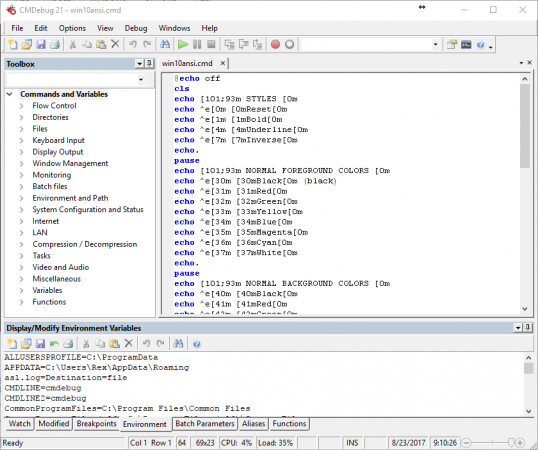
CMDebug is a stand-alone version of the Take Command IDE and batch debugger component. CMDebug is intended for developers who need to develop batch files to run in CMD.EXE or TCC-RT (runtime).

CMDebug allows you to create and debug your batch scripts with the integrated graphical IDE. CMDebug includes tabbed edit windows and a sophisticated debugger with single stepping, breakpoints, syntax coloring, tooltips, bookmarks, and tabbed variable and watch windows. Windows batch file programming has never been easier or more powerful!

You can use CMDebug to develop either CMD-compatible batch files (.BAT or .CMD), or TCC-RT-compatible scripts (.BTM). If you select the "TCC Syntax" option, CMDebug provides the full TCC-RT command set. If you select the "CMD Syntax" option, CMDebug will maximize CMD compatibility and disable TCC-only internal commands, variables, and functions. Some internal CMD / TCC commands will also behave slightly differently or modify their display output in order to match CMD's behavior more closely.

Using CMDebug with TCC-RT allows you to write (and encrypt) scripts using the TCC command language, and then distribute them with the free TCC-RT runtime on an unlimited number of target machines.

Whats New

System Requirements: Windows 10, Server 2016, Server 2019, Windows 11, and Server 2022


HOMEPAGE


Код:
https://jpsoft.com/


DOWNLOAD

Код:
https://rapidgator.net/file/1b0147724d5d9a53b242ceef34669689/JP_Software_CMDebug_36.01.53..rar.html

Код:
https://nitroflare.com/view/0F83B87FD815DA5/JP_Software_CMDebug_36.01.53..rar
 
8ceb967bcd57e68af01d168d1c9523d4.jpeg


JP Software Take Command 36.01.53 (x64) Multilingual

File size: 57.2 MB


Take Command is a comprehensive interactive GUI and Windows command line toolkit that makes your Windows command prompts easier to use and far more powerful. Take Command includes optional Windows Explorer integration, tabbed console windows, and major enhancements to standard Windows CMD commands such as COPY, DEL, FOR, MOVE, REN, SET, and START And it and adds 210+ new commands, command dialogs, command line syntax coloring, vastly improved command line editing, programmable filename and directory completion, and thousands of other features.

Take Command is also a powerful batch file programming tool, including an integrated IDE with a sophisticated editor and batch debugger. Take Command offers extensions such as DO loops, SWITCH statements, error and exception handling, system monitoring and event triggers, third-party plugins, and more than 700 built-in variables and functions.

The Windows "Command Prompt" shortcut is a Windows console (command line, or character mode) session that runs the default command processor CMD (also called the "Windows command shell"). The command prompt is essential for developers, systems administrators and advanced users. Unfortunately, CMD commands and the Windows console UI have always been woefully lacking in ability compared to what is available in most other operating systems. Because of the limitations in the Windows command prompt, users have been forced to use the GUI for inappropriate tasks, or even to write custom programs to perform simple tasks that CMD should have been able to handle.

Are you frustrated with the limitations of the CMD command line and batch scripting? Do you yearn for a real scripting language, and an integrated IDE and batch debugger? How about a Windows command processor that can do all of that, and still run your existing CMD prompt commands and batch files?

Take Command is our flagship product. For 30+ years, JP Software has been helping programmers, system administrators, technical support professionals, and advanced users save time and money, and cure their command prompt frustrations. Take Command offers a new approach to working in Windows, bringing users the power of the command line and the ease of use of the Windows GUI. Take Command includes a complete CMD replacement command shell that provides you with a vastly better Windows command line UI, and thousands of features that are not available in CMD (or even in those vaunted Linux shells).

Whats New

System Requirements: Windows 10, Server 2016, Server 2019, Windows 11, and Server 2022


HOMEPAGE


Код:
https://jpsoft.com/


DOWNLOAD

Код:
https://rapidgator.net/file/fd5da7704636ea291a67c9337b23b3b9/JP_Software_Take_Command_36.01.53..rar.html

Код:
https://nitroflare.com/view/C680B15DB3ABD4D/JP_Software_Take_Command_36.01.53..rar
 
6bcb70fff9287f67e582bef36a1a10e1.png


JP Software TCC 36.01.53 (x64)

File size: 55 MB


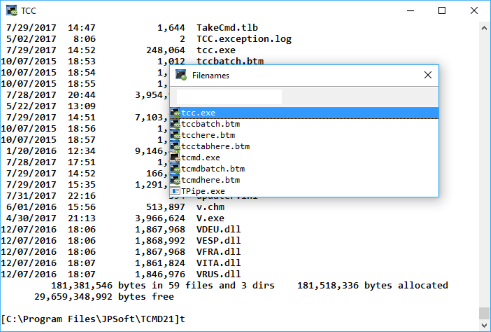
TCC is our console mode Windows command shell (formerly known as 4NT). TCC is a replacement for the CMD command line (the default Windows command prompt). TCC is a superset of CMD, with 250 internal commands (CMD has fewer than 40), 700+ internal variables and functions, and hundreds of enhancements to existing CMD commands.

TCC works with your existing command line applications and batch files, but offers major improvements in command line editing and batch file scripting, and adds thousands of new features to your console windows.

Benefits
TCC is a CMD replacement command processor that is compatible with your existing CMD commands and batch files, while adding thousands of new features. You're immediately more productive, and you can learn and add TCC's new features at your own pace.
Create and debug your batch scripts in a fraction of the time with the integrated editor and batch file debugger.
The integrated and familiar environment means you are immediately more productive with your interactive command prompt and batch file development tasks.
The consistent syntax reduces learning and development time.
The comprehensive help (including context-sensitive popup help for command line syntax), speeds your development time and reduces syntax errors.

Whats New

System Requirements: Windows 10, Server 2016, Server 2019, Windows 11, and Server 2022


HOMEPAGE


Код:
https://jpsoft.com/products/tcc.html


DOWNLOAD

Код:
https://rapidgator.net/file/32fee356894141c01f449dfe411ca8ed/JP_Software_TCC_36.01.53..rar.html

Код:
https://nitroflare.com/view/42F7DCC2810386D/JP_Software_TCC_36.01.53..rar
 
18b84206c0a262fa2cd3e0c8052641b2.webp

Free Download Lucen Timeline Expert 14.14.00.00 | 147.3 Mb
Office Timeline is now called Lucen Timeline, part of Lucen Software! The #1 PowerPoint Timeline Maker for Windows and Office. Create PowerPoint timelines or roadmaps as fast as clients and executives need them. Simple but powerful PowerPoint add-in that anyone can use to quickly make and manage impressive timelines.


Beauty trumps complexity.
Build stunning PowerPoint timelines without the effort and cost.
Free yourself from manually building and managing visual project plans.
Office Timeline helps you make timelines, Gantt charts and Swimlanes in PowerPoint almost instantly. Customize them with just a few clicks to create clear, elegant high-level presentations that everyone will understand.
User-friendly PowerPoint timeline generator. Works the way clients and colleagues do.
Office Timeline works with all versions of PowerPoint. Give them stunning PowerPoint slides that can be viewed, edited and shared by anyone who has Microsoft Office.
Manage and change data with ease.
The plugin's powerful Data wizard and drag & drop Visual Editor make timeline management agile and intuitive. Updating timelines when projects and plans change is quick and easy.
PowerPoint timelines made easy.
No complex steps. No learning curve. No hassle!
Start from scratch or pick a template.
The timeline wizard was designed to make it simple. It all starts by selecting the type of timeline you want to make.
Enter your data and click Create.
Once you've selected a timeline template, enter or import your key milestones and tasks. Set their dates, click the Create button, and voilà ! Timeline created.
Arrange and style to impress.
Use Drag & Drop to instantly rearrange or update your visual. Then customize it your way â?? colors, shapes, date formats, task duration, percent completeâ?¦ change any detail, anyway you want.
Enjoy more freedom with Plus Edition.
While the Free edition is fully functional, Office Timeline Plus brings more! Plus Edition unlocks predesigned templates and gives you the freedom to add as much data as needed, so you can create detailed, unique PowerPoint timelines and Gantt charts.
See the power of Pro Edition.
Office Timeline Pro gives you everything you get with the Plus add-in, but adds powerful extra features. Pro Edition creates impressive Swimlanes and roadmaps, so you can manage complex projects with big-picture visuals that anyone can understand.
System Requirements:
- Microsoft Windows Vista, Windows 7 (SP1), Windows 8, or Windows 10 (LTSB, CBB and CB). Office Timeline does not run on Windows 10 S. The add-in is functional on Windows XP and Windows Server but unsupported.
- 32-bit versions of Microsoft Office 2007 (SP3), 2010, 2013, or 2016. Although Office Timeline works with 64-bit versions of Office, we do not formally test or support it on 64-bit. The vast majority of the Office install base is the 32-bit version of Office. 32-bit is recommended by Microsoft unless you have very specific needs for 64-bit.
- .NET Framework 4.5.2 or greater.
Home Page -
Код:
https://www.lucensoftware.com/

Rapidgator
Код:
https://rapidgator.net/file/a42f13a62fda788f60d5b45c08b69d8c/ukuqu.Lucen.Timeline.Expert.14.14.00.00.rar.html

Код:
https://nitroflare.com/view/1078287A39FFC6B/ukuqu.Lucen.Timeline.Expert.14.14.00.00.rar
 
64a41e217c3539cc08a54ba7b90197a7.jpg

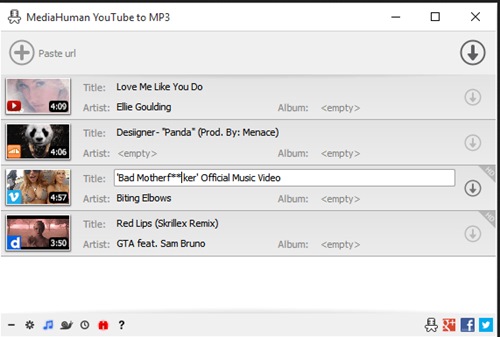
Mediahuman Youtube To Mp3 Converter 3.9.20 (1905) Multilingual
Windows x64 | File size: 82.91 MB


You like to listen to music on YouTube or SoundCloud and want to save it for offline playing. Or you want to download soundtrack of a new movie. Then we recommend you to try out this software developed specifically for this purpose.
• Downloads all music from playlist or channel
• Downloads highest available quality up to 320 kbps
• Supports YouTube, Vimeo, SoundCloud, Dailymotion, VEVO, etc.
• Downloads simultaneously several tracks
• Includes simple tag editor with cover art image support
• Works on all modern platforms (macOS, Windows, Ubuntu)
• Exports to iTunes
Main Features
Playlists and channels
The software supports downloading all videos of a playlist or a channel. And there is also an option for subscribing to and downloading only newly uploaded tracks.
iTunes support
In the preferences of the application you can select an option to add downloaded tracks into iTunes automatically. You can also specify iTunes playlist, where the converted track should be added.
Saves your time & traffic
The app detects audio track in YouTube video clip and downloads it, skipping the video part. As a result download speed increases dramatically, especially on HD-quality content.
Simple tag editor
Application automatically detects artist name and track title of the video and saves it in the downloaded file. But at the same time, you can easily change tags to whatever you want. You can even change a cover art image.
Original format, no conversions
You can save audio tracks in original quality without any conversion. It means that there will be no loss of quality and it greatly reduces the downloading time.
Free music
There is a great amount of music on YouTube. You can always find the one you like there. And YouTube to MP3 Converter allows you to save it on your computer for free. Just find the track you like and download it in the quality you need.
Not only YouTube
Vevo.com, Vimeo, DailyMotion, Soundcloud, Bandcamp, HypeMachine, MixCloud, UOL and many other sites are also supported. So you can download music as easy as from YouTube.
Clipboard tracking
The program tracks the content of the system clipboard. It means that you can easily add a video clip without switching from your favorite browser. Just copy an URL into the clipboard and it will be added to the download queue.
Multilingual interface
Localized to: Arabic, Armenian, Azerbaijani, Bulgarian, Catalan, Chinese (Taiwan), Croatian, Czech, Danish, Dutch, English, Esperanto, French, German, Greek, Hebrew (Israel), Hungarian, Indonesian, Italian, Japanese, Korean, Latvian, Lithuanian, Malay, Norwegian Bokmål, Polish, Portuguese, Portuguese (Brazil), Romanian, Russian, Spanish, Swedish, Turkish, Vietnamese
]System Requirements: Windows 11, Windows 10, Windows 8, Windows 7 for PC systems (64bit)

Код:
https://rapidgator.net/file/95ecd3576aa82ede4cc0abc17008ce61/YouTubeToMP3.3.9.20.1905.rar.html

Код:
https://nitroflare.com/view/B169A193755785C/YouTubeToMP3.3.9.20.1905.rar
 
e33704e2a0bc41132cfc5bf103e94c61.avif


Moneyspire 2026 v26.0.14 (x64)

File size: 119 MB


Personal finance software, made personal. Keep track of your bank accounts, credit cards, loans, cash and investment accounts. Categorize your spending and income with customizable categories. Keep track of your bills so you never forget to make a payment again and avoid late fees.

Set a budget to keep track of your spending so you don't overspend on specified categories like Dining Out. Forecast your account balance to prevent overdrafts and insufficient funds. Balance your checkbook and reconcile with bank statements to catch errors and bank fraud.

Generate detailed reports to see exactly where your money is going and to make tax time easier. Optionally sync to your financial institutions (if you would like) via the Moneyspire Connect feature and automatically download your transactions. Optionally sync to the cloud (if you would like) via the Moneyspire Cloud feature so you can share your finances between multiple computers and mobile devices.

Moneyspire can also import data from Quicken, Microsoft Money (MS Money) and other personal finance software, so you can easily make the change to Moneyspire.

Whats New

System Requirements: Windows 10 or later


HOMEPAGE


Код:
https://www.moneyspire.com/moneyspire-desktop/


DOWNLOAD

Код:
https://rapidgator.net/file/e2590fbfcff468f8f174a31c3af14354/Moneyspire2026v26..rar.html

Код:
https://nitroflare.com/view/5D476F1270436D7/Moneyspire2026v26..rar
 
Назад
Сверху Снизу