








All mitsumi'1s Applications !! (updated daily)

a2f378834d82f9961aae8fe7a7c5a438.png


WindowManager 10.27.5 | Size: 1.37 MB
Language: English


WindowManager helps you to improve your work flow by remembering and restoring the position and size of your programs and windows. Many programs don't remember their position and size between sessions and even Windows Explorer does not restore windows to their last position under Windows 7 or higher.

This is where WindowManager steps in and makes sure your windows are placed exactly where you want them every time you open them. WindowManager even allows you to lock the position and size of any window, so that it will always open at the same spot no matter where you move it. The window handling is fully customizable and you can set up special rules for your favorite or most frequently used windows.

You can also make WindowManager send keystrokes or mouse-clicks to a program when its window is opened, run additional programs and other advanced actions. With WindowManager, you can also minimize most windows to the system tray. Furthermore, WindowManager supports and enhances the virtual desktop functions of Windows 10 and 11 (switching desktops with Hot-Keys, individual desktop icons, etc.)

Features:
Remembers and restores the position and size of your programs and windows
Supports explorer windows, programs, dialogs, etc.
Configurable rules for moving or sizing only, activating, closing windows, etc.
Advanced actions for typing text into windows, pressing keys, clicking mouse buttons, etc.
Can be configured to work like "Save Workspace" for Excel users
Multi-monitor support
Multiple profiles
Powerful trigger system for profile switching
Hot-key support
Minimize windows to the system tray area
Virtual desktop support & enhancements (hot-keys, individual desktop icons, etc.) for Windows 10 and 11
Fully customizable
Silent installation and uninstallation for mass deployment
Especially designed for Windows 10 and 11

System Requirements:
Supported operating systems (32 and 64 bit):
Windows Vista
Windows 7
Windows 8
Windows 10
Windows 11
Windows Server

HOMEPAGE: Code:
Код:
https://www.desksoft.com/


DOWNLOAD LINKS:


Код:
https://rapidgator.net/file/a8e9601b63ffca8bd2b4d0cc7578c8f5/WindowManager_10.27.5.rar.html

Код:
https://clicknupload.click/4j4yivu2z0ug/WindowManager_10.27.5.rar
 
_bba6cd17bea165ea08ddb5c9ff578397.jpeg


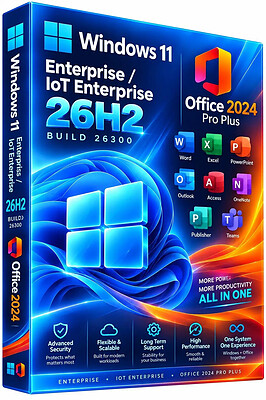
Windows 11 Enterprise/Iot Enterprise 26H2 Build 26300.9818 With Office 2024 Pro Plus Multilingual Preactivated November 2026 | Size: 9.75 GB
No TPM | Windows (x64) | Languages:Arabic,English,German,Greek,French,Spanish,Italian,Portuguese-Portuguese,Portuguese-Brazil,Turkish,Dutch,Czech,Norwegian


Windows 11 version 26H2 also known as the Windows 11 2026 Update,is built on the same servicing foundation as recent Windows 11 releases. It delivers the latest Windows innovations with a streamlined update experience designed to minimize disruption and help you stay secure, productive, and up to date.

For many eligible devices, moving to version 26H2 is as simple as installing a small enablement package, with a minimal download size, quick installation, and a single restart. Version 26H2 enables most of the features that were introduced in monthly updates for Windows 11, version 25H2.

What's new in Windows 11, version 26H2
Windows 11, version 26H2 is the next annual feature update for Windows 11. It builds on the same servicing foundation as Windows 11, versions 25H2 and 24H2, helping organizations adopt the latest release with minimal disruption. Devices running eligible versions of Windows 11 can move to version 26H2 through a small enablement package rather than a full operating system upgrade.

Because Windows 11, versions 26H2, 25H2, and 24H2 share a common servicing branch, many new features and improvements have already been delivered through monthly servicing updates. Version 26H2 enables selected features and resets the support lifecycle for the new release.

Servicing and deployment
Windows 11, version 26H2 provides a familiar update experience

Delivered as an enablement package for eligible devices running Windows 11, versions 25H2 and 24H2.
Fast installation with a single restart in most scenarios.
Reduced validation effort because supported versions share the same underlying platform.
Consistent management, security, and update experiences across supported releases.
Features enabled by default in version 26H2
For commercial organizations, Windows 11, version 26H2 enables capabilities that were introduced previously but controlled through temporary commercial controls.

Windows settings backup
Windows settings backup is now enabled by default for eligible commercial devices. This helps organizations preserve supported Windows settings and Microsoft Store app lists for recovery and device replacement scenarios. Existing administrator-configured policies continue to be honored.

App-specific actions from the taskbar
Windows 11, version 26H2 enables app-specific taskbar actions by default for commercial devices. Users can thus access common actions directly from taskbar experiences.

File Explorer enhancements
Several File Explorer improvements that were previously under temporary commercial controls are enabled by default in Windows 11, version 26H2. These enhancements focus on improving navigation and usability within File Explorer.

Update windows to 26H2 Build 26300.9818
Update Office to v2609 Build 20527.20196


System Requirements
Processor: 2 gigahertz (GHz) or faster.
RAM: 2 gigabyte (GB).
Free space on hard disk: 40 gigabytes (GB).
Graphics card: DirectX 9 graphics device or a newer version.
Additional requirements to use certain features.
To use touch you need a tablet or monitor that supports multitouch.
To access the Windows store to download and run apps, you need an active Internet connection and a screen resolution of at least 1024 x 768 pixels

HOMEPAGE:
Код:
https://microsoft.com


DOWNLOAD LINKS:


Код:
https://rapidgator.net/file/190808623803188e9f10fbfc7dfd0a5c/Win.11.E.Iot.26300.9818.Office..part1.rar.html
https://rapidgator.net/file/786d5047208278d53a40f934a547b6f9/Win.11.E.Iot.26300.9818.Office..part2.rar.html
https://rapidgator.net/file/6475e48f3e720ed9f67e35b42f02d305/Win.11.E.Iot.26300.9818.Office..part3.rar.html
https://rapidgator.net/file/c47a7a4bdb87a0fc4006f37aab99f1c5/Win.11.E.Iot.26300.9818.Office..part4.rar.html
https://rapidgator.net/file/9944c6ee38029eefc8fbe519e723cdbe/Win.11.E.Iot.26300.9818.Office..part5.rar.html

Код:
https://clicknupload.click/mb9xqsmhbfck/Win.11.E.Iot.26300.9818.Office..part1.rar
https://clicknupload.click/pct3j8yiolt4/Win.11.E.Iot.26300.9818.Office..part2.rar
https://clicknupload.click/8xxwrz0vx45q/Win.11.E.Iot.26300.9818.Office..part3.rar
https://clicknupload.click/a0ur90dv8fbz/Win.11.E.Iot.26300.9818.Office..part4.rar
https://clicknupload.click/jjz5f6dc31k7/Win.11.E.Iot.26300.9818.Office..part5.rar
 
_9adf93ff2cd969c46daaa33e24f59eb5.jpeg


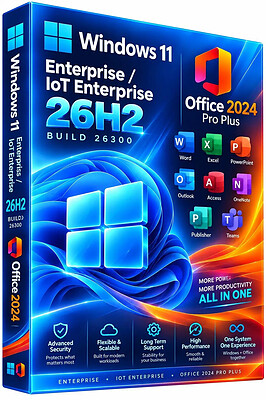
Windows 11 Enterprise/Iot Enterprise 26H2 Build 26300.9974 With Office 2024 Pro Plus Multilingual Preactivated November 2026 | Size: 9.67 GB
No TPM | Windows (x64) | Languages:Arabic,English,German,Greek,French,Spanish,Italian,Portuguese-Portuguese,Portuguese-Brazil,Turkish,Dutch,Czech,Norwegian


Windows 11 version 26H2 also known as the Windows 11 2026 Update,is built on the same servicing foundation as recent Windows 11 releases. It delivers the latest Windows innovations with a streamlined update experience designed to minimize disruption and help you stay secure, productive, and up to date.

For many eligible devices, moving to version 26H2 is as simple as installing a small enablement package, with a minimal download size, quick installation, and a single restart. Version 26H2 enables most of the features that were introduced in monthly updates for Windows 11, version 25H2.

What's new in Windows 11, version 26H2
Windows 11, version 26H2 is the next annual feature update for Windows 11. It builds on the same servicing foundation as Windows 11, versions 25H2 and 24H2, helping organizations adopt the latest release with minimal disruption. Devices running eligible versions of Windows 11 can move to version 26H2 through a small enablement package rather than a full operating system upgrade.

Because Windows 11, versions 26H2, 25H2, and 24H2 share a common servicing branch, many new features and improvements have already been delivered through monthly servicing updates. Version 26H2 enables selected features and resets the support lifecycle for the new release.

Servicing and deployment
Windows 11, version 26H2 provides a familiar update experience

Delivered as an enablement package for eligible devices running Windows 11, versions 25H2 and 24H2.
Fast installation with a single restart in most scenarios.
Reduced validation effort because supported versions share the same underlying platform.
Consistent management, security, and update experiences across supported releases.
Features enabled by default in version 26H2
For commercial organizations, Windows 11, version 26H2 enables capabilities that were introduced previously but controlled through temporary commercial controls.

Windows settings backup
Windows settings backup is now enabled by default for eligible commercial devices. This helps organizations preserve supported Windows settings and Microsoft Store app lists for recovery and device replacement scenarios. Existing administrator-configured policies continue to be honored.

App-specific actions from the taskbar
Windows 11, version 26H2 enables app-specific taskbar actions by default for commercial devices. Users can thus access common actions directly from taskbar experiences.

File Explorer enhancements
Several File Explorer improvements that were previously under temporary commercial controls are enabled by default in Windows 11, version 26H2. These enhancements focus on improving navigation and usability within File Explorer.

Update windows to 26H2 Build 26300.9974
Update Office to v2610 Build 20527.20196


System Requirements
Processor: 2 gigahertz (GHz) or faster.
RAM: 2 gigabyte (GB).
Free space on hard disk: 40 gigabytes (GB).
Graphics card: DirectX 9 graphics device or a newer version.
Additional requirements to use certain features.
To use touch you need a tablet or monitor that supports multitouch.
To access the Windows store to download and run apps, you need an active Internet connection and a screen resolution of at least 1024 x 768 pixels

HOMEPAGE: Code:
Код:
https://microsoft.com


DOWNLOAD LINKS:


Код:
https://rapidgator.net/file/9696e5dc0f88827fe9655c34f37edf9f/Win.11.Ent.Iot.26300.9974.Office..part1.rar.html
https://rapidgator.net/file/67f64a9fc8cd46b1a4f4517a58fd96bb/Win.11.Ent.Iot.26300.9974.Office..part2.rar.html
https://rapidgator.net/file/acd659d30568c82afa76f80bec22e6e5/Win.11.Ent.Iot.26300.9974.Office..part3.rar.html
https://rapidgator.net/file/e3dbb79d2a10cb241814809ab62c08f6/Win.11.Ent.Iot.26300.9974.Office..part4.rar.html
https://rapidgator.net/file/98237015930ee07798bd1a295e401493/Win.11.Ent.Iot.26300.9974.Office..part5.rar.html

Код:
https://clicknupload.click/5ug6qjd6z35h/Win.11.Ent.Iot.26300.9974.Office..part1.rar
https://clicknupload.click/v4mz2xx23uhj/Win.11.Ent.Iot.26300.9974.Office..part2.rar
https://clicknupload.click/t0iitv8meo47/Win.11.Ent.Iot.26300.9974.Office..part3.rar
https://clicknupload.click/nod7dlbqn5zb/Win.11.Ent.Iot.26300.9974.Office..part4.rar
https://clicknupload.click/v2q3gmfemyj6/Win.11.Ent.Iot.26300.9974.Office..part5.rar
 
0868f505249b86699682718c2fb5b7b8.png


Windows 11 Pro 26H2 Build 26300.9974 With Office 2024 Pro Plus Multilingual Preactivated November 2026 | Size: 9.62 GB
No TPM | Windows (x64) | Languages:Arabic,English,German,Greek,French,Spanish,Italian,Portuguese-Portuguese,Portuguese-Brazil,Turkish,Dutch,Czech,Norwegian


Windows 11 version 26H2 also known as the Windows 11 2026 Update,is built on the same servicing foundation as recent Windows 11 releases. It delivers the latest Windows innovations with a streamlined update experience designed to minimize disruption and help you stay secure, productive, and up to date.

For many eligible devices, moving to version 26H2 is as simple as installing a small enablement package, with a minimal download size, quick installation, and a single restart. Version 26H2 enables most of the features that were introduced in monthly updates for Windows 11, version 25H2.

What's new in Windows 11, version 26H2
Windows 11, version 26H2 is the next annual feature update for Windows 11. It builds on the same servicing foundation as Windows 11, versions 25H2 and 24H2, helping organizations adopt the latest release with minimal disruption. Devices running eligible versions of Windows 11 can move to version 26H2 through a small enablement package rather than a full operating system upgrade.

Because Windows 11, versions 26H2, 25H2, and 24H2 share a common servicing branch, many new features and improvements have already been delivered through monthly servicing updates. Version 26H2 enables selected features and resets the support lifecycle for the new release.
Servicing and deployment
Windows 11, version 26H2 provides a familiar update experience
Delivered as an enablement package for eligible devices running Windows 11, versions 25H2 and 24H2.
Fast installation with a single restart in most scenarios.
Reduced validation effort because supported versions share the same underlying platform.
Consistent management, security, and update experiences across supported releases.
Features enabled by default in version 26H2
For commercial organizations, Windows 11, version 26H2 enables capabilities that were introduced previously but controlled through temporary commercial controls.
Windows settings backup
Windows settings backup is now enabled by default for eligible commercial devices. This helps organizations preserve supported Windows settings and Microsoft Store app lists for recovery and device replacement scenarios. Existing administrator-configured policies continue to be honored.
App-specific actions from the taskbar
Windows 11, version 26H2 enables app-specific taskbar actions by default for commercial devices. Users can thus access common actions directly from taskbar experiences.
File Explorer enhancements
Several File Explorer improvements that were previously under temporary commercial controls are enabled by default in Windows 11, version 26H2. These enhancements focus on improving navigation and usability within File Explorer.

Whats New
Update windows to 26H2 Build 26300.9974
Update Office to v2610 Build 20527.20196

System Requirements For Windows 11
Processor: 2 gigahertz (GHz) or faster.
RAM: 2 gigabyte (GB).
Free space on hard disk: 40 gigabytes (GB).
Graphics card: DirectX 9 graphics device or a newer version.
Additional requirements to use certain features.
To use touch you need a tablet or monitor that supports multitouch.
To access the Windows store to download and run apps, you need an active Internet connection and a screen resolution of at least 1024 x 768 pixels

HOMEPAGE: Code:
Код:
http://www.microsoft.com


DOWNLOAD LINKS:


Код:
https://rapidgator.net/file/28a1527d51ac58fc0b8c5e733dfefec0/Win.11.Pro.26300.9974.Office..part1.rar.html
https://rapidgator.net/file/dacb9144695eb7999d516dbbb19bb628/Win.11.Pro.26300.9974.Office..part2.rar.html
https://rapidgator.net/file/4e6b4a85f96f0a2ab22404db7bcf55ca/Win.11.Pro.26300.9974.Office..part3.rar.html
https://rapidgator.net/file/21b52e362b6078e4bbd03c2ddd54f027/Win.11.Pro.26300.9974.Office..part4.rar.html
https://rapidgator.net/file/ae19907ad3aa09f398f2b891f1f9de0d/Win.11.Pro.26300.9974.Office..part5.rar.html

Код:
https://clicknupload.click/b17bbsppi2dv/Win.11.Pro.26300.9974.Office..part1.rar
https://clicknupload.click/6ryl1ep3sa83/Win.11.Pro.26300.9974.Office..part2.rar
https://clicknupload.click/b8pm4z4e5mea/Win.11.Pro.26300.9974.Office..part3.rar
https://clicknupload.click/vrztufyn8zs6/Win.11.Pro.26300.9974.Office..part4.rar
https://clicknupload.click/o10x34sgmvmi/Win.11.Pro.26300.9974.Office..part5.rar
 
21532ed9ea280872a8e67041d3626212.jpg


Windows Firewall Control 6.40 Multilingual | Size: 3.47 MB
Language: English


Windows Firewall Control is a nifty little application which extends the functionality of the Windows Firewall and provides quick access to the most frequent options of Windows Firewall. It runs in the system tray and allows user to control the native firewall easily without having to waste time by navigating to the specific part of the firewall.

Windows Firewall Control offers four filtering modes which can be switched with just a mouse click:

High Filtering - All outbound and inbound connections are blocked. This setting blocks all attempts to connect to and from your computer.
Medium Filtering - Outbound connections that do not match a rule are blocked. Only programs you allow can initiate outbound connections.
Low Filtering - Outbound connections that do not match a rule are allowed. The user can block the programs he doesn't want to initiate outbound connections.
No Filtering - Windows Firewall is turned off. Avoid using this setting unless you have another firewall running on your computer.

Program Features
√ Just one small executable file. All features are packed in the same file.
√ Intuitive and easy accessible interface in the system tray.
√ Full support with standard user accounts.
√ Possibility to create temporary rules.
√ Disable the ability of other programs to add Windows Firewall rules.
√ Multiple and easier ways of creating new rules in Windows Firewall.
√ Full support of creating, modifying and deleting Window Firewall rules.
√ Lock feature which can disable the access to the settings of the program.
√ Shell integration into the right click context menu of the executable files.
√ Search for invalid rules with the possibility to delete them.
√ Search for executable files through folders and create new rules in seconds.
√ View recently blocked connections and create new rules from the log.
√ Choose if you want the program to start at user logon.
√ Import and export the settings of the program.
√ Protection to unauthorized uninstallation.
√ Possibility to restore previous settings at uninstallation.
√ And many more. Just try it out.

OS : Compatible with all 32bit and 64bit versions of Windows 8, Windows 7, Windows Vista, Windows Server 2008
Language : Multilingual

HOMEPAGE: Code:
Код:
http://www.binisoft.org


DOWNLOAD LINKS:


Код:
https://rapidgator.net/file/d9e5a0bd664a96b1531c10da58717ce1/Windows_Firewall_Control_6.40_Multilingual.rar.html

Код:
https://clicknupload.click/o4msiinx32ri/Windows_Firewall_Control_6.40_Multilingual.rar
 
b3356dfe837c76cd4daeddaaac56b229.jpg


YT Geek YTDL 12.5.29 (x64) | Size: 89.78 MB
Language: English


YTDL is a little program for downloading videos from YouTube and other video sites.

Key Features
- Download videos from YouTube and other video sites.
- Increase download speeds by up to 400%.
- Download multiple videos at the same time.
- Pause and resume downloads at any time.
- Preview video content while downloading.

HOMEPAGE: Code:
Код:
https://www.ytdlapp.com/


DOWNLOAD LINKS:


Код:
https://rapidgator.net/file/877e480bbd6b8a4d20fed7db7d4fd941/YT_Geek_YTDL_12.5.29_x64.rar.html

Код:
https://clicknupload.click/xi7i244sfbyp/YT_Geek_YTDL_12.5.29_x64.rar
 
ca6debd4bff69fba6f98688c2be9ff55.jpg


YT Video Downloader 12.6.28 (x64) | Size: 193.08 MB
Language: English


Download videos from hundreds of video web sites.

Features:

Really increase your download speeds by up to 500%, or even more!
Download 8K, 5K, 4K Ultra HD, 2K Quad HD, 1080p Full HD, and 720p HD videos.
Download only audio stream and save in any format, without downloading the entire video file.
Download entire playlist with a few clicks. You don't need to do each video separately.
Download multiple videos at the same time.
Pause, resume, or cancel downloads at any time.
Preview videos while downloading.
Convert video and audio files between different formats. Support all popular video and audio formats: MP4, WebM, MKV, FLV, AAC, OGG, etc.
Convert and optimize video and audio for your iPhone, iPad, iPod, Galaxy, and other devices.
Extract audio track from video file and save in AAC, OGG, M4A, FLAC, MP2, or other audio format.
Ready-made presets for all popular video and audio formats.
Fully customizable video and audio format settings.
Optionally, YT Video Downloader can automatically add downloaded videos to your iTunes library.
Easy-to-use. Just drag and drop video link from your web browser to the Drop Box to start download.
YT Video Downloader contains a simple and easy-to-use media player for playing video and audio files that Windows Media Player cannot play.

HOMEPAGE: Code:
Код:
https://www.ytvideodownloader.com/


DOWNLOAD LINKS:


Код:
https://rapidgator.net/file/06227ad1d65d58d2ac8ac0579284d7b6/YT_Video_Downloader_12.6.28_x64.rar.html

Код:
https://clicknupload.click/btul1bqk8do7/YT_Video_Downloader_12.6.28_x64.rar
 
174f8de31d1b9f403338913345b3be1f.jpg


Zoom Player MAX 23.0.0.2300 | Size: 121.42 MB
Language: English


Zoom Player is the most Powerful, Flexible and Customizable Media Player application for the Windows PC platform. Based on our highly-touted Smart Play technology, more media formats play with less hassle, improved stability and greater performance.

Behind Zoom Player's classic media player look, hides a powerful Media Center application designed with a simple 5-Key (up/down/left/right/select) fullscreen navigation interface. The 5-Key system provides simple navigation with advanced interfaces. Interface such as the Media Library, File Browser, Playlist, Color Control, Audio Equalizer, Bookmarks, Play History and many more. Zoom Player's media center simplicity makes it ideal for users with no previous computer experience.

With Zoom Player, you can instantly Convert any PC into a Home Entertainment Center (HTPC) with no specialized hardware requirement or operating system. Zoom Player runs with every version of Windows.

Operating System: Windows Vista, XP, 7, 8/8.1, 10

HOMEPAGE: Code:
Код:
http://www.inmatrix.com/


DOWNLOAD LINKS:


Код:
https://rapidgator.net/file/f5557716313547c409c1ee81645febbb/Zoom_Player_MAX_23.0.0.2300.rar.html

Код:
https://clicknupload.click/necrex3jn2bl/Zoom_Player_MAX_23.0.0.2300.rar
 
Назад
Сверху Снизу