All Emperor2011's Software in one thread !! (updated daily)

32179d0205a330c3d0d1b4fd263b175d.jpg


YT Downloader 10.6.1 (x64) | Size: 164.21 MB
Language: English

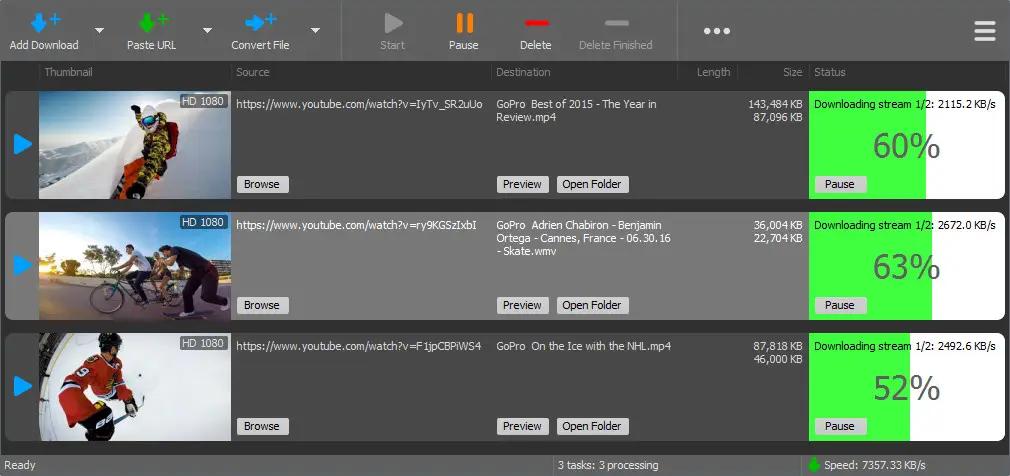
YT Downloader (ex YTD Youtube Downloader) is a simple and easy-to-use video download application. It helps you to download and convert videos from YouTube and hundreds of other video sites. YT Downloader increases your download speeds by up to 500%.

Features
YT Downloader is the easiest and the fastest way to download and convert videos from YouTube and other video sites.

Download videos from YouTube and hundreds of video sites
YT Downloader can download videos from YouTube, Facebook, Dailymotion, Vimeo, Metacafe, and hundreds of other video sites. After downloading your video files, you'll be able to watch them smoothly using any media player, even if you don't have internet access.

Accelerate your downloads
YT Downloader features an advanced download acceleration engine that lets you download videos 500% faster than normal speed.

Download 4K, 2K, HD 1080p and 720p videos from YouTube
You can also download 3D videos from YouTube if they are available.

YouTube to MP3
YT Downloader allows you to download only audio stream from YouTube, and save it as MP3. You don't need to download the entire video file. The audio stream is small, you can download it within seconds.

Download whole playlist from YouTube
Just enter a YouTube playlist ID, YT Downloader will download all or selected videos in the playlist from YouTube for you.

Support drag-and-drop
You can directly drag and drop video link from your browser to the drop box or program window to start a download. You don't even need to copy and paste video URL.

Download multiple videos at a time
YT Downloader supports simultaneous downloads. It allows you to download more than one video at same time and safe time.

Pause and resume downloads
You can pause, resume, or cancel your downloads if you need more connection to perform other important tasks.

Preview videos while downloading
While downloading, you can click the Preview button to play incomplete video and make sure the content you are downloading is really the content of your choice.

Video and audio converter
YT Downloader is also a powerful video/audio converter. It can convert local video/audio files to any format you wish so that they are playable everywhere.

Video to MP3
YT Downloader allows you to extract audio streams from videos and save them as mp3, wav, wma, ac3, ringtone, or other audio format.

Support all popular video and audio formats
YT Downloader allows you to save downloaded videos in any format for any device, so you can watch them smoothly on your PC, iPhone, iPad, Android phone, and other device.

Ready-made presets
YT Downloader provides ready-made presets for all video and audio formats. You can also custom output video/audio format settings.

iTunes compatible

Optionally, YT Downloader can add downloaded video/music to your iTunes library automatically, so you can easily synchronize your videos and music to your iPhone, iPad, iPod.

Media Player
YT Downloader includes a simple and easy-to-use media player. If your Windows Media Player cannot play your video/audio files, you may try our Media Player.

Operating System: Windows 11/10/8/7/Vista/XP/2000

HOMEPAGE:
Код:
http://www.ytdapp.com/

FREE DOWNLOAD LINKS:

Код:
https://rapidgator.net/file/14ca7baadd2576221a0874069e8842dd/YT_Downloader_10.6.1_x64.rar

Код:
https://nitroflare.com/view/BC0F765E3EF0EEE/YT_Downloader_10.6.1_x64.rar
 
091cf713c07486b4449292ab23e6b901.jpg


Yamicsoft Windows Manager 2.3.9 (x64) Multilingual | Size: 20.75 MB
Language: English

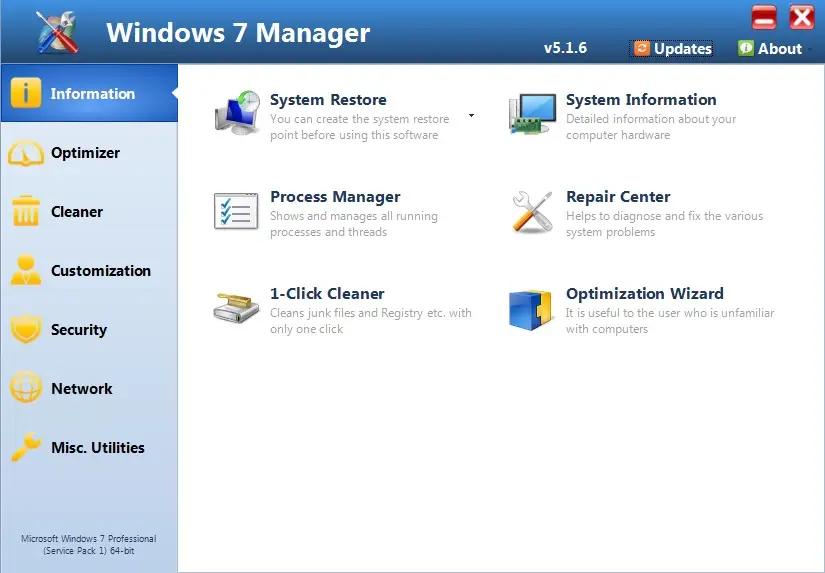
Windows 7 Manager is a system utility that helps you optimize, tweak, repair and clean up Windows 7. It will increase your system speed, eliminate system fault, improve system security, and meet all of your expectations.Windows 7 Manager is a system utility that helps you optimize, tweak, repair and clean up Windows 7. It will increase your system speed, eliminate system fault, improve system security, and meet all of your expectations.

Information:
Get detailed system and all hardware information on your system; help you find out the installation key of Windows, Office products; show all detailed information of running processes and threads on your machine; Windows 7 Manager offers 1-clicking Cleaner cleans your system automatically; Repair Center helps you to fix various system problems.

Optimizer:
Tweak your system to improve windows startup and shutdown speed, tweak your hardware to increase system speed and performance; Control what is started on Windows startup, check and repair the advanced starup items to restore the malicious change by viruses; Tune up and optimize system services and Task Schedule, turn off smartly some unnecessary system services and tasks to improve system performance.

Cleaner:
Find out which files or folders engross your disk space and shown with chart; Smart Uninstaller can fully delete programs from your system without residual files and Registry entries; Find and clean junk files to increase Hard Disk space; Duplicate Files Finder can scan your computer for files with the same size, name and modification time; Registry Cleaner checks and repair incorrectly linked Registry entries; Registry Defrag rebuilds and re-indexes your Registry to reduce registry access time and therefore improve application responsiveness; Desktop Cleaner can clean useless icons and files on Desktop easily.

Customization:
Customize the look of your system by tweaking system Explorer, Desktop, Start Menu, Taskbar and notification area; Manage the pinned items and can pin any files or folders to Taskbar; Create the quick startup items on Taskbar with the Jump List launcher; Tune up Windows 7 boot menu; edit context menus of mouse Right-Clicking; Create the shortcut that executed quick on run dialog box. Visual Customizer can change system and file type icons, custom the logon background.

Security:
Improve system security by tweaking system components, UAC and login settings; Tune up System Restore options; Hide and restrict to access drives and programs; Encrypt/decrypt files, move system folders to safe locations; Undelete the files that accidentally deleted or formatted on disk; Privacy Protector can maintain your personal privacy by eliminating the tracks that you leave behind; Hide, add or delete the Control Panel entries.

Network:
Optimize your Internet connection speed, manage all shares items; Tweak your Internet Explorer easily; IP Switcher can switch your IP address easily on different networks; Edits the Hosts file to speed up surfing internet and permit only to access the specified Hosts.

Misc. Utilities:
Show the collection of Windows utilities and pin system items to Taskbar; split and merge any files; Automatically back up files regularly using Super Copy. Registry Tools help you to operate Registry easily.

OS : Microsoft Windows 7 32 bit and 64 bit operating systems
Language : English

HOMEPAGE:
Код:
http://www.yamicsoft.com/

FREE DOWNLOAD LINKS:

Код:
https://rapidgator.net/file/cf99120a09cc1e860580f774e3feceba/Yamicsoft_Windows_Manager_2.3.9_x64_Multilingual.rar

Код:
https://nitroflare.com/view/F2E7F5DA2D8595E/Yamicsoft_Windows_Manager_2.3.9_x64_Multilingual.rar
 
c5ac20ecf71c7c18ed69680e231c7f8a.jpg


Adobe Acrobat Pro DC 2026.001.21677 (x86) Multilingual | Size: 1.54 GB
Language: English

Adobe Acrobat Pro DC is the leading PDF converter and much more. Adobe Acrobat Pro DC software lets you deliver professional PDF communications. It's packed with smart tools that give you even more power to communicate. Create and edit PDF files with rich media included, share information more securely, and gather feedback more efficiently.

Adobe Acrobat Pro DC software is the advanced way for business professionals to create, combine, control, and deliver more secure, high-quality Adobe PDF documents for easy, more secure distribution, collaboration, and data collection.

Assemble electronic or paper files into reliable PDF documents that are easy to share with others using free Adobe Reader. You can assemble even Web sites, engineering drawings, and e-mail.

With Adobe Acrobat Pro DC you can manage document reviews, synthesizing feedback from multiple reviewers while preserving document format and integrity. Extend commenting capabilities to anyone using Adobe Reader. Windows users can design intelligent Adobe PDF forms that include business logic, such as calculations and data validations, to help increase the accuracy of data collection while reducing the costs of manual data entry.

Use Adobe Acrobat Pro DC to create high-impact PDF communications, collaborate more easily, and streamline reviews. Adobe Acrobat Dynamic PDF helps you get more done - easier, faster, better.

Edit PDF files
With Adobe Acrobat Pro DC, you can make minor edits to text and images right in your PDF file without requiring the original document or graphic. Edit text in a PDF. Fix a typo, change a font, or add a paragraph to your PDF as easily as you do in other applications using a new point-and-click interface. Edit images in a PDF. Resize, replace, and adjust images in your PDF with no need to track down the original file or graphic.

Export from PDF files
Reduce the time you spend retyping information stuck in PDF files. Convert PDF files to editable Microsoft Office documents. And save fonts, formatting, and effort.
Convert PDF files to Word. Save your PDF as a Microsoft Word document and take your fonts, formatting, and layouts with you. Convert PDF files to Excel. Turn your PDF or just part of it into an editable Excel spreadsheet you can use for data analysis right away. Convert PDF files to PowerPoint. Get a head start on new projects by saving a PDF file as a fully editable PowerPoint presentation.

Create PDF files
Stop worrying about whether the files you send will look right on other people's screens. Turn documents into PDF files anyone can reliably view with free Adobe Reader.
Convert Word, Excel, or PowerPoint to PDF. Right from your Office application in Windows, you can create PDFs, start a shared review, restrict PDF edits, and more. Print to PDF. Convert files to PDF from virtually any application that prints simply by selecting Adobe PDF as your printer. Scan to PDF. When you need to turn a paper document or form into a digital file, just scan it to create a searchable PDF file you can edit. Convert HTML pages to PDF. Save web pages as PDF files to archive web content, review the pages offline, or print them more reliably.

Create and analyze forms
Cut the time you spend creating forms, rekeying data, and correcting errors. Distribute forms online, and then collect responses and analyze results in real time.
Create new PDF and web forms. Customize professional templates or design from scratch with the Adobe FormsCentral desktop app included in Adobe Acrobat Pro DC. Collect form responses with FormsCentral. Easily collect responses by moving your PDF or web forms online with the Adobe FormsCentral online service. Convert existing forms to fillable PDFs. Type less, gather more. Quickly convert your paper, Word, or Excel forms to fillable PDF forms. Collect form responses using Adobe Acrobat tools. Compile returned forms into one PDF, or host forms using a network folder or Microsoft SharePoint server.

System Requirements:
x86:
Intel® or AMD processor; 1.5GHz or faster processor
Windows 11 (64 bit), Windows 10 version 1810 or later (32 bit and 64 bit), Windows 8, 8.1 (32 bit and 64 bit)†, Windows 7 SP1 (32 bit and 64 bit), or Windows Server - 2008 R2 (64 bit), 2012 (64 bit), 2012 R2 (64 bit)†, 2016 (64 bit), or 2019 (64 bit)
2GB of RAM
4.5GB of available hard-disk space
1024x768 screen resolution
Video hardware acceleration (optional)

HOMEPAGE:
Код:
http://www.adobe.com/

FREE DOWNLOAD LINKS:

Код:
https://rapidgator.net/file/98dcbfd4cb6c043104350c73f0598b22/.Adobe.Acrobat.2026.u9.x86.Repack.m0nkrus.part1.rar
https://rapidgator.net/file/f2f520c4b6529946935cc5ac115a9fed/.Adobe.Acrobat.2026.u9.x86.Repack.m0nkrus.part2.rar

Код:
https://nitroflare.com/view/FCFE66DA4229780/.Adobe.Acrobat.2026.u9.x86.Repack.m0nkrus.part1.rar
https://nitroflare.com/view/23A51FAD0225147/.Adobe.Acrobat.2026.u9.x86.Repack.m0nkrus.part2.rar
 
1913c05fd44513de7e54a79942ca9ae1.jpg


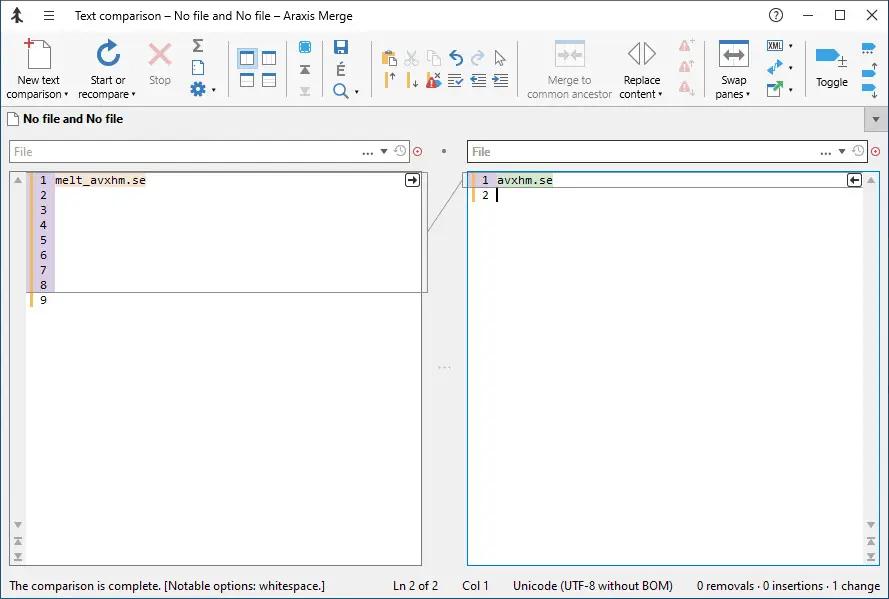
Araxis Merge Professional Edition 2026.0 (x64) | Size: 55.8 MB
Language: English

Araxis Merge - take control. Be productive. Join tens of thousands of other pros using Araxis software. Araxis Merge is a software program that has been created specifically in order to help you visually compare, merge and synchronize text files and folders.

Broad appeal, many uses

For legal and publishing professionals:
instantly identify every change between different contract or manuscript drafts. Directly open and compare the text from Microsoft Office (Word and Excel), OpenDocument, PDF and RTF files. Copy text from other applications (such as Microsoft Word) and paste it directly into a text comparison.

For code reviewers and auditors:
identify in context every change made between two or three source code hierarchies. Create a standalone HTML or XML report of your findings. Add bookmarks and comments to a file or folder comparison, then save it as a single-file archive for emailing to other team members for review.

For software engineers and web developers:
compare, understand and combine different source file versions. Work quickly and accurately, whether you are comparing individual files or reconciling entire branches of source code. Use three-way comparison to integrate changes made by you, and those made by a colleague, with a common ancestor version. Synchronize a website with its staging area via FTP using the supplied FTP plugin

For release and quality control managers:
compare different source code branches to give total confidence that you know and understand every change made to every file for a specific release. Compare product releases to be certain that only the expected files have been modified. Create an HTML or XML report of changes for audit purposes.

Other users:
Whether you are working with multiple revisions of text files or need to keep multiple folder hierarchies in sync (for example, between a desktop and laptop machine), Merge could help save time and reduce errors by helping you to work quickly and accurately.

Text comparison and merging
- Merge enables you to compare and work with different revisions of text files, such as program source code, XML and HTML files. Merge can extract and compare the text from Microsoft Office, OpenDocument, PDF and RTF files. XML files can be shown with special formatting, helping you to see changes more clearly. It supports files with ASCII, MBCS and Unicode character encodings.
- Merge shows detailed highlights of changes within lines. It can be configured to ignore differences in whitespace and line endings, as well as changes in lines matching specified regular expressions. The latter is useful for ignoring unimportant changes such as timestamps or expanded version control keywords.
- A colour-coded side-by-side comparison makes it easy to pinpoint at a glance similarities and differences between files. Linking lines are drawn between the documents showing clearly how they are related.
- Point-and-click merging helps you choose the parts of each file that you would like to add to a final merged version by simply clicking buttons. The in-place editor with unlimited undo enables complete control over the merged file as you create it. The text comparison display dynamically updates as the merge progresses.

Compare text from common office file formats
- Extract and compare the text content from Microsoft Office, OpenDocument, PDF and RTF files. Copy text from other applications and paste directly into a text comparison. (Note that office document layout and formatting is not shown in text comparisons.)

Image and binary file comparison
- Merge doesn't just compare text files. Use image comparison to compare many different types of image file and instantly see which pixels have been modified. Binary comparison enables you to identify differences in data files at a byte level.

Three-way comparison and automatic merging
- Merge Professional adds advanced three-way visual file comparison and merging to the Standard Edition's two-way visual file comparison and merging. This is particularly useful when more than one person is working on the same set of files.
- Automatic Merging enables swift reconciliation of even the largest files. Three-way file comparisons can be launched directly from a three-way folder comparison, allowing efficient integration of entire branches of source code.

Folder hierarchy comparison and synchronization
- Merge supports folder hierarchy comparison and synchronization, enabling you to compare and merge entire directory trees. This is ideal for detecting changes in different versions of source code or web pages. You can even use the efficient byte-by-byte comparison option to verify the contents of recordable CDs or USB thumbsticks.
- With support for a variety of archive formats (.zip, .tar, etc.), Merge enables you to compare archives as if they were folders. Compare the contents of an archive to a folder to verify its contents, or to see which files have changed since the archive was created.
- The Professional Edition of Merge supports three-way folder comparison (with automatic merging capability), enabling two revisions of a folder hierarchy to be merged with their common ancestor or some other folder hierarchy. This can be especially useful when used in conjunction with a source code control or software configuration management system.

Direct access to configuration management (version control) systems, Time Machine and FTP sites
- As well as being able to compare files and folders on local drives and network shares, Merge comes with plugins for Git, Mercurial, Subversion and Perforce. In addition to providing read-only access to older versions of the files you are comparing, the plugins make it possible to perform a folder comparison of a local Perforce or Subversion client workspace against the repository. Alternatively, different branches (or the same branch at different points in time) within a repository can be directly compared. A similar plugin for AllChange is available from Intasoft.
- Merge integrates with local Time Machine‡ volumes, so you can open any earlier revision of a file or folder. Open the same file or folder in both the left and right comparison panes, then use the Versions button to compare a file or folder with another revision of itself.
- An FTP plugin gives Merge file and folder comparisons direct access to files located on an FTP server. It is therefore possible to use a folder comparison to synchronize a local copy of a website's content with the main site itself, provided the main site is running an FTP server.

Portable reports
- File comparison reports can be created in HTML, HTML slideshow, XML or UNIX diff format. HTML reports are particularly useful for archiving and distribution. Folder comparison reports can be created in HTML or XML format.
- A folder comparison report can, optionally, include file comparison reports for some or all of the files involved in the folder comparison. Thus it is possible to generate a report that is a complete record of all the differences in all of the files involved in a folder comparison.

Printing, automation and other advanced features
- Other features include the ability to print a hard copy of file and folder comparisons, and to customize the behaviour and appearance of the application, including fonts, colours, whether the display is split horizontally or vertically, and more.
- A full Automation or AppleScript API and Command-Line Interface are included, allowing close integration with other applications (such as source/version control and software configuration management (SCM) systems) or your workflow.
- Comprehensive online documentation is available from the Araxis website, including context-sensitive help for very dialog and dialog control.

System Requirements:
This release is tested and supported on 64-bit Intel versions of the following platforms:
Windows 11 22H2 (2022 Update)
Windows 11 21H2
Windows 10 22H2 (2022 Update)
Windows 10 21H2 (November 2021 Update)

The following platforms are also supported and expected to work, but not routinely tested:
Windows Server 2022
Windows Server 2019

HOMEPAGE:
Код:
https://www.araxis.com/

FREE DOWNLOAD LINKS:

Код:
https://rapidgator.net/file/9313029674ad647f9c3de11526450224/Araxis_Merge_Professional_Edition_2026.0_x64.rar

Код:
https://nitroflare.com/view/F6A2BE7FF2A7C95/Araxis_Merge_Professional_Edition_2026.0_x64.rar
 
0731efdc61b3adbe8c0554c5df990e1e.jpg


Boris FX Optics 2026.0.3 | Size: 3.3 GB
Language: English

The definitive tool box for image editing and photo based visual effects. Created by Academy Award-winning effects artists, Optics brings Hollywood film quality lighting and lens effects, curated film looks, and realistic particle creation tools to photographers. 174 unique filters and 1000's of creative imaging presets in 10 categories: Color , Diffusion/Blurs , Film Lab , Grads/Tints , Image , Lens/Distort , Light , Render , Stylize , and new Particle Illusion.

Particles for Photo Editing
New! Optics now includes the Particle Illusion category. A fast and easy-to-use particle engine designed to create photoreal effects and unlimited creative elements. Featuring 1700+ particle presets to enhance your photo editing including: Smoke, Fire, Water, Sparkles, Explosions, Dust, Sci-Fi, and many more.

The Best Lighting Effects
Explore the largest collection of procedural lens flares, lighting, gobos, and particle effects for photography. Why use stock footage elements when you can design, edit, and save your own libraries of presets and favorites? Combine and build your own library of presets and favorites. Everything in Optics is procedural for creative control.

Trusted By Pro VFX Artists
Optics features plugins and filters regularly used on famous films and television shows. Top tools from the Boris FX Suite are included in Optics to help produce professional looking images. Includes Lens Flares, Light Rays, Ultra Zap (lightning), UltraGlow, Light Leaks, and many more from the popular Boris FX Sapphire collection and Continuum's Beauty Studio.

Physical Camera Qualities
Whether it is historical film stocks, color grading, or lens and diffusion effects, Optics is the only Photoshop filter designed to emulate the physical characteristics of optical camera filters. Add beauty and depth to your digital images with diffusion filters like Mist, Fog, Net, Halo, and more. New Beauty Studio filter simplifies detail separation techniques for subtle skin retouching!

Packed with Effect Presets
- 600+ historical film stocks and film looks including color grades from famous Hollywood films
- 126 optical lens flare presets from Boris FX Sapphire
- 800+ Gobo lighting patterns
- 1700+ particle presets including Abstracts, Dust, Smoke, Fire, and more

Masking and Paint Tools
Optics features powerful masking and paint tools to replace backgrounds, isolate effects, or fix and touch up pixels.

- EZ Mask with gestural stroke based masking
- Gradient, Spot, Path, Snap, Selection, and Paint mask types
- Combine multiple masks using blend modes
- Paint, clone, and blur with support for Wacom tablets

Explore Graphic Design
Apply Optics to text to create stunning graphics and inspired style frames. Optics also includes multiple generator and texture effects to design unique backgrounds and graphic elements.

HOMEPAGE:
Код:
https://borisfx.com/

FREE DOWNLOAD LINKS:

Код:
https://rapidgator.net/file/dc6c4f925dffa5f4fb3724142a7744b1/BorisFX.Optics.v2026.0.3..part1.rar
https://rapidgator.net/file/e7d71febb1249501e9fbd0a42bafcf0f/BorisFX.Optics.v2026.0.3..part2.rar
https://rapidgator.net/file/873583a4de392006ff98a261a2f11d65/BorisFX.Optics.v2026.0.3..part3.rar
https://rapidgator.net/file/eb8091c8579d1a901d49c7b4c94708c9/BorisFX.Optics.v2026.0.3..part4.rar

Код:
https://nitroflare.com/view/ADBF89B9DB3A37E/BorisFX.Optics.v2026.0.3..part1.rar
https://nitroflare.com/view/8F673641716BEBA/BorisFX.Optics.v2026.0.3..part2.rar
https://nitroflare.com/view/14761AF1D31D1F1/BorisFX.Optics.v2026.0.3..part3.rar
https://nitroflare.com/view/73C168C0045F7BB/BorisFX.Optics.v2026.0.3..part4.rar
 
66b34e1db879c419053db392c08ff406.jpg


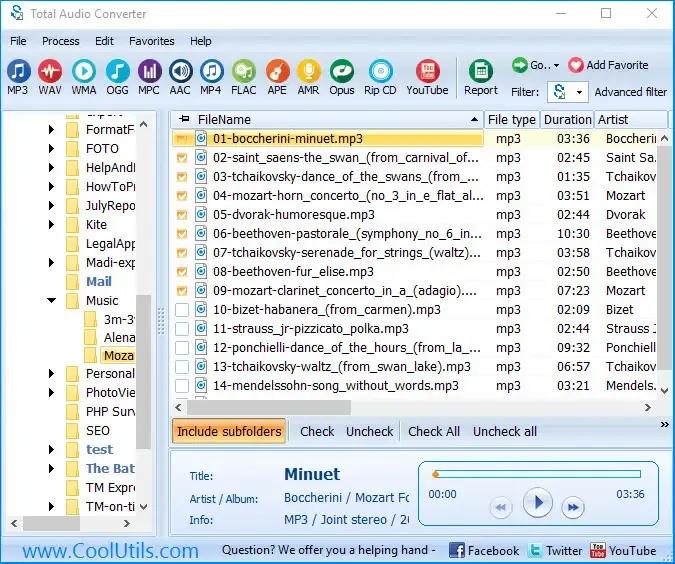
CoolUtils Total Audio Converter 6.1.0.298 Multilingual Portable | Size: 81.09 MB
Language: English

Total Audio Converter can easily convert almost any audio to WAV, MP3, OGG, WMA, APE, FLAC, MP4, AAC, MPC. A convenient batch option is available.

Supports WAV, AAC, FLAC, OGG, OFR, MP4, MPC, APE, and 24 other audio formats;
Rips CDs and convert CDA to lossless or compressed formats;
Converts audio files via GUI or the command line.
Total Audio Converter captures audio from YouTube or SoundCloud videos.
Splits APE and FLAC files by CUE.

HOMEPAGE:
Код:
https://www.coolutils.com/TotalAudioConverter

FREE DOWNLOAD LINKS:

Код:
https://rapidgator.net/file/4b463ddd0770bcd290c52de48480a8c3/CoolUtils_Total_Audio_Converter_6.1.0.298_Multilingual_Portable.rar

Код:
https://nitroflare.com/view/62F236295249101/CoolUtils_Total_Audio_Converter_6.1.0.298_Multilingual_Portable.rar
 
13ebc41b2fd6f912eed80938bf656233.jpg


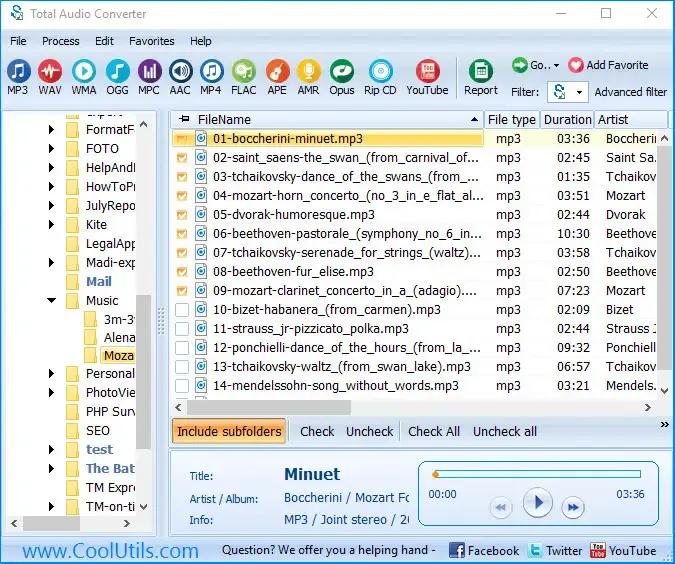
CoolUtils Total Audio Converter 6.1.0.298 Multilingual | Size: 153.51 MB
Language: English

Total Audio Converter can easily convert almost any audio to WAV, MP3, OGG, WMA, APE, FLAC, MP4, AAC, MPC. A convenient batch option is available.

Supports WAV, AAC, FLAC, OGG, OFR, MP4, MPC, APE, and 24 other audio formats;
Rips CDs and convert CDA to lossless or compressed formats;
Converts audio files via GUI or the command line.
Total Audio Converter captures audio from YouTube or SoundCloud videos.
Splits APE and FLAC files by CUE.

HOMEPAGE:
Код:
https://www.coolutils.com/TotalAudioConverter

FREE DOWNLOAD LINKS:

Код:
https://rapidgator.net/file/4c8f74c472e658c852453daccdae755f/CoolUtils_Total_Audio_Converter_6.1.0.298_Multilingual.rar

Код:
https://nitroflare.com/view/1D72F38C0143B66/CoolUtils_Total_Audio_Converter_6.1.0.298_Multilingual.rar
 
be9a7578f4ab788fb2cef6d36d06ab1f.jpg


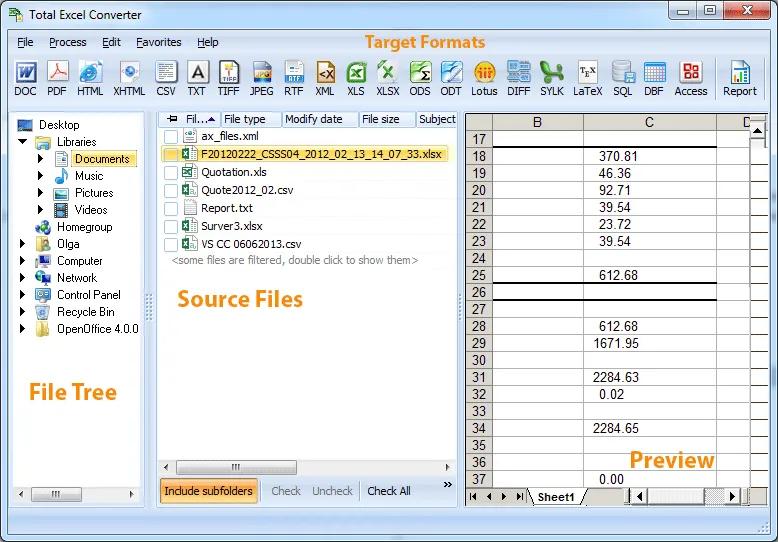
Coolutils Total Excel Converter 7.1.0.129 Multilingual | Size: 122.96 MB
Language: English

Total Excel Converter is the perfect choice to convert any type of table. Supported input formats include Excel and Excel 2007, XLSM, XLT, XLTM as well as OpenOffice formats ODS, XML, SQL, WK2, WKS, WAB, DBF, TEX, and DIF. The list of target formats is even more extensive: convert your tabled files into DOC, DOCX, PDF, HTML, Access, TXT, ODT, ODS, XML, SQL, CSV, Lotus, DBF, TEX, DIFF, SYLK, and LaTeX. Imagine how much time you'll save with this amazing conversion tool.

Total Excel Converter strictly preserves document layout; you'll get an exact copy of the source file but in a new format. In addition, we've included a number of handy options:
With Total Excel Converter, you can convert each sheet into a new file.
When you convert Excel to PDF you can set user permissions. This will protect your PDF files from being modified or copied.
Total Excel Converter can easily convert OpenOffice ODS files to Microsoft XLS documents; making it so that spread sheets produced by different programs are compatible with your viewer.

Operating System: Windows 2000/2003/Vista/7/8/10/11

HOMEPAGE:
Код:
http://www.coolutils.com/

FREE DOWNLOAD LINKS:

Код:
https://rapidgator.net/file/3c8d9a61c45f8db36313c872910fab1b/Coolutils_Total_Excel_Converter_7.1.0.129_Multilingual.rar

Код:
https://nitroflare.com/view/536647FF607FC4B/Coolutils_Total_Excel_Converter_7.1.0.129_Multilingual.rar
 
092eaec1e6edaf5bbd861189c85c7a5b.jpg


DP Animation Maker 3.5.51 | Size: 26.23 MB
Language: English

Smart 2D animation software that lets you turn still images into live moving scenes. Create living, breathing worlds from your still image with minimum effort. DP Animation Maker lets you make natural scenes burst with vibrancy and give motion to people and objects.

Fun software, with a wide variety of uses
DP Animation Maker helps you make animated videos for lots of stuff. Whether for business or personal use, some of the most popular items people create with the software include:

- Animated videos
- Web banners
- YouTube videos
- Digital greeting cards
- Mobile phone backgrounds
- PowerPoint presentations
- Music videos
- Video footage
- And more!

Sky's the limit! So why settle for boring, static photos or slideshows? With DP Animation Maker you can bring your images to life by making waves crash at the ocean, snow fall on mountains, and flames flicker on candle wicks.

It's fast and easy-to-use
The good news is, you don't have to be a tech guru to use this software. Thanks to our easy-to-understand interface, no special skills are required. Anyone can use it. But tech savvy graphic artists benefit, too. That's because DP Animation Maker takes the guesswork out of the time-consuming programming aspect of the animation process. Artists can concentrate on image design and artwork instead. No matter your level of tech sophistication, our process is painless. Simply open an image, select an effect, add moving objects, export to your preferred format, and voila - you're ready to share your animation with the world. It's that fast. With the press of a button, you can adjust motion, speed, and other key elements of any moving object. Ready-to-use, animated images are available within minutes.

Plenty of features to choose from
Our prebuilt animations are designed to give you a lot of options. Whether you have a single image or need to create a long slideshow, DP Animation Maker has the rich set of tools you need to put all the pieces together. Once you select your images, it's easy to go from 'static' to 'alive' with our wide range of effects, stationary objects, moving objects, brushes, music, timing, and camera adjustment features. You can also import your own animated GIF files if you want to add more effects to them as well.

Effects
Give images the appearance of being underwater, of having a reflection, or of being on fire. After you select a desired effect, you can fine-tune the height of your flames or the speed of your waves by tweaking the adjustment settings.

Stationary & Moving Objects
DP Animation Maker gives you more than 60 objects to choose from in our standard pack, and over 200 in extension packs.

Brushes
Add even more variety to your creations with our powerful set of animation brushes. Use nature brushes to insert fire, streams, water, or blinking lights. Intensify object movements with geometric brushes that give you waves, drifts, zooms, and rotation. Or go with pattern brushes that provide pink and colored hearts, glittering and gold stars, and other custom patterns.

Music
Have the perfect song you want to include, too? You can. Our music upload feature lets you integrate MP3 audio files that will play during your movie. Simply choose songs and put them in your preferred playing order.

Camera Settings
You can preview your animation by adjusting the scene zoom and camera speed before you export your work. With DP Animation Maker, you can add and delete effects as frequently as you wish. It's a helpful way to experiment and be creative so you can get the look you want.

Many file formats give you flexibility
When you're ready to publish, DP Animation Maker exports your animation into several popular formats.

Animated GIF
This highly compressed format is great for the times you need smaller files sizes, such as when you're creating web banners.

AVI
One of the most common video formats, AVI files can be played on any computer or uploaded on YouTube

MOV
Ideal for playing videos on Apple's QuickTime, MOV files are widely-used. They offer non-professionals a straightforward way to create ready-to-watch movies while giving professional filmmakers a tool that's lossless and supports alpha channels.

PNG Sequences
If you want your animation as individual frames that you can put into other types of software, such as a video editor, PNG sequences provide an easy way to do so.

EXE
Not sure what kind of video player your audience has? No problem. When you export your animation as an EXE, it will play on any computer. There's no need for a specific player (e.g. QuickTime) or plugins.

Add animation to images, without spending a fortune
Can you find other software out there to do your animation work? Of course. But professional editions of software like Adobe Flash, Adobe Photoshop, or Autodesk 3ds Max can set you back hundreds or thousands of dollars. Not DP Animation Maker. Our software has an affordable price that everyone can afford.

Operating System: Windows 7, 8/8.1, 10, 11

HOMEPAGE:
Код:
http://www.animationsoftware7.com/

FREE DOWNLOAD LINKS:

Код:
https://rapidgator.net/file/459ef863ae200d79b694baf0bd876b9a/DP_Animation_Maker_3.5.51.rar

Код:
https://nitroflare.com/view/F0F1E3EC108B68A/DP_Animation_Maker_3.5.51.rar
 
29a50d036c8453ff8fcf95b6c8e831bf.jpg


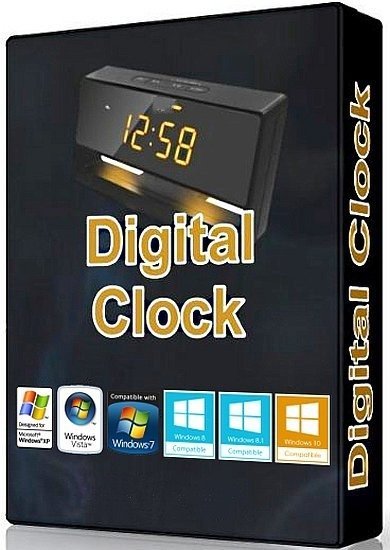
Digital Clock 5.2.2 (x64) | Size: 20.15 MB
Language: English

Digital Clock is a lightweight desktop enhancement utility built specifically for helping you place a digital clock on your screen. This unobtrusive tool runs quietly in the system tray until called upon when it reveals several configuration settings to tinker with. The digital clock can be moved to any area of the desktop, and you can make the clock remain on top of other windows, adjust the opacity and size, as well as change the layout of the clock by selecting from different skins, such as Vintage Digits, Binary Clock, Origami Style, Floral Digits, and others.

What's more, you can customize the text in terms of font, font style, and size, tweak the texture of the clock by selecting from various color or uploading an image from the computer (BMP, JPG, PNG, TIFF, XBM, XPM), and opt for a tile or stretch mode.
Digital Clock gives you the possibility to pick the time format, automatically check for updates at a preset time, as well as work with different plugins which help you set up alarms by adding MP3 files from the computer or specifying URLs, and displaying a user-defined message, show the date, turn off the computer at a certain time, and other options as well.
Since it doesn't require much computer knowledge to set up the dedicated parameters, even rookies can master the entire process with minimum effort.

During our testing we have noticed that Digital Clock carries out a task very quickly, and no errors showed up throughout the entire process. It leaves a minimal footprint on system resources, so the overall performance of the computer is not affected.
All in all, Digital Clock proves to be an efficient clock and time management application that provides a handy suite of tools.

System Requirements: Windows 11, Windows 10, 8 , 7

FREE DOWNLOAD LINKS:

Код:
https://rapidgator.net/file/b32cee219d0712538b23fa6a1a02b17b/Digital_Clock_5.2.2_x64.rar

Код:
https://nitroflare.com/view/80E1E3BA7EF74EB/Digital_Clock_5.2.2_x64.rar
 
36ec73c0e3da793ec9fe88aea0b37298.jpg


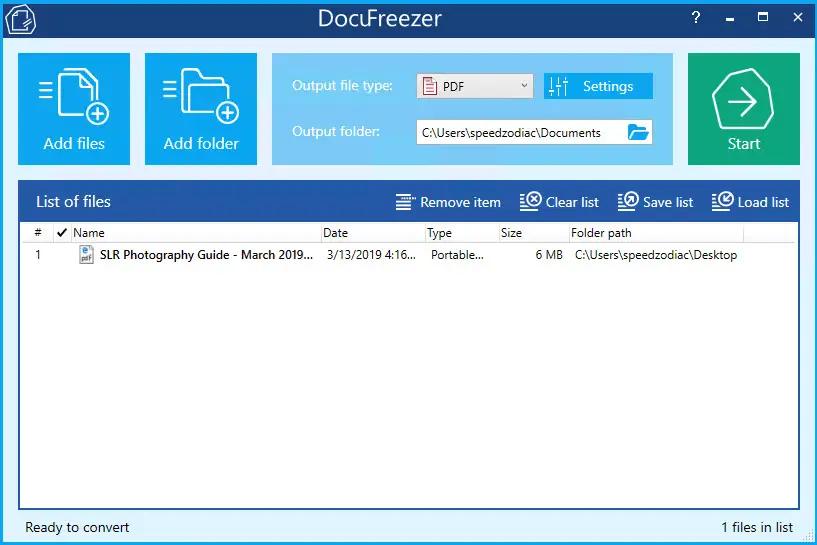
DocuFreezer 7.0.2606.20080 | Size: 214.61 MB
Language: English

Batch File Converter for Windows. DocuFreezer is a desktop application that converts your documents and images to PDF, TXT, JPG, TIFF, or PNG formats, "freezing" the look of the input documents and protecting them from any amendments. No matter which device the document will be displayed on, it will look exactly the same as the original.

Why DocuFreezer?
DocuFreezer advantages Converting an Adobe PDF document, Word document, Excel spreadsheet, Outlook e-mail, PowerPoint presentation, HTML page, Photoshop image file, XPS file, text file, or JPEG image to another format is usually not a problem. But what if you need to batch convert many files and don't want to repeat the same operations over and over again? Free file converter DocuFreezer can save your time every day.

Simple & easy-to-use interface
The program interface is intuitive: drag-and-drop your files, select the output format, and click Start. You can add several files, entire folders, RAR, ZIP, and 7ZIP archives with documents directly on the main window. DocuFreezer keeps it simple - you can use the default settings to get great results. However, you can adjust many things by yourself with numerous settings and options.

Keeping original file contents
DocuFreezer helps you easily convert your files and protect them from being modified. After conversion, the output files will keep the original files' structure, page layout, text formatting, fonts, and hyperlinks. DocuFreezer can also preserve the original file names, metadata, folder structure, attachments, and color attributes of source files.

Saving your files to PDF or images
If you need to archive documents, save them as a backup, or if you want to provide a non-editable copy to someone, DocuFreezer will help you convert almost any document to PDF, JPG, TXT, TIFF. This will let you have your files accessible on any modern device, keep them safe and open several years later.

Conversion of multiple files at once
DocuFreezer software is designed to batch process documents and images quickly and automatically via a drag-and-drop interface. Add dozens or even hundreds of documents to the list and have them converted in one go without any user attention. You no longer need to open each file and convert it by yourself! Besides, you can configure page rotation, page range, filter mask, and post-processing actions for faster workflows.

80+ supported input file formats
DocuFreezer supports over 80 input file types (and the number is growing!), including all popular types of documents and images such as Adobe PDF files (.PDF), Microsoft Word documents (.DOC, .DOCX), Microsoft Excel worksheets (.XLS, .XLSX), Microsoft PowerPoint presentations (.PPT, .PPTX), plain and rich text files (.TXT, .RTF), XPS files (.XPS, .OXPS), AutoCAD files (.DWG, .DXF), and more.

Merge, combine & split options for PDF
With DocuFreezer, you can add several PDFs to combine and merge them into one multi-page document. Or create a merged PDF from various files like JPG, XPS, HTML, DOCX, TIF. Or split a large PDF - extract all pages into many single-page files. Moreover, you can add new pages to an existing PDF, e.g., add a cover page to the beginning or an additional page to the end of the document. Merge and split options are available for PDF and TIFF.

Convert multiple files at once: PDF to JPG, Word to PDF, TIFF to JPG, HTML to PDF, etc.
Most programs, such as Microsoft Word, OpenOffice, Excel, PowerPoint, and Adobe Acrobat, make it possible to export documents to PDF format without installing any third-party applications. This is convenient when there are just a few documents to process. Still, when there are dozens of them to be converted, the task becomes pretty tedious: you will need to handle each document individually. Opening each file, saving it as a PDF file, closing the document, and then repeating the same steps with the next file can be very time-consuming.

DocuFreezer is designed specifically for processing a large number of documents or images that need to be changed to other formats. Try our software and see how much time you can save!

With DocuFreezer you can convert
- MS Word DOC to JPG / TIFF
- HTML to JPG / PNG
- JPEG to TIFF / TIFF to JPEG
- PDF to JPG / TIFF / TXT
- Publisher PUB files to JPG
- MS Word to TIFF
- TIFF to JPEG / PNG
- ODF / ODT to JPG
- PPTX / PPSX to PDF
- TXT to JPG

You can also
- Convert any number of files to PDF or raster images
- Convert e-mail files with attachments in different ways
- Merge, split, and combine PDF / TIFF files
- Add text or image watermark to document pages
- Convert CAD files into a multipage PDF or separate pages
- Set color space (color scheme), DPI, and image quality
- Set filename of output multipage PDF / TIFF
- Save and load file lists for regular use
- OCR scans, images into TXT or searchable PDF
- Set page rotation or auto rotation (Portrait/Landscape)

System Requirements
- Microsoft Windows 11 / 10 / 8 / 7 / XP Service Pack 3 (32-bit or 64-bit system) or Microsoft Windows Server 2003 / 2008 / 2012 / 2016 / 2019 or newer versions
- Intel Core i3 or AMD Athlon II X2 processor or faster processor
- 8 GB RAM or more
- Free space on hard drive: 412 MB
- Required software: Microsoft NET Framework 4.0

HOMEPAGE:
Код:
https://www.docufreezer.com/

FREE DOWNLOAD LINKS:

Код:
https://rapidgator.net/file/32a113d87156e85bba6756f68beaf8f4/DocuFreezer_7.0.2606.20080.rar

Код:
https://nitroflare.com/view/37512DE62C0EC4F/DocuFreezer_7.0.2606.20080.rar
 
b89d430d42fd99ac183f55b39fab766c.jpg


Graitec Advance PowerPack 2027.0 For Autodesk Revit (x64) | Size: 2.44 GB
Language: English

GRAITEC PowerPack for Autodesk® Revit® is an add-on packed with tools that deliver more functionality, better control, and more automation for Revit users across all industries.

With more than 80 tools available, the PowerPack increases the productivity of both engineers and designers, helping to ensure data reliability, whilst automating documentation and improving BIM coordination.

Three Packages are available, Standard, Professional, and Premium. Premium dedicated to the creation of Structural Reinforcement detailed description of the packages here.

Languages are available on installation: English, French, Czech, German, Italian, Polish, Romanian, and Spanish.

Numbering Tool:
Elements' numbering in Revit requires a manual selection of objects, one after the other, within the project. Locating or renumbering several hundred objects can thus become a tedious, time-consuming and error-prone task. Numbering using the GRAITEC PowerPack saves time and eliminates the risk of errors such as duplicates or omissions, also preventing inherent information inconsistencies.

Link To Excel:
Exporting BIM information from Revit to Excel can be a long manual operation. The "Dynamic Link to Excel" function in the PowerPack allows users to transfer data directly into Excel (BOMs) either dynamically or by a simple click. Similarly, integrating Excel data into Revit is carried out just as easily.

Family Manager:
By default, Revit offers a basic families library depending on the localization country. The PowerPack "Family Manager" is the necessary step-up to optimize the BIM model creation and facilitate collaborative work! In order to guarantee effective collaboration and ensure coherence between project elements within an agency or a design office, the library is accessible to the entire team. Easy to use, this tool has a visual graphical interface that allows for very intuitive handling.

Element Lookup:
Currently, certain Revit parameters are difficult to access and thus cannot be effectively exploited when Revit filters are activated. The PowerPack for Revit provides advanced searching features that offer the flexibility needed to allow easy object selection based on their characteristics, for batch-processing purposes.

Batch Exporter:
Exporting Drawings and views to different file formats is time-consuming, Batch Exporter gives you the ability to export Views and Sheets from your Revit project to various file formats simultaneously. Batch exporter has over 10 different file formats available to the user, including DWG, PDF, DGN FBX, SAT, NWC. The export naming convention can also be customized to the user's needs.

Main Bars:
The Main Bars tool is an intelligent interface that will automatically change depending on the type of element you wish to reinforce. The user is presented with an intuitive interface where all aspects of reinforcement related to that type of element are listed. Supported elements include Footings, Columns, Beams and Walls. A key feature in both Beams and Columns is the ability to easily create "Packages" that allow for varying distribution of Transversal bars such as stirrups.

Visibility:
Setting rebar visibility in Revit can be a time-consuming job, newly created reinforcement will not automatically inherit the existing view settings. Graitec has created several tools to optimize and control the visibility of reinforcement. The Browse Reinforcement command enables users to browse all reinforcement through filters based on rebar parameters ( type, partition, mark, shape, diameter.) and highlights all corresponding instances in the view.

Bending Details:
PowerPack for Revit comes with the ability to create intelligent Bar bending details based on the modeled reinforcement. It can create a 2D fully dimensioned bar bending detail, that will update as the design changes. Both the placement and scale of these details can be controlled to help increase the speed of the documentation process.

Recommended System Requirements
In addition to the minimal configuration, here is the hardware and software recommended by GRAITEC
- PC with Intel® Core™ i5 or i7 latest generation Processor
- 16 GB RAM - According to the project size and complexity, additional RAM might be required
- SSD with 50 GB free space or more
- 22" display or higher with 1920x 1080 resolution
- Graphics card with DirectX 12 or higher and OpenGL 3.0 compliancy
- Installed operating system: Windows 10 64-bit version
- Windows and AutoCAD® compatible printer or plotter.
-Supprort Autodesk Revit:2024

HOMEPAGE:
Код:
https://graitec.com/

FREE DOWNLOAD LINKS:

Код:
https://rapidgator.net/file/01ad728f68b541d7c3aae8ba89d8751a/_GRAITEC_PowerPack_2027_Revit.part1.rar
https://rapidgator.net/file/6ebadc931da56f0e0a538fdbfc605d3d/_GRAITEC_PowerPack_2027_Revit.part2.rar
https://rapidgator.net/file/df8e7f8ee5c94b33166fe9c6c97bb1be/_GRAITEC_PowerPack_2027_Revit.part3.rar

Код:
https://nitroflare.com/view/D59ADF2C945A18F/_GRAITEC_PowerPack_2027_Revit.part1.rar
https://nitroflare.com/view/C299599DEC03598/_GRAITEC_PowerPack_2027_Revit.part2.rar
https://nitroflare.com/view/1F5ACCB87C123ED/_GRAITEC_PowerPack_2027_Revit.part3.rar
 
_20c54407abe371910629e75b74a82daa.jpeg


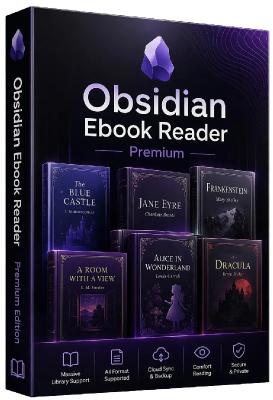
Obsidian Ebook Reader Premium 2.0.0 | Size: 141.59 MB
Language: English

Your books, beautifully organized. Obsidian Reader allows you to read s and PDFs with no ads, no online connection, and complete privacy. Manage your library with folder synchronization, editable metadata, and enjoy a modern, customizable interface for the best reading experience.

Everything you need for a great read.
Designed with simplicity and speed in mind, allowing you to focus purely on your content.

Private & Offline
Fully private and 100% offline. Read your and PDF books locally with absolutely no ads to distract you.

Manage Your Library
View all your books in an organized grid or list. Sync your book folders and edit titles, authors, and cover images.

Highly Customizable
Change font, text size, padding, line space, and word spacing. Choose from themes including true black mode.

Sleek Interface
A sleek, modern interface free from distractions, giving you the best environment to focus purely on reading.

Save Bookmarks
Easily save bookmarks in your books so you can always pick right back up exactly where you left off.

Blazing Fast
Built to be lightweight and fast. Massive s and PDFs load instantly so you never have to wait.

HOMEPAGE:
Код:
https://obsidianreader.app

FREE DOWNLOAD LINKS:

Код:
https://rapidgator.net/file/b232ca3f855bd4261c17a246f91a7970/Obsidian_Ebook_Reader_Premium_2.0.0.rar

Код:
https://nitroflare.com/view/90B9D99AFD0B3D2/Obsidian_Ebook_Reader_Premium_2.0.0.rar
 
0f8d2057bf30ddd77cd7295a90773767.png


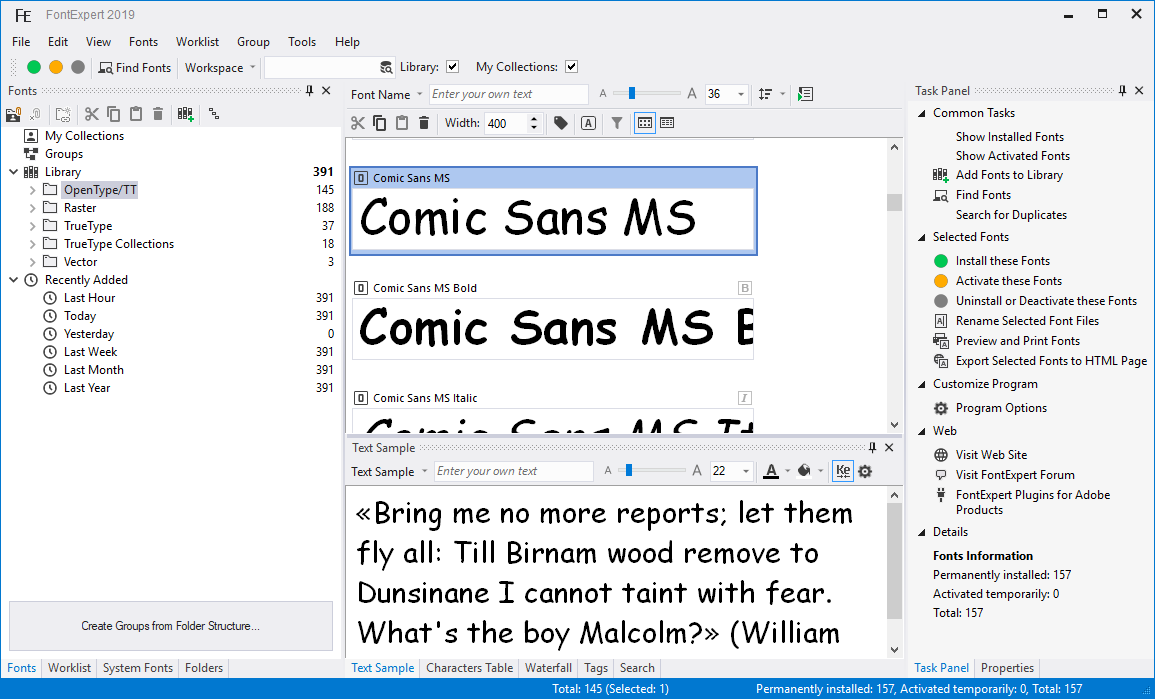
Proxima FontExpert 2026.21.0 Release 1 Multilingual | Size: 17.14 MB
Language: English

FontExpert Font Manager enables you to preview and manage both installed and uninstalled typefaces, plus examine your system for font errors. You can display the list of installed font faces, customizable font samples and advanced font properties.

FontExpert Features:

View and Preview Fonts
FontExpert displays the list of all installed typefaces and lets you explore folders and preview uninstalled fonts located on your compact disks or DVDs, local disks, removable disks or network drives. You can preview the font as a paragraph of text or as a detailed character map. It is easy to choose the desired font size, font style or color.
Assign Keywords, Ratings and Categories to Fonts
Assign keywords, categories, ratings and captions in new Tags view.

Search in Database
Search for fonts in the database by keywords, ratings and categories in new DB Search view.
Search for Fonts on Local Discs and Network Drives
FontExpert can search your local disks, CDs or DVDs, network drives for fonts, and put all fonts to a special list for your further work.

Search for Duplicates and Corrupted Fonts
FontExpert automatically detects corrupted and incomplete fonts, and allows you to search for and manage duplicate fonts.

Manage Fonts
It is easy to manage any typefaces that are shown in any view of the program. You can sort, filter, preview fonts, copy, move, delete font files, activate or deactivate fonts, add or link fonts to font groups (sets). The program can control fonts located in the Windows Fonts and Psfonts folder (used by Adobe Type Manager), so you do not need to remove fonts from standard folders as some font managers require.

Create Font Library
FontExpert imports fonts and creates font library. You can keep your fonts organized in groups (sets), and activate or deactivate font sets. A group may include either the font file, or a link to a file located in any folder on your computer or network drive. It is easy to add fonts or links by drag-and-dropping from the Windows Explorer to the Groups view.

Print Fonts
FontExpert can print selected fonts. It is easy to print character map, "water flow" or face name reports for selected fonts, either installed or uninstalled. You can customize and format page headers and footers as desired, for example, by adding the name of your company.

View Advanced Font Properties
The program displays detailed information about the selected font, including type foundry or copyright, TrueType tables, number of kerning pairs in a font, Panose attributes, Windows font metrics and more.

Examine your System for Font Errors
With the help of Detect Font Problems feature, it is easy to find errors in installed fonts and to optimize Windows by resolving typeface conflicts and by removing records about missing fonts.

Export Fonts to HTML Web Album
FontExpert can create HTML Web Album from selected fonts. You can create GIF, JPG, PNG, TIFF, and BMP images of selected font faces. See the sample of HTML page created by FontExpert.

Automatic Activation of Missing Fonts
FontExpert includes Missing Fonts Loader plug-in for Adobe InDesign, and for Adobe Illustrator.

Windows Shell Extensions
The program adds Open, Print and Install Font custom menu commands to Windows Explorer context menu, and adds custom property page that displays detailed attributes of selected .ttf or .otf file. FontExpert adds font management capabilities to the shell so it is easy to activate or print any font in a folder you browse in Windows Explorer.

System requirements:
Operating systems (32-bit and 64-bit):
Windows 10, 8.1, 8, 7, Vista

HOMEPAGE:
Код:
http://www.proximasoftware.com/fontexpert/

FREE DOWNLOAD LINKS:

Код:
https://rapidgator.net/file/bde7df55a2bf8d2c3c4b878e90515c31/Proxima_FontExpert_2026_21.0_Release_1_Multilingual.rar

Код:
https://nitroflare.com/view/38DECECE0A1FC18/Proxima_FontExpert_2026_21.0_Release_1_Multilingual.rar
 
ff4aaff27bf1da4bd68884b6c89c740d.jpg


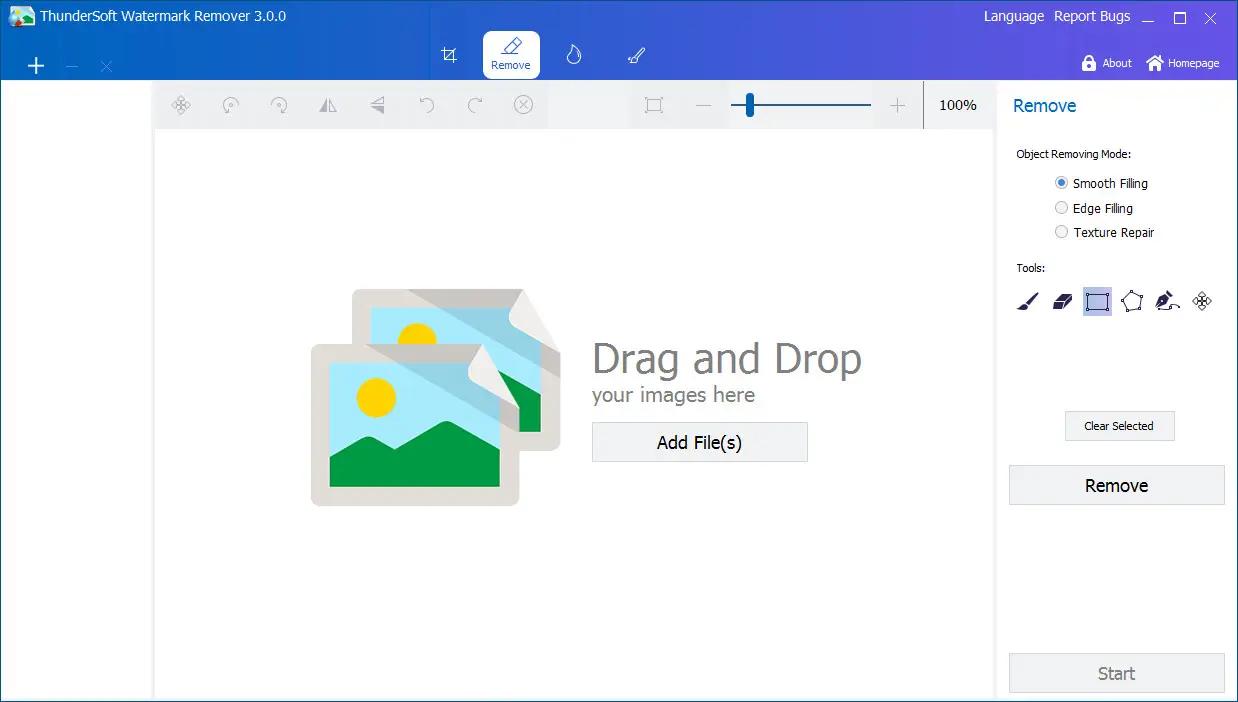
ThunderSoft Watermark Remover 6.3.0 | Size: 219.56 MB
Language: English

Watermark in a photo or picture is very annoying, getting rid of it is very difficult even with a professional photo editor. Watermark Remover can help you remove watermark, logo, date stamp and other unwanted objects on your photo or pictures. With various area selection tools, it's easy to select a watermark, and remove it by clicking the "Remove" button. The area removed is filled with automatically generated texture, and the photo will be back into its natural state.

Features:
Provide various area selection tools.
Provide 3 different removing methods: Smooth Filling, Edge Filling and Texture Repair.
Allow undo and redo your operations.
Contains basic photo editing features: crop, rotate, flip, resize, etc.
Allow add your own watermark and logo.
Allow drawing shapes, such as straight line, curve, rectangle, ellipse, arrow, etc.
Supports batch operation.

Operating System: Windows 11/10/8.1/8/7/Vista/XP

HOMEPAGE:
Код:
https://www.thundershare.net/

FREE DOWNLOAD LINKS:

Код:
https://rapidgator.net/file/077454d4cdac00670689f3b947d848ef/ThunderSoft_Watermark_Remover_6.3.0.rar

Код:
https://nitroflare.com/view/CA556DB566C29FF/ThunderSoft_Watermark_Remover_6.3.0.rar
 
6552822a30b16d6df37f08ed13f86135.jpg


Windows 11 AIO 16in1 23H2 Build 22631.7219 (No TPM Required) Preactivated June 2026 | Size: 6.54 GB
Windows (x64) | Languages: English

This is the latest version of Windows OS releases, with new interface and other new features like new Microsoft Store, a new personalized feed powered by AI and best-in-class browser performance from Microsoft Edge, Chat from Microsoft Teams integrated in the taskbar and many more!

Editions Includes
1. "Windows 11 Home"
2. "Windows 11 Home N"
3. "Windows 11 Pro"
4. "Windows 11 Pro N"
5. "Windows 11 Home Single Language"
6. "Windows 11 Enterprise"
7. "Windows 11 IoT Enterprise"
8. "Windows 11 IoT Enterprise Subscription"
9. "Windows 11 Enterprise multi-session"
10. "Windows 11 Education"
11. "Windows 11 Pro Education"
12. "Windows 11 Pro for Workstations"
13. "Windows 11 Enterprise N"
14. "Windows 11 Education N"
15. "Windows 11 Pro Education N"
16. "Windows 11 Pro N for Workstations"

System Requirements
Processor: 2 gigahertz (GHz) or faster.
RAM: 2 gigabyte (GB).
Free space on hard disk: 25 gigabytes (GB).
Graphics card: DirectX 9 graphics device or a newer version.
Additional requirements to use certain features.
To use touch you need a tablet or monitor that supports multitouch.
To access the Windows store to download and run apps, you need an active Internet connection and a screen resolution of at least 1024 x 768 pixels

HOMEPAGE:
Код:
https://microsoft.com

FREE DOWNLOAD LINKS:

Код:
https://rapidgator.net/file/eef2640569322ab61033370143640f77/Win.11.Aio.23H2.22631.7219.Eng..part1.rar
https://rapidgator.net/file/b0a7a1a673213c4f29169369d4f558bc/Win.11.Aio.23H2.22631.7219.Eng..part2.rar
https://rapidgator.net/file/cc53ed90b11d8d2d50b9710a1f8b8c8d/Win.11.Aio.23H2.22631.7219.Eng..part3.rar
https://rapidgator.net/file/3d8479bede3a7e46d0f57da5f53fe4ef/Win.11.Aio.23H2.22631.7219.Eng..part4.rar
https://rapidgator.net/file/d65b76bafe9f5820ba156e9289bca60b/Win.11.Aio.23H2.22631.7219.Eng..part5.rar
https://rapidgator.net/file/811444b73538ef317c1d8442aa38276c/Win.11.Aio.23H2.22631.7219.Eng..part6.rar
https://rapidgator.net/file/bbf17c4527faaf7d0765c05656b04455/Win.11.Aio.23H2.22631.7219.Eng..part7.rar

Код:
https://nitroflare.com/view/92549D01BB9FC5C/Win.11.Aio.23H2.22631.7219.Eng..part1.rar
https://nitroflare.com/view/C8A7CF3F06A662E/Win.11.Aio.23H2.22631.7219.Eng..part2.rar
https://nitroflare.com/view/F635CA17912C5F9/Win.11.Aio.23H2.22631.7219.Eng..part3.rar
https://nitroflare.com/view/4A77BAD102528B3/Win.11.Aio.23H2.22631.7219.Eng..part4.rar
https://nitroflare.com/view/BD2721202374F3E/Win.11.Aio.23H2.22631.7219.Eng..part5.rar
https://nitroflare.com/view/D8BB536C0411071/Win.11.Aio.23H2.22631.7219.Eng..part6.rar
https://nitroflare.com/view/FEA25AE5EC9C4D0/Win.11.Aio.23H2.22631.7219.Eng..part7.rar
 
21fcb3da09a713dab17df477970286e7.jpg


tiny11 Core 25H2 Build 26200.8655 Multilingual Preactivated | Size: 4.01 GB
No TPM | Languages: Arabic,English,German,Greek,French,Spanish,Italian,Portuguese-Brazil,Turkish,Dutch,Czech,Norwegian

The fastest and most optimized Windows 11. You can install it on older and unsupported devices. The image was build via official tiny11 Builder and MSDN image of Windows 11 25H2 Pro Build 26200.8328.

While Windows 10 and Windows 11 aren't the most compact operating systems (minimum system requirements require at least 20GB of free disk space), modern versions of Windows are increasingly difficult to run on less powerful devices.
In this context, projects such as tiny10 and tiny11 come to the fore, providing lightweight and stripped-down versions of the OS for older computers that retain compatibility or key features.

Tiny11 is a majorly stripped-back, bare-bones version of Windows 11 Pro 22H2 that dramatically lowers the system requirements. The operating system needs just 8GB of disk space and 2GB of RAM, and it does not require TPM (Trusted Platform Module) and Secure Boot support.

Note! This image is a significantly reduced Windows 11 image. However, it's not suitable for regular use due to its lack of serviceability - you can't add languages, updates, or features post-creation. tiny11 Core is not a full Windows 11 substitute but a rapid testing or development tool, potentially useful for VM environments. Keep in mind that you cannot add back features in tiny11 core.

What is removed:
- Clipchamp
- News
- Weather
- Xbox (although Xbox Identity provider is still here, so it should be possible to be reinstalled with no issues)
- GetHelp
- GetStarted
- Office Hub
- Solitaire
- PeopleApp- PowerAutomate
- ToDo
- Alarms
- Mail and Calendar
- Feedback Hub
- Maps
- Sound Recorder
- Your Phone
- Media Player
- QuickAssist
- Internet Explorer
- Tablet PC Math
- Edge
- OneDrive

For tiny11 core:
- all of the above +
- Windows Component Store (WinSxS)
- Windows Defender (only disabled, can be enabled back if needed)
- Windows Update (Windows Update wouldn't work anyway without WinSxS, so enabling it would only put the system in a state where it would try to update but fail spectacularily)
- WinRE

System Requirements:
Processor: 1 gigahertz (GHz) or faster.
RAM: 1 gigabyte (GB).
Free space on hard disk: 16 gigabytes (GB).
Graphics card: DirectX 9 graphics device or a newer version.
Additional requirements to use certain features.
To use touch you need a tablet or monitor that supports multitouch.
To access the Windows store to download and run apps, you need an active Internet connection and a screen resolution of at least 1024 x 768 pixels

HOMEPAGE:
Код:
https://microsoft.com

FREE DOWNLOAD LINKS:

Код:
https://rapidgator.net/file/b7e5769e2fbefdba7d26e3e796da4c12/tiny11_Core_25H2_Build_26200.8655..part1.rar
https://rapidgator.net/file/cb7ab07cd21efa9c6e9d50134c72906c/tiny11_Core_25H2_Build_26200.8655..part2.rar
https://rapidgator.net/file/4462771a45276b48b2c66a53e304fa17/tiny11_Core_25H2_Build_26200.8655..part3.rar

Код:
https://nitroflare.com/view/441322F607D35CA/tiny11_Core_25H2_Build_26200.8655..part1.rar
https://nitroflare.com/view/2A2D2DFA2CEA32D/tiny11_Core_25H2_Build_26200.8655..part2.rar
https://nitroflare.com/view/06496FA77D8D40B/tiny11_Core_25H2_Build_26200.8655..part3.rar
 
Назад
Сверху Снизу