All Emperor2011's Software in one thread !! (updated daily)

992c1578bbf0fc3b3d33df435ddc12c9.jpg


WinRAR 7.20 Beta 3 (x64) | Size: 3.81 MB
Language: English


WinRAR is a powerful archive manager for Windows. This is a powerful compression tool with many integrated additional functions to help you organize your compressed archives. It can backup your data and reduce size of email attachments, decompress RAR, ZIP and other files downloaded from Internet and create new archives in RAR and ZIP file format. The archiver puts you ahead of the crowd when it comes to compression. By consistently creating smaller archives, WinRAR is often faster than the competition. This will save you disc space, transmission costs AND valuable working time as well. WinRAR is ideal for multimedia files. It automatically recognizes and selects the best compression method.

The special compression algorithm compresses multimedia files, executables and object libraries particularly well. RAR files can usually compress content by 8 percent to 15 percent more than ZIP files can.

Features
It is a powerful compression tool with many integrated additional functions to help you organize your compressed archives.
It puts you ahead of the crowd when it comes to compression. By consistently creating smaller archives, WinRAR is often faster than the competition. This will save you disk space, transmission costs AND valuable working time as well.
Supports all popular compression formats (RAR, ZIP, CAB, ARJ, LZH, ACE, TAR, GZip, UUE, ISO, BZIP2, Z and 7-Zip).
It is ideal for multimedia files. Automatically recognizes and selects the best compression method. The special compression algorithm compresses multimedia files, executables and object libraries particularly well.
Allows you to split archives into separate volumes easily, making it possible to save them on several disks for example.
Allows you to create selfextracting and multivolume archives.
Recovery record and recovery volumes allow to reconstruct even physically damaged archives.
It is also ideal, if you are sending data through the web. Its 256 bit password encryption and its authenticated signature technology will give you the peace of mind you have been looking for.
It is easier to use than many other archivers with the inclusion of a special "Wizard" mode which allows instant access to the basic archiving functions through a simple question and answer procedure. This avoids confusion in the early stages of use.
It is a trial product, meaning you have the chance to thoroughly test it. The program can be used absolutely free of charge for 40 days!
Licenses are valid for all available language and platform versions. If you have purchased several licenses, you can even mix versions to meet your own personal needs.


HOMEPAGE:
Код:
https://www.rarlab.com

FREE DOWNLOAD LINKS:

Код:
https://rapidgator.net/file/733fbec08c0da5750fece9a1cf3a0813/WinRAR_7.20_Beta_3_x64.zip

Код:
https://nitroflare.com/view/2F8998319F0DF22/WinRAR_7.20_Beta_3_x64.zip
 
64ccf401a113e602b861d127bd3f19e8.jpg


WinToUSB 10.4 Multilingual | Size: 37.94 MB
Language: English


WinToUSB (also called Windows To USB) is the best free Windows To Go (WTG) Creator which allows you to install and run a fully-functional Windows on external hard drive, USB flash drive or Thunderbolt drive. It is so easy and efficient, with just 3 steps and a few minutes, you can create your first portable Windows 11/10/8/7 or Windows Server directly from an ISO, WIM, ESD, SWM, VHD, VHDX file or CD/DVD drive, or you can clone existing Windows installation to USB or Thunderbolt drive as portable Windows. WinToUSB also supports creating Windows installation USB flash drive from Windows 11/10/8/7 and Windows Server installation ISO, with it you can install Windows from the USB flash drive easily.

Features
- Creation of Windows To Go from ISO, WIM, VHD, VHDX or CD/DVD drive.
- Clone Windows 11/10/8/7 to USB/Thunderbolt drive as portable Windows.
- Creation of Windows To Go on Non-Certified Windows To Go USB drive.
- Encrypt Windows To Go with BitLocker to keep your data safe.
- Creation of Windows installation USB flash drive with BIOS & UEFI support.
- Use any edition of Windows 11/10/8/7 and Windows Server 2019/2016/2012/2010 to create Windows To Go USB drive.
- Support for Thunderbolt and non-512 byte sector size drives.

Windows To Go (Portable Windows) Creator
WinToUSB allows you to install & run fully-functional Windows on an external HDD/SSD, USB flash drive or Thunderbolt drive, which means you can carry the portable Windows drive to anywhere and use it on any computer.
- Use any version of Windows 11/10/8/7 and Windows Server to create Windows To Go Workspace
- Creation of Windows To Go from an ISO, WIM, ESD, SWM, VHD(X) image file or CD/DVD drive
- Clone existing Windows installation to USB drive or Thunderbolt drive as portable Windows
- Creation of Windows To Go on Non-Certified Windows To Go drive
- Hot clone Windows without restarting the source computer to be cloned
- Create BitLocker encrypted Windows To Go Workspace
- Support for creating VHD/VHDX-based Windows To Go Workspace

Windows Installation USB Creator
WinToUSB releases a feature called "Windows Installation USB Creator" which allows you to create a Windows installation USB flash drive from a Windows 11/10/8/7/vista/2019/2016/2012/2008 installation ISO file with a few simple steps, with this feature you can create a bootable Windows installation USB drive to install Windows on both Traditional BIOS and UEFI computers by using the same USB drive.

Windows PE Bootable USB Creator
WinToUSB also supports creating a bootable Windows PE USB drive, it can help you transfer the contents of a Windows PE image to a USB drive and make the USB drive bootable


HOMEPAGE:
Код:
https://www.easyuefi.com/

FREE DOWNLOAD LINKS:

Код:
https://rapidgator.net/file/795679c546081787bf81becf862a7b4c/WinToUSB_10.4_Multilingual.rar

Код:
https://nitroflare.com/view/54F420F51C33B0A/WinToUSB_10.4_Multilingual.rar
 
1d9693df29c61794810bc9cce34824bf.png


Windows Key Viewer 1.3.0.20 | Size: 280.08 KB
Language: English


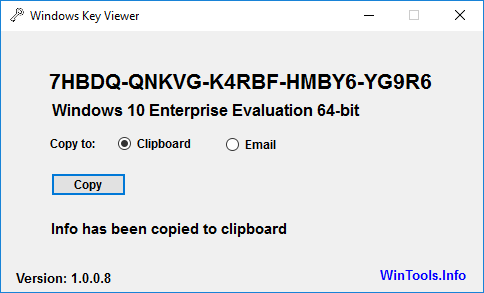
By using Windows Key Viewer, the current computer product key can be easily determined. In some cases it is very important to know the product key, e.g. when reinstalling the computer.Generally, the product key can be found on the Windows installation kit or on a label on the computer. This label often gets damaged and becomes illegible, and when using multiple computers, installation packages can get mixed up. That is when Windows Key Viewer becomes useful, as the product key can be easily displayed with it.

The Windows operating system stores the product key, but there is no possibility to display it directly as this data is encrypted. Windows Key Viewer can display the Windows Product key in its original format.
Advantages of Windows Key Viewer
Displays the Windows Product key in its original format
Copies the Windows Product key to the clipboard and sends it to the specified email address
Doesn't require installation or setup
Free to use
It supports Windows 7/8/10 operating systems

HOMEPAGE:
Код:
https://www.wintools.info

FREE DOWNLOAD LINKS:

Код:
https://rapidgator.net/file/b329e65f742e0c394d328d5a93afc617/Windows_Key_Viewer_1.3.0.20.exe

Код:
https://nitroflare.com/view/25624CAB7CB7790/Windows_Key_Viewer_1.3.0.20.exe
 
62dc5331c0fd98d3a6812fc1d8369233.png


X-Sec Malware Scanner 3.2.4.0 | Size: 249.86 MB
Language: English


X-Sec Malware Scanner, previously known as X-Sec Antivirus, is a user-friendly and efficient virus scanner designed to work seamlessly with other antivirus programs. It was developed to be lightweight and easy to use.

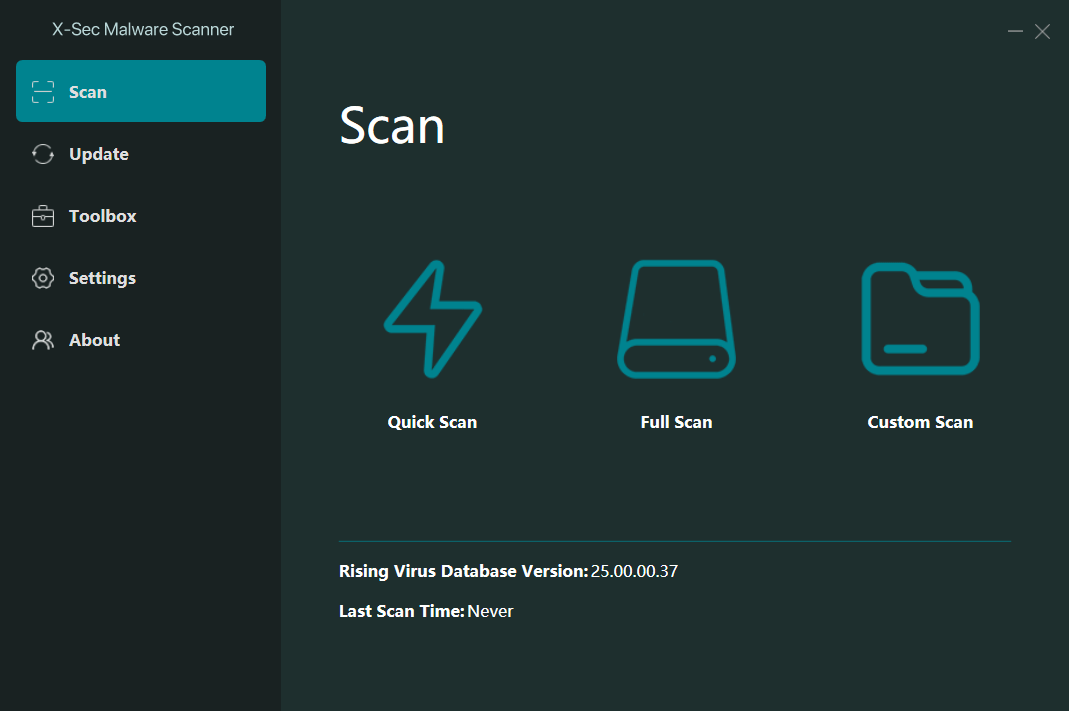
The user interface has been crafted to be intuitive and easy to navigate. On the left-hand side of the screen, you'll find a series of tabs that grant access to various functions, including Scan, Update, Toolbox, Settings, and About. Each tab offers a wealth of information, which can be viewed in detail on the right-hand side of the interface. With this design, you'll have no trouble finding the information you need precisely when you need it.
One complaint out of the gate is that the file is packed in 7z format. While many of you can open 7z, everyone can open a ZIP or executable. You will need 7-zip or similar to unpack and use X-Sec Malware Scanner.
In order to perform a scan, you will need to access the Scan Task Manager by navigating to the Scan button. Once there, you can choose between three different scan options: Quick Scan, Full Scan, or Custom Scan. Depending on the speed of your computer, a Quick Scan can take as little as two minutes, while a Full Scan may take up to fifteen minutes, especially if it involves scanning two large drives that are combined to total 1.5 Terabytes.

HOMEPAGE:
Код:
https://www.xsecantivirus.com/index.aspx

FREE DOWNLOAD LINKS:

Код:
https://rapidgator.net/file/90ad173714a742bcbdba5494056e6c17/X-Sec_Malware_Scanner_3.2.4.0.rar

Код:
https://nitroflare.com/view/B977FD3D8D93A4E/X-Sec_Malware_Scanner_3.2.4.0.rar
 
853c3de38750182afa53700398cff436.jpg


XML Blueprint 22.2025.1217 | Size: 74.78 MB
Language: English


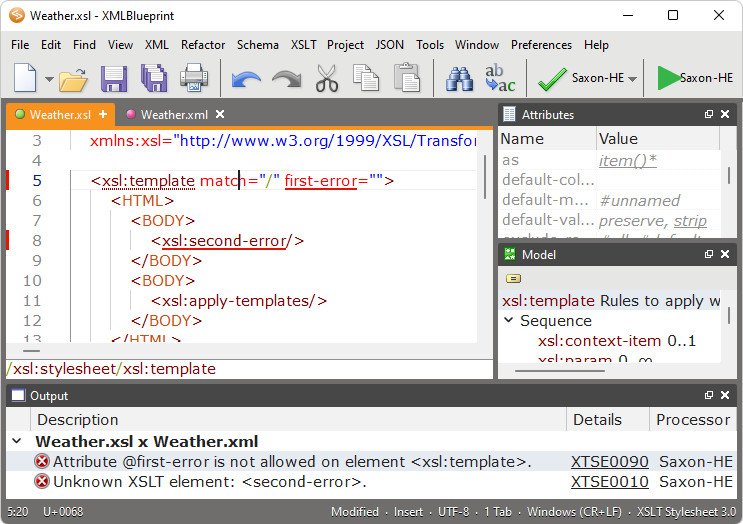
The smart XML Editor in XMLBlueprint has full support for DTD, Relax NG, Schematron, XSD, XSLT (1.0, 2.0, 3.0) and XPath (1.0, 2.0, 3.1). Its unique combination of just the right features and an affordable price for both professionals as well as home users makes it the smart choice for all your XML-related work. With XMLBlueprint you can edit and validate very large XML files (1GByte and larger). With its intuitive user interface, XMLBlueprint makes XML editing fast and easy. XMLBlueprint is the best choice for professional XML developers and home users alike.

XML Validator
The XML Editor automatically validates XML files against XSD, DTD, Relax NG Schema, and Schematron. All files are automatically validated as-you-type. XMLBlueprint provides wizards to associate your XML Document with a DTD, Relax NG schema or XSD. Supported Processors: Xerces, MSXML and Jing.

XML Catalogs
XML Catalogs lets you redirect schemas on the Internet to your local computer, which makes validating your XML files much faster and more reliable.

XML Tag Completion
Context-Sensitive XML Helpers, or IntelliSense, based on XSD, DTD, and Relax NG Schema, for element names, attribute names and attribute values. Closing tags are automatically added. Annotations are read from the XML Schema and presented as tooltips, to provide context sensitive help.

XML Refactoring
XMLBlueprint has an extensive range of XML editing features, such as: XML Refactoring helps you change the structure of your xml documents. Sometimes a simple find/replace of text is not powerful enough to make subtle changes in your XML Document. For instance, if want to change all

elements into

elements you cannot globally replace "p" into "div" because this would also change text such as "simple" into "simdivle". Nor could you change

into

because then the would still remain. It's much faster to use the XML editor's refactoring functions for this type of changes.

XML Formatter
The XML Formatter lets you indent text, split long lines, remove whitespace, handle empty elements, format attributes. You can specify how XMLBlueprint should format your xml file. For instance, what to do with empty elements and where to place attributes and text. XMLBlueprint correctly handles whitespace (the xml:space attribute), and you can override this behavior for specific elements.

XML Generator
XML Generator to generate sample XML based on XSD, DTD, or Relax NG Schema. You can specify if you want XMLBlueprint to generate optional elements, optional attributes, attribute values, etc. XSD Generator to generate XSD, DTD, or Relax NG Schema from multiple sample XML files. Convert CSV to XML and Convert Excel to XML. Once you have created your scenario you can run it from the command line. To run conversions on a regular basis, you can use Windows' Task Scheduler. Schema Viewer.

XML Folding
To simplify working with large XML Documents, XMLBlueprint provides XML Folding.

Non-English Languages
XMLBlueprint supports languages such as French, Russian, Japanese, and Chinese.

FTPS, SFTP, and WebDAV
With XMLBlueprint you can edit files stored on a remote FTPS server, SFTP server or WebDAV server.

Large Files
XMLBlueprint is optimized for large files, up to 1GByte and larger. Even large files are open quickly without losing any of the XML features.

Outline View
The Outline View shows all XML elements and attributes. The outline is updated in real time as you type. Selecting an XML element in the outline automatically selects the corresponding XML in the editor.

Jump to element definition in XML Schema
While editing your XML file you can jump directly to the corresponding element definition in the associated XML Schema.

Breadcrumbs
The breadcrumbs tool displays the path from the root of your xml file to the current xml node.

Additional Features
Folding simplifies working with large XML documents.
Syntax Coloring is supported for XML documents, but also for HTML, CSS, Java and JavaScript files. You can customize the text colors and the background colors.


HOMEPAGE:
Код:
https://www.xmlblueprint.com/

FREE DOWNLOAD LINKS:

Код:
https://rapidgator.net/file/d7510688975197ad1a02d49e8505d9b3/XML_Blueprint_22.2025.1217.rar

Код:
https://nitroflare.com/view/D5D5157CDD31F3A/XML_Blueprint_22.2025.1217.rar
 
b8969b4fc01235dfc1b43887f3ec5b2f.png


addLEDs 1.3.0.7 | Size: 439.58 KB
Language: English


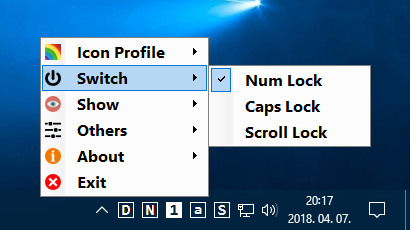
Conventional computers provide some basic information with the help of LEDs. Modern computers often lack these LEDs or they are not in a clearly visible place. AddLEDs replaces or supplements them by means of software. AddLEDs displays the state of the Caps Lock, Num Lock and Scroll Lock keys and provides information on network and disc activity with the help of icons. Each of these information has its own tray icon ("Virtual LED") which indicates the given state in an informative way.

These icons can be grouped in any way and their display can be enabled or disabled. The state of the given key can be changed by clicking on the icons displaying the keyboard's operating mode. The state of the keyboard can also be queried and switched in the menu. State change from any source results in a short sound signal if it is enabled.

AddLEDs can also be set up to start with the operating system (Autostart). The sensitivity of network activity can be chosen from five levels. The display of the program can be customized by selecting icon profiles.

he "Reset All" menu restarts the program with default settings. Options are designed in a way that leaves at least one icon enabled. Therefore, the program's menu and settings are always available. If, as the result of an error, no icons are displayed upon starting the program, a default window makes it possible to carry out appropriate settings.

Advantages of addLEDs
Replaces or supplements information LEDs which are missing or not clearly visible in an informative way
Provides a software option for the state change of the "Lock" keys
Short sound signal when there is a state change of "Lock"
Autostart operating mode
Several display modes
Doesn't require installation
Compatible with Windows 7/8/10
Free to use


HOMEPAGE:
Код:
https://www.wintools.info

FREE DOWNLOAD LINKS:

Код:
https://rapidgator.net/file/1af8d1214c19023d6d2ac9bfbe933538/addLEDs_1.3.0.7.exe

Код:
https://nitroflare.com/view/021006DC4E9F40B/addLEDs_1.3.0.7.exe
 
e9e6b12736ca1805fd03135fa3e26fef.png


iTop Easy Desktop 4.0.0.231 | Size: 90.49 MB
Language: English


iTop Easy Desktop allows you to take control of your Windows desktop items flexibly and get things back to order readily. Easily declutter and organize your desktop to improve your efficiency and productivity.

Associate icon placements more efficiently and intuitively with rules you creatan improvement over the regular windows desktop.
iTop Easy Desktop Auto organizes documents, videos, folders, apps, etc., to boxes on the desktop, helping maintain a cleaner look. You can even set up multiple pages.

You can easily adjust color, transparency, and fonts for any folder, and there is an excellent little Quick Search function to help you locate items quickly. You can also mirror folders to the desktop and access any files rapidly.

iTop Easy Desktop is easy to use and light on the resources making it a fun way to change things up and make your desktop more effective.

Whats New
Updates: official site does not provide any info about changes in this version

HOMEPAGE:
Код:
https://www.itopvpn.com/

FREE DOWNLOAD LINKS:

Код:
https://rapidgator.net/file/08451f21e0cfffca38180c66b976596e/iTop_Easy_Desktop_4.0.0.231.rar

Код:
https://nitroflare.com/view/FBFC7BF20E7FA34/iTop_Easy_Desktop_4.0.0.231.rar
 
de7dd233a2cf71200dcc641ef078a8b1.jpg


n-Track Studio Suite 10.2.3.10380 Multilingual | Size: 555.7 MB
Language: English


n-Track Studio turns your PC into an easy to use multitrack audio recording studio. It is the perfect tool for professional quality audio recording, encoding, mixing and editing. Record, edit, overdub your audio tracks, apply effects, process audio live input, mix and then burn audio CDs or create mp3 files. n-Track Studio is an Audio and MIDI Digital Multitrack Recorder that transforms your computer into a powerful audio recording studio. You can record, playback, overdub your audio tracks exploiting the flexibility and power of today's PCs for applying effects, realtime input processing, automated aux channels sends and returns, destructive and non-destructive wave editing. The program supports 24bit-192 khz recording, 64 bit mixing, multiple channels soundcards, live input processing, CD burning, mp3 encoding and more.

Main n-Track Studio features
• Records and plays back a virtually unlimited number of audio and MIDI tracks
• DirectX, VST and ReWire effects can be added to each channel/track
• Built-in effects include Reverb, Compression, Parametric and Graphic EQ, Echo, Auto-volume, Pitch Shift, Chorus, Multiband Compression, Spectrum analyzer
• Supports 16 and 24 bit single and multichannel soundcards at sampling frequencies up to 192 Khz using Asio, WaveRT, WDM, MME and DirectSound
• Is compatible with multichannel Asio, WaveRT, WDM and MME audio drivers, which means that n-Track can work with almost any soundcard available today with the lowest possible latency
• Supports VST Instruments and DirectX Instruments synth plug-ins. Sample-accurate MIDI tracks can be sent to VSTi/DXi software MIDI synths, without the need of expensive hardware MIDI synths.
• Adjust the effect settings and listen to the result in real time.
• Built-in effects include Reverb, Compression, Parametric and Graphic EQ, Echo, Auto-volume, Pitch Shift, Chorus, Multiband Compression, Spectrum analyzer.
• Supports third party DirectX, VST 2.0 and ReWire plug-ins.
• Realtime Audio effects can be added to each channel.
• Supports 16 and 24 bit single and multichannel soundcards at sampling frequencies up to 192 Khz using Asio, WaveRT, WDM, MME and DirectSound.
• Input processing allows to process with plug-ins live signals. Record the 'dry' (unprocessed) signal while processing and reprocess the recording later - i.e. Play a guitar through a distortion plug-in then change the distortion after the recording!

More Features
• Supports surround mixing for creating DVD audio projects using 5.1, 6.1 and 7.1 channels surround formats
• Each audio track includes a 20 bands parametric EQ with graphical frequency response view, a full spectrum analyzer and an automatic instrument tuner. Up to 32 aux channels with fully automated sends and returns.
• Supports multiple input and output soundcards or more than one soundcard. You can record multiple tracks at a time and output to more than one stereo output. Each output channels has its own master channel effects and volume control.
• Supports technology by Propellerhead Software AB. Mix signals in realtime with n-Track's own channels from other programs (such as Reason, Ableton Live, Fruityloops and many others).
• Import and export .wav, .mp3, .wma, .mid, .ogg, .flac, .aiff, .cda, .sng, .sgw audio files
• Import and export EDL multitrack song files for exchanging songs with other multitrack programs
• Sync to other programs or external devices using SMPTE/MTC or MIDI Clock sync, acting either as master or slave
• Loads and saves MIDI tracks to standard MIDI files
• Play Videos (AVI, MPEG) in sync with the song in a dedicated video playback window
• Automated volume, pan, aux sends and returns and effects parameters. You can "program" fade-in/outs, cross fades, boost the volume of a track when there is a solo etc.


Supported Operating Systems: Windows 11, 10, 8

HOMEPAGE:
Код:
https://ntrack.com/

FREE DOWNLOAD LINKS:

Код:
https://rapidgator.net/file/71d837cb6d3723ce9a129363f7d6ea83/n-Track_Studio_Suite_10.2.3.10380_Multilingual.rar

Код:
https://nitroflare.com/view/9A447CE7C0BAC14/n-Track_Studio_Suite_10.2.3.10380_Multilingual.rar
 

1682981c507cb44b00141cf1282c3e00.png


Arturia V Collection 11 Pro v11.2.0 | Size: 6.55 GB
Language: English


Reference instruments for music makers. A premium suite of software instruments for unparalleled sonic exploration; from evocative emulations and hybrid synth engines, to authentically modeled keyboards and beautifully captured acoustic sounds - enhanced for today's production workflow.
Expand your
sonic powers
Unlock your full creative potential with an all-in-one suite of iconic instruments and cutting-edge production tools - tailored to suit your style, performance needs and production workflow.
Reference instruments
A curated suite of 45 definitive instruments - vintage analog legends, forward-thinking digital synths, blissful keyboards, and faithfully captured acoustic sounds - ready for any genre.
7 new additions
Explore new sonic territory with Jup-8000 V, Pure LoFi, Synthx V, MiniBrute V, the new SEM V and next-generation Augmented instruments - fresh ways to sculpt, layer, and perform.
Seamless workflow
Stay immersed in creativity with refined UX/UI, deep hardware integration, and Analog Lab Pro's unified interface-browse, tweak, and play effortlessly so you can focus on making music.

FREE DOWNLOAD LINKS:

Код:
https://rapidgator.net/file/b584cc045c0bfc2075b45f5a1271b05f/Arturia.V.Collection.11.Pro.v11.2.0-R2R..part1.rar
https://rapidgator.net/file/9c1e379d7628e260e2787905b6822396/Arturia.V.Collection.11.Pro.v11.2.0-R2R..part2.rar
https://rapidgator.net/file/6a67c2fee9dc4168f70f0af951921ccd/Arturia.V.Collection.11.Pro.v11.2.0-R2R..part3.rar
https://rapidgator.net/file/06ab6d4f1d0a5bdf3d47d17fcc8f5356/Arturia.V.Collection.11.Pro.v11.2.0-R2R..part4.rar

Код:
https://nitroflare.com/view/820BBB2EB0AC1D4/Arturia.V.Collection.11.Pro.v11.2.0-R2R..part1.rar
https://nitroflare.com/view/E38A1645FE64922/Arturia.V.Collection.11.Pro.v11.2.0-R2R..part2.rar
https://nitroflare.com/view/4B4E47FC2BBF828/Arturia.V.Collection.11.Pro.v11.2.0-R2R..part3.rar
https://nitroflare.com/view/5981A90ECBCE739/Arturia.V.Collection.11.Pro.v11.2.0-R2R..part4.rar
 
b315b5ae0f6d4d38bca7f3d34db75967.jpg


Blackmagic Design Fusion Studio 20.3.1 (x64) Multilingual | Size: 5.51 GB
Language: English


The world's most advanced visual effects, 3D, VR and motion graphics solution! Fusion is the world's most advanced compositing software for visual effects artists, broadcast and motion graphic designers, and 3D animators. Over the last 30 years, Fusion has been used on thousands of Hollywood blockbuster movies and television shows. Fusion features a powerful node based interface that lets you quickly and easily create sophisticated effects by connecting different types of image processing tools together! You get a massive range of tools, incredible VR and 3D support, GPU accelerated performance, unlimited network rendering and more! Fusion gives you everything you need to create exciting broadcast graphics, dramatic titles, and even major feature film visual effects!

What's New in Fusion 20
Compositions you create on the Fusion page can now be saved as a template and used on the edit or cut page! New animation curve modifiers can be used to automatically retime animations when you change their duration in an edit. Audio playback with waveform display makes it easier to create precisely timed animations, there are shared markers with the edit page and more. In addition, 27 GPU accelerated Resolve FX have been added to the Fusion page, including the noise reduction and sharpening tools from the color page! New node view bookmarks make it easy to navigate large comps, the toolbar can be customized with your favorite tools, and vertical layouts are supported in the node editor.

Build Your Own Effects with Customizable Templates
Fusion effect templates let you create any effect imaginable and apply them to clips on the edit and cut pages! Simply build a composition, save it as a macro, define the parameters you want to make visible, and save it in the correct location. Just drag Fusion effect from the library onto any clip!

Automatically Retime Animations
Retime Animations
Animation curve modifiers let you easily stretch or squish keyframes and add bounce, mirror or loop animations that automatically change when the duration of the composition changes. When you drop Fusion titles or effects onto the timeline and change its duration, the animation adjusts accordingly!

Video Step
Animations
The Fusion page can now playback audio from the edit or cut page timeline. You can choose a mix down from the timeline, or you can listen to the source clip's audio. Waveforms are displayed in the keyframe editor, allowing you to create precisely timed animations that are in sync with the audio!

Custom Vector Shapes
Vector shape tools make it easier to create motion graphics! You get ellipsis, rectangles, polygons and stars, along with boolean operators for combining shapes to create intricate designs. Grid, jitter, offset and transform, let you customize animations. Shapes can also be used as particle sources!

GPU Accelerated Resolve FX
The Fusion page has 27 new GPU accelerated Resolve FX. This includes the color page's noise reduction and sharpening tools, along with lens blur, light effects, color effects, revival image restoration tools and more. You also get texture and stylize, temporal effects, warping and beauty tools.

Personalize Your Workflow
Node tree bookmarks let you quickly navigate to any part of the node tree in a large composition. Customizable toolbars let you quickly switch toolbars based on the current task. Vertical node tree layouts give you more room to view the spline and keyframe editors when creating animations, and more.


HOMEPAGE:
Код:
https://www.blackmagicdesign.com/

FREE DOWNLOAD LINKS:

Код:
https://rapidgator.net/file/870d89a905698efb8f203910e8d74d81/Blackmagic_Design_Fusion_Studio_20.3.1..part1.rar
https://rapidgator.net/file/97f673c58458ff19dc601bd50a4935fa/Blackmagic_Design_Fusion_Studio_20.3.1..part2.rar
https://rapidgator.net/file/a558219681be996ae23856a17800fe22/Blackmagic_Design_Fusion_Studio_20.3.1..part3.rar
https://rapidgator.net/file/fe013ec95ccf240cdd710907c403757f/Blackmagic_Design_Fusion_Studio_20.3.1..part4.rar
https://rapidgator.net/file/344da94f8db35a81567f7f7aeace1fe2/Blackmagic_Design_Fusion_Studio_20.3.1..part5.rar
https://rapidgator.net/file/106253ebaaedb003bbafa634e35c2aca/Blackmagic_Design_Fusion_Studio_20.3.1..part6.rar

Код:
https://nitroflare.com/view/FE998B8E95F46CA/Blackmagic_Design_Fusion_Studio_20.3.1..part1.rar
https://nitroflare.com/view/50AD5D2C4C3C936/Blackmagic_Design_Fusion_Studio_20.3.1..part2.rar
https://nitroflare.com/view/D6758A1250425D2/Blackmagic_Design_Fusion_Studio_20.3.1..part3.rar
https://nitroflare.com/view/ED1D2F23F860DCD/Blackmagic_Design_Fusion_Studio_20.3.1..part4.rar
https://nitroflare.com/view/D71CB97976FE6FC/Blackmagic_Design_Fusion_Studio_20.3.1..part5.rar
https://nitroflare.com/view/8B48689B724B695/Blackmagic_Design_Fusion_Studio_20.3.1..part6.rar
 
f0113a77141dd265eaf52f40fe345276.jpg


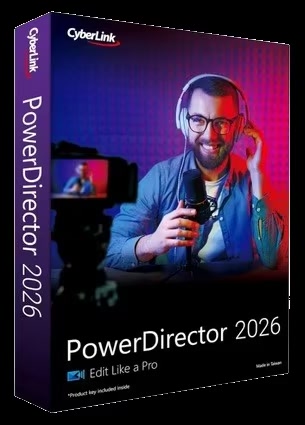
CyberLink PowerDirector Ultimate 2026 v24.0.1216.0 | Size: 686.63 MB
Language: English


Award-winning video editing software for professional creators. Create. Edit. Share. Video editing, made for everyone. No experience necessary. Do more, faster with customizable templates. Discover and create attention-grabbing video intros alongside our community of creatives.

Kickstart Your Projects
- No experience necessary.
- Do more, faster with customizable templates.

Save Time With Thousands of Shareable Video Intros
Discover and create attention-grabbing video intros alongside our community of creatives.

Mask Designer
Remove unwanted objects, or composite clips together.
- Custom Masks
- Image Masks
- Text Masks

Title Designer
Choose from drag-and-drop presets or get creative with an array of gradient, border, and shadow tools.
- Motion Graphics
- Sound Effects
- Blending Modes
- Special Effects

PiP Designer
Use animated stickers, shapes, and callouts to grab your viewers' attention.
- In/Out Animations
- Animated Stickers and Graphics
- Custom Shapes and Callouts

AI Motion Tracking
Add text or graphics that automatically follow the motion of any object.

AI Sky Replacement
From blissful blue skies to dramatic sunsets, don't let bad weather ruin your perfect shot.

AI Object Detection
Instantaneously create masks with automatic object selection for cars, people, pets, and more.

Minimum System Requirements

Operating System
Microsoft Windows 11, 10 (64 bit OS only, Windows 11 Arm64 is supported)

Processor (CPU)
- Intel® Core™ i-series (6th generation) and above.
- Intel Haswell (4th generation) processor: Core i7-4770 (only Core and Xeon branded), and above required for AI features.
- AMD Ryzen-series and above
- AMD Phenom® II and above
- AMD A8-7670K and above, AMD Ryzen™ 3 1200 and above required for AI features.
- Qualcomm Snapdragon® 8cx Gen 3
- Qualcomm Snapdragon® X Elite

Graphics Processor (GPU)
- Standard Video: 128 MB VGA VRAM or higher.
- 360-video: DirectX 11 compatible.
- AI Plugin: 2 GB VGA VRAM or higher.
- NVIDIA Audio/Video Denoise and Room Echo Removal: NVIDIA GeForce RTX 2060, NVIDIA Quadro RTX 3000, NVIDIA TITAN RTX, or higher.

Other Requirements
- Memory: 8GB required (16GB or above recommended).
- Hard Disk Space: 7GB
- Burning Device: Burning drive is required for disc burning purpose.
- Sound Card: Windows compatible sound card is required.
- Screen Resolution: 1024 x 768, 16-bit color or above.

Language Support
- English
- French
- German
- Italian
- Spanish (European)
- Chinese Simplified
- Chinese Traditional
- Japanese
- Korean
- Dutch
- Portuguese (Brazilian)

FREE DOWNLOAD LINKS:

Код:
https://rapidgator.net/file/55a7081882754be7a1220e51305decb2/CyberLink_PowerDirector_Ultimate_2026_v24.0.1216.0.rar

Код:
https://nitroflare.com/view/F51EBBCE804B3E4/CyberLink_PowerDirector_Ultimate_2026_v24.0.1216.0.rar
 
ea50e89ac5f71022f34d0055a3851318.jpg


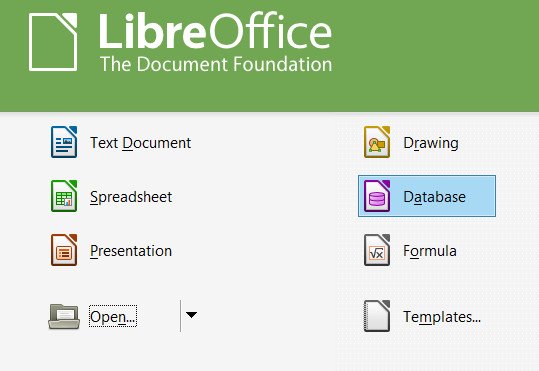
LibreOffice 25.8.4 | Size: 677.25 MB
Language: English


LibreOffica powerful office suite. Translated into more than 30 languages. LibreOffice is free and is open source, so you can free to download, use and learn LibreOffice. LibreOffice free for private and for educational or commercial use. It can be used without any licensing fees to your family, friends, colleagues, students, employees, and so on.

LibreOffice office suite consists of several components that are integrated into a common core, in particular
Text Editor Writer;
Table Editor Calc;
A tool for presentations and demonstrations Impress;
Vector editor Draw;
Formula editor Math;
Database Management System Base.

Features
As the name implies, LibreOfficone of the largest free office products. Freedom is manifested in
The absence of any license fees for the purchase and use the product.
The absence of a language barrier. If your language is not included in LibreOffice, it is certain that this will soon change.
Open access to the source code under a license agreement OSI.
- LibreOffice cares about the quality
LibreOffice have a rich heritage. The development has its roots in the past. The community has more than 20 years of experience on which to rely.
Thousands of users around the world are taking part in the beta testing the new version.
The process of creating LibreOffice is completely open. Everyone has the opportunity to participate in the improvement of LibreOffice.
- LibreOffice convenient
Easy to use and can be used without special training by all who had once worked with any office software.
Switching from another office suite on LibreOffice simple, since LibreOffice supports most existing formats "office" files.
LibreOffice has the technical support that is provided by volunteers around the world to help find answers to questions both novices and experienced users.

HOMEPAGE:
Код:
https://www.libreoffice.org

FREE DOWNLOAD LINKS:

Код:
https://rapidgator.net/file/57c3ae8415c07a6605b6d512e09b55b6/LibreOffice_25.8.4.rar

Код:
https://nitroflare.com/view/1930A5D3CE1323A/LibreOffice_25.8.4.rar
 
Назад
Сверху Снизу