All Emperor2011's Software in one thread !! (updated daily)

58e7f162761077cb0a864b1c75d881f6.png


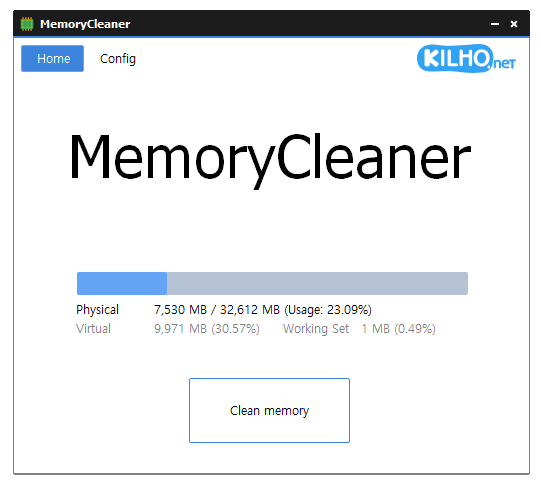
MemoryCleaner 1.9.5 | Size: 2.77 MB
Language: English


MemoryCleaner utilizes many functions already built into Windows to free memory with no impact on your system.You can also access Memory Cleaner functions right from your systray without having to open up the program. The cleaning procedures are both silent and the only time you will see an alert is to show the amount of RAM recovered briefly.

Feature
A program that cleans up memory.
Only Working Set, Standby automatically cleans up the memory.
Cleans up memory every specified time.
Automatically cleans up when the specified memory usage rate is exceeded.

HOMEPAGE:
Код:
https://global.kilho.net/memorycleaner

FREE DOWNLOAD LINKS:

Код:
https://rapidgator.net/file/a0b9d1349aa83d30b57b54937118d798/MemoryCleaner_1.9.5.zip

Код:
https://nitroflare.com/view/9EF7AC0DF5B2DD2/MemoryCleaner_1.9.5.zip
 
8066639d115a02c637ecc2ddf49a9aee.png


MiniTool Partition Wizard 13.6 Multilingual | Size: 145.57 MB
Language: English


MiniTool Partition Wizard is a rich-featured partition magic, which is designed to optimize disk usage and to protect your data. It comes with so many powerful features with which you can completely control your hard disk and partition. With its user-friendly interface and straightforward guidance, you are able to resize partition, copy disk, scan lost partitions, and migrate OS to SSD easily and safely. Due to its outstanding performance, MiniTool Partition Wizard Free Edition has earned good reputation among global users.

Create/Delete/Format Partition
Create/delete partition in simple steps. Format inaccessible hard drive and convert RAW to NTFS to revive your hard drive.

Move/Resize Partition
Move non-adjacent partitions together for extending purpose; enlarge C drive to remove low disk space warning.

Copy Disk/Partition
Fully copy disk to disk, or copy the content of a partition to another location without data loss. Works for both system and non-system disk partition.

Wipe Disk/Partition
Erase the data on the partition completely and ensure that the data removed cannot be recovered by any data recovery solution.

Merge/Split Partition
Combine two partitions into one without losing data. Split a hard drive into two partitions for various data saving purpose.

Disk/Partition Check
Cover all the disk/partition checking features you can find from Free Edition like file system check, disk surface test, view disk property, etc

Features

Extend System Partition
Extend system partition to solve low disk space issue by its "Move/Resize Partition" & "Extend Partition" f

Copy Disk Partition
Copy disk partition for hard drive upgrade or for data backup in case that your computer may run into a problem.

Merge Adjacent Partitions
Combine two adjacent partitions into a bigger one safely so as to make full use of the unused space.

Migrate OS to SSD
Migrate OS to SSD/HD to get better computer performance or to back up OS for system restoration.

Surface Test
Check disk/partition surface test to confirm whether there are bad sectors on the target location.

Basic Management
Enable to manage disk partitions such as create, delete, format, split, wipe, align partition and more.

Convert Disk Partition Table
Convert non-system disk from MBR to GPT and vice versa without data loss to support large drive or full OS.

Convert File System?
Convert NTFS to FAT or convert FAT to NTFS without formatting to support early Windows OS or to store large files.

Set Primary/Logical
Set partition logical to create more than four partitions or set partition primary to make it active.?

MiniTool Partition Wizard Pro Deluxe
- Change Cluster Size
- Extend System Partition (C: Drive)
- Convert NTFS to FAT
- Convert Dynamic Disk to Basic
- Migrate OS to SSD/HD
- Copy OS Disk
- Convert OS Disk from MBR to GPT
- Partition Recovery
- Data Recovery
- Bootable Media Builder

Technical Specification
Supported Operating Systems: Windows 11, Windows 10, Windows 8.1/8, Windows 7, Windows Vista, Windows XP
Supported File Systems: FAT12/16/32, exFAT, NTFS, Ext2/3/4
Supported Storage Devices: HDD, SSD, SSHD, External Hard drive, USB Flash drive, SD card, Dynamic disk, Hardware RAID

Edition: Pro / Pro Deluxe / Pro Platinum / Pro Ultimate / Server / Enterprise / Technician


HOMEPAGE:
Код:
https://www.partitionwizard.com/

FREE DOWNLOAD LINKS:

Код:
https://rapidgator.net/file/af74786d74da1018057198c658499174/MiniTool_Partition_Wizard_13.6_Multilingual.rar

Код:
https://nitroflare.com/view/60A6F76B627C485/MiniTool_Partition_Wizard_13.6_Multilingual.rar
 
443c5bb2077eb27e030c679eb57cdb1d.jpg


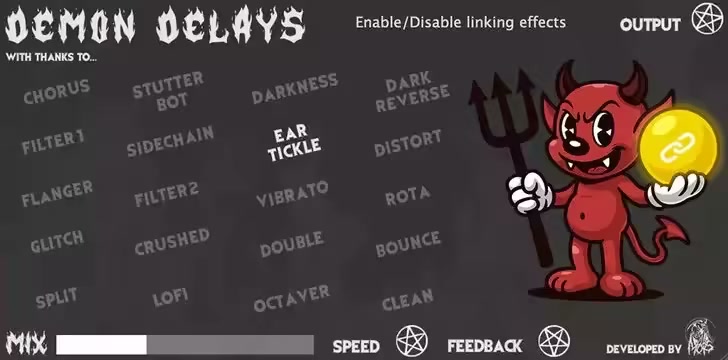
Mors Demon Delays 1.0.0 (Win macOS) | Size: 85.11 MB
Language: English


From simple to unique & chaotic delays, this plugin has it all. Experiment with 20 unique delay types or stack them together for even bigger sounds. Mix - Sets how much delay blends into your dry sound. Speed - Tunes the delay's tempo and spacing between echoes. Feedback - Controls how intense and sustained your repeats become. Output - Adjusts the overall output volume of the plugin.

Whats New
Updates: official site does not provide any info about changes in this version

HOMEPAGE:
Код:
https://www.patreon.com/posts/demon-delays-fx-141467305

FREE DOWNLOAD LINKS:

Код:
https://rapidgator.net/file/bd36125c30c5f0dc852ba71efc547777/Mors_Demon_Delays_1.0.0_Win_macOS.rar

Код:
https://nitroflare.com/view/673ACB6A9DE4C48/Mors_Demon_Delays_1.0.0_Win_macOS.rar
 
38f08f69114c4f08ba15975213a205f0.jpg


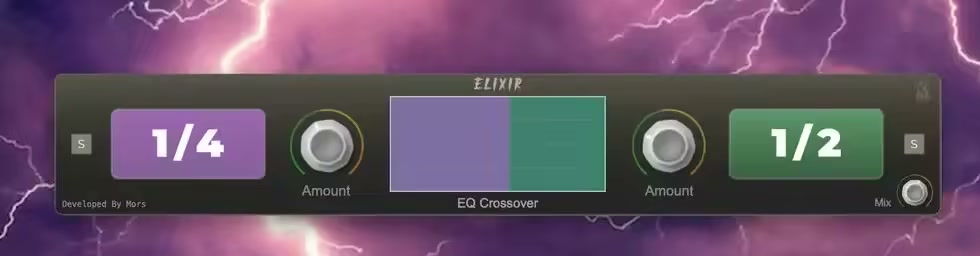
Mors Elixir 1.0.0 (Win macOS) | Size: 60.41 MB
Language: English


Control each side of the EQ with the crossover slider in the centre & then use the controls on each side to create a different delay for the low and high side of the EQ!

Perfect for Drums, Melodies, FX & One Shots

Controls;
EQ Crossoveadjusts the crossover of the EQ
Amount - adjusts the amount of each sides delay
Delay Noteadjusts the speed of each sides delay
Mix - adjusts the overall mix level of the delays
Solo - solos each band individually

Whats New
Updates: official site does not provide any info about changes in this version

HOMEPAGE:
Код:
https://www.patreon.com/posts/elixir-multiband-103507507

FREE DOWNLOAD LINKS:

Код:
https://rapidgator.net/file/2c2587af4893a4e6e1d8cecb04f76b86/Mors_Elixir_1.0.0_Win_macOS.rar

Код:
https://nitroflare.com/view/197146797C2C862/Mors_Elixir_1.0.0_Win_macOS.rar
 
f6dcd5a6a86e3e00559e195104b95722.jpg


Mors Pocket Candy 1.0.0 (Win macOS) | Size: 89.05 MB
Language: English


Create amazing pieces of ear candy & transitions with full control & infinite possibilities.

You have 8 FX modules to choose from
Pitch, Stutter, Crush, Lowpass Filter, Highpass Filter, Panning, Swell, Wind

Then to use
Simply select which effects you want to use then set each effect's parameters and min/max & additional values and automate the effect from 0-100
But the fun doesn't end there! Here's a few more creative ways to use it.
Lock any effect by setting the same min/max values (automating the main knob wont effect it.

Set the controls & main automation knob to specific values for standard non modulated/automated effects.
Let effects switch on/off at random for glitchy, unpredictable textures - or keep everything clean and precise

Whats New
Updates: official site does not provide any info about changes in this version

HOMEPAGE:
Код:
https://www.patreon.com/posts/pocket-candy-fx-144483646

FREE DOWNLOAD LINKS:

Код:
https://rapidgator.net/file/de5614b42c3257d3c79afa8fab0b4753/Mors_Pocket_Candy_1.0.0_Win_macOS.rar

Код:
https://nitroflare.com/view/6E2EC7ED607FCD5/Mors_Pocket_Candy_1.0.0_Win_macOS.rar
 
b44c78452e4dac862a09d1018bdf54e1.jpg


Mors Rumble 808 Booster 1.0.0 (Win macOS) | Size: 72.87 MB
Language: English


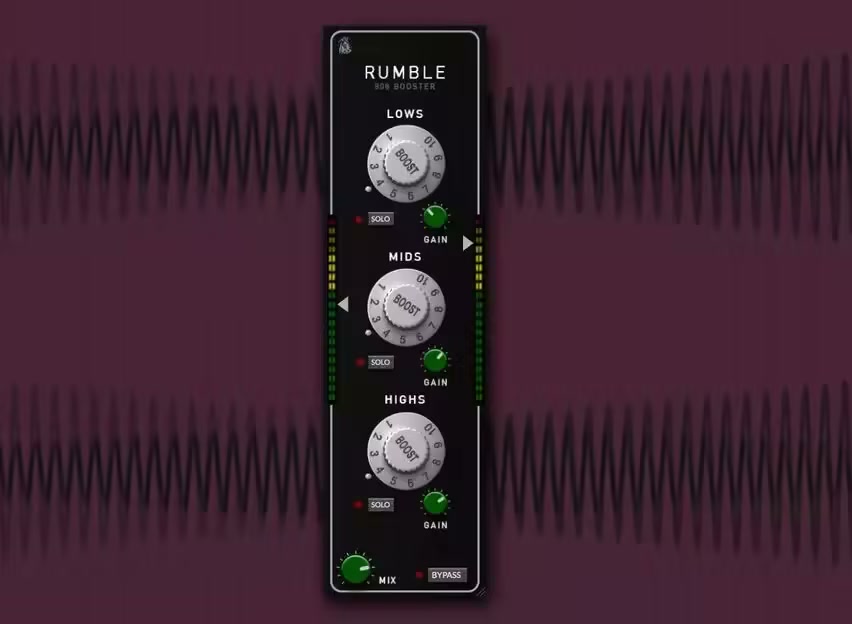
Easily enhance your 808's with this incredibly intuitive plugin. Subtly enhance them to stand out more (perfect for small speakers) or really boost them to get that gritty distorted sound.

Controls
Low Boost - Boosts the low end of the 808
Mid Boost - Boosts the mids of the 808
High Boost - Boosts the highs of the 808
Gain ControlControl the volume of each band
Mix - Adjusts the amount of the effect
Input & Output - Controls the input & output level

*Available for MAC (VST3, AU, AAX) & WINDOWS (VST3, AAX)
*All DAWs Including Pro Tools!

Whats New
Updates: official site does not provide any info about changes in this version

HOMEPAGE:
Код:
https://www.patreon.com/posts/rumble-808-fx-116760125

FREE DOWNLOAD LINKS:

Код:
https://rapidgator.net/file/48a348b8c24b8cc593f9fa3fb46ebf99/Mors_Rumble_808_Booster_1.0.0_Win_macOS.rar

Код:
https://nitroflare.com/view/B1E5A2FBF3185B4/Mors_Rumble_808_Booster_1.0.0_Win_macOS.rar
 
3542da4cf2fcdeb5795524f103030ea4.jpg


Mors VOXZI 1.0.0 (Win macOS) | Size: 83.17 MB
Language: English


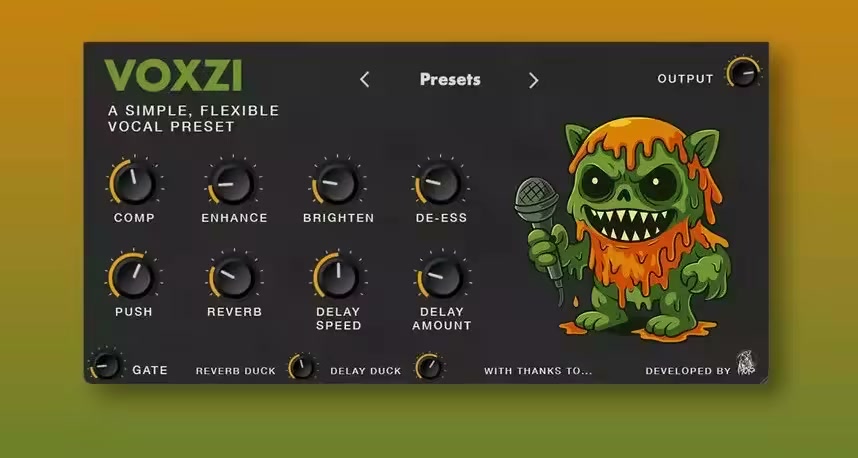
Vocal presets are great, but are not made with your vocals, room, mic and style. VOXZI gives you easy, simple to use controls to create the PERFECT vocal preset for whatever vocals & song you're working on.

There's also a bunch of presets ready for you in a variety of different styles to get you started.

The controls
COMP - Adjusts the level of compression
ENHANCE - Adds a nice boost
BRIGHTEN - Adds brightness
DE-ESS - Gets rid of those annoying ess frequencies to give you a cleaner vocal
PUSH - Gives a 'push' to bring the vocals more forward
REVERB - Adjusts the amount of reverb
DELAY SPEED - Adjusts the delay speed from slow to fast
DELAY AMOUNT - Adjusts the amount of delay
GATE - Adjusts the level of the gate to remove annoying background sounds
REVERB DUCK - Adjusts the level of how much reverb is 'ducked' during the vocal to not overpower them
DELAY DUCK - Adjusts the level of how much delay is 'ducked' during the vocal to not overpower them
OUTPUT - Adjusts the overall output volume

*Available for MAC (VST3, AU, AAX) & WINDOWS (VST3, AAX)

Whats New
Updates: official site does not provide any info about changes in this version

HOMEPAGE:
Код:
https://www.patreon.com/posts/voxzi-simple-131397729

FREE DOWNLOAD LINKS:

Код:
https://rapidgator.net/file/9268b38c49ca778e8227e95e65db198f/Mors_VOXZI_1.0.0_Win_macOS.rar

Код:
https://nitroflare.com/view/F64F20B9C213D34/Mors_VOXZI_1.0.0_Win_macOS.rar
 
2f3576b26239e2387c2d3894ec2b17f0.jpg


Mors Verbatim 1.0.0 (Win macOS) | Size: 105.95 MB
Language: English


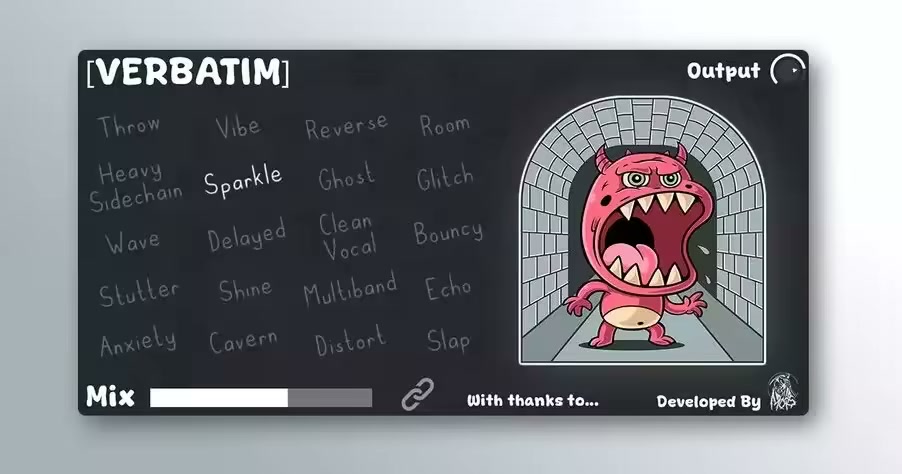
Get instant reverb vibes in one click. Verbatim is 20 different reverb effects ranging from simple ones like 'Room' and 'Cavern' to crazy ones like 'Reverse' and 'Glitch'.

Available for Mac (AU, VST3, AAX) & Windows (VST3, AAX)

Works with all DAWs

*FL studio causing distortion in some effects? - Under the plugins settings select 'use fixed size buffers' and it will work as should

Whats New
Updates: official site does not provide any info about changes in this version

HOMEPAGE:
Код:
https://www.patreon.com/posts/verbatim-reverb-134031648

FREE DOWNLOAD LINKS:

Код:
https://rapidgator.net/file/8c441a4eeac8835ef00a125bbaf721d9/Mors_Verbatim_1.0.0_Win_macOS.rar

Код:
https://nitroflare.com/view/72B2B12477E16A6/Mors_Verbatim_1.0.0_Win_macOS.rar
 
0316b27135d9931446e543b8974970c7.jpg


Mors Voicemail Pro 1.0.0 (Win macOS) | Size: 76.89 MB
Language: English


Get the incredibly popular voicemail effect in just one easy to use plugin.

This isn't just a simple 'EQ'..
Maybe you want to make it sound like your listening to a voicemail from your ex whilst your crying on the toilet?
Or maybe you want it to sound like your in the middle of a warzone?

Either way, just answer the call and edit the different parameters for a variety of different effects to create your own unique Radio Style Effects

The controls;
low cut - adjusts the low cut filter
high cutadjust the high cut filter
noisadds radio noise
reverb - adds a roomy reverb
delay - adds a very slappy reverb
gain - controls the overall gain of the plugin

*Available for MAC (VST3, AU, AAX) & WINDOWS (VST3, AAX)

*All DAWs Including Pro Tools!

Whats New
Updates: official site does not provide any info about changes in this version

HOMEPAGE:
Код:
https://www.patreon.com/posts/voicemail-pro-fx-104989965

FREE DOWNLOAD LINKS:

Код:
https://rapidgator.net/file/040cbec7afec16d6e572ebc70afa23f0/Mors_Voicemail_Pro_1.0.0_Win_macOS.rar

Код:
https://nitroflare.com/view/0C7D36EB8C07C8C/Mors_Voicemail_Pro_1.0.0_Win_macOS.rar
 
f9bb80d5699cbc4d7be6530e9b071e3a.png


Mozilla Firefox 148.0 | Size: 156.22 MB
Language: English


Mozilla Firefox is a fast, secure and easy to use web browser that offers many advantages over other web browsers, such as the tabbed browsing and the ability to block pop-up windows. It lets you to view Web pages way faster, using less of your computer's memory. Take Firefox with you wherever you go. Synchronize your browsing across multiple devices. Forget clunky URLs - find the sites you love in seconds. Firefox has the most ways to customize your online experience specifically for the way you use the web. It is built with you in mind, so it's easy and instinctive to use even the first time you try it.

Thousands of Add-ons (little extras that augment Firefox to meet your unique needs) just waiting out there to help you do more, have more fun and be more creative online.
Mozilla Firefox keeps your personal info and your online interests away from the bad guys. Simply put, your security is our top priority.
Choose from 5000 free extras to make your Mozilla Firefox browser look and function the way you want. An add-on can be a new time-saving toolbar button, a shortcut to search, a themed look, and more. Add-ons make browsing easier.

Mozilla Firefox Helps You Stay Safe
• Protect Your Privacy. When you browse, you leave a trail of data that potentially contains all sorts of personal information. We believe this info belongs to you and you alone (and least of all to overzealous advertisers), and have built in features to ensure that's the case.
• Browse With Security. Whether it's buying a gift, paying your bills or simply signing in to Facebook, it's important keep your personal info out of the hands of any online bad guys who might be snooping around. Fortunately, Firefox is packed with advanced security features to help you stay safe.
• Stay In Control. The online world is always changing, which is why we give you easy-to-use tools to let you adapt and make smart choices as you go.
• It's Part of Firefox Mission. Mozilla is a non-profit organization with the goal of making the Web better for everyone. We're not trying to make money off our users - we just want you to have the best possible experience online, and that includes keeping you and your personal information safe and private.

Mozilla Firefox Personal Settings
• Add Style: Personas. Make Firefox match your style! Choose from thousands of Personas designed by users around the world, or create one yourself. With a single click you can dress up your browser however you want.
• Customize: Add-ons. Many of the most popular add-ons are extensions, little extras you download to add more bells & whistles to Firefox. Compare prices, check the weather, listen to music, update your Facebook profile - all built right into the browser!
• Make It Work: Plugins. Plugins are small bits of third-party software built by companies like Adobe Systems or Apple to power videos, animation and games (examples include Flash Player or Quicktime). They can cause browser crashes or pose security risks when they get out of date, so we've built an easy tool to help you stay current.
• Adapt Your Interface. The Firefox interface has been designed by a team of experts and tested by a community of millions of users around the world to make sure your browsing is as easy and intuitive as possible. But, everyone has their own specific needs, and you can always adjust the interface to be exactly the way you like it: re-arrange, organize, add or remove buttons or fields to change your browsing experience however you want.
• Stay In Sync. Sync seamlessly connects your desktop and mobile Firefox, so you can access your browsing history, passwords, bookmarks and even open tabs no matter which device you use. Now you can surf the Web on your desktop, get up in the middle of browsing and have your open tabs ready and waiting on your mobile, just as you left them. Your browsing will never be the same!

Blazing Performance
• Making the Web Faster. Fasten your seat belts! With faster start-up times, rapid graphics rendering and improved page load speed, Firefox is full of major performance enhancements you'll notice instantly. Upgrades to DOM and Style Resolution performance mean pages load faster, scrolling up and down is smoother, and web applications can run at breakneck speed. It's an entirely new - and fast - browsing experience.
• Web Application Speed. Web applications like mail, video or games keep getting more awesome, but they also require additional processing power to run smoothly. To meet these increasingly sophisticated demands, Firefox features a massively improved javascript engine called JägerMonkey. As a result, Firefox handles even the most dynamic applications smoothly and easily, allowing you to enjoy the very best the modern Web has to offer.
• Hardware Acceleration. Whether you're using Windows 8.1, 8, 7, Vista, XP or Mac OS X with Firefox, you'll also enjoy hardware acceleration for many common operations, such as watching videos or playing games. Firefox uses a new layers-based graphics system that takes advantage of Direct2D and Direct3D on Windows and OpenGL on Mac to deliver amazing performance even on graphics-heavy sites.

HOMEPAGE:
Код:
https://www.mozilla.org/

FREE DOWNLOAD LINKS:

Код:
https://rapidgator.net/file/fd1c5a07ad3a723490c367cd78336802/Mozilla_Firefox_148.0.rar

Код:
https://nitroflare.com/view/B5757F4F1DE5333/Mozilla_Firefox_148.0.rar
 
23d3d00d70c4e627b4ac991b64baf2c5.jpg


OkMap Desktop 19.5.0 Multilingual | Size: 77.39 MB
Language: English


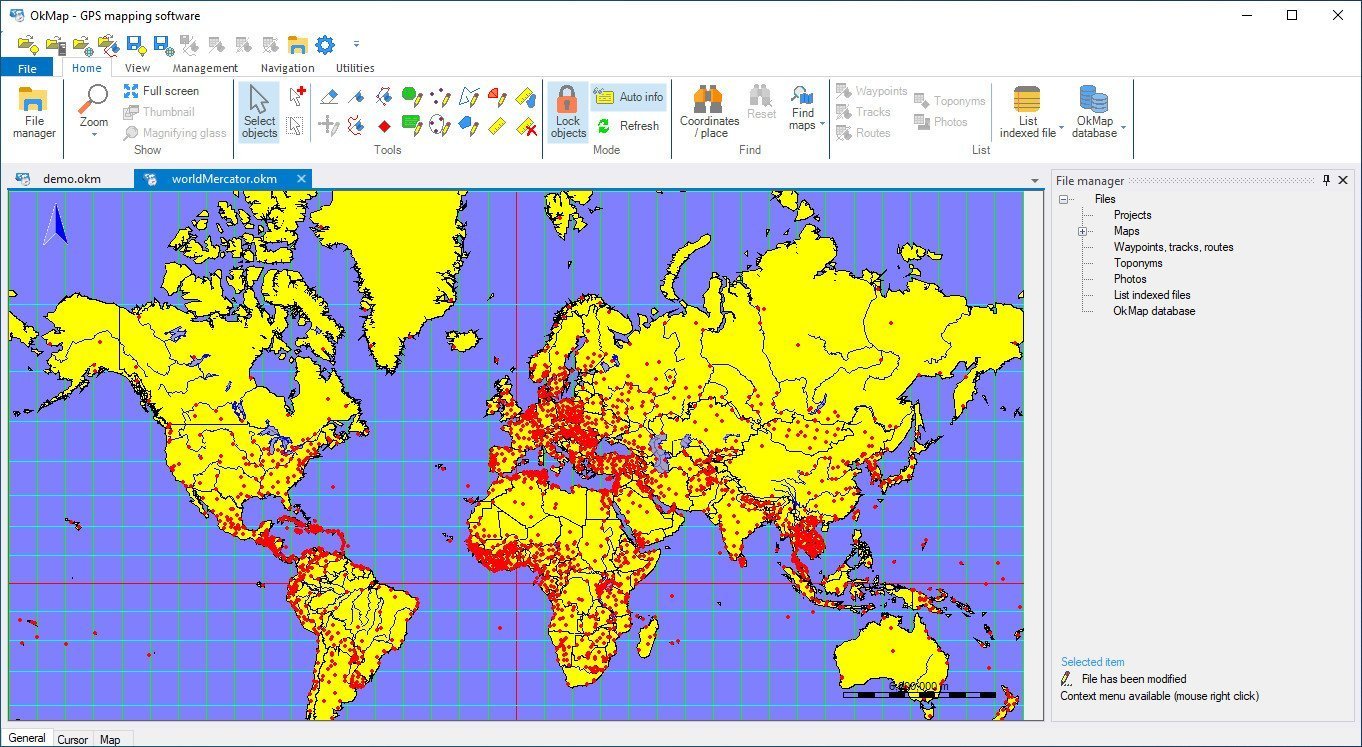
OkMap is an interactive software which allows you to work on your computer screen with web maps or digital maps that you have either bought or scanned. OkMap can also import vectorial data from the most common formats and DEM data relevant to height information. Through these maps, you can organize your paths by creating waypoints, routes and tracks on your computer monitor, and upload this data to your GPS. OkMap sets automatically altitude data and estimates travel times.

Features
- Calibration / display raster maps (over 30 image formats)
- Display vectorial maps
- Display hybrid maps (raster + vectorial data)
- Ability to open multiple maps simultaneously
- 9 cartographic projections of the most used
- Database with over 500 predefined projections by geographic area
- Database with over 300 datum
- Viewing 3D raster maps on Google Earth (for supported image formats)
- Map add-ons management (icons, comments)
- Vectorial data management (point, multipoint, line, polygon)
- GPX data management (waypoints, tracks, routes)
- Selecting multiple objects with the mouse
- Context menu (right mouse)
- Auto-info function
- Zoom, autofit functions
- Moving map function in 3 modes
- Customizing toolbar
- Showing yes / no toolbar
- Showing yes / no statusbar
- Check new releases at startup


HOMEPAGE:
Код:
https://www.okmap.org/

FREE DOWNLOAD LINKS:

Код:
https://rapidgator.net/file/9043a480cd325b0ac2bea2e2b57948a2/OkMap_Desktop_19.5.0_Multilingual.rar

Код:
https://nitroflare.com/view/6F866ED4E87081A/OkMap_Desktop_19.5.0_Multilingual.rar
 
a6bcac01a491068a070f14bf54b03d77.jpg


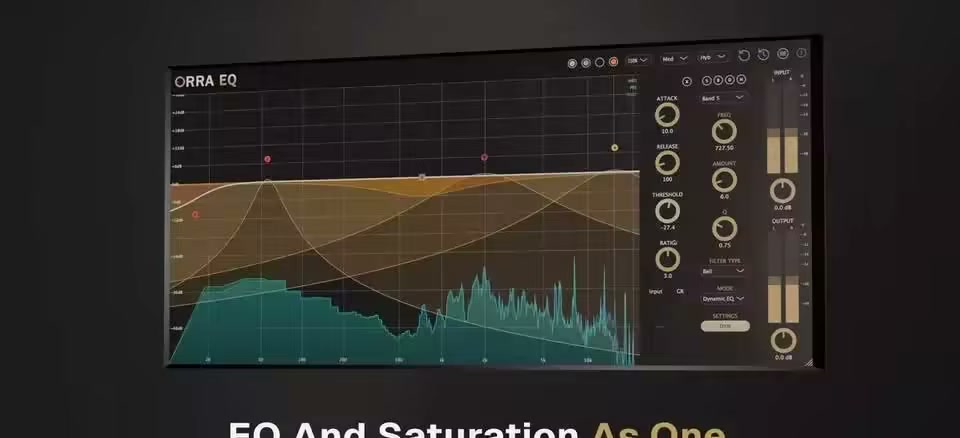
Orra Audio Orra EQ 1.0.1 | Size: 5.21 MB
Language: English


Your New Secret Sauce

Streamline your workflow by combining processing you would normally need a plugin chain for, into one tool.

• 16 parametric bands processing in series
• Five modes per band: EQ, Orra Tube, Tape, Models, Dynamic EQ
• 17 saturation options: Orra Tube + 6 tape models + 10 saturate algorithms
• Dynamic saturation for intelligent harmonic enhancement
• Create EQ or Orra Tube saturation bands with a double left or right-click on the curve
• Surgical precision with Q range 0.1 to 40
• Real-time spectrum analyzer with pre/post monitoring

Why Orra EQ exists
We didn't set out to build another EQ. We wanted per-frequency control over our entire tone-shaping chain-EQ, saturation, and dynamics woven together however we needed, not locked into separate plugins.

Traditional Approach
Load an EQ to shape tone. Load a saturator for color. Load a compressor for dynamics. Each plugin processes your entire signal before passing it to the next-you can't EQ just the highs, saturate just the mids, then compress just the lows in one fluid chain.

Full-signal processing, one stage at a time.

The Orra Way
Sixteen bands, each with its own mode. EQ one frequency, saturate another, compress a third-all in whatever order you want. Stack a tube saturator after a dynamic cut on the same band, or alternate between processing styles across the spectrum.

Per-frequency control over your entire tone-shaping chain.

17 Saturation Types - All Dynamic-Ready
Choose from Orra Tube, 6 tape machines, and 10 creative saturators-from vintage preamp warmth to aggressive wavefolder destruction.

Every saturation type can be made dynamic. Instead of just adding harmonics, dynamic saturation brings up quiet details through harmonic enrichment-like upward compression, but with color and character instead of just gain.

The result: presence and richness that responds to your playing, not just a static effect slapped on top.

Saturation that breathes with your music

Snap to Note & Key
Stop guessing frequencies. Enable snap-to-note and your bands lock to musical pitches-C2, F#4, whatever note you need.

Right-click any band and choose the exact note you want it locked to-C2, F#4, A1, whatever your song needs. No more hunting for frequencies with a calculator.

Perfect for surgical work on bass notes, taming resonant frequencies in vocals, or making sure your boosts align with the actual music.

EQ musically, not just technically

A Complete EQ - Plus Everything Else
Before you even touch saturation, Orra EQ is a fully-featured parametric equalizer: 16 bands, Q from 0.1 to 40, filter slopes up to 48dB/octave, and frequency range from 10Hz to 22kHz.

High-pass, low-pass, shelves, bells, notches-all the surgical tools you expect, with a real-time spectrum analyzer showing pre or post processing.

Use it as a clean, transparent EQ when that's what you need. Then flip a band into saturation or dynamic mode when you want more. One plugin, zero compromises.

Pro-grade EQ that grows with your needs

EQ Mode
Surgical parametric EQ with Q from 0.1 to 40. Slopes up to 48dB/octave for brick-wall filtering.

Perfect for corrective work and precise tonal shaping

Orra Tube
Our signature tube saturation. Even-order harmonics add warmth without muddiness.

When you need air, body, and vintage character

Tape Models
Six authentic tape machines from mastering-grade to lo-fi. Three speed modes: High, Medium, Low and noise reduction.

Analog glue and cohesion across the frequency spectrum

Saturate
Ten algorithms: Vintage Preamp, British Console, Transistor, Wavefolder, and more.

Creative color ranging from subtle to extreme

Dynamic Mode
Frequency-dependent compression with full envelope controls. Threshold, ratio, attack, release.

Control resonances and tame problem frequencies

Dynamic Saturation
Upward compression through harmonics. Brings up quiet details without raising the noise floor.

Add presence and richness without just turning things up

Whats New
Updates: official site does not provide any info about changes in this version

HOMEPAGE:
Код:
https://www.orraaudio.com/products/orra-eq

FREE DOWNLOAD LINKS:

Код:
https://rapidgator.net/file/059d14cc14c50d47c136da02dbe3312b/Orra_Audio_Orra_EQ_1.0.1.rar

Код:
https://nitroflare.com/view/22F9739DC838EFC/Orra_Audio_Orra_EQ_1.0.1.rar

 
1f7b249e27281616416fa1e58e1d6aa9.jpg


PDF-XChange Editor Plus 10.8.3.408 (x64) Multilingual | Size: 459.15 MB
Language: English


The smallest, fastest, most feature-rich PDF editor/viewer available! Create, View, Edit, Annotate, OCR and Digitally Sign PDF files plus much more.. Designed for anyone from home users to large corporate environments that wish to View/Edit/Modify and even OCR Image based PDF files on their Windows PC's.

The PDF-XChange Editor is smaller, faster and more feature rich than any other FREE PDF Reader/ PDF Viewer/ PDF Editor available on the market. This free pdf editor download also allows users to try the extended functionality offered by the licensed PDF-XChange Editor in evaluation modfor free. No PDF reader or Viewer offers more features than PDF-XChangor does so without compromising performance, quality or security. Checkout the feature list below and save $100's in unnecessary expenditure on your PDF software solution today.

Advanced features
. PDF-XChange Editor Plus only) Create and Edit Fillable PDF Forms
. PDF-XChange Editor Plus only) Create and Edit Dynamic Stamps
. Convert PDF to MSPowerPoint. format
. Reduce PDF file size by Image compression/downsampling & embed/unembed Font, PDF Optimization
. Advanced PDF Bookmark creation and management
. Direct Content Editing (Paths & Images)
. Combine PDFs open/closed pdfs
. Import Directly from XPS and other support formats
. Header & Footer Support
. Bates Numbering
. Delete Pages
. Move PageBy Drag&drop in Thumbnails View.
. Insert/Import Pages (from existing PDF files)
. Extract pages to a new file (PDF or Image format - 15 formats supported)
. Crop Pages/Files
. Flatten Annotations/Comments
. Insert Blank page
. Summarize Comments
. Export Comments
. Scan Direct to PDF (now with inline OCR option during scanning process)
. Create PDF documents from text and RTF files
. Convert 15 supported image formats to PDF
. Extended Digital Signature Support (incl. Time Stamps)
. Security Profiles (for adding security to documents conveniently)
. Improved Browser Plug-ins to reduce compatibility issues
. and much more...


HOMEPAGE:
Код:
https://www.tracker-software.com

FREE DOWNLOAD LINKS:

Код:
https://rapidgator.net/file/af7d1d390c2e13092a08ad818e56332f/PDF-XChange_Editor_Plus_10.8.3.408_x64_Multilingual.rar

Код:
https://nitroflare.com/view/1E8A10100D73769/PDF-XChange_Editor_Plus_10.8.3.408_x64_Multilingual.rar
 
8d9f2276a38067f91769fdf05a6aa207.jpg


PDF-XChange Pro 10.8.3.408 (x64) Multilingual | Size: 556.9 MB
Language: English


PDF-XChange PRO is the ultimate PDF solution. It's a bundle package that combines the three best-selling applications that Tracker Software produces.

PDF-XChange Editor Plus is a hugely dynamic and fully-customizable PDF application. Create, view, edit, annotate, OCR* and sign PDF files - and that's just the beginning. If you work with PDF then this fully-customizable product will optimize your work process to levels that no other product can achieve. Create PDF files from scanned documents, images, text files, Markdown files and much more. Open, edit and convert Microsoft Office documents.* Avail of over thirty tools to assist in the creation of document comments, annotations, links and fillable forms. These tools make editing PDFs a finely-tuned, precise process that produces documentation and image files of the highest quality. Our user-friendly functionality is diverse enough to meet the needs of all practitioners from novices to professionals.**

PDF-Tools is a worldwide leader in the creation and manipulation of PDF and image files. Highly user-friendly, it can be used to convert files of almost any format to/from PDF. Avail of sixty-six built-in standard tools, as well as functionality to clone and edit these tools and their variables as you desire. Use the Actions Library to fully customize your tools and the Tool Actions Sequence to determine the order in which they perform operations. Combine seventy-three available actions to create your own toolout of billions of possibilities. PDF-Tools is compatible with large PDF files and can also handle a huge number of files simultaneously - batch conversion is its strength.

PDF-XChange Standard Printer is Tracker Software's best-selling virtual printethe ultimate application for the creation and virtual printing of industry-standard PDF files. It's compatible with files from almost all Windows applications, such as Word, Excel and AutoCAD, and features an optimized engine for superb conversion of images and image-based text characters. The files it creates are surprisingly small, given their quality - allowing for faster uploads/downloads, a reduction in storage space and increased data retention - even at high levels of compression. PDF-XChange Standard also features MS Office integration, which provides extra functionality such as adding clickable tables of contents and embedded URL support that facilitates the creation of external links.
What do you get when you combine three applications of such functionality and potential into one package? The answer is simple: unbeatable power at an unbeatable price. See below for further information on the features and functionality of each product.

The Enhanced OCR plugin is now available as an optional extra in PDF-XChange PRO. It is more accurate, dynamic and faster than the default OCR engine, and contains a range of extra features. Further information on this plugin is available here.


HOMEPAGE:
Код:
https://www.tracker-software.com

FREE DOWNLOAD LINKS:

Код:
https://rapidgator.net/file/8f5b7d2db20289587d9870510d44d55a/PDF-XChange_Pro_10.8.3.408_x64_Multilingual.rar

Код:
https://nitroflare.com/view/05DC2575107341A/PDF-XChange_Pro_10.8.3.408_x64_Multilingual.rar
 
41c52d30974512cb946087819b0dad40.jpg


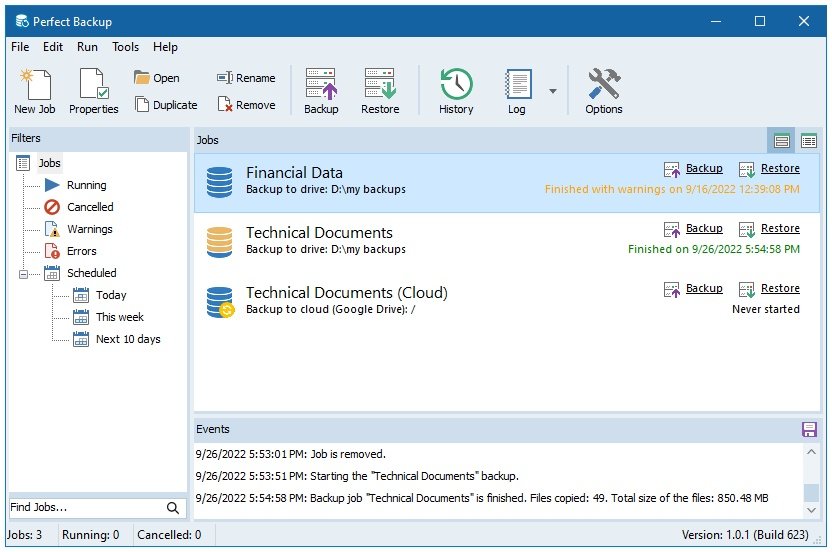
Perfect Backup 3.6 | Size: 5.03 MB
Language: English


What if you woke up one day to find that you lost your business documents, important files or your family photos? This is not uncommon situation because the life of your PC hard drive is not that long. And most people face this problem at some point.
What is the solution? Making backups! The modern backup software will keep your data safe and secure. Your fiels will be backed up on a regular basis and may be stored simultaneously on multiple storage media, which will increase the level of security.

Key Features
Create backup jobs in wizard. Just complete several steps, and the jobbackup is ready to run.
Support for most storage devices: local or external drives, network locations, FTP servers and cloud storages.
Support for all types of backup: incremental, differential, full and syncronization.
Compress and password-protect your files. Create single ZIP file or multiple archives.
Schedule backups. Choose the days of week or days of the month when you want to run automatic backup.

Whats New
Updates: official site does not provide any info about changes in this version

HOMEPAGE:
Код:
https://www.perfect-backup.com

FREE DOWNLOAD LINKS:

Код:
https://rapidgator.net/file/e8f092ecc36b1bb5fb9427f2c8b354c2/Perfect_Backup_3.6.rar

Код:
https://nitroflare.com/view/86529AD970DF537/Perfect_Backup_3.6.rar
 
9d04906d0039205ab3bdd15847657927.jpg


Perfectly Clear WorkBench 5.0.2.3110 | Size: 247.54 MB
Language: English


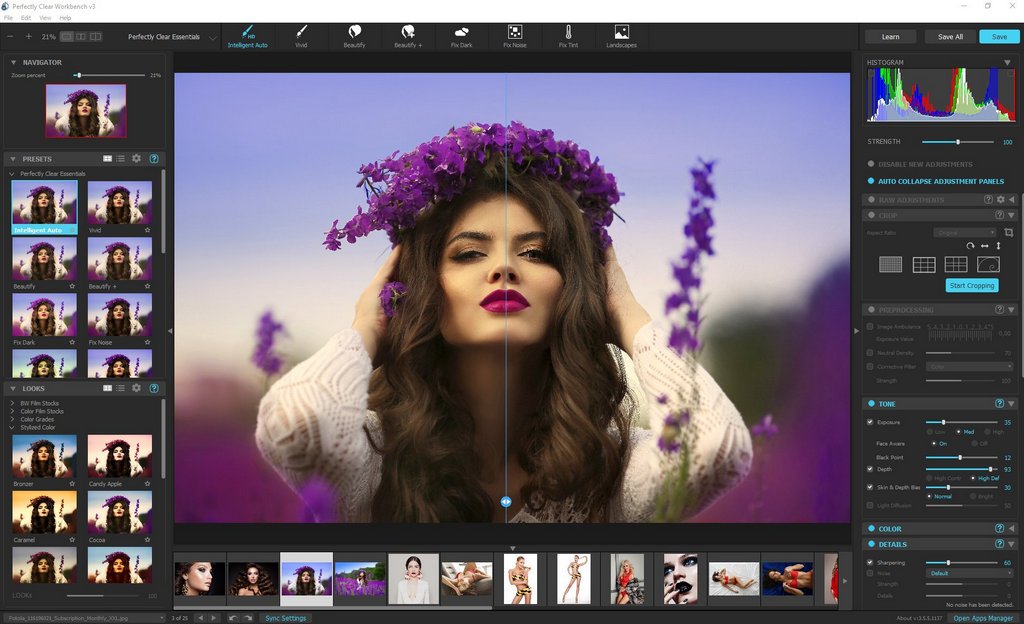
Perfectly Clear Workbench is an application that uses Athentech's Perfectly Clear image correction libraries and is made available to demonstrate the capabilities of the Perfectly Clear processing libraries, face detection library and to allow a quick export of the processing settings for use.

One of the key features in Workbench is the ability to "export to API" when saving a Preset. This allows you to make image corrections in Workbench and tune the settings to match your style and correction needs. Then, you can quickly export these settings to a text filready to be copy / pasted into your source code with our image correction SDK.

What's New in Perfectly Clear WorkBench
1. Beautiful new interface
2. New image correction tools
a. Preprocessing section for Input Looks and "Image Ambulance" for manual exposure corrections
b. "Face Aware" exposure for more accurate auto-exposure corrections in portraits and group photos
c. Black Point tool to deepen blacks
d. New Color Vibrancy tool to complement our previous "Vibrancy" control (now renamed to Color Restoration)
e. Sky and Foliage enhancements
3. Existing tools have been improved
a. Added strength sliders to Light Diffusion and Vibrancy for better control
b. Better 'color pickers' for Skin Tone and Blush adjustments
4. Manually identify faces that are not detected automatically
5. One-click to zoom to individual faces
6. Modify facial regions to provide the best corrections
7. Histogram
8. Much improved preset management

Supported Image Formats
Perfectly Clear requires RGB-formatted images in either 8 or 16-bit color depth. Any image file that Photoshop or Lightroom can open and convert to this format may be used in Perfectly Clear. Monochrome and CMYK images must be converted to RGB before using Perfectly Clear. RAW files must be opened through Adobe Camera RAW and loaded into Photoshop to be accessible to Perfectly Clear.

HOMEPAGE:
Код:
https://eyeq.photos/

FREE DOWNLOAD LINKS:

Код:
https://rapidgator.net/file/80c0d8b10b7dd58a24ff184777015d6e/Perfectly_Clear_WorkBench_5.0.2.3110..rar

Код:
https://nitroflare.com/view/0E2AC676BBD9269/Perfectly_Clear_WorkBench_5.0.2.3110..rar
 
a02b93e5475d65379439bb3801bb0beb.jpg


Scooter Beyond Compare 5.2.0.31950 | Size: 27.96 MB
Language: English


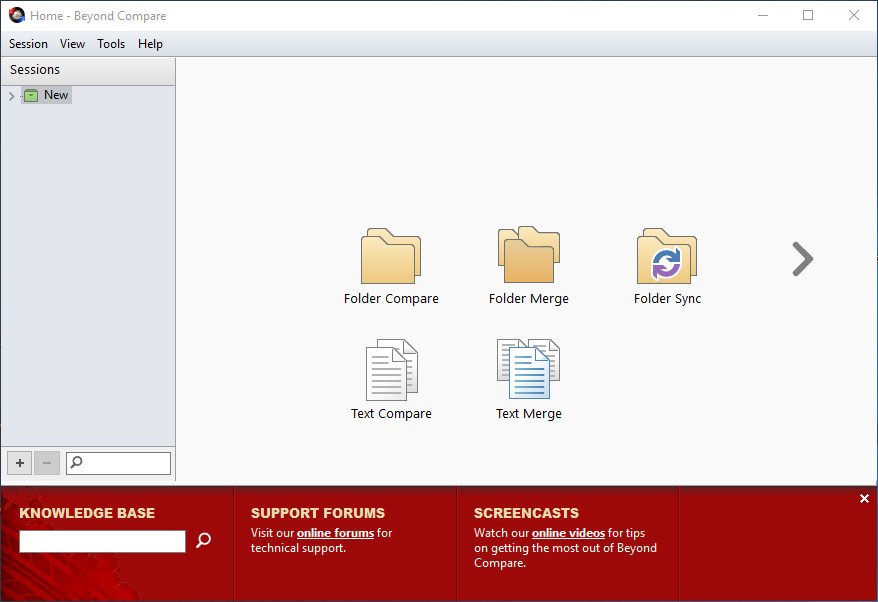
Change is inevitable, so manage it with the best tools. Beyond Compare is the popular choice for data comparison. Compare folders, text files, images, and tables. Review differences efficiently and merge changes with confidence.

Compare
Compare files and folders using simple, powerful commands that focus on the differences you're interested in and ignore those you're not.

Merge
Combine changes from two versions of a file or folder into a single output.

Synchronize
Synchronize your local data, FTP sites, and cloud storage.


HOMEPAGE:
Код:
https://www.scootersoftware.com/

FREE DOWNLOAD LINKS:

Код:
https://rapidgator.net/file/3d719fb64c2bbeeaf13a33d99a36debc/Scooter_Beyond_Compare_5.2.0.31950.rar

Код:
https://nitroflare.com/view/4F0C18528F7809F/Scooter_Beyond_Compare_5.2.0.31950.rar
 
f59bf2cb0428135dc5d4cd8a802c26f1.jpg


Screenpresso Pro 2.2.3 Multilingual | Size: 46.21 MB
Language: English


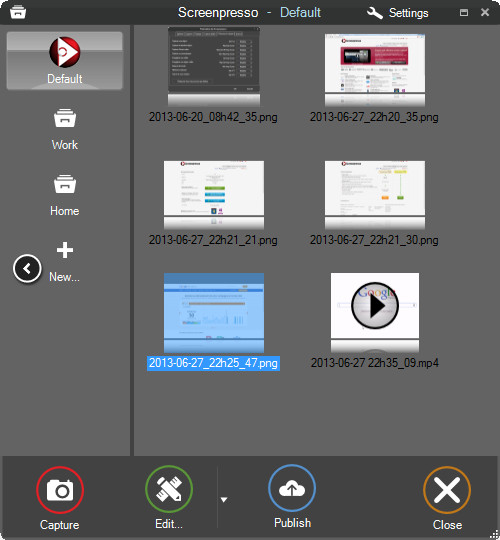
Screenpresso overrides the Print Screen key and makes it easy to take the best screen captures in a few seconds. It is a light-weight Windows software giving a wonderful look to your screenshots.

Features
Capture windows and region
Capture part of the screen or a specific window with the same shortcut. Simple.

Portable application
No need to install the application, you can run it directly after download.

Screenshot history
Don't bother to save screenshots on your drive, Screenpresso does it for you. Practical.

Attach screenshots to emails
Drag and drop screenshots from the history directly to your favorite email editor. Webmails like GMail are also taken into account! Swift.

Built-in image editor
Crop, spotlight an area or comment parts of a captured image. Efficient.

Capture scrolling part
Can't fit it on the screen ? Make a unique image thanks to the stitching mechanism. Smart.

Add effects
Look like a pro. Add drop shadow, rounded corners, reflection and more. Sleek.

Resize bunch of images
Need to export images or create thumbnails at a specific size, one click.

Share screenshots
Easily share your screenshots via Twitter, Facebook, G-Mail, Evernote, Flickr or FTP.

Great support
Simply send an e-mail to support team. It will always quickly respond.


HOMEPAGE:
Код:
https://www.screenpresso.com

FREE DOWNLOAD LINKS:

Код:
https://rapidgator.net/file/ac90f3fa8f4d390327a76cf42b1ce7be/Screenpresso_Pro_2.2.3_Multilingual.rar

Код:
https://nitroflare.com/view/F2B8A612C3882D5/Screenpresso_Pro_2.2.3_Multilingual.rar
 
_c51d67f3d4cb90be3628fe531bc8e94b.jpeg


StruSoft FEM-Design Suite v25.00.001 (x64) | Size: 981.36 MB
Language: English


Description
FEM-Design is an advanced modeling software for finite element analysis and design of load-bearing concrete, steel and timber structures according to Eurocode. The unique user-friendly working environment is based on the familiar CAD tools what makes the model creation and structure editing simple and intuitive. The quick and easy nature of FEM-Design makes it ideal for all types of construction tasks from single element design to global stability analysis of large structures and makes it the best practical tool for structural engineers.

Features
-The structural model is created easily in 3D with intuitive CAD-tools or imported from BIM-software.
-The finite element mesh is generated and optimized automatically.
-The Auto Design feature helps to choose the most efficient cross-section or reinforcement arrangement.
-Resultant and connection forces in shell elements can be easily assessed.
-Results are shown in a variety of 3D-graphs, contour lines, color palettes or sections.
-Auto-updated project reports can be created from within the built-in FEM-Design documentation editor.

System Requirements
OS:Windows 10
RAM:4 GB
CPU:Intel Core i3 - 2nd generation (or equivalent)
Space:40 GB
GPU:OpenGL 1.5 or DirectX 9.0 compatible video card

FREE DOWNLOAD LINKS:

Код:
https://rapidgator.net/file/14905169822b38d1ba32870b00cce92d/StruSoft_FEM-Design_Suite_v25.00.001_x64.rar

Код:
https://nitroflare.com/view/453EC631A0E4CE6/StruSoft_FEM-Design_Suite_v25.00.001_x64.rar
 
5414f85af715adc001f8b92c252850fd.jpg


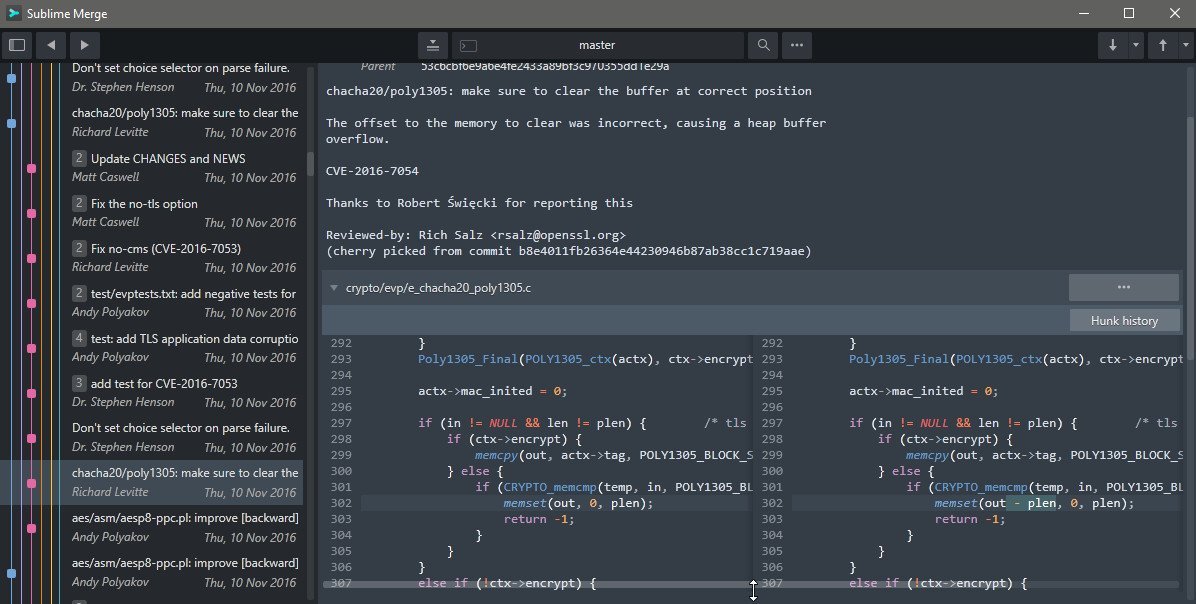
Sublime Merge 2 Build 2123 (x64) | Size: 33.03 MB
Language: English


Git Client, done Sublime. Meet a new Git Client, from the makers of Sublime Text. A snappy UI, three-way merge tool, side-by-side diffs, syntax highlighting, and more. Stage Files, Hunks and Lines with no waiting - Sublime Merge is really, really fast.

Feature Highlights
INTEGRATED MERGE TOOL
The Integrated Merge Tool allows you to resolve any merge conflicts directly in Sublime Merge, rather than having to open up your editor of choice.
Conflicts are presented with a 3-pane view. On the left are your changes and on the right are theirs. In the center pane is the resolved text, with buttons to choose between your changes or theirs. The same text editing functionality as Sublime Text is also available for more complicated merges.
Clicking on the header in the middle pane will switch between the editable merge results and the base file.
Use Ctrl+S or the Save button to save your merged file.

POWERFUL SEARCH
Use find-as-you-type search to dig up the exact commit you're looking for.
Search for commit messages, commit authors, file names, and wildcard patterns. Complex search queries can be constructed using and, or and () symbols.
For example min-parents:2 author:jskinner path:tests/* (bug fix or test) will search for a merge commit from jskinner inside the tests directory that contain the words "bug" and "fix" or the word "test".
You can open search with Ctrl+F or through the menu: NavigatSearch.

UNMATCHED PERFORMANCE
Sublime Merge is built on the same custom platform as Sublime Text, providing unmatched responsiveness. With a powerful, cross-platform UI toolkit, an unmatched syntax highlighting engine, and a custom high-performance Git reading library, Sublime Merge sets the bar for performance.

BLAME
Open the Blame of a file through the Command Palette or when viewing a commit to see exactly which lines of the file were added by which commits.
Easily view the age, author, and commit hash of every line of code and see which lines come from the same commit with our commit color coding. Click a line in the gutter to highlight all other lines from the same commit.
The blame tool will also detect when a piece of code was moved from another place in your repository, so you can truly follow the history of your code.

ADVANCED DIFFS
Where it makes sense we will show you exactly which individual characters have been changed for a commit.
This includes when you rename or move a file, when you're resolving conflicts or just viewing commit history.
Select any two commits in Sublime Merge with Ctrl+Left Mouse to show the diff between them.

FILE AND HUNK HISTORY
From any file or hunk in the history use ..File History or the Hunk History button to view the full history of that source code. This will also follow any file moves or renames throughout the repository.

COMMAND PALETTE AND KEY BINDINGS
Keyboard usage is important to us. Use Tab to navigate through parts of the application, Space to toggle expansion, and Enter to stage/unstage hunks. When writing a commit message, use Ctrl+Enter to commit.
The Command Palette is triggered by Ctrl+P and allows quick access to a large set of Git commands as well as other Sublime Merge functionality.

LIGHT AND DARK THEMES
Choose between a light and a dark theme to suit your tastes. You can preview these themes above.
Open the PreferencePreferences... menu to change theme.
The dark theme is only available with a valid license key.

EXTENSIBILITY
Just like Sublime Text, just about everything in Sublime Merge is extensible. Key bindings, menus, theming, and the command palette are all customizable with simple JSON files.

SYNTAX HIGHLIGHTING
Sublime Merge performs full syntax highlighting identically to Sublime Text for every line of code you see.

We'll even use any extra syntax definitions that we find in your Sublime Text installation for syntax highlighting!

COMMAND LINE INTEGRATION
Sublime Merge is designed to work hand in hand with the command line. All changes to the repository are updated live and everything works the same way whether it's triggered from the command line or the UI. Use the terminal where it makes sense and use the GUI where it works best.

Use the smerge tool that comes with Sublime Merge to interact with it from the command line: open repositories, blame files or search for commits

REAL GIT
Sublime Merge uses the same terminology as Git, and doesn't make use of any state beyond Git itself. When you're working with Sublime Merge, you're working with Real Git, not a simplified version
You can also hover over most buttons to see which git command it will run.

HOMEPAGE:
Код:
https://www.sublimemerge.com/

FREE DOWNLOAD LINKS:

Код:
https://rapidgator.net/file/b78af1c6b787a4c794ada461224a079b/Sublime_Merge_2_Build_2123_x64.rar

Код:
https://nitroflare.com/view/F825DA72D115FE3/Sublime_Merge_2_Build_2123_x64.rar
 
Назад
Сверху Снизу