All Emperor2011's Software in one thread !! (updated daily)

1eb306ebccd6f23bfa94a326c3ce52d6.jpg


UPDF 2.5.4 (x64) Multilingual | Size: 228.77 MB
Language: English


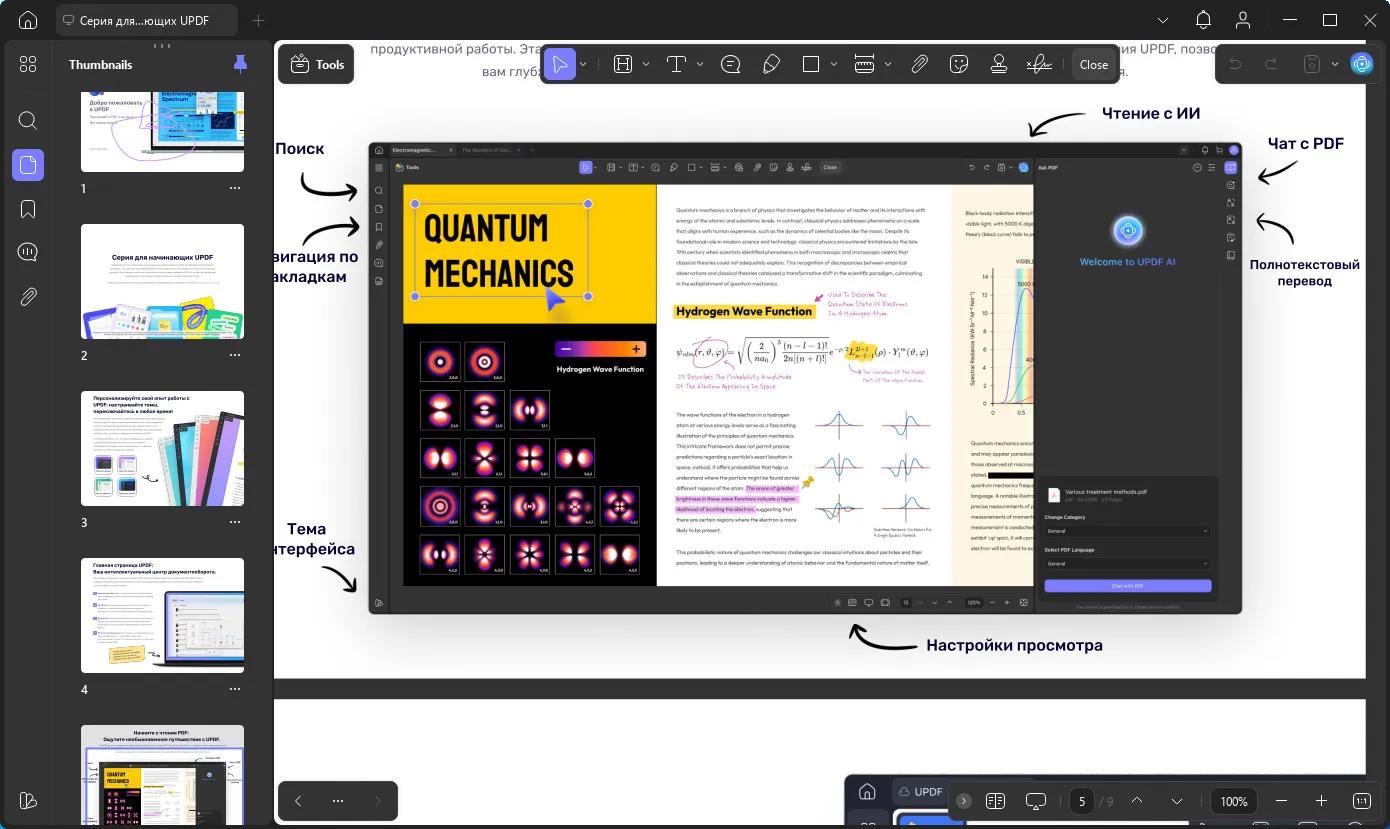
An all-in-one AI PDF editor on Windows that allows you to efficiently and easily edit, annotate, summarize, translate, and convert PDFs.

Editing PDF on PC is as Easy as in Word
UPDF for Windows is an easy-to-use Windows PDF software! Enjoy powerful editing tools for text, images, links, and more in your PDF. Customize backgrounds, watermarks, and page sizes with simplicity like in Word.

Analyze PDFs with 10X Efficiency
Upload a PDF with 100+ pages to get lightning-fast summaries, precise translations, in-depth explanations, and engaging conversations from your documents. Experience a new era of efficiency and accuracy with AI in this PDF editor software for Windows!

Read and Annotate, All in UPDF on Windows
UPDF for Windows offers diverse page display modes and scaling options for an optimal reading experience. Utilize its practical annotation toolkit, including sticky notes, stickers, stamps, highlighters, underlines, and more, to enhance your PDF review.

PDF Conversion. So Fast, So Accurate, So Easy
UPDF PDF editor for Windows offers a complete solution for transforming documents across formats. It provides 7 methods to create PDFs and supports converting PDF to 14 formats.

Digitize Paperwork for Better Collaboration
This PDF editor for PC can help you create fillable forms, share for collaborative filling, embed signatures, and enhance your PDF capabilities. Experience a seamless and customizable PDF journey that boosts versatility for improved collaboration.

Operating System: Windows 10 and higher

HOMEPAGE:
Код:
https://updf.com/updf/

FREE DOWNLOAD LINKS:

Код:
https://rapidgator.net/file/109761ca1f623fdcb71b3320cf01bb79/UPDF_2.5.4_x64_Multilingual.rar

Код:
https://nitroflare.com/view/37E17966F7F9A5C/UPDF_2.5.4_x64_Multilingual.rar
 
a592ad74ec1bf5e96df4d1b91ac395d0.png


UWPSpy 1.5.4 | Size: 1.23 MB
Language: English


With UWPSpy, you can modify UWP apps by repositioning UI elements and more. Whether you want to make minor or extensive modifications, you must have some knowledge in this area to manipulate the apps effectively. Fortunately, UWPSpy streamlines the process and minimizes concerns, making it as smooth as possible.

Observe changes in real-time
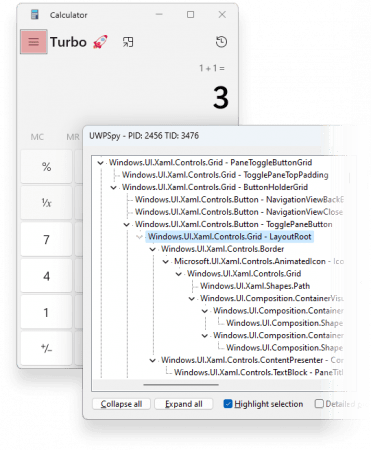
UWPSpy enables users to observe how changes affect the structure and functionality of their UWP app. It's beneficial for helping with UI design tasks during app development. When you select specific properties, the linked elements will be highlighted, and any changes will update in real-time.
UWPSpy is a handy and efficient tool (brought to you by the developer of Textify and 7+ Taskbar Tweaker) that caters to the needs of UWP app developers. It offers practical and convenient features that allow developers to view real-time changes in their projects instantly. With UWPSpy, developers can quickly and seamlessly optimize the development process, leading to a more streamlined and effective workflow.
Usage
Run UWPSpy.exe and select the UWP/WinUI 3 application you want to spy on.
A window with the application's UI elements will appear for each UI thread of the target application.
A UWPSpy spying window can be closed, in which case it will become hidden. It can be shown again by running UWPSpy.exe again and selecting the same application.
To completely stop spying on an application, its process must be terminated.

System Requirements: Windows 11, Windows 10

FREE DOWNLOAD LINKS:

Код:
https://rapidgator.net/file/ce7271244185d356a0f078ba9153acfc/UWPSpy_1.5.4.zip

Код:
https://nitroflare.com/view/F3F2541FDA95B9E/UWPSpy_1.5.4.zip
 
57e34e25189e90c1bf8ee2dbffdd06e8.jpg


VideoForge AI Pro 1.0.3 | Size: 547.92 MB
Language: English


VideoForge AI Pro - AI video upscaling to 4K - pro features, fully offline. VideoForge AI Pro is the professional solution for AI-based video upscaling on Windows. Batch queue, multiple models, ProRes output - all directly on your GPU, no cloud, no subscription.

- Batch queue: process multiple videos in sequence
- Photo/Realistic + Anime/Illustration model selectable
- Output: 4K / 1080p / 720p / Custom - H.265, H.264, ProRes
- Denoise filter · audio preserved in full
- 100% offline · AMD, NVIDIA, Intel (Vulkan/GPU)

BATCH QUEUE
Drop multiple videos and process them all in one run. Each file shows live status: Queued → Processing → Done ✓. Perfect for processing complete Seedance or Kling projects in one go - start it before bed, wake up to 4K.

TWO AI MODELS
- Photo / Realistic - optimized for cinematic footage, people, real-world scenes
- Anime / Illustration - optimized for animated content, stylized AI art, illustrations

FLEXIBLE OUTPUT RESOLUTION
- 4K Native - full Real-ESRGAN 4x output
- FHD 1080p - 1920x1080 (landscape) or 1080x1920 (portrait)
- HD 720p - ideal for social media drafts and previews
- Custom - enter any width x height you need

PROFESSIONAL OUTPUT FORMATS
- H.265 (HEVC) - maximum quality, smallest file
- H.264 (AVC) - broadest compatibility
- ProRes 422 (.mov) - professional quality for DaVinci Resolve, Adobe Premiere, and Final Cut Pro

DENOISE FILTER
Optional hqdn3d pre-filter reduces noise in source footage before AI upscaling - useful for lower-quality source clips.

SAVE AI CREDITS - SCALE PROFESSIONALLY
Generate at 480p, upscale to 4K for free. Why pay 3x more per clip in Seedance when VideoForge AI Pro handles the quality overnight?

System Requirements
- Windows 10 (1809) and Windows 11
- GPU-accelerated - AMD, NVIDIA, Intel all supported

HOMEPAGE:
Код:
https://beckhusen-ai.com/software

FREE DOWNLOAD LINKS:

Код:
https://rapidgator.net/file/f7e3e1d58b97ab62ae314009f7cacd0f/VideoForge_AI_Pro_1.0.3.rar

Код:
https://nitroflare.com/view/1E664AC286D4CE1/VideoForge_AI_Pro_1.0.3.rar
 

73dd6d204481fe857c3af9f832b2a835.png


Vivaldi v8.0.4033.44 + Mail + VPN | Size: 138.34 MB
Language: English


Superior Internet/Web Browser (+ E-mail Client and VPN).

Vivaldi is Chromium-based. Chromium is the source code of "Google Chrome Browser". But Vivaldi doesn't have any of the negative characteristics of Google Chrome.

You can use the Chrome extensions/add-ons on Vivaldi. Take a look at the extensions available in the 'Chrome Web Store'.

→Vivaldi Mail compared to other e-mail clients. →New:Now Proton VPN, the best VPN service, is integrated into Vivaldi.

We're building the most feature-packed, customizable browser out there.

Built-in features: e-mail client, calendar, contacts, feed reader, webpage translation (108 languages), screen capture (incl. full-page screenshots), ad/tracker blocker, ...

***

Now with Vivaldi Mail
Vivaldi Mail, Calendar, and Feed Reader have arrived, built right into your favorite browser.

Vivaldi Mail makes it easy to manage e-mails from multiple accounts, mailing lists and feeds in a unified inbox.

Stress less, celebrate more! Because your e-mails and schedules are now better organized and in safe hands with Vivaldi Mail.

Vivaldi Mail is our ode to the original, simple, and reliable form of communication. And we hope you will enjoy using it as much as we have enjoyed building it for you.

Enable Vivaldi Mail via "Settings → General → Productivity features → Enable Mail, Calendar and Feeds".

***

Features
• Tab Management
Unique features give you full control of how you group and display browser tabs.

• Customization
Tweak and tune every part of the browser to create your own unique experience.

• User Interface
An adaptive interface lets you adjust the position, size and appearance of the browser's UI elements.

• Navigation
Get to where you're going faster with fully configurable Search options, custom shortcuts and a Bookmark manager fit for power users.

• Privacy and Security
Vivaldi is built with privacy as a priority and gives you full control of settings critical to keeping your data safe.

• Tools
An arsenal of built-in tools like Notes, Image Properties and more give you advanced functionality without sacrificing performance.

• Mouse and Keyboard
Use custom Keyboard Shortcuts, Mouse Gestures or the command line control of Quick Commands. The choice is at your fingertips.

FREE DOWNLOAD LINKS:

Код:
https://rapidgator.net/file/436b8a87c88b6fe3d0b337bbde12df69/Vivaldi_v8.0.4033.44___Mail___VPN.rar

Код:
https://nitroflare.com/view/16575FAA9A10526/Vivaldi_v8.0.4033.44_%2B_Mail_%2B_VPN.rar
 
dd56aa4240eb03269a3af8bd9db46bbe.jpg


WizFlow Flowcharter Professional 7.53.2223 | Size: 6.15 MB
Language: English


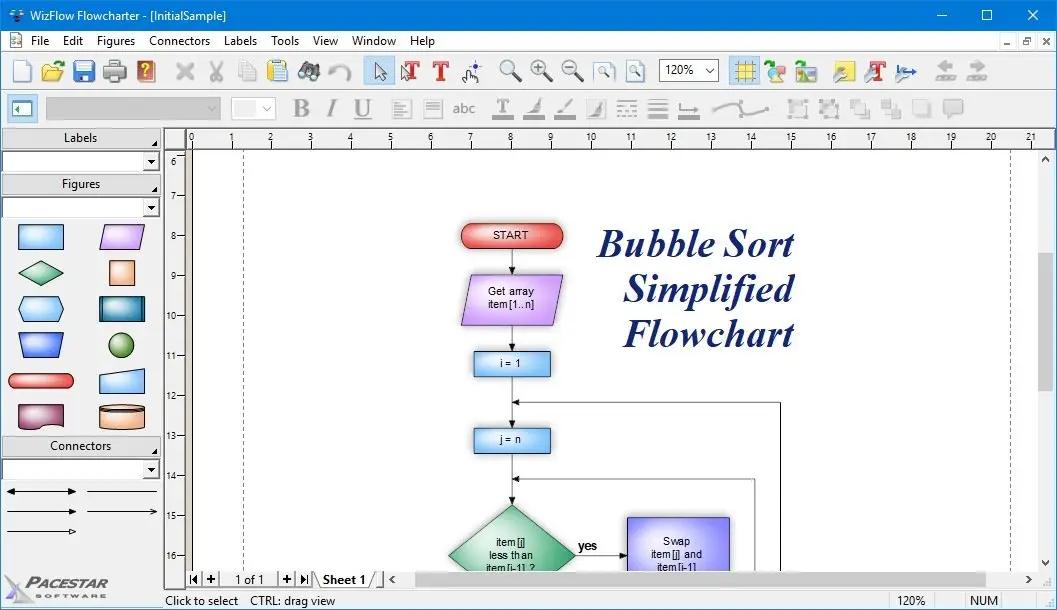
WizFlow Flowcharter is an easy-to-use, feature-rich, flowcharting and diagram drawing tool for Windows. WizFlow lets you define shape "styles" using over a hundred predefined shapes and arrowheads. Save your styles in diagram templates to establish your own diagramming methods. WizFlow comes with complete flowcharting templates to get you started.

WizFlow can create flowcharts and similar diagrams with minimal effort. As you draw your diagram, WizFlow connects lines to figures and attaches labels to lines. It remembers these relationships and adjusts automatically when you move objects around. It can also adjust the size of a shape when you add text to it.

Features:
- Includes hundreds of pre-defined shapes and symbols organized in the Figure Symbol Gallery.
- Auto-save and Auto-backup. Choose to save backup versions whenever you save a file, or have a backup file saved periodically. Fully programmable.
- Includes several pre-defined diagram templates for flowcharts and block diagrams.
- Attach / detach figures in "flows". Drop a symbol onto a line and the symbol merges into the flow automatically.
- Create your own styles combining the attributes, shapes, colors, and behaviors of your own figures
- New diagram wizard lets you select sizes, color schemes, and initial fonts with great convenience.
- Create custom diagram templates to represent your own diagramming methodologies and to store your custom symbol libraries.
- Enable "jogs" (also called jumps or crossovers) to clarify line routing.
- Full zoom and scrolling capability with dozens of intuitive and convenient features for easy navigation around even the most complex diagrams
- Add freeform text labels anywhere on your diagram or add specialty labels described below. You can control text justification, color, point size, font, bold, italic, underline, subscript, superscript, and so on.
- Connectors can have many different lines styles, colors, curves, patterns, end symbols (arrows), and designs. Plus you can select flow symbols that are drawn along the path of the line.
- Connector labels attach to a line and adjust when the line moves.
- Connectors can have many possible terminators (arrowheads). Many are included in the End Symbol Gallery.
- Flow labels attach to the point where a line meets a symbol and adjust automatically when either the symbol or the line moves.
- Snap grid for precise placement. The snap grid can be visible or invisible, enabled or disabled, or customized to different sizes for any diagram.
- Branch labels such as 'yes' and 'no' in flowcharts can be snapped into place in a single step and remain attached to their respective symbol/line.
- Create large multi-page wall posters. Pages can be managed separately or cropped and attached to create a poster.
- Line spacing is programmable. Select from many line spacing options.
- Group objects to create larger objects. Features include Group, Ungroup, Ungroup All, and Regroup.
- Alignment and arrangement tools. In addition to the usual aligning, centering, and spacing features, the program also performs subtle behind-the-scenes steps to help you keep your diagram organized and looking good.
- Container symbols show divisions of larger diagrams by creating a "box around" a number of other symbols. The container also lets you work with the included symbols as a unit.
- Copy or export diagrams to other programs such as Microsoft Word with OLE. Simply copy and paste into most any other software, or link and embed into any OLE-enabled program for full control. Export formats include WMF, EMF, BMP, and JPG.
- English (inches) or metric (millimeters) measurement units
- Copy or export diagrams to other programs such as Microsoft Word with OLE. Simply copy and paste into most any other software, or link and embed into any OLE-enabled program for full control. Export formats include WMF, EMF, BMP, and JPG.
- Any figure or label can include text memos which show in text balloons
- Full install/uninstall. Does not modify your operating system files!
- Import external graphics and clip-art to use in your diagrams. Supports EMF, WMF, BMP, and JPG files.
- Comprehensive online help.

HOMEPAGE:
Код:
http://www.pacestar.com/

FREE DOWNLOAD LINKS:

Код:
https://rapidgator.net/file/57f91e78435736bc60f4950459636de1/WizFlow_Flowcharter_Professional_7.53.2223.rar

Код:
https://nitroflare.com/view/038767A876D2390/WizFlow_Flowcharter_Professional_7.53.2223.rar
 
41b3c9af282a9e717a0394fbf3c544b2.jpg


XL-Connector 3.7.10.0 | Size: 18.97 MB
Language: English


XL-Connector is a popular plugin that safely integrates Excel and Salesforce to seamlessly export, import, refresh and transform data with a lightning fast-api connection. It offers Salesforce admins a comprehensive toolbox that easily performs data and metadata management operations in a familiar Excel environment.

Your ideal tool for Salesforce data management in Excel

Export from Salesforce to Excel
Pull data from an existing Salesforce report or build your own SOQL query directly into Excel.

Import data into Salesforce
Manage and transform your data in Excel, and push it back with one click.
- Use all the amazing Excel tools on your Salesforce data: pivot tables, charts, and formulas.
- Perform any data operation with no row limits!
- Ideal Salesforce data cleansing tool
- Access great metadata management tools

Get the most valuable Salesforce plugin for excel
- Saves hours and days of data-loading.
- Image not found
- Private and secure.
- Image not found
- Boosts team productivity.
- Amazing features for data manipulation.
- Image not found
- Improves the quality of your data by keeping it up to date.

Perform and automate any data operation in bulk
Mass create, update and upsert opportunities, accounts, leads, quotes and other SFDC objects with XL-Connector. Become a master of bulk updates and upserts in Salesforce with just a click of a button!

Manage your Salesforce duplicate records
Efficiently merge Salesforce Accounts, Contacts, and Leads in bulk (available in the Enterprise Admin edition).

Delete your Salesforce records in bulk
Mass delete records in Salesforce and keep your data fresh and updated.

Perform your Salesforce Data Migration with the help of XL-Connector
Safely migrate large amounts of data.

XL-Connector: Your Ideal tool for Salesforce metadata management.
XL-Connector is the only Excel to Salesforce connector that provides a complete assortment of metadata management tools that will hugely boost the productivity of Salesforce admins.

These tools enable management of such things as fields, validation rules, processes, picklists, security settings, custom metadata and much more. Tasks that normally take days, like updating the descriptions and help texts of data fields, will take minutes with XL-Connector.

Other XL-Connector great features you will appreciate

Super intuitive user interface
A climax between simplicity and comprehensiveness, The user interface is very friendly and presents a minimal learning curve.

Security by design
XL-Connector is a locally installed app that doesn't send your data anywhere outside of your secure environment. There's no cloud component to it, so the data travels directly between your PC and Salesforce instance over a secure encrypted channel.

HOMEPAGE:
Код:
https://www.xappex.com/

FREE DOWNLOAD LINKS:

Код:
https://rapidgator.net/file/e348ac6b3ebdbaa8bccb678afdb2ae2c/XL-Connector_3.7.10.0.rar

Код:
https://nitroflare.com/view/112A34235292B83/XL-Connector_3.7.10.0.rar
 
3af34bf553192af04d22a8015b329127.jpg


Adobe Camera Raw 18.3.2 (x64) | Size: 1.71 GB
Language: English


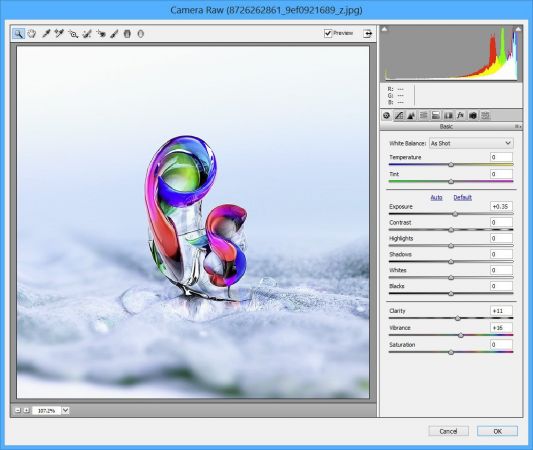
Adobe Camera Raw is a must-have powerful Adobe Photoshop plugin that provides fast access to the RAW image formats. The Adobe Camera RAW converter functionality in Adobe Photoshop software provides fast and easy access to the raw image formats produced by many leading professional and midrange digital cameras. By working with these "digital negatives," you can achieve the results you want with greater artistic control and flexibility while still maintaining the original RAW files. The Photoshop Camera Raw plug-in became the latest must-have tool for professional photographers when it was released in February 2003. Adobe Photoshop Lightroom software is built upon the same powerful raw processing technology that is available in the Adobe Camera Raw plug-in.

Photoshop is more than a feature-packed graphic processor and editor, as its functions can be constantly expanded due to third-party extensions. Such an addon is Camera Raw, an Adobe product that is meant to allow everyone to use Photoshop for processing raw formats, including DNG.

Due to this extension, users can not only edit raw images, but they can also convert them to other formats that are widely supported by other apps. Photographers finally get the possibility to work directly on their shots, thus making sure the original capture is not distorted in any way.

One can apply artistic effects to their photographs, or perform basic editing, such as crop, cut, rotate or tilt, depending on the result they want to obtain.

Furthermore, Adobe Camera Raw supports a wide range of cameras, to allow as many people as possible to process their raw images with ease, regardless if they use Cannon, Kodak, Olympus, Konica Minolta, Samsung, Ricoh, Leaf, Contax, Hasselblad, Panasonic, Sony, Sigma, Casio, Leica, Nikon, Fujifilm, Pentax or Mamiya cameras.

In addition, Adobe Camera Raw is not meant to be exclusively used with highly professional digital cameras, as the shots taken with midrange ones can also be processed.

Adobe Camera Raw comes with a downside, it cannot be integrated into any version of Photoshop one might choose - each version can only be installed onto a certain Photoshop edition, so users need to check the compatibility before downloading and installing this graphic plugin.

System Requirements: Windows 11/10

FREE DOWNLOAD LINKS:

Код:
https://rapidgator.net/file/39df8b4b5026aa33a39d7457c97ac7af/Adobe_Camera_Raw_18.3.2_x64.rar

Код:
https://nitroflare.com/view/1176B621741993E/Adobe_Camera_Raw_18.3.2_x64.rar
 

c0528e94cb6b8d00c2ec26dd564c2e5c.png


Adobe DNG Converter 18.3.2 (x64) | Size: 1.69 GB
Language: English


Digital Negative (DNG) is an openly published raw file specification that stores the "raw" pixel data captured by the digital camera sensor before it has been converted to JPEG or TIFF along with standard EXIF metadata, date, time, camera used, and camera settings. This format is freely available for other software and hardware vendors to support.

What is the Adobe (DNG) Converter?
The Adobe DNG Converter enables you to easily convert camera-specific raw files from the supported cameras listed below to a more universal DNG raw file.

What is a "raw" file?
A raw file contains the "raw" data captured by the digital camera sensor before it has been converted to JPEG or TIFF. Cameras that create JPEG or TIFF files process (and in the case of JPEG files, compress) the sensor data.When working with raw files, the file is not compressed or processed in the camera-instead, our software gives the user complete control over the conversion settings. For example, white balance is not applied to the raw file but is stored with the file so the software can default to the originally intended setting. Other information contained in a DNG file includes standard EXIF metadata (just like in JPEG files), date, time, camera used, and camera settings.

Benefits of raw files
Some of the benefits of shooting raw include
Smaller files than uncompressed TIFF
Does not have the artifacts of compressed JPEGs
Many key camera parameters, such as white balance, can be modified even after the image is captured
You have complete control over conversion settings rather than letting the camera decide
Access to 16-bit data for greater detail and fidelity
Flexibility of converting a single file using multiple conversion settings

What's New
official site does not provide any info about changes in this version.

System Requirements: Windows 11/10

FREE DOWNLOAD LINKS:

Код:
https://rapidgator.net/file/48979d94192da643d3fbb159d5aa8d50/Adobe_DNG_Converter_18.3.2_x64.rar

Код:
https://nitroflare.com/view/2F8E6595DEE9C9A/Adobe_DNG_Converter_18.3.2_x64.rar
 
88f82e7f7138be0fcdc0f03b5e1258b1.jpg


Antidote 12 v4.0.3 | Size: 3.26 GB
Language: English


Meet The New Antidote: Smarter and Savvier Than Ever. Powered by artificial intelligence and built on our linguists' expertise, Antidote 12, Antidote Web and Antidote Mobile come loaded with features that are second to none. They'll redefine your writing experience. Period. All the tools you need to improve your writing. Antidote is an intelligent multi-resource writing assistant that integrates with your favourite software.

Remedy Your Writing
The corrector analyzes your text and flags any detections in a click. It doesn't just correct your mistakes, it also helps you improve your style. Hover the mouse over a highlighted word to display a tooltip providing a correction with detailed explanation or options for replacement. Click to confirm, and Antidote applies the changes automatically.

Besides fixing spelling and grammar mistakes, its smart filters help you touch up your typography, root out repetition and make your message more inclusive. Never before has a tool been so effective at helping you refine your writing.

Transform Your Texts
In Reformulation mode, the corrector comes up with smart solutions for reshaping your writing that stay true to your ideas. See your text transformed through different views that Rewrite, Retouch, Soften or Shorten it to suit your needs. Reformulate entire passages or only certain segments. Whatever approach you choose, you're always in control.

Powered by generative artificial intelligence trained by our linguists, Reformulation will redefine your writing experience.

Find the Right Word
Antidote lets you look up a definition, then jump from one word or reference to another to find the perfect term in just a few clicks. Browse through synonyms, antonyms, expressions, related words or words in the same family. Find combinations that resonate through their strong associations. Check your conjugation, listen to audio pronunciation*, take note of any linguistic difficulties and see numerous hand-picked examples. Antidote's uniquely comprehensive content and high-powered search tools push the limits of what dictionaries can do.

Learn From Your Mistakes
The corrector's explanatory tooltips take you straight to the answers you need with quick links to the article in the language guides that clearly and concisely explains the rules and exceptions for the case in question. Helpful tips and practical examples make everything easy to understand. Explore related topics with ease and browse 572 articles that cover every aspect of writing, from grammar and style to spelling and punctuation.

Make Your Emails Mistake⁠-⁠Proof
Anti-Oops! technology vets your emails to ensure you didn't forget to carefully review them and to add all the attachments you meant to include. It even flags parts of your message that risk being ill received by the recipient. It springs into action as soon as you click Send to make sure you remember to run what you've written through Antidote for one last once-over.

System Requirements
- Windows 64 bits : (32 bits systems are not compatible)
- Windows 10 (21H2, 22H2)
- Windows 11 (22H2, 23H2, 24H2)
- Windows Server (2022)
- RAM : 4 GB Memory
- Processor : x86-64/AMD64, 1 GHz
- Disk space : 6 GB (1 language); 7.5 GB (2 languages); SSD Drive

Incl. English and French Language Modules

HOMEPAGE:
Код:
http://www.antidote.info/en/antidote

FREE DOWNLOAD LINKS:

Код:
https://rapidgator.net/file/fcab0caa8137302364068a9f2494bda4/Antidote_12_v4.0.3.rar

Код:
https://nitroflare.com/view/9A93F79B89B56F9/Antidote_12_v4.0.3.rar
 
cfcf6fa2e604b6feb410814712b855a0.jpg


Coolmuster Screen Recorder 1.1.68 Multilingual | Size: 45.41 MB
Language: English


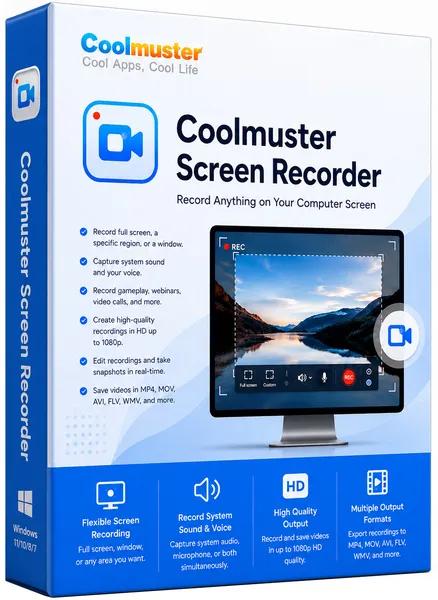
Coolmuster Screen Recorder is a lightweight, 2-in-1 Windows software designed for private, high-definition screen recording and screenshot capturing. It allows users to record full screens, specific application windows, or custom regions directly to their local drive in HD MP4 format.

2-in-1 Screen Recording & Capture for Windows
- Record full screen or custom regions and save videos as MP4 in HD quality.
- Capture system audio, microphone, or neither while recording your screen.
- No time limit, no watermark after registration, lossless image quality, lightweight and lag-free.
- Screenshot full screen or region, edit with shapes/text, save as PNG/JPEG/BMP.
- Keep everything private with 100% local processing - no uploads, no cloud, no external servers.

Why Should You Choose Coolmuster Screen Recorder?

Record Video in HD Quality - Full Screen or Any Region
Capture your entire desktop or just a custom area. Save as MP4 in crystal-clear HD quality - no watermark after registration, no time limit, and no lag

- Smart Area Selector: Drag to select any region with real-time pixel dimensions - get exactly what you need without extra editing.
- Flexible Recording Modes: Record full screen, a specific app window, or a custom region. Unlimited recording sessions.
- Lightweight & Reliable: Smooth high-resolution recording with minimal system impact - even on modest hardware.

Choose Your Audio Source - System Sound or Mic
Decide which audio to include. Record either system sound (game, video playback) or your voice - never both, for clean and focused audio

- Single-Source Audio: Pick system sound only for gameplay captures, or microphone only for voiceover tutorials. No interference.
- Flexible Options: Also choose no audio at all for silent demos or privacy-sensitive recordings.

Take & Edit Screenshots - Full Screen or Custom Region
Capture anything on your screen and enhance it instantly. Save as PNG, JPEG, or BMP - all with lossless quality

- Easy Screenshot Capture: Grab full screen or drag a custom region. Real-time pixel dimensions help you frame perfectly.
- Built-in Editing Tools: Add boxes, circles, arrows, lines, or text to highlight key areas before saving.
- Multiple Formats: Export as PNG, JPG/JPEG, or BMP - whatever suits your workflow.

100% Private - Local Processing, No Uploads
Everything stays on your computer. Your recordings, screenshots, and data never leave your device - no cloud, no external servers

- Local-Only Processing: All recording and editing happens directly on your Windows PC. Total privacy guaranteed.
- Full Ownership: You keep complete control of every file from start to finish. No third-party access, no unexpected sharing.
- One-Click Simplicity: Start or stop recording with a single click. A handy toolbar keeps controls accessible without interrupting your work.

System Requirements: Windows 11/10/8/7 (x64 bit only)

FREE DOWNLOAD LINKS:

Код:
https://rapidgator.net/file/6fce78f9e40cd9425f6b9e9de4c66c8b/Coolmuster_Screen_Recorder_1.1.68_Multilingual.rar

Код:
https://nitroflare.com/view/4E5F353DD710DFA/Coolmuster_Screen_Recorder_1.1.68_Multilingual.rar
 
e7964d8ea0676339ed45cc64858b2a3f.jpg


Copy Protect 3.0 | Size: 118.84 MB
Language: English


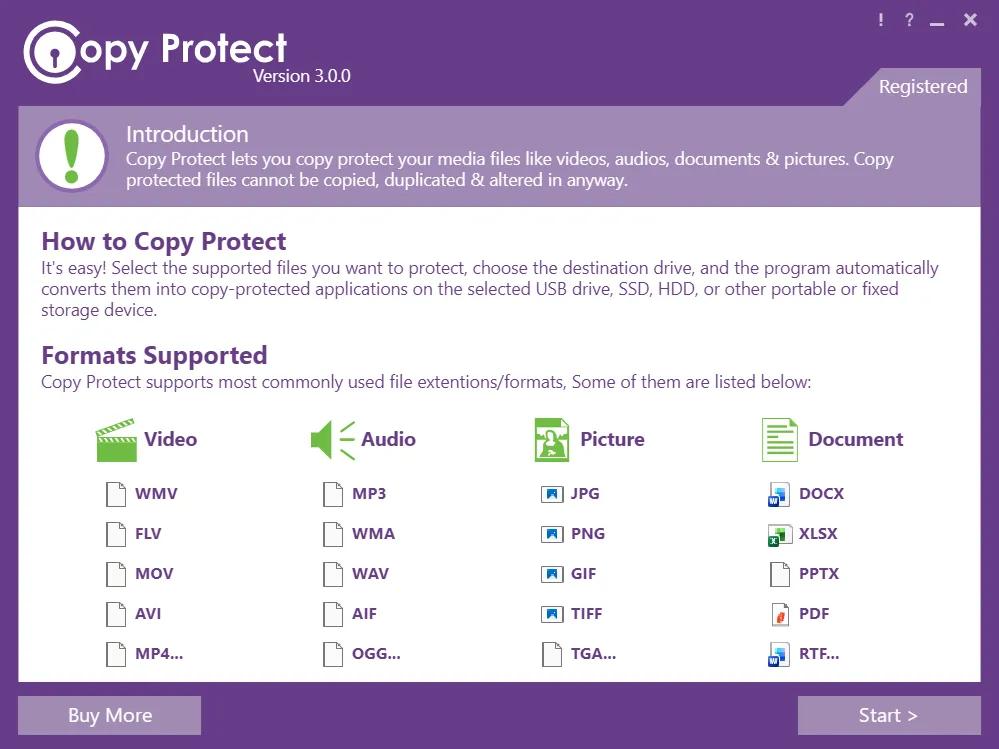
Copy Protect all types of media files like videos, audios, documents and pictures. The program converts your media files into executable files that will only run in the drive you choose using the program. If these executable are copied to another device or drive, they will simply not run.

Copy Protection
Unbreakable protection for all your media files including your videos, audios, pictures and documents.

Prevent Duplication
Safeguards from data infringement which can lead to lost revenues & loss of intellectual credit.

Prevent Illegal Dist.
Videos, photographs and presentation cannot be illegally distributed when protected with copy protect.

Data Leak Prev.
Copy Protect enhances your data's integrity and confidentiality with advance copy protection technology.

Protect Data-in-use
Advance copy protection technology restricts access to your data from unauthorized users.

Secure Burning
Securely distribute your music, audio or document files to clients or other computers.

Custom Security
Custom security can be applied on media files for a variation between speed and security.

Operating System: Windows 11, 10, 8, 7, XP

HOMEPAGE:
Код:
http://www.newsoftwares.net/

FREE DOWNLOAD LINKS:

Код:
https://rapidgator.net/file/db3b22fc8d77ddb1b4c3a196cd450bcd/Copy_Protect_3.0.rar

Код:
https://nitroflare.com/view/2DEA782EA25B8FE/Copy_Protect_3.0.rar
 
16fbb84bd8e96a1fad557be382fd6bc0.jpg


Icecream Ebook Reader Pro 6.55 Multilingual | Size: 32.02 MB
Language: English


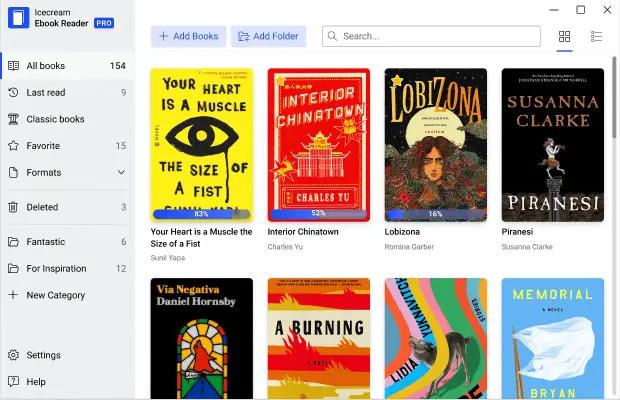
Meet easy-to-use free reader for Windows to read eBooks in , MOBI, PDF and other popular formats. Enjoy books in full screen with Icecream Ebook Reader.

Supported eBook formats
Not just an reader. The software also enables you to read books of other formats: MOBI, PDF, FB2, CBR, CBZ, TXT and even ZIP. However, no DRM protected content is supported.

Highlight and add notes
Add notes or highlight text in eBooks of the major formats such as and MOBI. Search and sort your notes by text or color.

Create your digital library
Add books to the eBook reader without limits, categorize them, add to favorites, etc. Search the library, track reading progress, use bookmarks and much more.

Windows 10 support
Our reader supports all the main Windows OSs including Windows 11. We worked hard to make it the perfect, if not the best, Windows 10 reader.

Free reader
All the essential reading features are available in the free version of the eBook reader.

Full-screen mode
Make the most of your reader: press F11 to switch to full-screen mode instantly.

Text to speech
Our reader will convert text to speech from any eBook and read it aloud for you. Different voices are available according to your system's settings.

Search in eBooks
Don't get lost in your eBook. Use in-book smart search by text or a page number to find what you need in no time.

Dark reading mode
Reading and making notes must be still enjoyable even in dim light. That's why we created a well-designed night version of the reader.

Copy, Translate, Google Search
Quickly select eBook text to copy it to clipboard, translate or search it on Google or Wikipedia.

Customizable layout
Adjust font family, font size, line space if needed. Set double or single page text layout.

System requirements:
OS: Windows 11, Windows 10, Windows 8.1, Windows 8, Windows 7
Intel®, AMD or any other compatible processor, 1.33Ghz
1GB of RAM minimum (2GB for better performance)
Display resolution: 1024x768 minimum

HOMEPAGE:
Код:
https://icecreamapps.com/

FREE DOWNLOAD LINKS:

Код:
https://rapidgator.net/file/58f340fb3f0bcf13d19083024788f001/Icecream_Ebook_Reader_Pro_6.55_Multilingual.rar

Код:
https://nitroflare.com/view/EEDA93FF188A791/Icecream_Ebook_Reader_Pro_6.55_Multilingual.rar
 
f92f4e8cc295cc2b5d679ae2e3d1035d.jpg


Icecream PDF Candy Desktop Pro 3.20 Multilingual | Size: 157.31 MB
Language: English


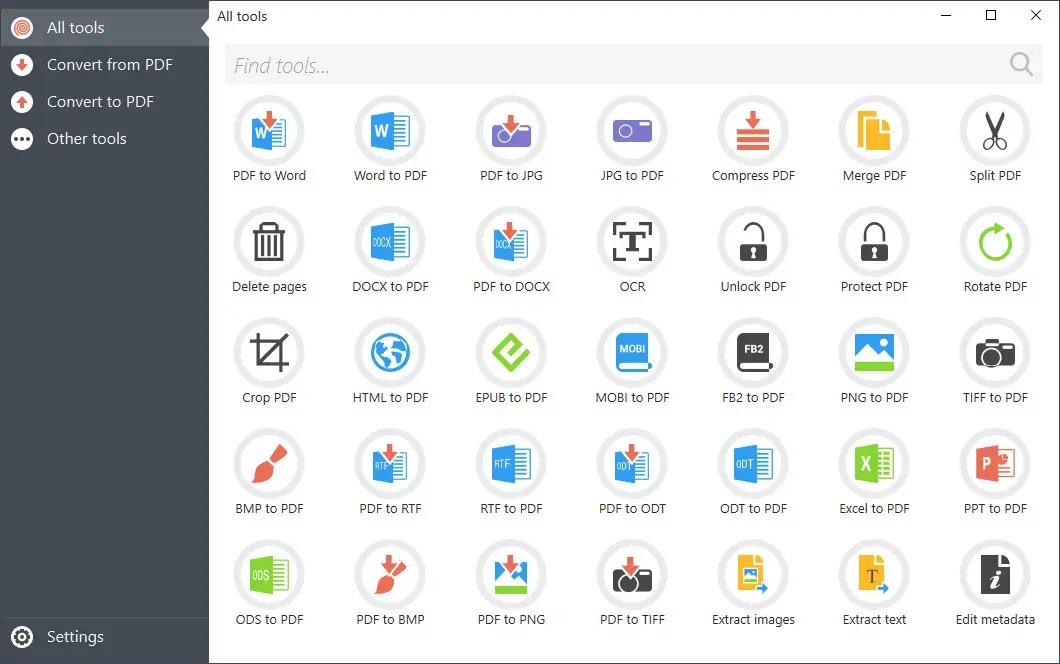
PDF Candy Desktop is a versatile tool that enables you to convert files from PDF to various supported formats (PDF to DOC, PDF to JPG, etc), convert documents, ebooks and images to PDF, merge PDF, split PDF, extract images and text from PDF, edit PDF metadata, protect PDF and unlock password-protected PDF files. Most modes support processing files in a bulk. All these features are available through modern and user-friendly interface.

100% Privacy
Process sensitive data locally on your PC to keep maximum privacy

Batch Processing
Convert, merge multiple files at a time

No Limits
Convert, split or merge files of any size

OCR (Text Recognition)
Recognize text in scanned PDFs to create editable documents

No Internet Connection Needed
Process your files whenever and wherever you need

PDF to editable Word files
High quality conversion of PDF documents to editable DOC format

System Requirements
OS: Windows 10, Windows 8.1, Windows 8, Windows 7, Windows Vista, Windows XP
1.33Ghz Intel AMD or any other compatible processor / faster processor for netbooks;
512MB of RAM (1GB for better performance)

HOMEPAGE:
Код:
https://pdfcandy.com/

FREE DOWNLOAD LINKS:

Код:
https://rapidgator.net/file/4105f3e515615659ee2126f45c55a038/Icecream_PDF_Candy_Desktop_Pro_3.20_Multilingual.rar

Код:
https://nitroflare.com/view/C8E6736F71BC9D0/Icecream_PDF_Candy_Desktop_Pro_3.20_Multilingual.rar
 
c89a1f359939d5e94a4b37cea4eb3342.jpg


Icecream Screen Recorder Pro 7.48 (x64) Multilingual | Size: 27.57 MB
Language: English


Icecream Screen Recorder is an easy-to-use software to record screen with audio. Record apps and webinars, Zoom meetings and Whatsapp calls, video tutorials, live streams and more.

Record screen
Record full screen or select any area you'd like to record, screen recording has never been easier. Capture any monitor of your PC.

Annotate and edit recordings
Draw while screen capture, add text, arrow and bullet annotations. Screen recorder enables you to trim your videos and change speed, mute and much more.

Share instantly
Record screen and upload the video to our servers in 1 click to share with your colleagues or clients. Track the number of recording views in the app.

Windows 10 support
Our software perfectly supports all main Windows OSs including Windows 11. However, the latest rebuilds and optimization make it the best Windows 10 screen recorder.

Record webcam
Add a webcamera window to your screen recording to personally narrate and comment videos. Set the webcam window shape and size.

Record audio
This screen recorder for PC supports recording of both computer audio and microphone. Narrate while you record screen activity with music in the background.

Add logo
Upload an image to be used as a watermark for the recorded videos. Set the position within selected area and opacity.

Scheduled screen recording
Set the start and stop date and time to screen record full screen or its area. The capture process will be initiated automatically along with the schedule.

Display hotkeys
Enable this feature to show the hotkey combinations that were used during the screen recording on Windows.

Make screenshots
3 ways to screenshot on Windows: save a screenshot as JPG or PNG file, copy to clipboard or upload to our server.

System Requirements:
OS: Windows 11, Windows 10, Windows 8.1, Windows 8, Windows 7, Windows 2003, Windows 2000, Windows Vista
Processor: Intel®, AMD or any other compatible processor, 2.66Ghz
Ram: 1GB of RAM minimum (4GB for better performance)

HOMEPAGE:
Код:
https://icecreamapps.com/

FREE DOWNLOAD LINKS:

Код:
https://rapidgator.net/file/ae6082ffa1dfdba2381ddebdaa6bc397/Icecream_Screen_Recorder_Pro_7.48_x64_Multilingual.rar

Код:
https://nitroflare.com/view/06B862663C8D172/Icecream_Screen_Recorder_Pro_7.48_x64_Multilingual.rar
 
f88bda098975e642ae0758451ec97210.png


IronCad 2027 (x64) | Size: 2.86 GB
Language: English


Transforming CAD from Concept to Creation.
IronCAD significantly reduces manufacturing barriers and increases engineering productivity with intuitive 3D and 2D solutions for rapid design and seamless collaboration enterprise-wide.

Why IronCAD
Fundamentally a Better Way to Design
Create design iterations, proposals, and production drawings in less time and simply design faster than any other CAD system available today.

Design How You Think
What makes us different? IronCAD lets you design intuitively in the way you interact in the world, in 3D. With this easier and faster design approach over traditional CAD software, it's a fundamentally better way to design.

Take Your Model to Market Faster
IronCAD gives you the speed to invent the future, with time left to watch it unfold. Skip repetitive steps so you can get to market faster, ahead of your competitors, and with far more return on your investment.

Learn in Days, Not Months
Just like designing in the real world, learning IronCAD only takes days or even hours. Quickly integrate it into your existing workflows and start producing results immediately.

Make Design Changes in Seconds
Make design changes when you want, not when your CAD software decides to let you. IronCAD empowers you to model with or without history-dependency, so making a change is as simple as doing it.

Transforming CAD From Concept to Creation
Choose How You Design
Going from 2D to 3D and final assembly is as easy as drag, drop, and click with lronCAD's intuitive design methodology.

Simplify File Management
Large or small, store all parts and assemblies in one document or save separately and link them via 3D Scene.

Save Time With Catalogs
Kickstart the design process with catalogs of predefined shapes that can be easily modified to create working geometry.

Seamlessly Trade Data
Share data in all major 3D and 2D file formats for design reuse or modification with flexible import-export options.

Become More Productive
Accelerate your design process from concept to production with integrated, intuitive tools in one easy-to-use interface.

Empower Sales
Foster collaboration with salespeople and customers via real-time design visualization and configuration.

System Requirements
64-Bit Window Operating System
A Pentium 4 CPU or higher (current AMD processors supported)
4GB Recommended (8 GB or more for large assembly work)
Direct X and/or OpenGL compatible accelerated video graphics card (required for large assembly work)
2 GB of free disk space to install. More recommended for design data.
Windows 10/11 - Recommended having all the latest Windows updates.

HOMEPAGE:
Код:
http://www.ironcad.com

FREE DOWNLOAD LINKS:

Код:
https://rapidgator.net/file/c892d254adf167007378860eb22193c7/IronCad_2027_x64.rar

Код:
https://nitroflare.com/view/9F6E092D9554433/IronCad_2027_x64.rar
 
dd338628225debb0e9bbdc966c74ba2f.jpg


K-Lite Codec Pack 19.7.5 Mega/Full/Standard | Size: 159.05 MB
Language: English


The K-Lite Codec Pack is a collection of DirectShow filters, VFW/ACM codecs, and tools. Codecs and DirectShow filters are needed for encoding and decoding audio and video formats. The K-Lite Codec Pack is designed as a user-friendly solution for playing all your audio and movie files. With the K-Lite Codec Pack you should be able to play all the popular audio and video formats and even several less common formats.

Some codec packs are far from being friendly with computers, as they tend to slow down Windows, break down multimedia files and make the whole movie watching experience a nuisance. This is why an efficient software has to be chosen, one that does exactly what it is supposed to without additional and unnecessary features.

Easily deployed on the system
Simply put, this is exactly what K-Lite Codec Pack Full is meant to do. This is one of the most efficient codec packs out there that is not only delivered as a very light package but is also impressively friendly with computer resources.

Installing it is quite easy, unless one is an expert who really enjoys toying around with the advanced settings. K-Lite has numerous advanced customization options but novices are advised not to spend too much time on this section, as they might erroneously modify some options and break the entire process.

View detailed info on what is installed
Furthermore, before going through the step-by-step thorough setup process, one gains access to a list that displays content, along with several details regarding each of the codecs, to give users a glimpse of what they are about to deploy.

If everything goes well and K-Lite Codec Pack Full is successfully installed, users will be able to open any multimedia files stored on their computers, without any quality loss. Furthermore, it works like a breeze from the first run, without major changes to its default settings, which is a clear indication that beginners and those who want a codec that just works have chosen the right package.

Adjust settings with a dedicated tool
Experts have the possibility to configure the audio and video decoders, as well as the DirectVobSub, in an attempt to obtain a top-notch experience when it comes to playing multimedia files. This is easily done with the help of an integrated tweaking tool that, if managed properly it can enhance the overall multimedia experience.

To sum it up
All these considered, K-Lite Codec Pack should be the first on everyone's list when it comes to codec packages. It is light, freeware, easy to use and gets along perfectly even with slower computers. It represents the first brick that needs to be placed in the multimedia entertainment wall.

System Requirements: Windows 11, Windows 10, 8 , 7

HOMEPAGE:
Код:
http://www.free-codecs.com/

FREE DOWNLOAD LINKS:

Код:
https://rapidgator.net/file/6b725e4698663f83471b2b014d17ff96/K-Lite_Codec_Pack_19.7.5_Mega_Full_Standard.rar

Код:
https://nitroflare.com/view/58EBE2789AE1180/K-Lite_Codec_Pack_19.7.5_Mega_Full_Standard.rar
 
f9b0194f3ea6e4ca4005ea2ca00a1997.jpg


LibreOffice 26.2.4 | Size: 690.1 MB
Language: English


LibreOffice brings some very interesting new features such as bundled extensions (which provide PDF import, a slide-sow presenter console and more), import and work with SVG files, an easy way to format title pages and their numbering in Writer, a more-helpful Navigator Tool for Writer, improved ergonomics in Calc for sheet and cell management and Microsoft Works and Lotus Word Pro document import filters.

What does LibreOffice give you?

Writer is the word processor inside LibreOffice. Use it for everything, from dashing off a quick letter to producing an entire book with tables of contents, embedded illustrations, bibliographies and diagrams. The while-you-type auto-completion, auto-formatting and automatic spelling checking make difficult tasks easy (but are easy to disable if you prefer). Writer is powerful enough to tackle desktop publishing tasks such as creating multi-column newsletters and brochures. The only limit is your imagination.

Calc tames your numbers and helps with difficult decisions when you're weighing the alternatives. Analyze your data with Calc and then use it to present your final output. Charts and analysis tools help bring transparency to your conclusions. A fully-integrated help system makes easier work of entering complex formulas. Add data from external databases such as SQL or Oracle, then sort and filter them to produce statistical analyses. Use the graphing functions to display large number of 2D and 3D graphics from 13 categories, including line, area, bar, pie, X-Y, and net - with the dozens of variations available, you're sure to find one that suits your project.

Impress is the fastest and easiest way to create effective multimedia presentations. Stunning animation and sensational special effects help you convince your audience. Create presentations that look even more professional than the standard presentations you commonly see at work. Get your collegues' and bosses' attention by creating something a little bit different.

Draw lets you build diagrams and sketches from scratch. A picture is worth a thousand words, so why not try something simple with box and line diagrams? Or else go further and easily build dynamic 3D illustrations and special effects. It's as simple or as powerful as you want it to be.

Base is the database front-end of the LibreOffice suite. With Base, you can seamlessly integrate into your existing database structures. Based on imported and linked tables and queries from MySQL, PostgreSQL or Microsoft Access and many other data sources, you can build powerful databases containing forms, reports, views and queries. Full integration is possible with the in-built HSQL database.

Math is a simple equation editor that lets you lay-out and display your mathematical, chemical, electrical or scientific equations quickly in standard written notation. Even the most-complex calculations can be understandable when displayed correctly. E=mc2.

LibreOffice also comes configured with a PDF file creator, meaning you can distribute documents that you're sure can be opened and read by users of almost any computing device or operating system.

HOMEPAGE:
Код:
http://www.libreoffice.org/

FREE DOWNLOAD LINKS:

Код:
https://rapidgator.net/file/07c2d658e861563d77ddf29202bddb3f/LibreOffice_26.2.4.rar

Код:
https://nitroflare.com/view/837A97794955CBE/LibreOffice_26.2.4.rar
 
5630e44dd679a2c452b90668073fdd17.jpg


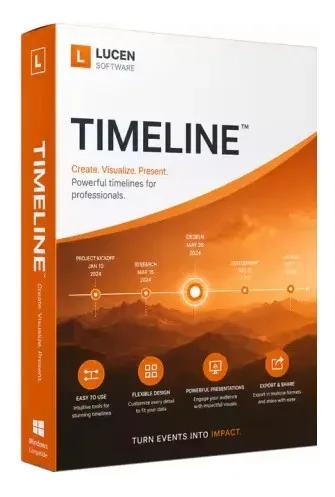
Lucen Timeline Expert 14.18.00.00 | Size: 148.58 MB
Language: English


Office Timeline is now called Lucen Timeline, part of Lucen Software! The #1 PowerPoint Timeline Maker for Windows and Office. Create PowerPoint timelines or roadmaps as fast as clients and executives need them. Simple but powerful PowerPoint add-in that anyone can use to quickly make and manage impressive timelines.

Beauty trumps complexity.
Build stunning PowerPoint timelines without the effort and cost.

Free yourself from manually building and managing visual project plans.
Office Timeline helps you make timelines, Gantt charts and Swimlanes in PowerPoint almost instantly. Customize them with just a few clicks to create clear, elegant high-level presentations that everyone will understand.

User-friendly PowerPoint timeline generator. Works the way clients and colleagues do.
Office Timeline works with all versions of PowerPoint. Give them stunning PowerPoint slides that can be viewed, edited and shared by anyone who has Microsoft Office.

Manage and change data with ease.
The plugin's powerful Data wizard and drag & drop Visual Editor make timeline management agile and intuitive. Updating timelines when projects and plans change is quick and easy.

PowerPoint timelines made easy.
No complex steps. No learning curve. No hassle!

Start from scratch or pick a template.
The timeline wizard was designed to make it simple. It all starts by selecting the type of timeline you want to make.

Enter your data and click Create.
Once you've selected a timeline template, enter or import your key milestones and tasks. Set their dates, click the Create button, and voilà ! Timeline created.

Arrange and style to impress.
Use Drag & Drop to instantly rearrange or update your visual. Then customize it your way â?? colors, shapes, date formats, task duration, percent completeâ?¦ change any detail, anyway you want.

Enjoy more freedom with Plus Edition.
While the Free edition is fully functional, Office Timeline Plus brings more! Plus Edition unlocks predesigned templates and gives you the freedom to add as much data as needed, so you can create detailed, unique PowerPoint timelines and Gantt charts.

See the power of Pro Edition.
Office Timeline Pro gives you everything you get with the Plus add-in, but adds powerful extra features. Pro Edition creates impressive Swimlanes and roadmaps, so you can manage complex projects with big-picture visuals that anyone can understand.

System Requirements:
- Microsoft Windows Vista, Windows 7 (SP1), Windows 8, or Windows 10 (LTSB, CBB and CB). Office Timeline does not run on Windows 10 S. The add-in is functional on Windows XP and Windows Server but unsupported.
- 32-bit versions of Microsoft Office 2007 (SP3), 2010, 2013, or 2016. Although Office Timeline works with 64-bit versions of Office, we do not formally test or support it on 64-bit. The vast majority of the Office install base is the 32-bit version of Office. 32-bit is recommended by Microsoft unless you have very specific needs for 64-bit.
- .NET Framework 4.5.2 or greater.

HOMEPAGE:
Код:
https://www.lucensoftware.com/

FREE DOWNLOAD LINKS:

Код:
https://rapidgator.net/file/1fb7fb8a82066a9bd74b153719812530/00_14.18.00.rar

Код:
https://nitroflare.com/view/242E416FFCA412D/00_14.18.00.rar
 
504f0c01e38dd1cce8b011f661b86c9d.jpg


Media Player Classic Home Cinema 2.7.2 Multilingual | Size: 42.51 MB
Language: English


MPC HomeCinema is comfortable in all plans for the media player. It was built on the basis of a classical player Media Player Classic and one of the best collections of media codecs ffdshow, and thus can play many formats of video and audio files without installing external codecs. This player has a large number of different functionalities: it can play DVD disks, the hardware is able to decode H.264 format popular on the latest generation graphics cards, knows how to work correctly with the second monitor (TV), supports the various type of subtitles can work with QuickTime and RealVideo formats etc.
The player is small and completely understandable, and not overloaded functions redundant interface translated into 14 languages.

It has full compatibility with Windows XP, Vista and Se7en. Media Player Classic Home Cinema is an extremely light-weight media player for Windows. It looks just like Windows Media Player, but has many additional features. You can use the player as a Media Player Classic Home Theater.

Supported Decoding
MPEG-1, MPEG-2 and MPEG-4 playback. Media Player Classic is capable of VCD, SVCD and DVD playback, without the need to install any additional software or codecs.
It has built-in codecs for MPEG-2 video and codecs for LPCM, MP2, AC3 and DTS audio, and also contains an improved MPEG splitter that supports playback of VCDs and SVCDs using its VCD/SVCD/XCD Reader. A *.mp4 and MPEG-4 Timed Text support added. An AAC decoding filter makes MPC suitable for AAC playback in MP4.
MPC Home Cinema also has H.264 and VC-1 with DXVA support, DivX, Xvid, and Flash Video formats is available in MPC HC. MPC can also use the QuickTime and the RealPlayer architectures. Media Player Classic supports native playback of OGM and Matroska container formats.

Supported Video, Audio and Image File Formats
WAV, WMA, MP3, OGG, SND, AU, AIF, AIFC, AIFF, MIDI, MPEG, MPG, MP2, VOB, AC3, DTS, ASX, M3U, PLS, WAX, ASF, WM, WMA, WMV, AVI, CDA, JPEG, JPG, GIF, PNG, BMP, D2V, MP4, SWF, MOV, QT, FLV

Additional Player Features
* Option to remove Tearing.
* Better support for Windows Vista, including a release for 64 bits platform.
* Support for EVR (Enhanced Video Renderer)
* Supports Subtitles.
* Playback and recording of television if a supported TV tuner is installed.
* Creation of minidump when MPC HC crashes.
* OSD (On Screen Display)
* Shuttle PN31 remote control support
* Support Multi-Monitor configuration
* Pixel shader to convert BT601 - BT701
* YV12 Chroma Upsampling pixel shader
* Language Translations.
* All features from the Guliverkli MPC Project from Gabest.

languages: (currently Belarusian, Brazilian, Catalan, Czech, Dutch, English, French, German, Hungarian, Italian, Japanese, Korean, Polish, Russian, Simplified & Traditional Chinese, Slovak, Spanish, Swedish, Turkish, Ukrainian.)

System Requirements: Windows 11, Windows 10, 8 , 7

FREE DOWNLOAD LINKS:

Код:
https://rapidgator.net/file/24b1fade9364203ee805065d768736d5/Media_Player_Classic_Home_Cinema_2.7.2_Multilingual_.rar

Код:
https://nitroflare.com/view/B76E3D4F5A0E8AD/Media_Player_Classic_Home_Cinema_2.7.2_Multilingual_.rar
 

3d616dda7b000eb3103e8f9e599ce268.jpeg


Media Player Codec Pack / Plus 5.0.1.605 | Size: 218.54 MB
Language: English


Media Player Codec Pack is a Windows codec pack created for video and audio playback to allow you to fully enjoy your multimedia files. It supports almost every compression and file type used by modern video and audio files. The package includes video codecs and filters, such as ffdshow, LAV, XviD Encoder and Flash FLV, audio codecs and filters (AC3Filter, LAV Audio, DivX Audio and Lame MP3), plus a collection of other source splitters and filters. The installer gives you the power to pick the components you wish to deploy on your computer.

Media Player Codec Pack gives you a chance to set some file associations straight from the installer, which means you can set up Windows Media Player to handle MKV, VOB, FLV, FLAC, OGG and a bunch of other files by default. By using SlySoft AnyDVD HD with this Codec Pack, Windows Vista and Windows 7 users can play: Protected Blu-ray, AVCHD, HD-DVD, DVD, CD.

Package Components
● ffdshow DirectShow Video Codec x86 by clsid.
● ffdshow DirectShow Video Codec x64 by clsid.
● LAV Video decoder x86 & x64.
● XviD Video (Encoder) Codec
● Lagarith Video (Encoder) Codec x86 & x64.
● Flash Video Splitter/Decoder x86 & x64.
● AC3Filter AC3/DTS Decoder x86 & x64.
● LAV Audio Decoder x86 & x64.
● DivX Audio Decoder
● Lame MP3 ACM Encoder/Decoder Codec.
● DSP-worx Bass Source Filter/Decoder v1.30.
● Haali Media Splitter/Decoder x86 & x64 - For MP4, MKV, OGM and AVI files.
● LAV Splitter x86 & x64.
● VSFilter x86 & x64 - Subtitle Readers.
● CDXA Reader - Also known as Form 2 Mode 2 CD or XCD x86 & x64.
● GSpot Codec Information Appliance.

System Requirements: Windows 11, Windows 10, 8 , 7

FREE DOWNLOAD LINKS:

Код:
https://rapidgator.net/file/7968654e18d229b6dca9fc39d61012f6/Media_Player_Codec_Pack_Plus_5.0.1.605.rar

Код:
https://nitroflare.com/view/39C20A8768FD330/Media_Player_Codec_Pack_Plus_5.0.1.605.rar
 
Назад
Сверху Снизу