All Emperor2011's Software in one thread !! (updated daily)

cda194d83b610094e120baef6b459fd4.jpg


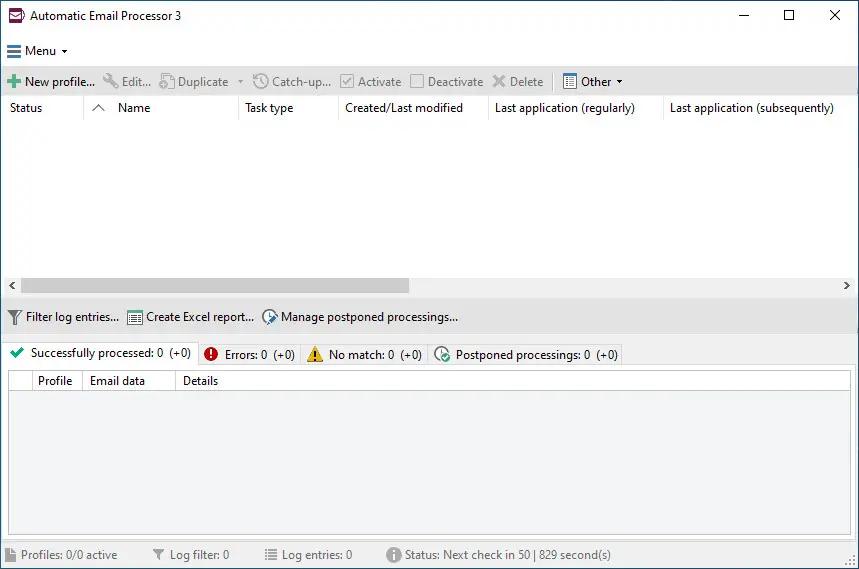
Automatic Email Processor 4.2.2 | Size: 86.09 MB
Language: English

Automatic Email Processor is the complete solution for Outlook to store and print incoming emails and their attachments automatically. For this, various filters, flexible configuration options, such as individually definable storage folders and the possibility of subsequent processing are available. For example, the path of the location where you want Automatic Email Processor to save certain emails or email attachments, can be assembled dynamically from individual properties of an email.

For storing email messages, among other things, the output format can be specified (e.g. PDF, RTF or HTML). The standard Outlook message format (save email as MSG file) is particularly suitable for archiving important messages. The program supports the creation of an unlimited number of rules in order to be able to make separate settings for different email accounts. In addition, rules can be applied to emails of a certain period of time or to all emails already received in an Outlook folder.

Monitor Outlook folders
Examine incoming emails and apply appropriate rules.

Automatically save emails and attachments
Save emails and email attachments from Outlook automatically into dynamically created folders.

Print emails automatically
Send certain emails and attachments directly to the printer (for example, fax emails).

Optional further processing
Perform subsequent tasks, e.g., run a program with the filename of a saved attachment passed as parameter.

With Automatic Email Processor, you can:
• save emails automatically (as PDF file or in the original format)
• automatically print emails and email attachments (PDF files, Office documents etc.)
• save attachments automatically (save all or certain attachments of an email by using a filter)
• extract or print certain or all files from ZIP files
• monitor an unlimited number of Outlook folders
• create custom rules for different tasks
• filter by subject, sender, recipient, attachment file name .
• receive status reports by email, forward messages or inform the sender
• use command line parameters: only one run, exit, catch-up
• create storage folders dynamically from properties of an email
• perform subsequent actions such as start a program with parameters, mark the message as read, or move the email into another Outlook folder
• re-process all emails (with certain criteria) of an Outlook email folder
• archive emails from any Outlook folder and period (e.g. as MSG files)
• have the email moved to a different Outlook folder after processing and have subfolders generated dynamically from properties of the email
• have an Excel report with an overview and detailed information sent to you on a regular basis
• limit the automatic processing of email messages to certain days and times

Automatically print emails and attachments from Outlook
Automatic Email Processor monitors Outlook and allows you to send emails or attachments that meet pre-defined criteria directly to a printer upon receipt. Different print settings can be defined for each rule, for example to be able to print certain emails in a different quality. The respective printer can be defined individually for each rule as well as separately for printing the email message or attachment. You can also specify that only certain pages of the email should be printed automatically (for example, print only the first or last page of a PDF attachment of the email).

Automatically save incoming emails as PDF files
With Automatic Email Processor, emails received in Outlook can automatically be saved into a specified directory as PDF file, for example, in order to keep a copy of the message for backup purposes. Attachments and the email itself can also be embedded (as MSG file with or without digital signature) in the PDF file. The path as well as the folder and file name of the PDF file to be saved can be composed of various properties of the email, such as the date and, for example, a part of the subject.

Automatically save and optionally detach Outlook email attachments
In addition to archiving the complete email, Automatic Email Processor can also automatically save attachments. The properties of the email and the name of the attachment can become part of the path, i.e. properties such as the sender name can be integrated in the folder and file name. After successfully saving the attachments, they can be detached or, more precisely, replaced by a link file containing only the path of the saved attachment. This can prevent problems caused by too large Outlook PST files and save storage space. The detachment of the attachment can optionally be done with a time delay - for example, two weeks.

Operating System: Windows 11, 10, 8, 7 or Server (32-bit or 64-bit version)

HOMEPAGE:
Код:
https://gillmeister-software.com/

FREE DOWNLOAD LINKS:

Код:
https://rapidgator.net/file/f1d2a5d1fa8d2ed61de3db5dcbb47853/Automatic_Email_Processor_4.2.2.rar

Код:
https://nitroflare.com/view/F0920B2A9B27E78/Automatic_Email_Processor_4.2.2.rar
 
45d1df1ccf0d0b590ce0e6c7c75e9334.jpg


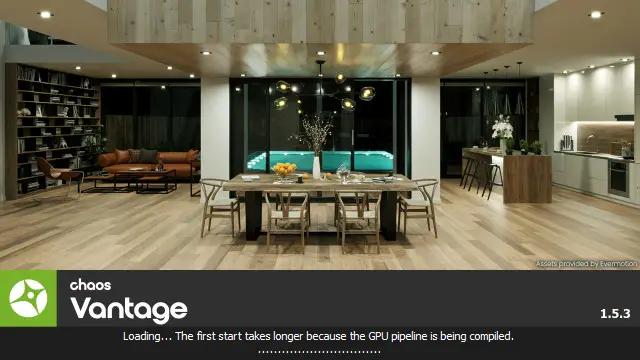
Chaos Vantage 3.3.1 (x64) | Size: 940.02 MB
Language: English

Explore your most complex 3D production scenes ray traced in real-time. With Chaos Vantage, there are no time-consuming conversions. Simply drag and drop your complete V-Ray scene into Vantage and start exploring. There's also a direct live link available from 3ds Max, so you can use it just like a viewport.

Chaos Vantage requires an NVIDIA RTX series GPU.

Features:

Zero setup
Drag and drop your V-Ray scene into Chaos Vantage and start exploring. Unlike other real-time solutions, there's no geometry to optimize, UVs to unwrap, or lighting to bake.

Go big!
Chaos Vantage is built to handle huge scenes and billions of polygons. It's the fastest way for you to see your most detailed V-Ray scenes in real-time.

Easy to navigate
Navigating your scene is easy. Use controls similar to your 3D app, or move around just like playing a game. Walk up stairs and avoid walking through walls with automatic collision detection.

100% ray-traced quality
With fully raytraced and real-time rendering, Chaos Vantage uses physically based cameras, lights, materials, and global illumination for the most realistic results.

Simple and fast animation
Perfect for previsualization, you can create, edit, and render animation right from Chaos Vantage. Easily animate between cameras, apply transitions, arrange your sequence in the Animation Editor.

Live link
Get a live raytraced view of your scene with a live link from 3ds Max. Changes you make in your 3ds Max scene will instantly appear in Chaos Vantage.

System Requirements:
Windows 10 with Update 2004 (version 10.0.19041) or newer

HOMEPAGE:
Код:
https://www.chaosgroup.com/

FREE DOWNLOAD LINKS:

Код:
https://rapidgator.net/file/9e5247b641455a9d93438f24e4fa6933/Chaos_Vantage_3.3.1_x64.rar

Код:
https://nitroflare.com/view/455E6EE595CFFDB/Chaos_Vantage_3.3.1_x64.rar
 
5278bb6ae2eb6f8cfc80c35c1e2fe0e4.png


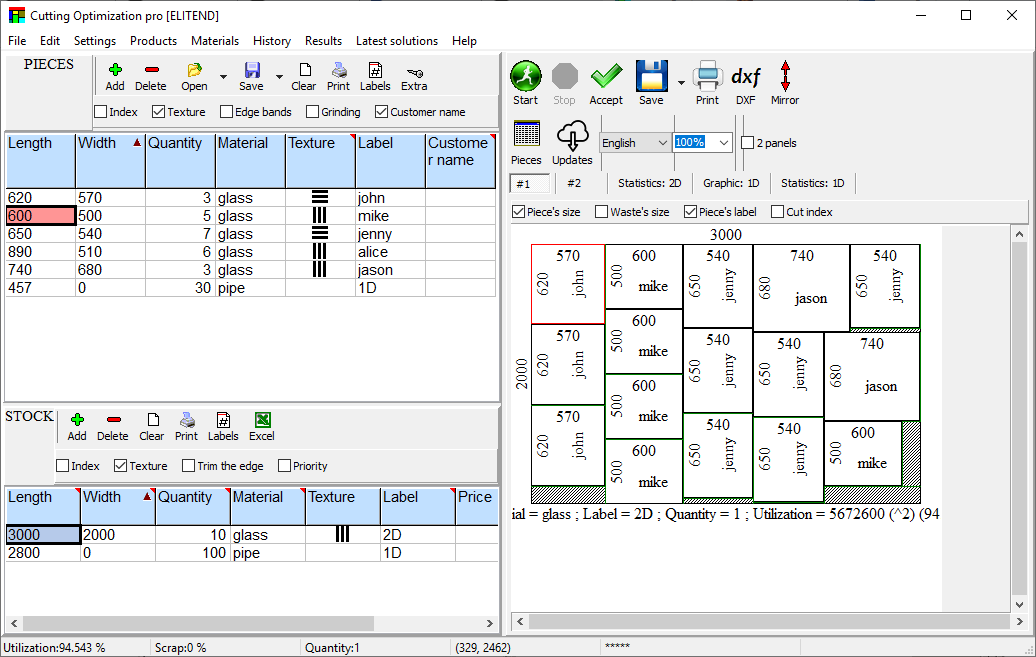
Cutting Optimization Pro 5.18.28 Multilingual | Size: 2.26 MB
Language: English

Cutting Optimization Pro is a cutting software used for obtaining optimal cutting layouts for one (1D) and two (2D) dimensional pieces. The software also lets you to define and handle complex products, such as table, desk, cupboard, locker, book shelf.

Cutting Optimization Pro can be used for cutting rectangular sheets made of glass, wood, metal, plastic, or any other material used by industrial applications.

Cutting Optimization Pro can also be used as cutting software for linear pieces such as bars, pipes, tubes, steel bars, metal profiles, extrusions, tubes, lineal wood boards, etc and other materials.

System Requirements: Windows 10,8,7,Vista,XP

HOMEPAGE:
Код:
https://www.optimalprograms.com/cutting-optimization/

FREE DOWNLOAD LINKS:

Код:
https://rapidgator.net/file/ff5fe3953f3f7b10c57fad00d8c8f782/Cutting_Optimization_Pro_5.18.28_Multilingual.rar

Код:
https://nitroflare.com/view/BEE7A4BF85131B7/Cutting_Optimization_Pro_5.18.28_Multilingual.rar
 

82d1fe48df26b4a9599b9eadcd455d45.jpg


Desktop Calendar 3.30.297.9126 Multilingual | Size: 7.07 MB
Language: English

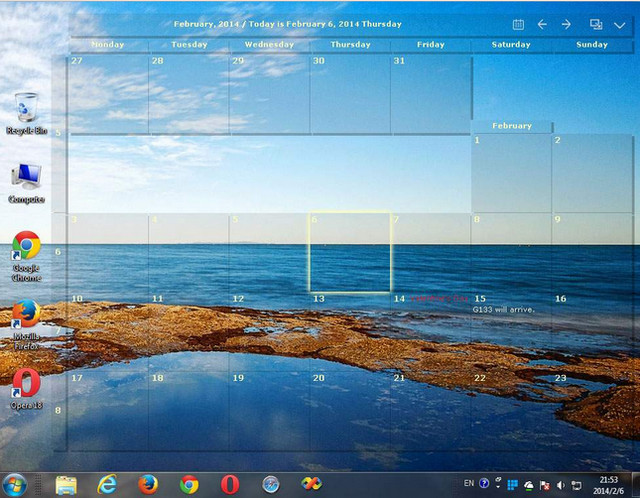
DesktopCal is a very useful piece of software that helps change your normal desktop into a calendar, so that time management can be done with more ease.The interface of the application is pretty straightforward, thus allowing any type of person to easily work with it. Moreover, the interface is highly customizable, enabling users to change the background colors, level of transparency, font of all the text, and gaps between the cells.

The utility can also control the entire desktop and what it looks like. For example, you can leave the wallpaper existent, delete it altogether or loop certain pictures of your choosing. The latter option enables you to add entire folders with hundreds of files and program them to change every 5, 10, 20, 30 minutes or even more. The position of the images can be modified, from "Fill" to "Stretch," "Center," "Fit" or "Tile".

All of the features aforementioned make this software tool highly efficient and should suit any person's taste.

The interface supports multiple languages such as English, French, Vietnamese, Chinese and Spanish.

In order to make annotations to a certain date in the calendar, all you have to do is double click on the corresponding panel and write. You should also know that each and every cell can be colored in a different way, so as to help you color-code specific events according to importance.

All in all, DesktopCal is a very useful piece of software, if you like being organized. You are able to input important occasions and meetings to the calendar with just two clicks, use a color-coded system, while also being able to manipulate the desktop.

Key features
- Record anything by double clicking on the windows desktop.
- Offers a variety of common festivals, anniversaries and other information.
- Move your data from one deveice to another with powerful tools.
- Print any page of calendar with wallpaper as you work.
- Set background color for any day you want. So, the days are colorful.
- Powerful and easy-to-use settings allows you to easily customize your own calendar.

System Requirements: Windows XP, Vista, Windows 7, 8, 10, 11

FREE DOWNLOAD LINKS:

Код:
https://rapidgator.net/file/2fe1d4091c939b712afdbf2412dfc1de/Desktop_Calendar_3.30.297.9126_Multilingual.rar

Код:
https://nitroflare.com/view/DFA5C48583FFDF4/Desktop_Calendar_3.30.297.9126_Multilingual.rar
 
f0c2f5ee058eee1edd0211eb28470f72.jpg


Dezert Audio FREQ-FX 1.0.8 | Size: 276.73 MB
Language: English

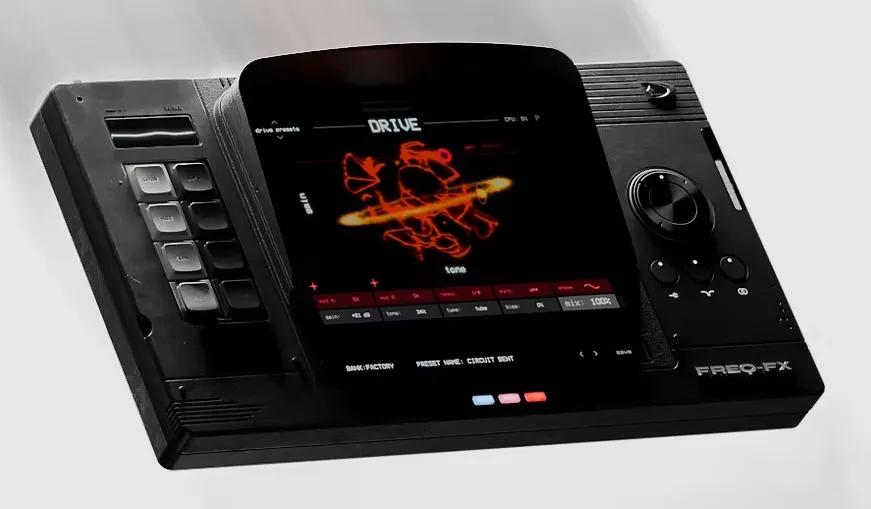
FREQ-FX is our analog modeled multi-effect plugin that truly puts the sound of classic effect pedals and hardware into your hands. Explore 8 modules that bring texture, dimension, width & character to any sound source. With a modular effect chain that you can re-order, a fine tuned randomizer, patch generator, and dedicated LFO's, adding effects to your music has never sounded better than this. 8 powerful effect modules to transform your sound.

DRIVE
Add subtle warmth or extreme distortion to your signal with 3 models: tube, tape and opamp.

CHOP
Real-time slicer for reverse chops, stutters, repeats, pitch jumps and shuffled phrase edits.

GRAIN
High quality granular with two modes: classic mode & crystal mode for micro-looper layers.

SCAN
Spectral filter with 3 modes and user-drawable waveform for filtered scapes.

LOFI
3 Distinct modes: sample, tape, and digital, that transform any sound to have digital crunch, noise, and pitch instability.

VIBE
Modulation: chorus/flanger & phaser, modeled after vintage analog racks and pedals.

DELAY
Dual mode bbd delay: analog with grit and character. Pitch to create musical harmonies by shifting the delay time.

SPACE
Our custom reverb algorithm paired with convolution reverb lets you choose from plate, spring, digital classics, and real spaces.

HOMEPAGE:
Код:
https://www.dezertaudio.com/freq-fx

FREE DOWNLOAD LINKS:

Код:
https://rapidgator.net/file/814af5c46a66a05a7333519a2c2c4ad2/Dezert_Audio_FREQ-FX_1.0.8.rar

Код:
https://nitroflare.com/view/659DF713383E5D4/Dezert_Audio_FREQ-FX_1.0.8.rar
 
3eef9a2a17ee953c8cb824305e5299bf.jpg


Diffchecker 7.1.8 Multilingual | Size: 160.18 MB
Language: English

Discover the power of offline security. Safely compare text, images, and files offline - on Windows.

Protect your confidential documents
Using Diffchecker Desktop is like keeping your files in a safety deposit box - our enterprise-grade security ensures your data never leaves your computer.

How does it work?
Diffchecker Desktop operates exclusively on your computer, without any interaction with our web servers. This guarantees industry-leading functionality and faster speed, all packaged in a powerful interface designed for utmost security.
Whether you find yourself at JFK or Mount Everest, browse your files with confidence knowing that Diffchecker Desktop operates fully offline, keeping your client data safe on your machine.

Perfect for:
Legal documents
Tax forms
Sensitive code
Encrypted files
Confidential data
Unsecured networks

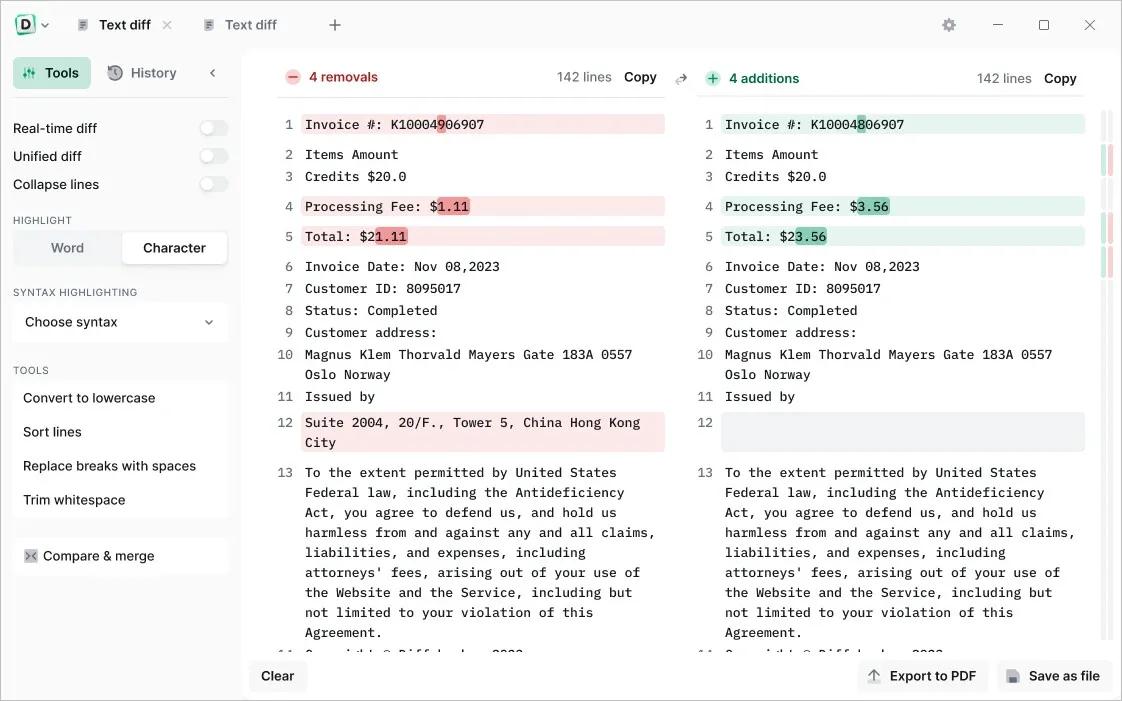
Compare text with total precision
Instantly compare any text files, whether it's code, legal documents, or your favorite sourdough recipes. Check differences by word or character and make real-time edits

Compare photos, images and graphics
Slide to compare images pixel by pixel or seamlessly fade and overlay two pictures for a clear result

Compare Word and PDF documents
Use our AI software to extract and compare content from two PDFs, or merge files to highlight graphic differences

Compare spreadsheets
Scan through each cell like an X-ray or display files side by side for a detailed overview of your data

Compare folders
Check folder contents and document details to organize your files or see what's missing

Do more with Diffchecker Desktop
Your all-in-one comparison powerhouse, with over 30+ features for a faster, easier workflow.

Character-by-character comparison
When every detail matters, check your code, contracts or invoices down to each individual character

Syntax highlighting
Pick from more than 20+ languages, including Javascript, Markdown, Python, R, and C++

High-speed performance
Compare a thousand lines of code or even the most complex PDFs in no time

Export in multiple formats
Download files in the Diffchecker format or export them as a PDF in one click

No ads
Eliminate distractions so you can focus on what really matters - your work

HOMEPAGE:
Код:
https://www.diffchecker.com/desktop/

FREE DOWNLOAD LINKS:

Код:
https://rapidgator.net/file/d14290fba3dd2d357b64718c95198c6c/Diffchecker_7.1.8_Multilingual.rar

Код:
https://nitroflare.com/view/75DD9A222750DBB/Diffchecker_7.1.8_Multilingual.rar
 
39af89a2e179f4ffe2d584b555d191fb.jpg


EditPad ProLite 8.6.1 | Size: 51.71 MB
Language: English

EditPad Pro is a powerful and versatile text editor or word processor. Designed to make text editing as convenient as possible, using EditPad Pro to edit text files will save you a lot of time and frustration.

A Powerful and Convenient Text Editor
EditPad Pro has a lot of functionality that makes editing text files more convenient for you. A lot of this does not sound very impressive or even works behind the scenes, but you will surely appreciate it when you need it. These are only a small number of EditPad Pro's many little features that make heavy text editing a breeze.

With EditPad Pro you can easily open and edit many text files at the same time. There's no limit. Arrange text files into multiple projects to open them at once and edit them together. Open all files in a folder (and its subfolders) into a project. Many of EditPad Pro's editing commands can work on all files in a given project at once. Quickly switch between files and projects by clicking on their tabs. Move back and forth with the handy "previous editing position" and "previously edited file" commands. Manage long lists of text files and large projects with the handy file manager sidebar which can rename, move, copy and delete files.

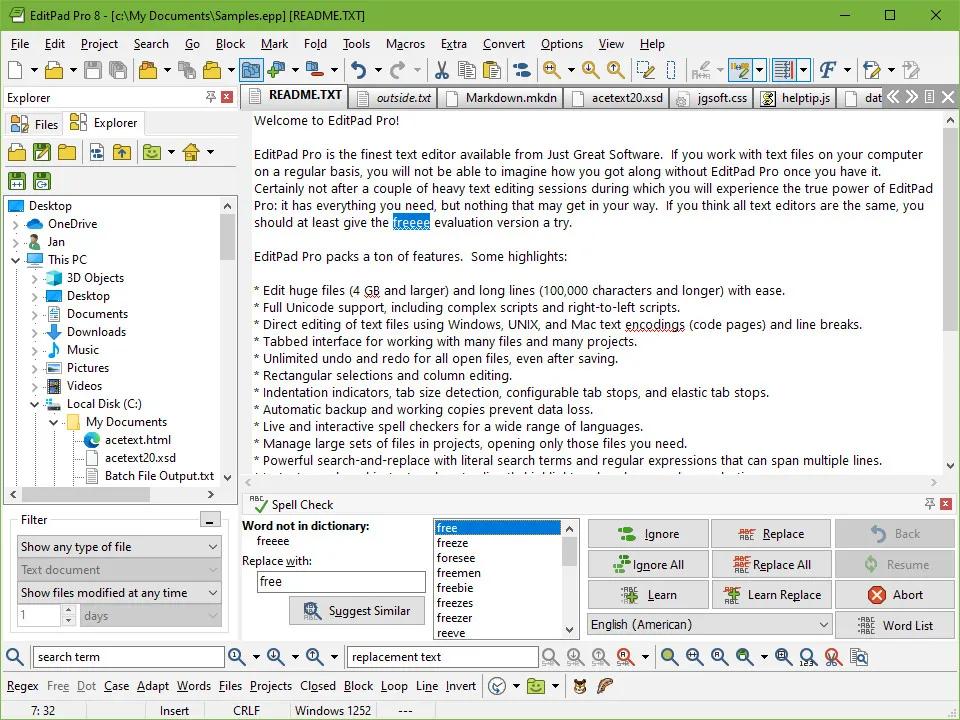
You can make sure you're writing with proper spelling by using EditPad Pro's spell checker. Word lists are available in many languages. You can tell EditPad Pro to point out misspelled words in the current file, current project, all open files, or just the selected text. Turn on Live Spelling to make EditPad Pro highlight misspelled words as you type.

EditPad Pro sports one of the most extensive search-and-replace features of any text editor. Quickly find the part of the file you want to edit. Highlight matches, fold lines, and skip over matches and files. Instantly make many replacements throughout a (rectangular) selection, file, project, or all files in all projects. Use regular expressions and adaptive case options for powerful and dynamic search terms and replacements. Clever use of EditPad Pro's search-and-replace can automate much tedious editing.

Record and play back keystroke macros to reduce repetitive tasks to a single key combination. Record a search as part of a macro to instantly edit all search matches in any particular way. Save any number of macros to build your own library of high-octane text editing wizards.

EditPad Pro's syntax highlighting is fully configurable. You can change the colors to mimic the CodeGear or Visual Studio IDE, or choose your own colors. EditPad Pro ships with large number of syntax coloring schemes, all of which are fully editable.

EditPad Pro's File Navigator can show you a detailed layout of the file's structure. Use it to instantly jump to the relevant part in the file. A large number of file navigation schemes for various programming languages and other file formats are included. All file navigation schemes are fully editable. You can create schemes to visualize the layout of almost any kind of file. The schemes can also make various blocks of text foldable with a single click. By folding blocks you can hide lines to get a better overview of the file's structure, making it easier to rearrange blocks of code or navigate between them.

EditPad Pro's Clip Collection makes it easy to keep a list of text snippets at your fingertips, ready to be inserted into the file's you're editing. Such a snippet can be a word, phrase, three paragraphs, half a book, or anything you want. Clips can consist of "before" and "after" parts to be inserted around a selection.

Use EditPad Pro's built-in FTP and SFTP client to upload your web pages and scripts to your web server right within EditPad Pro. You can even edit web pages directly on the server via FTP, without having to download the HTML files to your computer's hard disk first. EditPad Pro transfers files in the background, so you'll never have to wait for all files to download, or for a file you've saved to finish uploading. You can go on editing right away. EditPad Pro can stay connected to multiple servers.

Don't worry about saving files with EditPad Pro extensive auto-save and backup options. Choose how many backup copies you want to keep and/or for how long. The File History shows you the backup copies for the current file. You can easily open and compare backups, as well as save specific milestone copies. EditPad Pro's unlimited undo and redo even allows you to undo changes after saving them.

Compare any two files to get a view of the differences between two files, or check which changes were made between two (backup) copies of the same file. EditPad Pro can highlight difference, merge the two files, and extract the differences or similarities into new files. Very convenient for rolling back inappropriate changes you made to a file, or for double-checking the changes somebody else made to a file you sent them. You can easily send files via email right within EditPad Pro.

Use rectangular selections to easily edit columns of text. Any editing command that works on a usual linear selection also works on a rectangular selection. Shift and insert columns left and right, move blocks up and down, fill and indent blocks, etc. Handy commands to begin, end, shrink and expand selections make it easy to work with blocks spanning many pages.

Easily edit all kinds of lists with handy commands to sort lines alphabetically and delete duplicate lines. Use these commands with rectangular selections to sort and trim lists of multiple columns on one of the columns.

EditPad Pro will highlight URLs (web site addresses) and email addresses in your text files. You can easily open the web site by double-clicking the URL in EditPad Pro. Of course, you can always turn this option off.

When writing a report or an article that has certain length requirements, you can use EditPad Pro's statistics feature to instantly see how many paragraphs, words and letters you've typed so far. Get statistics for just the current file, or for all files in a project, or even all files in all projects.

If you need to type in some special characters not available on your keyboard, you can use EditPad Pro's character map to quickly insert them by double-clicking on them. Easily insert special symbols like the trademark or copyright symbol into your documents, or enter letters from a foreign script that your keyboard does not support. If you save your files as Unicode files, you can use any character known to humanity.

EditPad Pro edits all text files. Open text files saved on Linux, UNIX and Macintosh computers, or even text files from old DOS PCs or IBM mainframes. EditPad Pro preserves the file's compatibility with those systems, unless you explicitly convert it. You'll never have to worry about being unable to open a text file, and you'll always be able to save your files in a format that people with less flexible text editors can read. EditPad Pro handles DOS/Windows, UNIX/Linux and Macintosh line breaks. Open and save text files encoded in Unicode (UTF-8, UTF-16 and UTF-32), any Windows code page, any ISO-8859 code page, and a variety of DOS, KOI8 and EBCDIC code pages. Convert files between any of these encodings.

HOMEPAGE:
Код:
https://www.editpadpro.com/

FREE DOWNLOAD LINKS:

Код:
https://rapidgator.net/file/acc14927bfb9c9bd6201b9687679c446/EditPad_ProLite_8.6.1.rar

Код:
https://nitroflare.com/view/7987A3F76BD53C7/EditPad_ProLite_8.6.1.rar
 
3714648de8140af744870b213f60bd5c.jpg


ElcomSoft Advanced Office Password Recovery Forensic Edition 7.21.2682 Multilingual | Size: 79.23 MB
Language: English

Recover, remove or circumvent passwords protecting documents created with a variety of office suites. Break passwords to Microsoft Office documents and files in OpenOffice, Apple iWork and Hangul Office formats.

- Break passwords to all relevant office documents
- The fastest office recovery tool on the market thanks to low-level optimization and GPU acceleration
- Exploits all known backdoors and tricks in the Office family for instant recovery
- Multiple video cards get the job done up to 200 times faster than CPU alone
- Combine brute-force, dictionary and advanced attacks into a straightforward workflow

Gain Access to Password-Protected Documents
Advanced Office Password Recovery unlocks documents created with all versions of Microsoft Office from the ancient 2.0 to the modern 2016, and supports documents in OpenDocument and Hangul Office formats. The tool can recover passwords for Microsoft Word, Excel, Access, Outlook, Project, Money, PowerPoint, Visio, Publisher and OneNote, all OpenOffice applications, and all applications comprising the Hangul Office suite.

Baster Attacks with GPU Acceleration
Microsoft has strengthened password protection in Office 2007, further improving its strength in Office 2013[1]. OpenDocument and Hangul Office formats are equally strong. With computation-intensive encryption used in latest versions of Microsoft Office, password recovery tools relying solely on computer's CPU are no longer able to provide reasonable recovery times.

To further boost the recovery speed, Elcomsoft enables support for multiple video cards and simultaneous operation of all CPU and GPU cores. All or some CPU/GPU cores can be designated to the password recovery task, enabling maximum performance or allowing for nonintrusive background processing. The latest generation of [ElcomSoft GPU acceleration technology][gpu] supports unlimited numbers of AMD or NVIDIA boards including the latest generation of high-performance accelerators.

Note for Hangul Office users: GPU acceleration is available for Hangul Office spreadsheet application (Hancell), and is not available for its text processing application (Hanword).

Instant Access to Password-Protected Documents
Not all passwords are equally strong. Advanced Office Password Recovery provides instant access to many types of password-protected documents, including those created in Microsoft Word and Excel versions 97 and 2000. Later versions of Microsoft Word and Excel save documents and spreadsheets in compatibility mode by default making them available for instant password recovery.

By carefully analyzing the algorithms and implementations of password protection in different versions of Microsoft Office applications, ElcomSoft developed work-around solutions that allow recovering certain kinds of passwords instantly instead of performing lengthy attacks. Advanced Office Password Recovery is well aware of the various methods of password protection, and implements all the tricks that allow you to recover protected documents in a matter of seconds.

All Features and Benefits:
- Automatic Password Removal
- Targeting Human Psychology
- Dictionary Attacks
- Advanced Attacks
- Accelerated Brute Force Attack
- Word and Excel Documents: Guaranteed Recovery

System Requirements:
Windows 11/10/8.1/8/7 (32-bit or 64-bit)
Windows Server 2022/2019/2016/2012

HOMEPAGE:
Код:
https://www.elcomsoft.com/

FREE DOWNLOAD LINKS:

Код:
https://rapidgator.net/file/9c52efd0178765e98a92cc6b31bbf620/ElcomSoft_Advanced_Office_Password_Recovery_Forensic_Edition_7.21.2682_Multilingual.rar

Код:
https://nitroflare.com/view/09F61BA920F0514/ElcomSoft_Advanced_Office_Password_Recovery_Forensic_Edition_7.21.2682_Multilingual.rar
 
_36b5aeeae570664682bd7ea1266b955b.jpeg


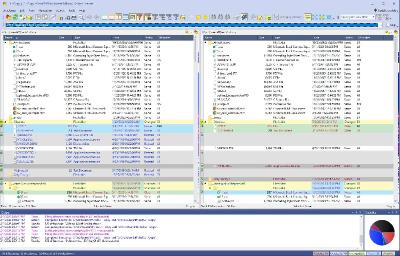
ExamDiff Pro Master Edition 17.0.1.6 | Size: 46.61 MB
Language: English

ExamDiff Pro is a powerful and easy-to-use file and directory comparison tool for Windows. It includes numerous helpful features for comparing and merging many kinds of files and folders - from source code to Office documents to Zip archives to files on remote computers. If you've been frustrated with other comparison utilities, you will find that ExamDiff Pro offers a much more user-friendly and customizable experience.

For developers
track changes in files and folders
perform code reviews
easily merge different versions of files using two- and three-way diff and merge.
share HTML and printed difference reports with your colleagues
compare a local website to an FTP server (using the FTP plug-in)
ignore programming language comments to focus only on the most important aspects of your source code
visualize different aspects of code through syntax highlighting
compare executable files (DLLs, EXEs, etc.) using built-in binary comparison

For regular computer users
quickly navigate through differences
synchronize files and directories between your PC and external media
create directory snapshots for future comparison and archiving
quickly find and undo mistakes by comparing files with previous versions
easily drag and drop files and directories
compare from Windows Explorer using the built-in Shell extension

For testers
validate test results by comparing them with a baseline
save test comparison results into reports

For writers
edit your documents within the comparison window using the built-in text editor
use synchronized word wrap to compare document paragraphs
compare Word, Excel, and PDF documents using plug-ins

Operating System: Windows XP, 2003, Vista, 7, 2008, 8, 2012, 8.1, 2012 R2, 10, 2016, 2019, 11, 2022

HOMEPAGE:
Код:
https://www.prestosoft.com/

FREE DOWNLOAD LINKS:

Код:
https://rapidgator.net/file/d6186137d11e0a4c96dbc498f9aa1fb0/ExamDiff_Pro_Master_Edition_17.0.1.6.rar

Код:
https://nitroflare.com/view/B9F98C39ABD8174/ExamDiff_Pro_Master_Edition_17.0.1.6.rar
 
dcb85ed488ec3cae1d68d8a6bbf6e3c8.jpg


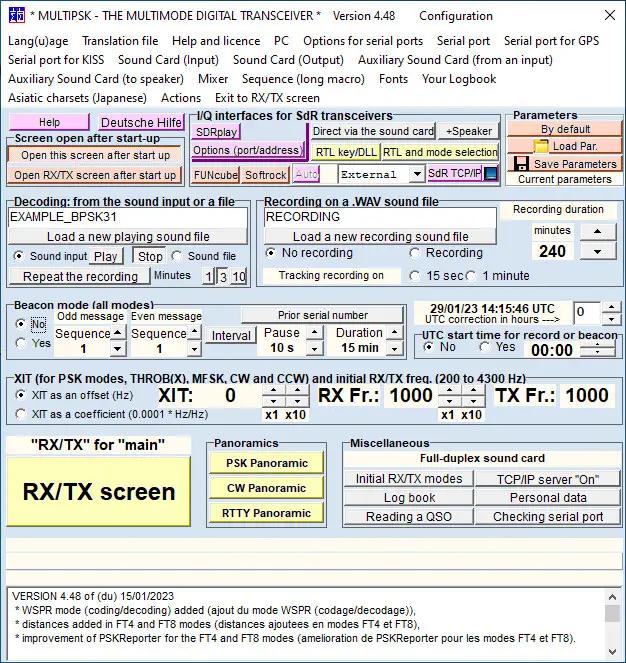
F6CTE MultiPSK 4.52 | Size: 24.13 MB
Language: English

With an active Internet connection you can set up and share nearly all forms of entertainment. In case you are a music enthusiast you can also make a selection of songs you can broadcast online in the form of radio. However, you need to use specialized applications in order for everything to run smooth. Amongst others, MULTIPSK provides an astonishing amount of tools with the help of which you can decode frequencies from WAV files.

Requires patience to learn its features
One of the application's biggest disadvantages is the user interface which is anything but friendly. A considerable amount of effort and time needs to be put into understanding each element, piece of text and button, especially because most of them bring up new windows with similarly confusing layouts.

From the first time you run the application you clearly see it's meant for experienced users. If you have even the slightest knowledge and take a little tour, you realize it's the Swiss Army Knife of digital mode applications.

Real-time frequency analysis
You can easily load a custom WAV file in order to decode frequency through the dedicated option. Moreover, several reception types, like PSK, CW or RTTY come with individual tools you can access with a simple mouse click. These display a spectrum of received signal across different frequencies, decoding as signal comes in.

If the first menu wasn't enough for you, there is also an RX / TX screen you can choose to be launched instead of the confusing initial window. This brings up a whole new set of options, with the possibility to set BPSK31, QPSK31, PAX, PSK10 and a lot more.

Operating System: Windows 7, 8/8.1, 10, 11

HOMEPAGE:
Код:
http://f6cte.free.fr/index_anglais.htm

FREE DOWNLOAD LINKS:

Код:
https://rapidgator.net/file/deedac52611c64dfd2f854af40d2d9fd/F6CTE_MultiPSK_4.52.rar

Код:
https://nitroflare.com/view/3740AA4A6BF278C/F6CTE_MultiPSK_4.52.rar
 
7146c8837d6dff1c418a4054c8d09c13.jpg


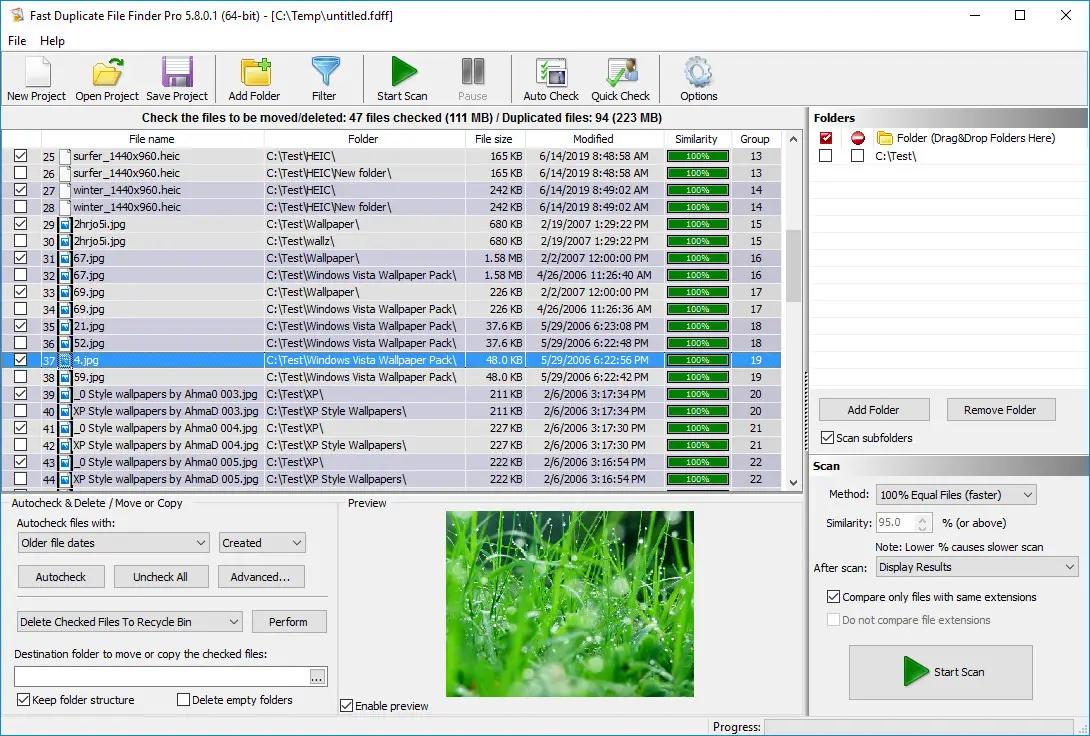
Fast Duplicate File Finder Pro 7.3.0.1 | Size: 16.67 MB
Language: English

Fast Duplicate File Finder will find duplicate files in a folder, computer or entire network. The application will compare the content of the files and will find duplicates even if they are using different file names.

The Professional version can find similar files regardless of their file types. It will analyze the file data in order to find duplicates and not just file attributes like name and size as the standard clone removers do. It uses advanced algorithms while searching for related files and provides accurate results, which is not true for the commonly advertised FUZZY search methods.

The duplicate remover uses fast binary comparison algorithm and has internal preview supporting a lot of image, video, music and text file formats. It can also preview the common file formats.

After the scan process is finished the program shows all the duplicated files in groups and can automatically mark the oldest for deleting. The auto-mark algorithm has advanced settings to exclude from auto mark files with user specified extensions, file sizes, file dates, and file names. A "source" folder can also be excluded from the auto mark. There is an option to protect system files and folders which is enabled by default and guarantees that the application will not remove any critical system files.

Duplicate File Finder - Features
The duplicate cleaner is a powerful utility for finding repeating files in a folder and all its sub folders. The duplicate remover has the following features:

Find duplicate files or find similar files in user specified folders, hard drives, computers or entire networks
Fast binary comparison algorithm
Internal preview supporting images, videos, music, text and binary files
Older or smaller files can be automatically marked for deletion
Redundant files can be moved to Recycle Bin, custom folder or deleted permanently
Support for all kinds of removable media - usb drives, diskettes etc.
Has intuitive interface and rich documentation
Process priority settings that will let the application scan in your computers IDLE time
Protection for system files and folders that will prevent damages to your system files when removing redundant files
Automatically locate duplicated files in Windows Explorer
Open file with associated program
Powerful filter and exclude from auto-check options
Powerful Quick Check/Uncheck dialog
Multi-language file system support
Native support for 64 bit and 32 bit operating systems

System Requirements:
Operating system: Windows 11 / Windows 10 / Windows 8.1 / Windows 8/Windows 7 / Windows Vista / Windows 2000 / Windows 2003 / All Windows Server operating systems
CPU: 2 GHz or higher
512 MB RAM
20 MB free hard disk space
True Color display and video card
Mouse or other pointing device

HOMEPAGE:
Код:
https://www.mindgems.com/

FREE DOWNLOAD LINKS:

Код:
https://rapidgator.net/file/5a986d87c3a813c091167421cb6ebf68/Fast_Duplicate_File_Finder_Pro_7.3.0.1.rar

Код:
https://nitroflare.com/view/513D296A045D1AA/Fast_Duplicate_File_Finder_Pro_7.3.0.1.rar
 
098679cc96a845a0539ad09ceee95eda.jpg


FastSum 1.7.0.514 | Size: 12.18 MB
Language: English

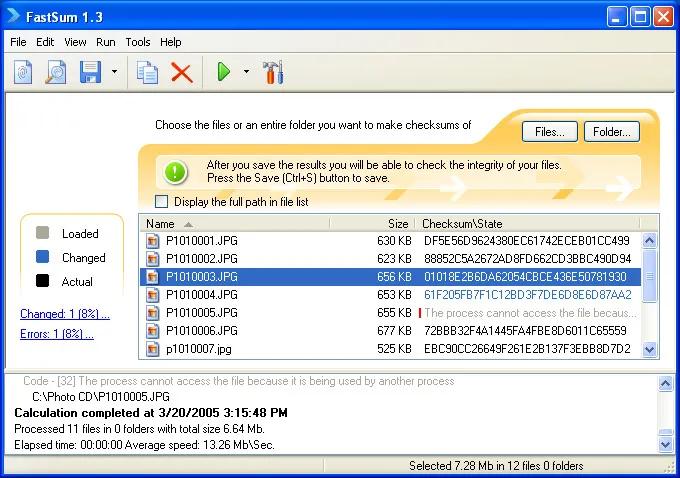
Take control of your files. Whether you have the important files burned on a CD or DVD archive, or just about any kind of digital materials that you intend to put for storage or share, you can always check its integrity with FastSum.

FastSum is build upon the well proven MD5 checksum algorithm which is used worldwide for checking integrity of the files, and been used for this purpose for at least the last 10 years. FastSum provides you with three interfaces from the console application for technician professionals to modern graphical application for any-level users.

What's inside?
When you select files FastSum computes their checksums according to the MD5 checksum algorithm, which can be easily compared with previously computed checksums or stored for future integrity checking. There are two most important MD5 checksum properties for the end-user: the fixed size and the non-discoverability. The first property means that it does not matter how big the source file is, it always has a short 128bit MD5 checksum value that can be compactly stored and easily shared. While the second property implies that a pair of nonidentical files will have different MD5 checksum value i.e. even a short fixed size value is enough for detecting changes within the file.

HOMEPAGE:
Код:
https://www.fastsum.com/

FREE DOWNLOAD LINKS:

Код:
https://rapidgator.net/file/9eb1d0ed7d194ebd7c354a279ab095f3/FastSum_1.7.0.514.rar

Код:
https://nitroflare.com/view/C92CF805F5912F2/FastSum_1.7.0.514.rar
 
fee8c44c993e8eb9166569814da3c332.jpg


FreeCommander XE 2026 Build 951 (x64) Multilingual | Size: 20.99 MB
Language: English

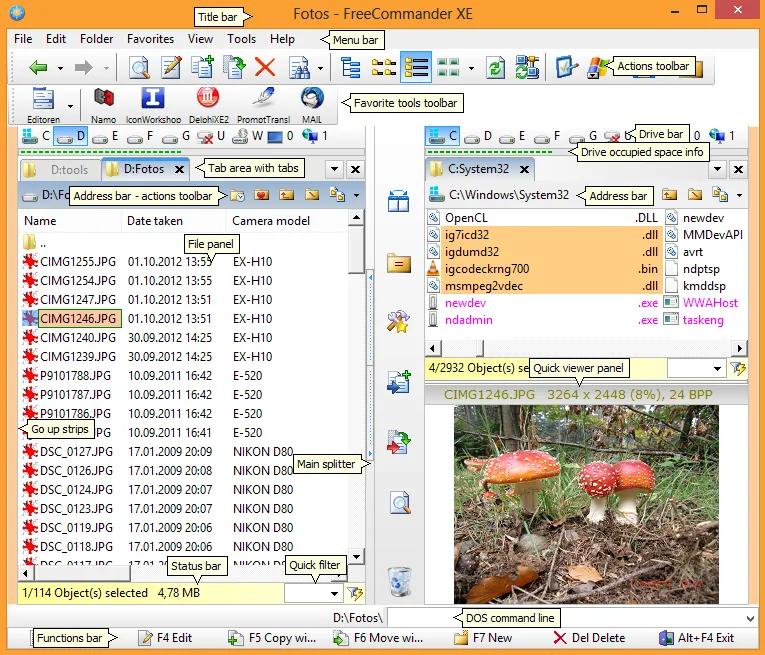
FreeCommander is an easy-to-use alternative to the standard windows file manager. The program helps you with daily work in Windows. Here you can find all the necessary functions to manage your data stock. You can take FreeCommander anywhere - just copy the installation directory on a CD or USB-Stick - and you can evenwork with this program on a foreign computer.

Main features in FreeCommander
Dual-panel technology - horizontal and vertical (one panel possible too)
Tabbed interface
Full access to desktop
Optional tree view for each panel
Built-in file viewer to view files in hex, binary, text or image format
File viewer and thumbnail view inside archives too
Built-in archive handling: ZIP (read, write)
Nested archive handling
Plugins for other archive (RAR, 7z, .)
Plain view - structureless view for files and folders
Linked browsing
Easy access to system folders, control panel, desktop and start menu
Copy, move, delete, rename files and folders (alternatively as Windows or FreeCommander operation)
Drag&drop
File searching (inside archive too)
Searching duplicates
Create and verify MD5 and SHA checksums
Wipe files
Multi rename tool
Paths longer than 255 characters can be opened, copied, moved and renamed
File properties and context menu
Calculation of folder size
Folder comparison
Folder synchronization
Modification of file date and attributes
Folder / program favorites
File filters (regexp possible too) for display and file operations
User defined columns for detailed views
Automatic views
Simple FTP/SFTP client (SFTP only 64 bit)
Access to mobile devices (e.g. smartphones, tablets)
DOS command line
Quick viewer
Quick search
Quick filter
Quick starter
Desktop snapshots
All keyboard shortcuts are definable
Flexible configuration of almost all features
Color schemes
Multiple language support

HOMEPAGE:
Код:
https://freecommander.com/en/

FREE DOWNLOAD LINKS:

Код:
https://rapidgator.net/file/e71668ad9e056158b70df88a6420cb1b/FreeCommander_XE_2026_Build_951_x64_Multilingual.rar

Код:
https://nitroflare.com/view/0FAB64937FDCDA2/FreeCommander_XE_2026_Build_951_x64_Multilingual.rar
 
5678e24031ec04340dad2af7126a6380.jpg


Gillmeister Automatic PDF Processor 2.6.0 | Size: 226.69 MB
Language: English

With Automatic PDF Processor, PDF files can be processed automatically. Any number of folders can be monitored in order to automatically print, rename or move incoming PDF files to dynamically named folders. Numerous metadata of the PDF document can be used in addition to the content, for example to include invoice information in the file path. The PDF files to be processed can be narrowed down with various profile-specific filters - the document text, PDF metadata and general file information are available as filters.

Extraction of data from the text of PDF files is optional. An unlimited number of extraction rules can be created within a profile. The extracted data can be used (after optional validation and formatting) for naming folders or the file name, and can be saved as an extract in a CSV file. Another task that can be automated with the Automatic PDF Processor is the extraction of attachments from PDF files, for example to save ZUGFeRD XML files, XRechnung attachments or similar as part of a PDF invoice in the same folder.

Features:
Print, rename, move, or copy PDF files automatically
Store embedded PDF attachments in any folder for archiving
Extract textual data from PDF documents automatically and save them as CSV file
Monitor any number of folders (hot folder monitoring)
Create individual rules for different tasks
Filter by document text, file date, attachment name or count, title .
Create the storage location (storage folder) dynamically from PDF document properties or based on content
Get informed about different processing statuses by email
Limit the automatic processing of PDF files to certain days and times, for example to print only during office hours
Combine a scan and OCR process with subsequent automatic naming by the Automatic Email Processor in order to be able to file older PDF documents in a structured way as well
Perform subsequent actions e.g., start a program with the path of the saved PDF file or PDF attachment as parameter
Process all already existing PDF files of a folder (with user-defined criteria)
Sort PDF - files automatically or have them moved to another folder and subfolder created dynamically from file properties
Send an Excel report with overview and detailed information on a regular basis

System requirements:
Microsoft Windows 11, 10, 8, 7 or Server (32-bit or 64-bit version)

HOMEPAGE:
Код:
https://www.gillmeister-software.com/

FREE DOWNLOAD LINKS:

Код:
https://rapidgator.net/file/bf04815ad87a8992c8f34d9e3b32236b/Gillmeister_Automatic_PDF_Processor_2.6.0.rar

Код:
https://nitroflare.com/view/96DDC0908E46D24/Gillmeister_Automatic_PDF_Processor_2.6.0.rar
 
328eb8457a632ec6ccc619c706307c87.jpg


HTTP Debugger Pro 10.6 | Size: 12.16 MB
Language: English

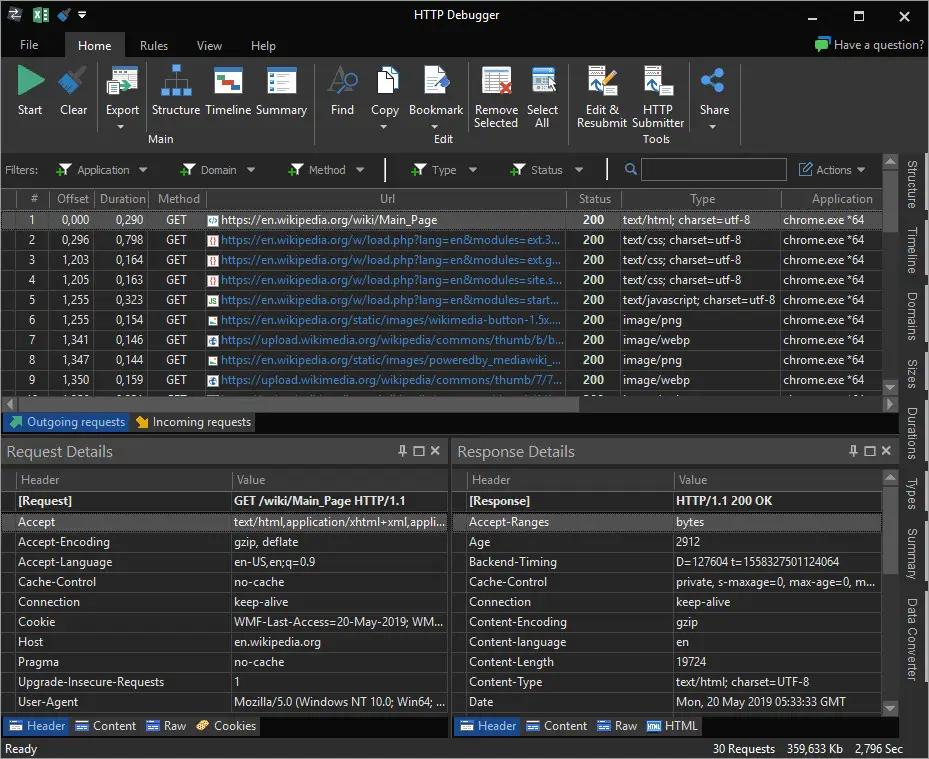
If you need to view and analyze all of the HTTP traffic between a web browser or any program that uses the HTTP protocol and the web server, then HTTP Debugger is the program for you. Web developers can view and analyze HTTP header parameter values, cookies, query strings, the source code of HTML/XML web pages and Java/VB scripts, error codes etc. They can measure the size and downloading time of their web pages and identify web site performance bottlenecks.

You can improve your web programming skills by viewing and analyzing how other web sites work and how they implement certain features.

Software developers can view and analyze the HTTP traffic of their own or any third party software program and the Internet, irrespective of whether this program is a user mode application or works as a Windows NT Service.

System and network administrators can analyze the behavior of suspicious web sites and view what information programs have sent from your computer to their owners (for example, during a registration or update procedure).

Want to see all browser http requests and server http responses? Need to analyze http headers and http content data? Try HTTP Debugger!

Web developers locate and eliminate website errors analyzing http headers, query strings, cookies, redirections, authorization headers, POST parameters and error codes.For each web page analyze the number of produced http requests and responses, its size, downloading time and speed.

Software developers analyze all http requests sent by own programs (C#, Java, VB, C++, Delphi, etc) and server responses. Analyze each http request and response produced by a web browser add-on, ActiveX component or Java applet.

System and network administrators analyze all outgoing http requests from your computers. Analyze each http request/response header and content data to see what information is sent by programs to the Internet.

HTTP Debugger Pro Key Features
- Full support of both 32-Bit and 64-Bit applications.
- Decoding of HTTPS/SSL connections and gzip/chunked content.
- Support of Dial-up modem, DSL/ISDN/Cable/LAN connections.
- Support of Internet Explorer, Mozilla Firefox, Opera and Google Chrome.

Operating System: Windows 7, 8/8.1, 10, 11 (x86/x64)

HOMEPAGE:
Код:
http://www.httpdebugger.com/

FREE DOWNLOAD LINKS:

Код:
https://rapidgator.net/file/c792d00b496cafddebe266557b83e30b/HTTP_Debugger_Pro_10.6.rar

Код:
https://nitroflare.com/view/82C91C4EBEB1A37/HTTP_Debugger_Pro_10.6.rar
 
01c7efba1fbc7e8aaf73d9851c56ac36.jpg


IDimager Photo Supreme 2026.3.1.9360 Multilingual | Size: 162.69 MB
Language: English

Photo Supreme v2026 is a thoughtful and forward-looking release. This update has focused on smarter discovery, faster performance, and modern workflow expectations, especially around large catalogs, mobile integration, searches, and team environments.

Import and Select
One of the standout additions in Photo Supreme v2026 is the new multi-pass Import and Select workflow. This allows users to review and refine image selections in multiple stages instead of making all decisions in one pass. It's especially useful for large shoots, letting photographers cull images more deliberately and with less pressure. In addition, the Import and Select feature now loads images faster than ever. Mac users will also appreciate direct iOS device importing, which makes it possible to bring photos straight from an iPhone or iPad into the catalog without relying on intermediary software. This significantly streamlines mobile-first workflows.

Powerful Searches
Photo Supreme now supports natural language searching, allowing users to find images using plain, conversational phrases rather than rigid metadata queries. This feature is powered by AI services such as OpenAI, Google Gemini, or local models with Ollama. This gives users flexibility in how advanced features are enabled. In addition, a new classification system enhances search accuracy by grouping images into meaningful categories upon import, making it easier to surface relevant results in large or complex catalogs.

Video & Media Handling
For users working with video, Photo Supreme v2026 introduces hover-based video previews. Simply hovering over a video thumbnail now reveals a short animated preview, making it much faster to identify clips without opening them individually. Support for modern formats has also been expanded, ensuring the software keeps pace with current media standards.

Sharing with ZIP
Exporting images is more flexible in v2026 thanks to ZIP output support in transfer profiles. This makes it easy to bundle images into a single archive for delivery, backup, or client sharing, all directly from within Photo Supreme. These enhancements simplify distribution workflows and reduce the need for external tools.

GEO Maps
GEOgraphic-Mapping features can now generate maps using not only Google Maps, but also OpenFreeMap with OpenStreetMaps. This removes the need for API keys while still delivering rich, interactive map displays. This update makes location-based browsing easier to configure and more accessible for all users.

Performance and Refinements
Photo Supreme v2026 delivers notable performance enhancements, resulting in faster browsing and a more responsive overall experience. Response times are improved by up to 10%, with especially noticeable gains for large libraries containing many catalog labels.
Catalogs with numerous stacks also see significant performance improvements, particularly when displayed in stacked views.
v2026 includes a wide range of refinements, such as: "Visually similar" stack detection, numerous stability fixes and workflow enhancements, polished UI behavior in collections, searches, and metadata handling

Wait, there's more, a lot more.
New "RAW Files" and "Video Files" catalog states
Added support for Google Gemini as an AI service
Added support for OpenAI GPT-5.2 as an AI Service
Added support for Ministral3 model with Ollama
Added file management support for ACR sidecar files
Update HTTP Server with Photo Supreme Online (Server Edition)
Faster face recognition
Added "AI-Estimated GEO Location" to the AI Panel
Faster result display in the Collection Viewer
"Cascade Metadata" from image to Stack or Version Set is now a background process
A highlighted stroke has been added to the active tabs, improving navigation
Now you can display metadata charts and graphs across multiple tabs
Added support for Ctrl/Cmd+Z functionality in text and memo fields
Defined the new Affinity v3 .AF and .AVIF file format as a supported "other file format"
Switching the collection viewer's view style is faster (eg from Basic to Grid to Clean to Custom Thumb Info)
Advanced Search now has an option to search by "File Size" and "File Size MB"
Finetuned the check for "need to compact" on PostgreSQL (Server Edition)
Bookmark keyboard shortcuts are now a "toggle", similar to ratings and color labels
Expanding nodes in the Catalog Tree is ~25% faster
When using the "Dump Full to Catalog File" feature, there's now the option to create either a "catalog dump" file, or a "catalog with thumbs" dump files
Added a XMP Storage Location for "original file AND non-standard sidecar file"
In "Stacked View", you can now select a specific item from the stack to show
Support for PostgreSQL 18.
And more.

Highlights for v2026
Multi-Pass "Import and Select": Seamlessly transition through passes with a fast-culling system that optimizes your workflow.
Direct iOS Image Import on macOS: Import images directly from your iOS devices with ease.
Video Thumbnail Preview: Hover over a video thumbnail or open the Quick View to view a live video preview.
Natural Language Search Powered by AI: Search your content using plain language, with smart integration through OpenAI, Google Gemini, or Ollama models.
Transfer Profiles can now create ZIP output files: Copy or send sets of images as a single ZIP file for easier sharing.
Maps with OpenFreeMap: Display images on interactive maps using OpenFreeMap/OpenStreetMaps with no API key needed.
Server Edition Thumbnail Caching: Enjoy faster performance with local thumbnail caching, automatic cleanup, and customizable settings for retention and cache size.
Classifications: Enhance search accuracy with an automatic image classification mechanism on import.

Operating System: Windows 10 or higher

HOMEPAGE:
Код:
https://www.idimager.com/

FREE DOWNLOAD LINKS:

Код:
https://rapidgator.net/file/4a8a8186bb852148cf29aab0a44c0b49/IDimager_Photo_Supreme_2026.3.1.9360_Multilingual.rar

Код:
https://nitroflare.com/view/D1CE26D9239D28C/IDimager_Photo_Supreme_2026.3.1.9360_Multilingual.rar
 
4e6d1aa9e18ca6b523cd8d012b3b971c.jpg


IObit Malware Fighter Pro 13.4.0.1669 Multilingual | Size: 74.55 MB
Language: English

IObit Malware Fighter is an advanced malware & spyware removal utility that detects, removes the deepest infections, and protects your PC from various of potential spyware, adware, trojans, keyloggers, bots, worms, and hijackers. With the improved, unique "Dual-Core" engine and the heuristic malware detection, IObit Malware Fighter detects the most complex and deepest spyware and malware in a very fast and efficient way.

Here are some key features of "IObit Malware Fighter":
One-click Solution and Very Easy to Use:
· Traditional advantages of IObit products. We love simple and automatic styles.
Complete PC Security Care:
· Anti-malware, anti-spyware, anti-adware, anti-trojan, anti-bots, and more. IObit Malware Fighter can assist your antivirus to defend any tricky and complex threats.
Finds the Deepest Infections:
· Using DOG (Digital Original Gene), a novel heuristic malware detection method, while IObit Malware Fighter can find the most complex threats.
· Very Fast and Light Thanks to the improved, unique "Dual-Core" anti-malware engine, complicated analysis can be made faster now.
· Work with All Antivirus Products Everyone needs a qualified antivirus software, and IObit Malware Fighter will surely be the best mate for your current antivirus.
· Automated Working in the Background Just install it and forget it. This powerful utility works continuously, automatically and quietly in the background on your PC. You can set it as your schedule or just let it work automatically when your PC is idle.
· Automatic and Frequent Updates By the new-generation malware analysis system and our professional database team, IObit Malware Fighter catches the emerging dangerous malware in the Internet.

System Requirements
OS: Windows 7/8/8.1/10/11
Hardware requirements:
1 GHz processor or faster processor
1 GB of RAM
1,000 MB of free hard disk space
1024*768 screen resolution and above

HOMEPAGE:
Код:
http://www.iobit.com/

FREE DOWNLOAD LINKS:

Код:
https://rapidgator.net/file/d79f11a9e40658f57b19e83f14c31ded/IObit_Malware_Fighter_Pro_13.4.0.1669_Multilingual.rar

Код:
https://nitroflare.com/view/D0A071640475909/IObit_Malware_Fighter_Pro_13.4.0.1669_Multilingual.rar
 
079032cb1a2e1b191b89e44f8982a823.jpg


LDPlayer 9.5.27 Multilingual | Size: 749.85 MB
Language: English

LDPlayer is an Android 5.1 emulator that enables you to access mobile applications and play games using your mouse and keyboard. Whether you are looking for a simple way to debug the apps you are developing for mobiles or perhaps, you would like to enjoy Android-specific games on a larger screen, there are numerous reasons why an emulator could come in handy.

The setup is a quick and straightforward process that does not require special attention from your part. The app comes with a sleek and stylish interface and thanks to its side-panels, it enables swift navigation and browsing, similarly to the Android OS.

As indicated after installation, you need to download the APK packages for the games you want to play. Afterwards, you can simply drag over the interface to install or you can use the dedicated installation button, if you find that more convenient.

Take note that the tool comes with a quick link to Google Play and providing that you have or create an account with the service, you can find the games you want from here.

Enables you to create macros and mapping for all game genres
A noteworthy feature is that the tool comes with several advanced options to create custom mapping for the games you are playing. Therefore, you can set key and mouse discs, set the view based on the game graphics or place buttons on the screen for shooting or casting spells.

At the same time, the program allows you to create macros, which can come in handy if you are playing more advanced games that rely on sensitivity of the push, tilt, drag or click. In case none of the mapping options work for your game, then you will be happy to learn that you can create a custom one just as easily.

An intuitive and smooth Android emulator application
All in all, LDPlayer can come in handy for both users and developers who do not have an Android device, but still want to try out the latest games or perhaps, test out apps developed for this operating system.

System Requirements
Intel or AMD CPU Processor x86 / x86_64
Windows XP XP3 / Win7 / Win8 / Win8.1 / Win10 / Win 11
Windows DirectX 11 / Graphic driver with OpenGL 2.0
Minimum 2GB of system memory (RAM)
Minimum 36GB of free hard disk space
Hardware Virtualization Technology (Intel VT-x/AMD-V) enabled in BIOS

FREE DOWNLOAD LINKS:

Код:
https://rapidgator.net/file/93c965f6117a1c8964e6de2adb1aed45/LDPlayer_9.5.27_Multilingual_.rar

Код:
https://nitroflare.com/view/5F03B2E7A06E4A4/LDPlayer_9.5.27_Multilingual_.rar
 
fe84d74b423eccff0a5cc6a0263758c9.png


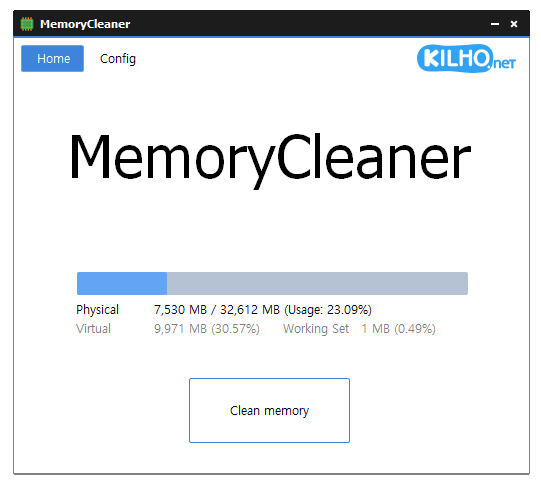
MemoryCleaner 2.0.1 | Size: 2.77 MB
Language: English

MemoryCleaner utilizes many functions already built into Windows to free memory with no impact on your system.You can also access Memory Cleaner functions right from your systray without having to open up the program. The cleaning procedures are both silent and the only time you will see an alert is to show the amount of RAM recovered briefly.

Feature
A program that cleans up memory.
Only Working Set, Standby automatically cleans up the memory.
Cleans up memory every specified time.
Automatically cleans up when the specified memory usage rate is exceeded.

System Requirements: Windows 11, Windows 10, 8 , 7

FREE DOWNLOAD LINKS:

Код:
https://rapidgator.net/file/1e5d86f907ce354cb6a6be2213d56359/MemoryCleaner_2.0.1.zip

Код:
https://nitroflare.com/view/7C44D1E5BC20FBD/MemoryCleaner_2.0.1.zip
 

2301a7b4b7b139dfe60bc66d175d54e9.jpg


Multi Commander 16.1.0.3189 Multilingual | Size: 20.2 MB
Language: English

Multi Commander is a multi-tabbed file manager that is an alternative to the standard Windows Explorer. It uses the very popular and efficient dual-panel layout. Multi Commander has a everything you need in your daily works with files to make your work fast and efficient. It has all the standard features like a file manager has like copy, move, rename, view. But Multi Commanders big strength is the special features that allow you to do advanced task with ease. Like Auto-unpacking , Auto-sorting , Browse inside archives, registry and FTP, Search for file, View files and pictures and the Scripting support let you automate many task. And it allows you to do everything from the keyboard using shortcut so you can work fast and efficient.

Features
- Tabs allowing you to have multiple folders open.
- Caching that enable fast file browsing.
- Show files in Detailed, List, or Thumbnail list modes.
- Background work for all tasks that takes time to finish, allowing you to continue working without interruptions.
- Customize the layout and colors to fit your styling needs.
- Extensions and plugins that will increase the functionality of Multi Commander.
- FTP, Registry , Zip, 7-Zip, Rar , Tar , GZ , Bz2 , Jar Support
- View and Change file permissions, Take ownership of files.
- Picture tools like Convert / Rotate Pictures, View/Remove EXIF tags, Adjust EXIF Date of pictures.
- Internal picture viewer for Jpg, Png, Gif, Png, Bmp, Tiff and many RAW formats.
- Show Movie information from IMDB/Rotten tomato as extra columns on you movie files.
- Audio tools like View Audio file properties, View/Edit MP3 Tags.
- Open API for developers to create extensions and plugins.
- Remember selections when you get back from another location when browsing the filesystem.
- Use mouse and drag and drop or use quick keyboard command for all the task.
- FileOperations plugins that can automatically sort / unpack files when they are moved or copied.
- MultiRename tool for fast and safe rename of multiple files/folder, Rule based and supports Undo.
- File viewer that lets you view files of any size, as ASCII/Unicode/UTF8/Binary and Hex.
- Take over the file type association from windows. Configure view, edit and open action based on file type and path.
- Both 32bit and 64bit versions available.
- Handle folders with many thousands of files with easy, And use power full filters to limit what you want to view.
- Compare folders and select the files and folders that are different, that are the same and many other options.
- Powerfull script engine allowing you to create script that automate tasks.
- Portable. Can be installed and run from portable (USB) device. Will not write any settings/session info on host computer.
- Multi Language support. English, German, French, Czech, Dutch, Russian, Spanish, Swedish, Chinese (Simplified & Traditional), Polish and Japanese is supported.

System Requirements: Windows 10,11

FREE DOWNLOAD LINKS:

Код:
https://rapidgator.net/file/ae66f626228a26a420acfefd944a9639/Multi_Commander_16.1.0.3189_Multilingual.rar

Код:
https://nitroflare.com/view/3C30B8234FA585F/Multi_Commander_16.1.0.3189_Multilingual.rar
 
Назад
Сверху Снизу