







All Emperor2011's Software in one thread !! (updated daily)

_1559795cd3498444b0bec3a244c37b38.jpeg


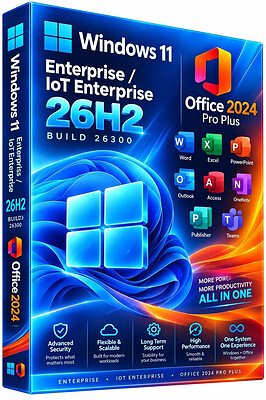
Windows 11 Enterprise/Iot Enterprise 26H2 Build 26300.9550 (No TPM Required) With Office 2024 Pro Plus Multilingual Preactivated | Size: 10.22 GB
Windows (x64) | Languages:Arabic,English,German,Greek,French,Spanish,Italian,Portuguese-Portuguese,Portuguese-Brazil,Turkish,Dutch,Czech,Norwegian
​
Windows 11 version 26H2 also known as the Windows 11 2026 Update,is built on the same servicing foundation as recent Windows 11 releases. It delivers the latest Windows innovations with a streamlined update experience designed to minimize disruption and help you stay secure, productive, and up to date.

For many eligible devices, moving to version 26H2 is as simple as installing a small enablement package, with a minimal download size, quick installation, and a single restart. Version 26H2 enables most of the features that were introduced in monthly updates for Windows 11, version 25H2.

What's new in Windows 11, version 26H2
Windows 11, version 26H2 is the next annual feature update for Windows 11. It builds on the same servicing foundation as Windows 11, versions 25H2 and 24H2, helping organizations adopt the latest release with minimal disruption. Devices running eligible versions of Windows 11 can move to version 26H2 through a small enablement package rather than a full operating system upgrade.

Because Windows 11, versions 26H2, 25H2, and 24H2 share a common servicing branch, many new features and improvements have already been delivered through monthly servicing updates. Version 26H2 enables selected features and resets the support lifecycle for the new release.

Servicing and deployment
Windows 11, version 26H2 provides a familiar update experience

Delivered as an enablement package for eligible devices running Windows 11, versions 25H2 and 24H2.
Fast installation with a single restart in most scenarios.
Reduced validation effort because supported versions share the same underlying platform.
Consistent management, security, and update experiences across supported releases.
Features enabled by default in version 26H2
For commercial organizations, Windows 11, version 26H2 enables capabilities that were introduced previously but controlled through temporary commercial controls.

Windows settings backup
Windows settings backup is now enabled by default for eligible commercial devices. This helps organizations preserve supported Windows settings and Microsoft Store app lists for recovery and device replacement scenarios. Existing administrator-configured policies continue to be honored.

App-specific actions from the taskbar
Windows 11, version 26H2 enables app-specific taskbar actions by default for commercial devices. Users can thus access common actions directly from taskbar experiences.

File Explorer enhancements
Several File Explorer improvements that were previously under temporary commercial controls are enabled by default in Windows 11, version 26H2. These enhancements focus on improving navigation and usability within File Explorer.

Update windows to 26H2 Build 26300.9550
Update Office to v2609 Build 20430.20140


System Requirements
Processor: 2 gigahertz (GHz) or faster.
RAM: 2 gigabyte (GB).
Free space on hard disk: 40 gigabytes (GB).
Graphics card: DirectX 9 graphics device or a newer version.
Additional requirements to use certain features.
To use touch you need a tablet or monitor that supports multitouch.
To access the Windows store to download and run apps, you need an active Internet connection and a screen resolution of at least 1024 x 768 pixels

HOMEPAGE:
Код:
https://microsoft.com

FREE DOWNLOAD LINKS:​

Код:
https://rapidgator.net/file/29c9714ae4880098ffde101556cb1d8e/Win.11.Enter.Iot.26300.9550.Office..part1.rar
https://rapidgator.net/file/5d0bc743e42240192102c716959019d2/Win.11.Enter.Iot.26300.9550.Office..part2.rar
https://rapidgator.net/file/7e6adbaf03b4b72b15ee49c8f959be33/Win.11.Enter.Iot.26300.9550.Office..part3.rar
https://rapidgator.net/file/8b06f7bd0853bf3bf3582fe0190e925d/Win.11.Enter.Iot.26300.9550.Office..part4.rar
https://rapidgator.net/file/ab6dd86880e927ef5fe5725d175a2718/Win.11.Enter.Iot.26300.9550.Office..part5.rar
https://rapidgator.net/file/394a908999deebf2e502578cc378c1f2/Win.11.Enter.Iot.26300.9550.Office..part6.rar


Код:
https://clicknupload.click/u23os9yxv1dg/Win.11.Enter.Iot.26300.9550.Office..part1.rar
https://clicknupload.click/xlw66qsmmpvf/Win.11.Enter.Iot.26300.9550.Office..part2.rar
https://clicknupload.click/wv4ctzos2quv/Win.11.Enter.Iot.26300.9550.Office..part3.rar
https://clicknupload.click/q9rh94wriy0v/Win.11.Enter.Iot.26300.9550.Office..part4.rar
https://clicknupload.click/fum0i6rwvqnm/Win.11.Enter.Iot.26300.9550.Office..part5.rar
https://clicknupload.click/j6mes85wglzs/Win.11.Enter.Iot.26300.9550.Office..part6.rar
 
_3c95f09dfecf93399e4f6b3445cf92f4.jpeg


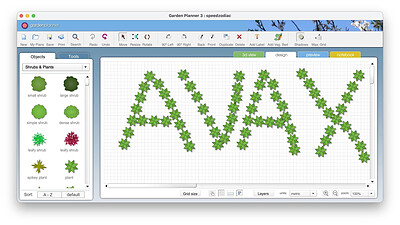
Artifact Interactive Garden Planner 3.9.14 | Size: 204.62 MB
Language: English
​
Design your dream garden with this very easy to use program. Arrange plants, trees, buildings and objects using an easy to use 'drag and drop' interface. Use tools to quickly create paving, paths and fences. Then produce a high quality color print out of your design.

Features:
• Very easy to use interface
• Save and Load your own designs.
• Use a wide range of generic plant shapes to design your garden, so you dont need to be a botanist to use it
• Produce a professional looking print out of your plan
• Use tools to quickly create paving, fences and paths.
• Generate a report of all the plants and objects in your garden
• Create a library of custom plants

System Requirements:

• Operating System: Mac OS X 10.7 or later (compatible with newer macOS versions via desktop app or modern browsers like Safari 15.3+, Chrome, Edge, or Firefox).
• Processor: Intel Core Duo or higher.
• Memory (RAM): 512 MB minimum (1 GB recommended).

HOMEPAGE:
Код:
http://smallblueprinter.com

FREE DOWNLOAD LINKS:​

Код:
https://rapidgator.net/file/1241ea538d82beec08df5e0cc08ff147/Artifact_Interactive_Garden_Planner_3.9.14.rar


Код:
https://clicknupload.click/7xq0no9p1c15/Artifact_Interactive_Garden_Planner_3.9.14.rar
 
61f47fd8785f34655949897f7afb4715.jpg


Charles 5.2.2 (x64) | Size: 79.56 MB
Language: English
​
Charles is a web debugging proxy that enables a developer to view all of the HTTP and SSL/HTTPS traffic between their machine and the internet. This includes deep inspection of requests, responses, headers, TLS information, compression and performance, and binary protocols such as Protobuf for both HTTP 1.1 and 2. Charles is perfect for debugging and measuring your web or mobile app's API requests and responses.

Charles Features
The following features are what I believe to be the key features of Charles. The best way to explore these features and to discover others is to download the free trial.

SSL Proxying
Charles can act as a man-in-the-middle for HTTP/SSL communication, enabling you to debug the content of your HTTPS sessions.

Bandwidth Throttling
Charles simulates modem speeds by effectively throttling your bandwidth and introducing latency, so that you can experience an entire website as a modem user might (bandwidth simulator).

AJAX
Charles is useful for XML development in web browsers, such as AJAX (Asynchronous Javascript and XML) and XMLHTTP, as it enables you to see the actual XML that is flowing between the client and the server. Charles natively supports JSON, JSON-RPC and SOAP; displaying each in a simplified tree format for easy viewing and debugging.

Flash
Charles is great for Adobe Flash developers as you can view the contents of LoadVariables, LoadMovie and XML loads. Charles also has native support for Flash Remoting (AMF0 and AMF3).

Browser & System Configuration
In order for any browser (or any application) to use Charles it must be configured to use Charles as its proxy server. Most browsers will have a way to configure this manually, but configuring manually is annoying because you have to configure and reconfigure everytime you start and stop Charles.

Fortunately Charles can autoconfigure the proxy settings in many cases including:
Windows / Internet Explorer proxy settings - used automatically by most Windows applications

Windows Proxy Settings
Charles can automatically configure the Windows proxy settings so that Internet Explorer and other Windows applications automatically start using Charles. By default Charles will configure and then reconfigure the Windows proxy settings whenever Charles is started or quit.

Charles proxy configuration behaviour can be changed in Charles in the Proxy Menu, Proxy Settings dialog.

The Windows proxy settings are configured in the Internet Options control panel on the Connections tab if you want to look at them yourself.

Microsoft Edge has an additional setting that you may need to make by browsing to about:flags and enabling Allow localhost loopback. This is required in order to connect to Charles Proxy running on localhost.

HOMEPAGE:
Код:
https://www.charlesproxy.com/

FREE DOWNLOAD LINKS:​

Код:
https://rapidgator.net/file/42625f7c523a1fc14f886aa863ef5685/Charles_5.2.2_x64.rar


Код:
https://clicknupload.click/navjcxyx86bt/Charles_5.2.2_x64.rar
 
5c204cb9a7a9537b1f5e235d624a3741.jpg


CrystalDiskInfo 9.9.3 Multilingual | Size: 5.92 MB
Language: English
​

CrystalDiskInfo - is a small utility to monitor the status of hard drives, monitors the status of hard drives that support SMART technology Monitors and provides an overall assessment of "health" of your drive. Also displays detailed information about the hard drives installed in your computer (flash, serial number, a standard interface, the total time, etc.), and also displays the attributes of the parameters of SMART self-test (read errors, performance, start / stop spindle, seek time, the number of on-off cycles, errors and many other sectors).

CrystalDiskInfo is a HDD / SSD utility which support SMART (Self-Monitoring, Analysis, and Reporting Technology). This includes such details as current drive temperature, firmware version, number of failed read or write attempts, how long the drive has been running and how often it's been started and stopped, and so on. As various factors approach thresholds of danger, CrystalDiskInfo will alert you, letting you know it's time to make backups while you still can.

Key features
show S.M.A.R.T Information
show HDD Information
change dialog design
internationalization

System Requirements: Windows 11, Windows 10, 8 , 7

HOMEPAGE:
Код:
https://crystalmark.info/en/

FREE DOWNLOAD LINKS:​

Код:
https://rapidgator.net/file/50502ee90407e250038e93a4e62546b9/CrystalDiskInfo_9.9.3_Multilingual.rar


Код:
https://clicknupload.click/z9yx3bpmg5jn/CrystalDiskInfo_9.9.3_Multilingual.rar
 
58507a803c2d1fa10fcc3424499aa3b4.jpg


Exportizer Enterprise 10.3.8.2878 Multilingual | Size: 25.3 MB
Language: English
​
Exportizer is a database export tool. It allows to browse, edit, and export data to database, file, clipboard, or printer. This is an extremely cheap, but very powerful database export solution which opens tens of database types and supports tens of destination formats.

Supported source data types:
- ODBC data sources;
- files of DB (Paradox), DBF (dBase, FoxPro), MDB, ACCDB, XLS, XLSX, GDB, IB, FDB, HTML, UDL, DBC, TXT, CSV types;
- databases specified by ADO connection strings;
- Oracle, SQL Server, Postgresql, DB2, Informix, SQLite, Interbase, Firebird, Advantage Database Server, SQL Anywhere, MySQL, Visual FoxPro databases.

Supported destination data types:
- file formats like text, CSV, JSON, XLS, XLSX, RTF, XML, HTML, PDF, DBF, SLK, SQL script (with INSERT, UPDATE, MERGE, or DELETE statements);
- relational database of any supported source type (see above).

For example, it is possible to convert dbf to txt, Paradox to xlsx, dbf to csv, SQLite to Excel, Access to HTML, Excel to Access, Interbase to MySQL, FDB to Excel, Oracle to PostgreSQL, and much more.

Operating System: Windows 7/8/10/11, .NET 4.52

HOMEPAGE:
Код:
https://www.vlsoftware.net/

FREE DOWNLOAD LINKS:​

Код:
https://rapidgator.net/file/ca943f4146e89270e823f9aa0e4bac56/Exportizer_Enterprise_10.3.8.2878_Multilingual.rar


Код:
https://clicknupload.click/dwsrsp8fz3ik/Exportizer_Enterprise_10.3.8.2878_Multilingual.rar
 
92e04e869e6ad4f7ad24a37af793ad4a.jpg


Helium Music Manager 18.2.872 Premium Multilingual | Size: 48.41 MB
Language: English
​
Helium Music Manager is a music manager that can rip, tag, play, browse, search, rename, burn and synchronize your music with a portable player. You can take control of your music collection. Stop spending time looking for files on your computer or hunting through CDs, vinyl records and tapes - instead, simply enjoy and explore your music! Helium Music Manager can replace your ripper, player, tag editor and other audio related software.

Helium Music Manager is a music tagger, renamer, cataloguer, browser, playlist manager and report creator. It can catalogue, edit and play the most common music formats (MP3, Ogg, WMA, iTunes M4A, FLAC, APE and MPC) as well as standard Audio CDs. Catalogue your entire music music collection with just a few clicks, regardless which media the music is stored on. Use the new built in Music Information Browser to navigate through your music collection in an intuitive manner by means of a Web style user interface.

Helium makes it easy to find your favorite music by searching for criteria such as Artist, Title, Genre, Rating etc. Avoid manual typing by downloading artist and title information from various sources on the Internet (CDDB, Amazon.com, AllMusic, Discogs to mention a few). Helium supports downloading of album pictures, artist pictures, track information, artist relations, biographies, discographies and lyrics.

Operating System: Windows Server Server 2008, Server 2012, Windows 7, 8, 8.1, 10 (32-bit, 64-bit)

HOMEPAGE:
Код:
https://www.imploded.com/

FREE DOWNLOAD LINKS:​

Код:
https://rapidgator.net/file/8174a9d12f60ae3316cd0e6a448e75de/Helium_Music_Manager_18.2.872_Premium_Multilingual.rar


Код:
https://clicknupload.click/lf8esrhblijc/Helium_Music_Manager_18.2.872_Premium_Multilingual.rar
 
3ee2ee5e64070435c35aadb4bc52cb8e.jpg


Helium Streamer 8.1.0.1885 Premium | Size: 51.11 MB
Language: English
​
Helium Streamer is an app you can use to stream your music in your Helium collection to your wherever you are, on whatever device. This app is ideal if you want to listen to your Helium music collection away from your PC. It uses the Wi-Fi connection to receive streamed music from anywhere in and around your home and 3G/4G if you are out and about.

There are a variety of ways to browse your music collection including by artist, album, title, genre, year and more.

Helium Streamer enables the playback of playlists, searches, suggested tracks and user favourites. Details of the currently playing track are shown; as is information about the playing track's artist.

The app fully supports multiple users to ensure that you see exactly your personal playlists, favourites and ratings. Whilst playing you can change rating and favourite per-user as well as scrobble tracks with Last.fm.

Helium Streamer consists of a web based music streamer application installed on your Windows computer and optionally the Helium Streamer app for Android or iOS.

Operating System: Windows 7, 8/8.1, 10

HOMEPAGE:
Код:
https://www.imploded.com/

FREE DOWNLOAD LINKS:​

Код:
https://rapidgator.net/file/332bc6be9e8f14fb25fb3d94c33d1e31/Helium_Streamer_8.1.0.1885_Premium.zip


Код:
https://clicknupload.click/xh60b7t05asj/Helium_Streamer_8.1.0.1885_Premium.zip
 

eeda6ff5d983840d1487249e31548c3f.png


Inno Setup Unpacker 2.2.13 | Size: 4.13 MB
Language: English
​

Inno Setup Unpacker can come in handy for users who work with installers created with Inno Setup. The tool runs strictly from Command Line and allows you to quickly extract the installation files from their container. Moreover, you can set several process parameters.

Inno Setup is a popular and reliable application that facilitates the creation of program installers by helping you in generating the script. Unpacking the setup files from their container, resulting from compiling the code with Inno Setup, can only be done via self-extracting files. In other words, you need to create a self-extracting executable file to shell the installation documents.

Inno Setup Unpacker can help you avoid such actions, which is useful especially because several system security protocols block the download of executable files. The program allows you to extract the files from the archive with a few keystrokes. Inno Setup Unpacker features no GUI, but you can view all the functions and easily operate it from Command Line. Administrative rights might be required for the program to open, but otherwise it runs with no problems.

Inno Setup Unpacker's functionality consists of commands and options. The commands include display installation information, verbosely list the files, extract the files to the current directory. You can also extract the files without paths and test them for integrity. As for options, you may enable the batch mode, extract internal embedded files, decrypt the installation with a password or extract all the copied of duplicate files, for example. As you open Inno Setup Unpacker in Command Line, you can view the list of commands, options and usage instructions. The program allows you to extract the files from Inno Setup packages in a quick and effortless manner. Moreover, it is simple to use and it requires no installation.

System Requirements: Windows 7, 8.1, 10, 11

HOMEPAGE:
Код:
https://www.rathlev-home.de/tools/prog-e.html

FREE DOWNLOAD LINKS:​

Код:
https://rapidgator.net/file/d7f6a27f69c453e71868775a0ade7d37/Inno_Setup_Unpacker_2.2.13.rar


Код:
https://clicknupload.click/ugivqz5jrs0d/Inno_Setup_Unpacker_2.2.13.rar
 

6713452e7c0fc6c52dd1aa90f08ade60.png


MiTeC EXE Explorer 3.7.5 | Size: 12.24 MB
Language: English
​

This application is based on MiTeC Portable Executable Reader. It reads and displays executable file properties and structure. It is compatible with PE32 (Portable Executable), PE32+ (64bit), NE (Windows 3.x New Executable) and VxD (Windows 9x Virtual Device Driver) file types. .NET executables are supported too.

It enumerates introduced classes, used units and forms for files compiled by Borland compilers.
It contains powerful Resource Viewer that is able to abalyze and display al basic resouce types and some extra ones as JPEG, PNG, GIF, AVI, REGISTRY. It contains excellent Type Library viewer that enumerates all objects and creates import interface unit in Object Pascal language. Every type of resource can be saved to file.
EXE Explorer produces text report with all important information about selected file.
Searching capability is also available. It searches all resources that can be interpreted as text.

Here are enumerated structures that are evaluated
DOS, File, Optional, Rich and CLR headers
CLR Metadata streams
Sections
Directories
Imports
Exports
Resources
ASCII and Unicode Strings
.NET Metadata
Load Config
Debug

Thread Local Storage
Exceptions
Units
Forms
Packages
Classes
Certificates
Package Flags
Version Info
Hexadecimal File Content View
TypeLib Viewer
Form Preview
VirusTotal scan report
Compiler and installer/packer/protector identification

System Requirements: are Microsoft Windows XP-11 and Windows Server 2003-2025.

HOMEPAGE:
Код:
https://www.mitec.cz/wp/

FREE DOWNLOAD LINKS:​

Код:
https://rapidgator.net/file/a9fac14712c9d6a9074f2b4a9ab5ef3e/MiTeC_EXE_Explorer_3.7.5.zip


Код:
https://clicknupload.click/akux4mkwca3i/MiTeC_EXE_Explorer_3.7.5.zip
 
57fe4a76668246946bb748cec25c7ed4.jpg


Movavi Video Editor 27.0.1 (x64) Multilingual | Size: 134.38 MB
Language: English
​
Movavi Video Editor is a friendly video editing software designed to create professional-looking videos with an easy-to-use interface. It is suitable for YouTubers, students, teachers, marketers, and anyone who wants to edit videos without advanced technical skills

Main Features

1. Video Editing
Trim, cut, and split video clips.
Merge multiple videos into one.
Rotate and crop videos.
Adjust playback speed.
Reverse video clips.

2. Audio Editing
Add background music.
Record voiceovers.
Remove unwanted noise.
Synchronize audio with video.
Adjust volume and apply fade-in/fade-out effects.

3. Visual Effects
Hundreds of filters and transitions.
Motion tracking.
Chroma Key (Green Screen).
Picture-in-Picture (PiP).
Animated stickers and overlays.

4. Text and Titles
Add animated titles.
Create subtitles.
Customize fonts, colors, and animations.

5. AI Tools
AI Background Removal.
AI Noise Reduction.
AI Motion Tracking.
AI Upscaling (in supported versions).

6. Color Correction
Brightness adjustment.
Contrast enhancement.
Saturation control.
White balance correction.
LUT support.

7. Export Options
Export videos in:
MP4
AVI
MOV
MKV
WMV
Upload directly to YouTube.

Advantages
Simple interface.
Fast rendering.
Large collection of effects.
Ideal for beginners.
Supports 4K videos.

HOMEPAGE:
Код:
https://www.movavi.com

FREE DOWNLOAD LINKS:​

Код:
https://rapidgator.net/file/f18d15ce5d4f8089d39a345483603808/Movavi_Video_Editor_27.0.1_x64_Multilingual.rar


Код:
https://clicknupload.click/lby2a5zp4fym/Movavi_Video_Editor_27.0.1_x64_Multilingual.rar
 
2d9c58cd5be3e05f7540118109e41d6e.jpg


SC Secure Soft PDF Signer 12.0 | Size: 6.04 MB
Language: English
​
The main function of PDF Signer is to sign PDF documents using X.509 digital certificates. Using this product you can quickly sign multiple PDF files (bulk sign) by selecting input and output directory. This is ideal for bulk signing of a large number of corporate documents rather than signing each one individually.

Benefits:

- Support for Smart card certificates (qualified certificates)
- Batch (bulk) digital signature (sign an entire folder)
- Command line parameters
- Time Stamping
- SHA 256/512 support
- PAdES Part 2 and PAdES LTV (Long Term Validation)
- Embedding Revocation Information for the signing certificate (CRL, OCSP)
- Encryption

Configurable Signature Appearance - PDF Signer provides a fully configurable appearance for its digital signatures. The positioning of the signature appearance is configurable, plus on which pages of the document it should appear (first page, last page or all pages).

PKI Interoperability - PDF Signer is completely PKI neutral and will work with PKI components from any vendor (this includes CAs, certificates, CRLs, smartcards, etc.).

Timestamping - Like signatures, timestamps are easier to verify when they're associated with a timestamp authority's trusted certificate. Including a timestamp helps to prove that the document wasn't changed after you had signed it and it reduces the chances of an invalid signature.

Long-term validation purposes - Using our software you can sign and timestamp PDF documents for long-term validation purposes. PDF Signer supports advanced digital signatures which include embedded RFC 3161 compliant secure timestamps. Such signatures can be verified even after the signer's certificate expires or is revoked.

SHA 256, SHA 512 algorithms and RSA 2048 - Our software can digitally sign and time stamp PDF documents using SHA 256 or SHA 512 hash algorithms (also known as SHA2 algorithms) and RSA 2048 or higher key length according to ETSI TS 102 176-1 V2.0.0.

PAdES standard - PDF Signer is fully compatible with PAdES Part 2 (ETSI TS 102778-2) and PAdES LTV (Long Term Validation).

Invoice signing - PDF Signer allows organizations to digitally sign and process large numbers of invoices. EU VAT Directive requires that: "Invoices sent by electronic means shall be accepted by Member States provided that the authenticity of the origin and integrity of the contents are guaranteed". The only standard and interoperable way of doing this is to use digital signatures and in general EU member states require that a qualified electronic signature is used to confirm the identity of the originator.

HOMEPAGE:
Код:
http://www.signfiles.com

FREE DOWNLOAD LINKS:​

Код:
https://rapidgator.net/file/df69278c13339b6f9b45c1353a593e57/SC_Secure_Soft_PDF_Signer_12.0.rar


Код:
https://clicknupload.click/1ndryofggc21/SC_Secure_Soft_PDF_Signer_12.0.rar
 
fbf344bece17c44ed99b41349727fe4f.jpg


SmartSystemMenu 2.34 | Size: 982.89 KB
Language: English
​
Smart Driver Manager offers a fast, easy and safe solution for automatically managing and updating your drivers. The program scans your computer and all associated hardware devices and provides a list of all the drivers that need to be updated. With just a single click Smart Driver Manager safely installs each update on your PC. Finally, the driver database contains over 1,200,000 drivers and is constantly updated ensuring that you always download the most current drivers.

Features:

Keep your devices fully optimized
Hardware manufacturers are constantly updating their product drivers in order to fix problems or improve performance. By running regular scans with Smart Driver Manager you can make sure you always have the latest driver updates installed.

Some of the biggest problems faced by users upgrading to Windows 10 is when their existing hardware is not compatible with their new operating system. Smart Driver Manager can fix these issues by identifying the problem drivers and downloading the correct version for Windows 10.

Fast & safe way to update your drivers
Smart Driver Manager has a database of over 1,200,000 drivers. We are constantly updating and editing the database to make sure that we have the best driver updates available. As a Smart Driver Manager user, you will have ongoing access to all database updates to ensure that you are always running the best drivers for your system.

Backup and Restore
If you're upgrading your operating system or just need to reinstall Windows, Smart Driver Manager can backup all the drivers on your PC or laptop. The driver backup will be compressed into a zip file that is easy to export and reinstall. In the end, Smart Driver Manager's backup and reinstall features can save you hours of searching for and installing individual device drivers.

Easy to use
Our goal is always to design simple easy to use solutions. With just one click Smart Driver Manager will analyze your PC and any attached hardware devices. The scan identifies outdated drivers and finds the correct new drivers to replace them with. With Smart Driver Manager even if you're a novice computer user you will be able to easily find, replace, backup and restore your drivers.

Built-in Scheduler means that you can set it and forget it!
Simply set the built-in scheduler to run a scan automatically at start-up or at a convenient time either daily, weekly or monthly. Smart Driver Manager lets you know when new driver updates are available for your system so that you always have the best possible drivers.

Operating System: Windows 7, 8/8.1, 10, 11

HOMEPAGE:
Код:
https://smartpctools.com/

FREE DOWNLOAD LINKS:​

Код:
https://rapidgator.net/file/57f6e0674b357f77f31f0941f103308a/SmartSystemMenu_2.34.zip


Код:
https://clicknupload.click/o77bhx72ii19/SmartSystemMenu_2.34.zip
 
eebe73142f5634478e017d65ab9018b6.jpg


Syncovery Premium 12.9.3.96 (x64) Multilingual | Size: 92.51 MB
Language: English
​
Create your first sync or backup job step by step, with explanations of the main settings you need to make. Each job (or profile) works with two paths - source and destination, or just the left and right path (since profiles can be 2-way copy tasks also).

Extremely Fast Scanning
Syncovery's multi-threaded folder listing algorithm provides an unparalleled speed, and easily handles millions of files and huge numbers of folders. Even more speed can be gained with our Destination File List Cache and Remote Service features.

Block Level Copying
This will help you save bandwidth as well as backup space. Syncovery can detect changed blocks in large files, and copy only these. The detection works by keeping checksums in a database, or with the help of the Syncovery Remote Service, or by using our revolutionary File System Monitoring Service (the File Sytem Monitoring Service is Windows only).

Real-Time Synchronization
Real-Time Synchronization will make sure that changes are synced quickly. Syncovery listens to file system events and quickly performs the appropriate actions. For cloud servers, it can use polling to detect changes. These features are available on Windows and macOS only.

SmartTracking
The SmartTracking sync mode is frequently used in two-way sync jobs. It can detect moved files, deleted files, and conflicts (files changed on both sides).

Versioning
Syncovery allows you to keep multiple versions of modified files, allowing you to restore your files from an earlier date. The restore date can be chosen for individual files or multiple files, in our Restore Wizard.

File Server Migration
Syncovery's advanced NTFS copying features, high speed, and scaleability enable you to perform large-scale migrations. Read our new, comprehensive Server Migration Guide.

Advanced Mode
Keep Everything Under Control
Advanced Mode allows you to unleash Syncovery's full potential. The Profile Overview shows your jobs (or profiles), their last and next run times, and the last result or current progress. You can easily create, edit, and run profiles. Syncovery offers various ways to start profiles. These are available when right-clicking a profile:

Attended Mode
This mode has detailed progress dialogs, and shows the Sync Preview for you to confirm before proceding to the copying phase. It may also show additional confirmation dialogs according to your settings.

Unattended Mode
Unattended Mode also shows detailed progress dialogs, but does not show a Sync Preview and won't ask any further questions. Some confirmations must be given beforehand, in the profile settings (for example, to delete files).

Run in Background
Running a job in the background is the most unobtrusive way to run a profile. You will see basic progress information in the Profile Overview, but no extra dialogs. This is how the scheduler runs profiles. You can still see detailed progress info by right-clicking the job that's already running and choosing "Show Detailed Progress".

Background With Preview
This new feature in Syncovery 9 has proven to be extremely useful. You won't see detailed progress dialog, and the job doesn't block the Syncovery GUI. You can run multiple jobs simultaneously, and check the Sync Preview for each profile when it's ready. After confirming the preview dialog, the job goes into the background again.

System Requirements:
All versions of Windows since Windows Vista and Windows Server 2008 are fully supported, including Windows 10/11 and Server 2019-2025 and all other versions and editions of Windows that have a graphical user interface.

HOMEPAGE:
Код:
https://www.syncovery.com/

FREE DOWNLOAD LINKS:​

Код:
https://rapidgator.net/file/8721000156b74ed8e76b15798af11308/Syncovery_Premium_12.9.3.96_x64_Multilingual.zip


Код:
https://clicknupload.click/181p2wtebvme/Syncovery_Premium_12.9.3.96_x64_Multilingual.zip
 
d945e0ccd9cc3bd76c49234568beb801.jpg


VovSoft Hide Files 10.1 Multilingual | Size: 6.12 MB
Language: English
​
Vovsoft Hide Files is a folder-locker utility. You can encrypt and decrypt your sensitive documents, photo albums, videos, emails and any kind of data. You can password protect any secret or embarrassing files. Hide your files and folders from prying eyes. Set your password and lock your files. No one can access your files without your master password.

Password protect folders
Hide Files supports NTFS, exFAT, FAT32 and FAT16 file system types, local hard drives, external hard drives, SSD drives, SD/MMC memory cards and USB flash disks. The ability to hide and encrypt on bulk files and open them in a few seconds is the expertise of this software. Hide Files can lock and unlock your gigabytes of data within seconds. Hide Files supports drag and drop from Windows Explorer and lost password recovery. Hide Files stops locking process if any file or disk error occurs and helps you keep your important data. However it is always a good idea to back up your important files and folders.

How to hide files and folders
Add your files or folders by using the dedicated menu or drag & drop from Windows Explorer. Then, select the items you wish to hide and lock them by using the "Lock" button. Whenever you want them to reveal, all you need to do is use the "Unlock" button.

Operating System: Windows 11/10/8.1/8/7/Vista/XP (32-bit and 64-bit)

HOMEPAGE:
Код:
https://vovsoft.com/

FREE DOWNLOAD LINKS:​

Код:
https://rapidgator.net/file/28c1a2a973f4864ef3111b32e028e79c/VovSoft_Hide_Files_10.1_Multilingual.rar


Код:
https://clicknupload.click/fqafk0dk1bpk/VovSoft_Hide_Files_10.1_Multilingual.rar
 
eb6dbdb336815a1a9aa68dc57720b07f.jpg


CoolUtils PDF Combine Pro 4.2.0.206/168 Multilingual | Size: 424.56 MB
Language: English
​
PDF Combine Pro is a life saver for those who need to combine PDF, DOC, TXT, DOCX, HTML, XLS files, images (TIFF, JPEG, PNG) and emails into one PDF. Now you do not have to use several programs and converters to get one PDF. PDF Combine Pro does it in one go. Supported input formats include DOC, DOCX, RTF, TXT, XLS, XLSX, HTML, HTM, MHT, PS, EPS, PRN, PDF, TIFF, JPEG, PNG, PST, EML, MSG.

PDF Combine Pro can combine files within folders. For example, you have 3 folders with different file types inside each. - The app can produce three combined PDF files.
- It can easily create bookmarks that can be used as table of contents.
- Users can add custom Cover pages to the combined PDF.
- Legal users will appreciate the flexible bates stamping option.
- Transparent user interface and full command line support.

Features
- Combines PDF, DOC, HTML, XLS, TIFF, PNG, JPEG files into PDF
- Creates table of contents
- Adds Back to Content link to the footer of each page
- Inserts a Cover page of your choice
- Combines PDF files by folders
- Combine PDFs by common name part
- Creates bookmarks out of file names or titles
- No need for Adobe Acrobat
- Command line
- Clean graphic user interface
- ActiveX and Server version

HOMEPAGE:
Код:
https://www.coolutils.com/PDFCombinePro

FREE DOWNLOAD LINKS:​

Код:
https://rapidgator.net/file/296a8cccb08fa5f78d24746459918fc8/CoolUtils_PDF_Combine_Pro_4.2.0.206_168_Multilingual.rar


Код:
https://clicknupload.click/8xs6c9ra5gsh/CoolUtils_PDF_Combine_Pro_4.2.0.206_168_Multilingual.rar
 
98e19f9ddb38294666c3f5f2a12d83b8.jpg


CoolUtils Total Audio Converter 6.1.0.322 Multilingual | Size: 156.1 MB
Language: English
​
Total Audio Converter can easily convert almost any audio to WAV, MP3, OGG, WMA, APE, FLAC, MP4, AAC, MPC. A convenient batch option is available.

Supports WAV, AAC, FLAC, OGG, OFR, MP4, MPC, APE, and 24 other audio formats;
Rips CDs and convert CDA to lossless or compressed formats;
Converts audio files via GUI or the command line.
Total Audio Converter captures audio from YouTube or SoundCloud videos.
Splits APE and FLAC files by CUE.

HOMEPAGE:
Код:
https://www.coolutils.com/TotalAudioConverter

FREE DOWNLOAD LINKS:​

Код:
https://rapidgator.net/file/1d26f7f03be4c6f6894c3da9d8415282/CoolUtils_Total_Audio_Converter_6.1.0.322_Multilingual.rar


Код:
https://clicknupload.click/3qcdd95f38sm/CoolUtils_Total_Audio_Converter_6.1.0.322_Multilingual.rar
 
fc2414f9634639f2d7d772826547a62c.jpg


Core Temp 1.21.0.207 | Size: 1.73 MB
Language: English
​

Core Temp is a compact, no fuss, small footprint, yet powerful program to monitor processor temperature and other vital information.What makes Core Temp unique is the way it works. It is capable of displaying a temperature of each individual core of every processor in your system! You can see temperature fluctuations in real time with varying workloads. Core Temp is also motherboard agnostic. All major processor manufacturers have implemented a "DTS" (Digital Thermal Sensor) in their products. The DTS provides more accurate and higher resolution temperature readings than conventional onboard thermal sensors.

When you launch it the main window will appear, along with a system tray icon
1) Hover the mouse over the icon with enumerate all cores and show their temperature.
2) Double-Left click will either show or hide the main window.
3) Minimizing the main window will minimize it to system tray.
4) Single-Right click will bring up the "File" menu.

There are also settings that you can adjust
1) Set the interval between each temperature read (10 - 9999ms).
2) Set the interval between each write to the log file (Equal to read interval and up to 99999ms).
3) Toggle the logging On/Off.
4) Prevent from the "CPU is overheating!" message from appearing in case of overheating.
5) Show temperature in Fahrenheit - self explanatory.

6) Start minimzed - when checked will start Core Temp with the main window hidden.
7) Show Delta to Tj.Max. - Will display the output of the DTS value on Intel CPUs.
8) Start Core Temp with Windows - Check the checkbox to make Core Temp start together with Windows.
You can also adjust the settings for the system tray icons.
There is support for the Logitech G15 keyboard.
Core Temp will automatically launch a G15 applet, and display temperature on the G15 display.
It currently only supports single processor (up to 4 cores) systems.
Core Reacts to the Soft-Buttons
Button1: Show current temperature.
Button2: Show highlow temperature per core.
Button3: Reserved, currently does nothing.
Button4: Closes the G15 applet (doesn't quit Core Temp, just disconnects it from the G15.
To get it back to the G15, rerun Core Temp).

System Requirements: Windows 11, Windows 10, 8 , 7

HOMEPAGE:
Код:
https://www.alcpu.com/CoreTemp/

FREE DOWNLOAD LINKS:​

Код:
https://rapidgator.net/file/0770f143e312b9511604c29f2b4abac2/Core_Temp_1.21.0.207.rar


Код:
https://clicknupload.click/7m2tz1n9s0lc/Core_Temp_1.21.0.207.rar
 
_a3b017b2b175cf5a0e2f9ecf6b616287.jpeg


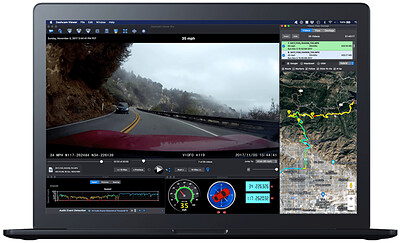
Dashcam Viewer Plus 4.0.9 Multilingual | Size: 111.56 MB
Language: English
​
Dashcam Viewer is a software application for viewing movies, GPS data, and shock-sensor data recorded by your dashcam or action cam. Dashcam Viewer supports over 70 camera models. See below for the complete list of supported cameras and features.

Map Displays
Your vehicle's entire route and current position are displayed in an animated 2D map. The route line is color-coded based on the vehicle's speed. Click anywhere along the route to jump to that point in the video sequence. Choose between different map providers (Google, MapQuest) and themes (satellite, road, hybrid). Highlight important points in the route with Geotag markers.

Geotags
Geotags are custom markers you can drop at any point along your trip. They appear in the map and in the Geotags list view. Metadata such as the time, date, speed, latitude, longitude, street address, movie name, and movie time are stored with each geotag. Double-click a geotag in the Geotags List and you will jump instantly to that point in the video sequence. Geotags can be exported and imported for easy access.

Export GPS Data
Dashcam Viewer's Data Browser allows you to preview and export your GPS data in multiple formats, including comma-separated value (CSV), GPX, Google Earth KML, and GeoJSON. Portions of videos can be exported to short clips, with or without sound, at accelerated or decelerated playback rates. Still frames from videos can be exported to JPG, PNG, or BMP images individually or at a specific frequency.

Data Plots
Dashcam Viewer's Plot Views show a time history of your vehicle's speed, distance, and compass direction. For dashcams that record additional GPS data, the G-sensor (shock), vehicle altitude, number of GPS satellites in view, and horizontal dilution of precision (HDOP) are also displayed.

Audio Event Detection
Important events in the video series are often characterized by sudden changes in volume. For example, the sound of a collision or the sound of a horn can be heard against the normal driving noise background. Dashcam Viewer's Audio Event Detection can assist in locating key sound events in a series of videos.

Videos List
Loaded videos are shown in the Videos list. Videos that are uninteresting can be toggled off so they no longer appear in the video sequence and their GPS data is removed. To play a specific video simply double-click on it in the list. Additional information about each video is displayed alongside its filename, including file size, maximum vehicle speed, date, and time, is displayed in the list item.

Trip List
Dashcam Viewer bins videos automatically into trips. A trip is categorized as one or more contiguous videos that have no break between them greater than one minute. Dashcam Viewer then computes statistics for each trip. This includes the start date and time, duration of the trip, amount of time between trips, and the number of videos per trip.

Export & Merge Video
You can export whole videos or parts of videos into short clips or a series of images. Video clips can be exported with or without sound and at an accelerated or decelerated playback rate. Still frames can be exported to JPG, PNG, or BMP images individually or at a specific frequency. You also have the ability to merge multiple videos into a single large file. When merging, Dashcam Viewer will create a GPX file with the GPS data from the selected videos so that you can import that data back into Dashcam Viewer if needed.

Dashboard Display
Dashcam Viewer's dashboard display shows your vehicle's current metrics including position, speed, and compass heading. Speed can be shown in mph or km/h. The dashboard also shows the weather conditions at the time and location of the drive. For dashcams that support enhanced GPS data collection, Dashcam Viewer displays the altitude, number of satellites in view, and signal confidence. Choose from one of 19 compass pointer icons in the Pro version.

Operating System: Windows 10, 11 64-bit recommended

HOMEPAGE:
Код:
https://dashcamviewer.com/

FREE DOWNLOAD LINKS:​

Код:
https://rapidgator.net/file/f0079d8d29c9fdc72c7a7be782e330a7/Dashcam_Viewer_Plus_4.0.9_Multilingual.rar


Код:
https://clicknupload.click/sahvdfhxi01o/Dashcam_Viewer_Plus_4.0.9_Multilingual.rar
 
5af348fdc0525f27c461661e8d310d5e.jpg


Disk Sorter 18.4.12 | Size: 71.63 MB
Language: English
​
DiskSorter is a file classification solution allowing one to classify files in local disks, network shares, NAS devices and enterprise storage systems. Users are provided with the ability to gain an in-depth visibility into which types of files are using most of the disk space, save reports and perform file management operations on categories of files.

DiskSorter Main GUI Application
The DiskSorter main GUI application provides the user with the ability to classify one or more disks or directories, analyze, categorize and/or filter file classification results, export file classification reports to the HTML, PDF, Excel, XML, text or CSV formats, copy, move or delete specific file classes, class groups or individual files and much more.

File Classification Plugins
DiskSorter provides a large number of file classification plugins allowing one to classify and categorize files by the file type, extension, creation, last modification or last access dates, etc. Advanced users are provided with the ability to implement custom file classification plugins using an easy, XML-based format.

File Categories and Filters
DiskSorter is capable of categorizing and filtering file classification results by the file type, size, user name, extensions, etc. The bottom part of the main GUI application shows the available file categories and allows one to apply one or more file categories as file filters limiting the currently displayed results to the selected file categories.

File Classification Pie Charts
The pie charts dialog is capable of showing the amount of used disk space and the number of files per class, category, extension, user name, last access, modification and creation times, etc. In addition, the user is provided with the ability to copy the chart image to the clipboard allowing one to easily integrate DiskSorter charts into presentations and documents.

Classifying Files in Network Servers and NAS Storage Devices
DiskSorter allows one to scan the network, discover network servers and NAS storage devices, automatically detect all accessible network shares and classify files in hundreds of network servers and NAS storage devices.

File Classification Options
The file classification options dialog provides the ability to set the default report title, the speed of the file classification process, the number of parallel directory scanning and file classification threads, the results sorting mode, the disk space counting mode, etc.

File Classification Rules
The file classification rules dialog allows one to limit the file classification process to specific types or groups of files using one or more file matching rules.

Supported Operating Systems:
Windows XP, Vista, 7, 8, 8.1, 10, 11 and Server 2003, 2008, 2008 R2, 2012, 2012 R2, 2016, 2019, 2022, 2025

HOMEPAGE:
Код:
https://www.disksorter.com/

FREE DOWNLOAD LINKS:​

Код:
https://rapidgator.net/file/feb3efa8a4ba46ec24c1bfea2f8b925b/Disk_Sorter_18.4.12.rar


Код:
https://clicknupload.click/azjigqoz1p3j/Disk_Sorter_18.4.12.rar
 
4e8ccef0f01caa3c7c7d93c54245afe5.jpg


Dup Scout 18.4.12 | Size: 80.29 MB
Language: English
​
Dup Scout is a duplicate files finder allowing one to search and cleanup duplicate files in local disks, network shares, NAS storage devices and enterprise storage systems. Users are provided with the ability to search duplicate files, save reports, replace duplicates with links, delete duplicate files or move duplicate files to another location.

DupScout Main GUI Application
The DupScout main GUI application provides the ability to search duplicate files, categorize and filter detected duplicate files, save reports to the HTML, PDF, Excel, text, CSV and XML formats, export duplicate files to an SQL database, replace duplicate files with links, move duplicate files to another directory, delete duplicate files, etc.

Search Duplicate Files Dialog
The search duplicate files dialog allows one to specify disks, directories and/or network shares that should be processed. In addition, the user is provided with the ability to detect servers and NAS storage devices on the network and search duplicate files in network shares in one or more servers or NAS storage devices.

Remove Duplicate Files
DupScout provides the ability to replace duplicate files with links, move duplicate files to another directory, compress duplicate files, delete duplicate files, etc. Before executing duplicate files removal actions, DupScout shows the duplicate files removal actions preview dialog allowing one to select/unselect specific duplicate files.

Duplicate Files Statistics and Pie Charts
The pie charts dialog is capable of showing the amount of duplicate disk space and the number of duplicate files per file type, extension, user name, last access, modification and creation dates, etc. In addition, the user is provided with the ability to copy the chart image to the clipboard allowing one to easily integrate DupScout charts into user-custom presentations and documents.

Searching Duplicate Files in Network Servers and NAS Storage Devices
DupScout allows one to scan the network, discover network servers and NAS storage devices, automatically detect all accessible network shares and search duplicate files in hundreds of network servers and NAS storage devices.

Duplicate Files Search Options
The duplicate files search options dialog allows one to specify the default report title, the type of file signature algorithm to use, the maximum number of duplicate file sets to display and provides an option to enable processing and display of duplicate files user names.

Supported Operating Systems:
Windows XP, Vista, 7, 8, 8.1, 10 Server 2003, 2008, 2008 R2, 2012, 2012 R2, 2016

HOMEPAGE:
Код:
https://www.dupscout.com/

FREE DOWNLOAD LINKS:​

Код:
https://rapidgator.net/file/a3692116f272e18eb8fb8a80f4145ae6/Dup_Scout_18.4.12.rar


Код:
https://clicknupload.click/3y0aqu19ghxo/Dup_Scout_18.4.12.rar
 
Назад
Сверху Снизу