All sanddisk Software's Collection [Daily Updated]

ezgif-81f619f0417dbe51.jpg


Security Eye 4.7 Multilingual

File size: 35.07 MB

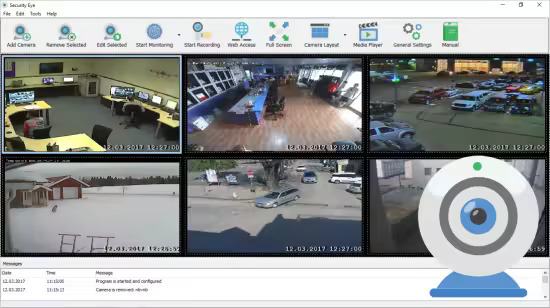
Security Eye is a personal surveillance system that enables you to monitor multiple IP cameras or webcams.The software offers motion detection recording, continuous and scheduled recordings. If you are using motion detection, it will automatically record (or take snapshots) when motion is detected take photos and optionally sound an alarm, send you an email or SMS notification.

Video Surveillance
Installed on your PC, Security Eye uses IP cameras and webcams to perform unbeatable video monitoring. The program supports more than 1200 models of IP cameras, and virtually all webcams. Video stream can be viewed from 64 sources simultaneously. You can also watch live stream via browser, from any place in the world!

Motion Detector
Motion detector is one of the main tools available in Security Eye. It is based on the video frame analyzing algorihm. You can use it to protect your home or company from intruders. The motion sensor and masking tool are fully customizable so you can be sure you will not get the false alerts.

Task Scheduler
Video recording and motion monitoring are useful when you need it. The software allows you to setup the periods of a day and special dates for these tasks. For example, you can start monitoring your home at the beginning of your working day, and to finish the task at the evening. Or if you are a boss, you can schedule recording the video in your office rooms on the working hours only, and then watch it later, to make sure your employees do the job.

Video Recording
The software uses xVid encoding engine for quality video recording. You can record the events in your home, office or shop while you are away. The easy-to-use, integrated video player allows you to playback recorded video anytime, on any speed. You can run recording at special periods of a day and the week.

Alerts via Email & SMS
If Security Eye detects motion, it can turn on a loud sound (siren). It can also send you an alert message to your email, with attached photos from cameras. In addition, it can send sms to your cell phone.

Capture the Incident
It is not only important to identify the security threat, but also to capture the evidence. When the program detects the motion, it can make snapshots on cameras, and to record video. The captured media files are saved to the local folder, or on the cloud.

Typical Scenarios and Uses

Home Security
Keep an eye on your home when you are away. Just install Security Eye software, and use existing USB webcam connected to your computer. Your home security system is complete! Now in case of intrusion, you'll instantly be alerted with photos of the thieves sent to your email and mobile

Business Monitoring
As well as your home, your office or retail store also needs a good security system. At night, you can use it as a motion detection system, and on working hours - for recording the work process. Your staff needs to be monitored as well! WIth Security Eye, you'll always know what's happening at work.

Baby Surveillance
Keep a constant eye on your child anytime, anywhere. Follow what is happening in your baby's room when you are away. Do you have any suspicions about your nanny? Use Security Eye to collect an evidence - you'll have it all on tape!

Pet Monitoring
Have you ever wondered what your favorite animal is doing while you are not at home? Download Security Eye now and create the next buzz on YouTube.

What's new
Код:
https://www.security-eye-software.com/download.php

For Windows XP, Vista, 7, 8, 8.1, 10, 11

Homepage
Код:
https://www.security-eye-software.com/

DOWNLOAD

Код:
https://rapidgator.net/file/2f2bb2096730449094be000d4a0bdb0b/Security.Eye.4.7.rar.html

https://nitroflare.com/view/ED797BAD84A294D/Security.Eye.4.7.rar
 
ezgif-8afa376e66840a53.jpg


DoYourClone v3.2 WinPE

File Size: 552.91 MB | Language: English

TweakNow WinSecret for Windows 10, 11 allows users to explore the hidden settings in Windows 11.
Easily and securely clone HDD, SSD, USB flash drive, memory card or other storage device. The best disk cloning software to help you migrate data, copy hard drive and back up your files.

DoYourClone offers outstanding disk cloning features to help you clone HDD, SSD, external storage device, move data from crashed Windows computer to an external hard drive or create bootable backups for your computers.

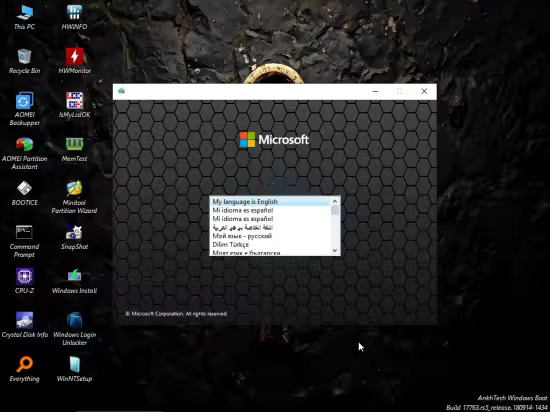
Bootable WindowsPE ISO file for your USB stick.

Features
Two Disk Clone Modes
Clone Disk to A Smaller One
Easy-to-use Disk Clone Tool
Flexible Clone Options
100% Safe and Fast Clone

Release Notes

Changes inv3.2: some improvements.

Homepage
Код:
https://www.doyourdata.com/disk-clone/

DOWNLOAD

Код:
https://rapidgator.net/file/e55a4ca0bdbf36a5b312189d2aadbe83/DoYourClone-v3.2-WinPE.rar.html

https://nitroflare.com/view/F4F940FE76BDB45/DoYourClone-v3.2-WinPE.rar
 
th-d7Fk-T94bd0YP07Gw-QJc-NWj-QNPGL9Kpa7.jpg


Ekahau AI Pro 11.8.9 (x64) Multilingual

File size: 546.1 MB

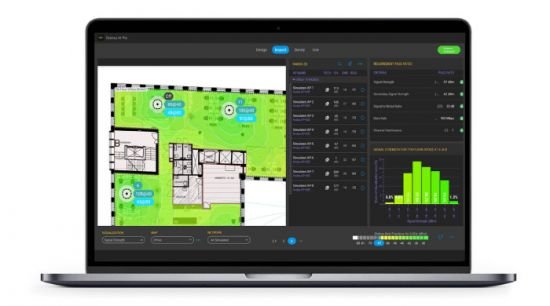
Powerful Wi-Fi planning and AI design for the most reliable, best performing wireless networks – now including 6 GHz.

Unlock the Power of 6GHz
Design your perfect, blazing-fast 6 GHz network with the top tri-band wireless access points today.

Expert AI to the Rescue
Automate thousands of design iterations and discover your network’s optimal AP placement and configuration in mere seconds.

Awesome Wi-Fi is Now Easy
Get ultra-fast, ultra-reliable Wi-Fi with smart tools for defining, designing and inspecting your Wi-Fi.

The Most Trusted Solution for Business-Critical Wi-Fi Design
Ekahau AI Pro™ is the Wi-Fi design software of choice for IT professionals leading business-critical Wi-Fi design and deployment projects.
Create powerful AI-assisted predictive wireless network designs
Run network upgrade simulations to test performance
Inspect collected and live survey data
Generate custom reports detailing the performance health of your network

See Your Wireless World in 6 GHz Today
Evaluate your options for 6 GHz with rip-and-replace and redesign simulations tuned to your exact network requirements and environment. Use the new Channel Planner and Network Simulator to show recommended improvements to your current network design or start a redesign with the all-new AI Auto-Planner and discover your network’s optimal AP placements and configuration.
Support your next gen business applications with the unprecedented speed and reliability of your Ekahau-perfected 6 GHz network design.

Design with the Speed and Precision of Expert AI
AI Pro takes your business requirements for Wi-Fi connectivity and identifies the ideal wireless access point placements for your network. Ekahau AI Auto-Planner runs tens of thousands of iterations against your specific wall materials and floor plan to find the optimal positions for your AP placements. Generate a multi-floor network design that will effortlessly exceed your primary and secondary signal strength requirements while minimizing channel interference in mere seconds. The fastest, most reliable networks come from Ekahau.

Start Using AI Auto-Planner in 3 Steps
Define Your Physical Environment
Import your CAD file floor plan (or simply draw and assign wall materials with our easy-to-use design tool.)

Set Your Network Requirements
Input your Wi-Fi connectivity needs for coverage, capacity, device types and channel preferences.

Get a Great Wi-Fi Design in Minutes
Click Create and watch the dancing APs perform thousands of iterations giving you an awesomely fast and reliable Wi-Fi design!

Whats New
Код:
https://sw.ekahau.com/download/pro/Release%20Notes.html

Homepage
Код:
https://www.ekahau.com/products/ekahau-connect/ai-pro/

DOWNLOAD

Код:
https://rapidgator.net/file/1b4fe1bc9e9c6d8d897edb0d12a77692/Ekahau_AI_Pro_11.8.9.rar.html

https://nitroflare.com/view/08F52F058DF8B66/Ekahau_AI_Pro_11.8.9.rar
 
th-6gem-XDPJoj8lx-IMx11Lm-Ohk-JN3VDYad5.jpg


Windows Firewall Control 6.26 Multilingual

File size: 3.0 MB

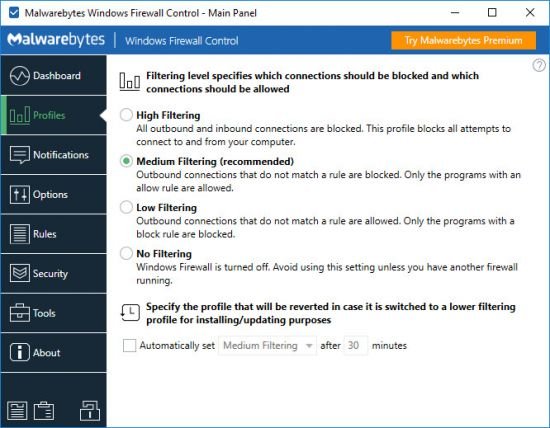
Windows Firewall Control is a powerful software which extends the functionality of Windows Firewall and provides new extra features which makes Windows Firewall even better. It runs in the system tray and allows the user to control the native firewall easily without having to waste time by navigating to the specific part of the firewall. This is the best tool to manage the native firewall from Windows 10, 8.1, 8, 7, Vista, Server 2008, Server 2012.

Quick access from the tray icon
Once initialized, the app creates an icon in the system tray area and allows you to select the security profile, ranging from no filtering (turns off Windows Firewall) to high filtering mode (blocks all inbound and outbound connections).

Thorough management of application connections
When it comes to rules management, you can allow or deny access to any application, disable, delete it from the list or create a duplicate. The list shows names, groups, programs, locations, statuses, actions, directions, locate and remote ports, remote addresses, protocols, and services.

Populate permission lists with custom apps
It is possible to sort items by status or direction (inbound, outbound, all, user-created), use a search function, view recently blocked programs, as well as switch to a simplified viewing mode for enabling and disabling program access, as well as for adding a new app to the list.

Rich settings to work with
Windows Firewall Control features a control panel where you can make additional tweaks. You can integrate the tool into the Explorer context menu, set it to autorun at startup, disable other programs from adding firewall rules, activate global hotkeys for the control panel and rules management area, adjust the frame's hue, import and export rules, as well as access some Windows tools (Firewall with Advanced Security, Command Prompt, Event Viewer, Resource Monitor, Windows Registry).

To end with
All in all, the application has a fair reaction speed and works smoothly, without causing any problems to the OS. It quickly applies rule changes. Windows Firewall Control is an excellent utility for a better control over Windows Firewall options, especially when it comes to setting up rules for each program.

Whats New
Код:
https://www.binisoft.org/changelog.txt

Homepage
Код:
https://www.binisoft.org

DOWNLOAD

Код:
https://rapidgator.net/file/29b0f11979368e9fee5ced187677e4fa/wfc6setup.exe.html

https://nitroflare.com/view/8143747623848EA/wfc6setup.exe
 
ezgif-3feba6766901f705.jpg


Ashampoo Photo Commander 19.0.4 (x64) Multilingual

File Size: 670.5 MB

20 years ago, beautiful photos were scarce. 10 years ago, memory was scarce. Today, we've got both–but we've also got a veritable file chaos, thanks to hundreds of files! Ashampoo Photo Commander 19 not only turns chaos into neat photo collections but it also turns good into great shots, and can even make collages, greetings cards, and slideshows. Convert your photos, even automatically and in batches, add watermarks, and sort your files by location for instant visual clarity. Photo Commander is the all-in-one solution for you!

Ashampoo Photo Commander is back!
A modern technology overhaul for a classic
Ashampoo Photo Commander 19 eliminates duplicate images using four techniques simultaneously! Experience a new, adaptive screen layout, significantly improved photo browsing speed, and powerful new formats! Instantly see where photos were taken, apply new effects, and use XMP and EXIF data for quick filtering! With handy new switches and an interface designed to support your workflow, you’ll experience Ashampoo Photo Commander like never before!

Automatic duplicate photo filter for quickly finding and grouping duplicates
Four-way fingerprinting for precise image comparison and duplicate detection
Auto-adaptive UI layout for portrait or landscape orientation
Faster thumbnail loading, including subfolders
Progress display for running tasks
Auto-listing of city names in GPS data in group view
Filter by favorites, duplicates, and file formats in real time
Support for XMP and EXIF data in filters
Faster folder scans
Customizable folder view and UI elements
Up to 50% faster PNG load times
Support for SVG, AVIF, and the latest RAW formats
New effects like Bevel, Inner Glow, and Pseudo 3D
Right-click bitmap export for objects
New Pop Art, color, and artistic frame effects
New "Change Color" tool for easy color adjustment
Uniform design with updated dialogs and new controls
Improved full-screen mode with new transition effects
Faster display and zoom for 32-bit photos with alpha channel
Optimized video playback with slow drives

Find duplicates, edit metadata, smart-search for files
No more duplicate photos – with four-way fingerprint technology
Ashampoo Photo Commander is handy indeed! It scans your library for duplicates and helps you filter your photos by name, EXIF/IPTC data, or comments. Looking for a needle in a haystack has just become super-easy. You can even add missing metadata manually so you'll never lose track of your photos again!

Collages, cards and frames included
From birthdays to Christmas: Create just the right card in no time
Get creative: Photo Commander lets you create stylish collages and elegant cards with the help of numerous included templates. Add nifty frames to your photos and combine images and texts to create greeting cards for holidays, parties, and special occasions.

Crop and edit photos
Beginner or professional user: Make the most of your shots
Crop your photos with ease, straighten image horizons and accentuate colors. Cut out individual people and objects and modify image perspective at your convenience. Play with numerous great photo effects and go professional with gradation curves and tonal value correction! Whether quick fix or detailed post-processing: Ashampoo Photo Commander has got you covered!

The image viewer with the perfect overview
Smart-group and sort by capture date, time, or file name
With Ashampoo Photo Commander, you always stay on top of your photos. Clever filters and grouping options help you keep track no matter how large your photo collections are! Sort chronologically, thematically and by location or apply custom filters and instantly find every shot!

Design slideshows with ease
Create high-res slideshows with music
Create high-resolution 4K slideshows with fitting transitions and underline your shots with music in various formats. Finished projects are instantly previewable with the new video playbar and can be burned to disc straightaway.

Auto-enhance your photos
Smart algorithms for better colors or contrasts and less noise
Even underwhelming shots turn into precious vacation memories thanks to image auto-correction. Remove scratches and eliminate image noise or red eyes instantly! Auto-correction does most of the heavy lifting for you–even in batch processing mode so you can polish your entire library in one go! Optimize colors or contrasts and get rid of compression artifacts at the click of a button!

Present your photos in style
Versatile presentation mode for every occasion
Whether you're enjoying your photos on your own or with friends and family, the new presentation mode is simply genius–especially in multi-display environments. You control the presentation on one display and your viewers get to enjoy the results on another, e.g. a video projector. You can even make live adjustments without leaving the presentation!

Apply geotags
No more confusion about shooting locations
Modern cameras and cellphones use geotagging to save location information along with each shot. Ashampoo Photo Commander not only uses these tags for sorting but can also edit and create them. You'll get precise information down to street level! Want to see all photos from Paris? No problem. You can even view each location in Google Maps instantly!

A real feature beast for your photos
20 years in the making–and it shows!
Ashampoo Photo Commander includes over 200 photo-related functions and is rightly called "feature beast" by its fans. And it's true: You can click your way through he program and keep discovering new handy features and tools that other companies would gladly sell you as separate apps. Your fun journey into the world of photo editing begins today!

Salvage or create
Breathe new life into bad shots or create stunning panoramic pictures
Not every shot is a hit! Photo Commander includes a special auto-feature that fixes overexposed or washed out colors with great results. You can also apply effects individually to add more vibrancy and structure to your shots, or combine them into breathtaking panoramic views.

Batch-processing done right
Process entire photo libraries in one go
Convert multiple images into different formats at once and adjust image size and aspect ratio in the process. Add watermarks or frames to your photos and rotate or mirror them to your needs. Modify brightness and contrast settings or eliminate image noise. You can do all that with batch-processing and save loads of time and effort!

Fast multi-purpose image editing
A quick fix for common image issues
Discover tools that optimize your photos, add filters and polish contrasts and colors. Straighten image horizons, clone areas, and accentuate details with the focus or tilt-shift effect. Adjust image size and rotation or crop your photos perfectly. Why buy several programs when you can just get the one that does it all in a single interface?

Helpful wizards
Step-by-step guidance
Ashampoo Photo Commander comes with multiple wizards that offer step-by-step assistance for various tasks. Whether you're designing a calendar, creating a collage, or batch-processing hundreds of photos, there's a wizard that will guide you through the process, no previous knowledge required. Pick your photos, select an option, and you're good to go!

Full Windows 11 compatibility and 64-bit support
Maximum performance for all current Windows versions
Ashampoo Photo Commander is not only Windows 11 compatible but has also been completely overhauled for true native 64-bit support and optimal memory management. It's the best-looking, fastest, and most stable Photo Commander yet. Whether you're editing single images or entire libraries, you'll feel the difference right away!

Whats New
Код:
https://www.ashampoo.com/en-us/photo-commander

Homepage
Код:
https://awww.ashampoo.com

DOWNLOAD

Код:
https://rapidgator.net/file/93be02aa9e0dfa581fc2626b255edbca/AshampooPhotoCommander19.rar.html

https://nitroflare.com/view/79C55C92BCF73AF/AshampooPhotoCommander19.rar

 
ezgif-3feba6766901f705.jpg


Ashampoo Photo Commander 19.0.4 (x64) Multilingual


File Size: 670.5 MB


20 years ago, beautiful photos were scarce. 10 years ago, memory was scarce. Today, we've got both–but we've also got a veritable file chaos, thanks to hundreds of files! Ashampoo Photo Commander 19 not only turns chaos into neat photo collections but it also turns good into great shots, and can even make collages, greetings cards, and slideshows. Convert your photos, even automatically and in batches, add watermarks, and sort your files by location for instant visual clarity. Photo Commander is the all-in-one solution for you!


Ashampoo Photo Commander is back!

A modern technology overhaul for a classic

Ashampoo Photo Commander 19 eliminates duplicate images using four techniques simultaneously! Experience a new, adaptive screen layout, significantly improved photo browsing speed, and powerful new formats! Instantly see where photos were taken, apply new effects, and use XMP and EXIF data for quick filtering! With handy new switches and an interface designed to support your workflow, you’ll experience Ashampoo Photo Commander like never before!


Automatic duplicate photo filter for quickly finding and grouping duplicates

Four-way fingerprinting for precise image comparison and duplicate detection

Auto-adaptive UI layout for portrait or landscape orientation

Faster thumbnail loading, including subfolders

Progress display for running tasks

Auto-listing of city names in GPS data in group view

Filter by favorites, duplicates, and file formats in real time

Support for XMP and EXIF data in filters

Faster folder scans

Customizable folder view and UI elements

Up to 50% faster PNG load times

Support for SVG, AVIF, and the latest RAW formats

New effects like Bevel, Inner Glow, and Pseudo 3D

Right-click bitmap export for objects

New Pop Art, color, and artistic frame effects

New "Change Color" tool for easy color adjustment

Uniform design with updated dialogs and new controls

Improved full-screen mode with new transition effects

Faster display and zoom for 32-bit photos with alpha channel

Optimized video playback with slow drives


Find duplicates, edit metadata, smart-search for files

No more duplicate photos – with four-way fingerprint technology

Ashampoo Photo Commander is handy indeed! It scans your library for duplicates and helps you filter your photos by name, EXIF/IPTC data, or comments. Looking for a needle in a haystack has just become super-easy. You can even add missing metadata manually so you'll never lose track of your photos again!


Collages, cards and frames included

From birthdays to Christmas: Create just the right card in no time

Get creative: Photo Commander lets you create stylish collages and elegant cards with the help of numerous included templates. Add nifty frames to your photos and combine images and texts to create greeting cards for holidays, parties, and special occasions.


Crop and edit photos

Beginner or professional user: Make the most of your shots

Crop your photos with ease, straighten image horizons and accentuate colors. Cut out individual people and objects and modify image perspective at your convenience. Play with numerous great photo effects and go professional with gradation curves and tonal value correction! Whether quick fix or detailed post-processing: Ashampoo Photo Commander has got you covered!


The image viewer with the perfect overview

Smart-group and sort by capture date, time, or file name

With Ashampoo Photo Commander, you always stay on top of your photos. Clever filters and grouping options help you keep track no matter how large your photo collections are! Sort chronologically, thematically and by location or apply custom filters and instantly find every shot!


Design slideshows with ease

Create high-res slideshows with music

Create high-resolution 4K slideshows with fitting transitions and underline your shots with music in various formats. Finished projects are instantly previewable with the new video playbar and can be burned to disc straightaway.


Auto-enhance your photos

Smart algorithms for better colors or contrasts and less noise

Even underwhelming shots turn into precious vacation memories thanks to image auto-correction. Remove scratches and eliminate image noise or red eyes instantly! Auto-correction does most of the heavy lifting for you–even in batch processing mode so you can polish your entire library in one go! Optimize colors or contrasts and get rid of compression artifacts at the click of a button!


Present your photos in style

Versatile presentation mode for every occasion

Whether you're enjoying your photos on your own or with friends and family, the new presentation mode is simply genius–especially in multi-display environments. You control the presentation on one display and your viewers get to enjoy the results on another, e.g. a video projector. You can even make live adjustments without leaving the presentation!


Apply geotags

No more confusion about shooting locations

Modern cameras and cellphones use geotagging to save location information along with each shot. Ashampoo Photo Commander not only uses these tags for sorting but can also edit and create them. You'll get precise information down to street level! Want to see all photos from Paris? No problem. You can even view each location in Google Maps instantly!


A real feature beast for your photos

20 years in the making–and it shows!

Ashampoo Photo Commander includes over 200 photo-related functions and is rightly called "feature beast" by its fans. And it's true: You can click your way through he program and keep discovering new handy features and tools that other companies would gladly sell you as separate apps. Your fun journey into the world of photo editing begins today!


Salvage or create

Breathe new life into bad shots or create stunning panoramic pictures

Not every shot is a hit! Photo Commander includes a special auto-feature that fixes overexposed or washed out colors with great results. You can also apply effects individually to add more vibrancy and structure to your shots, or combine them into breathtaking panoramic views.


Batch-processing done right

Process entire photo libraries in one go

Convert multiple images into different formats at once and adjust image size and aspect ratio in the process. Add watermarks or frames to your photos and rotate or mirror them to your needs. Modify brightness and contrast settings or eliminate image noise. You can do all that with batch-processing and save loads of time and effort!


Fast multi-purpose image editing

A quick fix for common image issues

Discover tools that optimize your photos, add filters and polish contrasts and colors. Straighten image horizons, clone areas, and accentuate details with the focus or tilt-shift effect. Adjust image size and rotation or crop your photos perfectly. Why buy several programs when you can just get the one that does it all in a single interface?


Helpful wizards

Step-by-step guidance

Ashampoo Photo Commander comes with multiple wizards that offer step-by-step assistance for various tasks. Whether you're designing a calendar, creating a collage, or batch-processing hundreds of photos, there's a wizard that will guide you through the process, no previous knowledge required. Pick your photos, select an option, and you're good to go!


Full Windows 11 compatibility and 64-bit support

Maximum performance for all current Windows versions

Ashampoo Photo Commander is not only Windows 11 compatible but has also been completely overhauled for true native 64-bit support and optimal memory management. It's the best-looking, fastest, and most stable Photo Commander yet. Whether you're editing single images or entire libraries, you'll feel the difference right away!


Whats New

Код:
https://www.ashampoo.com/en-us/photo-commander


Homepage

Код:
https://awww.ashampoo.com


DOWNLOAD


Код:
https://rapidgator.net/file/93be02aa9e0dfa581fc2626b255edbca/AshampooPhotoCommander19.rar.html


https://nitroflare.com/view/79C55C92BCF73AF/AshampooPhotoCommander19.rar

 
Назад
Сверху Снизу