All sanddisk Software's Collection [Daily Updated]

ezgif-3b48dc9c05c27047.jpg


tiny11 Core 25H2 Build 26200.8894 Multilingual Preactivated

No TPM | Languages: Arabic,English,German,Greek,French,Spanish,Italian,Portuguese-Portuguese,Portuguese-Brazil,Turkish,Dutch,Czech,Norwegian | File Size: 3.43 GB

Windows 11, version 25H2 is an enablement update that builds on the features of 24H2 by enabling new, "continuous innovation" features, rather than introducing entirely new features itself. Key updates include a Braille Viewer for the Narrator, improvements to Click-to-Do (including a new "Convert to Table" feature), support for plug-in credential managers for passkeys, and enhancements to the mobile device companion experience. Microsoft is also implementing IT admin-focused features like the ability to remove pre-installed Store apps and a new Quick Machine Recovery system to reduce downtime.

For Users
Accessibility
The Narrator now includes a Braille Viewer, allowing users to see the braille equivalent of on-screen text on a refreshable braille display.
Passkeys
Users can now utilize plug-in credential managers for setting up and using passkeys, offering improved security and management.
Time & Language
Ported settings from the Control Panel to the Settings app, including configuring additional clocks and changing the NTP time server.
Mobile Experience
The mobile device companion has a new, more accessible layout to view calls, messages, photos, and more from your phone.
Click-to-Do
New AI features for Click-to-Do are included, such as a new "Convert to Table" capability for converting text to an Excel table and more flexible selection methods.
For IT Administrators
Quick Machine Recovery
This new feature in the recovery system aims to reduce downtime and simplifies the process for recovering a system, according to PCMag.
Removable Apps
IT admins can now remove certain pre-installed Microsoft Store apps via Group Policy or MDM CSP on Enterprise/EDU devices.
Feature Removals
25H2 removes older components like PowerShell 2.0 and WMIC for greater security and efficiency.

What is removed
- Clipchamp
- News
- Weather
- Xbox (although Xbox Identity provider is still here, so it should be possible to be reinstalled with no issues)
- GetHelp
- GetStarted
- Office Hub
- Solitaire
- PeopleApp- PowerAutomate
- ToDo
- Alarms
- Mail and Calendar
- Feedback Hub
- Maps
- Sound Recorder
- Your Phone
- Media Player
- QuickAssist
- Internet Explorer
- Tablet PC Math
- Edge
- OneDrive

For tiny11 core
- all of the above +
- Windows Component Store (WinSxS)
- Windows Defender (only disabled, can be enabled back if needed)
- Windows Update (Windows Update wouldn't work anyway without WinSxS, so enabling it would only put the system in a state where it would try to update but fail spectacularily)
- WinRE

Whats New
Код:
https://support.microsoft.com/en-US/servicing/os/windows-11/2026/04/april-14-2026-kb5083769-os-builds-26200-8246-and-26100-8246

System RequirementsFor Windows 11
Processor: 1 gigahertz (GHz) or faster.
RAM: 1 gigabyte (GB).
Free space on hard disk: 16 gigabytes (GB).
Graphics card: DirectX 9 graphics device or a newer version.
Additional requirements to use certain features.
To use touch you need a tablet or monitor that supports multitouch.
To access the Windows store to download and run apps, you need an active Internet connection and a screen resolution of at least 1024 x 768 pixels

Homepage
Код:
https://support.microsoft.com/en-us

DOWNLOAD:

Код:
https://rapidgator.net/file/67c821a50718532d69acaba6f6c2672c/tiny11.Core..26200.8894.part1.rar.html
https://rapidgator.net/file/8c44356adf7974b2cf628e9c6e80709a/tiny11.Core..26200.8894.part2.rar.html
https://rapidgator.net/file/7f48ea821ac4ea88fcb46a2f3f77e079/tiny11.Core..26200.8894.part3.rar.html
https://rapidgator.net/file/23cfeb21a8501579e2365cc5ef6192e7/tiny11.Core..26200.8894.part4.rar.html

Код:
https://ddownload.com/h1hnkx5k7n5u/tiny11.Core..26200.8894.part1.rar
https://ddownload.com/9qvcrvezdlt5/tiny11.Core..26200.8894.part2.rar
https://ddownload.com/8lsaxtjheicm/tiny11.Core..26200.8894.part3.rar
https://ddownload.com/xxlx2bgzutx3/tiny11.Core..26200.8894.part4.rar
 
s2H3Ugc-ZLi0kymnc5y-Qod-OInq9ptu7VX.png


Album TD 4.9.2.0 Multilingual

Languages: Multilingual
File Size: 524.37 MB

Professional album design, fast and easy. Awesome album designs with no effort. If you love taking pictures and are overwhelmed by albums just try Album TD and forget the stress. Already available version 4.0 with image resolution control. With Album Turbo Design you may design a wedding album, communion, baptism, senior, etc.; any album theme with awesome layouts in just seconds.

Layout preview
True wysiwyg layout preview, including margins, gaps, backgrounds and cliparts.

Magnetic alignment
Automatic alignment and a unique algorithm to position images perfectly aligned even with small gaps.

All spreads at once
The only album design software which allows designing all spreads at once, enable grid view and drag images.

Full layered PSD
Exporting to PSD you will get a full layered document with uncut images as smart object, ready for any extreme retouch.

Fast tool for busy photographers
From Album DS creators, the album design software for Photoshop, a new tool has been developed: Album Turbo Design. All the drag and drop power at album design service, our new design engine will instantly create the layout both for panoramic sheets and double paged. Atractive and modern designs you may modify to suit your style.
With Album Turbo Design you may design a wedding album, communion, baptism, senior, etc.; any album theme with awesome layouts in just seconds. Album TD doesn’t require Photoshop and is compatible with Windows Vista or higher.

Designer
- Layout preview
- Border gap
- Images gap
- Auto alignment
- Panoramic or 2 paged

Awesome results
- Full color management
- JPG and TIF
- Layered PSD
- Preview PDF
- Preview JPG

No restrictions
- Backgrounds
- Image as background
- Masks
- Custom mask
- Clipart

Image editor
- Hue & saturation
- Levels
- Shadow & highlights
- Contrast and lightness
- External editor

Best value for album design software
Drag and drop a few images into the editor and a design will be created, select a new design from our true preview layouts list. Move freely any image in the layout, resize and rotate it; also a selection of images. Swap images with a simple drag, even between different spreads. Insert a new image between others or at their border, easy and fast. Full gap control with our unique homogenization algorithm for perfectly aligned images.

Release Notes
- - Release notes were unavailable when this listing was updated.

System Requirements
Windows Vista 64bits or higher (not compatible with 32bits OS)

Homepage
Код:
https://www.albumtd.com

DOWNLOAD:

Код:
https://rapidgator.net/file/4397a61f8bd176f35e561229729ee238/Album.TD.4.9.2.0.rar.html

https://ddownload.com/79ex2g8d8462/Album.TD.4.9.2.0.rar
 
ezgif-3a9c9d99adfaed7c.jpg


Vexy Lines 2.0.330

File size: 91 MB

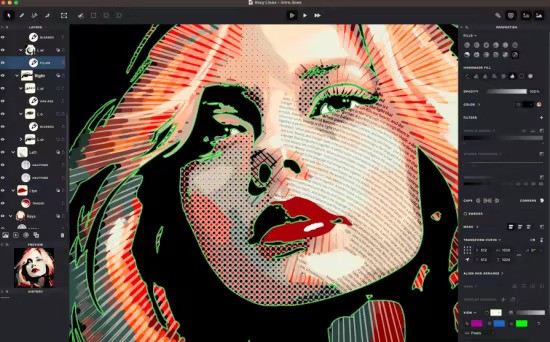
Vexy Lines, Vexy Linestra and Vexy Playlines is a family of tools that turn photos and other bitmap images into expressive, scalable SVG & PDF vector art. Transform any photo or bitmap into engraving-style line art, halftone dot patterns, spirals, wave textures, scribble effects, wireframes, fractal curves, and text-based fills.

Whats New
Updates: official site does not provide any info about changes in this version

System Requirements: Windows 10 and later

Homepage
Код:
https://vexy.art/
DOWNLOAD:

Код:
https://rapidgator.net/file/581190f1888dccf40bc8f9b44d429baa/VexyLines_2.0.330.0.rar.html

https://ddownload.com/tnekj80p51x6/VexyLines_2.0.330.0.rar
 
ezgif-750c81f1c131e671.jpg


AI Offline OCR Scanner Pro 1.1.1

Languages: English
File Size: 1.68 GB

Extract text from images and PDFs instantly — bulk processing, 20+ languages, 100% offline. There is a category of digital task that sounds simple on the surface but proves remarkably tedious in practice: extracting text from images. Whether you are working with scanned paper documents, screenshots containing important information, photographs of printed materials, or PDFs that were created from scans rather than digital text, the process of manually retyping content is slow, error-prone, and completely unnecessary when the right software is available. AI Offline OCR Scanner Pro automates this process with high accuracy, processing entire folders of image files in bulk while running entirely on your own hardware.

The optical character recognition engine supports more than twenty languages simultaneously, which means a document containing a mix of English, Chinese, and Arabic text can be processed in a single pass without any manual configuration. The layout preservation mode applies intelligent paragraph detection to maintain the natural reading order of structured documents — important for legal contracts, academic papers, and formatted reports where the spatial arrangement of text carries meaning. Output can be saved in plain text for simple use cases, JSON format for developers who need bounding box coordinates and per-word confidence scores, or CSV for users who want to import extracted data directly into spreadsheets.

Privacy is a structural feature of this application, not an afterthought. Many organisations handle documents that contain sensitive personal information, financial data, or confidential business content that cannot be sent to a cloud OCR API without creating compliance and data protection risks. Because AI Offline OCR Scanner Pro runs its entire processing pipeline locally, those concerns disappear. Your documents are read by the application on your machine and nowhere else. For healthcare administrators, legal professionals, accountants, and anyone else regularly handling sensitive paper-based information, this is the practical, compliant choice for text extraction at scale.

100% Offline Privacy
All processing is local. No data is uploaded to the internet — safe for confidential documents.

Bulk Folder Processing
Point the app at a folder and it extracts text from every image automatically.

GPU Acceleration
Full NVIDIA CUDA support for lightning-fast extraction. Automatically falls back to CPU.

20+ Languages
Supports English, Chinese, Japanese, Korean, Arabic, French, German, and more simultaneously.

Multiple Export Formats
Save results as TXT, JSON (with bounding boxes), or CSV (spreadsheet-ready).

Layout Preservation
Smart paragraph detection maintains the natural reading order of structured documents.

Release Notes

- Release notes were unavailable when this listing was updated.

System Requirements
- Platform: Windows 10 version 17763.0 or higher
- Memory: 4 GB (min), 8 GB (rec)

Homepage
Код:
https://bytesweavers.tech

DOWNLOAD:

Код:
https://rapidgator.net/file/14268772f80b5f88e9c6ad770da278f0/AI.Offline.OCR.Scanner.Pro.1.1.1.rar.html

https://ddownload.com/04qrcoro5cs4/AI.Offline.OCR.Scanner.Pro.1.1.1.rar
 
ezgif-41026b2b19ae0c55.jpg


DocuFreezer 7.0.2607.26130 Multilingual

Languages: Multilingual
File Size: 222.93 MB

Batch File Converter for Windows. DocuFreezer is a desktop application that converts your documents and images to PDF, TXT, JPG, TIFF, or PNG formats, “freezing” the look of the input documents and protecting them from any amendments. No matter which device the document will be displayed on, it will look exactly the same as the original.

Why DocuFreezer?
DocuFreezer advantages Converting an Adobe PDF document, Word document, Excel spreadsheet, Outlook e-mail, PowerPoint presentation, HTML page, Photoshop image file, XPS file, text file, or JPEG image to another format is usually not a problem. But what if you need to batch convert many files and don't want to repeat the same operations over and over again? Free file converter DocuFreezer can save your time every day.

Simple & easy-to-use interface
The program interface is intuitive: drag-and-drop your files, select the output format, and click Start. You can add several files, entire folders, RAR, ZIP, and 7ZIP archives with documents directly on the main window. DocuFreezer keeps it simple - you can use the default settings to get great results. However, you can adjust many things by yourself with numerous settings and options.

Keeping original file contents
DocuFreezer helps you easily convert your files and protect them from being modified. After conversion, the output files will keep the original files’ structure, page layout, text formatting, fonts, and hyperlinks. DocuFreezer can also preserve the original file names, metadata, folder structure, attachments, and color attributes of source files.

Saving your files to PDF or images
If you need to archive documents, save them as a backup, or if you want to provide a non-editable copy to someone, DocuFreezer will help you convert almost any document to PDF, JPG, TXT, TIFF. This will let you have your files accessible on any modern device, keep them safe and open several years later.

Conversion of multiple files at once
DocuFreezer software is designed to batch process documents and images quickly and automatically via a drag-and-drop interface. Add dozens or even hundreds of documents to the list and have them converted in one go without any user attention. You no longer need to open each file and convert it by yourself! Besides, you can configure page rotation, page range, filter mask, and post-processing actions for faster workflows.

80+ supported input file formats
DocuFreezer supports over 80 input file types (and the number is growing!), including all popular types of documents and images such as Adobe PDF files (.PDF), Microsoft Word documents (.DOC, .DOCX), Microsoft Excel worksheets (.XLS, .XLSX), Microsoft PowerPoint presentations (.PPT, .PPTX), plain and rich text files (.TXT, .RTF), XPS files (.XPS, .OXPS), AutoCAD files (.DWG, .DXF), and more.

Merge, combine & split options for PDF
With DocuFreezer, you can add several PDFs to combine and merge them into one multi-page document. Or create a merged PDF from various files like JPG, XPS, HTML, DOCX, TIF. Or split a large PDF – extract all pages into many single-page files. Moreover, you can add new pages to an existing PDF, e.g., add a cover page to the beginning or an additional page to the end of the document. Merge and split options are available for PDF and TIFF.

Convert multiple files at once: PDF to JPG, Word to PDF, TIFF to JPG, HTML to PDF, etc.
Most programs, such as Microsoft Word, OpenOffice, Excel, PowerPoint, and Adobe Acrobat, make it possible to export documents to PDF format without installing any third-party applications. This is convenient when there are just a few documents to process. Still, when there are dozens of them to be converted, the task becomes pretty tedious: you will need to handle each document individually. Opening each file, saving it as a PDF file, closing the document, and then repeating the same steps with the next file can be very time-consuming.
DocuFreezer is designed specifically for processing a large number of documents or images that need to be changed to other formats. Try our software and see how much time you can save!

With DocuFreezer you can convert
- MS Word DOC to JPG / TIFF
- HTML to JPG / PNG
- JPEG to TIFF / TIFF to JPEG
- PDF to JPG / TIFF / TXT
- Publisher PUB files to JPG
- MS Word to TIFF
- TIFF to JPEG / PNG
- ODF / ODT to JPG
- PPTX / PPSX to PDF
- TXT to JPG

You can also
- Convert any number of files to PDF or raster images
- Convert e-mail files with attachments in different ways
- Merge, split, and combine PDF / TIFF files
- Add text or image watermark to document pages
- Convert CAD files into a multipage PDF or separate pages
- Set color space (color scheme), DPI, and image quality
- Set filename of output multipage PDF / TIFF
- Save and load file lists for regular use
- OCR scans, images into TXT or searchable PDF
- Set page rotation or auto rotation (Portrait/Landscape)

Release Notes
DocuFreezer - Version History

Код:
https://www.docufreezer.com/download/version-history

System Requirements
- Microsoft Windows 11 / 10 / 8 / 7 / XP Service Pack 3 (32-bit or 64-bit system) or Microsoft Windows Server 2003 / 2008 / 2012 / 2016 / 2019 or newer versions
- Intel Core i3 or AMD Athlon II X2 processor or faster processor
- 8 GB RAM or more
- Free space on hard drive: 412 MB
- Required software: Microsoft NET Framework 4.0

Homepage
Код:
https://www.docufreezer.com

DOWNLOAD:

Код:
https://rapidgator.net/file/839cfbfaa4cfd93ffdb4abe395d6a749/DocuFreezer.7.0.2607.26130.rar.html

https://ddownload.com/jqq84zuhk4y0/DocuFreezer.7.0.2607.26130.rar
 
xmim-Kn-JDg-SAat-Kfsjx1T22yx-Cmxj9Gs-G.gif


DisplayFusion Pro 12.1.1 Multilingual

File Size: 155.9 MB

DisplayFusion will make your dual monitor (or triple monitor or more) experience smooth and painless. With DisplayFusion you can add a taskbar to every monitor that works and looks just like the Windows Taskbar. Or take advantage of advanced multi-monitor wallpaper support, Flickr Integration for image searching and fully customizable window management hotkeys. These are just a few of the many things that DisplayFusion can do.

Features
DisplayFusion will make your multi-monitor life much easier. With powerful features like Multi-Monitor Taskbars, TitleBar Buttons and fully customizable Functions, DisplayFusion will make managing your multiple monitors easy. Take a look at some of the features below to learn how DisplayFusion can help you!

Multi-Monitor Taskbars
Keep your windows easily organized by adding a taskbar to each of your monitors. The taskbar on each monitor can be configured to show all windows, or only the windows that are located on that monitor. Use button grouping, auto-hide, window previews, shortcuts, a Start Button and much more to help you work more easily with your application windows.

Advanced Wallpaper Management
DisplayFusion has powerful Wallpaper features that let you use images from your own computer, or load images from online sources. Tile, stretch, scale, crop, position and tint your images exactly how you want.

Customizable Functions
DisplayFusion comes bundled with over 30 pre-configured Functions, or you can create your own powerful custom Functions. Create Functions to load Wallpaper or Monitor Profiles, move windows around, change window opacity, toggle DisplayFusion features and much more. Any Function, including custom Functions that you've created, can be assigned to a TitleBar Button for easier access with the mouse, or to a keyboard shortcut for keyboard power users. Functions can also be assigned to the Jump List menus on the DisplayFusion Multi-Monitor Taskbars, allowing them to be run even on applications that are minimized.

Monitor Configuration
Use DisplayFusion to set your Monitor Configuration. Configure the resolution, colour depth, refresh rate and orientation. You can even save your configurations as Monitor Profiles that you can load later using a key combination or TitleBar Button. Link a Wallpaper Profile with your Monitor Profile to load your desktop wallpaper automatically based on the monitors you have connected.

Window Snapping
DisplayFusion's Window Snapping feature makes it easy to line-up your windows with each other, or line-up your windows along a monitor edge. Just drag a window near a monitor edge or another window and release the mouse button to let DisplayFusion snap the window into place. Fully configurable, with the ability to ignore specific applications if needed.

Window Management
Use DisplayFusion's Window Management feature to easily move windows between your monitors. Whether you use the simple Middle-Click Move, or the more advanced Maximized Window Dragging, managing your desktop windows has never been so easy. You can even show tooltips when moving or resizing windows to help you position them precisely.

Window Location
The Window Location feature allows you to specify which monitor you would like selected applications to open on. You can customize this by specifying actions like maximize, centre, span or 'Run Function'. You can have all windows from the selected application open on the specified monitor, or only the first window.

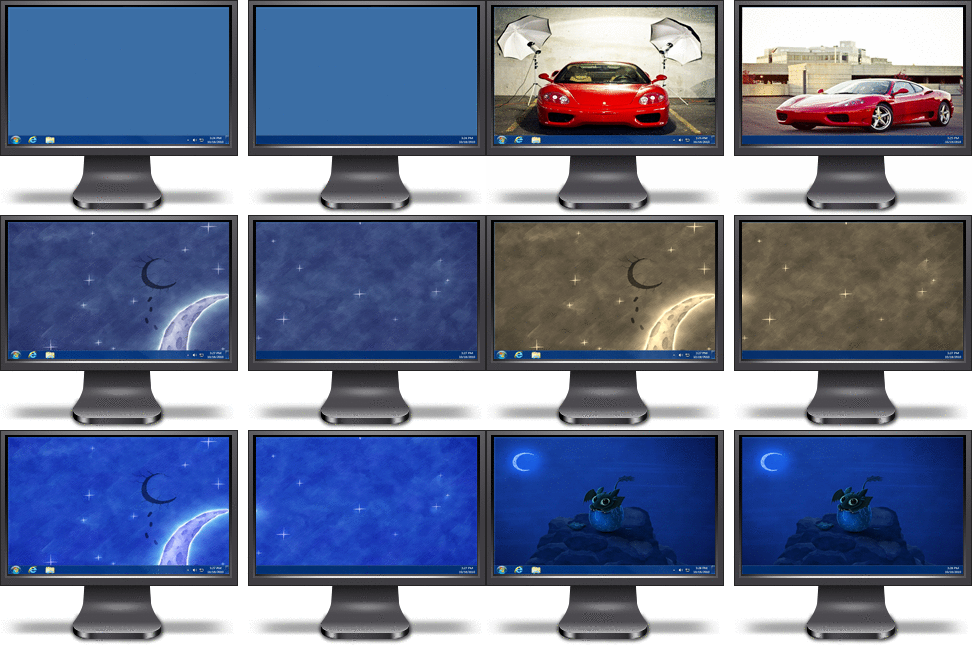
Windows Logon Background
Use DisplayFusion's powerful Windows Logon background image changer to customize your logon screen. Load images from your computer, or from any of the online providers that DisplayFusion supports. Customize the image positioning and colours (greyscale, sepia... etc) to suit your taste.

Multi-Monitor Screen Savers
Why settle for one screen saver on your main monitor? With DisplayFusion you can span your screen saver across all monitors, or even display a different screen saver on each monitor. Use the default Windows screen savers, or load your own custom screen savers to fully customize your desktop.

Desktop Icon Profiles
sEasily save and load your desktop icon layouts using DisplayFusion's Desktop Icon Profile feature. Loading a previously saved Desktop Icon Profile is an easy way to restore your familiar desktop icon layout when the icons get jumbled after adding or removing a monitor.

Easy Administration
Deploy and manage DisplayFusion in your corporate environment with ease by using DisplayFusion's silent installer options, and custom ADMX templates for Active Directory Group Policy environments. The custom ADMX templates will allow you to make sure your DisplayFusion settings are consistent across all workstations, making management and troubleshooting much easier.

Available in dozens of Languages
DisplayFusion comes bundled with dozens of languages, and more are added all the time. Using DisplayFusion in your native language makes it easier to fully understand and use each feature

Whats New
Код:
https://www.displayfusion.com/ChangeLog

System Requirements
Windows 11 and 10 (1607 and higher) (x86, x64 and ARM64 compatible)
Windows Server 2022, 2019, and 2016 (x86, x64 and ARM64 compatible)
The Microsoft .NET 8 desktop runtime is required and will be installed automatically if needed
The Microsoft WebView2 runtime is required and will be installed automatically if needed

Homepage
Код:
https://www.displayfusion.com/

DOWNLOAD:

Код:
https://rapidgator.net/file/52f2b8043cf18e1fd0fc37b72b17ae0f/DisplayFusion.12.rar.html

https://ddownload.com/os36afzhb8jm/DisplayFusion.12.rar
 
th-x-Qc-XTnc-G2Tyyoy-Llb-Yg5Gba-Rrr-Iqkn7c.jpg


Topaz Gigapixel Pro 1.3.2 (x64) Multilingul

File Size: 212.1 MB

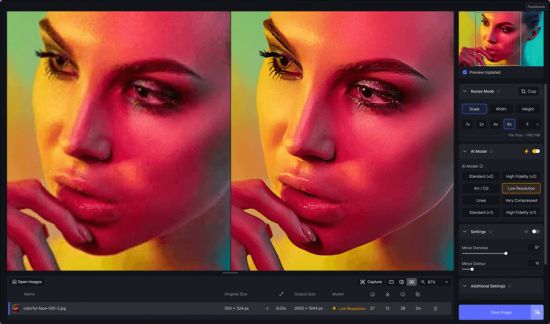
Creative vision doesn't come in standard definition. The nine AI-powered tools in Topaz Gigapixel not only make your images larger, but more detailed, more real, and even more valuable.

The industry standard for upscaling.
Used by professional photographers, fine artists, designers, illustrators, and creative teams worldwide. Gigapixel AI was the first commercially available AI image upscaler, since 2019. Now as Topaz Gigapixel, the models are better than ever.

6x Lossless Zoom
Crop in on your subject without losing quality and while enhancing detail.

True-to-Input Details
Explore nine different AI models inside Topaz Gigapixel to make every image larger.

Use Before Every Print
From poster to billboard. Ensure every detail is crisp, defined, and bold.

Photogs, Artists & Designers
Every type of creative professional can benefit from running their images through Topaz Gigapixel.

Whats New
Код:
https://community.topazlabs.com/c/gigapixel-ai/109

System Requirements: Windows 10,11

Homepage
Код:
https://community.topazlabs.com/

DOWNLOAD:

Код:
https://rapidgator.net/file/46f235f27321609bdf31256a26e657eb/Topaz_Gigapixel_Pro_v1.3.2.rar.html

https://ddownload.com/zcqr0o6bao96/Topaz_Gigapixel_Pro_v1.3.2.rar
 
bz96mt-LB54W3Qu-Mx-Sk28JVTe83PFhgx-F.png


MathType 7.12.2.466

File size: 45 MB

MathType is a powerful interactive equation editor for Windows and Macintosh that lets you create mathematical notation for word processing, web pages, desktop publishing, presentations, elearning, and for TeX, LaTeX, and MathML documents.

More Ways to Create Equations
Entering Math by Hand
Enter equations as easily as you would write math with paper and pencil! This feature uses the built-in handwriting recognition in Windows 7 and later.

Point-and-Click Editing with Automatic Formatting
Create equations quickly by choosing templates from MathType's palettes and typing into their empty slots. MathType applies mathematical spacing rules automatically as you type.

Keyboard Shortcuts
Save time using keyboard shortcuts. MathType has customizable keyboard shortcuts for virtually every symbol, template, and command.

Type TeX or LaTeX
If you already know the TeX typesetting language, you can enter equations directly into MathType or Microsoft Word documents. TeX editing can be mixed with point-and-click editing so you get the best of both worlds. You can even paste in equations from existing TeX documents.

Copy and Paste
If you created a MathType equation for use in another application or found one on a website, why take the time to create it by hand again? Simply copy and paste it directly into MathType, and it is ready to edit or use in your work.
Save Expressions in the Toolbar: Drag frequently used equations and expressions to the MathType toolbar so they can be inserted later with just a click or a keystroke.

Supports Microsoft Office
- Office 2016 for Windows: is fully compatible with Office 2016 and Office 365 for Windows
- Office 2013, 2010, 2007, 2003, & XP: is fully compatible.
- Office Web Apps, Office Mobile, and Office RT: MathType equations cannot be edited in these Office versions but equations created in other versions of Office will display and print.

Microsoft Office 365, 2016 (Windows), 2013, 2010 & 2007
MathType Ribbon Tab in Word and PowerPoint: MathType takes full advantage of Office's Ribbon User Interface making it easier than ever to do equation operations in documents and presentations. New equation numbering and browse features work with all Word equation types.

Microsoft Office 2003 and XP (2002)
MathType Toolbar and Menu in Word and PowerPoint: MathType adds a toolbar and menu to Microsoft Word and PowerPoint, allowing quick access to its features and powerful commands to do equation numbering, produce great-looking math web pages, presentations, and much more.
Find Symbols: MathType's Insert Symbol dialog allows you to explore the available symbols and insert them with a click or keystroke.

More Control
- Color: Use color to highlight part of an equation and focus your audience's attention on just the portions you want. Show what changed in each step of a multi-step procedure and make those equations really come to life.
- More Fonts: MathType has hundreds more symbols and templates than Equation Editor. Besides our exclusive Euclid™ math fonts, you can also make use of the 1000s of math symbols in fonts already on your computer, as well as other math fonts you can download from the Internet.

Whats New
Updates: official site does not provide any info about changes in this version

System Requirements
Microsoft Windows 7, 8/8.1 (not Windows RT), 10 and 11. MathType will run on Microsoft Surface Pro, Surface Pro 2, Surface 3, and Surface 3 Pro tablets. MathType will not run on Surface RT, Surface, and Surface 2 tablets. If in doubt, check the version of Windows your tablet is running. If it is running Windows RT, you cannot use MathType with it. If it is running Windows 10 or any of the other supported versions of Windows, MathType will work with it.

Homepage
Код:
https://www.dessci.com

DOWNLOAD:

Код:
https://rapidgator.net/file/04247056f80f47ae8b6c4c82f6826cb0/MathType_7.12.2.466.rar.html

https://ddownload.com/2q84li8voqj8/MathType_7.12.2.466.rar
 
th-u-Fz-Fxl1i9CN3x-UXAh8m-Xgbeg3Pk-Di-ABM.png


Close All Windows 6.0 Multilingual

File size: 6.44 MB

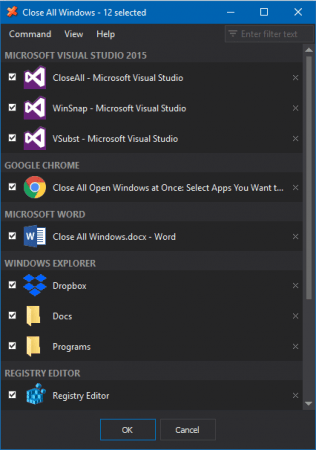
Close All Windows (or CloseAll) is an ultimate task management tool for Windows designed specifically to quickly close multiple applications. CloseAll flashes a ‘close’ signal to the selected applications and then ceases. It doesn’t use any system resources at all, since you run it only when needed. What can be easier than a task list with check boxes and OK button? Yes, you can run CloseAll without any UI too!

CloseAll allows you to choose different sorting and grouping options for the task list, double-click groups to select/deselect the whole group, filter apps by typing in any part of their window title or app name, and use individual close buttons to close apps one by one.

What's New in CloseAll
Код:
https://www.ntwind.com/software/closeall/what-is-new.html

System Requirements: Windows 11, 10, 8, 7 and Vista (32-bit and 64-bit)

Homepage

DOWNLOAD:

Код:
https://rapidgator.net/file/6197b0fbe2226bd10fd5b7b74e77f79a/Close.All.Windows.6.0.rar.html

https://ddownload.com/gsjdace23wbd/Close.All.Windows.6.0.rar
 
ezgif-3720eeb30165a4ac.jpg


Fender Studio Pro 8.1.1

File size: 432.2 MB

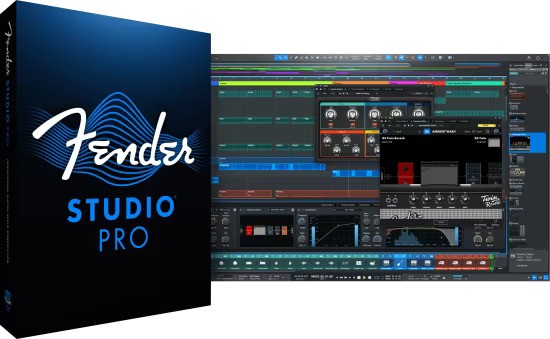
Fender Studio® Pro is the next evolution of modern music creation. Built on PreSonus’ award-winning Studio One platform, it combines celebrated features and trusted performance with a modernized interface, Fender’s renowned amps and effects, and intuitive new workflows that make creating music faster, more inspiring, and more connected than ever.

From the first riff to the final mix, Fender Studio Pro empowers musicians, producers, and creators to bring ideas to life effortlessly. Its drag-and-drop workflow, Channel and Arrangement Overviews, and integrated Fender Mustang Guitar and Rumble Bass plug-ins make recording, producing, and performing more intuitive and inspiring than ever. Additional tools like AI-powered Audio-to-Note conversion, Chord Assistant, updated samplers, Studio Verb, and Show Page video playback give creators the precision, flexibility, and sonic depth to produce professional-quality music in any genre.

Whats New
Updates: official site does not provide any info about changes in this version

System Requirements: Windows 10, 11

Homepage
Код:
https://intl.fender.com/products/fender-studio-pro

DOWNLOAD:

Код:
https://rapidgator.net/file/7ad2427be30e380e268b74d50c648dba/Fender.Studio.Pro.8.v8.1.1-R2R.rar.html

https://ddownload.com/2z7vw9t149u3/Fender.Studio.Pro.8.v8.1.1-R2R.rar
 
FUWv9NEin-VS3nn-P3o76N5ra-Pk-Xc-Hh6f-X.jpg


Internet Download Manager 6.43 Build 7 Multilingual + Retail

File Size: 23.9 MB

Internet Download Manager has a smart download logic accelerator that features intelligent dynamic file segmentation and safe multipart downloading technology to accelerate your downloads. Unlike other download accelerators and managers that segment files before downloading starts, Internet Download Manager segments downloaded files dynamically during download process.

Features
• All popular browsers and applications are supported!
Internet Download Manager has been tested with the following browsers: Internet Explorer, MSN Explorer, AOL, Netscape Communicator, Netscape 6, Netscape 7, Mozilla, Mozilla Firefox, Mozilla Firebird, Opera, NetCaptor, UltraBrowser, Slim Browser, Avant Browser, MyIE2, Optimal Desktop, Ace Explorer, Advanced Browser, 27 Tools-in-1 Wichio Browser, WindowSurfer, 550 Access Browser, FineBrowser Freeware, Kopassa Browser, Fast Browser Pro, Enigma Browser, GoSuRF, K-Meleon, Smart Explorer, The Off By One Web Browser, Smartalec Voyager, CrystalPort AppCapture, The Family Browser, XANA Web Browser, Bluto, AutoSurf, 32bit Web Browser, BrowseMan, WrestlingBrowser, Eminem Browser, UltraBrowser, Cygsoft LDAP Browser, and Net M@nager. Internet Download Manager supports all versions of popular browsers, and can be integrated into any 3rd party Internet applications.

• Easy downloading with one click.
When you click on a download link in a browser, IDM will take over the download and accelerate it. IDM supports HTTP, FTP, HTTPS and MMS protocols.

• Download Speed Acceleration.
Internet Download Manager can accelerate downloads by up to 5 times due to its intelligent dynamic file segmentation technology. Unlike other download managers and accelerators Internet Download Manager segments downloaded files dynamically during download process and reuses available connections without additional connect and login stages to achieve best acceleration performance.

• Download Resume.
Internet Download Manager will resume unfinished download from the place where they left off.

• YouTube grabber.
Internet Download Manager can grab FLV videos from popular sites like YouTube, MySpaceTV, and Google Video.

• Simple installation wizard.
Quick and easy installation program will make necessary settings for you, and check your connection at the end to ensure trouble free installation of Internet Download Manager

• Drag and Drop.
You may simply drag and drop links to IDM, and drag and drop downloaded files out of Internet Download Manager.

• Automatic Antivirus checking.
Antivirus checking makes your downloads free from viruses and trojans.

• Advanced Browser Integration.
When enabled, the feature can be used to catch any download from any application. None of download managers have this feature.

• Built-in Scheduler.
Internet Download Manager can connect to the Internet at a set time, download the files you want, disconnect, or shut down your computer when it's done.

• IDM includes web site spider and grabber.
IDM downloads all required files that are specified with filters from web sites, for example all pictures from a web site, or subsets of web sites, or complete web sites for offline browsing. It's possible to schedule multiple grabber projects to run them once at a specified time, stop them at a specified time, or run periodically to synchronize changes.

• IDM supports many types of proxy servers.
For example, IDM works with Microsoft ISA, and FTP proxy servers.

• IDM supports main authentication protocols
Basic, Negotiate, NTLM, and Keberos. Thus IDM can access many Internet and proxy servers using login name and password.

• Download All feature.
IDM can add all downloads linked to the current page. It's easy to download multiple files with this feature.

• Customizable Interface.
You may choose the order, and what buttons and columns appear on the main IDM window.

• Download Categories.
Internet Download Manager can be used to organize downloads automatically using defined download categories.

• Quick Update Feature.
Quick update may check for new versions of IDM and update IDM once per week.

• Download limits.
Progressive downloading with quotas feature. The feature is useful for connections that use some kind of fair access policy (or FAP) like Direcway, Direct PC, Hughes, etc.

• IDM is multilingual.
IDM is translated to Albanian, Arabic, Azerbaijan, Bosnian, Bulgarian, Chinese, Croatian, Czech, Danish, Dutch, Farsi, French, German, Greek, Hebrew, Hungarian, Italian, Japanese, Korean, Lithuanian, Macedonian, Norwegian, Polish, Portuguese, Romanian, Russian, Serbian, Slovak, Slovenian, Spanish, Thai, Turkish, and Uzbek languages.

Whats New
Код:
https://www.internetdownloadmanager.com/news.html

System Requirements: Windows 7, Windows 8/8.1, Windows 10, Windows 11

Homepage
Код:
https://www.internetdownloadmanager.com/

DOWNLOAD:

Код:
https://rapidgator.net/file/9968d7de1fbca6bc4556e4ec9e88122f/idman6.zip.html

https://ddownload.com/mjugxn3qf2kf/idman6.zip
 
ezgif-220e7346d511a3a2.jpg


AI Text To Image Generator Pro 1.2.5

Languages: English
File Size: 1.60 GB

Unleash your creativity with AI Text to Image Generator, the ultimate desktop app for turning your words into stunning, high-quality art. Whether you’re a digital artist, designer, or hobbyist, our powerful AI image generator gives you direct access to state-of-the-art models like Flux, Stable Diffusion, Juggernaut XL, and more—right on your PC.

Create photorealistic portraits, anime characters, breathtaking landscapes, and abstract art with a simple text prompt. Our application is a complete AI art studio, designed for both beginners and experts. It operates locally on your computer, ensuring your creations and prompts remain private.

State-of-the-Art AI Models
Generate incredible images with built-in models like Flux, Stable Diffusion, Juggernaut XL for photorealism, and Animagine XL for anime styles.

Total Creative Control
Fine-tune your creations with advanced settings for Image Size, Guidance Scale (CFG), Inference Steps, and Seed for reproducible results.

Add Your Own Models - PRO
Import any Diffusers-compatible model from the Hugging Face Hub to expand your creative toolkit with endless variety.

100% Private & Offline
After the initial model download, everything works completely offline. Your prompts and images never leave your computer.

No Subscriptions, No Limits - PRO
A one-time purchase gives you unlimited image generations forever. Generate as many images as you want!

One-Click Recommended Settings
Instantly apply the optimal settings for any selected model to get the best quality results with a single click.

Generate Any Style
- Photorealistic Portraits: Create stunning, lifelike human portraits and faces.
- Anime & Manga Art: Generate vibrant anime characters with specialized models like Animagine XL.
- Landscapes & Scenery: Design breathtaking natural and fantasy landscapes.
- Abstract & Conceptual: Explore abstract art and unique visual concepts.
- Product Visualization: Create product mockups and design concepts.

Release Notes

- Release notes were unavailable when this listing was updated.

System Requirements
Requires Windows 10 version 17763.0 or higher. Minimum 8GB RAM (16GB recommended). A GPU with 4GB VRAM minimum (6GB recommended) is required for optimal performance.

Homepage
Код:
https://bytesweavers.tech

DOWNLOAD:

Код:
https://rapidgator.net/file/d0579921b152933c36cda4818861687e/AI.Text.To.Image.Generator.Pro.1.2.5.rar.html

https://ddownload.com/nj68lfl0ldfi/AI.Text.To.Image.Generator.Pro.1.2.5.rar
 
ezgif-26cc9d7144e967aa.jpg


Obsidian Ebook Reader Premium 2.1.2

Languages: English
File Size: 141.53 MB

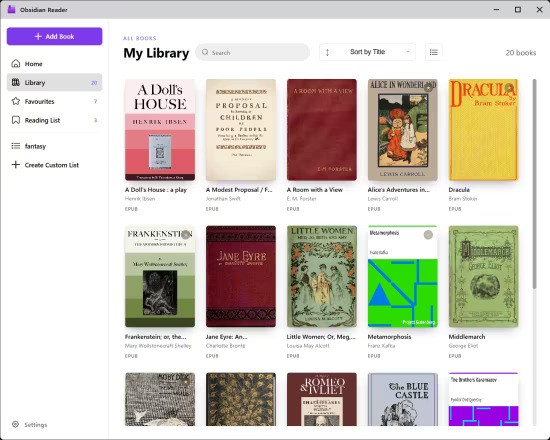
Simply your library. Designed for privacy. Obsidian is a Windows ebook reader built around library management and privacy. Point it at your folders, organize EPUBs and PDFs, and read entirely offline — with no accounts, ads, or telemetry.

Built for your library and your privacy
Organize books from your own folders, keep everything on your machine, and read without handing data to anyone else.

Add books your way
Import one file at a time, pull in a whole folder, include nested subfolders, or set up folder sync so your library stays up to date automatically.

- Add File — single EPUB or PDF
- Add Folder — bulk import
- Include Subfolders
- Sync Folders — auto-scanned directories

Edit book metadata
Fix titles, authors, and cover art after import so large collections stay organized. Premium lets you curate every detail of your shelf.

- Edit title and author
- Replace cover images
- Reset to defaults when needed

Browse and organize at a glance
See covers, titles, authors, and formats in a sortable list. Mark favorites, switch views, and manage growing collections without losing track of a single book.

- Sort and filter your collection
- List and grid-style browsing
- Light and dark interface themes

Typography and layout controls
Open the styling panel while you read to adjust fonts, spacing, and margins. Dial in a comfortable layout for long sessions on any screen.

- Font family and size
- Line, word, and letter spacing
- Margin presets and page layout

Release Notes

- Completely redesigned UI
- Reading list tab for better organization of your books
- Custom collections for greater book management
- Performance optimizations

System Requirements
Windows 10 version 14316.0 or higher

Homepage
Код:
https://obsidianreader.app

DOWNLOAD:

Код:
https://rapidgator.net/file/6ead5a0fb29baa34922d91eeb8f65645/Obsidian.Ebook.Reader.Premium.2.1.2.rar.html

https://ddownload.com/ws751rh3g2de/Obsidian.Ebook.Reader.Premium.2.1.2.rar
 
ezgif-2ab00cc916571c37.jpg


AI Text to Speech 1.0.15

Languages: English
File Size: 686.15 MB

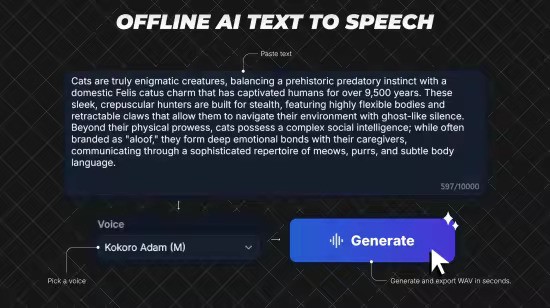
AI TTS is an offline Windows desktop AI text-to-speech app for fast local voice generation. Paste your script, choose a model and voice, generate speech, preview the result, and export WAV files. AI TTS is built for creators, students, and professionals who want a fast, repeatable desktop TTS workflow.

Choose the model that fits your workflow
- Kokoro-82M (Balanced): better voice quality for final narration
- KittenTTS (Fast): quicker drafts and iterations

Core workflow
1) Paste text
2) Pick model + voice
3) Generate
4) Preview
5) Export

Key Capabilities
- Local AI synthesis workflow (no cloud API key required)
- Up to 10,000 characters per generation
- Automatic chunking for long scripts to keep generation stable
- Speed control from 0.50x to 1.50x
- Preview player with play/pause, seek, and preview history navigation
- Manual export mode: choose save location when exporting
- Auto export mode: save directly to your configured output folder
- Inference hardware preference in settings (Auto / CPU / GPU)
- Dark and light themes
- In-app logs, notices, and license references
- Built-in settings for defaults and export behavior

AI TTS is built for creators, students, and professionals who want a fast, repeatable desktop TTS workflow.

Release Notes

- Added multilingual text-to-speech support
- Added a new Language dropdown beside voice selection
- Added Auto-detect as the default language option
- Added support for English (US), English (UK), Spanish, French, Italian, Hindi, Brazilian Portuguese, and Mandarin Chinese
- Improved voice filtering so voices match the selected language
- Added language info to preview/export metadata
- Improved multilingual generation reliability
- Fixed an auto-detect issue when no text is entered

System Requirements
- OS: Windows 10 version 17763.0 or higher
- Memory: 4 GB (Minimum), 8 GB (Recommended)
- Processor: 64-bit dual-core 2.0 GHz (Minimum), 64-bit quad-core 3.0 GHz (Recommended)

Homepage
Код:
https://apps.microsoft.com/detail/9np9xhh0c5pv?hl=en-US&gl=US

DOWNLOAD:

Код:
https://rapidgator.net/file/cc18dc863a627791c13f4543d10f60aa/AI.Text.to.Speech.1.0.15.rar.html

https://ddownload.com/gnocv6yeahy1/AI.Text.to.Speech.1.0.15.rar
 
Назад
Сверху Снизу