All sanddisk Software's Collection [Daily Updated]

ezgif-73325e251ffad0eb.jpg


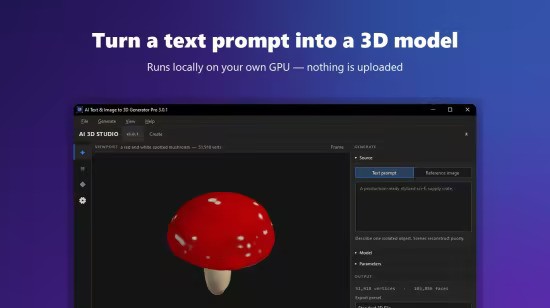
AI Text & Image to 3D Generator Pro 3.0.2

Languages: English
File Size: 1.77 GB

Powered by cutting-edge, open-source AI models like Shap-E, TripoSR, and Stable Fast 3D, this tool allows you to generate high-quality 3D meshes locally on your PC. No expensive cloud subscriptions, no hidden fees, and complete privacy—your data never leaves your computer.

Text-to-3D
Simply type a description (e.g., "a medieval wooden chair" or "a futuristic sports car") and watch the AI construct a 3D mesh from scratch.

Image-to-3D
Upload a single 2D photo and instantly convert it into a textured, UV-unwrapped 3D object.

Ultra-Fast Generation
Utilize models like TripoSR and Stable Fast 3D to generate models in under a second (hardware dependent).

Interactive 3D Viewer
Inspect your creations instantly with the built-in 3D previewer. Rotate, pan, and zoom to ensure perfection.

Industry-Standard Exports
Save your models as GLB, OBJ, STL, PLY, or GLTF for seamless integration into Blender, Unity, Unreal Engine, or your 3D printer slicer.

Advanced Controls
Take full control over your generation with adjustable Inference Steps, Guidance Scale, and Frame Size. The app also features automatic background removal for 2D input images, ensuring clean 3D outputs.

Privacy First (Offline Processing)
After a one-time automatic download of the AI model weights, the application runs 100% offline. Your text prompts, personal images, and generated 3D files remain completely private and secure on your local machine.

Elevate your workflow, speed up prototyping, and generate infinite 3D assets effortlessly. Download AI Text & Image to 3D Generator Pro today!

Release Notes
- Release notes were unavailable when this listing was updated.

System Requirements
- OS: Windows 10 version 17763.0 or higher
- Memory: 8 GB (Minimum), 16 GB (Recommended)

Homepage
Код:
https://bytesweavers.tech

DOWNLOAD:

Код:
https://rapidgator.net/file/0c9a855a3d79ecc1afaf0193efe992fd/AI.Text.Image.to.3D.Generator.Pro.3.0.2.rar.html

https://nitroflare.com/view/D0DC7095523E0E8/AI.Text.Image.to.3D.Generator.Pro.3.0.2.rar

https://ddownload.com/9ewswvq4iwuz/AI.Text.Image.to.3D.Generator.Pro.3.0.2.rar
 
ezgif-7337e57eadaad2e2.jpg


AI Text To Speech Generator Pro 1.2.4

Languages: English
File Size: 1.86 GB

Transform your written words into ultra-realistic, human-like audio with AI Text To Speech Generator Pro. Whether you are a content creator making video voiceovers, a student listening to study notes, or an author creating audiobooks, this powerful desktop utility provides professional-grade speech synthesis without the expensive monthly subscriptions.

Unlike cloud-based alternatives, AI Text To Speech Generator Pro runs state-of-the-art neural network models directly on your PC. This guarantees 100% privacy, zero data collection, and the ability to generate unlimited audio completely offline!

REVOLUTIONARY AI ENGINES INCLUDED
- Kokoro TTS: The industry-leading model for broadcast-quality, ultra-realistic human voices.
- Piper TTS: Fast, offline speech generation supporting over 30+ languages and dozens of distinct accents.
- Bark (by Suno): A highly expressive and creative AI that can generate natural voice inflections, hesitations, sighs, and even laughs.
- Google TTS (gTTS): A lightweight, reliable online fallback for simple translation reading.

CORE FEATURES
- Total Control: Fine-tune the speed (-50% to +100%), adjust voice pitch, and boost output volume to get the perfect take.
- Long-Form Audio: Paste entire articles or book chapters. The app automatically chunks long text to prevent memory crashes and seamlessly stitches the final audio together.
- Export Options: Save your generated speech locally as high-quality WAV or MP3 files.
- Built-In Studio: Preview voices using the Voice Browser and listen to your generated tracks instantly with the built-in media player.
- Complete Privacy: Your text is never uploaded to the cloud (when using offline models). Keep your proprietary scripts and personal documents safe.

Stop paying per-character for AI voiceovers. Unlock the power of local AI and generate unlimited, natural-sounding speech today with AI Text To Speech Generator Pro!

Release Notes

- Release notes were unavailable when this listing was updated.

System Requirements
- OS: Windows 10 version 17763.0 or higher
- Memory: 4 GB (Minimum), 8 GB (Recommended)
- Processor: x64 Dual-Core Processor (Minimum), Quad-Core Processor or better (Recommended)

Homepage
Код:
https://bytesweavers.tech

DOWNLOAD:

Код:
https://rapidgator.net/file/e421520cb169370ae0af034a486d93d4/AI.Text.to.Speech.Generator.Pro.1.2.4.rar.html

https://nitroflare.com/view/659E5FC871F592B/AI.Text.to.Speech.Generator.Pro.1.2.4.rar

https://ddownload.com/mpqiyr3w6seu/AI.Text.to.Speech.Generator.Pro.1.2.4.rar
 
ezgif-7db7fedc1ce13855.jpg


SharpScanner 3.0.0 Multilingual

File Size: 20.6 MB

SharpScanner - Scan for vulnerabilities, detect malware, manage cookies, control startup programs, and monitor system performance — all from one powerful security dashboard. 100% local, no data collection.

Complete Security Toolkit
Vulnerability scanning, malware detection, and system optimization in one suite

Vulnerability Detection
OSV Database integration with CVE queries to identify vulnerable applications installed on your system with severity classification.

Malware Scanning
Real-time progress tracking using Microsoft's Malicious Software Removal Tool (MRT) for deep system scans.

Cookie Scanner
Multi-browser scanning for Chrome, Edge, Firefox, Brave, and Opera. Detects 60+ known tracker domains for privacy protection.

Startup Management
Control startup programs via registry, folders, and Task Scheduler. Speed up your boot time with enable/disable toggles.

Performance Monitor
Live CPU, RAM, and disk usage monitoring with network connection tracking and open port detection in real-time.

Security Dashboard
Visual security score with vulnerability severity charts, summary cards, and system hardware information at a glance.

Release Notes

- New UI and Theme
- Fixed bugs on scanning
- Fixed apps scan vulnerabilities
- New: full support for 6 languages (English, Spanish, German, French, Portuguese, Chinese)
- New: modern redesigned dashboard and dialogs
- New: Security Score Trend — watch your PC's health improve over time
- New: one-click exportable security report
- Smoother one-click fixes and a smarter Background Guardian
- Faster, lighter and more polished throughout

Minimum System Requirements
- Windows 10 (19041.0+) or Windows 11
- 2 GB RAM (4 GB recommended)
- x86 or x64 architecture

Note
- Administrator access required
- Internet for CVE lookups

Homepage
Код:
https://spaqitech.com

DOWNLOAD:

Код:
https://rapidgator.net/file/41ac22313c0b3e619c8519ecc4b4cd90/SharpScanner.3.0.0.rar.html

https://nitroflare.com/view/8000417181380A4/SharpScanner.3.0.0.rar

https://ddownload.com/5wpbuhujwpub/SharpScanner.3.0.0.rar
 
ezgif-29c6bf664de85cab.jpg


Luminar Neo 1.28.0.17626 Multilingual

Languages: Multilingual
File Size: 2.06 GB

Luminar Neo is a powerful, next-generation photo editing software designed to inspire creativity and deliver professional results with ease. It features an intuitive interface and a modern toolkit powered by cutting-edge AI technologies. With a flexible, performance-focused engine at its core, Luminar Neo offers faster editing, seamless layer-based workflows, and precise control over every detail. Whether you're enhancing portraits, transforming landscapes, or exploring your artistic vision, Luminar Neo makes the editing experience both efficient and enjoyable.

AI-Powered
Advanced AI features automatically enhance your photos and save you time.

Easy to use
An intuitive interface and smart tools make editing simple for everyone.

Connected Ecosystem
Start editing on your phone or tabled, finish on desktop — your work stays synced.

Use as a plugin
Integrate seamlessly with Lightroom classic and Photoshop for smooth, flexible editing.

Experience Luminar Neo's capabilities
With support for raw files, exporting in all major file formats, layers, masking, and much more, photography editing software Luminar Neo meets all your editing needs.

- AI image enhancement
- Clone tool
- Raw editing
- Dodge & burn
- Layers support
- Color enhancement
- Non-destructive editing
- Crop and resize
- Lens correction
- Batch processing

Release Notes
What's New

Код:
https://skylum.com/whats-new/luminar-neo

System Requirements
- Hardware: Windows PC with a mouse or similar input device
- Processor: Intel® Core™ i5 8 gen or better, AMD Ryzen™ 5 or better
- OS version: Windows 10 version 1909 or higher (only 64-bit OS)
- RAM: 8 GB or more (16+ GB recommended)
- Disk space: 10 GB free space; SSD for best performance
- Display: 1280×768 or higher resolution
- Graphics: Compatible with OpenGL 3.3 or later

Homepage
Код:
https://skylum.com

DOWNLOAD:

Код:
https://rapidgator.net/file/653a9266ee3fa9269d0af54eaedad97c/Luminar.Neo.1.28.0.17626.rar.html

https://nitroflare.com/view/480C50E5E80B3ED/Luminar.Neo.1.28.0.17626.rar

https://ddownload.com/xmmc00hcakqk/Luminar.Neo.1.28.0.17626.rar
 
ezgif-29dafdcfadeb9bd0.jpg


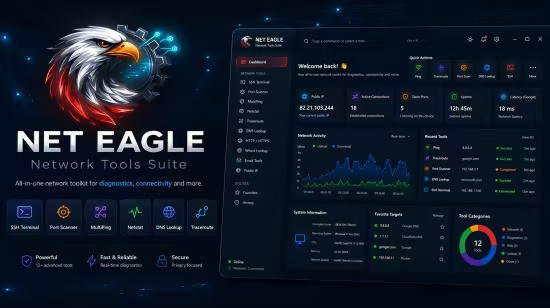
Net Eagle 3.0.1

Languages: English
File Size: 578.11 MB

The ultimate network diagnostics toolkit for IT professionals. Consolidate network discovery, packet capture, SSH terminal, security inspection, and connectivity diagnostics into one powerful, modern interface.

Powerful Features
Everything you need for professional network diagnostics in one application

Network Discovery & Scanning
Scan subnets to discover active hosts, perform port scanning, resolve MAC addresses and hostnames. Generate SVG topology maps and use Wake-on-LAN to remotely power on devices.

Packet Capture & Analysis
Real-time packet capture with BPF filter support, protocol color-coding, hex view inspection, and export to PCAP (Wireshark compatible) or CSV formats.

SSH Terminal
Full-featured SSH terminal with password and private-key authentication, host key verification, and saved connection profiles for quick access to remote systems.

Security & Inspection
TLS/SSL certificate inspection, email security record lookups (MX, SPF, DMARC, DKIM), and HTTP client with full header visibility for security analysis.

Connectivity Diagnostics
Multi-host ping monitoring, visual traceroute with hop-by-hop timing, DNS lookups for all record types, and Netstat view with process information.

Modern Interface
Clean, tab-based design with MahApps.Metro framework. Dark and light themes with customizable accent colors. Built for Windows 10/11 (x86 and x64).

Release Notes

- New Theme and UI/UX with modern Dashboard
- SFTP now direct from the app download/upload files
- SNMP
- IPWhois also lookup
- Fixed bugs for the Subnet Calculator and enhanced features
- Fixed the ui and the port scanner warning limitation to avoid freezing.
- Network host discovery and port scanning added subnets
- Live packet capture with BPF filters and PCAP export
- New SSH terminal with key auth and host key verification profile saving and master key encryption
- Multi-host ping monitoring
- Traceroute visualization enhanced to see the latency
- DNS record lookup
- TLS/SSL certificate inspection
- Email security record checker (MX, SPF, DMARC, DKIM)
- HTTP request client
- Netstat connection viewer
- Wake-on-LAN
- Network topology map generation with export

Minimum System Requirements
- Windows 10 version 19041.0+
- 2 GB RAM
- x86 or x64 architecture

Optional
- Npcap or WinPcap (for packet capture)
- Administrator privileges (some features)

Homepage
Код:
https://spaqitech.com

DOWNLOAD:

Код:
https://rapidgator.net/file/c848f974986ee24e043ff26de2cb16a3/Net.Eagle.3.0.1.rar.html

https://nitroflare.com/view/CB769A91D2874AD/Net.Eagle.3.0.1.rar

https://ddownload.com/v4ltnw6lrjj4/Net.Eagle.3.0.1.rar
 
ezgif-2550ffc2aab81340.jpg


AI Video Watermark Remover Pro 1.0.8

Languages: English
File Size: 1.66 GB

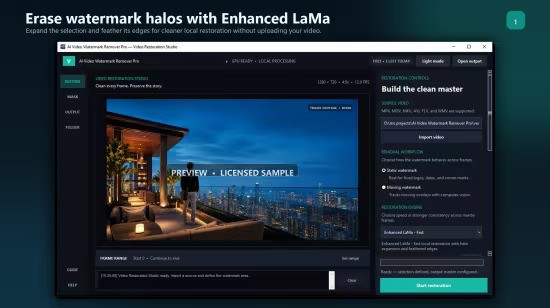
Erase static and moving watermarks from any video with AI. Effortlessly remove any watermark from your videos with AI Video Watermark Remover Pro. Powered by cutting-edge LaMa AI inpainting technology, our application intelligently reconstructs the area behind unwanted logos, text overlays, and timestamps. Unlike online tools that require you to upload sensitive files, our app performs all processing 100% offline on your computer. Your videos never leave your hard drive, ensuring complete security and confidentiality.

Dual-Mode System for Any Scenario
Our revolutionary system is designed to handle every type of watermark with ease

- Basic Mode (Static Watermarks): Perfect for fixed logos or text that stay in one place. Simply paint over the watermark on one frame, and the AI will erase it from the entire video.
- Advanced Mode (Moving Watermarks): Tackle dynamic watermarks like those on TikTok or broadcast logos. Draw a box around the watermark on the first frame, and our robust object tracker will follow it and erase it, frame by frame.

Advanced AI Inpainting
Utilizes state-of-the-art AI to produce natural, high-quality results without blurry patches or artifacts.

Object Tracker
Robust AI tracking system follows moving watermarks throughout the entire video automatically.

GPU Acceleration
Leverages NVIDIA GPU CUDA for significantly faster processing with full CPU support.

Audio Preservation
Original audio track automatically preserved and perfectly synced with cleaned video.

100% Offline & Private
All processing happens locally. Your videos never leave your computer.

All Video Formats
Supports MP4, AVI, MKV, MOV, WMV, and more. Output as high-quality MP4.

Perfect For
- Content Creators: Remove watermarks from stock footage or clean up recordings.
- Video Editors: Clean up client-provided footage with unwanted overlays.
- Archivists: Restore old videos with date stamps or broadcast logos.
- Social Media: Repurpose content by removing platform-specific watermarks.

Release Notes
- Release notes were unavailable when this listing was updated.

Minimum System Requirements
- Windows 10 version 1903+
- 4 GB RAM
- DirectX 11 GPU
- 500 MB disk space

Recommended System Requirements
- Windows 11
- 8 GB RAM+
- NVIDIA GPU with CUDA
- SSD storage

Homepage
Код:
https://bytesweavers.tech

DOWNLOAD:

Код:
https://rapidgator.net/file/c1fa131c1715b11a06fd6eecf6a4fc90/AI.Video.Watermark.Remover.Pro.1.0.8.rar.html

https://nitroflare.com/view/B6136BF50E2694C/AI.Video.Watermark.Remover.Pro.1.0.8.rar

https://ddownload.com/91hn91kynagm/AI.Video.Watermark.Remover.Pro.1.0.8.rar
 
ezgif-2557db3da7818000.jpg


Hasleo Backup Suite Enterprise / Technician 5.9.2.1 Multilingual WinPE

File size: 737/415 MB

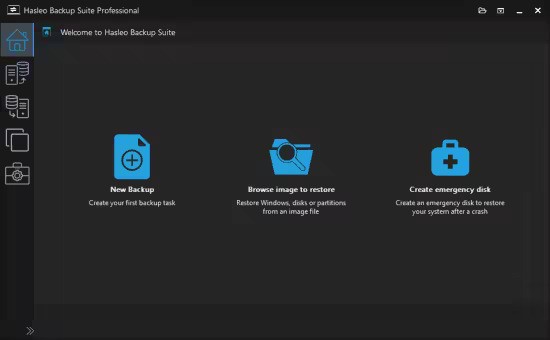
Hasleo Backup Suite is a Windows backup and restore software, which embeds backup, restore and cloning features, it is designed for Windows operating system users and can be used on both Windows PCs and Servers.

The backup and restore feature of Hasleo Backup Suite can help you back up and restore the Windows operating systems, disks and partitions to protect the security of your Windows operating system and personal data. The cloning feature of Hasleo Backup Suite can help you migrate Windows to another disk, or easily upgrade a disk to SSD or a larger capacity disk.

As a professional backup and restore software, the bootable Windows PE emergency disk can help you quickly and effectively restore the Windows operating system to a healthy state after a disaster strikes, such as system crash or disk corruption.

Highly intuitive looks
This application comes with a straightforward appearance that makes it easy even for those with little PC skills to choose the operation they want to initiate. You can either backup the currently running Windows to an image file or an entire disk or partition.

Regardless of the one you need, you can specify customize a flurry of details related to it, such as compression level, protect it with a password, define the notification SMTP server and target email addresses. You can even choose pre- and post-commands.

Restoring a previously created task can be managed just as easily, even if you are not a tech-savvy user.

Supports cloning operations
Hasleo Backup Suite can also be used to clone the currently running OS to another disk, to clone one disk to another one, as well as clone a partition to a different location.

You need to select the source and the target locations, then you can define the new partition size, specify its alignment (1M, Cylinder, 4K or none) and activate sector by sector clone.

Packs additional tools
When using Hasleo Backup Suite, you get the possibility to rebuild the MBR, wipe a drive or add a boot menu. If you are interested in creating an emergency disk, you can save it to your connected USB device or export it as an ISO file and burn it on a disc later on.

What's new
Код:
https://www.easyuefi.com/backup-software/tech-spec.html

System Requirements: Windows Vista/Server 2008 or later (32/64-bit)

Homepage
Код:
https://www.easyuefi.com/

DOWNLOAD:

Код:
https://rapidgator.net/file/53763ebbd791f81bea8ecac73274fa2e/Hasleo_Backup_Suite_5.9.2.1_Technician_WinPE.iso.html
https://rapidgator.net/file/005671764758b07915c90a10469083d9/Hasleo_Backup_Suite_5.9.2.1_Enterprise_WinPE.iso.html

Код:
https://nitroflare.com/view/F83610FD5605CBB/Hasleo_Backup_Suite_5.9.2.1_Enterprise_WinPE.iso
https://nitroflare.com/view/7190D5394CBC6F5/Hasleo_Backup_Suite_5.9.2.1_Technician_WinPE.iso

Код:
https://ddownload.com/14uz4oskz5g5/Hasleo_Backup_Suite_5.9.2.1_Enterprise_WinPE.iso
https://ddownload.com/cxam6w743dv2/Hasleo_Backup_Suite_5.9.2.1_Technician_WinPE.iso
 
b8via22Tgcb-NWGbr-Lu-TXsm-Eo-HLK24DMg.jpg


Revo Uninstaller Pro 5.5.2 Multilingual

File size: 17.5 MB

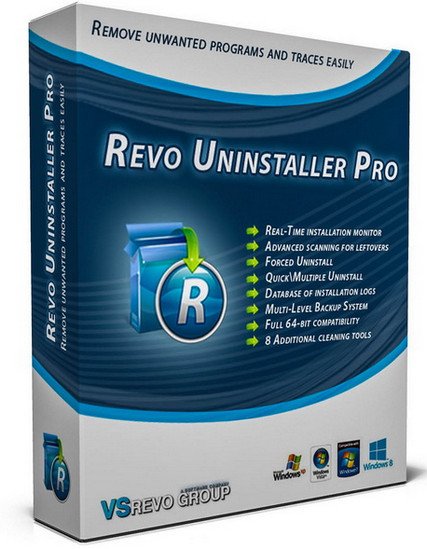
Revo Uninstaller Pro is innovative uninstaller program which helps you to uninstall unnecessary software and remove easily unwanted programs installed on your personal computer. Revo Uninstaller gives you the convenience to optimize your device, as well as to get rid of all the program files you do not need and slow down your computer processes. You might be surprised to learn that the "Add/Remove Programs" option in the Windows Control Panel does not always completely remove all software data from your system. Traces like registry items or program files and folders may still remain. Now with Revo Uninstaller you can be sure that you can clean your system from all these remnants and provide more comfort and optimization to your device.

Also, most programs come with their own uninstallers, but in most cases, these don't do complete and thorough job, leaving behind temporary files, leftovers, unused registry entries, and other unnecessary program files. These remnants take up space and slow down your Windows PC, and can cause conflicts if you want to install a newer version of the same software in the future. That's where Revo Uninstaller Pro comes in.

The secure and powerful uninstall of a program, sometimes becomes a difficult process. Windows inbuilt Add/Remove Program tool isn't always the perfect solution. As we mentioned earlier it is slower and usually doesn't remove all the traces of the application in your PC (like registry entries, files, folders of the program).

Revo Uninstaller is a great replacement for Add/Remove programs in Windows and offers lots of functions to remove guaranteed any program, faster and completely from your computer. It can effectively remove unnecessary files, folders and registry keys and values related to the program.

Revo Uninstaller also includes a number of cleanup tools such as Junk Files Cleaner, Browsers Cleaner, MS Office Cleaner, Windows Cleaner and Autorun Manager which can be used to take control of the programs that start automatically with Windows.

WHY USE REVO UNINSTALLER PRO?
Complete powerful software uninstall
Quick Uninstall of one or few programs in a row
The best Windows application to uninstall stubborn programs easily
Remove junk files and unnecessary program files
Compatible with all 32-bit and 64-bit versions of Windows
Portable version for all your personal Windows devices
Customizable and flexible easy to use user interface
Free professional technical support

Whats New
Код:
https://www.revouninstaller.com/revo-uninstaller-pro-full-version-history/

System Requirements
32-bit and 64-bit versions of Windows Vista, 7, 8, 8.1, 10, 11 and Windows Server Editions, 512MB RAM, 85MB HDD Free Space, 800MHz Pentium-Compatible CPU

Homepage
Код:
https://www.revouninstaller.com/

DOWNLOAD:

Код:
https://rapidgator.net/file/b9b5e0882fe07a6b9ea47dfc5b5bcea3/RevoUninstallerPro5.zip.html

https://nitroflare.com/view/40A996346307A5D/RevoUninstallerPro5.zip

https://ddownload.com/7enku5dobk25/RevoUninstallerPro5.zip
 
ezgif-2e1ad213cfc228ba.jpg


AI Image Object Replacer Pro 1.1.1

Languages: English
File Size: 1.61 GB

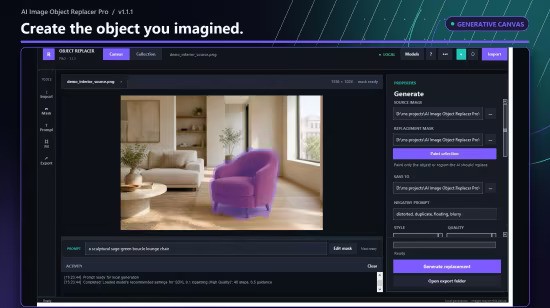
Tired of unwanted objects, people, or text cluttering your perfect shots? Wish you could magically replace a boring sky or fix a flawed background without learning complex software? AI Image Object Replacer Pro puts the power of cutting-edge generative AI right on your desktop. Effortlessly remove, replace, or add anything you can imagine to your images with just a few clicks and a simple text prompt. Our intuitive tools and powerful AI models make professional-level photo editing accessible to everyone.

Effortless Object Removal
Intelligently remove unwanted people, distractions, watermarks, blemishes, and any other object from your photos. Our AI seamlessly fills the background for a natural, flawless finish.

AI-Powered Object Replacement
Go beyond removal! Replace anything you've masked with stunning, AI-generated content. Swap a cloudy sky for a golden sunset, add a vase of flowers to a table, or change the color of a car—your imagination is the only limit.

Intuitive Precision Masking
Our built-in Mask Editor gives you total control. Use the simple brush and eraser tools to precisely select any object, no matter how complex. Zoom in for pixel-perfect accuracy.

Pro-Level AI Models
Choose from a range of powerful inpainting models, from the lightning-fast SDXL Turbo for quick edits to high-quality models for photorealistic results.

Total Privacy
100% Offline: Your photos and data never leave your computer. After an initial one-time model download, the entire editing process happens locally on your machine, ensuring your creations remain completely private.

Batch Processing Power
Save hours of repetitive work. Apply the same mask and prompt to an entire folder of images at once—perfect for real estate, product photography, and event shots.

Bring Your Own AI (Advanced)
Users can add and manage their own custom inpainting models from the Hugging Face Hub, giving you endless possibilities for specialized editing tasks.

WHO IS THIS FOR?
1. Photographers: Clean up portraits, landscapes, and event photos.
2. Content Creators: Create eye-catching thumbnails and social media posts.
3. E-commerce Sellers: Produce clean, professional product images.
4. Real Estate Agents: Declutter property photos by removing unwanted items.
5. Anyone who wants to create perfect pictures without the steep learning curve.

Stop wrestling with complicated editors. Download AI Image Object Replacer Pro and start transforming your photos in seconds!

Release Notes
- Release notes were unavailable when this listing was updated.

System Requirements
- OS: Windows 10 version 17763.0 or higher
- Memory: 8 GB (Minimum), 16 GB (Recommended)
- Video Memory: 4 GB (Minimum), 6 GB (Recommended)
- Processor: 64-bit processor with 4 cores (Intel Core i5, AMD Ryzen 5, 2nd Gen or newer) (Minimum), 64-bit processor with 8 cores (Intel Core i7, AMD Ryzen 7, 4th Gen or newer) (Recommended)
- Graphics Processor: NVIDIA GeForce GTX 1650 or equivalent with 4 GB VRAM (Minimum), NVIDIA GeForce RTX series (RTX 2060, 3060, 4060 or better) with 8 GB+ VRAM (Recommended)

* Internet connection is required only for launching the program.

Microsoft Store - Full Version

Homepage
Код:
https://apps.microsoft.com/detail/9mwvxqv4ck07?amp%3Bgl=US&hl=en-US&gl=KZ

DOWNLOAD:

Код:
https://rapidgator.net/file/70511bcda82f77c175d80dbcc6290108/AI.Image.Object.Replacer.Pro.1.1.1.rar.html

https://nitroflare.com/view/23A32C91EF11307/AI.Image.Object.Replacer.Pro.1.1.1.rar

https://ddownload.com/lfr2wvbwlc5s/AI.Image.Object.Replacer.Pro.1.1.1.rar
 
ezgif-2139776b00e1ac2a.jpg


AI Image Object Remover Pro 1.0.3

Languages: English
File Size: 1.60 GB

Effortlessly clean up your photos with AI Image Object Remover Pro, the ultimate tool for removing any unwanted objects, people, text, or blemishes in seconds. Powered by the advanced LaMa (Large Mask Inpainting) AI model, our application intelligently reconstructs the background behind the removed object, delivering natural and seamless results that are impossible to achieve with traditional clone stamp tools.

Whether you're a professional photographer retouching a portrait, a real estate agent removing clutter from property photos, or just someone wanting to erase photobombers from a precious memory, AI Image Object Remover Pro provides the power you need in a simple, intuitive interface.

How It Works (It's as easy as 1-2-3!)
1. Select Your Image: Open any standard image file (JPG, PNG, WEBP, etc.).
2. Create a Mask: Use our powerful built-in editor to simply paint over the items you want to remove. The intuitive brush, eraser, and zoom tools make it easy to be precise.
3. Process with AI: Click the "Start" button and let the AI work its magic. Your cleaned image is saved automatically.

Remove People
Easily erase photobombers or unwanted individuals from group shots and travel photos.

Erase Text & Watermarks
Clean up images by removing distracting text, logos, and date stamps.

Blemish & Skin Retouching
Remove acne, scars, and other skin imperfections for flawless portraits.

Delete Unwanted Objects
Get rid of trash cans, power lines, street signs, and any other distracting elements to create the perfect composition.

Best of all, AI Image Object Remover Pro runs 100% offline on your computer. Your photos are never uploaded to the cloud, guaranteeing complete privacy and security. No subscriptions, no credits, just unlimited, high-quality object removal.

Release Notes
- Release notes were unavailable when this listing was updated.

System Requirements
- OS: Windows 10 version 17763.0 or higher
- Memory: 4 GB (Minimum), 8 GB (Recommended)
- Processor: Dual-core processor (Intel Core i3 / AMD Ryzen 3 or equivalent) (Minimum), Quad-core processor (Intel Core i5 / AMD Ryzen 5 or equivalent) (Recommended)
- Graphics Processor: Integrated Graphics (for CPU processing) (Minimum), NVIDIA GPU with CUDA support (e.g., GTX 1060 or newer) for significantly faster performance (Recommended)

* Internet connection is required only for launching the program.

Microsoft Store - Full Version

Homepage
Код:
https://apps.microsoft.com/detail/9n3pcdpbwm67?amp%3Bgl=US&hl=en-US&gl=KZ

DOWNLOAD:

Код:
https://rapidgator.net/file/0d758309a119fb9bbe44a7efff3ea03e/AI.Image.Object.Remover.Pro.1.0.3.rar.html

https://nitroflare.com/view/D4CAB5F9350B2F5/AI.Image.Object.Remover.Pro.1.0.3.rar

https://ddownload.com/7abrgedzbu6l/AI.Image.Object.Remover.Pro.1.0.3.rar
 
ezgif-67f6ac98a20c54ea.jpg


AI Image Background Remover Pro 2.0.1

Languages: English
File Size: 1.28 GB

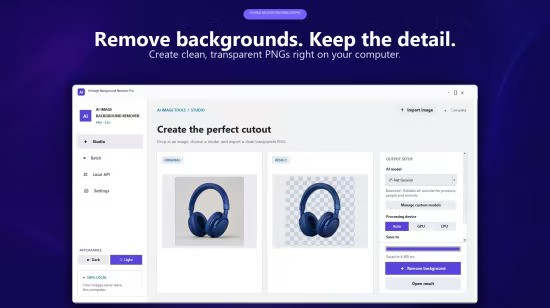
Designed for e-commerce sellers, graphic designers, and photographers, our powerful desktop tool gives you complete control over your creative workflow. Unlike online tools, AI Image Background Remover runs 100% offline on your computer. This guarantees your images remain completely private and secure—there are no uploads, no data collection, and no privacy concerns.

Whether you need to create product photos with transparent backgrounds, design marketing materials, or process hundreds of images for your online store, this app delivers professional results without compromising your privacy.

Advanced AI Engine
Intelligently detect foreground subjects and erase backgrounds cleanly, handling complex details like hair, fur, and semi-transparent objects with ease.

17+ Specialized Models - PRO
Choose from a variety of models fine-tuned for portraits, products, animals, and high-resolution photography for perfect results every time.

Powerful Bulk Processing - PRO
Save hours of manual work by processing entire folders of images at once. Set your options and let the app do the work.

Bring Your Own Models - PRO
Power users can import their own custom .onnx models via the intuitive Model Manager for unlimited flexibility.

Release Notes

- Release notes were unavailable when this listing was updated.

System Requirements
Windows 10 version 1903 or higher, or Windows 11. Minimum 4GB RAM (8GB recommended). An NVIDIA GPU is optional but recommended for faster processing. About 4GB of disk space for the app and models.

Homepage
Код:
https://bytesweavers.tech

DOWNLOAD:

Код:
https://rapidgator.net/file/f90c31ec833c312d437c8863f793f3ce/AI.Image.Background.Remover.Pro.2.0.1.rar.html

https://nitroflare.com/view/AB64677C30D2542/AI.Image.Background.Remover.Pro.2.0.1.rar

https://ddownload.com/fhso7u9x4gpd/AI.Image.Background.Remover.Pro.2.0.1.rar
 
ezgif-671b98c27b097c0f.jpg


AI Image Upscaler Pro 2.0.0

Languages: English
File Size: 1.91 GB

Tired of blurry, low-resolution images? Enlarge photos and increase image resolution with AI Image Upscaler Pro, the ultimate desktop tool to enhance your photos with the power of artificial intelligence. Whether you need to make a picture bigger for a print, improve photo quality for a professional project, or simply perform photo restoration on cherished memories, our app delivers stunning results right on your PC.

Powered by state-of-the-art Real-ESRGAN AI models, AI Image Upscaler Pro is more than just a simple image resizer. It intelligently analyzes and reconstructs your images, adding realistic detail and clarity. Transform a pixelated drawing into a crisp piece of digital art, upscale images for 4K displays, or fix blurry pictures with just a few clicks.

AI Image Enhancer
Go beyond simple scaling. Our technology intelligently fills in missing details for a natural, high-quality finish, making it the perfect tool to make images clearer.

Bulk Upscaling Power
Have an entire folder of pictures to process? Use our batch processing feature to upscale multiple images at once. Save hours of manual effort and streamline your workflow, whether you're working with a photo library, game assets, or AI training datasets.

Bring Your Own AI Models
For advanced users, our app offers the unique ability to import your own custom-trained .pth models (RRDBNet & SRVGGNetCompact). Use your specialized AI upscaler models for unique and tailored results.

100% Offline and Private
Your privacy is our priority. Unlike an online photo editor, our application works completely offline. Your files are never uploaded to a server, ensuring your personal and professional images remain secure and confidential on your own computer.

Release Notes

- Release notes were unavailable when this listing was updated.

System Requirements
- OS: Windows 10 version 17763.0 or higher
- Keyboard: Integrated Keyboard
- Mouse: Integrated Mouse
- Memory: 8 GB (Minimum), 16 GB (Recommended)
- Video Memory: 4 GB (Minimum), 6 GB (Recommended)
- Processor: Quad-core processor (e.g., Intel Core i5 / AMD Ryzen 5) (Minimum), Six-core or higher processor (e.g., Intel Core i7 / AMD Ryzen 7) (Recommended)
- Graphics Processor: NVIDIA GeForce GTX 1050 / AMD Radeon RX 560 (with CUDA/DirectML support) (Minimum), NVIDIA GeForce RTX 2060 / AMD Radeon RX 6600 or better (Recommended)

* Internet connection is required only for launching the program.

Microsoft Store - Full Version

Homepage
Код:
https://apps.microsoft.com/detail/9plkskq5gs1k?amp%3Bgl=US&hl=en-US&gl=IN

DOWNLOAD:

Код:
https://rapidgator.net/file/86c26858b3f4b4f2a15c13d820def432/AI.Image.Upscaler.Pro.2.0.0.rar.html

https://nitroflare.com/view/89C0A2A49589092/AI.Image.Upscaler.Pro.2.0.0.rar

https://ddownload.com/2iztdmgft5bx/AI.Image.Upscaler.Pro.2.0.0.rar
 
ezgif-6c5d8e31c161f364.jpg


Corel AfterShot Pro 3.7.0.457 (x64)

Languages: Multilingual
File Size: 144.66 MB

Corel® AfterShot™ Pro 3 is up to 4x faster than Adobe® Lightroom®*. It's the photo editor that reveals your true creative potential and frees you: from high costs, from endless subscriptions, from hours spent editing at your computer. Import, process and output faster, and get back behind the camera where you belong with AfterShot™ Pro 3.

Simple photo management
Sort, organize and view all your photos in one place, quickly and easily with flexible file management options--no importing required.

Ultra-fast workflow
Experience dramatically faster loading, selecting, editing and output with the world's fastest RAW conversion software, featuring performance that's up to 4x faster than Adobe Lightroom.

Powerful batch processing
Edit and perfect one or thousands of photos with powerful batch processing controls and presets that let you quickly bring out the best in every image.

Comprehensive Watermarking
Protect and promote your work with versatile Watermarking features. Deter unauthorized copying, brand your photos with your logo or contact info, or add text and graphics. Apply watermarks to individual photos or batches, and easily adjust size, rotation, position, transparency and more.

Enhanced! Highlight Recovery
Regain more of the detail and tone from your overexposed photos with enhanced Highlight Recovery. Powered by a new algorithm, this feature lets you access more of the data in your RAW files for superior image quality.

Enhanced! Blemish Remover
Save time and edit faster by doing more touchups and photo corrections in AfterShot Pro 3, rather than jumping to PaintShop Pro or Adobe® Photoshop®. The new Blemish Remover offers circle, brush, polygon and freehand tools for detailed editing, making portrait editing faster and easier. Remove dust, spots, smudges and a variety of imperfections on any photo.

New! Image Preset Library
Now it's easier to tap into the power of presets to automate more of your repetitive processing jobs or quickly reproduce a look that would otherwise be tedious to replicate. The new Image Preset Library^ lets you browse, preview and download free and for-purchase presets.

New! Lens Correction Development Kit
Make and share your own lens corrections—ideal for photographers working with rare, unique or spanking new glass. Simply follow the instructions, save your correction, then load it into AfterShot Pro 3—or share online.

New! Lens Corrections
Update to AfterShot Pro 3 for new, sought-after lens corrections that build on the hundreds of lenses already supported by AfterShot to quickly correct the different types of distortion introduced by various lenses. Join the AfterShot Pro community on Facebook to discover when new lens corrections are posted or to share your own.
See what's new with plugins

Enhanced!
Find and install free and for-purchase plugins, and get updates in a flash with AfterShot Pro 3's new Plugin Manager^. Or make your own with our unique plugin API—a love of photography, a knowledge of C++ and the updated Plugin SDK are all you need. Share your plugins freely with the AfterShot community, or work with Corel to sell them.

New! Updated RAW camera profiles
We're committed to constantly delivering support for today's most popular, powerful and creative cameras, including professional DSLRs, flexible and high-quality mirrorless cameras, and many more. A new dynamic camera profile updater^ notifies you when new cameras are added a new feedback mechanism captures and prioritizes your requests with Corel.

New! Modular Camera Profiles
Get the latest camera profiles sooner—and without patching your software—with dynamic camera updates^. Simply browse and download directly from AfterShot Pro 3. Don't see a camera you want? Hit the 'feedback' button and log your request directly to the AfterShot Pro development team.

New! Get involved!
AfterShot Pro wants you! Corel has built AfterShot Pro to give you, the photographer, control, letting you make you own plugins, lens corrections and presets. Now a new feedback loop makes it easier for you to send your ideas and requests to the Corel Photo team--better helping us to meet your needs. Simply click 'feedback' and send us your comments.

Powerful adjustments
Whether you're shooting in RAW or JPEG, you can alter your photos using a wide variety of adjustment tools, including Crop, Straighten, Highlight Recovery, Noise Removal, Color, Temperature, Exposure, Highlights, Fill Light and more.

Multi-version editing
Easily make adjustments to multiple versions of your master photo without ever changing your original file. Make an unlimited number of versions of one image, with a wide variety of corrections and customizable presets, including Black & White, Cross Processing and more.

Precise control with Selective Editing
Apply adjustments exactly where you want them with unique Layers and Regions capabilities that isolate precise areas of your photo for adjustment.

Local Contrast
Recreate the look of a high-end camera lens and make objects within an image 'pop' by bringing out the texture and dimension in your photos.

High Dynamic Range (HDR) tools
Create impressive photos with intense visual contrast using High Dynamic Range (HDR) tools. Combine multiple exposures to create a single, stunning HDR photo. Within the AfterShot HDR module, apply Smart Photo Fix, White Balance, Brightness/Contrast, Fill Light/Clarity, Local Tone Mapping, High Pass Sharpening, and Digital Noise Removal.

Noise reduction by Athentech
Optimize your images with Athentech Imaging Noise Removal. This award-winning technology automatically adjusts lighting for every pixel in a shot while maintaining true color and zero clipping.

Red eye removal
Get precise control when cleaning up red eye in your photos.
Get complete control with a personalized workflow

Customizable workspace
Easily change the AfterShot Pro workspace any time to suit your task. Hide or show the Thumbnail, Preview, Browse and Tools panel. Choose from several viewing options, including Slideshow, Full Screen and Multi-Image view.

Easy integration with photo editors
Process your RAW photos quickly in AfterShot Pro, then simply click the "Send to External Editor" button to quickly export in TIF to PaintShop Pro, Photoshop or another editor for more detailed editing.

Accurate color correction
Fine tune the color in your photos with several adjustment tools, including Vibrance, Saturation, Color Balance and Mixer and Selective Color Control. Adjust everything from the overall color intensity for the entire image to the intensity of any single color.

Curves and Levels
Apply adjustments exactly where you want them with unique Layers and Regions capabilities that isolate precise areas of your photo for adjustment.

A complete photo manager
Take charge of your photos with extensive photo management support that lets you quickly organize your existing photos, and easily add new ones or catalogs any time. Powerful search tools, star ratings and other management tools let you quickly find photos even in very large collections.

Quick review
Easily compare, filter and select your best photos from any number of similar shots.

Robust search tools
Finding the right photo in a collection of hundreds or thousands is fast with powerful Metadata tools. Add your own searchable keywords, ratings, tags and labels. Or search by camera-written data like date, camera type, settings, aperture and more.

Customizable asset management
Unlike other workflow tools, AfterShot Pro 2 does not force you to import your images into a catalog just to work with them. Easily access your photos in existing folders, on a network or on a memory card. If you wish, try catalogs to take advantage of powerful digital asset management tools to organize your collection as it grows.

Create web galleries
Quickly create a web gallery to share your images online with friends, colleagues or clients. Choose from various gallery styles to control how your photos are displayed.

Back up and archive
Use batches to easily back up and archive your AfterShot Pro catalogs.

Release Notes
AfterShot Pro 3 Release Notes

Код:
https://www.aftershotpro.com/en/support/updates/asp/3/index.html

System Requirements
- Windows 11, Windows 10, Windows 8.1, Windows 8, Windows 7 with latest service pack (64-bit editions)
- 64-bit Intel or AMD processor (multi-core processor recommended)
- 2 GB of RAM (4 GB recommended for HDR)
- 400 MB of available hard-disk space required
- 1024x768 resolution with 16-bit color display (1280 x 768 resolution with 24 bit or higher color display recommended). 16MB or more of dedicated VRAM required to use OpenCL Hardware Acceleration

Homepage
Код:
https://www.aftershotpro.com

DOWNLOAD:

Код:
https://rapidgator.net/file/822e46012295bd620d60b2f10f3f07c5/Corel.AfterShot.Pro.3.7.0.457.rar.html

https://nitroflare.com/view/5B87E7BAD29788E/Corel.AfterShot.Pro.3.7.0.457.rar

https://ddownload.com/3bpc4bdyl3mq/Corel.AfterShot.Pro.3.7.0.457.rar

 
Назад
Сверху Снизу