Latest Software Collection (Updated Daily)


e8c5615a3a5b126ffb484ab4a151a249.jpg


Perfectly Clear WorkBench 5.0.2.3110 (x64) Multilingual | File size: 247.5 MB

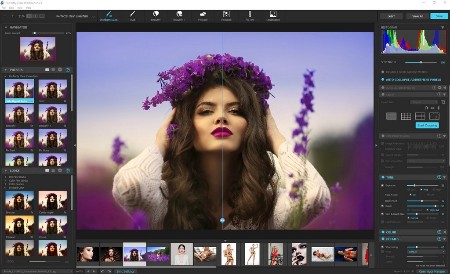
Perfectly Clear Workbench is an application that uses Athentech's Perfectly Clear image correction libraries and is made available to demonstrate the capabilities of the Perfectly Clear processing libraries, face detection library and to allow a quick export of the processing settings for use.

One of the key features in Workbench is the ability to "export to API" when saving a Preset. This allows you to make image corrections in Workbench and tune the settings to match your style and correction needs. Then, you can quickly export these settings to a text file - ready to be copy / pasted into your source code with our image correction SDK.

What's New in Perfectly Clear WorkBench
1. Beautiful new interface
2. New image correction tools
a. Preprocessing section for Input Looks and "Image Ambulance" for manual exposure corrections
b. "Face Aware" exposure for more accurate auto-exposure corrections in portraits and group photos
c. Black Point tool to deepen blacks
d. New Color Vibrancy tool to complement our previous "Vibrancy" control (now renamed to Color Restoration)
e. Sky and Foliage enhancements
3. Existing tools have been improved
a. Added strength sliders to Light Diffusion and Vibrancy for better control
b. Better 'color pickers' for Skin Tone and Blush adjustments
4. Manually identify faces that are not detected automatically
5. One-click to zoom to individual faces
6. Modify facial regions to provide the best corrections
7. Histogram
8. Much improved preset management

Supported Image Formats
Perfectly Clear requires RGB-formatted images in either 8 or 16-bit color depth. Any image file that Photoshop or Lightroom can open and convert to this format may be used in Perfectly Clear. Monochrome and CMYK images must be converted to RGB before using Perfectly Clear. RAW files must be opened through Adobe Camera RAW and loaded into Photoshop to be accessible to Perfectly Clear.

HomePage:
Код:
https://eyeq.photos/

-:DOWNLOAD FROM LINKS:-​
RapidGator
Код:
https://rapidgator.net/file/6994317f0ce281534317d54d24368b92/

NitroFlare
Код:
https://nitroflare.com/view/C6DA666B4B39755/
 

bc7271b378b35770a1b57f6c65f5e3b5.jpg


VideoMeld 1.83 (x64) | File size: 10.8 MB

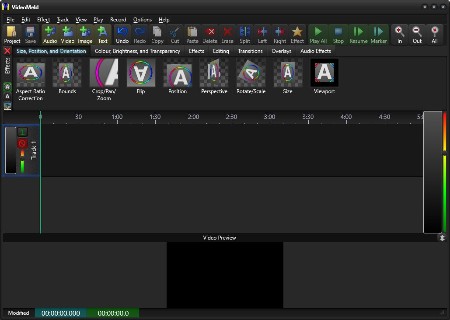
VideoMeld is an all new multitrack digital audio and video editing program. VideoMeld has one of the most advanced effects editors in its class. Many effects can be applied at the same time, creating incredible variety. Effect settings can be varied precisely over time for detailed animated visuals.

Use it to
- Mix together any number of audio and video files into a single file
- Create impressive presentations or tutorials with background music, photos, and video
- Edit videos and add text captions, special effects, and transitions
- Create professional looking YouTube videos
- Master music recordings, keeping instrument and vocal tracks separate
- Make video recordings of the computer screen (screencasting), ideal for software training videos or demonstrations

VideoMeld features include
- High quality HD video up to 1920x1080 and save as MPEG 4 H.264
- High quality 8 channel audio (7.1 surround sound)
- Over 50 video effects, transitions, and compositing functions
- 7 audio effects including Noise Reduction, Compressor/Expander, Equalizer, and Pitch
- Powerful! dynamic effect settings for all audio and video effects
- Scrolling captions for credits or tickers
- Screencasting records video directly from the computer screen

Whats New
Код:
https://goldwave.ca/forums2/viewforum.php?f=16

HomePage:
Код:
https://goldwave.com/

-:DOWNLOAD FROM LINKS:-​
RapidGator
Код:
https://rapidgator.net/file/e4aa51021446663ef45447f2581dabd9/

NitroFlare
Код:
https://nitroflare.com/view/EC5689CD6370787/
 

71ed8a6044eb99b8d283c14d25404c0a.jpg


VovSoft Open Multiple Files 3.3 | File size: 5.1 MB

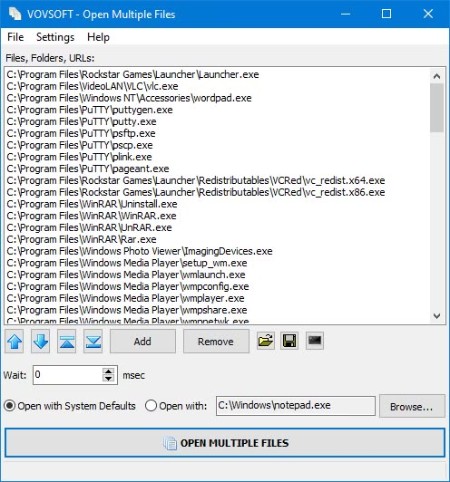
Working with multiple files, folders, apps or URLs at the same time can result in hectic situations, especially when trying to launch or open several instances at a time. Carried out manually, this process can be at least tiresome, not to mention inefficient. Open Multiple Files is an app which was developed for helping users cope with such issues and allow them to open multiple files or folders simultaneously.

Adding files or folders is a breeze and users can do so by either resorting to the dedicated menu, buttons or by dragging-and-dropping the preferred files. Once files or folders have been added, these will appear listed in the app's main viewing area, which could have benefited from the addition of a detailed-type listing, for better identification. Besides the files or folders, the app can also receive URLs as input, as well as executable files, this way providing users a broader usage palette. Running the main feature - the multi-file opener will quickly launch all the added content, simultaneously, in the inserted order.

A great feature is the ability to save the added content as a text listing, which can be opened at any time. This not only improves overall efficiency but also offers people the ability to manage their multi-file sessions better. It also adds shortcut to SendTo folder, user can right-click files and folders from the context menu.

Whats New
Код:
https://vovsoft.com/version-history/open-multiple-files/

HomePage:
Код:
https://vovsoft.com

-:DOWNLOAD FROM LINKS:-​
RapidGator
Код:
https://rapidgator.net/file/e57ee30e018791144bb30468de50f56a/

NitroFlare
Код:
https://nitroflare.com/view/919E4E6A5AB3D47/
 

872e12ab04cb5927bf5ace175b1c26b7.jpg


VRGeoscience Virtual Reality Geological Studio 3.03 Build 6 (x64) | File size: 271.3 MB

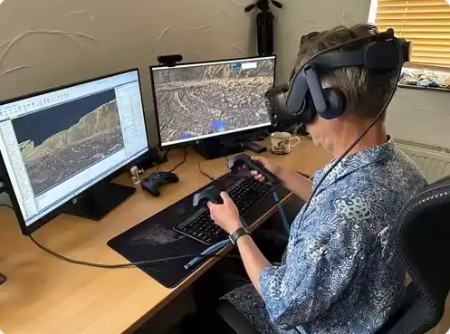
VRGS (Virtual Reality Geological Studio) provides an integrated software solution to visualise, interpret and analyse 3D geological datasets of virtual outcrops. It enables users to import large datasets from Lidar and Structure from Motion (SfM)/photogrammetry, create and visualise ultra-high-resolution models in 3D in VR or desktop mode and deploy a comprehensive suite of analytical tools to describe and interpret key geological features such as bedding, faults and fractures.

Whats New
Код:
https://docs.vrgeoscience.com/docs/release-notes/r3-2-notes

HomePage:
Код:
https://www.vrgeoscience.com/

-:DOWNLOAD FROM LINKS:-​
RapidGator
Код:
https://rapidgator.net/file/fe9ded2258e8964f3ab16a88cf7fb06e/

NitroFlare
Код:
https://nitroflare.com/view/3E4DC17F8E9E02A/
 

55ea903757f5b3ac534c94b4a3769fb0.jpg


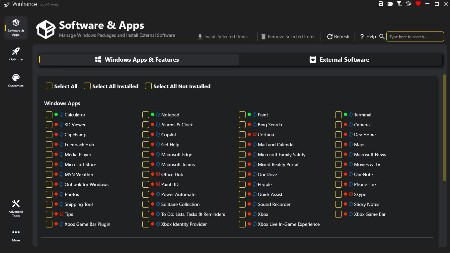
Winhance 26.03.06 | File Size : 90 Mb

Winhance provides an efficient solution to streamline and enhance your Windows experience. It allows you to easily remove unnecessary applications, optimize system performance, and customize your settings to better suit individual preferences.

Add or Remove Windows 10 & 11 Components with Ease
Winhance streamlines adding or removing components in Windows 10 and 11. If you've ever debloated your Windows system after installation, you've likely encountered methods similar to those used by Winhance. However, what sets Winhance apart is its user-friendly interface, which simplifies the process and makes it far more accessible than navigating extensive PowerShell scripts that can be daunting for many users.

Windows is Top Heavy
Windows comes preloaded with a variety of built-in applications and features that, while useful to some, may go unused by many users. These unnecessary components can not only occupy precious system resources but also raise concerns regarding user privacy. With Winhance, you can efficiently manage unwanted apps and features, optimizing your system's performance and enhancing your overall user experience. This ensures your Windows environment is tailored to your specific needs and free of unnecessary clutter that could hinder performance and security.

Winhance provides a user-friendly interface to
● Debloat: Remove unwanted Windows apps, capabilities, and features safely.
● Optimize: Tune system settings for better performance, privacy, and gaming experience.
● Customize: Easily adjust Windows themes, taskbar, start menu, and explorer settings.
● Automate: Create custom Windows installation media and automated setup files.

HomePage:
Код:
https://winhance.net/

-:DOWNLOAD FROM LINKS:-​
RapidGator
Код:
https://rapidgator.net/file/dcf906a1eca330323e24ca865eb1c666/

NitroFlare
Код:
https://nitroflare.com/view/0CFF5219D94D713/
 

363435cf2f6b37e842de46c0307f88c6.jpg


Wondershare PDFelement Professional 12.1.13.4069 Multilingual | File size: 223.27 MB

The PDF Experience, Simplified. The easiest way to create, edit, convert and sign PDF documents. Get control over PDFs like never before. The most Powerful and Simple PDF solution that changes the way you work with your important documents forever.

Edit PDF Like Word
Wondershare PDFelement enables you to edit PDF documents just as easily as you would in Word documents.

Edit PDF Text
Add, edit, remove text, link, watermark, header&footer, or bates numbers on your PDF easily. You can also edit the size, font, and color of the added content.
When you need to change the background of the PDF file, you can also add or change the file's background with any color, PDF or image.

Edit PDF Image
Click on an image, then move, rotate, crop (resize), extract, replace, overturn or delete images in PDF. Even you can set the Z-Order of the image.
Export each image in a PDF to a separate image file with "Convert" feature of Batch Process tool.

Move and Align Objects
It is easy to move an item forward or back just one level, or send it to the front or back of the stacking order of elements on the page.
The Align properties options (in the right-hand panel on Windows version, or right-click to call up the Align properties) let you precisely align multiple objects on a side - left, right, top, bottom vertical center, and horizontal center.

Edit PDF Pages
Organizing pages in PDFelement is intuitively simple and fast. It is easy to sort, add, rotate, move, split, crop and delete PDF pages with PDFelement in a second, from anywhere.

Edit PDF Forms
PDFelement can help you create, edit PDF forms easily, also turn PDFs into fillable forms with "Recognize Form" tool or just add, delete, and drag and drop form fields or enable fields for e-signatures.
You can even add calculations and data validation rules to your form. It is simple!

Edit Scanned PDF
When you open a scanned document for editing, you need to perform OCR feature(optical character recognition) on PDFelement.
It can recognize text and characters from PDF scanned documents (including multipage files), photographs or digital camera captured images, so to make the PDF documents editable and searchable.

Edit Password Protected PDF
Unlock the PDF by entering the correct password so to access the file. Then you can edit, print, copy, comment, sign, organize the PDF file.
You can also remove security from a PDF if you have the document password.

Your Complete PDF Convert Solution
Convert PDFs into secure file formats, like Microsoft Office, image, text etc. in high-quality and minimum effort.

PDF to Word
Batch-convert PDF files to Word documents without losing fonts and formats. It supports .docx, .doc.

PDF to Excel
Convert PDFs to Microsoft Excel files: xlsx, xls, XML.

PDF to PPT
Convert PDFs to Microsoft PowerPoint files: .pptx, .ppt.

PDF to Image
Convert PDFs as separate images or into one single image with any image quality you want. It supports JPG, PNG, BMP, GIF, and TIFF.

What's new
Код:
https://pdf.wondershare.com/whats-new.html

HomePage:
Код:
https://pdf.wondershare.com/

-:DOWNLOAD FROM LINKS:-​
RapidGator
Код:
https://rapidgator.net/file/c1e878cb0aa8777a4a3db30e67d1e21c/

NitroFlare
Код:
https://nitroflare.com/view/D64D8496327F35F/
 

th-CPJRs-Jhw-KSXf-L9SQ630PHsn07pd-YMk-Z6.jpg

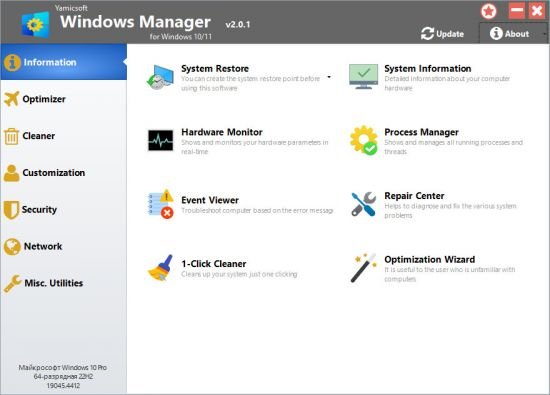
Yamicsoft Windows Manager 2.3.4 (x64) Multilingual | File size: 36.1 MB

Windows Manager is an all-in-one utility for Microsoft Windows 10/11 specially, it includes over forty different utilities to optimize, tweak, clean up, speed up and repair your Windows 10/11, helps make your system perform faster, eliminate system fault, increase stability and security, personalize your copy of Windows 10/11, and meet all of your expectations.

Information
Creates the system restore point manually; Gets detailed information about your system and hardware, helps you find out the Microsoft product key such as Microsoft Windows and Microsoft Office; Shows and manages all running processes and threads; Repair Center helps to diagnose and fix the various system problems; Cleans up your system just one clicking; Optimization Wizard is useful to the user who is unfamiliar with computers.

Optimizer
Tweaks your system to improve performance and increase speed; Manages and configures the Windows boot menu to your preference; Startup Manager controls all the started programs with Windows start, checks and repairs the advanced startup items to restore the malicious change by viruses; Manages and optimizes system services and drivers to improve performance; Manages and optimizes the scheduled tasks to speed up your system.

Cleaner
Disk Analyzer can analyze and view the disk space usage of all programs, files and folders find out which engross your disk space and shown with a chart; Cleans up WinSxS folder securely to reduce the component store size; Smart Uninstaller can fully delete programs from your system without residual files and Registry entries; Desktop Cleaner can analyze and move unused shortcuts, files and folders on desktop to specified folders; Searches and deletes junk files to save disk space and improve performance; Searches and deletes the duplicated files to save your disk space; Registry Cleaner searches Registry to find out and delete the invalid items; Registry Defrag rebuilds and re-indexes your Registry to reduce registry access time and therefore improve application responsiveness and eliminate mistakes and corruption in Registry.

Customization
Customizes system parameters according to your preferences by tweaking File Explorer, Desktop, Start, Taskbar and Notification area; Adds files, folders and system items to This PC, and Desktop; Pins the files or folders to your Desktop, Taskbar or Start; Creates the quick startup items for jumplist on Taskbar; Manages the context menu when right click the file, folder, etc; Edits the shortcut menu that right-click Start button (Win + X shortcut); Customizes the look of your system; Edits and adds the shortcuts that executed on Run dialog box; Tweaks the Windows Apps and Microsoft Modern UI settings.

Security
Tweaks system, components, UAC, Sign in settings, adjusts various settings and restricts access to drives and programs to improve system security; Safeguard your sensitive files and folders security, encrypt files, move system folders to safe locations; Privacy Protector ensures privacy and keeps sensitive information secure by eliminating tracks; File Undelete recovers and restores deleted or formatted files on logical disks; Locks some system features to improve security.

Network
Optimizes and tweaks your internet connection and network settings; Manages your URLs and IPs; IP Switcher can switch between different network settings easily; Edits the Hosts file to speed up system surfing internet; Wi-Fi Manager can view and manage all your wireless network; Network tools contains some commonly used network utilities; Network Monitor can display traffic data transmitted by the network.

Misc. Utilities
Creates scheduled tasks or the monitorings that trigger tasks; Shows and run the useful collection of utility that built-in your Windows; Splits a file into several smaller files or merges back to the original file; Super Copy is the powerful tool to copy files or backup automatically; Operates your Registry easily using the Registry Tools.

Features
Information
Optimizer
Cleaner
Customization
Security
Network
Misc. Utilities

HomePage:
Код:
https://www.yamicsoft.com/

-:DOWNLOAD FROM LINKS:-​
RapidGator
Код:
https://rapidgator.net/file/99fbf91b4674601175a3a2bcda268b81/

NitroFlare
Код:
https://nitroflare.com/view/49C76181365EB6D/
 

45cd35484ac3bed33769b01007f62fe1.jpg


Youtube Downloader HD 5.9.9.9 | File Size : 69.3 Mb

Youtube Downloader HD is a simple yet effective solution to downloading clips from YouTube in HD. It is easy to learn and addresses all types of users, even the ones with less or no experience in such tools.

After a brief installation procedure, you can check out the regular window with the well-defined layout, representing Youtube Downloader HD's interface.

So, all you have to do is specify the video URL, output location and format, in order to proceed with the download and conversion job.

Youtube Downloader HD supports a few video types for the output, namely FLV (240p, HQ 360p or HQ 720p) and MP4 (medium quality, HD 720p or full HD 1080p).

Additionally, the tool can convert FLV to AVI (XviD) compatible with most video players, as well as to MP4, supported by iPod and QuickTime.

Youtube Downloader is very low-demanding when it comes to the CPU and system memory, so it doesn't interfere with the runtime of other active apps. It finishes a download and conversion job rapidly, and delivers clips with a very good image and sound quality. No error dialogs have been shown in our tests and the tool did not freeze or crash. All in all, Youtube Downloader delivers very good results in regard to downloading YouTube clips in HD.

HomePage:
Код:
https://www.youtubedownloaderhd.com

-:DOWNLOAD FROM LINKS:-​
RapidGator
Код:
https://rapidgator.net/file/840bcddad4b4aa27c32e8e207a5dd76f/

NitroFlare
Код:
https://nitroflare.com/view/33132196143E76B/
 

e5ef6041442bf7ef21aa94473b1d041e.jpg


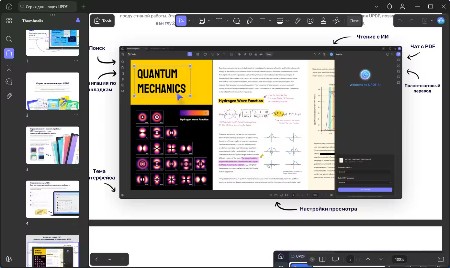
UPDF 2.2 (x64) Multilingual | File size: 225.2 MB

An all-in-one AI PDF editor on Windows that allows you to efficiently and easily edit, annotate, summarize, translate, and convert PDFs.

Editing PDF on PC is as Easy as in Word
UPDF for Windows is an easy-to-use Windows PDF software! Enjoy powerful editing tools for text, images, links, and more in your PDF. Customize backgrounds, watermarks, and page sizes with simplicity like in Word.

Analyze PDFs with 10X Efficiency
Upload a PDF with 100+ pages to get lightning-fast summaries, precise translations, in-depth explanations, and engaging conversations from your documents. Experience a new era of efficiency and accuracy with AI in this PDF editor software for Windows!

Read and Annotate, All in UPDF on Windows
UPDF for Windows offers diverse page display modes and scaling options for an optimal reading experience. Utilize its practical annotation toolkit, including sticky notes, stickers, stamps, highlighters, underlines, and more, to enhance your PDF review.

PDF Conversion. So Fast, So Accurate, So Easy
UPDF PDF editor for Windows offers a complete solution for transforming documents across formats. It provides 7 methods to create PDFs and supports converting PDF to 14 formats.

Digitize Paperwork for Better Collaboration
This PDF editor for PC can help you create fillable forms, share for collaborative filling, embed signatures, and enhance your PDF capabilities. Experience a seamless and customizable PDF journey that boosts versatility for improved collaboration.

Whats New
Код:
https://updf.com/whats-new/

HomePage:
Код:
https://updf.com/updf/

-:DOWNLOAD FROM LINKS:-​
RapidGator
Код:
https://rapidgator.net/file/92ac022f640017b747bc457e242b2395/

NitroFlare
Код:
https://nitroflare.com/view/F4D2D3D598C3F34/
 

74b3e014f9c669c9d9204971cdc769ce.jpg


Topaz Gigapixel Pro 1.1.3 (x64) Multilingual | File size: 464.5 MB

Larger. Sharper. More real. Upscale and enhance any image 16x. Take any image to 16X scale for the largest possible prints, posters, and billboard-size projects. Crop. Zoom in. Maximize photos, images, and AI-rendered art.

Sharper.
Just one click to both upscale and enhance your image at the same time. The result is an image sharper and larger than it started.

More real.
Every feature is built to bring your images closer to reality. Skin textures, fabrics, feathers, and hair. Trained using millions of images for the highest-quality detail.

Whats New
Код:
https://community.topazlabs.com/c/gigapixel-ai/109

HomePage:
Код:
https://topazlabs.com/

-:DOWNLOAD FROM LINKS:-​
RapidGator
Код:
https://rapidgator.net/file/2a812c2c34e86590484fb6cccbc90ed6/

NitroFlare
Код:
https://nitroflare.com/view/2995172A46FC57C/
 

39153c3d0abafbac8e5986ae3cfbaf7b.png


SysTools OST Splitter 8.0 | File size: 27 MB

OST Splitter Tool is an Application that can easily split oversized Outlook OST Files into Smaller sized PST files. The installation of Outlook on the computer is mandatory in order to use this tool to divide large OST files.

Split oversized OST file into multiple parts by Date, Size, Year, Folder, Email ID, Category
Option to Repair Corrupted Outlook OST files before splitting
Allows user to split OST files without any file size limit into UNICODE PST file
Option to Add Single / Multiple Files or Add Folder or Search Files
Tool provides option to break OST data items like emails, contacts, etc
Allows splitting newly created OST file & archive OST file
Outlook Installation is Not Required to divide OST file which is huge in size

Whats New
Updates: official site does not provide any info about changes in this version.

HomePage:
Код:
https://www.systoolsgroup.com/ost/splitter/

-:DOWNLOAD FROM LINKS:-​
RapidGator
Код:
https://rapidgator.net/file/a581fea9d9abc32627689f5fab61f227/

NitroFlare
Код:
https://nitroflare.com/view/D51F851D54DB670/
 

1fa262cc43afb14fd05b1e0ca61cd3b0.jpg


Symless Synergy Business 3.5.1 (x64) | File size: 164.7 MB

Control other computers on your local network with a single mouse and keyboard. Use the keyboard and mouse of one computer to control nearby computers. Copy and paste between all of your computers with shared clipboard.

Whats New
Updates: official site does not provide any info about changes in this version

HomePage:
Код:
https://symless.com/synergy

-:DOWNLOAD FROM LINKS:-​
RapidGator
Код:
https://rapidgator.net/file/ef079a7715347580ce0d8803c02decb2/

NitroFlare
Код:
https://nitroflare.com/view/D0D434432A255A1/
 

182b361c58de5c91697c1dc04dc9ca3d.jpg


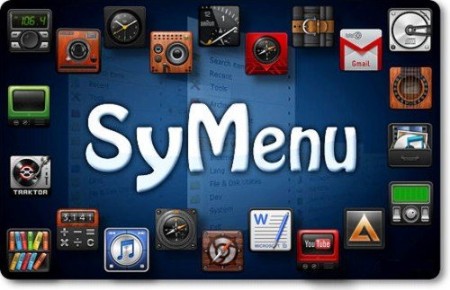
SyMenu 8.12.9561 Multilingual | File Size : 71 Mb

SyMenu is a portable menu launcher and a Start Menu replacer that allows you to organize your portable applications in a quick and easy way. Moreover SyMenu automatically links any application installed on the host pc. All the linked items - SyItems - and all the indexed applications can be organized in a hierarchical structure with colorful folders, separators and labels and can be found with the internal search tool.

You can customize SyMenu in a simple and quick way adding links to portable programs, documents, Windows commands, folders and urls.
It's easy to add new SyItem dragging & dropping file from host pc or using the mass importer tool.
Linked items can reside on the same USB device or even on host pc ever since SyMenu supports absolute path (such as C:\Windows\Explorer.exe).

These are SyMenu best functionalities
Start Search bar: (Windows Vista like) allows to quickly search amongst any SyItem configured on menu;
Windows Start Menu wrapper: SyMenu exposes through Start Search bar every program linked in host PC Windows Start menu too;
Extension Manager: allows to temporarly replace normal Windows extension associations with SyMenu custom extension association;
Autoexec: allows to launch a custom list of SyItems at SyMenu startup or closing.
Execution modes: Run, RunAs, Open folder and Show Properties.
Batch Import: allows to make massive imports of new SyItems.

SyMenu is a multilanguage program.
Up till now the languages supported are Chinese Simplified, Chinese Traditional, Dutch, English, Finnish, French, German, Greek, Hungarian, Italian, Polish, Portuguese, Russian, Slovak, Spanish, Swedish,

HomePage:
Код:
https://www.ugmfree.it/

-:DOWNLOAD FROM LINKS:-​
RapidGator
Код:
https://rapidgator.net/file/d95a4b0752144274636a09add502403e/

NitroFlare
Код:
https://nitroflare.com/view/FC1CF6268AE6427/
 

b6520a25266f8b0ce8f7d6bcde6fc3a4.jpg


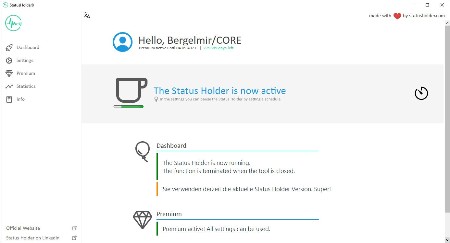
StatusHolder 9.0.0 Multilingual | File size: 14.9 MB

The topics of monitoring and data protection are very quickly slain with our tool, because with it it is possible to permanently set the status of Teams, but also of Skype for Business or other tools to Available. This means that you are online all the time.

Always available in teams
With the Status Holder it is possible to always be shown as Available in Microsoft Teams. The status is set to online throughout and thus disguises the absence.

INVISIBLE for IT
The Status Holder is a click-to-run application and does not need to be installed. Thus, the tool is also usable on the company PC and does not appear on the Install Software list.

Prevent surveillance
They are now always on green in teams and are shown as online. Thus, the actual online times are disguised and thus prevents the monitoring of the employee.

Starts automatically
In the settings, the Status Holder can be configured to start automatically. This means that you are always online in Teams as soon as you start up the computer.

Increase data protection
Is it really relevant whether you are available or absent? With the Status Holder you increase the data protection when using teams by setting the status to Available throughout.

Not only teams
The status is permanently set to Online not only in Teams, but also in Skype, Slack and other communication platforms. Thus, the areas of application are manifold.

Whats New
Код:
https://www.statusholder.com/en/features/changelog/

HomePage:
Код:
https://www.statusholder.com/

-:DOWNLOAD FROM LINKS:-​
RapidGator
Код:
https://rapidgator.net/file/2e146e9986074abed3c271c26bb0c3df/

NitroFlare
Код:
https://nitroflare.com/view/7772D38DD8B5D03/
 

fa3c55ba7b9f8e76a45c4e29f9920ef5.jpg


Starus RAID Restore 2.9 Multilingual | Windows x86/x64 | All Editions | File size: 71.78 MB

This program recovers data from non-operational RAID systems or from disks within such systems. It reads all the information about the controller, the motherboard or the software used to create a disk array. Our product can rebuild the crashed RAID and it lets you copy all critical information from there.

The integrated constructor wizard helps you recover a failing RAID in a step-by-step mode. You can use one of the presets or chose the required data in the damaged array, and RAID Recovery™ will collect the disks together to provide you with access to the data.

Why RAID gets damaged
Recover software or hardware RAID of any type: JBOD, RAID 0, RAID 1, RAID 10, RAID 5, RAID 50, RAID 6, RAID 60, etc.

Hard disk failure
Both hard disk types, HDD and SSD, have a limited operational life. Certainly, server-type NAS or SCSI disks can last longer than their SATA counterparts intended for home use only, but there is no such thing as a hard disk that works endlessly. For most RAID arrays, the day when one or two disks fail means loss of all information, from all disks within this array. Reliability of the entire array decreases with every disk which is added to it.

Accidental array rebuilding
Mistakes when replacing one of the disks within the storage system, accidental "rebuilding" of the array instead of "restoring" it, disconnecting and reconnecting the disks in a wrong order, incorrect RAID initialization or rebuild - any of these things will certainly result in the loss of information. After such errors, RAID can't restore itself automatically.

A controller bug or failure
A controller is the element containing information of critical importance which is vital for building a disk array and gaining access to all of the files stored on the disks. A controller failure may both result in losing service data and cause several disks to fail. The most expensive controllers use an additional battery and non-volatile memory. Such elements improve the whole system's reliability and are supposed to help save data even if a power interruption occurs.

A motherboard failure
Creating a RAID based on specific motherboard features is a cheaper (though less reliable) solution in comparison with buying an expensive controller. Motherboard failures, botched BIOS updates, low CMOS battery, power surges, disconnecting or reconnecting disks - all these things may cause your RAID to crash. As the entire system is very sensitive to all kinds of power issues, problems with your power supply unit may cause crashes as well.

A system crash
Software RAID systems based on the functionality offered by an operating system - Windows, macOS, Linux, FreeBSD, Ubuntu - depend largely on the health of that operating system. Upgrading your hardware, or updating other software may cause errors that prevent the computer from booting and make the data inside such array inaccessible.
Unlike hardware RAID systems, the software-based arrays are made of logical partitions rather than physical disks. Operations that involve formatting or removing partitions can easily destroy such array.

What's new
• official site does not provide any info about changes in this version

Editions: Home, Office, Commercial, Unlimited

HomePage:
Код:
https://www.starusrecovery.com

-:DOWNLOAD FROM LINKS:-​
RapidGator
Код:
https://rapidgator.net/file/d871400d6de930920ffdf3796ac4cd84/

NitroFlare
Код:
https://nitroflare.com/view/ACBAA90A3B13FA7/
 

c8eb3ee19db931b0deb72747b488ea30.jpg


Starus Office Recovery 5.0 Multilingual | Windows x86/x64 | File size: 28.15 MB

Recover many types of documents that go missing! Starus Office Recovery can quickly undelete a wide range of document formats, recover them from formatted partitions and repartitioned hard drives, and extract documents from corrupted volumes and unreadable pen drives and memory cards. Starus Office Recovery can recover Word documents, Excel spreadsheets, PowerPoint presentations, Adobe PDF files and many other formats produced by Microsoft Office and OpenOffice applications.

Best in Class Recovery Engine
Starus Office Recovery implements low-level, content-aware disk scan to enable surefooted recovery from badly damaged, corrupted and inaccessible devices. Content-aware analysis obtains information from the disk surface and not just the file system, allowing the product to successfully recover documents other tools cannot even notice. Its highly sophisticated document analysis engine combined with convenient user interface deliver best-in-class performance for safe, smooth recovery even in the hands of a complete novice.

Get Exactly What You See
With Starus Office Recovery, you get exactly what you see. The tool validates documents before adding them to the list of recoverable files, ensuring that any file you see is actually 100% recoverable. It won't show you thousands of corrupted copies - but the handful of those that make it to the list are fully functional copies that passed the tool's integrity check!
The built-in preview allows you viewing the documents before recovering. The viewer is completely self-contained and requires no office applications to be installed.

Undelete Documents in the Widest Range of Formats
Starus Office Recovery supports documents produced by Microsoft Office and OpenOffice applications as well as Adobe PDF files. It can securely undelete Microsoft Word files in RTF, DOC/DOCX formats, Excel spreadsheets XLS/XLSX, RTF, OpenOffice ODT, ODS, and ODP documents, Adobe PDF, and many other formats.

Recover Accidentally Deleted Documents
Whether you deleted a document directly with Shift+Del, removed it from the Recycle Bin, or never saved it at all, Starus Office Recovery will help you get those files back in no time. In its Quick Recovery mode, the tool will only take seconds to discover and undelete the documents. The easy recovery wizard will guide you through the entire process, enabling a safe and speedy recovery experience.

Restore Maliciously Destroyed Documents
Have some documents missing, corrupted or locked up after malware activities? Use Starus Office Recovery to quickly regain access to those document files! The tool can scan the entire disk surface looking for any document still remaining - even if any trace if it is deliberately eliminated from the file system.

Recover after Virus Attacks
Virus attacks can be devastating, corrupting your hard drive or locking up entire volumes. Starus Office Recovery can access corrupted partitions and locked-up disks in low level, bypassing affected Windows mechanisms to ensure smooth, safe recovery after a virus attack.

Recover Documents You Never Saved
Did you know that Microsoft Office applications save temporary copies of documents you are working on every few minutes? This opens an opportunity to recover the latest versions of documents - even if your computer crashed while you were typing. Starus Office Recovery supports temporary files created by Microsoft Office before you save them, allowing you to recover work you never saved at all!

Recover Documents Stored on Corrupted Partitions
Cannot read the disk or getting a Windows error when accessing a flash drive? Starus Office Recovery is here to help! Accessing the device in low level, the tool can recover documents no other program will even see. Corrupted or missing file systems, raw partitions and unpartitioned space are no problem with Starus Office Recovery!

Recover Documents from Formatted Disks
Clicked "OK" in a prompt to format a USB pen drive? Formatted a disk, pen drive or memory card? Starus Office Recovery will help you recover any office documents you had on that disk! Reading the complete content of the device in low level, Starus Office Recovery employs a highly sophisticated content-aware analysis allowing the tool to identify documents even if no file system is left on the disk. Content-aware analysis works great on hard drives, USB pen drives, memory cards, and many other types of storage devices.

Recover Documents from All Types of Storage Media
Regardless of whether your documents were stored on a local hard drive, external or removable device, Starus Office Recovery will help. Working with the widest range of storage devices, Starus Office Recovery explicitly supports all versions of FAT, FAT16, FAT32, NTFS and NTFS5 used in the latest versions of Windows.

Recover Documents from Inaccessible Flash Media
Can't read a memory card? Getting the "Windows cannot access the specified drive, path or file" error message for a newly inserted USB drive? More often than not, the reason is file system corruption. Starus Office Recovery can scan the entire content of the device to ensure that all documents stored there are successfully recovered - even if the file system is badly damaged or no longer exists.

Supports NTFS Compressed Files
Do you have NTFS compression enabled? Starus Office Recovery can recover compressed files, too! The tool supports the built-in NTFS compression algorithm, enabling surefooted recovery of documents compressed with on-the-fly mechanism built into all recent versions of Windows.
Why use NTFS compression at all? Older versions of Office documents used to compress well, saving considerable space on the hard drive. With newer DOCX, XLSX and similar formats, on-the-fly compression no longer makes sense as these files are already compressed (they are, in fact, ZIP files with XML content packed inside), so if you are using a newer version of Microsoft Office, disabling NTFS compression (if it is still on) is a good idea.

Recover Documents from Faulty Hard Drives with Virtual Disk Images
If you want the safest recovery experience possible, you can use Starus Office Recovery to take a bit-precise image of your disk in one long sweep, and continue the recovery using that disk image. If the hard drive is unstable, physically damaged or badly worn (contains multiple remapped sectors or "bad blocks"), reducing the number of head movements to absolute minimum is a must. Starus Office Recovery is designed to capture virtual images of physical drives with as little read operations as possible. And of course, the tool guarantees the number of write operations to be absolute zero!

What's new
• official site does not provide any info about changes in this version

Editions: Unlimited / Commercial / Office / Home

HomePage:
Код:
https://www.starusrecovery.com/

-:DOWNLOAD FROM LINKS:-​
RapidGator
Код:
https://rapidgator.net/file/c79e923b693d42528af96de4d4b89f33/

NitroFlare
Код:
https://nitroflare.com/view/718973788185BD5/

 

c5d4acf1b82c8365d98c743285695ca8.jpg


Starus File Recovery 7.2 Multilingual | Windows x86/x64 | File size: 72.78 MB

Recover deleted files and folders in a snap! The latest version of Starus File Recovery is the quickest file recovery tool on the market. Featuring new and improved disk analysis algorithms, Starus File Recovery can analyze your disk in just a few seconds. Featuring the familiar look and feel of Windows Explorer, Starus File Recovery will let you browse disks and folders while displaying any deleted files discovered.

Quick and Slow Modes
While having deleted files back in a few seconds is nice, it's not always possible. Files located on formatted, inaccessible, corrupted or badly damaged disks just don't come as easy. For tough scenarios, Starus File Recovery features a comprehensive "slow" mode, performing a complete scan of the entire disk surface in order to locate and recover every little bit of usable information. But don't you worry, the "slow" mode works completely automatically and does not require anything but a bit of your patience. In its "slow" mode, Starus File Recovery can successfully restore information from deleted partitions, corrupted and repartitioned disks.

Data Recovery for Everyone
Starus File Recovery is easy to use for the novices while advanced enough to interest data recovery professionals.

Fully Guided Wizards
Featuring a fully guided, step-by-step deleted file recovery wizard, Starus File Recovery helps selecting the right mode and configuring the settings in fully visual mode. The wizard guides users through in few easy steps.

Look and Feel of Windows Explorer
Starus File Recovery looks and feels just like Windows Explorer. Anyone familiar with how Windows handles files and folders will feel immediately at home with Starus File Recovery. Imagine browsing your disk in a familiar way and seeing all the deleted files and folders in real time.

Pre-Recovery Preview
A fully visual pre-recovery preview is supported for hundreds of file formats. All popular image formats, music, most types of videos, office documents, spreadsheets and presentations, ZIP and RAR archives, emails and attachments can be previewed before undeleting.

Professional Features
Some features included in Starus File Recovery can interest professional computer users and data recovery specialists. The ability to create a full snapshot of a disk being recovered and committing any changes onto that virtual disk image is the way the professionals work. Saving files onto a CD/DVD disc or sending them over an FTP connection comes handy when recovering lots of information.

System Compatibility
Starus File Recovery works in all versions of Windows up to the latest Windows 7 and Windows 2008 Server, and supports all Windows file systems including FAT, FAT32, NTFS, and NTFS5. The latest version can recover files compressed with corresponding NTFS attributes.

What's new
• official site does not provide any info about changes in this version

Editions: Unlimited / Commercial / Office / Home

HomePage:
Код:
https://www.starusrecovery.com/

-:DOWNLOAD FROM LINKS:-​
RapidGator
Код:
https://rapidgator.net/file/663948c765936b354d5cb8e6c98ec0fc/

NitroFlare
Код:
https://nitroflare.com/view/11915E8548AC257/
 

02ac662c0026a3d844cbf6f05892804e.jpg


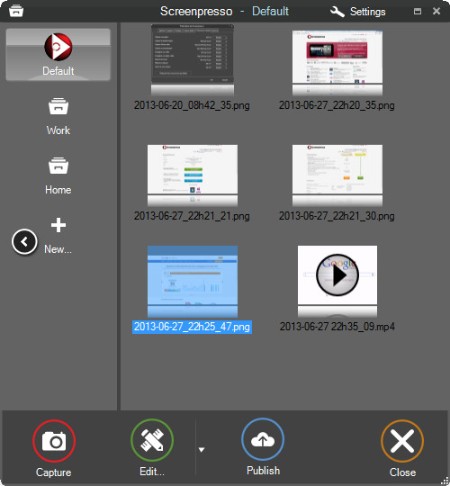
Screenpresso Pro 2.2.5 Multilingual | File size: 46.2 MB

Screenpresso overrides the Print Screen key and makes it easy to take the best screen captures in a few seconds. It is a light-weight Windows software giving a wonderful look to your screenshots.

Features
Capture windows and region
Capture part of the screen or a specific window with the same shortcut. Simple.

Portable application
No need to install the application, you can run it directly after download.

Screenshot history
Don't bother to save screenshots on your drive, Screenpresso does it for you. Practical.

Attach screenshots to emails
Drag and drop screenshots from the history directly to your favorite email editor. Webmails like GMail are also taken into account! Swift.

Built-in image editor
Crop, spotlight an area or comment parts of a captured image. Efficient.

Capture scrolling part
Can't fit it on the screen ? Make a unique image thanks to the stitching mechanism. Smart.

Add effects
Look like a pro. Add drop shadow, rounded corners, reflection and more. Sleek.

Resize bunch of images
Need to export images or create thumbnails at a specific size, one click.

Share screenshots
Easily share your screenshots via Twitter, Facebook, G-Mail, Evernote, Flickr or FTP.

Great support
Simply send an e-mail to support team. It will always quickly respond.

Whats New
Код:
https://www.screenpresso.com/releases/

HomePage:
Код:
https://www.screenpresso.com

-:DOWNLOAD FROM LINKS:-​
RapidGator
Код:
https://rapidgator.net/file/203068e733d8e03a85b67e41dc1fbabb/

NitroFlare
Код:
https://nitroflare.com/view/CA6E40A493A8ED4/
 

4b513aab160a0466c2515026833c4f63.jpg


RS RAID Retrieve 2.9 Multilingual | Windows x86/x64 | File size: 72.73 MB

Data stored on a broken NAS unit or RAID array with a failed controller can be difficult to recover - but not if you use RS RAID Retrieve! The tool can automatically repair many types of RAID arrays, allowing to recover files and folders from multi-disk volumes without the original RAID controller. Whether your disks were installed in a NAS unit, in a computer with a hardware RAID controller, or managed with mdadm in a Linux box, RS RAID Retrieve can reassemble and repair the storage spaces and recover your files and folders in just a few clicks.

Features
• Automatically detects and reassembles multi-disk volumes;
• Detects and rebuilds corrupted RAID arrays created in Windows, Linux and NAS devices;
• Supports RAID 0, RAID 1, RAID 4, RAID 5, and RAID 6;
• Supports RAID 1E, RAID 5E, RAID 5EE and composite arrays such as RAID 01, RAID 10, RAID 50, and RAID 60;
• Mounts multi-disk storage spaces even if the original RAID controller is unavailable;
• Recovers files and folders from healthy and corrupted multi-disk arrays;
• Recognizes most common file systems including NTFS, ReFS, FAT, exFAT, APFS, HFS+, Ext2/3/4, XFS, ReiserFS, and UFS 1/2;
• Automatically detects disk order and RAID parameters;
• Advanced manual mode offers fully manual or semi-automatic operation;
• Partial data recovery from RAID 5 and RAID 6 arrays crashed beyond fault tolerance threshold;
• Recovers data from single-disk volumes and JBOD arrays;
• Avoids array rebuild and resilvering for mirrored and checksum arrays;

What's new
• official site does not provide any info about changes in this version

Editions: Unlimited / Commercial / Office / Home

HomePage:
Код:
https://recoverhdd.com/

-:DOWNLOAD FROM LINKS:-​
RapidGator
Код:
https://rapidgator.net/file/54643d7ff55aacb52801c1fafca88e53/

NitroFlare
Код:
https://nitroflare.com/view/96C7FCC6BB6F696/
 

8cc7ee373759cc943bbfe384fa5d3dae.jpg


RS Photo Recovery 7.0 Multilingual | Windows x86/x64 | File size: 66.25 MB

Lost the entire content of a memory card after a shooting session? Deleted important photo albums? Lost a bunch of photos after a disk or memory card failure? Files lost after emptying the Recycle Bin or deleted with "Shift"+"Del"? Looking for a way to recover data lost after a virus attack, power failure, or hard drive corruption?

Recover your favorite images in minutes with RS Photo Recovery! This picture recovery tool offers quick, safe and intuitive recovery of digital photos with full pre-recovery preview, RAW support and universal storage media compatibility. RS Photo Recovery offers a quick and easy solution for your image restoration needs. Equipped with powerful undelete and recovery algorithms, this photo recovery utility can reliably recover files stored on formatted, corrupted and unreadable memory cards, repartitioned disks and deleted partitions.
Supporting a wide range of image formats, this photo recovery utility can locate, recover or undelete all popular photographic formats and RAW files produced by digital cameras manufactured by Canon, Nikon, Olympus, Panasonic, Pentax, SONY, and many others.
RS Photo Recovery Features
- Recovers lost and deleted digital pictures in all popular formats;
- Supports all popular formats and RAW files produced by Canon, Nikon, Olympus, Pentax, SONY cameras;
- Recovers all kinds of memory cards including SD, SDHC, SDXC, Compact Flash, Memory Stick etc.;
- Recovers images from all types of hard disks and SSD drives regardless of make and model;
- Recovers photos from deleted and formatted FAT and NTFS partitions;

What's new
• official site does not provide any info about changes in this version

Edition: Unlimited / Commercial / Office / Home

HomePage:
Код:
https://recoverhdd.com/

-:DOWNLOAD FROM LINKS:-​
RapidGator
Код:
https://rapidgator.net/file/79f0541c21fa3ff9b56a34acdcebd2f2/

NitroFlare
Код:
https://nitroflare.com/view/7F1B907B82D0A11/
 
Назад
Сверху Снизу