Latest Software Collection (Updated Daily)


da28ac410edb9b671b5ec6e13b1bd90c.jpg


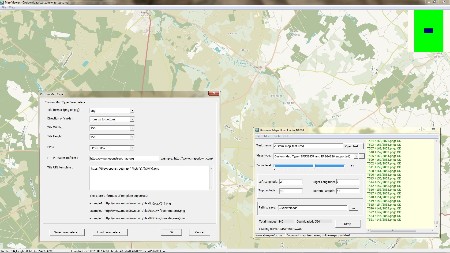
AllMapSoft Universal Maps Downloader 10.253 | File size: 18.8 MB

Universal Maps Downloader is also a tool like Offline Map Maker, that helps you to get offline tile images from many online maps providers, including 500+ maps types.

It is different with Offline Map Maker, it can only download single zoom level images, does not support kml and gpx, does not output html files.

Whats New
Код:
https://www.allmapsoft.com/umd/history.htm

HomePage:
Код:
https://www.allmapsoft.com/

-:DOWNLOAD FROM LINKS:-​
RapidGator
Код:
https://rapidgator.net/file/da160de6b29f950391536cd3c5330fad/

NitroFlare
Код:
https://nitroflare.com/view/EC4BB51A57F92B0/
 

d20171cd489103a42fa631a1a0839754.jpg


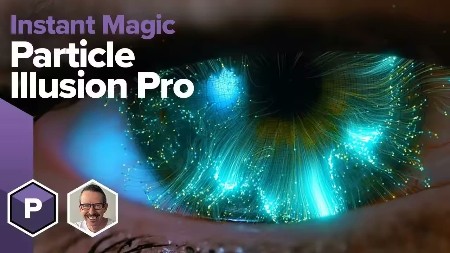
Boris FX Particle Illusion Emitter Libraries v2026.0.1 | Team R2R | 2026.05.03 | 189 MB

Emitter libraries for Particle Illusion Pro.
Fast and Easy 3D Particle Application
Instant Particle Magic
Particle Illusion Pro is a powerful particle generator that gives users instant access to 3D particles. Quickly create photorealistic particle effects to use for motion graphics, visual effects, titles, and lower thirds. Available as a fully functional standalone application and as a plugin part of the Continuum suite of effects.

Bring your animations to life with Particle Illusion

Fluid Dynamics
Fluid Dynamics allows you to transform any existing emitter into a complex animation that flows and swirls, just like in the real world, or to create your own custom animation. It includes more than 20 new presets designed by professionals.

Work in 3D
Work with emitters, forces, and deflectors in 3D, using the integrated camera to navigate through generated particle fields. Utilize position, pan, and orbit camera modes for navigation. Includes depth of field and motion blur features.

Forces and Deflectors
Force objects enable the addition of force fields to create complex, realistic particle movements, ranging from chaotic swirls to controlled flows, and even fluid dynamics. Deflector objects simplify the simulation of particles interacting with logos or other graphics, enabling them to bounce or interact seamlessly.

Lines and Turbulence
Connect your particles together with lines! Join particles to parent emitters, their birth positions, or even to other particles to create fresh, new geometric mograph looks. Turbulence varies the position and size of particles through auto-evolving, organic noise fields. Think of subtle wave-like motion, wild particle scatters, or anything in between.

Easy Preset-Driven Workflow
Particle Illusion comes with thousands of preset emitters (via a separate, free installer). An integrated search makes it easy to zero in on the effect you're looking for, and the live preview lets you click and drag to see how it will move. Use as-is or adjust the position, shape, life, number, size, etc., by scrubbing values in the control panel. You can also create new presets by saving any adjusted emitter back into your custom emitter library.

Node-based Navigation
Particle Illusion lets you create extremely complex effects, but the Node View makes it easier than ever to work with and customize them. Simply select an emitter or particle node to see the corresponding parameters displayed in the Controls View.

Whats new in this version
Official site does not provide any info about changes in this version.

System Requirements
Windows 10 & 11

HomePage:
Код:
https://borisfx.com/products/particle-illusion/

-:DOWNLOAD FROM LINKS:-​
RapidGator
Код:
https://rapidgator.net/file/930502b73385aecc9b1257b8c347e0a3/

NitroFlare
Код:
https://nitroflare.com/view/5CE7A110C2DA176/
 

22e8b86697ac71f7abd4721dd6ddcfa2.png


Boris FX Particle Illusion Pro 2026.0.1 | File size: 214.1 MB

Particle Illusion Pro is a powerful particle generator that gives users instant access to 3D particles. Quickly create photorealistic particle effects to use for motion graphics, visual effects, titles, and lower thirds. Available as a fully functional standalone application and as a plugin part of the Continuum suite of effects.

Particle Illusion Pro
New Background Layer Import

New
Particle Trails and Particle Lines Enhancements
New "lines" option adds trails, fading, and thickness variation to particle simulations.
Deflector and Force Improvements
3D Deflectors with rotation/depth, improved reliability, and Forces with "Direction Turbulence" for organic particle motion.
3D Models as Emitters
Import C4D/OBJ files as emitters with options like model wireframe drawing, including models and presets for innovative looks and streamlined object manipulation on stage.
Updated Gradient Editor and Gradient Presets
Enhanced gradient editor with flip, space actions, undo/redo, random generator, plus new color and alpha presets for fun particle workflows.
Easier to Use
New and easy workflow groups Controls View parameters into labeled sections, with "de-emphasis" dimming irrelevant ones for focused workflow.
3D Widgets
3D widgets now simplify interaction with emitters and objects in 3D environments.

HomePage:
Код:
https://borisfx.com/

-:DOWNLOAD FROM LINKS:-​
RapidGator
Код:
https://rapidgator.net/file/5355a8d8a3ffe2c171c85e84e293a3ed/

NitroFlare
Код:
https://nitroflare.com/view/DC234EB91518936/
 

bca32d9fbc6ed83f746540fb2881f923.jpg


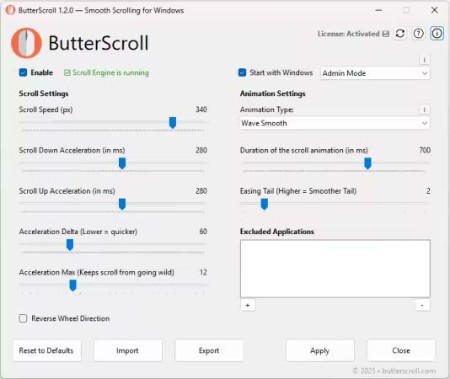
ButterScroll 1.5.2 | File Size: 8.6 MB

Smooth scrolling on Windows just got better. Smooth scrolling for Windows is what ButterScroll is all about. It enhances how your mouse scrolls using custom speed and easing settings.

Looking for smooth scrolling windows experience? ButterScroll delivers exactly that.

Smooth scrolling functionality to all mice.
ButterScroll enhances your everyday scrolling experience with buttery-smooth scrolling precision, customizable control, and a satisfying feel across all your Windows apps - from browsers to spreadsheets.

Easy to setup and use
Smooth, fluid scroll animations for all apps.
Works with any mouse - no extra hardware needed.
Adjustable speed, acceleration, and easing.
Lightweight and optimized.
No tracking, no ads, full privacy control.

What's New
official site does not provide any info about changes in this version.

HomePage:
Код:
https://butterscroll.com/

-:DOWNLOAD FROM LINKS:-​
RapidGator
Код:
https://rapidgator.net/file/89ab48d9ae9963849aed9b4c268ec789/

NitroFlare
Код:
https://nitroflare.com/view/7C77A963AC0C5EB/
 

a8dd1e77f3f71b1b11f7586de32a7d61.jpg


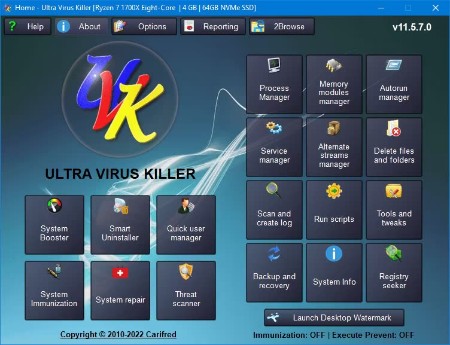
Carifred Ultra Virus Killer Pro 11.10.25 | File size: 27.7 MB

UVK is a powerful virus removal and Windows repair tool. With simple and intuitive interface, UVK allows users to detect and delete all types of malware and spyware from infected systems. It also includes lots of tools to repair windows after the disinfection.

Process manager
Filter all the running processes by their executable path.
Select and manage several processes at once.
Kill processes.
Kill several processes with the same path at once.
Kill processes and delete the parent files simultaneously.
Kill all the listed processes.
Kill all the listed processes except the system processes.
Kill all non trusted processes.
Pause and resume processes.
Verify the processes files signatures.
Search information about a process over the internet.
Submit one or more processes MD5 to VirusTotal using the VT API.
Open the processes files locations.
View the processes executable files properties.

Startup entries and scheduled tasks
Delete startup entries, scheduled tasks and corresponding files simultaneously.
Select and manage several entries at once.
Verify the startup entries files signatures.
Hide Microsoft signed files from the list.
Search information about a startup entry file over the internet.
Submit one or more startup entries files MD5 to VirusTotal using the VT API.
Jump to the registry key where the startup entry is located.
Open the startup entries files locations.
View the startup entries files properties.
Maximizable window in this section for a more comfortable view.

Windows services and drivers
Delete services or drivers, and the corresponding files simultaneously.
Perform all common service management tasks: Stop, start, pause, resume services, and set their startup type.
Select and manage several services or drivers at once.
Stop all non Microsoft services.
Choose the services and drivers to be displayed: Show all services and drivers. Hide inactive services and drivers, Hide Microsoft services and drivers, Hide inactive and Microsoft services and drivers.
Verify the services/drivers files signatures.
Search information about a service/driver file over the internet.
Submit one or more services/drivers files MD5 to VirusTotal using the VT API.
Jump to the registry key where the service/driver is located.
Open the service/driver file location.
View the service file properties.
Maximizable window in this section for a more comfortable view.

Delete or replace file or folder
Delete files and folders even if they're being used by applications.
Delete running executable files.
Delete files and folders you can't normally delete using the Windows explorer.
Choose to whether delete the files definitely or move them to the recycle bin.
Replace or copy files.
Expand compressed files.
Replace files even if they are loaded in the memory.

Scan & create log
Perform a full analysis of your system and save it to a text file that you can send to a friend or professional, post in a forum, or analyze it yourself.
Choose the areas you want to scan and show in the log.
Choose whether to show Microsoft signed files in the log.
Choose where to save the log.
Choose whether to verify the scanned files digital signatures.
Search for recently created files, and write them to the log.
Perform other custom scans, live retrieving specific information on files, folders, registry entries, or automatically get the VirusTotal analysis result for a file.

Run UVK Scripts
Disinfect your computer by pasting lines from the UVK log to delete corresponding registry entries and files.
Use custom commands to download files, execute programs, delete or add registry entries, terminate processes, delete files and folders, run cmd batch scripts, register system files or run the UVK Fixes.
Create system restore points, empty the recycle bin and all users temporary folders.
Create and run scripts that perform complete system repair and maintenance.
Automatically run any of the UVK fixes or scans.

UVK tools
Retrieve al sorts of information on any file.
Generate VirusTotal MD5 reports, deny or grant access or perform an sfc scan for any file.
Search information on files and registry entries over the internet.
Grant access or prevent changes to registry keys.
Enumerate all the restore points.
Select and delete one or several restore points.
Create system restore points.
Enable or disable the system restore.

UVK System repair
Fix your computer with more than fifty exclusive fixes: Fix file extensions, register system dlls, enable and repair Windows update, clear dns cache and the hosts file, reset user default registry settings, fix installation problems, empty all browsers cache, reset security settings, defragment and optimize the hard drives, install Java, Flash, DirectX, .Net Framework, Fix the WMI and the system restore, delete all restore points, fix the windows shell, reset the user shell folders and much more.

System Info
Show information that can be very useful specially if you're going to reinstall windows or if you need to diagnose a performance or hardware problem. This includes the processor, memory and page file usage, OS and office product keys, and hardware and users info.
Export this info to a comprehensive html file.

UVK immunization
Prevent the most vulnerable registry and file system areas from being infected.
Prevent adding programs to the windows startup and logon.
Prevent creating/deleting browser helper objects, Internet explorer toolbars and search providers.
Prevent modifying the internet settings and the Internet explorer startup pages.
Backup and restore the Windows registry.

HomePage:
Код:
https://www.carifred.com/

-:DOWNLOAD FROM LINKS:-​
RapidGator
Код:
https://rapidgator.net/file/70c32a51b44fdb822fdb5e74dff087ab/

NitroFlare
Код:
https://nitroflare.com/view/1BB7CCD1DE81721/

 

f1ffd2c9fbea6b3f6801658fb251ba92.png


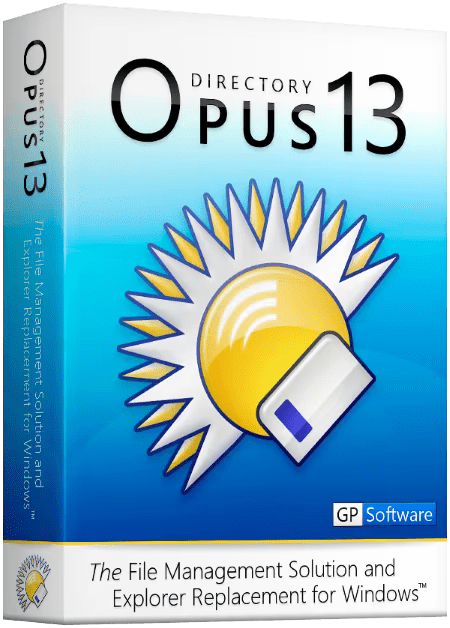
Directory Opus 13.22.12 Beta Multilingual | Windows x64 | File size: 29.16 MB

Are you frustrated by the limitations of Windows Explorer? Directory Opus provides a complete Explorer Replacement with far more power and functionality than any other file manager available today.

Just some of the features include
- Single or dual pane file display and folder trees
- Tabbed interface let you keep multiple folders open and switch quickly between them
- Unique Explorer Replacement mode provides a full replacement for Windows Explorer
- Quickly filter, sort, group and search your folders
- Color-code your files, assign status icons, star ratings, tags and descriptions
- View images, documents and more. Image marking lets you sort your photos quickly and easily
- Batch renaming including easy-to-use keyboard macros
- View and edit file metadata
- Support for FTP and archive formats like Zip, 7Zip and RAR
- Built-in tools including synchronize and duplicate file finder
- Calculate folder sizes and print or export folder listings
- Queue multiple file copies for improved performance
- Fully configurable user interface - colors, fonts, toolbars, keyboard hotkeys, and a full scripting interface let you tailor Opus exactly to suit your needs
- Efficient, multi-threaded, modern design. Supports the latest 4K monitors.

What makes Opus unique?
Built for speed
Opus is written in native C++ multi-threaded code; compiled for the latest 64 bit CPUs, with high performance our number one design principle.
Fully configurable
Change the colors. Change the fonts. Change the toolbars and menus. Set up hotkeys. Opus adapts to how you want to use it.
Makes file management a breeze
Powerful searching, sorting, grouping, labelling and tagging features let you take control of your files like never before.
Endlessly extensible
Work with third-party tools as easily as with the built-in features. A full scripting interface, including scriptable dialogs, means your imagination is really the only limit.
Replace Windows Explorer and don't look back
Our unique Explorer Replacement mode provides a full replacement for Windows Explorer.
Single or dual pane file display and folder trees
Tabbed interface let you keep multiple folders open and switch quickly between them
Integrated viewer, metadata editor and utility panel
Built-in tools including synchronize and duplicate file finder
Leverage indexed search engines like Windows Search and Everything

What's new
Код:
https://www.gpsoft.com.au/program/whatsnew.html

Windows Requirements: Windows 11, 10, 8, 7, Vista, and Server versions

HomePage:
Код:
https://www.gpsoft.com.au/

-:DOWNLOAD FROM LINKS:-​
RapidGator
Код:
https://rapidgator.net/file/ae413257f1338283ddf477e436ddee7f/

NitroFlare
Код:
https://nitroflare.com/view/457D68A9A1A3FDE/
 

6138ab2a8272c1fbed4b4bbdefc202e5.png


Easy Gamer Utility PRO 1.3.97 | File size: 1.6 MB

Easy Gamer Utility is an easy-to-use program for Windows that will do a variety of things on your PC to help fix gaming issues, performance issues, and general optimization! The best tool to improve your Windows gaming experience!

Easy Gamer Utility can help to fix issues when playing games on your PC such as crashing, loading, not launching, graphics issues, and errors.

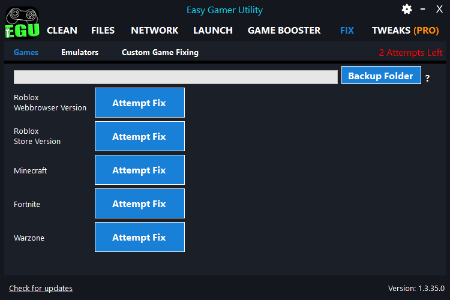
We have the Fix tab where you can use one click of a button to attempt to fix both the Roblox web and Roblox App versions, Minecraft, Fortnite, or Warzone.
You will be allowed 2 attempts on the free version, and more buttons will be added soon.
All changes will be saved into a backup folder which you can easily restore.

We also have the new custom game-fixing button. This is where you can browse for a games .exe file and click on the "Attempt Fix" button to try and fix any game of your choice.
This is also a trial on the free version and counts toward your 2 attempts.

Easy Gamer Utility PRO
Remove cache files
Locate game files
Remove old GPU drivers
Network troubleshooting options
Change game priority
Analyze game files
Fix Roblox button (UNLIMITED)
Fix Minecraft button (UNLIMITED)
Fix Fortnite button (UNLIMITED)
Fix Warzone button (UNLIMITED)
Fix Any Game button (UNLIMITED)
Deep Fix/Analyze Game button
Check game server status
Force games in High Priority
Clean game junk files
Enter Windows Troubleshoot & Bios
Remove Network Adapters
Launch a game on Windows startup
Automatic Updates
System Tweaks
Auto-Clean Cache on startup

Whats New
Updates: official site does not provide any info about changes in this version.

HomePage:
Код:
https://computersluggish.com/downloads/easy-gamer-utility/

-:DOWNLOAD FROM LINKS:-​
RapidGator
Код:
https://rapidgator.net/file/fb49347d319133f57a86907d7287e0e7/

NitroFlare
Код:
https://nitroflare.com/view/4AEFFC65635C238/
 

0a74ba4544729dbb503989a56e7b302e.jpg


EduIQ Network LookOut Administrator Pro 5.5.3 | Windows x86/x64 | File size: 99.22 MB

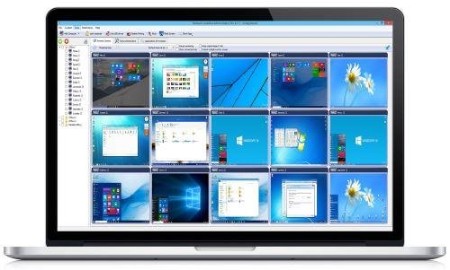
Network LookOut Administrator lets you see all your employee PC screens without leaving your desk. Monitor the activity of all the PCs in your company remotely and execute several administrative actions with just one click.

Main Features
• Displaying a live picture of an employee PC.
• You can take a control of a network PC by controlling its mouse and keyboard.
• More remote screens can be displayed in a table.
• PC desktops can be organized in groups
• A remote screen can be zoomed to an actual size.
• The name of the connected user is displayed.
• Power on/off, restart, hibernate, suspend PCs
• Log off desktop users
• Lock workstation
• Clear desktop
• Control screen-saver
• Block applications
• Mute PCs
• Limit employee PC audio volume level
• Disable printing
• Disable Ctr+Alt+Del
• Blank screen
• Start program on network connected PCs and see the output
• Open web page on network connected PCs
• Multi-monitor support
• Control over running processes and applications
• You can lock employee PCs
• When lower bandwidth is required, the refresh interval can be enlarged.
• Settings for the agent are encrypted and password protected.
• Connection to an employee PC is encrypted and password protected.
• Access to monitoring console is password protected. If more users use the same PC then different profiles and access passwords can be set.
• More monitoring consoles can be connected to the same employee PC, so you can monitor your employee from different offices.
• Agent can be remotely installed.
• Fast users switching is supported.
• Multi-session support for Remote Desktop, Terminal Services, Citrix,...

What's new
• official site does not provide any info about changes in this version

HomePage:
Код:
https://networklookout.com/

-:DOWNLOAD FROM LINKS:-​
RapidGator
Код:
https://rapidgator.net/file/32770defaaad051c59fd040e9a8e27f2/

NitroFlare
Код:
https://nitroflare.com/view/C3FEA133AF1749C/
 
Назад
Сверху Снизу