Latest Software Collection (Updated Daily)


61a43f4804cf719323cb443bd6af9ee1.png


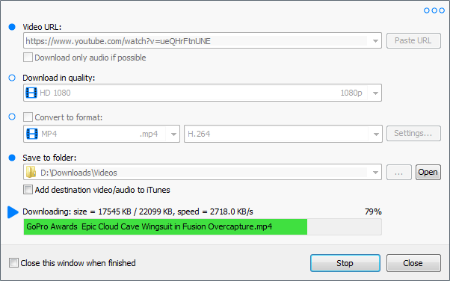
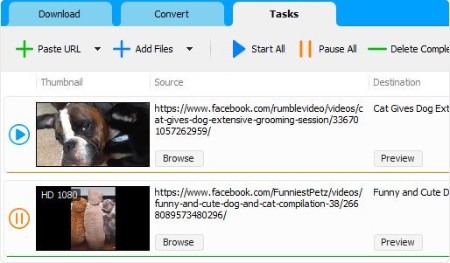
Robin YouTube Video Downloader Pro 7.3.5 (x64) | File size: 73.8 MB

YouTube Video Downloader is a small Windows app for downloading and converting videos from YouTube, Facebook, Dailymotion, and thousands of other video sharing sites. It accelerates your download by up to 5 times.

Features
Download video from YouTube and thousands of other video sites
YouTube Video Downloader can download videos from YouTube, Facebook, Dailymotion, Vimeo, Vine, Metacafe, and thousands of other video sites.

Accelerate download by up to 5 times
YouTube Video Downloader features an advanced download acceleration engine that lets you download video up to 500% faster than normal speed.

Download UHD 4K, QHD 2K, FHD 1080p, HD 720p, and 3D video from YouTube
YouTube Video Downloader can download 4K Ultra HD, 2K Quad HD, 1080p Full HD, 720p HD, and 3D video from YouTube if it is available.

Download only audio stream from YouTube
YouTube Video Downloader allows you to download only audio stream from YouTube, without downloading the entire video file.

Convert downloaded video to any format
YouTube Video Downloader can automatically convert downloaded video to the format that you specify. It supports MP4, FLV, WMV, MOV, ASF, AVI, DV, M4V, MKV, MPG, OGV, SWF, TS, VOB, WEBM, DVD, VCD, SVCD, and many other formats.

Optimize downloaded video for any device
YouTube Video Downloader automatically converts and optimizes downloaded video for your mobile/desktop device, so you can watch it smoothly on your iPhone, iPad, iPod, Android phone, Android tablet, Xbox, PSP, PS4, PS3, Samsung Galaxy, or other device.

Extract audio stream from video
YouTube Video Downloader allows you to extract audio stream from video, and save it as MP3, WAV, WMA, AC3, AAC, OGG, M4A, FLAC, MP2, or any other audio format.

Ready-made presets
YouTube Video Downloader provides ready-made presets for all popular video and audio formats. You can also custom output video/audio format settings.

iTunes compatible
Optionally, YouTube Video Downloader can automatically add downloaded video/music to your iTunes library, so you can easily synchronize your videos and music to your iPhone, iPad, iPod, etc.

Integrate with Internet Explorer and Firefox
YouTube Video Downloader adds download button and menu commands to the toolbar and the context menu of your browser, so you can download and convert any video with just one click.

Support drag-and-drop
You may directly drag and drop video link/URL from your browser to the main window of YouTube Video Downloader to start download, you don't even need to copy and paste video URL manually.

Whats New
Updates: official site does not provide any info about changes in this version

HomePage:
Код:
https://www.robinsoftware.com

-:DOWNLOAD FROM LINKS:-​
RapidGator
Код:
https://rapidgator.net/file/c2ab3fba70c89502360a29b3c628953f/

NitroFlare
Код:
https://nitroflare.com/view/1DA8BAED32391BE/
 

4b40caa7e89740edffa8b46e0cea24a8.jpg


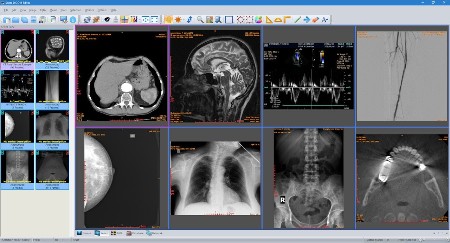
Sante DICOM Editor 10.4 | File size: 171.1 MB

Sante DICOM Editor is a professional DICOM editor, viewer, anonymizer, converter, dicomizer, PACS client, mini PACS server, patient CD/DVD burner (with viewer) and much more.

The unique viewer
Sante DICOM Editor is not a "yet another DICOM viewer" constructed with freely available libraries such as dcmtk, itk and vtk, like hundreds of other DICOM viewers which differ from each other only in the appearance, menus, panels and dialog boxes. It is a unique program with unique capabilities, designed and developed in-house by us, from the ground up, with the most advanced programming tools and it is the result of research and development on DICOM imaging of the last two decades.

The powerful editor
Sante DICOM Editor is the industry-leading post processing application for DICOM file editing, conversion and handling, it is used by almost all the large corporations and medical equipment manufacturers, and it is the DICOM editor of choice of the greatest universities and hospitals of the world. Among others, it lets the user to edit and modify DICOM files, to add and remove attributes, and even edit and modify sequence attributes.

Features and benefits
Powerful DICOM workstation, viewer and editor
Perpetual license that never expires.
Free updates and free technical support for product's lifetime
PACS client that supports all the DICOM network services (C-FIND SCU/SCP, C-MOVE SCU/SCP, C-STORE SCU/SCP, C-GET SCU/SCP, C-ECHO SCU/SCP)
It can be used as a mini PACS server as well
(the number of stored patients/studies depends on disk size only)
Command line switches for integration with PACS servers (learn more.)
Support of all charsets (latin, chinese, japanese, korean, cyrillic, arabic, greek, turkish, etc.)
Compatible with all modalities (CT, MR, NM, US, XA, MG, CR etc.), all manufacturers and all DICOM 3.0 and NEMA 2 file types.
Editing and modification of DICOM files (even of sequence attributes)
Simultaneous editing of all DICOM files of a series/study
DICOMDIR editor
Dual monitor support (new in version 6, learn more.)
Structured Report support (new in version 6.3)
Presentation State file editor
Structured Report file editor
Printing to DICOM printers and Windows printers
DICOM to DICOM conversion, DICOM file modification (transfer syntax, image width and height, color depth, frame insertion, removal, sorting, etc.)
Built-in Anonymizer, burned-in annotations removal (Patient data de-identification, suitable as well for avoiding issues with the GDPR regulation 2016/679 of EU)
Built-in Dicomizer: DICOM file creation from video files (avi, wmv) and plain image formats (jpeg, jpeg2000, tiff, bmp, and png)
Ultrasound region calibration module support (calibrated Ultrasound measurements)
Merging of DICOM files
Creation of DICOM CD/DVD disks with viewer
Support of Epson and Primera CD/DVD Disk Publishers (robots)
Contrast Agent Probe

Whats New
Код:
https://www.santesoft.com/win/sante-dicom-editor/whats_new.html

HomePage:
Код:
https://www.santesoft.com/

-:DOWNLOAD FROM LINKS:-​
RapidGator
Код:
https://rapidgator.net/file/28c390b826e424e98f0e25c123759530/

NitroFlare
Код:
https://nitroflare.com/view/D49D0B45CFF9B09/
 

189d5de05685955a04f0a2d57642511e.png


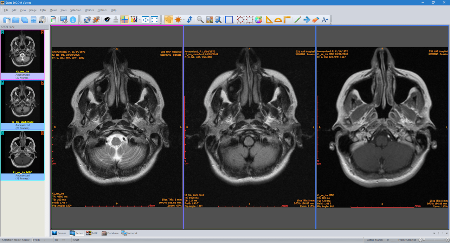
Sante DICOM Viewer Pro 14.4 | File size: 168.1 MB

Sante DICOM Viewer Pro is a professional DICOM viewer, anonymizer, converter, PACS client, mini PACS server, patient CD/DVD burner (with viewer) and much more.

The unique viewer
Sante DICOM Viewer Pro is not a "yet another DICOM viewer" constructed with freely available libraries such as dcmtk, itk and vtk, like hundreds of other DICOM viewers which differ from each other only in the appearance, menus, panels and dialog boxes. It is a unique program with unique capabilities, designed and developed in-house by us, from the ground up, with the most advanced programming tools and it is the result of research and development on DICOM imaging of the last two decades. Sante DICOM Viewer Pro has been developed since 1999 and it is one of the most popular professional DICOM viewers worldwide.

Features and benefits
Powerful DICOM workstation and viewer
Perpetual license that never expires.
Free updates and free technical support for product's lifetime
PACS client that supports all the DICOM network services (C-FIND SCU/SCP, C-MOVE SCU/SCP, C-STORE SCU/SCP, C-GET SCU/SCP, C-ECHO SCU/SCP)
It can be used as a mini PACS server as well
(the number of stored patients/studies depends on disk size only)
Command line switches for integration with PACS servers (learn more...)
Easy to use with native Windows "look and feel"
Support of all charsets (latin, chinese, japanese, korean, cyrillic, arabic, greek, turkish, etc.)
On-line, case sensitive help
Compatible with all modalities (CT, MR, NM, US, XA, MG, CR etc.), all manufacturers and all DICOM 3.0 and NEMA 2 file types.
Supports also jpeg, jpeg2000, tiff, png, and bitmap image formats
Dual monitor support (new in version 10, learn more...)
Structured Report support (new in version 10.3)
Built-in DICOM File Editor
Built-in DICOM Multi-File Editor
Full support of DICOMDIRs (view, open, create, edit, image/series selection for viewing or/and for transferring in another folder)
Built-in Anonymizer (Patient data de-identification, suitable as well for avoiding issues with the GDPR regulation 2016/679 of EU)
Scout image/localizer support
Support for Overlays
Study comparison side-by-side
Printing to DICOM printers and Windows printers
Creation of DICOM CD/DVD disks with viewer
Support of Epson and Primera CD/DVD Disk Publishers (robots)
Advanced ROI selection tools (free hand, magic wand, eye-dropper, rectangle, circle, ellipse, polygon)
Statistical analysis of ROIs (pixel count, min value, max value, mean value, standard deviation, area, volume)
Synchronized frame view between the series
Synchronized level-window between the series
Synchronized field of view between the series
Measurement tools (distance, angle, cobb angle, polyline, area, volume)
Ultrasound region calibration module support (calibrated Ultrasound measurements)
Annotation texts and arrows
Interpolated (smooth) zoom and advanced zoom tools (e.g. zoom dynamic, zoom window)
Comparison of DICOM files tag by tag
Built-in Hexadecimal File Editor
Built-in Hexadecimal DICOM Viewer
File searching with criteria (patient name, study ID etc.), within hard disk's or CD's folders
File searching by tag's existence and/or tag's value, within hard disk's or CD's folders
External DICOM dictionary support
Image orientation (flip, rotate)
Image and canvas resizing
Image processing filters (blur, sharpening, convolution masks, min mask, max mask, median mask etc.)
Subtraction filter for DSA
Video (wmv) creation with or without annotations
Batch convert to image formats (JPEG, TIFF, BMP, PNG, etc.)
Batch anonymizing, with ability of burned-in annotations removal
Export DICOM Headers to text files
Orthogonal Multi-planar Reconstruction (MPR)
Easy to use with native Windows "look and feel"
Windows 11/10/8.1/8/7/ and Vista compatible

Whats New
Код:
https://www.santesoft.com/win/sante-dicom-viewer-pro/whats_new.html

HomePage:
Код:
https://www.santesoft.com/

-:DOWNLOAD FROM LINKS:-​
RapidGator
Код:
https://rapidgator.net/file/2d8c19077c5853d3e41ea4bc79441c48/

NitroFlare
Код:
https://nitroflare.com/view/BD6E2A8B11D23C8/
 

f04650b20da5c1d7e426c4901faa6b07.jpg


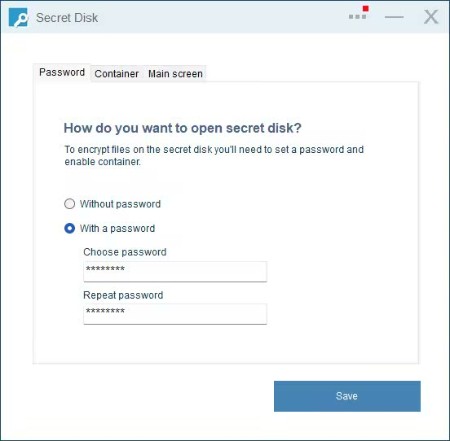
Secret Disk Professional 2026 v322 Multilingual | Windows x64 | File size: 4.32 MB

Creates an additional password-protected secret disk. Our application creates a special disk on your computer which can be completely hidden. You don't have to re-format your existing disks or make any changes to your current configuration. A secret disk will appear and disappear with one click.

A secret disk is a special kind of disk and access to it can be protected with a password. It's a very good place to store your sensitive files and folders - a disk that appears and disappears in a second, plus, it is protected with a password. However, in some cases you don't need this extra protection, and you can disable this function and use the disk without a password.

What's new
Код:
https://privacyroot.com/apps/freeware/tools-en-whatsnew-sede-.php

HomePage:
Код:
https://privacyroot.com/

-:DOWNLOAD FROM LINKS:-​
RapidGator
Код:
https://rapidgator.net/file/f718f6e26b7e8231fefca968e6561464/

NitroFlare
Код:
https://nitroflare.com/view/37C9E8938D9249D/
 

f4d0b9919e33df4dd7cccdaa63db9ef4.jpg


Social Media Downloader 8.3.5 (x64) | File size: 146.2 MB

Social Media Downloader is a simple and easy-to-use app for downloading and converting your favorite videos and audio from social web sites.

Whats New
Updates: official site does not provide any info about changes in this version

HomePage:
Код:
https://www.socialmediaapps.com/

-:DOWNLOAD FROM LINKS:-​
RapidGator
Код:
https://rapidgator.net/file/68a20771c558a669cd7ee500f1432589/

NitroFlare
Код:
https://nitroflare.com/view/E31D94B6E350A1F/
 

f0ebadd000dd3d61ab3c16bc83fe917a.jpg


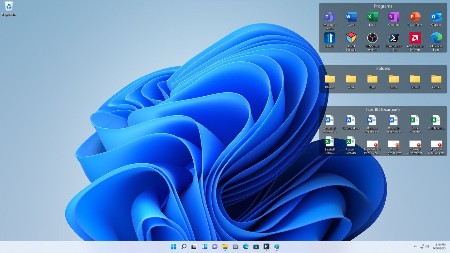
Stardock Fences 6.46 (x64) Multilingual | File size: 23.4 MB

Fences is a program that helps you organize your desktop. It can hide icons when they are not in use as well as make it easy to place icons into moveable groups called "fences". Fences is the world's most popular desktop enhancement for Windows®. What makes it so compelling is that what it does is so obviously useful and necessary that it is amazing that no one has thought of it before.

Create shaded areas to organize your desktop
Peek brings your fences on top for instant access
Roll up fences to the Title-bar for cleaner desktops
Define rules to organize your desktop icons
Swipe between multiple pages of fences
Designed to match Windows 10 and Windows 11 themes

Organize your PC by automatically placing your shortcuts and icons into resizable shaded areas on your desktop called fences that are designed to match Windows 10 and 11. Fences has many customization features that make it the world's most popular desktop enhancement.

Fences Peek
Instantly access your files, folders, and applications with Peek by pressing Winkey + Space to bring your fences on top of all your windows. Save time and be more productive by creating folder portals to make accessing frequently used content only a Peek away.

Roll up Fences
Eliminate clutter from your desktop, but keep your fences where it's easy to find them with our roll-up feature! Double-clicking on a fence's title-bar will "roll up" the rest of the fence into it, saving you valuable space on your desktop. To reveal your fence, you can move your mouse over the title-bar or double-click it again to view all of the icons as normal.

Folder Portals
Fences can act as a portal to any folder on your PC. For example, your documents or pictures folders can be mirrored onto your desktop as a fence enabling quick access to their contents without adding clutter to your desktop.

Customize your Fences
Quickly personalize the labels, background colors, and transparency of your fences from the easy-to-use configuration menu.

Desktop Quick-hide
Instantly clean up your desktop. Double-click any blank space on your desktop and your desktop icons will fade out. Double-click again and they will return. You can even pick icons and individual fences to exclude.

Desktop Pages
Create multiple pages of fences on your desktop and quickly swipe between them. To change to a different desktop page, just take your mouse cursor to the edge of your screen and click and drag. Then a new page of fences will be displayed. This feature provides greater control over how you can organize favorite programs, documents, websites and more.

System Requirements
Windows 11/10

Whats New
Код:
https://www.stardock.com/products/fences/history

HomePage:
Код:
https://www.stardock.com/

-:DOWNLOAD FROM LINKS:-​
RapidGator
Код:
https://rapidgator.net/file/514cf59864aff066b0e13e9fef4ea18d/

NitroFlare
Код:
https://nitroflare.com/view/5A47EA6A007C6E5/
 

ad0a4b0560deeecba35f595bbb21d8f5.png


TominLab WonderPen 3.1.1.8400 | File size: 138.7 MB

WonderPen is a writing app for both professional and amateur writers.

Features
- Tree view, drag-and-drop to reorder.
- An easy-to-use text editor that supports Markdown.
- Supports full-screen mode, lets you focus on writing.
- Docs can be exported as Image, PDF, Word, HTML, etc.
- Support whiteboard mode, in which you can add any note, table, kanban and other information.
- Auto save while editing. You can backup all docs as a single file and restore from it later.
- Add memo for each doc.
- Focus on one node of the doc tree.
- Search in all docs.
- Darkmode support.
- Data can be backed up automatically, and import and export are supported.

Whats New
Updates: official site does not provide any info about changes in this version

HomePage:
Код:
https://www.tominlab.com/en/wonderpen

-:DOWNLOAD FROM LINKS:-​
RapidGator
Код:
https://rapidgator.net/file/38fea3261870ebb1c7b7c9912e36742a/

NitroFlare
Код:
https://nitroflare.com/view/BEAC252254A6A71/
 

2e0af6f0c5e6ef2eb59377c8e4fe9fa7.jpg


Acronis True Image Build 42980 Bootable ISO | File size: 498 MB

Combining reliable backup with proven anti-malware technology, our unique cyber protection solution effectively safeguards all of your data, apps and systems.

Anywhere Access
Retrieve any file from your cloud backup, wherever you are, on any device. Manage backups remotely. Enjoy secure file sync and share.

Innovative Protections
The only personal backup solution that uses AI to stop ransomware and cryptojacking in real time. Offers blockchain data notarization.

Enhanced Vision
How we access and use data is constantly changing, as are the threats to that data. Your protection must evolve too. With 100+ enhancements and new features, Acronis True Image 2020 keeps you current.

Automated Dual Protection
Back up locally while simultaneously replicating it in the cloud so you've always got a secure off-site copy for recovery.

Tray Notification Center
Messages pushed to your desktop tray enable you to monitor the status of backups so you can quickly respond to any issues.

Custom Power Management
Avoid draining your battery by efficiently managing laptop backups. Set a minimum power level or block backups on battery power.

Back Up on Select Wi-Fi
Where you back up is your choice. Now you can easily avoid the metered connections and public networks that put data at risk.

Improved Cloud Restores
Enjoy faster performance and a more intuitive experience. Enhanced for even easier navigatation.

Efficient, All-in-one Protection
Using multiple solutions to protect your data? Then you're paying more for a patchwork that creates gaps in your defense. Acronis True Image 2020 delivers the power of integration, with data protection, cybersecurity, and management features you control from a single intuitive dashboard.

Versatile
Back up what you want, how you want with tools like mirror imaging, file/folder-level backups, active disk cloning, cloud-to-cloud Office 365 backups, event-based scheduling, non-stop backups, and automatic replication of local backups in the cloud.

Flexible
Control where you store your data, whether it's locally on an external hard drive, network folder or NAS device, off-site in the cloud, or a combination to ensure total protection. Approve specific Wi-Fi networks to avoid potential problems.

Visual
Know everything about your backup at a glance. Monitor the status of backups with push notifications to your desktop tray. See file sizes, backup speeds, and color-coded displays of the type of data stored with our visual dashboard.

Compatible
Safeguard your data regardless of where it lives with a solution that supports the latest versions of Windows, Mac, iOS and Android devices, as well as virtual machines. Our integrated anti-malware defense is 100% compatible with other anti-virus software.

HomePage:
Код:
https://www.acronis.com/

-:DOWNLOAD FROM LINKS:-​
RapidGator
Код:
https://rapidgator.net/file/d7305dda8916bb118bcf84e25f09ef93/

NitroFlare
Код:
https://nitroflare.com/view/FE6841532252B4A/
 

57270f4243947ae891562f8548e6a21d.jpg


ActivePresenter Professional Edition 10.1.2 Multilingual | Windows x64 | File size: 169.47 MB

ActivePresenter is a solution for creating screencast videos, handouts, manuals, documentation, and interactive training presentations. With the full-featured editor, ActivePresenter allows you to edit audio/video, tweak the look and feel of content, and define the branched scenarios easily and effectively. Supporting the latest web standard HTML5 and the ability to integrate with Learning Management Systems, the content created with ActivePresenter can be delivered virtually to any devices and platforms.

Quick & Easy
You can even just record the screen and publish to desired output without additional editing thanks to smart capture technology.

Feature-rich
ActivePresenter integrates almost features which are usually used in screencasting making the authoring process become more creative.

Cost effective
Create engaging interactive screencasts, software demos and SCORM-compatible training courses with less time and effort.

Who should use ActivePresenter?

Educators & Students
ActivePresenter can help educators demonstrate and teach the use of software features. Students can record video and audio as they demonstrate the proper procedure to solve a problem on an interactive whiteboard.

Corporate Training Personnels
With SCORM-compliant output, ActivePresenter is suitable for authoring interactive eLearning/eTraining courses which can be easily imported into enterprise training systems. Training personnel can easily track and evaluate learners' performance.

Anyone
It is easy to create screencast videos, presentations, and documents to share on popular video/slide sharing sites such as YouTube, SlideShare, Vimeo.

What's new
Код:
https://atomisystems.com/updates/ActivePresenter/v10/releasenotes_v10.html

Windows 11, 10, 8.1 (64-bit only)

HomePage:
Код:
https://atomisystems.com/

-:DOWNLOAD FROM LINKS:-​
RapidGator
Код:
https://rapidgator.net/file/ea002b1d24044775960863853e63328a/

NitroFlare
Код:
https://nitroflare.com/view/6A3E1ADF5A1EEC7/
 

dc961e8251ee2561a06259a0bb3b8676.jpg


AIDA64 8.30.8300 Multilingual | All Editions | File Size: 196 MB

AIDA64 offers you a tool for this task, called System Stability Test. It uses the AIDA64 Benchmark Module, which is heavily optimized for all 32-bit and 64-bit x86 processors. Thanks to this it can put an excessive load on the system, driving all parts of the CPU to the maximum, yielding in very high levels of power usage and heat dissipation. With the System Stability Test you can diagnose the stability and reliability of your PC. You can also verify the cooling performance with realtime updated graphs measuring temperatures, fan speeds and voltage levels.

Measurement statistics are available to register the minimum, maximum and average sensor readings while running the stress test. When you build a new computer, overclock or tune one, or when you experience mysterious freezes and system failures, you need to test the system for stability under heavy load to find the weak point or a faulty hardware component.

Extreme Edition is a streamlined Windows diagnostic and benchmarking software for home users. It provides a wide range of features to assist in overclocking, hardware error diagnosis, stress testing, and sensor monitoring. It has unique capabilities to assess the performance of the processor, system memory, and disk drives. AIDA64 is compatible with all current 32-bit and 64-bit Microsoft Windows operating systems, including Windows 10 and Windows Server 2016.

Business Edition is an essential Windows network management solution for small and medium scale enterprises. It provides a wide range of features to compile, manage, and analyse hardware and software inventory of corporate computer networks. Its capabilities cover local and remote system diagnosis, network monitoring, remote control, and license management. AIDA64 is compatible with all current 32-bit and 64-bit Microsoft Windows operating systems, including Windows 10 and Windows Server 2016.

CPU, memory and disk benchmarks
Implements a set of 64-bit benchmarks to measure how fast the computer performs various data processing tasks and mathematical calculations. Memory and cache benchmarks are available to analyze system RAM bandwidth and latency. Processor benchmarks utilize MMX, 3DNow! and SSE instructions, and scale up to 32 processor cores. For legacy processors all benchmarks are available in 32-bit version as well. AIDA64 Disk Benchmark determines the data transfer speed of hard disk drives, solid-state drives, optical drives, and flash memory based devices.

Temperature, voltage and cooling fan monitoring
Supports over 150 various sensor devices to measure temperatures, voltages, fan speeds, and power draw. Measured values can be displayed on System Tray icons, OSD panel, Sidebar Gadget, and Logitech G15/G19 Gaming Keyboard LCD. The values can also be logged to file or exported to external applications such as RivaTuner or Samurai. AIDA64 can also alarm the user when it detects overheating, over-voltage, or cooling fan failure.

Hardware diagnostics
AIDA64 has the most accurate hardware detection capabilities in its class, to provide detailed information on the computer internals without the need to open it up. The hardware detection module is strengthened by an exhaustive hardware database holding over 115,000 entries. Additional modules are available to overview processor frequencies, check CRT and LCD display status, and stress the system to reveal potential hardware failures and thermal issues.

Software and operating system analysis
Provides over 50 pages of information on installed programs, software licenses, security applications, and Windows settings. List of started processes, services, DLL files, startup programs, and visited web pages is also available.

Languages
Albanian, Arabic, Belarusian, Bosnian, Bulgarian, Catalan, Croatian, Czech, Danish, Dutch, Estonian, English, Finnish, French, German, Hungarian, Indonesian, Italian, Japanese, Korean, Latvian, Lithuanian, Macedonian, Norwegian, Polish, Portuguese (Brazil), Portuguese (Portugal), Romanian, Russian, Serbian (Cyrillic), Serbian (Latin), Simplified Chinese, Slovak, Slovenian, Spanish, Swedish, Traditional Chinese, Turkish, Ukrainian.

Whats New
AIDA FPS
APX optimized SHA3 benchmark for Intel Diamond Rapids and Nova Lake
Turing (Turzx) 4.6-inch and 12.3-inch LCD support
Support for Intel Core Ultra 250K Plus and 270K Plus (aka Arrow Lake-S Refresh)
Improved support for Intel Wildcat Lake and Nova Lake CPUs
Preliminary support for AMD Zen 6 based APUs
Aqua Computer Ampinel and Thermal Grizzly WireView Pro II sensor support
Advanced support for Adaptec RAID controllers
USB-NVMe passthrough support for Realtek RTL9220
Support for EXPO 1.2 memory profiles
GPU details for Intel Arc Pro B65 and Arc Pro B70
GPU details for nVIDIA RTX Pro 4500 Blackwell Server Edition

Editions: Extreme / Engineer / Business / Network Audit

HomePage:
Код:
https://www.aida64.com

-:DOWNLOAD FROM LINKS:-​
RapidGator
Код:
https://rapidgator.net/file/c44c662e4c87bd28861483f9f2b5813d/

NitroFlare
Код:
https://nitroflare.com/view/5E67712EFB290C7/
 

8487e4cec373ae341a705dca3ac81749.jpg


Ashampoo Burning Studio 2026 v1.27.2 Multilingual | File size: 110.8 MB

Ashampoo Burning Studio 2026 provides a comprehensive solution for burning CDs, DVDs, and Blu-rays. It efficiently writes various file types, including music and videos, to different media, inclkuding BDXL and high-security discs. Importing music CDs is straightforward, with automatic track identification and naming. Designing covers and cases is user-friendly. Copying audio CDs and other discs is seamless.

During ripping, playlists are created to maintain the desired music order. If a disc lacks sufficient storage, the disc spanning feature distributes data across multiple discs, allowing for secure storage and easy restoration of large photo, document, or music collections. The software also offers tools for creating and browsing disc images like ISO or CUE/BIN, complete with previews. Ashampoo Burning Studio 2026 includes a backup feature to secure files on CDs, DVDs, USB drives, or external hard drives. Backing up data from mobile devices, USB drives, and tablets is just a click away. A scratch protection function ensures that essential data remains readable even from damaged discs. The latest version reads CD-text data when available, utilizing it during the ripping process.

Compatible with all current Windows versions
Burn files to single or multiple CDs, DVDs and Blu-ray discs
Copy CDs, DVDs and Blu-ray discs
Burn scratch-protected discs
Back up cellphones, tablets or other external devices
Create audio CDs
Design and print covers and inlays for all disc types
Sleek new user interface

Whats New
Код:
https://www.ashampoo.com/en-us/burning-studio-2026

HomePage:
Код:
https://www.ashampoo.com/

-:DOWNLOAD FROM LINKS:-​
RapidGator
Код:
https://rapidgator.net/file/ba4cb6dcec4509bb9c63d2fa214d5d0b/

NitroFlare
Код:
https://nitroflare.com/view/36BA31D0B99075A/
 

1af6e90f680b71672b805b54296a915a.jpg


Ashampoo Burning Studio 27.0.2 Multilingual | File Size: 338.1 MB

The new Ashampoo Burning Studio 27 is the most comfortable way to burn your data securely and copy CD, DVD and Blu-ray discs without effort. Rip audio discs and back up your music or create your own music compilations with suitable cover art! Additional top-of-the-line multimedia features also let you create your own movies and slideshows, and even allow you to burn them to disc along with nifty animated menus. Say goodbye to data loss, back up your files instantly, and write important data to any disc type with powerful compression and password protection. And the new convenience features for audiobooks, audioplays, and podcasts guarantee high-quality entertainment!

Benefits at a glance
Professional-grade ripping with sample rates up to 48 kHz (e.g., WAV)
New AAC audio format support for ripping
Optional disc ejection after ripping
Improved CD database for more accurate results across all modules
Intelligent audiobook detection, even for multi-part files
New interface design with light and dark skins
Enhanced stability and security for reliable results every time
Extensive audiobook module
Best-of feature for quick source switching
More project versatility with intermediate buffering
Enhanced cover search
Greatly improved car radio support
Burn, copy and backup data with unbeatable ease of use
Create, cut and burn high-quality movies
Your photo memories as gorgeous slideshows
Create and burn audio discs complete with covers
Modern H.265 decoder for stunning video quality
Smart backup plans for reliable data backups
Perfectly arranged tracks in the best format for your car radio

High-end quality music
The reworked ripping module now delivers even better results. With higher sample rates up to 48 kHz, you'll create studio-grade audio files that meet professional standards. The new AAC format adds greater flexibility and compatibility with modern players and smartphones. And for even smoother workflows, the drive can now automatically eject the disc after each ripping process-perfect when digitizing multiple CDs in a row.

Smarter music and audiobook detection
The improved CD database ensures much more accurate title and album detection. This benefits every module that relies on CD information-from ripping to cover design. The audiobook module has also been enhanced: Multi-part audiobooks with incomplete or conflicting metadata are now automatically recognized and correctly grouped. That means no more manual sorting-just perfectly structured chapters right away.

New design, same clarity
Ashampoo Burning Studio 27 boasts a revamped interface that is modern, clean, and available in both light and dark themes. It can automatically adjust to your Windows settings for smooth integration. Behind the scenes, various optimizations enhance stability and security, ensuring full compatibility with the latest hardware, disc types, and Windows versions. The outcome: flawless burns, copies, and backups every time.

We're committed to our users!
Traditional disc burning may have become less common, but for many loyal users, it remains an essential medium for storage and archiving. That's why we continue to invest in development and incorporate customer feedback with every new version. Our goal is to ensure that Burning Studio remains technically up to date, supporting all modern formats, standards, and devices. When you choose Ashampoo, you can always count on quality, maintenance, and long-term support.

Backup your music discs and store your songs directly on your PC!
Need to extract audio from your music CDs? The clever disc ripping feature in Ashampoo Burning Studio extracts audio from music disc in a matter of minutes! Artist and genre are automatically recognized, there's no need for manual input. Turn audio CDs into high-quality audio files with meaningful file names and select from a variety of different formats! Naturally, you can then turn your files into music discs, along with equalizer and volume adjustments for an even better sound experience, and add your own cover designs. Sounds good? It is!

More audiobook goodness
Audiobooks, podcasts, and audioplays continue to be popular, and we'll help you make the most of them. Many audioplays are split up into dozens of smaller files, e.g. for easier marketing on Spotify. But who wants to skip through hundreds of files every time the player forgets the last playback position? With Burning Studio, you decide the length of your audio files, so listening becomes a fun and smooth experience again!

Ready for H.265-HEVC ready!
Codecs are the lifeblood of multimedia projects-and Ashampoo Burning Studio ships with a new star: H.265 (also called HEVC). This codec offers the same quality but 50% higher data compression rates compared to its predecessor! Take advantage of modern encoders and process your H.265 footage, e.g. shot with a digital camera, cellphone or action cam, effortlessly!

Disc ripping has always been super-comfortable and easy with Burning Studio. The program recognizes CD contents automatically and retrieves suitable metadata and cover artwork automatically for you. Burning Studio has seen a complete overhaul of this technology for better speed and exact matches, from covers, to artists, title names and more. It's the fastest and most convenient ripping feature of any Burning Studio yet!

The best plan for secure backups
Do you save your files in the cloud? Why not keep your files at home and burn them to CD, DVD or Blu-ray? The handy backup plans in Burning Studio do the heavy lifting for you. It's so easy to back up important data locally and the program can even remind you when the next backup is due! Managing backups is equally straightforward with one-click archive recovery and updates. It couldn't be any easier! And don't worry if your files don't fit on a single disc. Our disc spanning technology takes care of that and automatically spreads your archives across multiple volumes, along with compression and password protection for added security!

The sound for your music and audiobooks in your car
When you're burning discs for your car radio, picking the right format is crucial or you'll lose the song order or end up with a non-playable disc. The new Burning Studio puts and end to this nightmare! With now over 1800 presets and profiles for all common car radios, your discs will work the way you expect them to on any device. The program also supports multi-disc CD player emulators and both equalizer functionality and normalization. Song or audiobook, Burning Studio offers the best listening experience for your tracks on the go-and in the correct order!

The fast route to finished movie projects
Ashampoo® Burning Studio offers a short path to success for every project. When time is of the essence, it takes just a few clicks to combine images and videos with suitable music to create movies. No need for long-winded menu navigation and no additional manual work required. If needed, you can manually adjust image transitions and display durations for that extra bit of individuality - otherwise it's one more click and you're done!

The proper format for any movie!
Creating and burning movies with your PC is one of Ashampoo® Burning Studio's strong suits! To make movies compatible with retail players, they have to be converted into a suitable format. Burning Studio has got you covered with MPEG4, H.265 and AAC along with sound formats like MP3, WMA, OGG and more. Burn everything, from simple cellphone recordings to ambitious amateur movies, securely and in style with Burning Studio!

Recover data from surface-damaged discs-thanks to scratch protection
The proven scratch protection technology ensures your data stays safe. Scratches can render disc surfaces unreadable and files irrecoverable. Ashampoo Burning Studio takes the terror out of scratches by spreading multiple copies of your data across the disc along with an emergency recovery tool! This way, you can still recover your indispensable files and precious memories should a disc ever become scratched.

Process Disc images like ISO or CUE/BIN without effort
Working with disk images like ISO, CUE/BIN or our own ASHDISC is commonplace for professionals. Ashampoo® Burning Studio provides hassle-free support for all of these formats. Create, copy, burn and browse disk images with ease and enjoy the built-in preview for images. Naturally, creating disk images is fuss-free and anything but time-consuming.

Create perfect covers and artwork for any disc
Creating covers and inlays has always been a strong point of Burning Studio. The intuitive start menu sets you off in the right direction and has you select your favorite images right away. After that, it's step-by-step to the finished cover. To save time and effort, the import feature helps you analyze your disc and will automatically download the required metadata from the internet and create a suitable track list for you, if needed. Whether you need to quickly whip out a cover or design your own from the ground up, you won't be disappointed!

What's New
Код:
https://www.ashampoo.com/en/usd/pin/5810/burning-software/burning-studio-22

HomePage:
Код:
https://www.ashampoo.com

-:DOWNLOAD FROM LINKS:-​
RapidGator
Код:
https://rapidgator.net/file/a7ea62c99b2101ee77f58225115db577/

NitroFlare
Код:
https://nitroflare.com/view/5DF3B5C05720A85/

 

db3b3956013b4f71c0213d715ff648d2.jpg


Avast Premium Security 26.4.10932 Multilingual | File size: 814 MB

Avast Premium Security is an Avast product that offers antivirus protection and advanced security for your PC against online threats. It allows users to safely shop and bank online, avoid fake websites and phishing scams, block web spies, and more. Avast Premium Security also includes key features from Avast Internet Security and Avast Premier products, both of which no longer exist.

Avast Premium Security protects against all online threats, including spoofed websites and ransomware. Complemented by SafeZone technology, it creates an isolated virtual desktop, invisible to any possible attacker, where you can do your online shopping and banking securely.

The Avast award-winning and certified antivirus engine and shields stop even previously unknown threats - for peace of mind when you chat or spend time on Facebook, Twitter, or other websites.

The silent firewall stops hackers and other unauthorized entry attempts to your PC, to keep your data where it belongs - safe and sound. The antispam feature blocks both spam and sophisticated "phishing" attempts, to keep you from clicking "harmless" links that really can cause damage.

Safely shop and bank online
Spoofed (fake) websites are one of the oldest hacking tricks in the book. Avast Premium Security scans websites for security risks on both your computer and mobile phone, so you can finally shop and bank online safely on any device.

Avoid becoming the victim of digital extortion
Ransomware is quickly becoming one of the most common - and dangerous - types of malware out there. Avast Premium Security protects your devices against havoc-wreaking ransomware so you don't become the victim of digital extortion.

Features
- Blocks viruses, spyware, and other threats in real-time
- Enjoy peace of mind with advanced ransomware protection
- Avoid fake websites for safer online shopping and banking
- Keep hackers off your computer with our advanced firewall
- Prevent strangers from watching you via your webcam

With Avast Premium Security for Windows, you also get
- Advanced antivirus. Blocks viruses, spyware, and other malware in real-time.
- Web Shield. Blocks dangerous downloads and websites.
- Wi-Fi Inspector. Detects weaknesses in both your home Wi-Fi network and public networks.
- Real Site. Prevents you from visiting fake sites designed to steal passwords and money.
- Sandbox. Lets you open suspicious files in a safe environment to protect your PC.
- Advanced Firewall. Monitors and controls what goes in and out of your computer.
- Ransomware Shield. Prevents ransomware from harming any files in your protected folders.
- Sensitive Data Shield. Stops spyware from accessing sensitive documents on your computer.
- Webcam Shield. Blocks untrusted apps from accessing your webcam.
- Data Shredder. Helps you permanently delete sensitive files so they can't be recovered.
- Automatic Software Updater. Updates the most popular apps on your PC to help plug security holes.
- Passive Mode. Lets you safely use another antivirus on your PC alongside Avast Premium Security.
- Do Not Disturb Mode. Silences notifications from Windows, other apps, and even our own Avast apps.
- Real-time updates. Pushes security updates to you so you always have our best protection.

Whats New
Код:
https://community.avast.com/c/avast-free-antivirus-premium-security/6

HomePage:
Код:
https://www.avast.com/

-:DOWNLOAD FROM LINKS:-​
RapidGator
Код:
https://rapidgator.net/file/7f78da6f152de8fd3dbcd2debfebef76/

NitroFlare
Код:
https://nitroflare.com/view/4735BD794A9D471/
 

8811722ba33234827cbc7506c9ee361e.jpg


Avast! Clear 26.4.10932 Multilingual | File size: 12.8 MB

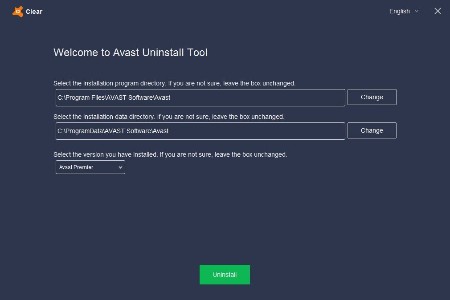
Avast! Clear is a utility for correct and complete removal of the anti-virus product line AVAST. Avast leaves a lot of garbage behind the computer and in the registry. Especially troublesome registry entries that can, for example, be an obstacle to install another antivirus Avast after. In such cases, you can use a special utility Avast! Clear.

How to uninstall our Avast using aswClear
Download aswclear.exe on your desktop
Start Windows in Safe Mode (reboot, tap f8)
Open (execute) the uninstall utility
If you installed avast! in a different folder than the default, browse for it. (Note: Be careful! The content of any folder you choose will be deleted!)
Click REMOVE
Restart your computer

Whats New
Updates: official site does not provide any info about changes in this version

HomePage:
Код:
https://www.avast.com

-:DOWNLOAD FROM LINKS:-​
RapidGator
Код:
https://rapidgator.net/file/6b8dcbe9aeecb4a30504bae2a95dbc8b/

NitroFlare
Код:
https://nitroflare.com/view/C0E524769510B03/
 

ea9ae2b00d85e78fd7835061f1d49ea2.jpg


AVG Clear 26.4.10932 Multilingual | File size: 15.2 MB

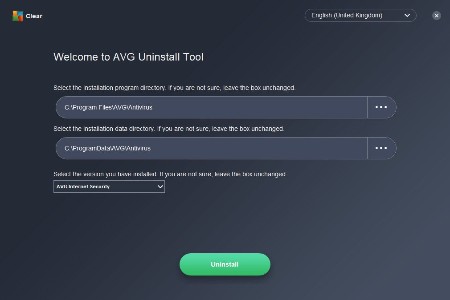
AVG Clear completely deletes everything from your current AVG installation including registry items, installation files, user files, etc.

AVG Clear is provided by AVG and is the last resort to use if you have a problem removing your current AVG whether it's a failed repair, reinstall or complete removal.

Please keep in mind that all AVG user settings will be removed after the uninstall process is complete. Items to be removed include content from the Virus Vault and all other items related to AVG installation and use.

You will need to restart your computer once you're finished so be sure to complete your work and save all relevant data before launching AVG Remover.

Other apps already exist that can do this including IObit, Revo, and Wise. We recommend using one of those unless AVG support asked you to use this. Finally, AVG Remover is one of those tools most techs will want on hand for that one time you need it.

Whats New
Updates: official site does not provide any info about changes in this version

HomePage:
Код:
https://www.avg.com

-:DOWNLOAD FROM LINKS:-​
RapidGator
Код:
https://rapidgator.net/file/fb4458e601fc1215396442dc5f91016c/

NitroFlare
Код:
https://nitroflare.com/view/24EEACE9334EB2F/
 

ae99d8eb785a55ccfc06c3d9b3310450.jpg


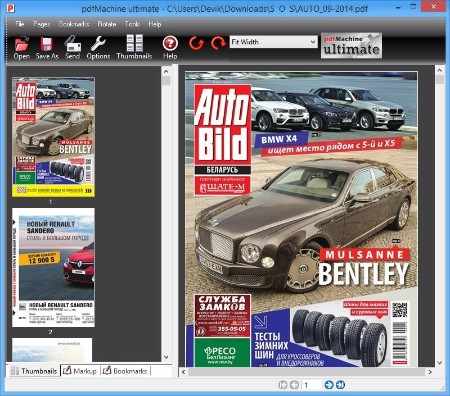
Broadgun pdfMachine 20.58 | All Editions | File size: 22.1 MB

pdfMachine converts a print stream from an application directly into a PDF. Once you have installed the pdf writer, open your document that you want to convert, then click "print", select the "Broadgun pdfMachine printer" and that's it - you have a PDF!

Integrity
PDF documents generated by pdfMachine, when printed or viewed, maintain the integrity of all formatting in the original document. PDF files preserve documents formats independent of software, hardware, or operating system used to generate the original file. They can be opened, read and printed by many free PDF readers available on the web, and viewed on operating systems such as Windows, MacOS, and Unix variants.

Technology
PDF format is the best document format for long-term digital archival. Often software becomes obsolete, rendering some documents unreadable by current technology. Widely published formats, such as PDF, are more future proof that proprietary formats such as MS Word. In 50 years time, even if PDF's are not used anymore, all you need is the PDF specification and you can have a viewer developed to read your documents.

Searchable
PDF has the ability to store text in a searchable form.

Browsers
PDF files can be viewed within Netscape and Internet Explorer. These files can then be saved for off-line use or printed. This makes for easy use within an intranet or website.

Colour and Size
PDF files enable sharp, colour-precise printing on most printers with precise onscreen colour match regardless of monitor brand. Users can magnify documents up to 800% without the loss of clarity in text or graphics. PDF files can be optimized and are often smaller than conventional document formats.

Whats New
Код:
https://www.pdfmachine.com/genp/release_history.html

HomePage:
Код:
https://www.pdfmachine.com/

-:DOWNLOAD FROM LINKS:-​
RapidGator
Код:
https://rapidgator.net/file/11de593a75a68eff036b3fa6f1057982/

NitroFlare
Код:
https://nitroflare.com/view/ED646F402C5B8A2/
 

9f521b28e851ba4167e124766b0ed86f.jpg


CoffeeCup Responsive Bootstrap Builder 2.5.370 | Languages: English File Size: 177.35 MB

Prototype. Build. Design. With Bootstrap Builder. Create authentic digital experiences using the most famous front-end framework in the industry. Accelerate production time by working in a real-time browser environment. With no code to worry about, exploring design alternatives is both faster and easier, resulting in killer sites.

Cool Interactive components
Drag in customizable prebuilt components like menus, accordions, alerts, tab panels, modal dialogs, and more. Visually create your own too. Combine elements, add click-action through data attributes and some CSS to create your own off-screen navigations, flex-cards, info-pop-ups, or galleries.

Harmonize common components
Symbols keep identical elements like logos, headings, menus the same across the project. Editing a symbol item globally updates all instances. Yup, update all footers, with one edit! Flexibility rules. Which is why you can easily unlink an individual instance from the bunch if different content is needed.

Battle sameness. Unleash. Design creativity.
Responsive sites tend to suffer from 'sameness'. Creating responsive sites manually is hard, and flexible creation tools scarce. Therefore framework code or templates are often tweaked just enough to create a moderately fitting site. But these sites lack personality and authenticity. They all feel the same. But not any more! With Bootstrap Builder you can tweak everything and transform the Bootstrap framework into a one of a kind creation that supports the unique business case.
Breakpoints when and where you need them. Design or layout changes need to be based upon the actual content for an optimal user experience. Breakpoint management is key for creating truly device-agnostic designs.

CSS controls
Harness the full design power of CSS through simple clickable controls.

Use the P for and performance
The Picture element serves device specific images.

Positioning Controls
Everything from display and absolute positioning, clear or float, to the amazing Flexbox controls.

Multiple background
Layer multiple backgrounds for ultra creativity.

Color Palette Management
Grab the colors from anywhere on screen and and organize them into reusable palettes.

Typographic perfection
Google fonts, fallbacks, inline editing, viewport related sizing and every other typographic style control you can think of.

Easy Layout Management
Add, delete, merge and move rows and columns. Adjust span widths, offsets and push & pull settings too.

Hand-tweaking is an option too!
Bootstrap Builder is a visual app, but any code-connoisseurs who want the ability to dive into the backend have that option too. Export to any code editor to manually edit the crisp and clean markup. Sweet: linked in custom stylesheets, will not get overwritten when re-exporting!

System Requirements
Windows 11, 10, 8/8.1, 7, Vista

HomePage:
Код:
https://www.coffeecup.com

-:DOWNLOAD FROM LINKS:-​
RapidGator
Код:
https://rapidgator.net/file/9e211d6b914d7c6277002fd466c9d316/

NitroFlare
Код:
https://nitroflare.com/view/CBD0FB2C0CFCF08/
 

9ab0e1eb545dceece8678122549dca57.jpg


CoffeeCup Responsive Foundation Framer 2.5.570 | Languages: English File Size: 189.38 MB

All the power of Foundation 6. Without coding. Front-end frameworks provide a solid grid system and a well-tested library of predefined styles. JavaScript modules allow for the creation of interactive website components such as dropdowns and responsive navigation patterns. We like Bootstrap, but we totally love Foundation because.

Customize Prebuilt Components
Choose from navigation menus, accordions, cool tab panels, modal dialogs, drop ups, and much, much more.

Create your own Interactive Components
Visually combine HTML elements, (predefined & custom) CSS. Then mixin interactive scripts to create off-screen navigations, flex-cards, info-pop-ups, or galleries. Really, there's no limit to what you can build!

Link Elements or Entire Components
Symbols represent linked elements or groups of elements. A change to a symbol item will globally update all instances of that symbol. Content such as text, images, and even component structures such as navigation menus, only need to be updated once.

Unchained Flexibility
Easily browse symbols with the preview function and navigate to specific instances with the click of a button. In case a variation of a symbol is needed, simply unlink an instance and it will stop being affected by global updates.

It's Minimal and Modular
Combine elements, create styles and add scripts. It's like playing with technic lego (instead of duplo.)

Has the Toggler
Which really rocks! Create all types of interactive elements by swapping out classes or revealing hidden items.

Includes Motion UI
This library helps to create flexible UI transitions and animations through the use of simple data attributes.

Battle sameness. Unleash. Design creativity.
Why do so many responsive websites look so similar? Restructuring the layout and predefined breakpoints in a mobile-first workflow can be a pain when hand coding. Foundation Framer features all the controls for visually creating unique designs, from XS to XXXL screens! Not having to worry about code allows for more experimentation and stimulates creativity. The snazzy interface and intuitive style controls guarantee unique designs that are out of this world.

A case for flexibility and designing with real content.
When we mapped out how our responsive apps would function, we focussed on the core of a device-agnostic design: custom breakpoints with a fully adaptable layout. After all, fanciness can only be built upon solid grounds. Curious why that is? Let's take a look at a real design case.

By default, Foundation 6 comes with 2 breakpoints.
These are the blue dots on the image below. Now look at the layout. The two column design looks great at the current width, but at smaller screens a single column might be preferred. However, using the default breakpoints, it would need to be one or the other; either a single column or a two column for every screen smaller than 640px.

Add breakpoints with a click.
The ability to easily add custom breakpoints to adapt the layout, while working with real content, leads to more flexibility and better design decisions. In this case, a custom breakpoint (the white dot) is added that changes the layout from a single column into a two column structure at 450px. Different spacing often leads to changes to font sizes; this and other design changes can be applied at breakpoints as well.

Design for extra large devices with no pain.
A similar case can be made when designing for (very) large screens. What about pulling up two columns and creating a six column row? With Foundation Framer, It's a decision the designer can now make with limited effort. Ultimately this will create better user experiences on all devices. Breakpoints when and where you need them. As seen from the examples, defining breakpoints without layout and content is meaningless. Design or layout changes need to be based upon the actual content for an optimal user experience. Breakpoint management is key for creating truly device-agnostic designs.

Automagically design with CSS.
Use the full layout power of CSS simply by selecting options, pressing buttons and specifying dimensions. It will not just be imaginative, it will be ingenious!

Use the P for and performance
Rescue mobile viewers from downloading heavy, slow-loading image files. Using the Picture element you can serve a friendlier size to every viewer.

Paramount Positioning Controls
Place content where you want it. Choose your display, absolute positioning, set to clear or float, or simplify your life by using the incredible, visual Flexbox controls.

Multiple background capabilities
Don't limit yourself to a single backdrop. Layer multiple backgrounds for extra dimensions to get a truly immersive look.

Color Palette Management
Use the precise picker to grab the colors from anywhere on screen. Keep them organized and reuse them by saving them to your palette.

Tasty Typography
Clickable controls make it a breeze to set and style your message. It's loaded with customizable Google fonts too. With the inline editor you can personalize special text with its own appearance.

Easy Layout Management
Click through the Layout pane to structure your layout. Add, delete, and merge rows and columns to hold content. Adjust span widths, offsets and push & pull settings too!

Hand-tweaking is an option too!
Foundation Framer is a visual app, but any code-connoisseurs who want the ability to dive into the backend have that option too. Export to any code editor to manually edit the crisp and clean markup. Sweet: linked in custom stylesheets, will not get overwritten when re-exporting!

System Requirements
Windows 11, 10, 8/8.1, 7, Vista

HomePage:
Код:
https://www.coffeecup.com

-:DOWNLOAD FROM LINKS:-​
RapidGator
Код:
https://rapidgator.net/file/e796ab07e090b26eb3779a3b8f24c3f5/

NitroFlare
Код:
https://nitroflare.com/view/5CADACBC263373A/
 

3757b43ac4e0ed99452e57e6b950e777.jpg


CoffeeCup Responsive Site Designer 4.0.3360 | Languages: English File Size: 207.73 MB

Site Designer. Design and develop digital experiences. No code. Build faster. Design better. CSS Frameworks help millions of designers and developers craft sites quickly. The top tools in the industry include Bootstrap 3 and 4, Foundation 6 and Materialize. These systems are highly tested and offer many advantages for designers. They use well organized HTML, CSS and Javascript that are frequently maintained and updated and is lightweight. Plus, they allow for creating cool interactive components such as dropups, navigation menus, galleries and more without wrestling with extra scripts - sweet!

Position with Flexbox
Align, stack, or reorder elements with the flick of a button. It's a phenomenal instrument that should be part of any responsive design toolkit. Discover what makes Flexbox fantastic and explore real design examples in our free interactive Flexbox guide.

A Fresh User Interface
Based on community feedback, we got moving on addressing visibility concerns and updated the UI. The stunning makeover it received makes it clearer and easier to navigate, helping you craft your pages faster than ever before.

CSS Filters & Blend Modes
Change colors on the fly, tweak settings for smaller displays, and make them respond to user with interactive effects and transitions. These techniques will take your site to another level!

A code-free design workflow
Select, click, point, pick and scroll to create websites and pages that are out of this world. Using code-free CSS controls, you can focus on design, while we take care of the code. You're free to explore fresh looks and try out unique layouts.

Better than legos
Forget repetitive design work and speed up production time using the Component Library. Save and reuse items in other projects. The CSS frameworks offer an elegant way to build navigation menus, accordions, cool tab panels, modal dialogs, and much, much more. Build it once, use it anytime!

Semantic and clean code
Building in a live browser environment allows your creativity to flourish as you won't be bogged down with code syntax. The clean and semantic code will be generated for you. The CSS3 is written directly to a real stylesheet, resulting in bloat-free, easy to interpret rules. The available HTML elements are standards based. Tags can be switched with two simple clicks to use semantic HTML5 elements like and , resulting in well marked-up pages and conveying meaning to search engines.

Export to CodePen
Skilled users will love the ability to export an element's markup to CodePen. This way you can use it with a CMS or other place without having to go through a full export.

Sync it up!
Keep common items in perfect harmony across the project. This ensures your footers, navigations, logos, and anything else stays in sync anytime it an edit is made.

System Requirements
Windows 11, 10, 8/8.1, 7, Vista

HomePage:
Код:
https://www.coffeecup.com

-:DOWNLOAD FROM LINKS:-​
RapidGator
Код:
https://rapidgator.net/file/510315cd492ab3ed597d4d8078ff9d01/

NitroFlare
Код:
https://nitroflare.com/view/1121485D5DA7BCE/
 

161ca04a0a8d1d5043ae5633433761ed.png


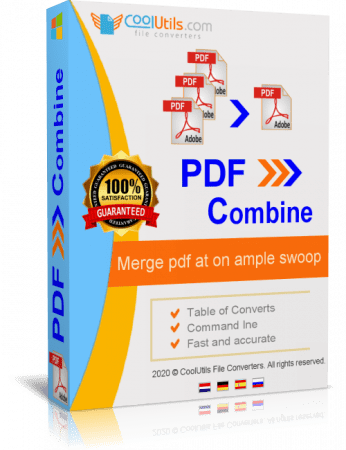
CoolUtils PDF Combine 8.1.0.74_11 Multilingual | File size: 241.91 MB

Do you need a utility that could combine several PDF files into one PDF? PDF Combine can do this easily. Are you looking for a program that could be easy-to-use and have enough options to satisfy your requirements? PDF Combine is the most efficient and handy program available in the market.

PDF Combine from CoolUtils easily
- Combines different pages of invoices, bank statements, contracts, or e-books
- Allows the selection of as many PDF files as you like
- Combines files by folders or common name part.
- Keeps your folder's structure, if you combine subfolders within a folder.
- For e-books PDF Combine can create a Table of Contents. Each file name of the combined files becomes a bookmark. You can set your own bookmarks as well. So you get easy navigation within the combined PDF file.
- Sets document properties (key words, author, creator, etc.)
- Encrypts PDF (you can allow or forbid users to print/annotate/modify PDF file)
- Signs combined PDF with your digital signature
- The Pro version combines Word, XLS, RTF, TXT, TIFF, JPEG files into one PDF.
- New! PDF Combine can add headers and footers to PDF pages. So you may add date or page count to each page of the output PDF document.
The interface of the program is so simple that even a newbie will master it in seconds. Check the files that you want to combine, set the destination folder and press Start! Also, PDF Combine may be run from the command line to be launched from within other programs.
Our pricing is clear and concise. Pay once you get all the upgrades and fast technical support for 1 year free. All emails are answered within 1 working day. That's right! No additional charges! Want a discount? To combine PDF files on Windows web or SQL servers use PDF Combine X (includes Active X for registered users, has no GUI).

Key Features
- Creates table of contents
- Combines PDF files by folders
- Combine PDFs by common name part
- Creates bookmarks
- No need for Adobe Acrobat
- Command line and GUI
- Fast and accurate
- ActiveX and Server version

What's new
• official site does not provide any info about changes in this version

HomePage:
Код:
https://www.coolutils.com

-:DOWNLOAD FROM LINKS:-​
RapidGator
Код:
https://rapidgator.net/file/09680943998094f8477ff892f0fe835c/

NitroFlare
Код:
https://nitroflare.com/view/6619678527C42AF/
 
Назад
Сверху Снизу