All Emperor2011's Software in one thread !! (updated daily)

83205b95bc1e3d0277f76d1218e668c1.png


Doppelganger 1.0.8 | Size: 6.77 MB
Language: English
​
Find and remove duplicate files. Extra copies of photos, documents, and music eat disk space and slow backups. Doppelganger finds them - even when the file names are different - and lets you keep the copies you want.

What it does
Finds duplicates by content, or by name, size, and date
Scans several drives and folders in one pass, including UNC paths
Works with USB drives and other devices that have a drive letter
Protects hidden and system files from accidental deletion
Move files, send them to the Recycle Bin, or delete them
Handles Unicode file and folder names

HOMEPAGE:
Код:
https://duplicate-file-finder-free.com/

FREE DOWNLOAD LINKS:​

Код:
https://rapidgator.net/file/f9a4d19e73e7b335cf115f70f76a04e0/Doppelganger_1.0.8.rar

Код:
https://clicknupload.click/b6tvefttsu0w/Doppelganger_1.0.8.rar
 
2eb46b224ef7fde26cf5491bd4670c7c.jpg


Dragonrise Games YoloX 1.15 (x64) Multilingual | Size: 10.65 MB
Language: English
​
Use YoloX to change your game crosshair. Includes inverted colors, audio sensor, motion sensor, anticheat safety, and other features never seen before. Evolve your aim with the next revolution in crosshair technology!

Effects: Inverted color and other effects.
Animations: Separate animations for main fire, alt fire, and jump.
Audio Sensor: Animated reactions to game audio. Now you can listen to your own music without missing key sounds.
Motion Sensor: Animated reactions to motion such as mouse movement.
Fullscreen: Just works in dedicated fullscreen and other modes.
Easy: No other apps or plugins, like gamebar, required.
Fast: Highly optimized using latest tech. No lag. No FPS drops.
Profiles: Crosshair, size, and offset assigned per game.
Crosshairs: Includes many crosshairs and more by community users, pros, and streamers.
Create: Create and publish your crosshairs to the community.
Autohide: Crosshairs show only when needed.

Scaling: Lossless scaling (sizing) between 200% and 25%.
Hotkeys: Hotkeys to change crosshair, scale, offset, and toggle.
Settings: Settings to autostart, autohide, and desync from Steam (hide playing status).
Anticheat Compliant: Overlay Only. No dangerous hooks. Code Signed. Whitelisted.

HOMEPAGE:
Код:
https://dragonrisegames.com/yolox/about

FREE DOWNLOAD LINKS:​

Код:
https://rapidgator.net/file/49412acf7b79b5ae64a1f4333d9e3b5d/Dragonrise_Games_YoloX_1.15_x64_Multilingual.rar

Код:
https://clicknupload.click/bs7z4tixbopv/Dragonrise_Games_YoloX_1.15_x64_Multilingual.rar
 
9e739f38afdef95316c3b05224e74b60.png


Dropbox 278.4.3944 (x64) | Size: 289.61 MB
Language: English
​
Dropbox is a free service that lets you bring all your videos, photos and docs anywhere and share them easily. This means that any file you save to your Dropbox will automatically save to all your computers, phones and even the Dropbox website. The program also makes it super easy to share with others, whether you're a student or professional, parent or grandparent. Even if you accidentally spill a latte on your laptop, have no fear! You can relax knowing that Dropbox always has you covered, and none of your stuff will ever be lost. The application works just like any other folder on your computer, but with a few differences. Any files or folders inside Dropbox will get synchronized to Dropbox's servers and any other computer linked to your account.

Features
Synchronization
Once installed, any file you drop into your Dropbox folder will synchronize and be available on any other computer you've installed Dropbox on, as well as from the web. Also, any changes you make to files in your Dropbox will sync to your other computers, instantly.
Backup
Let's say you accidentally delete that 8 page report that you were supposed to have for a meeting tomorrow. A handy Dropbox feature is the ability to undelete files or pull up any previous versions of it.
Sharing
You can also share files and folders with whomever you choose, whether it be music with buddies, docs with colleagues or photos with grandma, even if they're not Dropbox users.
Speed

We obsess over speed, and it shows. Dropbox is very smart about the way it handles files. For example, if you make a change to a huge file, dropbox will only update the piece of the file that changed.
Security
All files are transported over SSL and encrypted using AES-256 (banks use this too) System Requirements: Windows 11, Windows 10, 8 , 7
Synchronization
Once installed, any file you drop into your Dropbox folder will synchronize and be available on any other computer you've installed Dropbox on, as well as from the web. Also, any changes you make to files in your Dropbox will sync to your other computers, instantly.
Backup
Let's say you accidentally delete that 8 page report that you were supposed to have for a meeting tomorrow. A handy Dropbox feature is the ability to undelete files or pull up any previous versions of it.
Sharing
You can also share files and folders with whomever you choose, whether it be music with buddies, docs with colleagues or photos with grandma, even if they're not Dropbox users.
Speed
We obsess over speed, and it shows. Dropbox is very smart about the way it handles files. For example, if you make a change to a huge file, dropbox will only update the piece of the file that changed.
Security
All files are transported over SSL and encrypted using AES-256 (banks use this too)

System Requirements: Windows 11, Windows 10, 8 , 7

FREE DOWNLOAD LINKS:​

Код:
https://rapidgator.net/file/e0a540e6b739d0048e9c5a0f0fd3de2b/Dropbox_278.4.3944_x64.rar

Код:
https://clicknupload.click/q9rk5wetp4tb/Dropbox_278.4.3944_x64.rar
 
f302a2269d9a28916579c0476da24471.jpg


EaseUS Partition Master 20.11.0 Build 202611021322 Multilingual | Size: 146.89 MB
Language: English
​
This professional partitioning toolkit delivers the best disk management on Windows PCs/servers and offers a data storage service. Designed for organizations, enterprises, IT admins, technicians, consultants, and service providers.

Complete Data Storage Management
Data builds up fast. Keeping this data intact and well-organized presents a challenge for enterprises. Excellent storage management is crucial to any business. EaseUS Partition Master is a comprehensive storage management solution packed with partitioning features that allow you to make the best use of disk capacity: reallocate disk space while ensuring that your data is kept safe.

Partition Recall Protection
Partition Recall Protection acts as a safety net for NTFS partition adjustment. If you lose power or experience another hardware issue that interrupts a partition resize/move procedure, your hard drive will automatically revert to its previous state. It prevents any data loss or hard drive malfunction and allows you to safely try again.

For Service Providers
Partitioning is a critical way to organize physical space on hard drives. A partitioning tool that can handle data on an enterprise scale is essential for business. With this software, a storage service provider can offer disk management solutions and create partitions to meet any client's data storage requirements. With over 10,000,000 users worldwide, EaseUS partition manager is trusted to deliver best-in-class storage services and partition customizations on disks of any size with high efficiency.

For IT Administrator
EaseUS Partition Master simplifies IT administrative routines, giving you full control over disk groups and hard drive data. Systematically partition massive disks with this time-saving partition software. Avoid low disk space issues by monitoring data and partitions in real time.

All-in-One Disk Partition Toolkit
Various partitioning functions for your business. Supports Windows 10, 8.1, 8, 7, Vista, XP and Windows Server 2016, 2012, 2008, 2003.

Keep Systems Running
System drives are a key element to everyday business operation. When the system disk space runs low, your business is at risk to slow workflow. To solve a lack of space on the C drive, you need to actively monitor the drive and increase the size, as needed, to keep your system running at its best. EaseUS partition software works as a storage specialist to help you extend system partitions while the Windows system remains untouched, along with its data and configurations. After repartition, you are able to access the system directly. This way you can manage your data while still conducting business as usual. No downtime.

Migrate OS to HDD/SSD
- Swap out old disks for new SSD drives and run your system faster.
- Back up the system and restore it quickly in case disaster occurs.
- Optimize hardware performance and store data more effectively.

System cloning and data transfer complement each other within a data storage framework. EaseUS disk partition software offers a quick solution to move copies of operating systems to HDDs/SSDs without reinstalling Windows, removing programs, reconfiguring settings, or losing any files. Run your business without worry of data problems and time-consuming system deployment.

Recover Partition
Restore deleted or lost partitions to the unallocated space even when Windows fails to boot.

Convert Disk/Partition
Convert between primary/logical partition, MBR/GPT disk, dynamic/basic disk, and even FAT file system and NTFS.

Align SSD 4K Sectors
Align all sectors to be optimized for SSD during the repartition; exploit the full capability of your SSD.

Support Windows Storage Spaces
Easily manage virtual disks created from free space in a Windows environment storage pool.

Partition by Command Line
Fully manage disk/partitions from the Command Prompt with simple inputs.

Clean Disk
Clean up junk files and large files that occupy a lot of disk space, and optimize disk performance with defragmentation.

Repair RAID-5 Volumes
Repair a RAID-5 volume quickly when one member-disk fails to reduce business costs.

Create WinPE Bootable Disk
Create bootable media to boot up your PC and manage partitions on drives without Windows OS installed.

Operating Systems:
- Windows 10/8/7/Vista/XP
- Windows Server 2003, 2008 (R2), 2012 (R2), 2011, 2016, and 2019

HOMEPAGE:
Код:
https://www.easeus.com/

FREE DOWNLOAD LINKS:​

Код:
https://rapidgator.net/file/7f5fc64dc9c3999e4c8646b06531a49d/Multilingual_11021322.rar

Код:
https://clicknupload.click/if6xf0r10yvr/Multilingual_11021322.rar
 
0954d6e1edfe1d9878d9aa31b3cab301.jpg


EaseUS Partition Master 20.11.0 Build 202611021322 WinPE | Size: 863.31 MB
Language: English
​
This professional partitioning toolkit delivers the best disk management on Windows PCs/servers and offers a data storage service. Designed for organizations, enterprises, IT admins, technicians, consultants, and service providers.

Complete Data Storage Management
Data builds up fast. Keeping this data intact and well-organized presents a challenge for enterprises. Excellent storage management is crucial to any business. EaseUS Partition Master is a comprehensive storage management solution packed with partitioning features that allow you to make the best use of disk capacity: reallocate disk space while ensuring that your data is kept safe.

Partition Recall Protection
Partition Recall Protection acts as a safety net for NTFS partition adjustment. If you lose power or experience another hardware issue that interrupts a partition resize/move procedure, your hard drive will automatically revert to its previous state. It prevents any data loss or hard drive malfunction and allows you to safely try again.

For Service Providers
Partitioning is a critical way to organize physical space on hard drives. A partitioning tool that can handle data on an enterprise scale is essential for business. With this software, a storage service provider can offer disk management solutions and create partitions to meet any client's data storage requirements. With over 10,000,000 users worldwide, EaseUS partition manager is trusted to deliver best-in-class storage services and partition customizations on disks of any size with high efficiency.

For IT Administrator
EaseUS Partition Master simplifies IT administrative routines, giving you full control over disk groups and hard drive data. Systematically partition massive disks with this time-saving partition software. Avoid low disk space issues by monitoring data and partitions in real time.

All-in-One Disk Partition Toolkit
Various partitioning functions for your business. Supports Windows 10, 8.1, 8, 7, Vista, XP and Windows Server 2016, 2012, 2008, 2003.

Keep Systems Running
System drives are a key element to everyday business operation. When the system disk space runs low, your business is at risk to slow workflow. To solve a lack of space on the C drive, you need to actively monitor the drive and increase the size, as needed, to keep your system running at its best. EaseUS partition software works as a storage specialist to help you extend system partitions while the Windows system remains untouched, along with its data and configurations. After repartition, you are able to access the system directly. This way you can manage your data while still conducting business as usual. No downtime.

Migrate OS to HDD/SSD
- Swap out old disks for new SSD drives and run your system faster.
- Back up the system and restore it quickly in case disaster occurs.
- Optimize hardware performance and store data more effectively.

System cloning and data transfer complement each other within a data storage framework. EaseUS disk partition software offers a quick solution to move copies of operating systems to HDDs/SSDs without reinstalling Windows, removing programs, reconfiguring settings, or losing any files. Run your business without worry of data problems and time-consuming system deployment.

Recover Partition
Restore deleted or lost partitions to the unallocated space even when Windows fails to boot.

Convert Disk/Partition
Convert between primary/logical partition, MBR/GPT disk, dynamic/basic disk, and even FAT file system and NTFS.

Align SSD 4K Sectors
Align all sectors to be optimized for SSD during the repartition; exploit the full capability of your SSD.

Support Windows Storage Spaces
Easily manage virtual disks created from free space in a Windows environment storage pool.

Partition by Command Line
Fully manage disk/partitions from the Command Prompt with simple inputs.

Clean Disk
Clean up junk files and large files that occupy a lot of disk space, and optimize disk performance with defragmentation.

Repair RAID-5 Volumes
Repair a RAID-5 volume quickly when one member-disk fails to reduce business costs.

Create WinPE Bootable Disk
Create bootable media to boot up your PC and manage partitions on drives without Windows OS installed.

Operating Systems:
- Windows 10/8/7/Vista/XP
- Windows Server 2003, 2008 (R2), 2012 (R2), 2011, 2016, and 2019

HOMEPAGE:
Код:
https://www.easeus.com/

FREE DOWNLOAD LINKS:​

Код:
https://rapidgator.net/file/ae37abc13dd36e918e37299533b010a6/WinPE_11021322.rar

Код:
https://clicknupload.click/hcnhq1ispw31/WinPE_11021322.rar
 
75b41f026492e7b5f9f81e1182d72375.jpg


Firetrust MailWasher Pro 8.5.7 Multilingual | Size: 31.77 MB
Language: English
​
MailWasher Pro - the program allows users to view messages that are on various email accounts, before you download them to your computer. With MailWasher Pro, you can delete or return unneeded letters back to the sender with a message that the recipient is unknown.

Includes virus protection, provides access to POP3, IMAP4, SMTP, WebMail and WAP using SSL, provides filtering attachment / content-mail and MAPS / USER-DEFINED anti-spam database.
Works with multiple domains, you can create automated replies notification by SMS, create a shared and public folders, backup mail database, and secure remote administration. Available anti-virus plug-ins from McAfee and F-Secure.

There is the usual simple solutions in the form of black, white, a private list, renvoi letter with a note that the sender is unknown, preview, check-test of loyalty return address, an overlay of 25 e-mail message headers in the second, work on schedule, and more., Including Shared plugins antivirus from McAfee and F-Secure.

The main features of this program:
View mail before it gets to your computer
Destruction of unwanted mail before downloading it
Analysis of each message as soon as it arrives and warns you of suspicious content
Easy to organize and ease the work

Work with your existing e-mail programs - The Bat, Outlook, Outlook Express, Eudora, Netscape, Incredimail or other
Function Quick Reply - quick response c interface MailWasher Pro
Restoration of the destroyed mail
Unlimited number of mailboxes, support for POP3, AOL, Hotmail & MSN and IMAP.
Fast loading headers, speed up to 25 messages per second
A comprehensive guide and FAQ (also includes instructions and an animated guide)
Automatic e-mail client after checking mail;
Support new mail sound file;
Cyclic check mail with an additional opportunity to specify the time when its conduct is not necessary.

Operating System: Windows 7, 8, 10, 11, Vista

HOMEPAGE:
Код:
https://www.firetrust.com/

FREE DOWNLOAD LINKS:​

Код:
https://rapidgator.net/file/d19237ab3ee79701145925d6f75f0f54/Firetrust_MailWasher_Pro_8.5.7_Multilingual.rar

Код:
https://clicknupload.click/jy6cez279l02/Firetrust_MailWasher_Pro_8.5.7_Multilingual.rar
 
6fa490a90397cdf6e49d520a859df4c9.jpg


GIMP 3.2.8 | Size: 177.21 MB
Language: English
​
GIMP is the GNU Image Manipulation Program. It is a freely distributed piece of software for such tasks as photo retouching, image composition and image authoring. It works on many operating systems, in many languages. It has many capabilities. It can be used as a simple paint program, an expert quality photo retouching program, an online batch processing system, a mass production image renderer, an image format converter, etc.

GIMP is expandable and extensible. It is designed to be augmented with plug-ins and extensions to do just about anything. The advanced scripting interface allows everything from the simplest task to the most complex image manipulation procedures to be easily scripted.
GIMP is written and developed under X11 on UNIX platforms. But basically the same code also runs on MS Windows and Mac OS X.

Features and Capabilities:
• Painting
o Full suite of painting tools including Brush, Pencil, Airbrush, Clone, etc.
o Sub-pixel sampling for all paint tools for high quality anti-aliasing
o Extremely powerful gradient editor and blend tool
o Supports custom brushes and patterns
• System
o Tile based memory management so image size is limited only by available disk space
o Virtually unlimited number of images open at one time
• Advanced Manipulation
o Full alpha channel support
o Layers and channels
o Multiple Undo/Redo (limited only by diskspace)
o Editable text layers
o Transformation tools including rotate, scale, shear and flip
o Selection tools including rectangle, rounded rectangle, ellipse, free, fuzzy
o Foreground extraction tool
o Advanced path tool doing bezier and polygonal selections.
o Transformable paths, transformable selections.
o Quickmask to paint a selection.
• Extensible
o A Procedural Database for calling internal GIMP functions from external programs as in Script-fu
o Advanced scripting capabilities (Scheme, Python, Perl)
o Plug-ins which allow for the easy addition of new file formats and new effect filters
o Over 100 plug-ins already available
• Animation
o Load and save animations in a convenient frame-as-layer format
o MNG support
o Frame Navigator (in GAP, the GIMP Animation Package)
o Onion Skin (in GAP, the GIMP Animation Package)
o Bluebox (in GAP, the GIMP Animation Package)
• File Handling
o File formats supported include bmp, gif, jpeg, mng, pcx, pdf, png, ps, psd, svg, tiff, tga, xpm, and many others
o Load, display, convert, save to many file formats
o SVG path import/export
• Much, much more!

Changes in GIMP 3.2.8
* Bugs fixed:
571628 - Scaling image to 25% turn background from white to grey
567840 - GIMP's GtkScaleButton conflicts with GTK's
569043 - GEGL tool - missing Operation Settings for all sub-tools
568890 - don't rely on GtkAction implementation details
568909 - wrong RGB values for color names in libgimpcolor/gimprgb-parse.c
568839 - wrong hex RGB value for the color names slategrey and slategray
559408 - Brushes dragged to the image window look strange
563337 - Rectangle Select Tool does not allow 1:1 fixed ratio
568016 - Black pullout parameter of plug-in-newsprint has no effect
562818 - First image opened in GIMP offset
562213 - Align Tool doesn't work properly if it is the active tool at startup

* Updated translations:
- Spanish (es)
- Estonian (et)
- Hindi (hi)
- Italian (it)
- Brazilian Portuguese (pt_BR)
- Romanian (ro)
- Russian (ru)
- Serbian (sr)
- Tamil (ta)
- Simplified Chinese (zh_CN)

FREE DOWNLOAD LINKS:​

Код:
https://rapidgator.net/file/6a6f7ffa2cc6e1165c67b22002dc80ef/GIMP_3.2.8.rar

Код:
https://clicknupload.click/3xl2m36m66gj/GIMP_3.2.8.rar
 
9538cb834d6f8cc0eefdad191aee347b.jpg


HTML Match 1.3.2 | Size: 2.73 MB
Language: English
​
HTML Match is the visual web page comparison utility created by Salty Brine Software for Internet professionals. Use it to analyze the changes between two revisions of an HTML file. The files can be on a local hard drive or can be web pages on the Internet. HTML Match can locate the differences in the program source code, text content, or visual aspects of the pages. Differences, down to the individual character level, can be viewed in a side-by-side layout or in one browser window.

What Makes Us Best?

HTML Match has been designed with the needs of today's Internet professional in mind. It is much more than your basic run-of-the-mill file differencing utility. It has been designed specifically for the comparison of web pages. There really is no competition between HTML Match and any other file comparison tool.

Select your favorite file comparison tool and try to compare a local copy of an HTML document against one that is on the Internet. While this can be done easily with HTML Match, it is not possible with a generic file diff tool. The only way to do this with a generic tool is to save the web page and all of the graphics locally and hope that the browser that you used to save the web page doesn't alter the HTML code too much. HTML Match does not work in this way. The HTML code of the web page is not altered in any way and you are not required to save the page locally. Comparing two web pages on the Internet is as easy and as seamless as comparing two local HTML files. The two files compared can be local or on the Internet or any combination of the two possibilities.

From a user's perspective, your web page is not about the code that is behind it, it is about the content displayed on it. Very often, the only thing that changes on a web page is the content, not the code. With HTML Match you can easily compare the text content of two web pages and ignore the code. How do you view the changes in content using any other file comparison tool? You can't unless you want to manually extract the content from each of the pages.

File comparison tools will show you the html code of each file in a side-by-side display and color code the differences. HTML Match can do this too. Additionally though, HTML Match can show the original web page in a browser window with the revisions shown in-place directly on the web page. How cool is that? And of course by now you must know that this is not possible in any other generic file comparison tool.

When it comes to comparing HTML files, HTML Match blows away all other file comparison utilities. There are a couple of other HTML Diff tools available. But HTML Match even blows them away when it comes to features and ease of use. And it does so at a fraction of the cost.

Feature List
Compare local HTML files or web pages on the Internet
Compare either source code or visual aspects or text content only
View differences in a side by side presentation or in a one window composite view
Differences are clearly shown with color highlighting
Adjustable difference detail levels: Line level, Word level, and Character level
Allows drag and drop of files onto HTML Match for comparison
Can be run from a command line and differences saved to an HTML file.
Can be run in batch or script files.
Easy navigation from one difference to another
Search for text within the files
Bookmarks can be added to the comparison results
Ignore Space and Ignore Case comparison options supported
Files can be printed with the differences pointed out
Invoke your preferred HTML editor from within HTML Match

HOMEPAGE:
Код:
https://www.saltybrine.com/hminfo.htm

FREE DOWNLOAD LINKS:​

Код:
https://rapidgator.net/file/0623235d34b2f4d195afbfe041a52b08/HTML_Match_1.3.2.rar

Код:
https://clicknupload.click/88b6aln28f1d/HTML_Match_1.3.2.rar
 
aae6ea337c90db41b52a0f3a8bbecb94.jpg


IObit Smart Defrag Pro 12.1.0.619 Multilingual | Size: 21.06 MB
Language: English
​
IObit Smart Defrag is a Disk Defragmenter, that accelerates the whole system with fast and efficient disk defragment. Based on IObit latest disk defrag engine and "Boot Time Disk Defrag" technology, Smart Defrag is created with the world's leading defragmentation ability. It not only provides defragmentation, but also intelligently streamlines your files based on using frequency, thus accelerating disk speed and the whole system for top performance!

Smart Defrag works fast, automatically and quietly in the background and is suitable for large hard drives. IObit Smart Defrag helps defragment your hard drive more efficiently than any other product on the market - free or not. It is known that disk fragments has been a primary cause of slow and unstable PC performance.

Features:
- Higher File Access Speed
- Disk fragmentation is generally the main cause of slow and unstable computer performance. In order to accelerate hard drive for faster data access and outstanding disk performance, Smart Defrag provides efficient defragmentation to hard drives by optimizing file placement and consolidating free space. Then you can enjoy higher game launching speed, and copy files with only half of the time as before, etc.
- Up to 100% Faster PC Startup
- The Boot-time Defrag feature can defrag the system disk, in which some files cannot be safely moved while Windows is running, before the operating system is fully loaded. In this way, Smart Defrag will boost your startup speed and enable your computer to run at top speed with the most stability.
- Safe & Automatic Disk Defrag
- Smart Defrag not only provides disk defragmentation as any other tool does, but also optimizes it by intelligently streamlining your files based on using frequency. With IObit latest disk defrag engine, it is just as safe for your files as using Windows. And you just need to install & forget it. Smart Defrag will automatically work for you with no data lost.

Operating System: Windows 7, 8/8.1, 10, 11

HOMEPAGE:
Код:
http://www.iobit.com/

FREE DOWNLOAD LINKS:​

Код:
https://rapidgator.net/file/e8aeebaabc385f3713d3de502481a028/IObit_Smart_Defrag_Pro_12.1.0.619_Multilingual.rar

Код:
https://clicknupload.click/g2v5p3mop88s/IObit_Smart_Defrag_Pro_12.1.0.619_Multilingual.rar
 
707dd60698bb95f4511b3fd57dbee569.png


InstallerClean 3.6.0 | Size: 93.43 MB
Language: English
​
InstallerClean is a small tool made to clean up hidden leftover files that Windows keeps after installing or updating programs.

A simple, focused interface
The UI is very simple, showing a list of installer files with details like their size and whether they can be removed. At the end, it clearly displays how much space can be freed and gives a straightforward prompt after the cleanup is done.
It is designed to be a no-fuss tool: the scan runs automatically on startup, but both Delete and Move require confirmation before anything is changed. You see the count and total size before proceeding, so you have full control.
It double-checks before deleting anything
At this point, you may be wondering if the app is safe and the short answer is yes. After it scans the Windows installer files folder, it checks with the OS to determine what is safe to remove based on the Windows record of installed programs. In fact, the app asks Windows directly through its built-in installer system, not guessing or scanning blindly.

The developer explains that the app is designed to look for two types of junk, which are the orphaned files and the superseded patches. The latter are basically older update files that got replaced by newer ones, so Windows has already moved on but keeps the old files sitting there.
InstallerClean can be used occasionally or when you're re-installing many programs, as those junk files don't gather as often as you think. A completion screen shows exactly what was found and removed so you can review the result.

System Requirements: Windows 11, Windows 10, 8 , 7

HOMEPAGE:
Код:
https://github.com/no-faff/InstallerClean

FREE DOWNLOAD LINKS:​

Код:
https://rapidgator.net/file/4b326935d61c95755a7590e2c6733446/InstallerClean_3.6.0.rar

Код:
https://clicknupload.click/mum9v9qzk8a2/InstallerClean_3.6.0.rar
 
935c583526bb30bf670ff04f00707d8d.png


KMSpico 11.2.0 Multilingual | Size: 65.83 MB
Language: English
​
KMSpico is a KMS host emulator and activation client for Windows and Office, packaged as a single self-contained executable. v11.2.0 is the first release of the full rewrite of KMS ELDI from VB.NET to C# / .NET 9 - one executable for x64 and x86, with the Office hook DLLs embedded as resources and extracted at runtime, so there is nothing to install alongside it.

Key features
Emulates an MS-KMS host (protocol versions 4, 5 and 6) for other machines on the network, and activates this machine as a KMS client.
Detects and uses a genuine digital/OEM licence when the machine already has one, instead of emulating anything.
Installs and manages product keys and GVLKs.
Activates Office - 2010 (MSI) and 2013/2016/2019/2021 (Click-to-Run) - through KMS or through the Office hook.
The protocol core is verified byte for byte against an independent reference implementation (py-kms), using captured reference vectors that live in the test suite.
The activation planner is a real decision engine, in the spirit of MAS / TSforge: it picks the method that fits the situation and explains why it picked it.
The whole program, diagnostic log included, in 18 languages.

What it activates
Windows - the method is picked automatically, in this order
Digital licence - a genuine OEM/retail ticket is honoured and turned into a permanent digital licence.
KMS client - volume licence, 180 days, renewed automatically by the scheduled task.
OEM/SLP - machines with a SLIC table in the firmware get a local OEM licence, no host needed.
TSforge - direct write to the licensing store when none of the above applies.

Office - one method per product, not one for the whole machine
Office 2019 / 2021 / 2024 / Microsoft 365 (Click-to-Run) - activated through the Ohook hook. Verified: Microsoft Word reports "Product Activated".
Office 2010 (MSI) - activated as a KMS client. Verified: Word 2010 reports the product as activated, full 180-day KMS interval. This is the method we recommend for Office 2010.
Office 2013 / 2016 (MSI) - KMS client or hook, whichever fits.
Any already-activated MAK / Retail / OEM licence - not touched. A real licence is never overwritten.

Not activated - please read
Windows 7, Windows 8, Windows 8.1 - the program does not run at all. It is built on .NET 9, and Microsoft's last runtime to support Windows 7 / 8.1 was .NET 6 (support ended 12 November 2024). There is no .NET 9 for those systems. Windows 10 or newer is required.
Office preview / evaluation editions - no public volume key exists for them.
A retail Office with no product key installed - the hook does not invent licences. If Word says "This product is unlicensed", install a key first.
Office 2010 through the Ohook hook - it works, but it does not hold on Windows 11: Office's own repair ("Configuration Progress") keeps restoring the original licensing client. Use the KMS method for Office 2010 instead - that one is verified end to end and does not modify the Office installation.

New in v11.2.0
Every message now comes from one catalog in your Windows display language - all 130 diagnostic messages and all 36 activation-planning explanations. In v11.1.0 the GUI was translated but the log was Spanish and English mixed, and the console output was always Spanish even on an English Windows.
Fixed: the Office hook went to the wrong target when Office 2010 and a Click-to-Run Office were installed on the same machine. The target was decided from a machine-wide flag, so both products received the Click-to-Run hook; Office 2010 never loads that hook and stayed unactivated while the program reported "Ohook deployed". The target is now decided per product.
Fixed: the program could report the Office hook as deployed when it was not. The check looked only for the backup file, so once Office repaired its licensing client the program believed the hook was in place. It now checks that the licensing client really is the hook, and puts it back if it is not.
Fixed: a real race in OEM/SLP activation. The SLIC key catalog published its "loaded" flag before filling the list, so a second thread could read an empty catalog and activate with no key at all.
Fixed: the retail to volume conversion looked for a package that does not exist, so it silently did nothing. A retail Click-to-Run Office can now be converted and activated as a KMS client without depending on the hook.
Fixed: the window title could show the wrong version. It is now read from the binary itself.

System Requirements: Windows 10, 11

HOMEPAGE:
Код:
http://www.microsoft.com

FREE DOWNLOAD LINKS:​

Код:
https://rapidgator.net/file/395fbf78c2b1b31d1ee380e387dafd88/KMSpico_11.2.0_Multilingual.rar

Код:
https://clicknupload.click/dybrxqrthrx0/KMSpico_11.2.0_Multilingual.rar
 
de5c94706dfc866c91b079e2388370af.jpg


KeePass Password Safe 2.62 | Size: 4.39 MB
Language: English
​
KeePass Password Safe is a free, open source, lightweight, and easy-to-use password manager for Windows, Linux and Mac OS X, with ports for Android, iPhone/iPad and other mobile devices. With so many passwords to remember and the need to vary passwords to protect your valuable data, it's nice to have KeePass to manage your passwords in a secure way. KeePass puts all your passwords in a highly encrypted database and locks them with one master key or a key file. As a result, you only have to remember one single master password or select the key file to unlock the whole database. And the databases are encrypted using the best and most secure encryption algorithms currently known, AES and Twofish. See our features page for details.

Features
Strong security (AES encryption, SHA-256 hash, protection against dictionary and guessing attacks, in-memory protection, ...).
Portable (no installation required), available for many platforms (Windows, Linux, Mac OS X, smart devices/phones, ...).
Efficient and flexible organization (entry groups, tags, time fields, file attachments, ...).
Various data transfer methods (clipboard, drag and drop, auto-type, plugins can provide integration with other applications, ...).

Powerful password generator (generation based on character sets and patterns, with many options).
Extensible (plugin architecture) and multi-language (more than 40 languages are available).

System Requirements: Windows 11, Windows 10, 8 , 7

HOMEPAGE:
Код:
https://keepass.info/

FREE DOWNLOAD LINKS:​

Код:
https://rapidgator.net/file/435a4faeb9732f509458a984e4a746df/KeePass_Password_Safe_2.62.rar

Код:
https://clicknupload.click/34bn7xi7qhpn/KeePass_Password_Safe_2.62.rar
 
79500aa272f55ed9bb223b44452d658f.jpg


LightBurn 2.2.01 Multilingual | Size: 182.45 MB
Language: English
​
LightBurn is layout, editing, and control software for your laser cutter.

With LightBurn you can:
- Import artwork in a variety of common vector graphic and image formats (including AI, PDF, SVG, DXF, PLT, PNG, JPG, GIF, BMP)
- Arrange, edit, and even create new vector shapes within the editor, with powerful features like offsetting, boolean operations, welding, and node editing
- Apply settings like power, speed, number of passes, cut order, brightness & contrast, dithering mode, and much more
- Send the result directly to your laser cutter

Designed to Work With Your Laser
LightBurn talks directly to your laser, without the use of additional software.

We currently support most Ruida, Trocen, TopWisdom, and GCode based controllers. Supported GCode controllers,include Grbl, Smoothieware, Grbl-LPC, and Marlin. Supported Ruida controllers include the RDC6442G/S, RDC6445G, RDC6332G, RDLC-320A, and R5-DSP. Supported Trocen controllers include the AWC708C, AWC608, and TL-3120. More controllers will be added soon, so if you don't see yours listed, send us a message - maybe we're already working on it!

If your controller is GCode, Ruida, Trocen, or TopWisdom based, even if it's not listed it might be supported already - Download the free trial and try it for yourself. If it doesn't work, sometimes it only takes a day or two to make the required changes to support a new board in these existing families.

Please note that LightBurn does not support the stock M2-Nano board in the popular K40 laser. This board does not offer control of power through software - we recommend upgrading the board to take full advantage of LightBurn.

Operating System: Windows 7, 8/8.1, 10, 11 (64-bit only)

HOMEPAGE:
Код:
https://lightburnsoftware.com/

FREE DOWNLOAD LINKS:​

Код:
https://rapidgator.net/file/a3861603604c7d40fad33108cbb8572c/LightBurn_2.2.01_Multilingual.rar

Код:
https://clicknupload.click/k3cqf2gl2up1/LightBurn_2.2.01_Multilingual.rar
 
_ccbb2322ccd3434bd17c53bb98475e15.jpeg


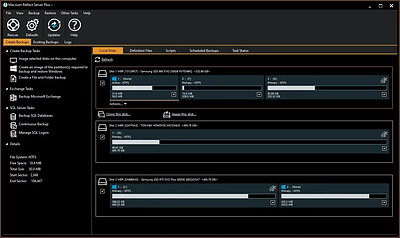
Macrium Reflect X Server 10.0.8989 (x64) WinPE | Size: 782.72 MB
Language: English
​
Macrium Reflect X is a fully featured and sophisticated tool for backing up the most critical of servers running applications such as Microsoft Exchange email, and SQL databases. IT professionals will be able to very quickly install and run backups using Server Plus. You can rely on it to protect your critical systems and provide rapid and trouble free recovery.

Designed for endpoint backup of business-critical servers, running Microsoft Exchange email or SQL databases, in a commercial environment. Macrium Reflect Server Plus is a reliable recovery solution for everything from individual files to entire Windows Operating Systems.

The Power of X:

2X Faster Performance
Experience backup, imaging, and recovery operations twice as fast as Reflect 8.x, minimizing downtime and boosting efficiency.

Resumable Imaging
Never worry about interruptions again. Image creation seamlessly continues from where it left off, ensuring continuous protection.

Open-Source Accessibility
Our image file formats are now open source, offering full transparency and flexibility for your data recovery and system deployment.

Comprehensive Device Support
From traditional x86 systems to the latest ARM-based devices, we've got your entire fleet covered with optimized performance across all platforms.

Enhanced Backup Filtering
Tailor your backups and system images with precision, enhancing performance and optimizing storage utilization.

Air-Gapped Activation for Business
Streamlined offline license activation for all business license types, perfect for high-security and air-gapped environments.

Minimum System Requirements:
At least 512MB RAM (1GB min recommended)
Windows XP Service Pack 3 or Windows Server 2003 Service Pack 2 or later

HOMEPAGE:
Код:
http://www.macrium.com/

FREE DOWNLOAD LINKS:​

Код:
https://rapidgator.net/file/e327184c00dc871cb06796b6a40b5eaa/Macrium_Reflect_X_Server_10.0.8989_x64_WinPE.rar

Код:
https://clicknupload.click/88dteajvh36s/Macrium_Reflect_X_Server_10.0.8989_x64_WinPE.rar
 
725b6a7fb6a7935eb02dc0850efaa1b5.jpg


Maplesoft Maple 2026.2 | Size: 2.41 GB
Language: English
​
Powerful math software that is easy to use. Maple is math software that combines the world's most powerful math engine with an interface that makes it extremely easy to analyze, explore, visualize, and solve mathematical problems.

What is Maple?
Maple is math software that combines the world's most powerful math engine with an interface that makes it extremely easy to analyze, explore, visualize, and solve mathematical problems.

- Solve math problems easily and accurately, without worrying that you've lost a minus sign somewhere
- Solve math problems quickly that you could never do by hand (or that you wouldn't want to do by hand because life is too short!)
- Solve problems from virtually any branch of mathematics or field that relies on mathematics, such as calculus, algebra, differential equations, statistics, control design, linear algebra, physics, optimization, group theory, differential geometry, signal processing, special functions, number theory, financial modeling, etc. etc.
- Gain insight into your problem, solution, data, or concept using a huge variety of customizable 2-D and 3-D plots and animations
- Keep problems, solutions, visualizations, and explanations all together in a single, easy-to-follow document, so you don't have to waste time reconstructing your thought processes

- Develop complex solutions using a sophisticated programming language designed for mathematics, so your code is shorter, easier to write, easier to debug, and easier to maintain
- Create interactive applications for yourself, your students, or your colleagues, without having to be an expert programmer, and share them over the web

What's New in Maple 2026
Maple 2026 combines significant enhancements to core functionality with the thoughtful integration of AI and an unprecedented collection of new benefits for Elite Maintenance Program (EMP) members, so you can do more with math, faster.

AI-Powered Assistance
Boost Productivity with the AI Assistant: Your personal AI Assistant will help you do unfamiliar or complex tasks in Maple in a fraction of the time!

Document Import
Bring Your Documents into Maple: Turn your PDFs, printed course notes, hand-written scribbles and other documents into Maple documents where the math is live and ready to be used.

New! Maple Classroom
Technology Preview: Create a class, assign Maple activities, and see in real time how students are working through the math. Get greater visibility into student thinking, not just the final answer.

Advanced Math
More Math, Faster Math: Experience enhanced core functionality, customer requested improvements, and more.

Linear Recurrence Equations
Cutting-edge Solvers for Linear Recurrence Equations: New algorithms solve even more LRE problems, faster, in computer science, pure and applied math, economics, biology, digital signal processing, and many other fields.

Plotting Themes
Plot It Your Way: Give all your graphs a consistent, custom look, easily, with new plotting themes.

Education
Try Another, and Another: Maple's practice problem generator is better than ever, so students can keep trying similar problems in even more areas of math, until they feel confident. Plus more!

Programming
More Programming Tools: New low-level commands and options simplify code and enable you to provide a smoother experience for the users of your work.

Performance
Faster Operations: Many common operations, including solving polynomial systems and computations involving units, are significantly faster.

Ongoing Math Library Improvements
Continuous Improvements: Get updates the math library throughout the year.

Interface
Smooth Interactions: Several small but important improvements to the interface make working in the Maple environment just that much smoother.

Maple Calculator
Maple Calculator, Included! Get Maple Calculator Premium on your phone. Now included with your EMP membership!

Maple Learn
Maple Learn, Included! Get full access to the online math tool Maple Learn, to use directly or to deploy educational content you create in Maple. Part of your EMP benefits!

Quantum Chemistry Toolbox
Compute and Visualize Molecules: The Maple Quantum Chemistry Toolbox does more than ever!

Elite Maintenance Program Benefits
Many More EMP benefits! Your membership in the Maplesoft Elite Maintenance Program provides more benefits than ever before!

System Requirements
- OS: Windows 10, 11, Windows Server 2025, 2022
- CPU: 1 gigahertz (GHz) or faster 64-bit (x64)
- RAM: 8 GB
- Hard Disk: 10 GB

HOMEPAGE:
Код:
https://www.maplesoft.com

FREE DOWNLOAD LINKS:​

Код:
https://rapidgator.net/file/b2e85f249f3059a606f7410899c609eb/Maplesoft.Maple.2026.2..part1.rar
https://rapidgator.net/file/4ea5cc456112ca77d7b545656ce518a2/Maplesoft.Maple.2026.2..part2.rar

Код:
https://clicknupload.click/nkluxh08pbwo/Maplesoft.Maple.2026.2..part1.rar
https://clicknupload.click/pu50vindrtjb/Maplesoft.Maple.2026.2..part2.rar

 
1bdc12cca78bbd50e864e537de2ef62e.jpg


Markdown Monster 4.6.2 | Size: 24.04 MB
Language: English
​
Markdown Monster is a Markdown editor and viewer that lets you edit Markdown with syntax highlighting and fast text entry. A collapsible, synced, live preview lets you see your output as you type or scroll. Easily embed images, links, emojis and code using Markdown text or use our gentle UI helpers that simplify many operations with a couple of keystrokes. Paste images from the clipboard or drag and drop from Explorer or our built-in folder browser. Inline spell-checking and word counts keep your content streamlined unobtrusively.

You can export your Markdown to HTML or PDF by saving to disk or by copying Markdown selections as HTML directly to the clipboard. The HTML preview can display syntax colored code snippets for most common coding languages, and can easily be customized with HTML and CSS template to match your own sites. You can choose from a light and dark app theme, and choose individual editor and preview themes that are fully customizable. You can even use Vim or EMacs type conventions. Other convenience features let you browse for and select files in the built-in folder browser, use the document outline to jump through sections in your Markdown, or shell out to Explorer, Terminal or your favorite Git client. It's all about convenience - everything is at your finger tips, but it's out of your way until you need it.

Features:
Syntax colored Markdown
Live HTML preview
Inline spell checking
Embed images, links and emoji
Paste images from Clipboard
Capture & embed screen shots
Save to Html and PDF
Weblog publishing and editing
HTML to Markdown conversion
Editor and preview themes
Git Integration
Document Outline
Template text expansion
.NET scripting & addins

System Requirements:
Windows 7 or newer, 2008 R2 or newer
.NET Framework 4.62 or later
Internet Explorer 11

HOMEPAGE:
Код:
https://markdownmonster.west-wind.com/

FREE DOWNLOAD LINKS:​

Код:
https://rapidgator.net/file/527210dc84b6fb85f6fe8799e7223c19/Markdown_Monster_4.6.2.rar

Код:
https://clicknupload.click/94dobyrn7afr/Markdown_Monster_4.6.2.rar
 
4259b6466ae1b0b2e47829d7129a5f87.jpg


MobiKin Transfer for Mobile 6.0.24 Multilingual | Size: 48.43 MB
Language: English
​
Switch to a new phone and wish to move data from the old phone to the new one? Or simply wish to share something between two different devices? MobiKin Transfer for Mobile can help you finish the data transference easily.

Transfer Files to Android Device with Ease
Can't find an effective way to transfer data from old phone to your new Android device? Don't worry! MobiKin Transfer for Mobile makes it easy for you to copy data from one device (iDevice/Android) to another mobile phone without restrictions. All transmission can be done with 1 simple click and risk-free.
Android to Android Transfer: copy contacts, text messages, call logs, music, videos, photos, documents and apps between two Android phones.
iOS to Android Transfer: sync contacts, SMS, music, videos, photos and books from iOS device to an Android phone.
Clear Data before Copying: remove the saved data on your destination Android phone before you transfer the data.

Switch to A New iDevice with One Click
Getting a new iPhone/iPad/iPod and can't wait to enjoy the wonderful device? Just see here! MobiKin Transfer for Mobile can help you switch to the new iDevice with one simple click. In addition, the transfer is very fast and no any quality will be lost during the moving process. Now just see what this program can do for you:
Android to iOS Transfer: support to transfer contacts and books from Android phone to an iDevice.
iOS to iOS Transfer: support to copy contacts, calendars, notes, bookmarks and books between iOS devices.

Backup & Restore The Data on Your Devices without Data Loss (Coming Soon!)
For upgrading your mobile phone to the latest one or switching it from one to another with different carrier, you may need to move something important between them. But during the moving process, you may wrongly delete or accidentally damage the data. So to avoid this issue, you can use MobiKin Transfer for Mobile to:
Easily back up the data on your iPhone or Android to PC/Mac without losing data.
Restore the backed up data from iTunes backups to your device as you like.

Support for 3000+ Phones
Since this software is designed to help users transfer contents between different mobile phones, so it is no doubt that the program can work well with various phones from different manufacturers. And after hundreds of tested from our technical team, we have proved that this software works well with almost 3000+ mobile phones.
iDevices: iPhone 11, iPhone 11 Pro, iPhone 11 Pro Max, iPhone XS Max, iPhone XS, iPhone XR, iPhone X, iPhone 8, iPhone 8 Plus, iPhone 7, iPhone 7 Plus, iPhone 6S, iPhone 6S Plus, iPhone 6, iPhone 6 Plus, iPhone 5S, iPhone 5, iPhone 4, iPhone 4S, iPad Air/mini, the new iPad, iPod touch, iPod classic, etc.
Android Devices: Samsung Galaxy, HTC, Motorola, Sony, LG, Xiaomi, Huawei, ZTE, etc.

System Requirements:
Operating System: Windows 10/8/7/XP/Vista
Processor: 750MHz Intel or AMD
RAM: 512MB or above
Hard Disk Space 1 GB or more

HOMEPAGE:
Код:
https://www.mobikin.com/

FREE DOWNLOAD LINKS:​

Код:
https://rapidgator.net/file/ff04d70018108a03a7b89998e5cf6a50/MobiKin_Transfer_for_Mobile_6.0.24_Multilingual.rar

Код:
https://clicknupload.click/9mpdmecpqksd/MobiKin_Transfer_for_Mobile_6.0.24_Multilingual.rar
 
4ecd48cfec71eec70a8bd5f18e445393.jpg


NWinfo 1.6.7 | Size: 5.85 MB
Language: English
​
NWinfo is a lightweight tool designed to give a quick look at your computer's key details, from hardware to software specs, without any fuss. You don't need to install it; just download, run, and see everything you need on one screen. It displays essential info about your CPU, memory, disk drives, network, and even the system's operating details. Since it's portable, you can carry NWinfo on a USB stick and use it on any Windows machine, making it a handy tool for both tech enthusiasts and troubleshooting.

NWinfo key features
Lightweight and portable-no installation required
Simple, user-friendly interface for easy navigation
Displays detailed CPU information, including model and speed
Shows memory (RAM) specifications and usage
Provides disk information, including storage capacity and usage
Lists network adapters and IP addresses
Displays motherboard details, including model and manufacturer
Shows system uptime and operating system version
Detects graphics card information and driver details
Includes battery status for laptops
Provides monitor specifications, including resolution and refresh rate
Displays BIOS version and other firmware details

Offers a summary of active processes and services
Generates detailed logs for sharing or troubleshooting
Open-source and free, allowing for customization and community support

System Requirements: Windows 11, Windows 10, 8 , 7

FREE DOWNLOAD LINKS:​

Код:
https://rapidgator.net/file/145e441a3ca5071ee41d45915b5cbb48/NWinfo_1.6.7.zip

Код:
https://clicknupload.click/87mpugdowk01/NWinfo_1.6.7.zip
 
114e48fccaa59a2e354bf4e0fb5cb7da.jpg


Netsdk Software CS Browser Pro 13.6.5 | Size: 11.21 MB
Language: English
​
CS Browser is a powerful Windows client compatible with Amazon S3, Amazon S3 Glacier, and Amazon S3 compatible cloud storage services. CS Browser helps you work with buckets and files from a familiar Windows interface: upload and download data, manage permissions, organize objects, and handle routine storage tasks without switching to command-line tools!

Powerful and easy to use, it will help you:
Reliably Upload and Download your files to and from Amazon S3.
Publish your Content using Amazon S3.
Browse, Create, Delete Amazon S3 Buckets.
Share your Buckets with other Amazon S3 users.
Use Buckets shared by other Amazon S3 users.
Set Access Control on Buckets and Files.
Keep your Files backed up in encrypted form.
Manage your Amazon CloudFront Distributions.
And Many More!

Cutting edge features make it exceptional!
Multiple Amazon S3 Accounts and Amazon S3 compatible storage services
Client Side Compression and Encryption (AES 256)
Support for Data Integrity Checking to guarantee reliable file transfer.

Convenient Folder Sync Tool - Upload Only New and Changed Files!
Support for Amazon S3 Versioning and convenient versions manager.
Full support for all Amazon S3 storage classes
Full support for Standard Infrequent Access Storage Class
Full support for OneZone-Infrequent Access Storage Class
Processing very large amounts of files (millions) effectively!
Support for AWS Identity and Access Management (IAM)
Easy to use CloudFront Manager
Support for very large files. Up to the 5 TB in size!
Amazon S3 Server Side Encryption support.
High-speed Multipart Uploads and Downloads with ability to Pause and Resume.
Full support for Amazon S3 Transfer Acceleration
An easy to use Bucket Sharing Wizard - share your Buckets with just two clicks!
Convenient HTTP Headers Editor.
Inclusion and Exclusion Filters
Support for Bucket Lifecycle Rules
Support for restore from Amazon S3 Glacier and Deep Archive storage classes.
Support for bulk ACLs assignment (edit ACLs in batch mode).
Default Http Headers to apply pre-defined HTTP Headers automaticaly!
Advanced Web URLs Generator.
Support for Static Website Hosting.
Support for Amazon S3 Bucket Policies.
Support for Cost Allocation Tagging and Cross-Origin Resource Sharing.
Command Line Tools - Automate your Amazon S3 Tasks with ease!
Bandwidth throttling and proxy support.
Support for copy/move between amazon s3 accounts and buckets.
Drag and Drop from Windows Explorer.
Fast working multithreaded Http Engine.
Support for Amazon S3 Bucket Logging (Server Access Logging).
Support for Requester Pays Buckets.
And tons of other cool features and tools!

HOMEPAGE:
Код:
https://s3browser.com/

FREE DOWNLOAD LINKS:​

Код:
https://rapidgator.net/file/68c8690d417fd0c6cd59a2cea572a545/Netsdk_Software_CS_Browser_Pro_13.6.5.rar

Код:
https://clicknupload.click/cfp91bdg1dja/Netsdk_Software_CS_Browser_Pro_13.6.5.rar
 
2030ba60dc17bfc76eaefbf61bba8ee9.jpg


PDF-compress Professional 2.002 Multilingual | Size: 39.68 MB
Language: English
​
PDF-compress: Compresses your PDF files reliably and in the best possible way. The PDF format is ideal for presenting and sharing complex texts, diagrams, graphics and forms. However, PDF files are therefore often very extensive, which in turn is actually a knockout criterion for sharing.

With PDF-compress you can optimize your PDF files so that they do not take up more storage space than absolutely necessary. Depending on the structure and content of the PDF document, compression rates of up to 95% can be achieved. In a test with over 1,000 randomly selected PDF files from different sources, an average compression rate of almost 50% was achieved.

PDF-compress uses different approaches for compression. For example, images contained in the document can be compressed losslessly, special optimization technology (MRC) can be applied, and blank pages and annotations can be removed from the PDF structure. Optionally, the image quality can also be reduced in several stages and an optimization for the display on the web can be carried out.

Supported Operating Systems:
Windows 11
Windows 10 (32-bit & 64-bit)
Windows 8.1 (32-bit & 64-bit)

Windows 8 (32-bit & 64-bit)
Windows 7 (32-bit & 64-bit)
Windows Server 2016/2019 (32-bit & 64-bit)
Windows Server 2012 (32-bit & 64-bit)
Windows Server 2008 (32-bit & 64-bit)

HOMEPAGE:
Код:
https://www.ascompsoftware.com/

FREE DOWNLOAD LINKS:​

Код:
https://rapidgator.net/file/e7b8d12201079d13e1cf8cc05746ab12/PDF-compress_Professional_2.002_Multilingual.rar

Код:
https://clicknupload.click/g6q1ai15ab4v/PDF-compress_Professional_2.002_Multilingual.rar
 
Назад
Сверху Снизу