All sanddisk Software's Collection [Daily Updated]

ezgif-3451d31bd0a1711a.jpg


FRITZ 20.8 Multilingual

Languages: Multilingual
File Size: 1.6 GB

FRITZ 20 is more than just a chess engine – it is a training revolution for ambitious players and professionals. Whether you are taking your first steps into the world of serious chess training, or already playing at tournament level, FRITZ 20 will help you train more efficiently, intelligently and individually than ever before.

New: playing style simulation at the highest level
FRITZ 20 analyses your next opponent – and plays like them! Use the style analysis in ChessBase 18 to configure whether Fritz should play aggressively, riskily, positionally or or exchange-oriented. This allows you to train specifically for your next game – realistically and practically.

Compete against legends
Compete against the strategies of the greatest players in history: Morphy, Lasker, Capablanca, Tal, Fischer, Karpov – with ELO ratings tailored to you, but in their authentic style. The unique style engine simulates their playing style as convincingly as only FRITZ can. New: the additional playing styles ‘Hypermodern’ and ‘Romantic’.

Play better - even under time pressure
Perfect your reflexes with the new Bullet Training mode: configure the time limit exactly, and learn to keep your nerves under pressure – ideal for blitz and bullet players on online platforms.

AI that understands chess – and speaks
Experience a new dimension of interaction with AI chat and voice output: polished commentary, amusing analyses and subtle hints – spoken in natural language if desired. Fritz commentary at its best. Even stronger. Even more beautiful. Even more direct.

Highlights in Fritz 20
- Fritz with 3,580 ELO – world-class level
- Capablanca, Tal, Kasparov Master as virtual opponents
- Opponent simulation via ChessBase 18 Style Report
- Manual opponent configuration
- New playing styles: ‘Romantic’ and ‘Hypermodern’
- Bullet training, AI chat, new 3D graphics, game controller support, new achievements

Release Notes
- Regression: Fixed character speech output.

Minimum Requirements
Desktop PC or notebook, 4 threads, 8 GB RAM, Windows 10 with 64-bit

Recommended Requirements
PC Intel i7, i9 or Ryzen 7/9, 16 GB RAM, Windows 11 with 64-bit, Windows Media Player, graphics card with 1 GB RAM

Supported Languages
German, English, Spanish, French, Italian

Homepage
Код:
https://shop.chessbase.com

DOWNLOAD

Код:
https://rapidgator.net/file/2874a5ade301fc3dd7219011882bec3c/FRITZ_20.8.rar.html

https://ddownload.com/wmmj5y6w96cl/FRITZ_20.8.rar
 
th-Sq-DJf9m-Y8k9Zrtg-Ij-Sc-U1Gn-Tkq8qmtux.jpg


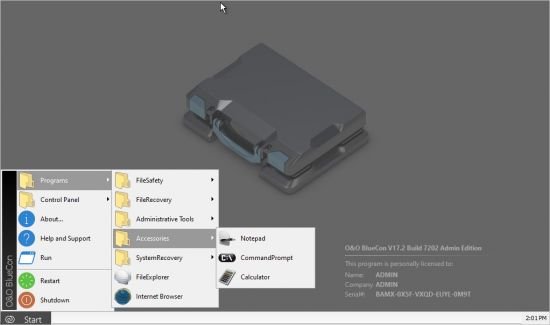
O&O BlueCon 23.0.14008 (x64) WinPE

File size: 1 GB

What if a machine or your entire network crashes overnight? Imagine waking up to a disaster: your system or network has crashed. As with the recent Crowdstrike incident, all your machines are down and you can’t access them. Every second of downtime costs your business thousands and panic spreads. What are you doing? In situations like this, O&O BlueCon could have brought your systems back online and saved you time and money. Known among IT experts as the “Swiss Army knife” for technicians, O&O BlueCon is the indispensable tool for every IT department to prevent and remedy system disasters quickly and efficiently.

The Ultimate Disaster Recovery Tool
O&O BlueCon is a powerful tool that recovers dead or faulty systems by booting them from a CD, USB stick, or network. Once booted, it provides administrators with unlimited access to a wide range of recovery and maintenance options, even if Windows is unresponsive. Here’s how O&O BlueCon can save your business after bringing your systems back to life
Recover Deleted Data: Recover accidentally deleted files and folders
Backup and restore data: Protect critical information by quickly backing up or restoring data from failed systems
Solve driver problems: Automatically loads missing drivers and resolves hardware conflicts
Secure data deletion: Permanently erase sensitive data to prevent recovery
Reset forgotten passwords: Quickly reset administrator and user passwords
Manage Partitions: Create, Modify, or Delete Disk Partitions Easily
Fix registry errors: Correct system-critical registry issues that could be causing the crash
Unlock encrypted drives: Easily access BitLocker-encrypted drives
Advanced diagnostics: Identify and troubleshoot with tools like EventViewer and CheckDisk
Built-in web browser: Download additional tools and access resources online without leaving the recovery environment

We take away your pain
O&O BlueCon addresses several critical business vulnerabilities in a cohesive manner. It significantly reduces system downtime, a key concern for maintaining uninterrupted business operations and productivity. The tool’s robust data recovery features protect against data loss, a major risk for businesses, by enabling the recovery of important information from compromised systems. This function alone positions O&O BlueCon as a cost-effective solution for IT emergencies and reduces the need for expensive hardware spare parts or extensive external IT consulting.

In terms of security, which is especially important when decommissioning or transferring computers, O&O BlueCon’s secure data erasure ensures that confidential information is permanently deleted, reducing the risk of data breaches. This is crucial for companies that handle confidential data. The tool’s compatibility with different versions of Windows and virtual environments such as Hyper-V makes it adaptable to diverse and complex IT infrastructures, addressing a common challenge in today’s diverse IT landscape.

In addition, O&O BlueCon contributes to efficient resource allocation in companies. By providing a streamlined solution to a range of IT issues, it frees up IT staff to focus on more strategic tasks instead of constantly dealing with system emergencies. This aspect is especially beneficial in environments where IT resources are limited or need to be optimized for critical projects.

Another significant advantage is in the area of backup and recovery. O&O BlueCon supports these processes, which are essential for companies to avoid data loss and quickly resume operations after a system failure. The tool’s PXE boot feature enhances its usefulness even further by enabling remote booting and troubleshooting of systems. This is especially beneficial for companies with multiple locations or those using remote workplaces, as it ensures that IT support is efficient and timely, regardless of geographical restrictions.

Request our free whitepaper now
Simply enter your e-mail address and you will receive our detailed whitepaper as a PDF directly in your inbox.
The document shows how O&O BlueCon is used as an indispensable tool for the prevention and management of IT disasters – often referred to as the “Swiss Army knife of IT”.
It explains why O&O BlueCon goes far beyond classic disaster recovery and how companies can use it to ensure business continuity, shorten downtime and reduce costs in the long term.

Neither hardware nor software vendors like to admit it: complete failures, damaged systems, and situations without any system access continue to occur regularly. This white paper shows why such failures not only affect operations, but can also cause high follow-up costs – and how IT managers can become able to act again quickly, securely and reliably with O&O BlueCon.

Whats New
Updates: official site does not provide any info about changes in this version

Homepage
Код:
https://www.oo-software.com/en/

DOWNLOAD

Код:
https://rapidgator.net/file/0038a1ac8e688fc5c51c682f205665f5/O&O_BlueCon_Tech_Edition_Plus_v23.0.14008.iso.html

https://ddownload.com/xo1y53pp4wpd/O%2526O_BlueCon_Tech_Edition_Plus_v23.0.14008.iso
 
th-Sq-DJf9m-Y8k9Zrtg-Ij-Sc-U1Gn-Tkq8qmtux.jpg


O&O BlueCon 23.0.14008 (x64)

File size: 133.5 MB

What if a machine or your entire network crashes overnight? Imagine waking up to a disaster: your system or network has crashed. As with the recent Crowdstrike incident, all your machines are down and you can’t access them. Every second of downtime costs your business thousands and panic spreads. What are you doing? In situations like this, O&O BlueCon could have brought your systems back online and saved you time and money. Known among IT experts as the “Swiss Army knife” for technicians, O&O BlueCon is the indispensable tool for every IT department to prevent and remedy system disasters quickly and efficiently.

The Ultimate Disaster Recovery Tool
O&O BlueCon is a powerful tool that recovers dead or faulty systems by booting them from a CD, USB stick, or network. Once booted, it provides administrators with unlimited access to a wide range of recovery and maintenance options, even if Windows is unresponsive. Here’s how O&O BlueCon can save your business after bringing your systems back to life
Recover Deleted Data: Recover accidentally deleted files and folders
Backup and restore data: Protect critical information by quickly backing up or restoring data from failed systems
Solve driver problems: Automatically loads missing drivers and resolves hardware conflicts
Secure data deletion: Permanently erase sensitive data to prevent recovery
Reset forgotten passwords: Quickly reset administrator and user passwords
Manage Partitions: Create, Modify, or Delete Disk Partitions Easily
Fix registry errors: Correct system-critical registry issues that could be causing the crash
Unlock encrypted drives: Easily access BitLocker-encrypted drives
Advanced diagnostics: Identify and troubleshoot with tools like EventViewer and CheckDisk
Built-in web browser: Download additional tools and access resources online without leaving the recovery environment

We take away your pain
O&O BlueCon addresses several critical business vulnerabilities in a cohesive manner. It significantly reduces system downtime, a key concern for maintaining uninterrupted business operations and productivity. The tool’s robust data recovery features protect against data loss, a major risk for businesses, by enabling the recovery of important information from compromised systems. This function alone positions O&O BlueCon as a cost-effective solution for IT emergencies and reduces the need for expensive hardware spare parts or extensive external IT consulting.

In terms of security, which is especially important when decommissioning or transferring computers, O&O BlueCon’s secure data erasure ensures that confidential information is permanently deleted, reducing the risk of data breaches. This is crucial for companies that handle confidential data. The tool’s compatibility with different versions of Windows and virtual environments such as Hyper-V makes it adaptable to diverse and complex IT infrastructures, addressing a common challenge in today’s diverse IT landscape.

In addition, O&O BlueCon contributes to efficient resource allocation in companies. By providing a streamlined solution to a range of IT issues, it frees up IT staff to focus on more strategic tasks instead of constantly dealing with system emergencies. This aspect is especially beneficial in environments where IT resources are limited or need to be optimized for critical projects.

Another significant advantage is in the area of backup and recovery. O&O BlueCon supports these processes, which are essential for companies to avoid data loss and quickly resume operations after a system failure. The tool’s PXE boot feature enhances its usefulness even further by enabling remote booting and troubleshooting of systems. This is especially beneficial for companies with multiple locations or those using remote workplaces, as it ensures that IT support is efficient and timely, regardless of geographical restrictions.

Request our free whitepaper now
Simply enter your e-mail address and you will receive our detailed whitepaper as a PDF directly in your inbox.
The document shows how O&O BlueCon is used as an indispensable tool for the prevention and management of IT disasters – often referred to as the “Swiss Army knife of IT”.
It explains why O&O BlueCon goes far beyond classic disaster recovery and how companies can use it to ensure business continuity, shorten downtime and reduce costs in the long term.

Neither hardware nor software vendors like to admit it: complete failures, damaged systems, and situations without any system access continue to occur regularly. This white paper shows why such failures not only affect operations, but can also cause high follow-up costs – and how IT managers can become able to act again quickly, securely and reliably with O&O BlueCon.

Whats New
Updates: official site does not provide any info about changes in this version

Homepage
Код:
https://www.oo-software.com/en/

DOWNLOAD

Код:
https://rapidgator.net/file/c63e0bc42978d2f81c13dca5de6b02ee/O&O_BlueCon_Tech_Edition_Plus_v23.0.14008.rar.html

https://ddownload.com/2cxztjefmp64/O%2526O_BlueCon_Tech_Edition_Plus_v23.0.14008.rar
 
ezgif-3759c9d983cc5896.jpg


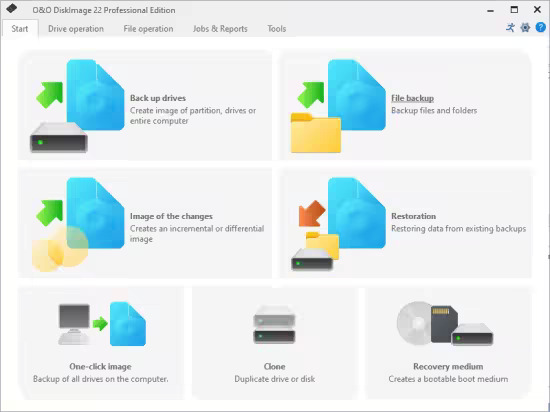
O&O DiskImage Professional / Server 22.1.232 (x64)

File size: 245 MB

Keeping your data safe has never been easier! With O&O DiskImage 22 you can quickly and conveniently create a data backup of the entire computer, your hard disks and partitions. Individual files and directories can also be easily backed up as backups. Or simply clone your hard drive to a reserve hard drive to be covered just in case. Of course, SSD (Solid State Disk) drives, GPT disks and current UEFI system configurations are also supported. A backup program is the most important software on your PC!

Regular data backup of one’s own data is still a neglected topic for many PC users. But at the latest with the first data loss due to a software, hardware or user error, it quickly becomes clear how valuable a reliable and up-to-date data backup can be.

In the event of data loss, a backup previously created with O&O DiskImage will quickly make your backed up data available again with just a few mouse clicks – even if Windows no longer starts.

Back up your entire PC, individual drives or files at the touch of a button
With drive-based backup, all contents of the selected disk are stored in a backup file. With a full backup of the system hard drive, the entire operating system, as well as the installed programs and settings are backed up. This not only protects irreplaceable files, but also saves you the tedious reinstallation and setup of all programs and the Windows operating system in an emergency.

Convenient and fast recovery
Restoring your data backup is child’s play with our backup software O&O DiskImage: simply boot the previously created boot medium (USB stick), select an existing backup and off you go. Our hardware-independent recovery is already included, so you can transfer your old backups 1:1 to a new machine. New hardware is automatically detected and the settings in Windows are carried out automatically.

Fortress mode for maximum isolation
The unique fortress mode of O&O DiskImage 22 Premium allows the application to run in a completely isolated and secured Windows environment, so that backups can be performed without the influence of other applications. Direct forensic backups are also possible, which freeze the current state of all memory sectors of the system and map it exactly.

O&O DiskImage 22 Premium offers two options: you have previously integrated it into the Windows rescue environment with the fortress mode, so that you can start it directly on the PC. Or you have created a boot medium beforehand, which you then start externally to restore the backup of the machine. Both options complement each other and offer maximum flexibility: restore to the original machine or restore to new hardware.

Comprehensive VHD / VHDX functionality
O&O DiskImage 22 offers comprehensive support for working with virtual machines. You can now create incremental and differential backups of virtual disks, merge them, and mount them as drives. This allows you to access your backed up files and continue working within seconds with an existing backup.

What's new
Код:
https://www.oo-software.com/en/diskimage-backup-your-data

System Requirements
The O&O DiskImage Premium is compatible with 11 and 10 (64-bit)

Homepage
Код:
https://www.oo-software.com/

DOWNLOAD

Код:
https://rapidgator.net/file/7145677e63b020d0f9ba008a2db1eeb4/DiskImage_22.1.232.rar.html

https://ddownload.com/8jbmswui7dcp/DiskImage_22.1.232.rar
 
th-Vyb-We-DLyca3h6y-Cab-NLbkm-PL4a-FDFONF.jpg


OneCommander Pro 3.105.0 Multilingual

File size: 65 MB

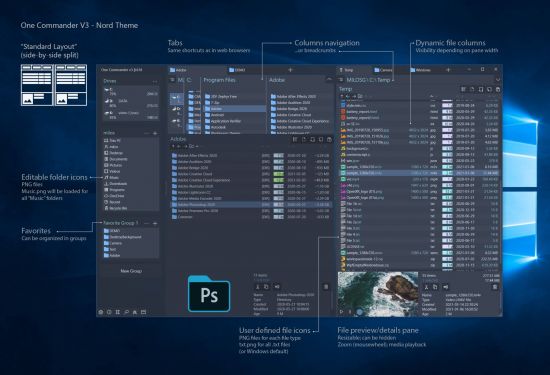
OneCommander is a modern file manager for Windows 10 and Windows 11. Features include tabs, dual-pane browsers, columns navigation, built-in preview, a theming system, color tags, and much more. It is free for home use and has no ads.

More information
Free for home use and no ads.
Commercial use is allowed with the Pro license. (What is commercial use?)
Privacy tldr: OneCommander is not collecting or transmitting users' data.
Detailed Privacy Policy.
64-bit software (x64 platform)
GPU Hardware DirectX accelerated where possible
Security: DEP (permanent); ASLR (high entropy); Memory-safe language C#/.NET

System Requirements
OneCommander requires Windows 10 or Windows 11 and .NET 4.8 framework (pre-installed on Windows 10 and 11)
Windows 10S is NOT supported.
High-DPI screen recommended (above 96ppi)
Acrylic window effect is supported only in Windows 10, but Mica window effect is available in Windows 11

Whats New
Код:
https://www.onecommander.com/releasenotes.txt

Homepage
Код:
https://www.onecommander.com/

DOWNLOAD

Код:
https://rapidgator.net/file/a4e89994b9448782cd91321539120ff0/OneCommander3.rar.html

https://ddownload.com/wqq55kqkc912/OneCommander3.rar
 
Li-C0TUgk9IOUs48N5v-HPe5Ih-Wtt-IXsj-K.jpg


Stellar Data Recovery 12.4.0.0 Multilingual

Windows x64 | Professional / Premium / Technician / Toolkit | File size: 753 MB (In Total)

Stellar Data Recovery is a complete solution to recover lost data from your hard disks and removable drives. It is a complete solution for all your data loss problems. The powerful scan engine of the software does a thorough scan of the selected storage device, shows a preview of files found during the scanning process and finally saves them to specified destination. Separate options to recover documents, folders, mails or multimedia files from the storage media is also available.

Stellar Data Recovery allows you to save scan information to resume recovery process from the same point, at a later stage. It also has an option to create an image of a complete hard drive or volume/partition on the drive. This image file can be used to recover lost data even when the actual hard drive is not available. This is very helpful, in case there is a probability of hard drive failure during the recovery process or the drive has lot of bad sectors.
Listed below are some of the new and key features of the product.

Key Features
• Categorization of scanned results
• Preview of files before recovery
• Raw recovery of volumes and hard drives to search data based on signatures
• Recovers data from accidently deleted volumes
• Recovers data from formatted volumes
• Recovers deleted files and folders
• Recovers from hard disk, removable media such as pen drives, memory cards etc
• Resume recovery option to recover data later on
• Supports 300 or more File types
• Support of all types of CD/DVD with CDFS, UDF, HFS+ file system
• Tabbed view of scanned Tree - File Type / Tree View / Deleted List
• User can add / edit their file types which makes it more robust
• User can create image of hard disk and volumes for recovery

Compare Edition
Код:
https://www.stellarinfo.com/free-data-recovery.php

What's new
• official site does not provide any info about changes in this version

Homepage
Код:
hhttps://www.stellarinfo.com/

DOWNLOAD

Stellar Data Recovery Professional

Код:
https://rapidgator.net/file/dcacc36780bba556b51fce7b39738efc/Stellar.Data.Recovery.Professional.12.4.0.0_x64.rar.html

https://ddownload.com/17ckhy615zef/Stellar.Data.Recovery.Professional.12.4.0.0_x64.rar

Stellar Data Recovery Premium

Код:
https://rapidgator.net/file/48b434a4484502183a29402ebae3787e/Stellar.Data.Recovery.Premium.12.4.0.0_x64.rar.html

https://ddownload.com/7zve6o59s5gl/Stellar.Data.Recovery.Premium.12.4.0.0_x64.rar

Stellar Data Recovery Technician

Код:
https://rapidgator.net/file/79ef2b1ed0abe7a3a930aeef3d38fa8f/Stellar.Data.Recovery.Technician.12.4.0.0_x64.rar.html

https://ddownload.com/hw9fzj9yollm/Stellar.Data.Recovery.Technician.12.4.0.0_x64.rar

Stellar Toolkit for Data Recovery

Код:
https://rapidgator.net/file/d603d1cd859af2074185d542702c161b/Stellar.Toolkit.for.Data.Recovery.12.4.0.0_x64.rar.html

https://ddownload.com/0wwka8nm811y/Stellar.Toolkit.for.Data.Recovery.12.4.0.0_x64.rar
 
acby6863QSi6Lm5Y4JHBYz-Nv-SNNo2fh-N.png


The Bat! Professional 12.0 (x64) Multilingual

File size: 219.2 MB

The Bat! is a popular email client that allows to work with unlimited number of the mailboxes. Furthermore, it has powerful sorting filters, fully customizable message templates, Mail Dispatcher and many more other features. The main task of the program is to secure protection of the correspondence from data theft and monitoring by third parties. The Bat! 8 is able to handle an unlimited number of e-mail accounts and to process and store an unlimited number of messages.

The program offers a system of automatic message filtering, easy system of templates, message editor with the spell checker. And many other useful features. The Bat! protects your information using different methods. It includes the encryption of the message base on the hard drive and e-mail traffic encryption. This email client protects your data through multiple encryption streams. It also ensures your correspondence stays private.

Finally, it protects confidential data by working without Web interfaces and without using global email providers that keep your messages in the cloud.The Bat! is perfect for work or at home. It has no restriction on the number of email accounts or messages you can have, high security and built-in features like automatic filters, templates, a spell-checker and more.

Features
- Strong Encryption
- Backup and restore
- PGP, GnuPG and S/MIME support
- The own Address Book
- Message Parking
- Internal HTML Viewer
- Image Download Manager for background retrieval of HTML images
- Selective download
- Antivirus interface
- Safe handling of attached files
- ASLR and DEP
- 64-bit version
- Electronic discovery protection
- Easily import .mbox and other file formats from a variety of third party email clients.
- Sort email messages based on addressee or issue with Sorting Office.
- Quick and powerful search features allow for easy retrieval of archived messages.

Productivity Improvement
- Smart Sorting Office
- Handy Message Templates
- Quick Templates
- Address Book features
- Address History
- Mail Synchronization
- Microsoft Exchange Connectivity
- Extended Support of National Codepages
- Convenient Message Dispatcher
- Multilanguage Interface
- Image Viewing
- Import Wizard
- IDN support
- RSS feed subscriptions

Whats New
Код:
https://www.ritlabs.com/en/products/thebat/revision-history/

Homepage
Код:
https://www.ritlabs.com/en/

DOWNLOAD

Код:
https://rapidgator.net/file/026de0ed920c6ae8a76c3c36cc6e2731/The_Bat!_Professional_12.0.rar.html

https://ddownload.com/bn8dnno16j33/The_Bat!_Professional_12.0.rar
 
th-7e0i-Td-Hr3zz-Gw-Blxpu0L8m-AHdhrm-SQr-T.jpg


Topaz Photo Pro 1.1.1

File size: 957.1 MB

Sharpen, remove noise, and increase the resolution of your photos with tomorrow's technology. Topaz Photo AI supercharges your image quality so you can focus on the creative part of photography.

Focus on your creativity rather than your tools.
AI is good at some things but bad at others. It can write sentences but can’t tell a story, and it can recommend songs but can’t compose music. But most importantly for us: AI is exceptionally good at improving image quality, but bad at knowing what to do with it.

We believe that stunning photography comes from artistic vision paired with world-class tools. AI will never replicate human creativity, so it’s still your job to provide the vision. But just like a sharper lens or better camera, Topaz Photo AI empowers you to create images that just aren’t possible with yesterday’s tools.

Your photos at their very sharpest.
You won’t always be able to retake a shot when your subject is blurry. Sometimes you won’t even know until you’re reviewing your photos on your computer.

In these cases, use Topaz Photo AI to make sure your photos are as sharp as possible. Instead of artificially boosting edge contrast like traditional sharpening, the Sharpen AI module naturally reverses the root causes of blurring (camera shake, motion blur, incorrect focus) to create more natural-looking results.

Without blurring, the sharpness remains: crisp, clear detail, free from edge halos or other artifacts.

Get sharp and clear images without noise.
It's a magical feeling to see noise evaporate while sharp detail remains.

After learning from millions of images, Topaz Photo AI's Remove Noise module can effectively understand the content of your image. It can accurately determine the difference between real image detail and noise with an astonishing level of accuracy.

Not all of your images will be noisy. For those who are, Topaz Photo AI will give you the best possible results that modern technology is capable of.

Whats New
Код:
https://community.topazlabs.com/c/topaz-photo/topaz-photo-releases/117

Homepage
Код:
https://www.topazlabs.com/topaz-photo

DOWNLOAD

Код:
https://rapidgator.net/file/03c1f813470af0cdac32793a3c153297/TopazPhoto-1.1.1.rar.html

Код:
https://ddownload.com/0zd2ne13q6bl/TopazPhoto-1.1.1.rar
 
th-d-Iwv-FTLJBxxd-QI7Qoc-I9LJetz-Ys1wvi-N.png


TweakNow WinSecret Plus 7.6.2

File size: 28.2 MB

TweakNow WinSecret for Windows 10, 11 allows users to explore the hidden settings in Windows 11.

This app is specifically geared for Windows 10, 11 grouping numerous registry settings and delivering them from an easy and safe user interface.

With TweakNow WinSecret for Windows 10, 11 you can move the Windows taskbar to the top and change the taskbar size by editing the registry value. With any app modifying the registry, it is strongly advised to have a backup to restore from in the advent of an issue.

TweakNow WinSecret for Windows 10, 11 makes the process easier than directly doing it via Regedit, potentially creating critical problems for a novice user. TweakNow WinSecret for Windows 10, 11 gives you a smooth platform to perform these tweaks in a more controlled environment.

TweakNow WinSecret for Windows 10, 11 is a solid option for those that want to improve their overall experience while on Windows 10, 11 through a simple and easy-to-navigate app.

Plus Features
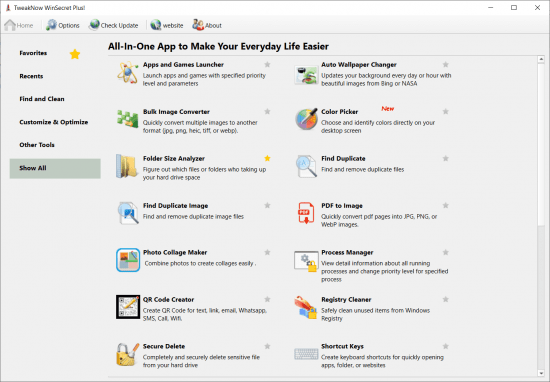
Auto Dark
Automatically change app and system theme mode to light or dark
Auto Wallpaper Changer
Updates your background every day or hour with beautiful images from Bing homepage
Folder Size Analyzer
Figure out which files or folders who taking up your hard drive space
Find Duplicate
Find and remove duplicate files
Process Manager
View detail information about all running processes and change priority level for specified process
Secure Delete
Completely and securely delete sensitive file from your hard drive
Smart Shortcut
Automatically specified priority level for your favourite apps
System Information
Show detail information about your system
Track Cleaner
Protect your privacy by eliminating traces of your digital activities
Transparent Taskbar
Make your Windows 10 Taskbar completely transparent
Troubleshooter
Fix problem with Internet connection, icon, thumbnail, and Microsoft Store
Windows Secret
Safely and easily explore Windows 10, 11 hidden settings

OS: Windows 10/11

Whats New
Код:
https://www.tweaknow.com/WhatsNew.php

Homepage
Код:
https://www.tweaknow.com/

DOWNLOAD

Код:
https://rapidgator.net/file/b15d87464e5bc121e1220434f35e5610/TweakNow_WinSecret_Plus_7.6.2.rar.html

https://ddownload.com/sggj7qyh0oa4/TweakNow_WinSecret_Plus_7.6.2.rar
 
th-Hp-GS3Ti47xr-Ey3Bl4mc-CO6j6q9w-Ks50t.avif


UPDF 2.1.1 (x64) Multilingual

File size: 224.8 MB

An all-in-one AI PDF editor on Windows that allows you to efficiently and easily edit, annotate, summarize, translate, and convert PDFs.
Editing PDF on PC is as Easy as in Word
UPDF for Windows is an easy-to-use Windows PDF software! Enjoy powerful editing tools for text, images, links, and more in your PDF. Customize backgrounds, watermarks, and page sizes with simplicity like in Word.

Analyze PDFs with 10X Efficiency
Upload a PDF with 100+ pages to get lightning-fast summaries, precise translations, in-depth explanations, and engaging conversations from your documents. Experience a new era of efficiency and accuracy with AI in this PDF editor software for Windows!

Read and Annotate, All in UPDF on Windows
UPDF for Windows offers diverse page display modes and scaling options for an optimal reading experience. Utilize its practical annotation toolkit, including sticky notes, stickers, stamps, highlighters, underlines, and more, to enhance your PDF review.

PDF Conversion. So Fast, So Accurate, So Easy
UPDF PDF editor for Windows offers a complete solution for transforming documents across formats. It provides 7 methods to create PDFs and supports converting PDF to 14 formats.

Digitize Paperwork for Better Collaboration
This PDF editor for PC can help you create fillable forms, share for collaborative filling, embed signatures, and enhance your PDF capabilities. Experience a seamless and customizable PDF journey that boosts versatility for improved collaboration.

Whats New
Код:
https://updf.com/whats-new/

Homepage
Код:
https://updf.com/

DOWNLOAD

Код:
https://rapidgator.net/file/b895c19310602e06bf67d2fcdd5a679c/UPDF_2.1.1.rar.html

https://ddownload.com/2747xvlzzuxu/UPDF_2.1.1.rar
 
th-a-Zf-Rt-UNx-G82lxi-Ng-RWVb3w2f-BWd3Bkm-M.jpg


WinToHDD 6.9 Multilingual

All Editions | File size: 17.9 MB

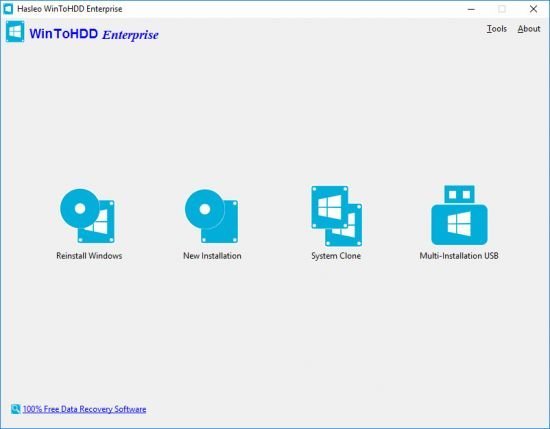
WinToHDD is a handy and useful software which allows you to install or reinstall Windows (Vista/2008 or later) without using a CD/DVD/USB drive. With this All-in-One Microsoft Windows deployment tool, you can easily reinstall Windows, install Windows onto disks other than the one where your Windows is installed, or clone existing Windows installation to other disk. Furthermore, you can use it to create a Windows installation USB containing all your Windows installation ISO files, then you can install Windows (Vista/2008 or later) from the same USB drive on both BIOS and UEFI computers.

Install, Reinstall, Clone Windows 11/10/8/7/Vista & Windows Server Without CD/DVD/USB Drive!
- Install/reinstall Windows from ISO, WIM, ESD without using CD/DVD/USB.
- Clone Windows to another disk without reinstalling Windows, apps.
- Easily bypass Windows 11 system requirements (TPM 2.0, RAM, internet connection, etc).
- Encrypt Windows partition with BitLocker when installing or cloning.
- Install any version of Windows 11/10/8/7/Vista, Server 2008 or later (64 & 32 bits) from same USB drive on both BIOS and UEFI computers.
- Fully compatible with GPT/UEFI and Windows UEFI CA 2023.

Reinstall Windows Without Using CD/DVD/USB Drive
The reinstall Windows feature allows you to reinstall Windows 11/10/8.1/8/7/Vista & Windows Server 2008 or later directly from an ISO, WIM, ESD, SWM, VHD or VHDX file without using a CD/DVD or USB drive. With this feature, even if you don't know anything about computer technology, you can easily reinstall Windows with just a few clicks, and it can help you bypass Windows 11 system requirements such as TPM 2.0 requirement, RAM requirement, internet connection requirement, etc.

Install Windows Without Using CD/DVD/USB Drive
With this feature, you can easily install Windows 11/10/8.1/8/7/Vista & Windows Server 2008 or later onto disks other than the one where your Microsoft Windows operating system is installed, using an ISO, WIM, ESD, SWM, VHD, VHDX image file or a CD/DVD drive as the source of installation. This feature can help you bypass Windows 11 system requirements such as TPM 2.0 requirement, RAM requirement, internet connection requirement, etc.

Migrate Windows to SSD or New Hard Disk
The system clone feature allows you to clone existing Windows OS installation (Windows 11/10/8.1/8/7/Vista & Windows Server 2008 or later) from the old disk to a new disk (HDD/SSD), with this feature you can generat an exact copy of the existing Windows system to another disk.

Create Multi-Installation USB to Install or Clone Windows
You can create a Windows installation USB flash drive to install any version of Windows (Vista/2008 or later, both 64 & 32 bits) from the same USB drive on both BIOS and UEFI computers. The bootable USB flash drive also contains the system clone feature, so you can use it to clone Windows OS installation from one disk to another.

Whats New
Код:
https://www.easyuefi.com/wintohdd/change-logs.html

Homepage
Код:
https://www.easyuefi.com/

DOWNLOAD

Код:
https://rapidgator.net/file/3af15ebd6e3ad0e7d7fc6b1a90f336a9/WinToHDD_6.9.rar.html

https://ddownload.com/t2dujhgi3z3j/WinToHDD_6.9.rar
 
GKWmaa-KSj0n-Q7U1G6w-Xbap-RDm-Yrd-P7Xw.jpg


WinTools.net Professional / Premium / Classic 26.0.1 Multilingual

File size: 7.3 MB

WinTools.net is a suite of tools for Windows operating system optimizing and increasing performance. This suite lets you cleanly remove unwanted software from disk drives and dead references from the Windows registry. WinTools.net Professional puts you in control of the Windows start up process, memory monitoring and gives you the power to customize desktop and system settings to fit your needs. Also it ensures your privacy and keep sensitive information secure, adds more speed and stability for your connection.

WinTools.net Professional contains tools: Clean Uninstaller, Scan Files, Scan Shortcuts, Scan Registry, Startup Manager, Tweak UI, Net Tweaker, The Privacy, Invisible Man, File Shredder...

Clean Uninstaller
Use it for correctly removing software. Also for monitoring changes made to the hard drive, MS Windows registry and system files during program installations.

Scan Files
For periodic cleaning of your hard drive from dead references, junk and obsolete files produced by different software. These files and references remain on the hard disk and increase drive access time.

Scan Registry
Use it periodic the MS Windows registry cleaning from unused applications remaining after uninstallation and from invalid references which decrease system speed and system loading time.

Start Up Manager
This tool allows you to monitor, add, remove, enable and/or disable individual startup items. You can also adjust applications initialized during the loading process of the operating system.

Tweak UI
This is a set of additional adjustments related to safety, system capacity and user preferences. And which are not included in the basic components of MS Windows.

Net Tweaker
The tool is used for speed increasing of data transfer and for greater stability of connection by changing hidden network settings.
The Privacy. This is a kit of tools which ensure your privacy and keep sensitive information secure. It consists of three basic parts: "Objects to Erase", "Invisible Man" and "File Shredder".

Invisible Man
This tool is used for saving private information and its later restoration. This is useful if you don't want any information saved by the system.

File Shredder
This tool is for secure deleting documents, programs, and any other files without possibility to restore them.
Memory Booster (free). This tool serves for monitoring, cleaning and optimisation of RAM. It is used for increasing of operation system performance and for releasing RAM for usage by other processes.

Whats New
+ Updated Scan Files options.
+ Links to the websites have been modified.
+ Updated language files.

Homepage
Код:
https://www.wintools.net

DOWNLOAD

Код:
https://rapidgator.net/file/fdde32f7192686184fcb040132e31608/WinTools_26.0.1.rar.html

https://ddownload.com/cehdypk8ky15/WinTools_26.0.1.rar
 
ezgif-3235e659593a4436.jpg


Ashampoo Backup Pro 27.5.37 Multilingual

File size: 213 MB

Ashampoo Backup Pro 27 takes the fear out of viruses, ransomware, and hardware errors! Experience an easy to use well-designed but powerful backup solution. The new Ashampoo Backup Pro offers you all possible storage options: Back up single files or entire partitions to local drives or online storage providers. Backup software couldn't get any easier. Just plug in a storage device and you're good to go! In addition, the program is light on resources, gets out of your way and does all the heavy lifting in the background. Restoring your backups is super easy! Ashampoo Backup Pro even comes with a bootable rescue system to restore your system in the event of major system failure!

Helps with
Malware infections
Hard disk failure
Accidentally deleted files
Operating system issues
Troublesome updates
Device theft

Faster backups–local or cloud
Improved performance no matter the storage location
Ashampoo Backup Pro stands for maximum security–and now also speed. Cloud backups are up to 30% faster than before, and file-based backups also benefit from noticeably improved performance.

Instant access to all popular providers and storage methods
Cloud storage has long been a secure way of backing up your data. As cloud providers keep advancing their services and storage methods, so do we: Ashampoo Backup Pro has been fully updated to support the latest and most secure online data transfer methods! Back up your data to Dropbox, OneDrive, Google Drive, OneDrive Business / Office 365, Owncloud, Telekom MagentaCLOUD, Strato, 1&1 and many others.

Whats New
Код:
https://www.ashampoo.com/en-us/backup

Homepage
Код:
https://www.ashampoo.com


DOWNLOAD

Код:
https://rapidgator.net/file/16f8b13778d11764ff36450365816d86/AshampooBackupPro27.rar.html

https://ddownload.com/rjgewktt6sc7/AshampooBackupPro27.rar

https://nitroflare.com/view/EF3790CB1B9C6D0/AshampooBackupPro27.rar
 
ezgif-3cc95e402bd8d132.jpg


Autodesk EAGLE Premium 9.6.2

Languages: English
File Size: 140.52 MB

PCB design made easy. Make anything with EAGLE PCB design software. Powerful, easy-to-use tools for every engineer. Speed through complex board layouts with modern PCB routing tools. Quickly reuse subcircuits that remain synchronized between schematic and PCB. Escape your ball grid arrays (BGA) in seconds, not hours.

PCB layout software for every engineer
Bring your electronic inventions to life with a complete set of PCB layout and schematic editing tools, library content, and community-driven features.

New - SPICE simulator
Quickly test your ideas and validate circuit performance with a complete suite of SPICE simulation methods.

New - Modular design blocks
Drag-and-drop reusable design blocks between your projects, complete with synchronized schematic and PCB circuitry.

Electronic rule checking
Validate your schematic design with a complete set of electronic rule checks, so your schematic can stay on track.

Real-time design synchronization
All changes stay automatically in sync between your schematic and layout, so you can focus on the creative process.

New - Push and shove routing
Adhere to all your design rules while the adaptive interactive router pushes and shoves your PCB traces.

New - Intuitive alignment tools
Precisely arrange and order PCB design objects with a complete set of alignment tools.

New - Obstacle avoidance routing
Route complex PCB layouts and maneuver around your design to easily get your trace to its destination.

New routing engine
Create beautiful PCB layouts quickly. Explore tools for loop removal, cornering, and via placement while you route.

New - Simpler selection and editing
Quickly select, group, and edit objects in your schematic and PCB layout. Group and edit grouped objects globally.

High-speed design
Route the latest interfaces—like DDR4, PCIe, and USB3.0—using diff pairs, blind and buried vias, and length tuning.

Design rule checking (DRC)
Control your design flow and avoid unexpected surprises with fully customizable PCB design rules and constraints.

New - Managed online libraries
Worry-free libraries are ready for your next design. Find and place parts dynamically linked to our growing catalog.

New - 3D PCB models
Don’t rely on luck to fit your board in its enclosure. Accurate 3D models enable the PCB to fit the first time.

Complete components
Out-of-the-box component libraries include symbol, footprint, 3D model, and parametrics.

Manufacturable parts
Component libraries link directly to manufacturers, so you can avoid a last-minute scramble to find replacements.

New - One-click make
PCB manufacturing without the headache. Push complete outputs to the hub, connecting with your manufacturer directly.

New - Fusion 360 Integration
Design the PCB object directly in Fusion 360 and synchronize bidirectional changes to your PCB design seamlessly.

User language programs (ULPs)
Enhance usability and capabilities with one of the scripts or programs created by the vast online PCB community.

BGA fanout
The advanced algorithm escapes all of your BGA nets, so you won’t waste time fanning out manually.

Release Notes
Autodesk EAGLE 9 Release Notes

Код:
https://eagle.autodesk.com/eagle/release-notes

System Requirements
- Microsoft® Windows® 7 or newer is required.
- EAGLE 64-bit requires a 64-bit operating system.

Homepage
Код:
https://www.autodesk.com

DOWNLOAD
Код:
https://rapidgator.net/file/ede6d4304cc2b21e4e4741ea16ecbff0/EAGLE_Premium_9.6.2.rar.html

https://ddownload.com/ac9t88bywnen/EAGLE_Premium_9.6.2.rar

https://nitroflare.com/view/91D01E0ADE94403/EAGLE_Premium_9.6.2.rar
 
E5tm-MG4KEEQHGg-QRs2354e-BYWv-LYz5Ee.jpg


EZ CD Audio Converter 12.4.0.1 Multilingual

File size: 79.4 MB

EZ CD Audio Converter (formerly Easy CD-DA Extractor) is all-in-one software: Audio CD Ripper, Audio Converter, Metadata Editor, and Disc Burner. It is easy to use and provides best audio quality. The software can rip audio CDs, make copies of discs, convert mp3, convert audio files, and burn audio CDs, MP3 CDs, and data discs. EZ CD Audio Converter is easy to use, fast, and has best audio quality.

EZ CD Audio Converter supports all popular audio file formats. Such as 3G2, 3GP, MP1, MP2, MP3, Windows Media Audio (WMA), Ogg Vorbis (OGG), MP4, M4A (AAC and Apple Lossless), AAC, aacPlus (HE-AAC, AAC+, HE-AAC+PS, eAAC+). Also supports FLAC, Musepack (MPC), WavPack (WV), WAV, AIFF, Monkey’s Audio (APE), CUE and M3U.

Furthermore, the Nero Digital (Nero AAC) is supported if you have the Nero Burning ROM installed on your computer.

State-of-the-art audio encoding technology. EZ CD Audio Converter includes the most advanced audio codec available, the aacPlus from the Coding Technologies. In addition, EZ CD Audio Converter also supports command line (.exe) encoders.

Key features
Easy to use
Reliable
Best audio quality
Secure audio CD ripping with error detection
Converts between all audio formats with metadata preservation
Burn audio CDs, mp3 discs, and data discs
Best audio codecs are included
Automatic updates (free lifetime updates also included)
Automatic high-quality cover art downloads
Features ReplayGain, normalization, silence removal
Convert audio from video files
Makes 1:1 copies of CDs and DVDs
Power features
Fast audio converter, can convert up to 8 files in parallel
Automatically download metadata with high quality cover art from multiple services (GD3, MusicBrainz, Freedb)
Utilizes multi-core processors and special processor multimedia instructions (SSE, MMX) for best performance
Gapless audio conversion, gapless sample rate conversion
Supports Cue Sheets (.cue), all types
Full ReplayGain support
Rips hidden audio tracks (HTOA)
CD-Text, ISRC, pre-gap, and pre-emphasis detection

Whats New
Код:
https://www.poikosoft.com/music-converter-version-history

Homepage
Код:
https://www.poikosoft.com

DOWNLOAD
Код:
https://rapidgator.net/file/31117cd621a10b1c8eb2b9c61eba14c1/EZ_CD_Audio_Converter_12.4.0.1.rar.html

https://ddownload.com/y00fbxb2myei/EZ_CD_Audio_Converter_12.4.0.1.rar
 
th-IDh-KRi-Ipz9-Xx6cs9g-AXptteun8-V7-VLVA.avif


Flip PDF Plus Corporate 7.10.15 Multilingual

Languages: Multilingual
File Size: 386.66 MB

Transform PDFs into stunning flipbooks even when offline. Customize your flipbooks with videos, audio, links, and assets for commercial use. Create professional flipbooks for your business needs and share them right away.

Corporate Only Features

Newly Dynamic Hotspot Effects
The Corp Version comes with 40+ new Hotspot dynamic effects, which support changing colors and adjusting speed. To call your readers' attention, you can add Hotspot to the key content of the book page. With its flashing effect, your ebook will be no longer monotonous. By adding Go to Link, Pop Up Video and other trigger actions to Hotspot, you can easily create highly interactive eBooks.

Nicely Designed Buttons
There are 70+ well-designed buttons that are easy to use and fully customizable. You can choose a button icon from the icon library of over 280 icons. You can also modify the text, color and other styles. The Button feature helps you get rid of searching hard for button materials. With trigger actions, you can easily achieve a variety of click effects on your buttons.

Enticing Photo Slideshows
Turn images into tempting photo slideshows and give readers more control over your books to keep them engaged. A variety of 13+ photo slideshow effects are available now, such as Flip, Roll, and Cube. Present more content in less space and be a better storyteller with the help of photo slideshows.

Multiple Shapes
There are 90+ different pre-made shapes available to use. You can adjust the angle of the shapes as needed. Add various shapes to embellish and fill in the blank space on the book page so that your ebooks can perform extra visual appeal and reflect a full sense of design.

Release Notes
- Release notes were unavailable when this listing was updated.

System Requirements
Windows 11, 10, 8.1, 7 (64-bit)

Homepage
Код:
https://www.flipbuilder.com

DOWNLOAD

Код:
https://rapidgator.net/file/3c50d784d386f7dee7e04c34a177b6fc/Flip_PDF_Plus_Corporate_7.10.15.rar.html

https://ddownload.com/vka5yol4ujr9/Flip_PDF_Plus_Corporate_7.10.15.rar
 
ezgif-39ae11fb5567e975.jpg


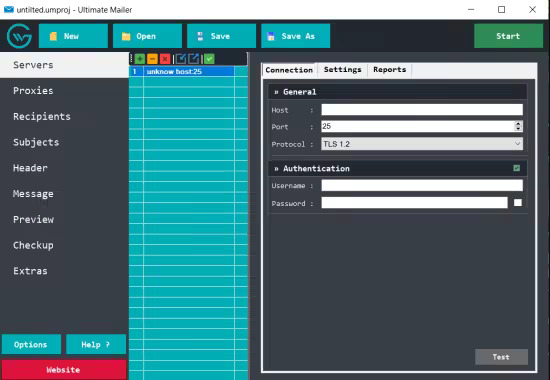
Greywater Ultimate Mailer 4.9.9.5

File size: 8 MB

Ultimate Mailer is a powerful and flexible email delivery application built for large-scale messaging with precision and control. It allows you to send customized messages to single recipients or large audiences while seamlessly handling SMTP servers and proxy connections in the background.

Whats New
Updates: official site does not provide any info about changes in this version

Homepage
Код:
https://apps.microsoft.com/detail/9p4rxbdh19zs?hl=en-US&gl=US

DOWNLOAD

Код:
https://rapidgator.net/file/22f47e87ee75a072f04296b496503a99/Greywater.Ultimate.Mailer.v4.9.9.5.rar.html

https://ddownload.com/b1n6h0uwvhuh/Greywater.Ultimate.Mailer.v4.9.9.5.rar

https://nitroflare.com/view/A98317F89FB2A9E/Greywater.Ultimate.Mailer.v4.9.9.5.rar
 
ezgif-3b282528102a8204.jpg


Help & Manual Professional 10.0.3 Build 7453

File size: 256 MB

Help And Manual makes producing help and documentation a pleasure. All the tools you need are at your fingertips in a single intuitive environment, and the program handles all the complex, technical aspects of the process for you. Instead of wasting countless hours "programming" your help you can focus all your energy on actually writing your documentation, so that all your working time is productive time.

How Help & Manual works
All the output formats supported by Help & Manual are generated from the same project. This means you only have to edit your help and documentation once. Forget about the nightmare of "converting" your documentation every time you change anything.

Generate all Windows help formats
You can output your projects to all standard Windows help formats (HTML Help, Winhelp and MS Help 2.0 / Visual Studio Help), and since Help & Manual is directly integrated with the Microsoft compilers for these formats all your output is 100% standard-compliant.

Help & Manual also generates Browser-based Help, PDF and Word RTF. In addition to this you can generate fully-formatted printed manuals directly from the same projects used for all the other formats.

The Browser-based Help output for web use includes a full menu structure that emulates the appearance and functionality of HTML Help and includes full-text search with highlighting for found words.

PDF output and printed manuals are fully customizable with the bundled Print Manual Designer program: You can include a table of contents and a keyword index, automatic page referrers for links and cross-references, customized page layouts, headers, footers, page numbering, covers, introductions and more.

All languages of this world
This world is a big place and localization becomes ever more important. Help & Manual lets you create documentation in up to 106 languages. It is one of the few help authoring tools that fully support Unicode and can handle languages like Japanese, Chinese, Korean and many others.

Key Features
- Responsive Webhelp, responsive images, web videos and SVG
- Multiple TOCs and version control
- New publishing formats: Word (DOCX), ePUB 3.0, Amazon Kindle, EWriter eBooks
- PDF output: support for PDF/A, better font embedding, improved table rendering, chapter feature images
- Lots of detail changes to the user interface, improving usability

What's New

Homepage
Код:
https://www.helpandmanual.com

DOWNLOAD

Код:
https://rapidgator.net/file/d548ebe1d95b2fef37d11e7e40b4b1f5/HelpAndManual.10.3.rar.html

https://ddownload.com/dswas63w7zlm/HelpAndManual.10.3.rar
 
th-D5Lnbf-Iqo-ID4l-UTJx-LSPrjz1RLd8Up-Nx.jpg


High-Logic FontCreator Pro 15.0.0.3042 (x64)

File size: 28.7 MB

With over 4.5 million downloads to date, FontCreator is the world's most popular font editor. An advanced feature set makes it the tool of choice for professionals, and its intuitive interface is straightforward enough for users at any expertise level. Create your own fonts, redesign existing characters, edit the spacing in font sets, and much more.

When you create or open a font, FontCreator displays an overview of all available characters. You can simply add missing characters, or select an existing character, and modify its appearance. You can import (scanned) images of your signature or company logo, or make a font from your own handwriting. With FontCreator you can also fix character codepoints, font names, kerning pairs, and at all times you can preview your typefaces before installing.

Font Overview with Categories
The glyph and character category panel gives you quick and easy access to the glyphs, character subsets and Unicode ranges.

Work with OpenType, TrueType and Web fonts
FontCreator supports Open Type, True Type and Web Open Font Format (WOFF) fonts which can be used on Windows, Mac OS X, Linux, and in all modern web browsers.

Design High Quality Fonts
The standard and professional edition include font validation features which enable you to improve the quality of your fonts by locating and solving common glyph problems.

Optimize Contours
Optimizing glyph outlines will reduce the number of points that make up the contour(s).

Import SVG Images
High quality vector graphics can be easily imported. You can even copy and paste between FontCreator and your favorite vector editing software.

Import Raster (bitmap) Images
Import (scanned) images and convert them into glyphs. Create your own handwriting font by scanning your handwriting and import it into FontCreator.

Scalable Color Fonts
FontCreator is the first font editor to support the new scalable color fonts extension. This new feature allows you to create multi-colored glyphs for systems that support it, while maintaining backwards compatibility for systems that do not. Watch the video above for a quick introduction on how to create color fonts with FontCreator.

Visual OpenType Designer
The intuitive OpenType Designer allows you to easily add and modify OpenType Layout Features for glyph positioning. The build-in anchor manager makes adding and editing Mark to Base and Mark to Mark positioning a breeze!

OpenType Layout Scripts Editor
The Script Editor allows you to quickly add and modify OpenType Glyph Substitutions through an easy to learn scripting language.

OpenType Layout Features Made Easy
Common OpenType layout features are automatically added to your fonts and with the standard and professional editions you can take full control over these features through custom scripts.

Easy Access to Common Glyph Properties
The glyph properties toolwindow gives you easy access to the glyph's name, codepoints and bearings.

Kerning
Manually add kerning to your font or let the Autokerning take care of kerning for you in the standard and professional edition.

Optical Metrics
The Optical metrics feature in the professional edition simplifies one of the most complex and time consuming tasks in font design. It analyzes a set of most common characters to find the best left and right side bearings of each of these glyphs.

Test Your Fonts
At any time during your font development, you can test it in other applications. You can even generate a local webpage to test it as a Web font.

Powerful Transform Wizard
The standard and professional edition come with a powerful transform wizard that allows you to easily transform glyphs with just a few clicks. Transform your font to Italic, Bold, automatically add characters for other languages, small capitals and more.

Easily Rename Fonts
On the font properties dialog you can view and edit the font name, legal and copyright information, embedding rights and more.

Complete Composites
The standard and professional edition allow intelligent generation of outlines for more than 2,200 (mostly accented) composite characters.

Whats New
Код:
https://www.high-logic.com/font-editor/fontcreator/changelog

Homepage
Код:
https://www.high-logic.com/

DOWNLOAD

Код:
https://rapidgator.net/file/47cb289c7d63724f703944609e075358/High-Logic_FontCreator_Pro_15.0.0.3042.rar.html

https://ddownload.com/s16fpjgwp5d6/High-Logic_FontCreator_Pro_15.0.0.3042.rar
 
ezgif-304971a40f2c8545.jpg


HyperStudio 5.2.0.579


Languages: English

File Size: 1.10 GB


HyperStudio 5 is a creative space where you can make fully interactive digital presentations to pass on knowledge, express ideas and attitudes, engage and entertain, all using the very latest technologies. If you're part of the generation that mixes and mashes, the generation that makes movies instead of just watching them, the generation that blogs and tweets instead of just reading or watching the news, the generation that makes podcasts instead of just listening to the radio, then you'll want to get to know HyperStudio for Windows. HyperStudio is all about media fusion.


What's New in HyperStudio 5? Plenty!

Developed by HyperStudio creator Roger Wagner and Software MacKiev, the new HyperStudio 5 is both true to the original design and updated for modern times with podcasting, Arduino™ integration and more.


Arduino Support

Integrate Arduino devices into your projects.


"Green Screen" Movies

Bring different backgrounds to your movies using "green screen" transparency.


Text Actions

Compare and move text between text objects, and read and write text to and from files without requiring any scripting! Save written essays and quiz results, and compare entered text to desired answers.


Snap-To Feature

Snap-to feature allows your audience to associate objects that snap magnetically into place.


Path Animation

Path animation offers you the ability to completely customize the paths that objects travel in your stories.


Animation with Onion Skin Views

Show the semitransparent image of the previous card, the next card, or both superimposed on the card with which you are currently working.


Podcasting Support

Export any project to iTunes® in iPad®/iPod®/iPhone® video format.


Narration Option for Videos

Make QuickTime® movies with audio narration.


Link to Google Maps™/Google Earth™ Locations

It just works!


Keynote® Integration

Import presentations created in Keynote.


iTunes Integration

Select music from iTunes.


Integration with Apple® Media Apps

Photos from iPhoto® and videos from iMovie®. (Mac only)


YouTube™ Browser

Import video clips straight from YouTube.


Drag-and-Drop

Drag-and-drop images, text, sounds, movies and more to instantly add elements to your projects without changing a menu. Classroom time is limited. There's nothing like HyperStudio for making the most of it!


The Inspector

In a single window, control the appearance, actions, features, layout, and style of any object.


Object Browser

Merge, flatten, layer, and delete objects in an instant. You can use Objects Browser to manipulate these objects quickly and easily.


Automatic Attributions

HyperStudio automatically notes the URL where content came from, with space for you to add additional comments.


Paint Tools

Each brush stroke is editable. Dozens of brush styles including 3D. Apply zoom, blur, twirl, antique, and more.


Release Notes


- This update includes improved export to HTML5 (Web Apps), new and improved MBAs "snap-to" functionality for draggable objects, stretchable custom buttons, the possibility to set preferences for drag-and-drop behavior and to play actions in a loop, as well as new sample stacks.


System Requirements

- System: Windows XP Service Pack 3 or later

- Processor: 1.5 GHz Intel or equivalent

- Memory: 512 MB RAM

- Video Adapter: 100% DirectX 9.0c compatible

- Display: 800 x 600, 16-bit color

- Free Hard Disk Space: 700 MB


Includes

- 1300+ Clipart graphics

- 500+ Background images

- 200+ Animations

- 280+ Sounds

- 30+ Movies, including semi-3D QTVR objects and panoramas


Export Formats for Projects

JPG, MOV, M4V (movie clips for iPod and iPhone), Standalone Player


Import Formats

- Graphics: PDF, PNG, JPEG, TIFF, GIF, BMP, PICT, PSD

- Icons: ICO, CUR, ICNS

- Sounds: MP3, AAC, WAV, AIFF, M4A, M4B, M4P, SND, CDDA, AU

- Movies: MOV, AVI, MPEG, QTVR


Homepage

Код:
https://www.mackiev.com


DOWNLOAD


Код:
https://rapidgator.net/file/a96820679aa8823ef6e01df842c847cd/HyperStudio_5.2.0.579.rar.html


https://ddownload.com/pirvali43x1u/HyperStudio_5.2.0.579.rar
 
Назад
Сверху Снизу